How can Optical Character 
Recognition technology help users in 
their research? 
Günter Mühlberger, Innsbruck University 
Digitisation and Digital Preservation group
Agenda 
Part 1: Optical Character Recognition – Some basics 
Part 2: Users – The Unknown Creature? 
Part 3: Some ideas!
Part 1 
Some basics on 
Optical Character Recognition (OCR) 
(a story about errors…) 
3
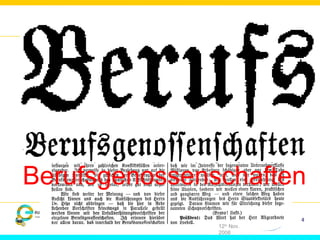
Berufsgenossenschaften 
IMPACT 
EVA/MIN 
ERVA 
12th Nov. 
2008 
4
Digitisation and OCR 
• Digitisation of historical printed material 
• Google: Billions of files, libraries: Millions of files 
• Google books: Would never have started without full-text 
• BNF: Partner in EU Project METADATA ENGINE (2000-2003, ABBYY Historical OCR) 
• OCR quality 
• There are only a few reliable data on the accuracy of OCR on large scale datasets 
• E.g. we do not know „how good the Google collection“ is as a whole, or per language, per 
century, decade or year, per text type, etc. 
• Simon Tanner (2009) 
• Has done evaluation of OCR accuracy on British Newspapers 
• Differences per newspaper are stronger than per publishing date 
• Overall we are speaking about 10% to 40% Word Error Rate, with an average of 22% WER 
for standard words and 31% for significant words 
• Evaluation done within the IMPACT project has shown similar figures
IMPACT 
EVA/MIN 
ERVA 
12th Nov. 
2008 
6 
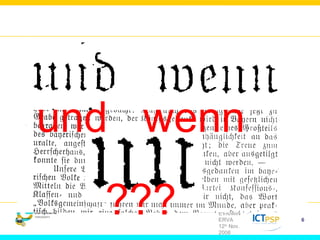
und wenn 
???
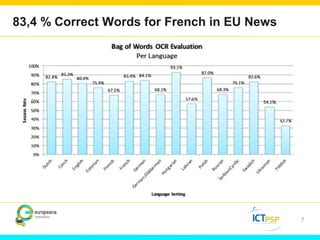
83,4 % Correct Words for French in EU News 
7
Part 2 
Users 
(the unknown creature) 
8
(1) 
Occasional users 
9 
Typology of users
Occasional users 
10
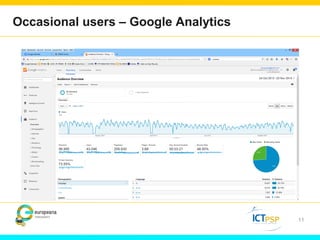
Occasional users – Google Analytics 
11
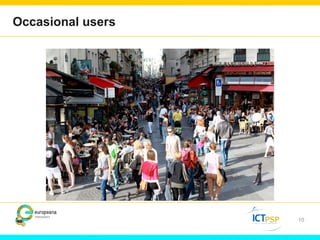
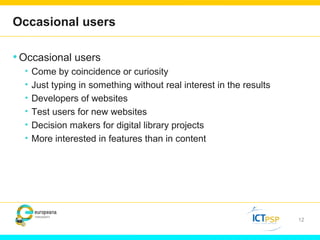
Occasional users 
•Occasional users 
• Come by coincidence or curiosity 
• Just typing in something without real interest in the results 
• Developers of websites 
• Test users for new websites 
• Decision makers for digital library projects 
• More interested in features than in content 
12
(2) 
Researchers 
13 
Typology of users
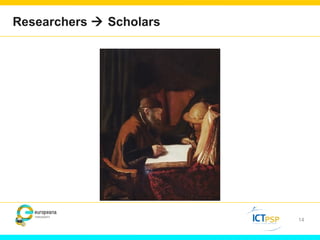
Researchers  Scholars 
14
Researchers 
•Definition 
• Anyone who is actually looking for some specific content and 
invests some reasonable time into these investigations 
• Professional researchers (e.g. historians,…) 
• Students (e.g. writing their thesis) 
• Family historians (e.g. searching for their family members) 
•Citizen scientists (e.g. writing Wikipedia articles) 
• Volunteers (e.g. contributing to improve OCR text) 
• Teachers (e.g. preparing lessons) 
• School pupils (e.g. doing their homework) 
• Etc. 
15
Researchers 
• Researchers are not searching a collection because they WANT 
to search the full-text – it is just a tool to satisfy their need for 
information! 
• Researchers are looking for answers on their specific questions! 
• Was my grandfather mentioned in the local newspaper when he returned 
from first World War? 
• What was written about my village in 1870? 
• Are there interesting news from the French Revolution in a newspaper 
from Vienna in 1789? 
• How were companies advertising their products in 1750, 1850 and 1950 
in newspapers? 
• How did newspapers write about “sex and crime” in 1900? 
• How did people find new jobs in the early 19th century? 
16
What researchers are doing with their sources 
•Read articles 
• Researchers want to know what is written in an article 
•Download – Collect – Print out 
• Researchers are conservative and pragmatic in organising their 
work 
• Want to work on their own computers, want to read offline, etc. 
•Work 
• Collecting the material is just the beginning 
17
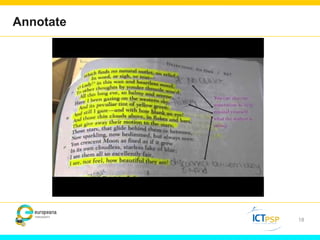
Annotate 
18
Excerpt 
19
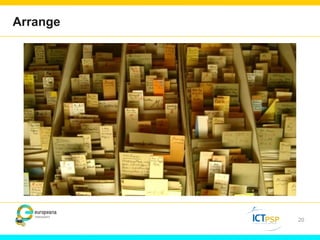
Arrange 
20
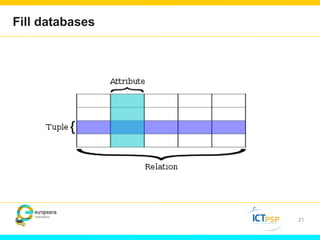
Fill databases 
21
Analyse 
22
Draw conclusions 
23
Exchange with others 
24
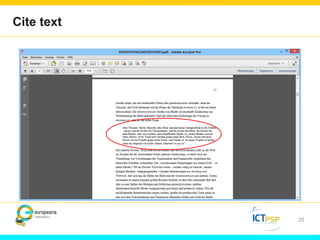
Cite text 
25
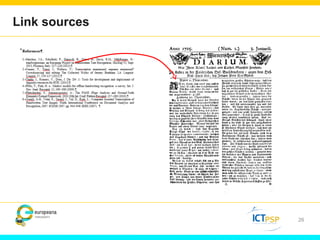
Link sources 
26
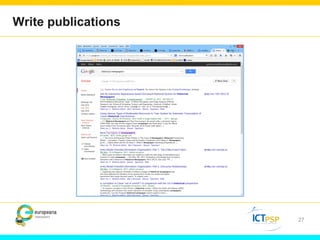
Write publications 
27
And many, many other activities… 
28
(3) 
Machines 
29 
Typology of users
Machines as users 
30
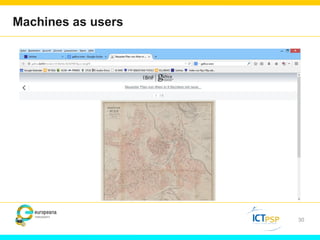
Machines as users 
• Google 
• Is just the beginning (though an important one) 
• Facebook, LinkedIn, Academia.edu,… 
• Image you could see from all users in Gallica their affiliation to a social 
network! 
• You would get the “social graph” of these users and therefore also see 
(understand) all connected users 
• Machines like very much 
• Rich data (machine generated) 
• Standardized formats (XML) 
• Normalized data 
• Clear distinction of metadata and content data 
• Permanent links 
• Open Data 
• … 
31
Part 3 
Some ideas… 
32
(1) 
Back to the sources! 
33 
Ideas
Source critics 
•Get to know your source! 
• Attitude of historians: Don’t trust your source! 
•Researchers need to know “What is my source? How 
reliable is it? What can I find, what not?” 
•Needs to be applied to OCR as well! 
• Simple information: 
• Number of pages per average day, month, year, decade, century 
• Number of words/articles on a page 
• Number of words missed on a page due to OCR errors 
• Etc… 
34
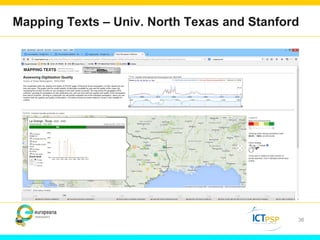
Tools 
•Users need to know more about the quantitative shape of the 
collection they are searching 
• The number of pages is increasing during the centuries 
• The number of words on a page is increasing until the 1950ies 
• The number of photos is increasing from the 1920ies onwards 
• The number of OCR errors (missing hits when searching) is in 
general decreasing but depends on many other factors as well 
35
Mapping Texts – Univ. North Texas and Stanford 
36
(2) 
Natural involvement – search and correct! 
37 
Ideas
10-30% errors… 
•What does this mean for the researcher? 
• For reading a page they have the original image 
• Simply because the OCR has errors they will miss e.g. 20% of all 
occurrences of a search term! 
•Maybe acceptable to specific use cases, but surely not for 
humanities scholars or family historians: They want to get 
„all relevant occurrences“ 
• What is “relevant” is decided by the user, some may be interested 
just within a specific time period, or periodical, or collection of 
documents 
• Note: Not all words are frequent in all collections („London“ in a 
Tyrolian newspaper collections is seldom whereas it is frequent in 
a British Newspaper Collection) 
38
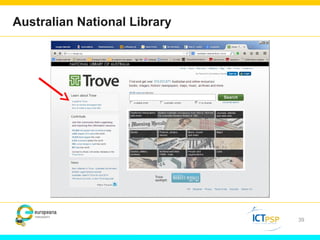
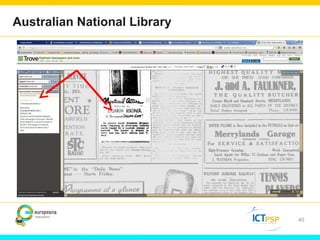
Australian National Library 
39
Australian National Library 
40
Searching AND correcting 
• Let‘s combine searching and crowd based correction! 
• Provide users with a powerful instrument to correct exactly 
those words where they are interested in (searching for) 
•Relieve users from actually editing words, but let them just 
approve or reject the results of the OCR engine 
41
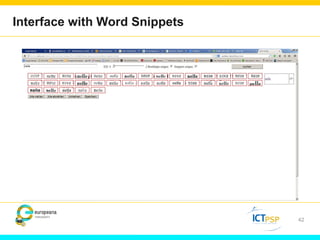
Interface with Word Snippets 
42
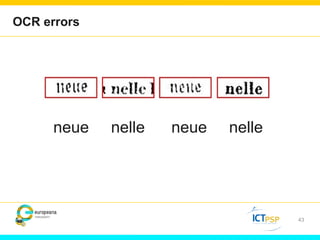
OCR errors 
43 
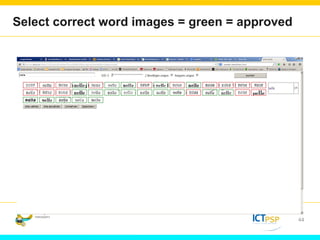
neue nelle neue nelle
Select correct word images = green = approved 
44
Consequences 
•User corrects exactly those words he is looking for 
• Together with an annotation tool he will be able to find ALL 
OCCURENCES of a search term and e.g. tag them as 
important, less important, etc. 
•Other users will benefit (and see) the corrections carried out 
by another user 
• Export feature where all occurrences are put together in one 
PDF would be a next step… 
45
(3) 
Knowledge based searching 
46 
Ideas
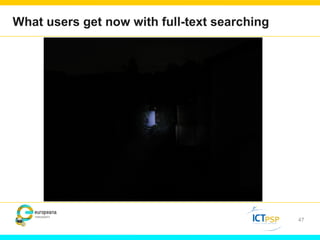
What users get now with full-text searching 
47
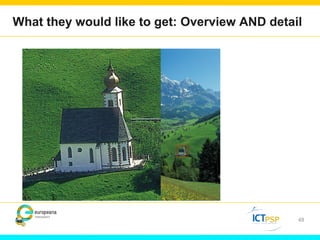
What they would like to get: Overview 
AND detail 
48
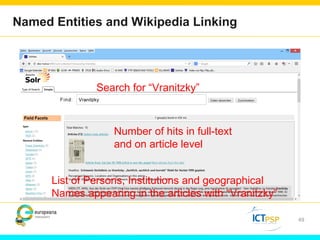
Named Entities and Wikipedia Linking 
49 
Search for “Vranitzky” 
Number of hits in full-text 
and on article level 
List of Persons, Institutions and geographical 
Names appearing in the articles with “Vranitzky”
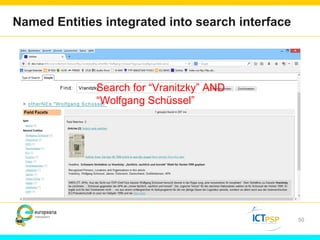
Named Entities integrated into search interface 
50 
Search for “Vranitzky” AND 
“Wolfgang Schüssel”
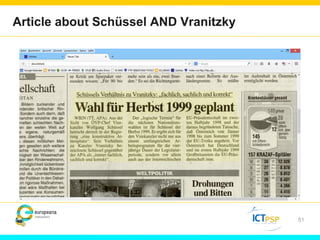
Article about Schüssel AND Vranitzky 
51
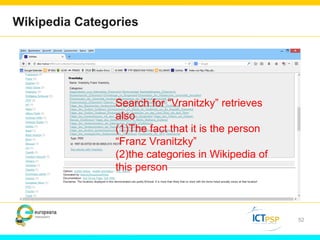
Wikipedia Categories 
52 
Search for “Vranitzky” retrieves 
also 
(1)The fact that it is the person 
“Franz Vranitzky” 
(2)the categories in Wikipedia of 
this person
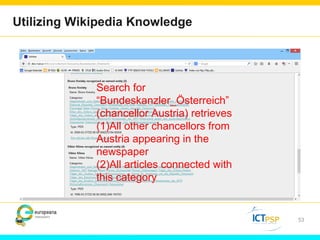
Utilizing Wikipedia Knowledge 
53 
Search for 
“Bundeskanzler_Österreich” 
(chancellor Austria) retrieves 
(1)All other chancellors from 
Austria appearing in the 
newspaper 
(2)All articles connected with 
this category
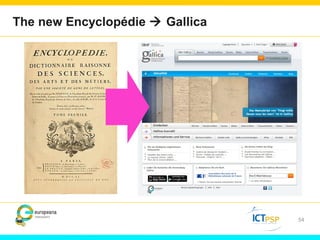
The new Encyclopédie  Gallica 
54
(4) 
Let’ machines play – and learn! 
55 
Ideas
Let ‘em play! 
• Progress/Innovation 
• = Computer Scientists + User needs + Data (from libraries) 
• Computer Science 
• Break through in face and speech recognition, big data analysis, recommender systems, 
information retrieval is based on statistical methods! 
• Statistical algorithm need data 
• Metadata are not enough (though important)! 
• Sample data are not enough! 
• The more data the better 
• An example 
• If you have 10 mill. digitized newspaper pages published within 200 years. How many pages 
do you have on average per day? 
• 136! 
• We have done 2 mill. pages for BNF within EU Newspapers! 
• The easier to access the data, the better! 
• Download (simple, easy, fast, cheap!) 
• Nice to have: APIs and dedicated web-services (something for real experts) 
56
What machines (computer scientists) can do… 
• Information extraction 
• Get names of persons, locations, 
• Images within printed text (photos…) 
• Book titles (reviewed), theatre plays, advertisments,… 
• But also: facts about car accidents, sex and crime, stock exchange rates, 
• And: Sentiment analysis… 
• Linking of text with external sources 
• A lot of the information in (historical) newspapers can be found elsewhere 
in a much better way 
• Start of World War I 
• Dreyfuss – Affair 
• German “Reichstagswahl” in March 1933 
• Wikipedia was just a simple example… 
57
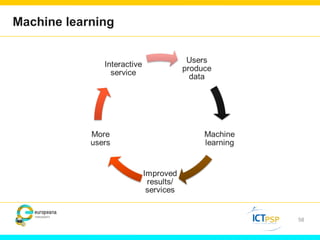
Machine learning 
58
Thank you for your attention! 
Contact: Günter Mühlberger 
<guenter.muehlberger@uibk.ac.at> 
www.europeana-newspapers.eu

Présentation Günter Mühlberger, BnF Information Day

  • 1.
    How can OpticalCharacter Recognition technology help users in their research? Günter Mühlberger, Innsbruck University Digitisation and Digital Preservation group
  • 2.
    Agenda Part 1:Optical Character Recognition – Some basics Part 2: Users – The Unknown Creature? Part 3: Some ideas!
  • 3.
    Part 1 Somebasics on Optical Character Recognition (OCR) (a story about errors…) 3
  • 4.
  • 5.
    Digitisation and OCR • Digitisation of historical printed material • Google: Billions of files, libraries: Millions of files • Google books: Would never have started without full-text • BNF: Partner in EU Project METADATA ENGINE (2000-2003, ABBYY Historical OCR) • OCR quality • There are only a few reliable data on the accuracy of OCR on large scale datasets • E.g. we do not know „how good the Google collection“ is as a whole, or per language, per century, decade or year, per text type, etc. • Simon Tanner (2009) • Has done evaluation of OCR accuracy on British Newspapers • Differences per newspaper are stronger than per publishing date • Overall we are speaking about 10% to 40% Word Error Rate, with an average of 22% WER for standard words and 31% for significant words • Evaluation done within the IMPACT project has shown similar figures
  • 6.
    IMPACT EVA/MIN ERVA 12th Nov. 2008 6 und wenn ???
  • 7.
    83,4 % CorrectWords for French in EU News 7
  • 8.
    Part 2 Users (the unknown creature) 8
  • 9.
    (1) Occasional users 9 Typology of users
  • 10.
  • 11.
    Occasional users –Google Analytics 11
  • 12.
    Occasional users •Occasionalusers • Come by coincidence or curiosity • Just typing in something without real interest in the results • Developers of websites • Test users for new websites • Decision makers for digital library projects • More interested in features than in content 12
  • 13.
    (2) Researchers 13 Typology of users
  • 14.
  • 15.
    Researchers •Definition •Anyone who is actually looking for some specific content and invests some reasonable time into these investigations • Professional researchers (e.g. historians,…) • Students (e.g. writing their thesis) • Family historians (e.g. searching for their family members) •Citizen scientists (e.g. writing Wikipedia articles) • Volunteers (e.g. contributing to improve OCR text) • Teachers (e.g. preparing lessons) • School pupils (e.g. doing their homework) • Etc. 15
  • 16.
    Researchers • Researchersare not searching a collection because they WANT to search the full-text – it is just a tool to satisfy their need for information! • Researchers are looking for answers on their specific questions! • Was my grandfather mentioned in the local newspaper when he returned from first World War? • What was written about my village in 1870? • Are there interesting news from the French Revolution in a newspaper from Vienna in 1789? • How were companies advertising their products in 1750, 1850 and 1950 in newspapers? • How did newspapers write about “sex and crime” in 1900? • How did people find new jobs in the early 19th century? 16
  • 17.
    What researchers aredoing with their sources •Read articles • Researchers want to know what is written in an article •Download – Collect – Print out • Researchers are conservative and pragmatic in organising their work • Want to work on their own computers, want to read offline, etc. •Work • Collecting the material is just the beginning 17
  • 18.
  • 19.
  • 20.
  • 21.
  • 22.
  • 23.
  • 24.
  • 25.
  • 26.
  • 27.
  • 28.
    And many, manyother activities… 28
  • 29.
    (3) Machines 29 Typology of users
  • 30.
  • 31.
    Machines as users • Google • Is just the beginning (though an important one) • Facebook, LinkedIn, Academia.edu,… • Image you could see from all users in Gallica their affiliation to a social network! • You would get the “social graph” of these users and therefore also see (understand) all connected users • Machines like very much • Rich data (machine generated) • Standardized formats (XML) • Normalized data • Clear distinction of metadata and content data • Permanent links • Open Data • … 31
  • 32.
    Part 3 Someideas… 32
  • 33.
    (1) Back tothe sources! 33 Ideas
  • 34.
    Source critics •Getto know your source! • Attitude of historians: Don’t trust your source! •Researchers need to know “What is my source? How reliable is it? What can I find, what not?” •Needs to be applied to OCR as well! • Simple information: • Number of pages per average day, month, year, decade, century • Number of words/articles on a page • Number of words missed on a page due to OCR errors • Etc… 34
  • 35.
    Tools •Users needto know more about the quantitative shape of the collection they are searching • The number of pages is increasing during the centuries • The number of words on a page is increasing until the 1950ies • The number of photos is increasing from the 1920ies onwards • The number of OCR errors (missing hits when searching) is in general decreasing but depends on many other factors as well 35
  • 36.
    Mapping Texts –Univ. North Texas and Stanford 36
  • 37.
    (2) Natural involvement– search and correct! 37 Ideas
  • 38.
    10-30% errors… •Whatdoes this mean for the researcher? • For reading a page they have the original image • Simply because the OCR has errors they will miss e.g. 20% of all occurrences of a search term! •Maybe acceptable to specific use cases, but surely not for humanities scholars or family historians: They want to get „all relevant occurrences“ • What is “relevant” is decided by the user, some may be interested just within a specific time period, or periodical, or collection of documents • Note: Not all words are frequent in all collections („London“ in a Tyrolian newspaper collections is seldom whereas it is frequent in a British Newspaper Collection) 38
  • 39.
  • 40.
  • 41.
    Searching AND correcting • Let‘s combine searching and crowd based correction! • Provide users with a powerful instrument to correct exactly those words where they are interested in (searching for) •Relieve users from actually editing words, but let them just approve or reject the results of the OCR engine 41
  • 42.
  • 43.
    OCR errors 43 neue nelle neue nelle
  • 44.
    Select correct wordimages = green = approved 44
  • 45.
    Consequences •User correctsexactly those words he is looking for • Together with an annotation tool he will be able to find ALL OCCURENCES of a search term and e.g. tag them as important, less important, etc. •Other users will benefit (and see) the corrections carried out by another user • Export feature where all occurrences are put together in one PDF would be a next step… 45
  • 46.
    (3) Knowledge basedsearching 46 Ideas
  • 47.
    What users getnow with full-text searching 47
  • 48.
    What they wouldlike to get: Overview AND detail 48
  • 49.
    Named Entities andWikipedia Linking 49 Search for “Vranitzky” Number of hits in full-text and on article level List of Persons, Institutions and geographical Names appearing in the articles with “Vranitzky”
  • 50.
    Named Entities integratedinto search interface 50 Search for “Vranitzky” AND “Wolfgang Schüssel”
  • 51.
    Article about SchüsselAND Vranitzky 51
  • 52.
    Wikipedia Categories 52 Search for “Vranitzky” retrieves also (1)The fact that it is the person “Franz Vranitzky” (2)the categories in Wikipedia of this person
  • 53.
    Utilizing Wikipedia Knowledge 53 Search for “Bundeskanzler_Österreich” (chancellor Austria) retrieves (1)All other chancellors from Austria appearing in the newspaper (2)All articles connected with this category
  • 54.
    The new Encyclopédie Gallica 54
  • 55.
    (4) Let’ machinesplay – and learn! 55 Ideas
  • 56.
    Let ‘em play! • Progress/Innovation • = Computer Scientists + User needs + Data (from libraries) • Computer Science • Break through in face and speech recognition, big data analysis, recommender systems, information retrieval is based on statistical methods! • Statistical algorithm need data • Metadata are not enough (though important)! • Sample data are not enough! • The more data the better • An example • If you have 10 mill. digitized newspaper pages published within 200 years. How many pages do you have on average per day? • 136! • We have done 2 mill. pages for BNF within EU Newspapers! • The easier to access the data, the better! • Download (simple, easy, fast, cheap!) • Nice to have: APIs and dedicated web-services (something for real experts) 56
  • 57.
    What machines (computerscientists) can do… • Information extraction • Get names of persons, locations, • Images within printed text (photos…) • Book titles (reviewed), theatre plays, advertisments,… • But also: facts about car accidents, sex and crime, stock exchange rates, • And: Sentiment analysis… • Linking of text with external sources • A lot of the information in (historical) newspapers can be found elsewhere in a much better way • Start of World War I • Dreyfuss – Affair • German “Reichstagswahl” in March 1933 • Wikipedia was just a simple example… 57
  • 58.
  • 59.
    Thank you foryour attention! Contact: Günter Mühlberger <guenter.muehlberger@uibk.ac.at> www.europeana-newspapers.eu