Brick breaker
game
A 2D GAME USING PYTHON
NAME :Kedara Sri Surya
Manobhiram
Manchimchetti
REGISTRATION
NUMBER :12305323
Table of content :
Serial
numbe
r
• 1
• 2
• 3
• 4
• 5
• 6
• 7
• 8
• 9
• 10
Components
Introduction
About the game environment
Design of game board
Implementation of ball mechanics
Detection of collision and scoring
Power ups
Game levels
User interface
Limitations
Conclusion
Introduction to Brick Breaker
• This project is a Python-based project or game which
is made using pyGames.
• Gameplay Overview:
Brick Breaker involves controlling a paddle to bounce a ball
against bricks, breaking them, with the goal of clearing all
bricks on the screen.
• Key Elements:
The game features a paddle, ball, bricks, scorekeeping,
power-ups, and level progression.
About The Game
Environment:
• 1. )Libraries: Start with the Pygame library for
graphics. A standard Python library used for
generating random number.
• 2.)Game guide:
Objective: Break all the bricks with the ball and paddle.
Avoid missing the ball to stay alive.
Increase your score by breaking bricks and completing
levels.
Designing The Game board:
1.) Screen Dimensions :
Width: 800 pixels
Height: 600 pixels
2.) Bricks :
Created grid of bricks with green colour and
different properties.
3.) Paddle :
The paddle is placed at the bottom of the
screen to bounce the ball and break the bricks.
4.) Ball :
The ball which is present in the game
Implementing The Ball Mechanics :
Ball Movement :
Set the initial ball speed and direction,
updating its position with each frame.
Bouncing of Walls :
Reverse the ball's direction when it collides
with the top, left, or right walls.
Collision Detection :
Determining if the ball collides with
bricks or the paddle.
Detecting Collisions and Scoring:
1
Ball-Brick Collision
Checking if the ball's position intersects a brick.
2 Brick Removal
Remove the brick and update the score when a collision o
3 Ball-Paddle Collision
Changing the ball's direction when it hits the paddle.
Introducing
Power-ups and
Obstacles:
• 1.) Power ups : We can power It by
changing the peddle size and change speed
of the ball.
• 2.) Obstacle Design : Introduce obstacles
that block the ball's path or change its
trajectory.
• 3.) Power-up effects : Implement the
effects of power-ups on gameplay, such as.
The game starts with 3 lives, and the player
loses a life each time the ball falls below the
paddle; the game ends when all lives are
lost.
Implementing Game
levels and Progression :
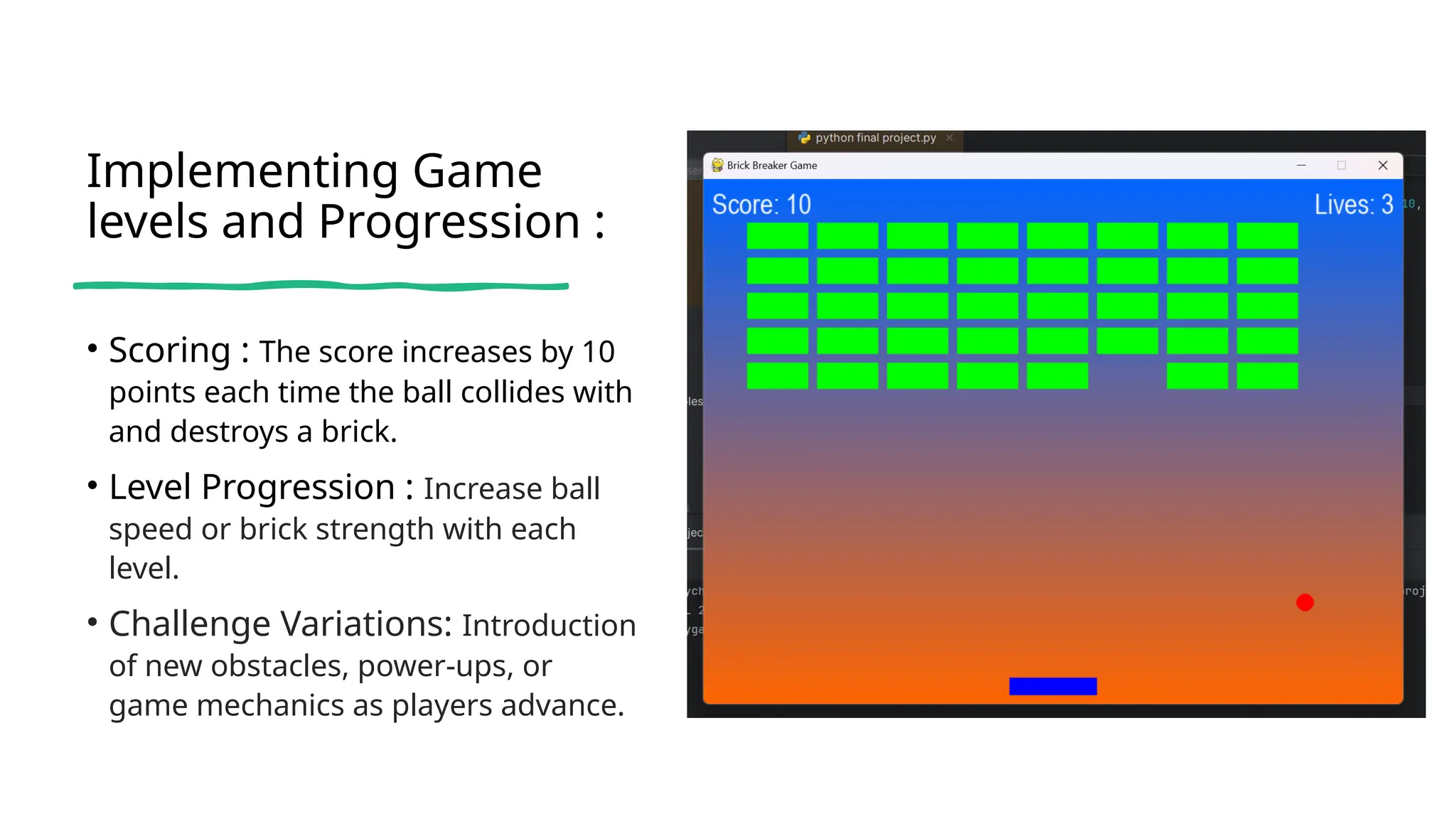
• Scoring : The score increases by 10
points each time the ball collides with
and destroys a brick.
• Level Progression : Increase ball
speed or brick strength with each
level.
• Challenge Variations: Introduction
of new obstacles, power-ups, or
game mechanics as players advance.
DFD:
Level0 Level
1
Developing a polished user Interface :
Menu
Screen :
Home Screen
for start ,quit
Game over
Screen:
Displays score
and a total of 2
Pause
option:The pause
feature in the code
allows players to
Limitations:
Limited Control :
The collision angle
adjustment based on the
distance from the paddle
center is simplistic and
could lead to unexpected
ball trajectories.
Unpredictable Bounces :
Uncontrolled angles lead to
erratic ball movement,
hindering player strategy
and making the game more
frustrating.
Gameplay Challenges
Limited angle adjustments
can create gameplay
scenarios where a player
has little control over the
No sound effects :
Immersion
Sound effects enhance the game's
immersion by providing auditory
cues for actions and events.
Feedback
Audio feedback reinforces actions,
like ball collisions and brick
destruction, making the game
more engaging.
Atmosphere
Sound effects contribute to the
game's overall atmosphere,
adding excitement and depth to
the gameplay experience.
Conclusion:
• The Brick Breaker game
project, developed using
Python
and the Pygame library,
successfully achieved its
primary
objectives of creating an
engaging and interactive
game.

Presentation for the Brick Breaker Game.

  • 1.
    Brick breaker game A 2DGAME USING PYTHON NAME :Kedara Sri Surya Manobhiram Manchimchetti REGISTRATION NUMBER :12305323
  • 2.
    Table of content: Serial numbe r • 1 • 2 • 3 • 4 • 5 • 6 • 7 • 8 • 9 • 10 Components Introduction About the game environment Design of game board Implementation of ball mechanics Detection of collision and scoring Power ups Game levels User interface Limitations Conclusion
  • 3.
    Introduction to BrickBreaker • This project is a Python-based project or game which is made using pyGames. • Gameplay Overview: Brick Breaker involves controlling a paddle to bounce a ball against bricks, breaking them, with the goal of clearing all bricks on the screen. • Key Elements: The game features a paddle, ball, bricks, scorekeeping, power-ups, and level progression.
  • 4.
    About The Game Environment: •1. )Libraries: Start with the Pygame library for graphics. A standard Python library used for generating random number. • 2.)Game guide: Objective: Break all the bricks with the ball and paddle. Avoid missing the ball to stay alive. Increase your score by breaking bricks and completing levels.
  • 5.
    Designing The Gameboard: 1.) Screen Dimensions : Width: 800 pixels Height: 600 pixels 2.) Bricks : Created grid of bricks with green colour and different properties. 3.) Paddle : The paddle is placed at the bottom of the screen to bounce the ball and break the bricks. 4.) Ball : The ball which is present in the game
  • 6.
    Implementing The BallMechanics : Ball Movement : Set the initial ball speed and direction, updating its position with each frame. Bouncing of Walls : Reverse the ball's direction when it collides with the top, left, or right walls. Collision Detection : Determining if the ball collides with bricks or the paddle.
  • 7.
    Detecting Collisions andScoring: 1 Ball-Brick Collision Checking if the ball's position intersects a brick. 2 Brick Removal Remove the brick and update the score when a collision o 3 Ball-Paddle Collision Changing the ball's direction when it hits the paddle.
  • 8.
    Introducing Power-ups and Obstacles: • 1.)Power ups : We can power It by changing the peddle size and change speed of the ball. • 2.) Obstacle Design : Introduce obstacles that block the ball's path or change its trajectory. • 3.) Power-up effects : Implement the effects of power-ups on gameplay, such as. The game starts with 3 lives, and the player loses a life each time the ball falls below the paddle; the game ends when all lives are lost.
  • 9.
    Implementing Game levels andProgression : • Scoring : The score increases by 10 points each time the ball collides with and destroys a brick. • Level Progression : Increase ball speed or brick strength with each level. • Challenge Variations: Introduction of new obstacles, power-ups, or game mechanics as players advance.
  • 10.
  • 11.
    Developing a polisheduser Interface : Menu Screen : Home Screen for start ,quit Game over Screen: Displays score and a total of 2 Pause option:The pause feature in the code allows players to
  • 12.
    Limitations: Limited Control : Thecollision angle adjustment based on the distance from the paddle center is simplistic and could lead to unexpected ball trajectories. Unpredictable Bounces : Uncontrolled angles lead to erratic ball movement, hindering player strategy and making the game more frustrating. Gameplay Challenges Limited angle adjustments can create gameplay scenarios where a player has little control over the
  • 13.
    No sound effects: Immersion Sound effects enhance the game's immersion by providing auditory cues for actions and events. Feedback Audio feedback reinforces actions, like ball collisions and brick destruction, making the game more engaging. Atmosphere Sound effects contribute to the game's overall atmosphere, adding excitement and depth to the gameplay experience.
  • 14.
    Conclusion: • The BrickBreaker game project, developed using Python and the Pygame library, successfully achieved its primary objectives of creating an engaging and interactive game.