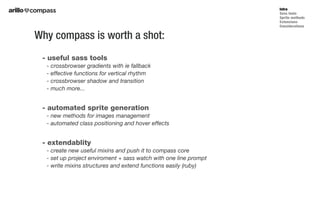
- useful sass tools
- crossbrowser gradients with ie fallback
- effective functions for vertical rhythm
- crossbrowser shadow and transition
- much more...
- automated sprite generation
- new methods for images management
- automated class positioning and hover effects
- extendablity
- create new useful mixins and push it to compass core
- set up project enviroment + sass watch with one line prompt
- write mixins structures and extend functions easily (ruby)
Why compass is worth a shot:
Intro
Sass tools
Sprite methods
Extensions
Considerations
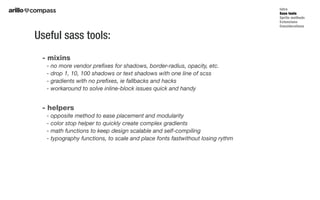
- mixins
- no more vendor prefixes for shadows, border-radius, opacity, etc.
- drop 1, 10, 100 shadows or text shadows with one line of scss
- gradients with no prefixes, ie fallbacks and hacks
- workaround to solve inline-block issues quick and handy
- helpers
- opposite method to ease placement and modularity
- color stop helper to quickly create complex gradients
- math functions to keep design scalable and self-compiling
- typography functions, to scale and place fonts fastwithout losing rythm
Useful sass tools:
Intro
Sass tools
Sprite methods
Extensions
Considerations
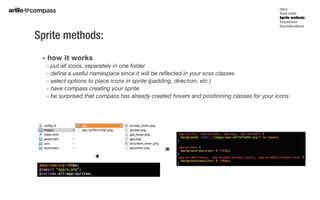
- how it works
- put all icons, separately in one folder
- define a useful namespace since it will be reflected in your scss classes
- select options to place icons in sprite (padding, direction, etc.)
- have compass creating your sprite
- be surprised that compass has already created hovers and positioning classes for your icons
Sprite methods:
Intro
Sass tools
Sprite methods
Extensions
Considerations
+
=
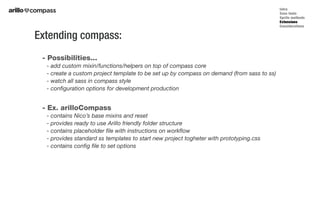
- Possibilities...
- add custom mixin/functions/helpers on top of compass core
- create a custom project template to be set up by compass on demand (from sass to ss)
- watch all sass in compass style
- configuration options for development production
- Ex. arilloCompass
- contains Nico’s base mixins and reset
- provides ready to use Arillo friendly folder structure
- contains placeholder file with instructions on workflow
- provides standard ss templates to start new project togheter with prototyping.css
- contains config file to set options
Extending compass:
Intro
Sass tools
Sprite methods
Extensions
Considerations
- Yes, because...
- compass is not invasive (no bootstrapping, no obliged classes or namespaces)
- compass is easy to implement in any workflow, since if you don’t need it, you don’t see it
- compass sprites method and vertical rhythm helper are (new) interesting approaches
- compass extension could provide an easy set-up for all of our future projects (bit of ruby..).
- No, beacause
- all of the mixins pushed into the extensions should be documented (very well)
- it could improve some issues, but as now it’s not a gamechanging
So, is this worth:
Intro
Sass tools
Sprite methods
Extensions
Considerations
Presentation

Presentation

  • 2.
    - useful sasstools - crossbrowser gradients with ie fallback - effective functions for vertical rhythm - crossbrowser shadow and transition - much more... - automated sprite generation - new methods for images management - automated class positioning and hover effects - extendablity - create new useful mixins and push it to compass core - set up project enviroment + sass watch with one line prompt - write mixins structures and extend functions easily (ruby) Why compass is worth a shot: Intro Sass tools Sprite methods Extensions Considerations
  • 3.
    - mixins - nomore vendor prefixes for shadows, border-radius, opacity, etc. - drop 1, 10, 100 shadows or text shadows with one line of scss - gradients with no prefixes, ie fallbacks and hacks - workaround to solve inline-block issues quick and handy - helpers - opposite method to ease placement and modularity - color stop helper to quickly create complex gradients - math functions to keep design scalable and self-compiling - typography functions, to scale and place fonts fastwithout losing rythm Useful sass tools: Intro Sass tools Sprite methods Extensions Considerations
  • 4.
    - how itworks - put all icons, separately in one folder - define a useful namespace since it will be reflected in your scss classes - select options to place icons in sprite (padding, direction, etc.) - have compass creating your sprite - be surprised that compass has already created hovers and positioning classes for your icons Sprite methods: Intro Sass tools Sprite methods Extensions Considerations + =
  • 5.
    - Possibilities... - addcustom mixin/functions/helpers on top of compass core - create a custom project template to be set up by compass on demand (from sass to ss) - watch all sass in compass style - configuration options for development production - Ex. arilloCompass - contains Nico’s base mixins and reset - provides ready to use Arillo friendly folder structure - contains placeholder file with instructions on workflow - provides standard ss templates to start new project togheter with prototyping.css - contains config file to set options Extending compass: Intro Sass tools Sprite methods Extensions Considerations
  • 6.
    - Yes, because... -compass is not invasive (no bootstrapping, no obliged classes or namespaces) - compass is easy to implement in any workflow, since if you don’t need it, you don’t see it - compass sprites method and vertical rhythm helper are (new) interesting approaches - compass extension could provide an easy set-up for all of our future projects (bit of ruby..). - No, beacause - all of the mixins pushed into the extensions should be documented (very well) - it could improve some issues, but as now it’s not a gamechanging So, is this worth: Intro Sass tools Sprite methods Extensions Considerations