ABCAL – October 10th 2013
How to improve your corporate performance by
Integrating your Business Partners ?
Agenda
•
•
•
•

Concept & objectives
In the practice : How to …
Cases
Your project: Steps & Business Case
B2B Integration

B2B Integration is the activity of automating the exchange of data and documents
between companies, so that they flow automatically from one company’s IT
system to another’s.
A priority …
Performance Improvement
• Integration with your Partners Saves Time
• Integration with your Partners Reduces the
number of Errors (quality)
• Integration with your Partners Reduces Cost
Agenda
•
•
•
•

Concept & Objectives
In the practice : How to …
Cases
Your project: 5 Steps & Business Case
Our business is B2B Integration
Automated transfer and translation of B2B data
exchanges

www.babelway.com
Babelway
“Any-to-any” connectivity

Any
format

Any
communication
protocol
“Any-to-any” connectivity
Application
connectors
“Any-to-any” connectivity
Company
connectors
Agenda
•
•
•
•

Concept & Objectives
In the practice : How to …
Cases
Your project: 5 Steps & Business Case
Cases
• Providers Integration: Wabco, Compass,
Armonea, Delfood, Cora, Poils et Plumes …
• Others : E-invoicing (Certech, AlterJob …),
Exchange of information with the belgian
customs (St Feuillien), Echange of financial
information (funds) between Banks …
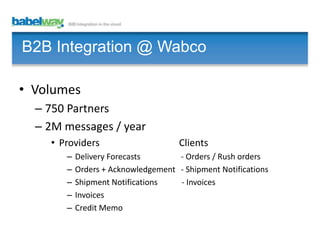
B2B Integration @ Wabco
• Volumes
– 750 Partners
– 2M messages / year
• Providers
–
–
–
–
–

Clients

Delivery Forecasts
- Orders / Rush orders
Orders + Acknowledgement - Shipment Notifications
Shipment Notifications
- Invoices
Invoices
Credit Memo
Agenda
•
•
•
•

Concept & Objectives
In the practice : How to …
Cases
Your project: 5 Steps & Business Case
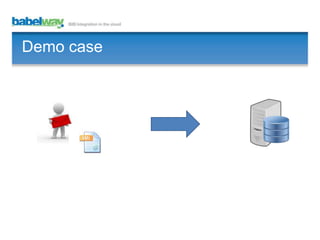
Demo case
Demo case
Demo case : Log in www.babelway.net
Demo case
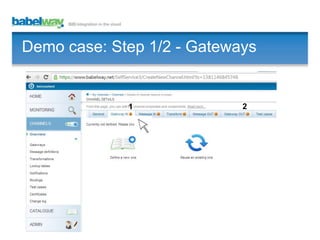
Demo case: Step 1/2 - Gateways

1

2
Demo case: Step 1/2 - Gateways

1

2
Demo case: Step 1/2 - Gateways
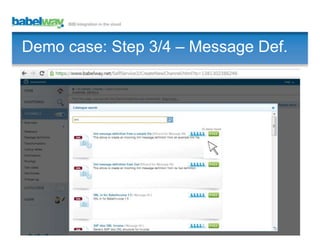
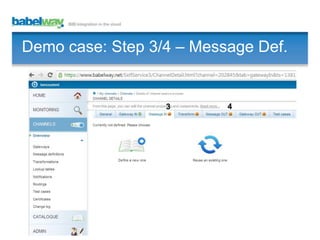
Demo case: Step 3/4 – Message Def.

3

4
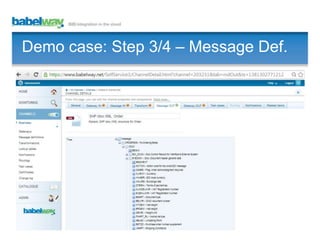
Demo case: Step 3/4 – Message Def.

Invoice XML from Provider
Demo case: Step 3/4 – Message Def.

3

4
Demo case: Step 3/4 – Message Def.

3

4
Demo case: Step 3/4 – Message Def.
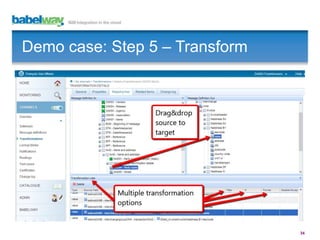
Demo case: Step 5 – Transform

34
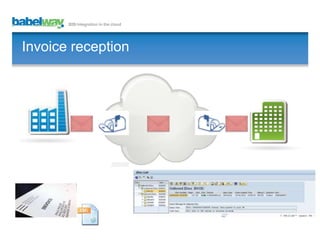
Invoice reception
Business Case (1/2)
Reasons (examples): Reception Invoice.
•
•
•
•
•

Large number of invoices or Invoice with multiple lines (time /cost)
Request of provider
Multiple portals of our providers. Easy for them. Not for us.
Issues with the paper process (errors, lost, poor scalability, ...)
…

Business Option
•
•

Act: Electronic and Automatic exchange of Documents
Do nothing

Expected Benefits
•
•

Improved performance and scalability.
Better visibility. Improved Finance management
Business Case (2/2)
Timescale
I.
II.
III.
IV.
V.

Evaluation of the needs (business case).
Choice of the solution for B2B Integration.
Agreement on the format and protocol.
Technical deployment
Mesure, Optimize, Scale up.

Costs
•

•

Subscription: as from 59 EUR per month for the Integration Platform. Prices
available on www.babelway.com
Project (external or internal) : average 1 day per flow / client
B2B Integration
• Integration is part of the solution to reach
operational excellence.
• No heavy investment. No Big bang. Not
reserved to large companies ...
You can start with PoC / Quick wins.
• Think big, start small, scale fast!
Babelway
•
•
•
•
•

Easy to learn
Integrate with any business partner
No Software, Full Control
Quick to implement
Affordable
Thank you

www.babelway.com
info@babelway.com
+32 10 390013
Benjamin Coumont
benjamin.coumont@babelway.com

How to improve your corporate performance by Integrating your Business Partners ?

Editor's Notes

  • #2 Duringthe next 30 minutes, wewill show how to integrate business partners, automate flows and ameliorateyourcorporate performance.
  • #27 STEP 3, 4 : I neednow to support the formats of both parties. Provider : XML, custom format.Me : idoc XML SAPIn Message IN, I click on « Define a new one… »
  • #28 Idem. I find in the list the XML file.
  • #29 The Integration Platformallows me to upload a sample file and the structure of the file isautomaticallyrecognized (result in nextslide).
  • #31 STEP 4 : Definition of My Format (idoc XML SAP).I click on « Define a new one… »
  • #32 In this case, I select the format idoc as defined in SAP.
  • #33 Structure isknown.Steps3/4 are done. Formats of both parties are identified by Babelway.
  • #34 Last.STEP (5). I need to mapboth formats.I click on « Create a new one ».