11
Internet 213Internet 213
2
World Wide WebWorld Wide Web
 Also called as WWW or W3Also called as WWW or W3
 Allows users to use the InternetAllows users to use the Internet
easilyeasily
 The web lets you connect by simplyThe web lets you connect by simply
clicking theclicking the hyperlinkhyperlink..
 It applies a protocol calledIt applies a protocol called TCP/IPTCP/IP
3
HyperlinkHyperlink
 This is a word, phraseThis is a word, phrase
or graphic image thator graphic image that
have URL’s (webhave URL’s (web
address) hidden onaddress) hidden on
them. Usually anthem. Usually an
underlined word orunderlined word or
phrase.phrase.
4
Transmission Control Protocol /Transmission Control Protocol /
Internet Protocol (TCP/IP)Internet Protocol (TCP/IP)
 The protocol of the InternetThe protocol of the Internet
 Let the computers communicateLet the computers communicate
Note: Internet itself is a massiveNote: Internet itself is a massive
network of hardware and softwarenetwork of hardware and software
while Web is the application facilitieswhile Web is the application facilities
provided by the Internetprovided by the Internet
5
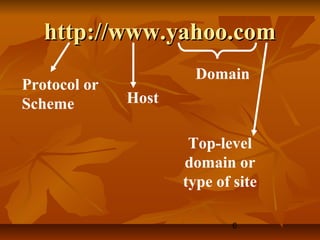
Uniform Resource LocatorUniform Resource Locator
 A unique address for a webA unique address for a web
page or documentpage or document
 It consists of protocol andIt consists of protocol and
domain name or IP address anddomain name or IP address and
a file namea file name
6
http://www.yahoo.comhttp://www.yahoo.com
Protocol or
Scheme Host
Domain
Top-level
domain or
type of site
7
HyperText Transfer ProtocolHyperText Transfer Protocol
 Manages the hypertext links that areManages the hypertext links that are
used to navigate the Webused to navigate the Web
 You can think of HTTP as drivingYou can think of HTTP as driving
the Webthe Web
 Ensures that browser correctlyEnsures that browser correctly
process and display the various typesprocess and display the various types
of information contained in Webof information contained in Web
pagespages
8
IP AddressIP Address
 Another way to uniquely identifyAnother way to uniquely identify
computers or devices connectedcomputers or devices connected
to the Internetto the Internet
 Using a series of four groups ofUsing a series of four groups of
numbers separated by periodsnumbers separated by periods
9
HyperText MarkupHyperText Markup
LanguageLanguage
 The lingua franca of the Web.The lingua franca of the Web.
 It is used to create web pages.It is used to create web pages.
10
TagsTags
 Formatting instructions that isFormatting instructions that is
used by HTML documentsused by HTML documents
 That’s why it is called MarkupThat’s why it is called Markup
because of using of tags inbecause of using of tags in
defining elements of the Webdefining elements of the Web
11
Parsing or RenderingParsing or Rendering
 The process of assembling andThe process of assembling and
formatting an HTML documentformatting an HTML document
of a web browserof a web browser
12
Brief history of JSBrief history of JS
 JavaScriptJavaScript, originally nicknamed, originally nicknamed
LiveWireLiveWire and thenand then LiveScriptLiveScript
when it was created bywhen it was created by NetscapeNetscape,,
should in fact be calledshould in fact be called
ECMAscriptECMAscript as it was renamedas it was renamed
when Netscape passed it to thewhen Netscape passed it to the
ECMA for standardisation.ECMA for standardisation.
13
Role of JS on the WebRole of JS on the Web
 Brings HTML to life andBrings HTML to life and
makes Web pages dynamic.makes Web pages dynamic.
14
JavaScriptJavaScript
 It is a scripting language (refers toIt is a scripting language (refers to
programming languages that areprogramming languages that are
executed by an interpreter fromexecuted by an interpreter from
within a Web browser)within a Web browser)
1515
Formats of JavaScriptFormats of JavaScript
16
Client-side JavaScriptClient-side JavaScript
 Programs are passed to thePrograms are passed to the
computer that the browser is on,computer that the browser is on,
and that computer runs them.and that computer runs them.
17
Server-Side JavaScriptServer-Side JavaScript
 The alternative is server side,The alternative is server side,
where the program is run on thewhere the program is run on the
server and only the results areserver and only the results are
passed to the computer that thepassed to the computer that the
browser is on. Examples of thisbrowser is on. Examples of this
would be PHP, Perl, ASP, JSP etcwould be PHP, Perl, ASP, JSP etc
1818
Logic and DebuggingLogic and Debugging
19
BugBug
 Any error in a program thatAny error in a program that
causes it to function incorrectly,causes it to function incorrectly,
whether due to incorrect syntax orwhether due to incorrect syntax or
flaws in logicflaws in logic
20
DebuggingDebugging
 Describes the act of tracing andDescribes the act of tracing and
resolving errors in a program.resolving errors in a program.
 First coined by Grace MurrayFirst coined by Grace Murray
HopperHopper
2121
A FirstA First
JavaScriptJavaScript
ProgramProgram
22
The <Script> TagThe <Script> Tag
 It is used to notify the WebIt is used to notify the Web
Browser that the commands thatBrowser that the commands that
follow it need to be interpreted byfollow it need to be interpreted by
a scripting engine.a scripting engine.
23
LanguageLanguage
 Attribute of the <script> tag tellsAttribute of the <script> tag tells
the browser which scriptingthe browser which scripting
language and which version of thelanguage and which version of the
scripting language is being used.scripting language is being used.
24
Note:Note:
 If you omit the Language attributeIf you omit the Language attribute
from the <script> tag, yourfrom the <script> tag, your
JavaScript program should still run.JavaScript program should still run.
 However, the Internet is alwaysHowever, the Internet is always
changing, it is difficult to determinechanging, it is difficult to determine
whether competing scriptingwhether competing scripting
languages such as VBScript willlanguages such as VBScript will
become dominantbecome dominant
25
Creating a JavaScript ProgramCreating a JavaScript Program
1. To start a JavaScript program1. To start a JavaScript program
use the <script> taguse the <script> tag
<Script language=“JavaScript”> -<Script language=“JavaScript”> -
specifying your browser that yourspecifying your browser that your
using JavaScriptusing JavaScript
2. Close it using </script>2. Close it using </script>
26
3. Use the comment tag to tell the3. Use the comment tag to tell the
incompatible browser to ignoreincompatible browser to ignore
the code that follows.the code that follows.
<!-- your codes here --><!-- your codes here -->
4. You can embed JavaScript on4. You can embed JavaScript on
head or body depending on thehead or body depending on the
application of your scriptapplication of your script
27
My First JavaScript ProgramMy First JavaScript Program
Hello WorldHello World
28
JavaScript is an OOPJavaScript is an OOP
 Object-Oriented ProgrammingObject-Oriented Programming
(OOP), in computer science, type of(OOP), in computer science, type of
high-level computer language thathigh-level computer language that
uses self-contained, modularuses self-contained, modular
instruction sets for defining andinstruction sets for defining and
manipulating aspects of a computermanipulating aspects of a computer
program.program.
29
ObjectObject
 A programming code and dataA programming code and data
that can be treated as anthat can be treated as an
individual unit or componentindividual unit or component
 Ex. Document objectEx. Document object
30
StatementsStatements
 Individual lines in a programmingIndividual lines in a programming
languagelanguage
31
MethodsMethods
 Group related statementsGroup related statements
associated with an objectassociated with an object
 Ex. write( ) and writeln( )Ex. write( ) and writeln( )
32
Document ObjectDocument Object
 Represents the content of aRepresents the content of a
browser’s windowbrowser’s window
 Any text, graphics, or otherAny text, graphics, or other
information displayed in a webinformation displayed in a web
page is part of the documentpage is part of the document
objectobject
33
ArgumentArgument
 Any type of information that canAny type of information that can
be passed to a methodbe passed to a method
 Ex. The text string within theEx. The text string within the
write() and writeln methods of thewrite() and writeln methods of the
Document objectDocument object
34
Text or Literal StringText or Literal String
 Text that is contained withinText that is contained within
double quotation marks.double quotation marks.
 Ex. <“this is a ‘text’ string”>Ex. <“this is a ‘text’ string”>
 Output: this is a ‘text’ stringOutput: this is a ‘text’ string
35
Note:Note:
 The only difference between theThe only difference between the
write() and writeln() methods is thatwrite() and writeln() methods is that
the writeln method adds a carriagethe writeln method adds a carriage
return after the line of text.return after the line of text.
 However it will be only recognized ifHowever it will be only recognized if
it is within the HTML <PRE> tagit is within the HTML <PRE> tag
pair.pair.
36
<PRE> Tag<PRE> Tag
 Short for Preformatted TextShort for Preformatted Text
 Tells a Web browser that any textTells a Web browser that any text
and line breaks contained betweenand line breaks contained between
opening and closing tag are to beopening and closing tag are to be
rendered exactly as they appearrendered exactly as they appear
 Known as Container ElementKnown as Container Element
because it contains text and otherbecause it contains text and other
HTML tagsHTML tags
37
JavaScript is Case SensitiveJavaScript is Case Sensitive
 Document.write is not similar toDocument.write is not similar to
document.writedocument.write
 Uppercase D will not be recognizedUppercase D will not be recognized
as an object and will cause erroras an object and will cause error
 You must use lowercase d whenYou must use lowercase d when
referring to document objectreferring to document object
38
JavaScript VariablesJavaScript Variables
 Then name must start with anThen name must start with an
alphabetic (a-z or A-Z) character oralphabetic (a-z or A-Z) character or
an underscore (_)an underscore (_)
 The rest of the name can contain anyThe rest of the name can contain any
letter, any digit, or an underscore.letter, any digit, or an underscore.
 Can’t contain a spaceCan’t contain a space
 Avoid JavaScript reserved words asAvoid JavaScript reserved words as
the names of variablesthe names of variables
3939
Debugging a ScriptDebugging a Script
40
1. Capitalization1. Capitalization
 JavaScript is a case sensitiveJavaScript is a case sensitive
language, meaning that it treatslanguage, meaning that it treats
capital and lowercase versions ofcapital and lowercase versions of
the same letter as differentthe same letter as different
charactercharacter
41
2. Spacing2. Spacing
 Some parts of a script canSome parts of a script can
encounter error if incorrectencounter error if incorrect
spacing is used.spacing is used.
 The best way to avoid spacingThe best way to avoid spacing
error is to pay careful attention toerror is to pay careful attention to
spacing while you enter codespacing while you enter code
42
3. Parenthesis( ), Brackets3. Parenthesis( ), Brackets
[ ], Braces{ } & Quotes “”[ ], Braces{ } & Quotes “”
 JavaScript often uses four typesJavaScript often uses four types
of symbols to enclose arguments,of symbols to enclose arguments,
values or numbers.values or numbers.
43
4. Typographical Errors4. Typographical Errors
 Error in entering command suchError in entering command such
as zero (0) to the letter (O).as zero (0) to the letter (O).
44
5. Others5. Others
 JavaScript-compatible browserJavaScript-compatible browser
often display a JavaScript erroroften display a JavaScript error
window describes the type ofwindow describes the type of
error the browser encountered.error the browser encountered.
4545
AddingAdding
JavaScript to aJavaScript to a
PagePage
46
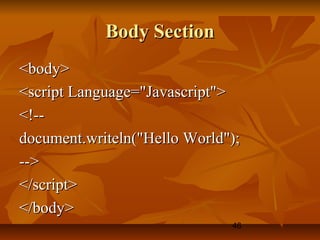
Body SectionBody Section
<body><body>
<script Language="Javascript"><script Language="Javascript">
<!--<!--
document.writeln("Hello World");document.writeln("Hello World");
-->-->
</script></script>
</body></body>
47
Head SectionHead Section
<head><head>
<script Language="Javascript"><script Language="Javascript">
<!--<!--
document.writeln("Hello World");document.writeln("Hello World");
-->-->
</script></script>
</head></head>
48
JavaScript Source FileJavaScript Source File
 A JavaScript code in an externalA JavaScript code in an external
filefile
 Designated with the file extensionDesignated with the file extension
of js and contains only JavaScriptof js and contains only JavaScript
statementsstatements
49
Reasons Behind .js Source FileReasons Behind .js Source File
 Your HTML document will be neaterYour HTML document will be neater
 The JavaScript code can be sharedThe JavaScript code can be shared
among multiple HTML documentsamong multiple HTML documents
 JavaScript Source Files hideJavaScript Source Files hide
JavaScript code from incompatibleJavaScript code from incompatible
browsersbrowsers
 JavaScript source files help hide yourJavaScript source files help hide your
JavaScript codeJavaScript code
5050
Adding CommentsAdding Comments
To a JavaScriptTo a JavaScript
ProgramProgram
51
CommentComment
 Nonprinting lines that you placeNonprinting lines that you place
in your code to contain variousin your code to contain various
types of remarks, including nametypes of remarks, including name
of the program, your name andof the program, your name and
the date you created and etc.,the date you created and etc.,
52
Double Slash (//)Double Slash (//)
 Indicates a single lineIndicates a single line
comment. Everything after itcomment. Everything after it
on the same line will beon the same line will be
ignored by the script engine.ignored by the script engine.
53
Slash-Asterisk (/* & */)Slash-Asterisk (/* & */)
 Indicates a block comment.Indicates a block comment.
Everything after it will beEverything after it will be
ignored by the script engineignored by the script engine
until an asterisk-slash isuntil an asterisk-slash is
encountered.encountered.

Prelims Coverage for Int 213

  • 1.
  • 2.
    2 World Wide WebWorldWide Web  Also called as WWW or W3Also called as WWW or W3  Allows users to use the InternetAllows users to use the Internet easilyeasily  The web lets you connect by simplyThe web lets you connect by simply clicking theclicking the hyperlinkhyperlink..  It applies a protocol calledIt applies a protocol called TCP/IPTCP/IP
  • 3.
    3 HyperlinkHyperlink  This isa word, phraseThis is a word, phrase or graphic image thator graphic image that have URL’s (webhave URL’s (web address) hidden onaddress) hidden on them. Usually anthem. Usually an underlined word orunderlined word or phrase.phrase.
  • 4.
    4 Transmission Control Protocol/Transmission Control Protocol / Internet Protocol (TCP/IP)Internet Protocol (TCP/IP)  The protocol of the InternetThe protocol of the Internet  Let the computers communicateLet the computers communicate Note: Internet itself is a massiveNote: Internet itself is a massive network of hardware and softwarenetwork of hardware and software while Web is the application facilitieswhile Web is the application facilities provided by the Internetprovided by the Internet
  • 5.
    5 Uniform Resource LocatorUniformResource Locator  A unique address for a webA unique address for a web page or documentpage or document  It consists of protocol andIt consists of protocol and domain name or IP address anddomain name or IP address and a file namea file name
  • 6.
  • 7.
    7 HyperText Transfer ProtocolHyperTextTransfer Protocol  Manages the hypertext links that areManages the hypertext links that are used to navigate the Webused to navigate the Web  You can think of HTTP as drivingYou can think of HTTP as driving the Webthe Web  Ensures that browser correctlyEnsures that browser correctly process and display the various typesprocess and display the various types of information contained in Webof information contained in Web pagespages
  • 8.
    8 IP AddressIP Address Another way to uniquely identifyAnother way to uniquely identify computers or devices connectedcomputers or devices connected to the Internetto the Internet  Using a series of four groups ofUsing a series of four groups of numbers separated by periodsnumbers separated by periods
  • 9.
    9 HyperText MarkupHyperText Markup LanguageLanguage The lingua franca of the Web.The lingua franca of the Web.  It is used to create web pages.It is used to create web pages.
  • 10.
    10 TagsTags  Formatting instructionsthat isFormatting instructions that is used by HTML documentsused by HTML documents  That’s why it is called MarkupThat’s why it is called Markup because of using of tags inbecause of using of tags in defining elements of the Webdefining elements of the Web
  • 11.
    11 Parsing or RenderingParsingor Rendering  The process of assembling andThe process of assembling and formatting an HTML documentformatting an HTML document of a web browserof a web browser
  • 12.
    12 Brief history ofJSBrief history of JS  JavaScriptJavaScript, originally nicknamed, originally nicknamed LiveWireLiveWire and thenand then LiveScriptLiveScript when it was created bywhen it was created by NetscapeNetscape,, should in fact be calledshould in fact be called ECMAscriptECMAscript as it was renamedas it was renamed when Netscape passed it to thewhen Netscape passed it to the ECMA for standardisation.ECMA for standardisation.
  • 13.
    13 Role of JSon the WebRole of JS on the Web  Brings HTML to life andBrings HTML to life and makes Web pages dynamic.makes Web pages dynamic.
  • 14.
    14 JavaScriptJavaScript  It isa scripting language (refers toIt is a scripting language (refers to programming languages that areprogramming languages that are executed by an interpreter fromexecuted by an interpreter from within a Web browser)within a Web browser)
  • 15.
  • 16.
    16 Client-side JavaScriptClient-side JavaScript Programs are passed to thePrograms are passed to the computer that the browser is on,computer that the browser is on, and that computer runs them.and that computer runs them.
  • 17.
    17 Server-Side JavaScriptServer-Side JavaScript The alternative is server side,The alternative is server side, where the program is run on thewhere the program is run on the server and only the results areserver and only the results are passed to the computer that thepassed to the computer that the browser is on. Examples of thisbrowser is on. Examples of this would be PHP, Perl, ASP, JSP etcwould be PHP, Perl, ASP, JSP etc
  • 18.
  • 19.
    19 BugBug  Any errorin a program thatAny error in a program that causes it to function incorrectly,causes it to function incorrectly, whether due to incorrect syntax orwhether due to incorrect syntax or flaws in logicflaws in logic
  • 20.
    20 DebuggingDebugging  Describes theact of tracing andDescribes the act of tracing and resolving errors in a program.resolving errors in a program.  First coined by Grace MurrayFirst coined by Grace Murray HopperHopper
  • 21.
  • 22.
    22 The <Script> TagThe<Script> Tag  It is used to notify the WebIt is used to notify the Web Browser that the commands thatBrowser that the commands that follow it need to be interpreted byfollow it need to be interpreted by a scripting engine.a scripting engine.
  • 23.
    23 LanguageLanguage  Attribute ofthe <script> tag tellsAttribute of the <script> tag tells the browser which scriptingthe browser which scripting language and which version of thelanguage and which version of the scripting language is being used.scripting language is being used.
  • 24.
    24 Note:Note:  If youomit the Language attributeIf you omit the Language attribute from the <script> tag, yourfrom the <script> tag, your JavaScript program should still run.JavaScript program should still run.  However, the Internet is alwaysHowever, the Internet is always changing, it is difficult to determinechanging, it is difficult to determine whether competing scriptingwhether competing scripting languages such as VBScript willlanguages such as VBScript will become dominantbecome dominant
  • 25.
    25 Creating a JavaScriptProgramCreating a JavaScript Program 1. To start a JavaScript program1. To start a JavaScript program use the <script> taguse the <script> tag <Script language=“JavaScript”> -<Script language=“JavaScript”> - specifying your browser that yourspecifying your browser that your using JavaScriptusing JavaScript 2. Close it using </script>2. Close it using </script>
  • 26.
    26 3. Use thecomment tag to tell the3. Use the comment tag to tell the incompatible browser to ignoreincompatible browser to ignore the code that follows.the code that follows. <!-- your codes here --><!-- your codes here --> 4. You can embed JavaScript on4. You can embed JavaScript on head or body depending on thehead or body depending on the application of your scriptapplication of your script
  • 27.
    27 My First JavaScriptProgramMy First JavaScript Program Hello WorldHello World
  • 28.
    28 JavaScript is anOOPJavaScript is an OOP  Object-Oriented ProgrammingObject-Oriented Programming (OOP), in computer science, type of(OOP), in computer science, type of high-level computer language thathigh-level computer language that uses self-contained, modularuses self-contained, modular instruction sets for defining andinstruction sets for defining and manipulating aspects of a computermanipulating aspects of a computer program.program.
  • 29.
    29 ObjectObject  A programmingcode and dataA programming code and data that can be treated as anthat can be treated as an individual unit or componentindividual unit or component  Ex. Document objectEx. Document object
  • 30.
    30 StatementsStatements  Individual linesin a programmingIndividual lines in a programming languagelanguage
  • 31.
    31 MethodsMethods  Group relatedstatementsGroup related statements associated with an objectassociated with an object  Ex. write( ) and writeln( )Ex. write( ) and writeln( )
  • 32.
    32 Document ObjectDocument Object Represents the content of aRepresents the content of a browser’s windowbrowser’s window  Any text, graphics, or otherAny text, graphics, or other information displayed in a webinformation displayed in a web page is part of the documentpage is part of the document objectobject
  • 33.
    33 ArgumentArgument  Any typeof information that canAny type of information that can be passed to a methodbe passed to a method  Ex. The text string within theEx. The text string within the write() and writeln methods of thewrite() and writeln methods of the Document objectDocument object
  • 34.
    34 Text or LiteralStringText or Literal String  Text that is contained withinText that is contained within double quotation marks.double quotation marks.  Ex. <“this is a ‘text’ string”>Ex. <“this is a ‘text’ string”>  Output: this is a ‘text’ stringOutput: this is a ‘text’ string
  • 35.
    35 Note:Note:  The onlydifference between theThe only difference between the write() and writeln() methods is thatwrite() and writeln() methods is that the writeln method adds a carriagethe writeln method adds a carriage return after the line of text.return after the line of text.  However it will be only recognized ifHowever it will be only recognized if it is within the HTML <PRE> tagit is within the HTML <PRE> tag pair.pair.
  • 36.
    36 <PRE> Tag<PRE> Tag Short for Preformatted TextShort for Preformatted Text  Tells a Web browser that any textTells a Web browser that any text and line breaks contained betweenand line breaks contained between opening and closing tag are to beopening and closing tag are to be rendered exactly as they appearrendered exactly as they appear  Known as Container ElementKnown as Container Element because it contains text and otherbecause it contains text and other HTML tagsHTML tags
  • 37.
    37 JavaScript is CaseSensitiveJavaScript is Case Sensitive  Document.write is not similar toDocument.write is not similar to document.writedocument.write  Uppercase D will not be recognizedUppercase D will not be recognized as an object and will cause erroras an object and will cause error  You must use lowercase d whenYou must use lowercase d when referring to document objectreferring to document object
  • 38.
    38 JavaScript VariablesJavaScript Variables Then name must start with anThen name must start with an alphabetic (a-z or A-Z) character oralphabetic (a-z or A-Z) character or an underscore (_)an underscore (_)  The rest of the name can contain anyThe rest of the name can contain any letter, any digit, or an underscore.letter, any digit, or an underscore.  Can’t contain a spaceCan’t contain a space  Avoid JavaScript reserved words asAvoid JavaScript reserved words as the names of variablesthe names of variables
  • 39.
  • 40.
    40 1. Capitalization1. Capitalization JavaScript is a case sensitiveJavaScript is a case sensitive language, meaning that it treatslanguage, meaning that it treats capital and lowercase versions ofcapital and lowercase versions of the same letter as differentthe same letter as different charactercharacter
  • 41.
    41 2. Spacing2. Spacing Some parts of a script canSome parts of a script can encounter error if incorrectencounter error if incorrect spacing is used.spacing is used.  The best way to avoid spacingThe best way to avoid spacing error is to pay careful attention toerror is to pay careful attention to spacing while you enter codespacing while you enter code
  • 42.
    42 3. Parenthesis( ),Brackets3. Parenthesis( ), Brackets [ ], Braces{ } & Quotes “”[ ], Braces{ } & Quotes “”  JavaScript often uses four typesJavaScript often uses four types of symbols to enclose arguments,of symbols to enclose arguments, values or numbers.values or numbers.
  • 43.
    43 4. Typographical Errors4.Typographical Errors  Error in entering command suchError in entering command such as zero (0) to the letter (O).as zero (0) to the letter (O).
  • 44.
    44 5. Others5. Others JavaScript-compatible browserJavaScript-compatible browser often display a JavaScript erroroften display a JavaScript error window describes the type ofwindow describes the type of error the browser encountered.error the browser encountered.
  • 45.
  • 46.
    46 Body SectionBody Section <body><body> <scriptLanguage="Javascript"><script Language="Javascript"> <!--<!-- document.writeln("Hello World");document.writeln("Hello World"); -->--> </script></script> </body></body>
  • 47.
    47 Head SectionHead Section <head><head> <scriptLanguage="Javascript"><script Language="Javascript"> <!--<!-- document.writeln("Hello World");document.writeln("Hello World"); -->--> </script></script> </head></head>
  • 48.
    48 JavaScript Source FileJavaScriptSource File  A JavaScript code in an externalA JavaScript code in an external filefile  Designated with the file extensionDesignated with the file extension of js and contains only JavaScriptof js and contains only JavaScript statementsstatements
  • 49.
    49 Reasons Behind .jsSource FileReasons Behind .js Source File  Your HTML document will be neaterYour HTML document will be neater  The JavaScript code can be sharedThe JavaScript code can be shared among multiple HTML documentsamong multiple HTML documents  JavaScript Source Files hideJavaScript Source Files hide JavaScript code from incompatibleJavaScript code from incompatible browsersbrowsers  JavaScript source files help hide yourJavaScript source files help hide your JavaScript codeJavaScript code
  • 50.
    5050 Adding CommentsAdding Comments Toa JavaScriptTo a JavaScript ProgramProgram
  • 51.
    51 CommentComment  Nonprinting linesthat you placeNonprinting lines that you place in your code to contain variousin your code to contain various types of remarks, including nametypes of remarks, including name of the program, your name andof the program, your name and the date you created and etc.,the date you created and etc.,
  • 52.
    52 Double Slash (//)DoubleSlash (//)  Indicates a single lineIndicates a single line comment. Everything after itcomment. Everything after it on the same line will beon the same line will be ignored by the script engine.ignored by the script engine.
  • 53.
    53 Slash-Asterisk (/* &*/)Slash-Asterisk (/* & */)  Indicates a block comment.Indicates a block comment. Everything after it will beEverything after it will be ignored by the script engineignored by the script engine until an asterisk-slash isuntil an asterisk-slash is encountered.encountered.

Editor's Notes

  • #13 European Computer Manufacturer Association Note: Java is different from JS
  • #21 Don’t confuse with the bugs with computer viruses.