My details
 Name : Sakshi Pandurang Bagade
 Enrollment Number : 1901180336
 Class name of institude : CO2I
 MSBTE code of institude : 0118
 Mobile Number : 7709380448/9561882314
 Email Id : sakshibagade2003@gmail.com
Flowchart
Government polytechnic college,Osmanabad
Introduction of
Flowchart
 Flowchart is graphical representation of
algorithm. The sequence of steps in algorithm is
maintained and represented in the flowchart by
using some symbols.
 As we know to solve big problems one way is to
divide it into smaller pieces to make it simpler,
same thing is applied in flowchart construction
also.
 The flowchart allows breaking the complex
problems into parts and at last connects them to
Symbols of Flowchart
The sequence of steps in algorithm is
maintained and represented in flowchart
by using some symbols.
Flowchart is constructed using standard
shapes commonly known as flowchart
symbols. This symbols are explained in
next section.
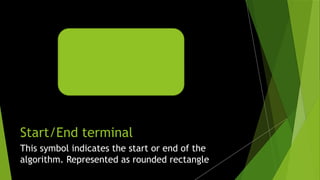
Start/End terminal
Click icon to add picture
This symbol indicates the start or end of the
algorithm. Represented as rounded rectangle
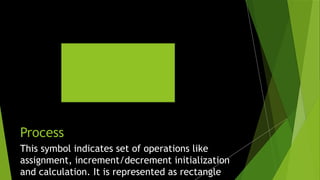
Process
Click icon to add picture
This symbol indicates set of operations like
assignment, increment/decrement initialization
and calculation. It is represented as rectangle.
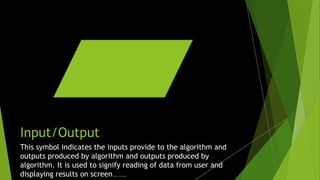
Input/Output
Click icon to add picture
This symbol indicates the inputs provide to the algorithm and
outputs produced by algorithm and outputs produced by
algorithm. It is used to signify reading of data from user and
displaying results on screen. Represented as parallelogram.
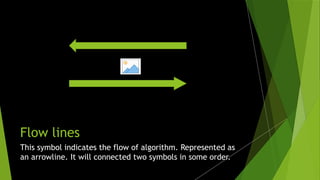
Flow lines
Click icon to add picture
This symbol indicates the flow of algorithm. Represented as
an arrowline. It will connected two symbols in some order.
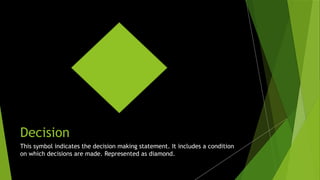
Decision
Click icon to add picture
This symbol indicates the decision making statement. It includes a condition
on which decisions are made. Represented as diamond.
On-page connector
Click icon to add picture
To connect parts of an flowchart this symbol is used if the parts are drawn on same page. To
simplify the complex parts of the flowchart labeled connectors are used. Represented as small
circle with a letter as it’s label.
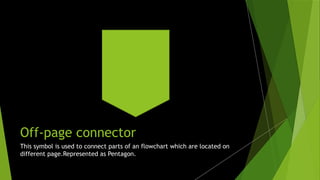
Off-page connector
Click icon to add picture
This symbol is used to connect parts of an flowchart which are located on
different page.Represented as Pentagon.
Thank you !!

PPT on Floaaaaaaaaaaaaaaaaaaaawchart1.pptx

  • 1.
    My details  Name: Sakshi Pandurang Bagade  Enrollment Number : 1901180336  Class name of institude : CO2I  MSBTE code of institude : 0118  Mobile Number : 7709380448/9561882314  Email Id : sakshibagade2003@gmail.com
  • 2.
  • 3.
    Introduction of Flowchart  Flowchartis graphical representation of algorithm. The sequence of steps in algorithm is maintained and represented in the flowchart by using some symbols.  As we know to solve big problems one way is to divide it into smaller pieces to make it simpler, same thing is applied in flowchart construction also.  The flowchart allows breaking the complex problems into parts and at last connects them to
  • 4.
    Symbols of Flowchart Thesequence of steps in algorithm is maintained and represented in flowchart by using some symbols. Flowchart is constructed using standard shapes commonly known as flowchart symbols. This symbols are explained in next section.
  • 5.
    Start/End terminal Click iconto add picture This symbol indicates the start or end of the algorithm. Represented as rounded rectangle
  • 6.
    Process Click icon toadd picture This symbol indicates set of operations like assignment, increment/decrement initialization and calculation. It is represented as rectangle.
  • 7.
    Input/Output Click icon toadd picture This symbol indicates the inputs provide to the algorithm and outputs produced by algorithm and outputs produced by algorithm. It is used to signify reading of data from user and displaying results on screen. Represented as parallelogram.
  • 8.
    Flow lines Click iconto add picture This symbol indicates the flow of algorithm. Represented as an arrowline. It will connected two symbols in some order.
  • 9.
    Decision Click icon toadd picture This symbol indicates the decision making statement. It includes a condition on which decisions are made. Represented as diamond.
  • 10.
    On-page connector Click iconto add picture To connect parts of an flowchart this symbol is used if the parts are drawn on same page. To simplify the complex parts of the flowchart labeled connectors are used. Represented as small circle with a letter as it’s label.
  • 11.
    Off-page connector Click iconto add picture This symbol is used to connect parts of an flowchart which are located on different page.Represented as Pentagon.
  • 12.