1
Computer Communication & Networks
Lecture 1
Introduction
http://web.uettaxila.edu.pk/CMS/coeCCNbsSp09/index.asp
Waleed Ejaz
waleed.ejaz@uettaxila.edu.pk
2
Overview
 Administrative
 Networking: An Overview of Ideas and
Issues
3
Who’s Who
 Instructor
 Engr. Waleed Ejaz
 2006 -2008 MS (Computer Engineering) from NUST
 Area of Specialization: Communication & Computer
Networks
 2003-2006 BE (Computer Engineering) from UET Taxila
 Lab Engineer
 Engr. Noshina Ishaq
4
Web Resources
 Course web
• http://web.uettaxila.edu.pk/CMS/coeCCNbsS
p09/index.asp
• This website and email will serve as a
communication medium between you and me
besides the lecture timing.
 Do visit the course website regularly and see
Recent Announcements for updates.
5
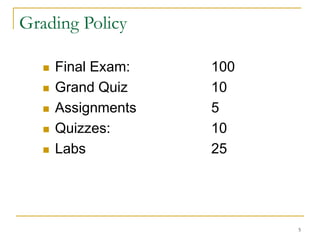
Grading Policy
 Final Exam: 100
 Grand Quiz 10
 Assignments 5
 Quizzes: 10
 Labs 25
6
Answers to FAQs
 All home works are due at the beginning of the class
indicated on the course calendar
 After that 10% penalty: only if submitted before solutions
are posted.
 Exams are closed-book and extremely time limited.
 Exams consist of design questions, numerical,
maybe true-false and short answer questions.
 More about Exams you can see Past Exams from
WEB.
7
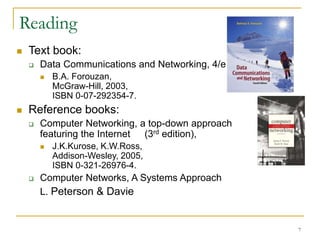
Reading
 Text book:
 Data Communications and Networking, 4/e
 B.A. Forouzan,
McGraw-Hill, 2003,
ISBN 0-07-292354-7.
 Reference books:
 Computer Networking, a top-down approach
featuring the Internet (3rd edition),
 J.K.Kurose, K.W.Ross,
Addison-Wesley, 2005,
ISBN 0-321-26976-4.
 Computer Networks, A Systems Approach
L. Peterson & Davie
8
Required Skills
 The course does not assume prior knowledge
of networking.
9
My Requirement from YOU
 I require YOU to take active part during lectures
 Which means Lot of Questioning in the class –
(Interactive session)
10
Aim of the Course
 Aim of the course is to introduce you to the
world of computer networks, so that you
could
 know the science being used in running this
network
 Use this knowledge in your professional field
11
Network design
Before looking inside a computer
network, first agree on what a
computer network is
12
Computer network ?
 Set of serial lines to attach
terminals to mainframe ?
 Telephone network carrying
voice traffic ?
 Cable network to disseminate
video signals ?
Specialized to
handle:
Keystrokes
Voice
Video
13
What distinguishes a
Computer network ?
 Generality
 Built from general purpose
programmable hardware
 Supports wide range of applications
14
Information, Computers, Networks
 Information: anything that is represented in bits
 Form (can be represented as bits) vs
 Substance (cannot be represented as bits)
 Properties:
 Infinitely replicable
 Computers can “manipulate” information
 Networks create “access” to information
15
Networks
 Potential of networking:
 move bits everywhere, cheaply, and with desired
performance characteristics
 Network provides “connectivity”
16
What is “Connectivity” ?
 Direct or indirect access to every other node in the
network
 Connectivity is the magic needed to communicate if
you do not have a direct pt-pt physical link.
 Tradeoff: Performance characteristics worse than true physical
link!
17
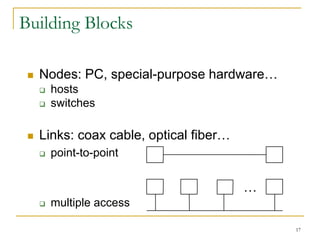
Building Blocks
 Nodes: PC, special-purpose hardware…
 hosts
 switches
 Links: coax cable, optical fiber…
 point-to-point
 multiple access
…
18
Why not connect each node
with every other node ?
 Number of computers that can be
connected becomes very limited
 Number of wires coming out of each
node becomes unmanageable
 Amount of physical hardware/devices
required becomes very expensive
 Solution: indirect connectivity using
intermediate data forwarding nodes
19
Switched Networks
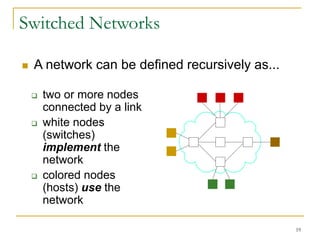
 two or more nodes
connected by a link
 white nodes
(switches)
implement the
network
 colored nodes
(hosts) use the
network
 A network can be defined recursively as...
20
Switched Networks
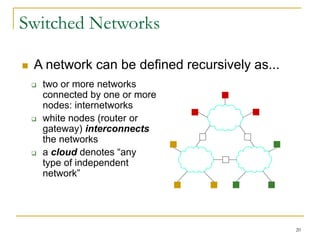
 two or more networks
connected by one or more
nodes: internetworks
 white nodes (router or
gateway) interconnects
the networks
 a cloud denotes “any
type of independent
network”
 A network can be defined recursively as...
21
A Network
A network can be defined recursively as
two or more nodes connected by a
physical link
Or
two or more networks connected by one or
more nodes
22
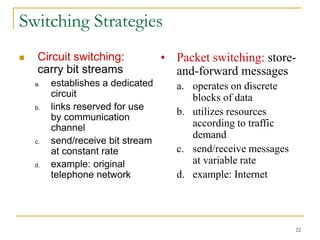
Switching Strategies
 Circuit switching:
carry bit streams
a. establishes a dedicated
circuit
b. links reserved for use
by communication
channel
c. send/receive bit stream
at constant rate
d. example: original
telephone network
• Packet switching: store-
and-forward messages
a. operates on discrete
blocks of data
b. utilizes resources
according to traffic
demand
c. send/receive messages
at variable rate
d. example: Internet
23
What next ?
 Hosts are directly or indirectly connected to
each other
 Can we now provide host-host connectivity ?
 Nodes must be able to say which host it
wants to communicate with
24
Addressing and Routing
 Address: byte-string that identifies a node
 usually unique
 Routing: forwarding decisions
 process of determining how to forward messages
to the destination node based on its address
 Types of addresses
 unicast: node-specific
 broadcast: all nodes on the network
 multicast: some subset of nodes on the network
25
Wrap-up
 A network can be constructed from
nesting of networks
 An address is required for each node
that is reachable on the network
 Address is used to route messages
toward appropriate destination
26
What next ?
 Hosts know how to reach other hosts on
the network
 How should a node use the network for
its communication ?
 All pairs of hosts should have the ability
to exchange messages: cost-effective
resource sharing for efficiency
27
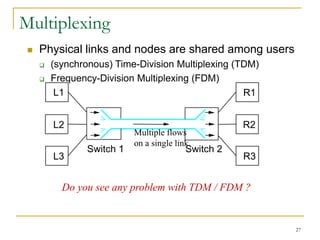
Multiplexing
 Physical links and nodes are shared among users
 (synchronous) Time-Division Multiplexing (TDM)
 Frequency-Division Multiplexing (FDM)
L1
L2
L3
R1
R2
R3
Switch 1 Switch 2
Multiple flows
on a single link
Do you see any problem with TDM / FDM ?
28
What Goes Wrong in the Network?
Reliability at stake
 Bit-level errors (electrical interference)
 Packet-level errors (congestion)
 distinction between lost and late packet
 Link and node failures
 distinction between broken and flaky link
 distinction between failed and slow node
29
What Goes Undesirable in the
Network?
Required performance at stake
 Messages are delayed
 Messages are delivered out-of-order
 Third parties eavesdrop
 The challenge is to fill the gap between
application expectations and hardware
capabilities
30
Research areas in Networking
 Routing
 Security
 Ad-hoc networks
 Wireless networks
 Protocols
 Quality of Service
 …
31
Readings
 Chapter 1: 1.1, 1.2
 Computer Networks, A Systems Approach
L. Peterson & Davie
32

PPT on computer networks and communication

  • 1.
    1 Computer Communication &Networks Lecture 1 Introduction http://web.uettaxila.edu.pk/CMS/coeCCNbsSp09/index.asp Waleed Ejaz waleed.ejaz@uettaxila.edu.pk
  • 2.
    2 Overview  Administrative  Networking:An Overview of Ideas and Issues
  • 3.
    3 Who’s Who  Instructor Engr. Waleed Ejaz  2006 -2008 MS (Computer Engineering) from NUST  Area of Specialization: Communication & Computer Networks  2003-2006 BE (Computer Engineering) from UET Taxila  Lab Engineer  Engr. Noshina Ishaq
  • 4.
    4 Web Resources  Courseweb • http://web.uettaxila.edu.pk/CMS/coeCCNbsS p09/index.asp • This website and email will serve as a communication medium between you and me besides the lecture timing.  Do visit the course website regularly and see Recent Announcements for updates.
  • 5.
    5 Grading Policy  FinalExam: 100  Grand Quiz 10  Assignments 5  Quizzes: 10  Labs 25
  • 6.
    6 Answers to FAQs All home works are due at the beginning of the class indicated on the course calendar  After that 10% penalty: only if submitted before solutions are posted.  Exams are closed-book and extremely time limited.  Exams consist of design questions, numerical, maybe true-false and short answer questions.  More about Exams you can see Past Exams from WEB.
  • 7.
    7 Reading  Text book: Data Communications and Networking, 4/e  B.A. Forouzan, McGraw-Hill, 2003, ISBN 0-07-292354-7.  Reference books:  Computer Networking, a top-down approach featuring the Internet (3rd edition),  J.K.Kurose, K.W.Ross, Addison-Wesley, 2005, ISBN 0-321-26976-4.  Computer Networks, A Systems Approach L. Peterson & Davie
  • 8.
    8 Required Skills  Thecourse does not assume prior knowledge of networking.
  • 9.
    9 My Requirement fromYOU  I require YOU to take active part during lectures  Which means Lot of Questioning in the class – (Interactive session)
  • 10.
    10 Aim of theCourse  Aim of the course is to introduce you to the world of computer networks, so that you could  know the science being used in running this network  Use this knowledge in your professional field
  • 11.
    11 Network design Before lookinginside a computer network, first agree on what a computer network is
  • 12.
    12 Computer network ? Set of serial lines to attach terminals to mainframe ?  Telephone network carrying voice traffic ?  Cable network to disseminate video signals ? Specialized to handle: Keystrokes Voice Video
  • 13.
    13 What distinguishes a Computernetwork ?  Generality  Built from general purpose programmable hardware  Supports wide range of applications
  • 14.
    14 Information, Computers, Networks Information: anything that is represented in bits  Form (can be represented as bits) vs  Substance (cannot be represented as bits)  Properties:  Infinitely replicable  Computers can “manipulate” information  Networks create “access” to information
  • 15.
    15 Networks  Potential ofnetworking:  move bits everywhere, cheaply, and with desired performance characteristics  Network provides “connectivity”
  • 16.
    16 What is “Connectivity”?  Direct or indirect access to every other node in the network  Connectivity is the magic needed to communicate if you do not have a direct pt-pt physical link.  Tradeoff: Performance characteristics worse than true physical link!
  • 17.
    17 Building Blocks  Nodes:PC, special-purpose hardware…  hosts  switches  Links: coax cable, optical fiber…  point-to-point  multiple access …
  • 18.
    18 Why not connecteach node with every other node ?  Number of computers that can be connected becomes very limited  Number of wires coming out of each node becomes unmanageable  Amount of physical hardware/devices required becomes very expensive  Solution: indirect connectivity using intermediate data forwarding nodes
  • 19.
    19 Switched Networks  twoor more nodes connected by a link  white nodes (switches) implement the network  colored nodes (hosts) use the network  A network can be defined recursively as...
  • 20.
    20 Switched Networks  twoor more networks connected by one or more nodes: internetworks  white nodes (router or gateway) interconnects the networks  a cloud denotes “any type of independent network”  A network can be defined recursively as...
  • 21.
    21 A Network A networkcan be defined recursively as two or more nodes connected by a physical link Or two or more networks connected by one or more nodes
  • 22.
    22 Switching Strategies  Circuitswitching: carry bit streams a. establishes a dedicated circuit b. links reserved for use by communication channel c. send/receive bit stream at constant rate d. example: original telephone network • Packet switching: store- and-forward messages a. operates on discrete blocks of data b. utilizes resources according to traffic demand c. send/receive messages at variable rate d. example: Internet
  • 23.
    23 What next ? Hosts are directly or indirectly connected to each other  Can we now provide host-host connectivity ?  Nodes must be able to say which host it wants to communicate with
  • 24.
    24 Addressing and Routing Address: byte-string that identifies a node  usually unique  Routing: forwarding decisions  process of determining how to forward messages to the destination node based on its address  Types of addresses  unicast: node-specific  broadcast: all nodes on the network  multicast: some subset of nodes on the network
  • 25.
    25 Wrap-up  A networkcan be constructed from nesting of networks  An address is required for each node that is reachable on the network  Address is used to route messages toward appropriate destination
  • 26.
    26 What next ? Hosts know how to reach other hosts on the network  How should a node use the network for its communication ?  All pairs of hosts should have the ability to exchange messages: cost-effective resource sharing for efficiency
  • 27.
    27 Multiplexing  Physical linksand nodes are shared among users  (synchronous) Time-Division Multiplexing (TDM)  Frequency-Division Multiplexing (FDM) L1 L2 L3 R1 R2 R3 Switch 1 Switch 2 Multiple flows on a single link Do you see any problem with TDM / FDM ?
  • 28.
    28 What Goes Wrongin the Network? Reliability at stake  Bit-level errors (electrical interference)  Packet-level errors (congestion)  distinction between lost and late packet  Link and node failures  distinction between broken and flaky link  distinction between failed and slow node
  • 29.
    29 What Goes Undesirablein the Network? Required performance at stake  Messages are delayed  Messages are delivered out-of-order  Third parties eavesdrop  The challenge is to fill the gap between application expectations and hardware capabilities
  • 30.
    30 Research areas inNetworking  Routing  Security  Ad-hoc networks  Wireless networks  Protocols  Quality of Service  …
  • 31.
    31 Readings  Chapter 1:1.1, 1.2  Computer Networks, A Systems Approach L. Peterson & Davie
  • 32.