Pay-Per-Click 101

What can it do for me?
  Should I bother?
Who Is This Guy?
• Giuseppe “G” Frustaci
  – Server, not Guru
• Startup After College
  – Marketing at scale = $$$
• iProspect and Catalyst
  – Staples, P&G, Novartis
     • $4M - $10M Budgets. Obscene Revenue
     • Focus on Testing & Data Analytics
Agenda
• Basic Vocab: This will be on the final
• Strategy : How can PPC help my business?
• Should I Bother?
  – Search Advertising
  – Display Advertising
• Free Money
• Homework
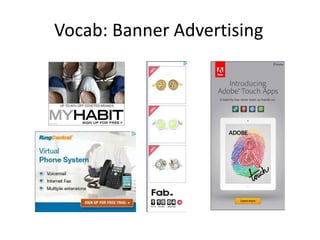
Vocab: Banner Advertising
Vocab: Search Advertising
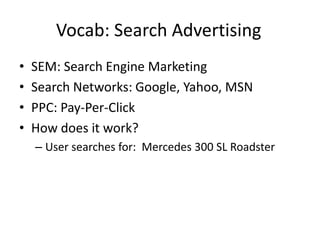
•   SEM: Search Engine Marketing
•   Search Networks: Google, Yahoo, MSN
•   PPC: Pay-Per-Click
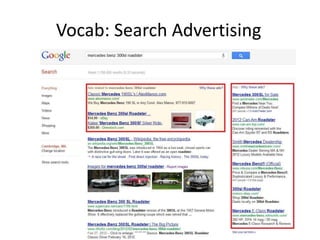
•   How does it work?
    – User searches for: Mercedes 300 SL Roadster
Vocab: Search Advertising
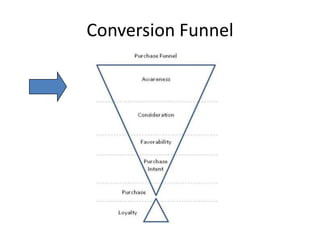
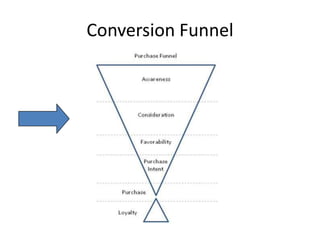
Conversion Funnel
Strategy : Awareness
• Display Network
  – Potential Customers Don’t Know about You
  – Targeting : Content Networks
     • Websites that publish content or Web-based Tools
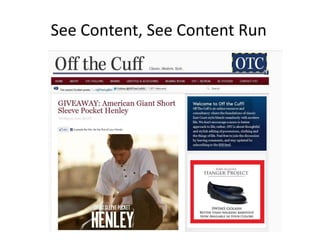
See Content, See Content Run
Conversion Funnel
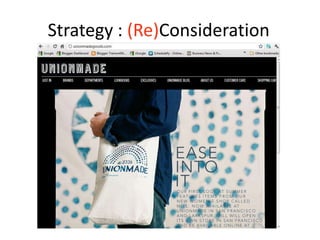
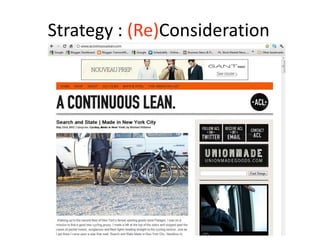
Strategy : (Re)Consideration
• Remarketing
  – Reengage your Website Visitors
     • 6 to 12 Impressions to be remembered
  – AKA: Stalking
  – DO THIS – If you want people to remember you and visit
 STOP WHAT YOU’RE DOING
    again
     • Good Examples: WarbyParker.com, Fab.com, Gilt.com
  Set this up IMMEDIATELY!
     • Graphics-based Ads (don’t bother with text)
     • Vertical Ads get more eyeball time
     • But do all of the sizes anyway
Strategy : (Re)Consideration
Strategy: Consideration(s)
• Message Testing
  – New Product
  – New Features
  – Benefits
  – Specials, Deals, Discounts
• Basic Question
  – Is my Ad Messaging resonating?
  – Are they engaging/converting on my site?
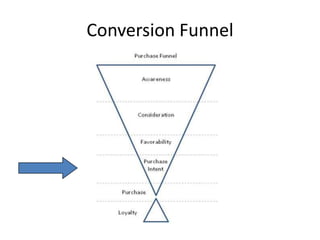
Conversion Funnel
Conversion Intent
• Search Engines
• Keywords Related to your business
  – Problem or Pleasure
  – Product/Service Category
  – Product/Service Name
  – Competitors
     • Trademark Issues: Keyword is OK, Ad Copy is Not
     • Buy, Upgrade, Hate, Technical Support, Problems
  – Brand & Misspellings
Should I bother with Search?
• Keyword Research Tool
  – See potential performance
  – Related Keywords
• Should I Bother?
  – Are people searching for my products?
  – Is this demand significant?
• If Yes, Basic Campaign
  – Purpose: Learning Your Customer’s Language
Should I bother with Search?
• Learning About Your Customers with Search
   – Keyword: Tennis Shoes
   – Start on “Exact” Match
      • Shows up for: Tennis Shoes
      • Doesn’t for: Anything else, no matter how similar
   – Move to “Phrase” Match
      • Shows up for: Red Tennis Shoes, Tennis Shoes Sale
      • Doesn’t for: Shoes for Tennis, Tennis Sneakers
   – If you have $$$, “Broad Match
      • Shows up for: Best Shoes for Tennis, Running Shoes
      • Doesn’t show up for: Spaghetti Monster, Pink Tutu
   – http://support.google.com/adwords/bin/answer.py?hl=en&ans
     wer=2497836
• Search Query Report
   – What terms did people search for when the saw your ad?
   – http://www.youtube.com/watch?v=QnUs9JFKl_g
Should I bother with Search?
• Ad Copy
  – http://certifiedknowledge.org/blog/an-endless-
    supply-of-adwords-ads-for-your-split-test-
    experiments/
  – http://www.netargument.com/2011/07/19bold-
    ideas-for-writing-google-adwords.html
  – Starting Out, Anything Goes
     • The Goal is understanding customer language
Should I Bother with Display?
•    Link: How to Build a Display Campaign
•    Tips
    – Unique Campaigns per effort
       •   Topics, Interests, Keywords, Remarketing
    – Graphics-based Display Ads work best
    – Vertical Ads get the most eyeball time
•    Building your ads
    – Google has a (fairly decent) Free Tool
      http://www.google.com/ads/displaynetwork/pla
      n-creative-campaigns/display-ad-builder.html
Free Money
• Come to my class on June 16th
  – $250 in Google, MSN, and Facebook credits
• Set up accounts, then wait
  – Analytics
  – 1and1.com, Godaddy
  – Gmail
  – Adwords
  – Google it
Homework
• Set up a Google Adwords Account
  – If you get lost, call Google
• Keyword Research Tool
  – Just brainstorm. Export the results file
• Find display ads for your competitors
  – Or companies selling to the same customers
  – Save the images
     • Ctrl Shift PrtSc

Ppc 101 class 1.2

  • 1.
    Pay-Per-Click 101 What canit do for me? Should I bother?
  • 2.
    Who Is ThisGuy? • Giuseppe “G” Frustaci – Server, not Guru • Startup After College – Marketing at scale = $$$ • iProspect and Catalyst – Staples, P&G, Novartis • $4M - $10M Budgets. Obscene Revenue • Focus on Testing & Data Analytics
  • 3.
    Agenda • Basic Vocab:This will be on the final • Strategy : How can PPC help my business? • Should I Bother? – Search Advertising – Display Advertising • Free Money • Homework
  • 4.
  • 5.
    Vocab: Search Advertising • SEM: Search Engine Marketing • Search Networks: Google, Yahoo, MSN • PPC: Pay-Per-Click • How does it work? – User searches for: Mercedes 300 SL Roadster
  • 6.
  • 7.
  • 8.
    Strategy : Awareness •Display Network – Potential Customers Don’t Know about You – Targeting : Content Networks • Websites that publish content or Web-based Tools
  • 9.
    See Content, SeeContent Run
  • 10.
  • 11.
    Strategy : (Re)Consideration •Remarketing – Reengage your Website Visitors • 6 to 12 Impressions to be remembered – AKA: Stalking – DO THIS – If you want people to remember you and visit STOP WHAT YOU’RE DOING again • Good Examples: WarbyParker.com, Fab.com, Gilt.com Set this up IMMEDIATELY! • Graphics-based Ads (don’t bother with text) • Vertical Ads get more eyeball time • But do all of the sizes anyway
  • 12.
  • 13.
  • 14.
    Strategy: Consideration(s) • MessageTesting – New Product – New Features – Benefits – Specials, Deals, Discounts • Basic Question – Is my Ad Messaging resonating? – Are they engaging/converting on my site?
  • 15.
  • 16.
    Conversion Intent • SearchEngines • Keywords Related to your business – Problem or Pleasure – Product/Service Category – Product/Service Name – Competitors • Trademark Issues: Keyword is OK, Ad Copy is Not • Buy, Upgrade, Hate, Technical Support, Problems – Brand & Misspellings
  • 17.
    Should I botherwith Search? • Keyword Research Tool – See potential performance – Related Keywords • Should I Bother? – Are people searching for my products? – Is this demand significant? • If Yes, Basic Campaign – Purpose: Learning Your Customer’s Language
  • 18.
    Should I botherwith Search? • Learning About Your Customers with Search – Keyword: Tennis Shoes – Start on “Exact” Match • Shows up for: Tennis Shoes • Doesn’t for: Anything else, no matter how similar – Move to “Phrase” Match • Shows up for: Red Tennis Shoes, Tennis Shoes Sale • Doesn’t for: Shoes for Tennis, Tennis Sneakers – If you have $$$, “Broad Match • Shows up for: Best Shoes for Tennis, Running Shoes • Doesn’t show up for: Spaghetti Monster, Pink Tutu – http://support.google.com/adwords/bin/answer.py?hl=en&ans wer=2497836 • Search Query Report – What terms did people search for when the saw your ad? – http://www.youtube.com/watch?v=QnUs9JFKl_g
  • 19.
    Should I botherwith Search? • Ad Copy – http://certifiedknowledge.org/blog/an-endless- supply-of-adwords-ads-for-your-split-test- experiments/ – http://www.netargument.com/2011/07/19bold- ideas-for-writing-google-adwords.html – Starting Out, Anything Goes • The Goal is understanding customer language
  • 20.
    Should I Botherwith Display? • Link: How to Build a Display Campaign • Tips – Unique Campaigns per effort • Topics, Interests, Keywords, Remarketing – Graphics-based Display Ads work best – Vertical Ads get the most eyeball time • Building your ads – Google has a (fairly decent) Free Tool http://www.google.com/ads/displaynetwork/pla n-creative-campaigns/display-ad-builder.html
  • 21.
    Free Money • Cometo my class on June 16th – $250 in Google, MSN, and Facebook credits • Set up accounts, then wait – Analytics – 1and1.com, Godaddy – Gmail – Adwords – Google it
  • 22.
    Homework • Set upa Google Adwords Account – If you get lost, call Google • Keyword Research Tool – Just brainstorm. Export the results file • Find display ads for your competitors – Or companies selling to the same customers – Save the images • Ctrl Shift PrtSc