Multimedia Design
Principles
Nicole Pittman
9/27/17
Organization
Consider This!
Desig
nRules Of
Form and
ContentTips and
ExamplesFinally
This!
Before you start a project
you should consider
these points:
• Your Audience
• Your Skill Level
• Your Equipment,
Time and Cost
Organization
Consider
This!
Desig
nRules Of
ThumbForm and
ContentTips and
Examples
Finall
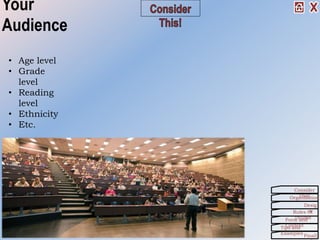
Your
Audience
• Age level
• Grade
level
• Reading
level
• Ethnicity
• Etc.
Organization
Consider
This!
Desig
nRules Of
ThumbForm and
ContentTips and
Examples
Finall
Skill Level
Are you a Super-
Techie?
Or, are you a
Beginner?
Organization
Consider
This!
Desig
nRules Of
ThumbForm and
ContentTips and
Examples
Finall
Equipment,
Time, and Cost
What equipment do you
need for:
• Creating
• Displaying
• Transporting
What will the cost
be?
How much time do
you have?
Organization
Consider
This!
Desig
nRules Of
ThumbForm and
ContentTips and
Examples
Finall
Organizat
ion
In order to be successful in any project, you need organization
skills.
That starts with taking steps to actually Get Organized and
follow some practical advice.
Another aspect in organization is creating a Story Board.
Organization
Consider
This!
Desig
nRules Of
ThumbForm and
ContentTips and
Examples
Finall
Get Organized!
Make a detailed outline before you turn the
computer on!
Order the information:
• Chronologically
• By development
• According to topics
• From general to specific
• From problem to solutionRefine each section and subsection according to a
consistent pattern.
Create a “Story Board” where you are
cryptic, but complete in your thoughts.
Organization
Consider
This!
Desig
nRules Of
ThumbForm and
ContentTips and
Examples
Finall
Story Board
The purpose of the story board is to allow you to collect your ideas,
order the material, and make revision before investing a great deal
of time and effort in the mechanics of creating the project.
An essential step in the process.
But how?
Organization
Consider
This!
Desig
nRules Of
ThumbForm and
ContentTips and
Examples
Finall
How to Create
a Story Board
1. Begin with an outline.
2. “Lay-out” the macro order of the
information. (Sections, headings,
etc.)
3. Put the pages in sequence. (Index
cards are very useful here.)
4. “Sketch each page/slide/screen
indicating text, graphics, colors,
and/or sounds.
5. Note any transitions and
animations.
6. Make off-page notes where they are
helpful.
7. Review and Revise
It is much easier to make changes in sketches than
after several pages have been created in the
application.
Organization
Consider
This!
Desig
nRules Of
ThumbForm and
ContentTips and
Examples
Finall
Desi
gn
The appearance of the information (text or
graphics) effects the way we perceive it.
It impacts the content.
Remember CCC:
• Clean
• Consistent
• ContrastWe will also consider some of the basic principles of
design that you should be aware of as you’re working.
Organization
Consider
This!
Desig
nRules Of
ThumbForm and
ContentTips and
Examples
Finall
Design
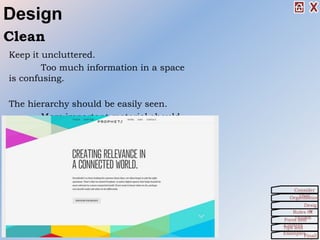
Keep it uncluttered.
Too much information in a space
is confusing.
The hierarchy should be easily seen.
More important material should
be at the top and/or left.
Clean
Organization
Consider
This!
Desig
nRules Of
ThumbForm and
ContentTips and
Examples
Finall
The mind orders information based, in part, on the
perceptual environment.
Constantly changing environments require constant
mental adjustment.
This can interfere with content.
Consist
ent
TIP: To see the consistency of the entire
presentation, view it in the Slide Sorter
View.
Organization
Consider
This!
Desig
nRules Of
ThumbForm and
ContentTips and
Examples
Finall
Design
Contra
st
Organization
Consider
This!
Desig
nRules Of
ThumbForm and
ContentTips and
Examples
Finall
Design
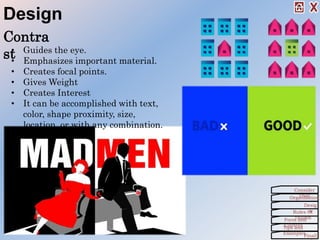
• Guides the eye.
• Emphasizes important material.
• Creates focal points.
• Gives Weight
• Creates Interest
• It can be accomplished with text,
color, shape proximity, size,
location, or with any combination.
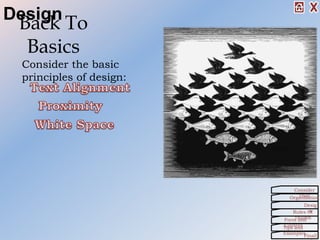
Back To
Basics
Consider the basic
principles of design:
Organization
Consider
This!
Desig
nRules Of
ThumbForm and
ContentTips and
Examples
Finall
Design
• Don’t mix
alignments
• Center=Balanced
• Left &
Right=Movement
Basics – Text Alignment
Alignment -
Horizontal We read from the top
down, therefore, the
top is the most
important position.
Alignment - Vertical
Alignment – Horizontal
Base line – the line that text and
graphics sit on.
Organization
Consider
This!
Desig
nRules Of
ThumbForm and
ContentTips and
Examples
Finall
Design
Lef
t
Cent
er
Righ
t
Justifi
ed
Top
Middle
Bottom
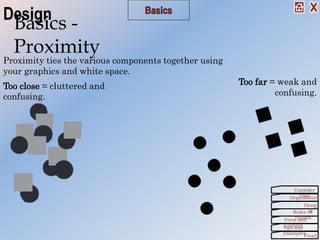
Too close = cluttered and
confusing.
Too far = weak and
confusing.
Basics -
Proximity
Proximity ties the various components together using
your graphics and white space.
Organization
Consider
This!
Desig
nRules Of
ThumbForm and
ContentTips and
Examples
Finall
Design
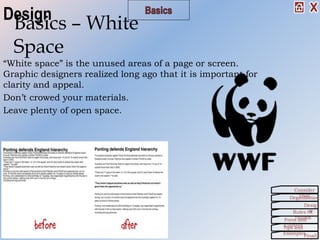
“White space” is the unused areas of a page or screen.
Graphic designers realized long ago that it is important for
clarity and appeal.
Don’t crowed your materials.
Leave plenty of open space.
Basics – White
Space
Organization
Consider
This!
Desig
nRules Of
ThumbForm and
ContentTips and
Examples
Finall
Design
Rules Of Thumb
General rules of thumb to remember
as you’re working are:
Organization
Consider
This!
Desig
nRules Of
ThumbForm and
ContentTips and
Examples
Finall
Keep It Simple
Stupid/Sweetie
Most multimedia presentations can be improved
by eliminating some elements or moving them to
another screen.
KIS
S
Organization
Consider
This!
Desig
nRules Of
ThumbForm and
ContentTips and
Examples
Finall
Rules Of Thumb
Typography
• Use only 2 (3 at the very most) fonts in any document.
• Let size and style (bold, italic, underline) create contrast.
• Avoid the use of all caps. (We read as much by the shape of the
words as by the collection of letters.)
• All capitalized texts have no variety in shape, so they are
more difficult to read.
• Avoid the use of all Bold
• Constant emphasis is no emphasis.
• Connect the style to the meaning of the text.
Con
t.
Organization
Consider
This!
Desig
nRules Of
ThumbForm and
ContentTips and
Examples
Finall
Rules Of Thumb
Sans - Serif
Fonts without terminating
marks.
Studies in perception indicate that when blocks of text are used,
serif fonts work best for the printed page and sans-serif are best
Typography -
Fonts
Serif Fonts
A serif is a terminating mark at the
end of a letter stroke.
Organization
Consider
This!
Desig
nRules Of
ThumbForm and
ContentTips and
Examples
Finall
Rules Of Thumb
Color
Color helps make the foreground/background distinction.
Light color indicates background and bold colors indicate
foreground.
Avoid strong backgrounds. They put the background “in your face”
and de-emphasize texts and graphics which need to be in the
foreground.
Organization
Consider
This!
Desig
nRules Of
ThumbForm and
ContentTips and
Examples
Finall
Con
t.
Rules Of Thumb
Color
Some colors work better
together than others.
More Importantly, some
background colors
should not be used with
certain font colors!
Organization
Consider
This!
Desig
nRules Of
ThumbForm and
ContentTips and
Examples
Finall
Con
t.
Rules Of Thumb
Color
Limit your pallet to 3 or 4 colors.
Like fonts, too many colors will be distracting.
Some colors have inherent meaning.
• Blue = comfort, “clear, blue sky”
• Green = growth, “lush, green forest”
• Red = danger, fire & red light
• Blue is for baby boys.
• Pink is for baby girls.
Organization
Consider
This!
Desig
nRules Of
ThumbForm and
ContentTips and
Examples
Finall
Rules Of Thumb
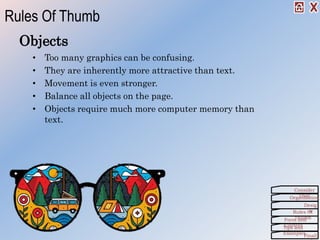
Objects
• Too many graphics can be confusing.
• They are inherently more attractive than text.
• Movement is even stronger.
• Balance all objects on the page.
• Objects require much more computer memory than
text.
Rules Of Thumb
Organization
Consider
This!
Desig
nRules Of
ThumbForm and
ContentTips and
Examples
Finall
Balanc
e
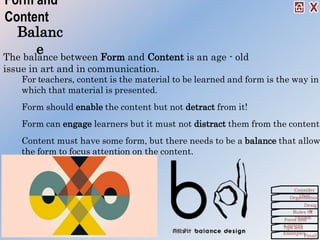
For teachers, content is the material to be learned and form is the way in
which that material is presented.
Form should enable the content but not detract from it!
Form can engage learners but it must not distract them from the content.
Content must have some form, but there needs to be a balance that allow
the form to focus attention on the content.
Form and
Content
The balance between Form and Content is an age - old
issue in art and in communication.
Organization
Consider
This!
Desig
nRules Of
ThumbForm and
ContentTips and
Examples
Finall
Tips and
Examples
This video is a little long, but it’s a great reference and has
some great points on creating presentations.
Also Reference:
Articles by Cliff Atkinson:
•
Organization
Consider
This!
Desig
nRules Of
ThumbForm and
ContentTips and
Examples
Finall
Co
nt.
Tips and
Examples
Organization
Consider
This!
Desig
nRules Of
ThumbForm and
ContentTips and
Examples
Finall
Another good
Finally!
It’s not about you!
Your students do not need to know what your favorite color is,
color is, or your favorite sport, animal, or flower. Nor is it
important what you think is pretty, cute, or “cool”.
It is about the content!
What your students need is a learning experience that is
clean, clear and consistent.
Design for your audience not for yourself!
Organization
Consider
This!
Desig
nRules Of
ThumbForm and
ContentTips and
Examples
Finall

PowerPoint Presentation Project

  • 1.
    Multimedia Design Principles Nicole Pittman 9/27/17 Organization ConsiderThis! Desig nRules Of Form and ContentTips and ExamplesFinally
  • 2.
    This! Before you starta project you should consider these points: • Your Audience • Your Skill Level • Your Equipment, Time and Cost Organization Consider This! Desig nRules Of ThumbForm and ContentTips and Examples Finall
  • 3.
    Your Audience • Age level •Grade level • Reading level • Ethnicity • Etc. Organization Consider This! Desig nRules Of ThumbForm and ContentTips and Examples Finall
  • 4.
    Skill Level Are youa Super- Techie? Or, are you a Beginner? Organization Consider This! Desig nRules Of ThumbForm and ContentTips and Examples Finall
  • 5.
    Equipment, Time, and Cost Whatequipment do you need for: • Creating • Displaying • Transporting What will the cost be? How much time do you have? Organization Consider This! Desig nRules Of ThumbForm and ContentTips and Examples Finall
  • 6.
    Organizat ion In order tobe successful in any project, you need organization skills. That starts with taking steps to actually Get Organized and follow some practical advice. Another aspect in organization is creating a Story Board. Organization Consider This! Desig nRules Of ThumbForm and ContentTips and Examples Finall
  • 7.
    Get Organized! Make adetailed outline before you turn the computer on! Order the information: • Chronologically • By development • According to topics • From general to specific • From problem to solutionRefine each section and subsection according to a consistent pattern. Create a “Story Board” where you are cryptic, but complete in your thoughts. Organization Consider This! Desig nRules Of ThumbForm and ContentTips and Examples Finall
  • 8.
    Story Board The purposeof the story board is to allow you to collect your ideas, order the material, and make revision before investing a great deal of time and effort in the mechanics of creating the project. An essential step in the process. But how? Organization Consider This! Desig nRules Of ThumbForm and ContentTips and Examples Finall
  • 9.
    How to Create aStory Board 1. Begin with an outline. 2. “Lay-out” the macro order of the information. (Sections, headings, etc.) 3. Put the pages in sequence. (Index cards are very useful here.) 4. “Sketch each page/slide/screen indicating text, graphics, colors, and/or sounds. 5. Note any transitions and animations. 6. Make off-page notes where they are helpful. 7. Review and Revise It is much easier to make changes in sketches than after several pages have been created in the application. Organization Consider This! Desig nRules Of ThumbForm and ContentTips and Examples Finall
  • 10.
    Desi gn The appearance ofthe information (text or graphics) effects the way we perceive it. It impacts the content. Remember CCC: • Clean • Consistent • ContrastWe will also consider some of the basic principles of design that you should be aware of as you’re working. Organization Consider This! Desig nRules Of ThumbForm and ContentTips and Examples Finall
  • 11.
    Design Keep it uncluttered. Toomuch information in a space is confusing. The hierarchy should be easily seen. More important material should be at the top and/or left. Clean Organization Consider This! Desig nRules Of ThumbForm and ContentTips and Examples Finall
  • 12.
    The mind ordersinformation based, in part, on the perceptual environment. Constantly changing environments require constant mental adjustment. This can interfere with content. Consist ent TIP: To see the consistency of the entire presentation, view it in the Slide Sorter View. Organization Consider This! Desig nRules Of ThumbForm and ContentTips and Examples Finall Design
  • 13.
    Contra st Organization Consider This! Desig nRules Of ThumbForm and ContentTipsand Examples Finall Design • Guides the eye. • Emphasizes important material. • Creates focal points. • Gives Weight • Creates Interest • It can be accomplished with text, color, shape proximity, size, location, or with any combination.
  • 14.
    Back To Basics Consider thebasic principles of design: Organization Consider This! Desig nRules Of ThumbForm and ContentTips and Examples Finall Design
  • 15.
    • Don’t mix alignments •Center=Balanced • Left & Right=Movement Basics – Text Alignment Alignment - Horizontal We read from the top down, therefore, the top is the most important position. Alignment - Vertical Alignment – Horizontal Base line – the line that text and graphics sit on. Organization Consider This! Desig nRules Of ThumbForm and ContentTips and Examples Finall Design Lef t Cent er Righ t Justifi ed Top Middle Bottom
  • 16.
    Too close =cluttered and confusing. Too far = weak and confusing. Basics - Proximity Proximity ties the various components together using your graphics and white space. Organization Consider This! Desig nRules Of ThumbForm and ContentTips and Examples Finall Design
  • 17.
    “White space” isthe unused areas of a page or screen. Graphic designers realized long ago that it is important for clarity and appeal. Don’t crowed your materials. Leave plenty of open space. Basics – White Space Organization Consider This! Desig nRules Of ThumbForm and ContentTips and Examples Finall Design
  • 18.
    Rules Of Thumb Generalrules of thumb to remember as you’re working are: Organization Consider This! Desig nRules Of ThumbForm and ContentTips and Examples Finall
  • 19.
    Keep It Simple Stupid/Sweetie Mostmultimedia presentations can be improved by eliminating some elements or moving them to another screen. KIS S Organization Consider This! Desig nRules Of ThumbForm and ContentTips and Examples Finall Rules Of Thumb
  • 20.
    Typography • Use only2 (3 at the very most) fonts in any document. • Let size and style (bold, italic, underline) create contrast. • Avoid the use of all caps. (We read as much by the shape of the words as by the collection of letters.) • All capitalized texts have no variety in shape, so they are more difficult to read. • Avoid the use of all Bold • Constant emphasis is no emphasis. • Connect the style to the meaning of the text. Con t. Organization Consider This! Desig nRules Of ThumbForm and ContentTips and Examples Finall Rules Of Thumb
  • 21.
    Sans - Serif Fontswithout terminating marks. Studies in perception indicate that when blocks of text are used, serif fonts work best for the printed page and sans-serif are best Typography - Fonts Serif Fonts A serif is a terminating mark at the end of a letter stroke. Organization Consider This! Desig nRules Of ThumbForm and ContentTips and Examples Finall Rules Of Thumb
  • 22.
    Color Color helps makethe foreground/background distinction. Light color indicates background and bold colors indicate foreground. Avoid strong backgrounds. They put the background “in your face” and de-emphasize texts and graphics which need to be in the foreground. Organization Consider This! Desig nRules Of ThumbForm and ContentTips and Examples Finall Con t. Rules Of Thumb
  • 23.
    Color Some colors workbetter together than others. More Importantly, some background colors should not be used with certain font colors! Organization Consider This! Desig nRules Of ThumbForm and ContentTips and Examples Finall Con t. Rules Of Thumb
  • 24.
    Color Limit your palletto 3 or 4 colors. Like fonts, too many colors will be distracting. Some colors have inherent meaning. • Blue = comfort, “clear, blue sky” • Green = growth, “lush, green forest” • Red = danger, fire & red light • Blue is for baby boys. • Pink is for baby girls. Organization Consider This! Desig nRules Of ThumbForm and ContentTips and Examples Finall Rules Of Thumb
  • 25.
    Objects • Too manygraphics can be confusing. • They are inherently more attractive than text. • Movement is even stronger. • Balance all objects on the page. • Objects require much more computer memory than text. Rules Of Thumb Organization Consider This! Desig nRules Of ThumbForm and ContentTips and Examples Finall
  • 26.
    Balanc e For teachers, contentis the material to be learned and form is the way in which that material is presented. Form should enable the content but not detract from it! Form can engage learners but it must not distract them from the content. Content must have some form, but there needs to be a balance that allow the form to focus attention on the content. Form and Content The balance between Form and Content is an age - old issue in art and in communication. Organization Consider This! Desig nRules Of ThumbForm and ContentTips and Examples Finall
  • 27.
    Tips and Examples This videois a little long, but it’s a great reference and has some great points on creating presentations. Also Reference: Articles by Cliff Atkinson: • Organization Consider This! Desig nRules Of ThumbForm and ContentTips and Examples Finall Co nt.
  • 28.
    Tips and Examples Organization Consider This! Desig nRules Of ThumbFormand ContentTips and Examples Finall Another good
  • 29.
    Finally! It’s not aboutyou! Your students do not need to know what your favorite color is, color is, or your favorite sport, animal, or flower. Nor is it important what you think is pretty, cute, or “cool”. It is about the content! What your students need is a learning experience that is clean, clear and consistent. Design for your audience not for yourself! Organization Consider This! Desig nRules Of ThumbForm and ContentTips and Examples Finall