Understanding, Debugging and Fixing

    Power Bugs
           Aditya & Satyam
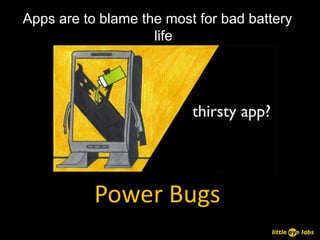
Apps are to blame the most for bad battery
                    life


           Power Bugs
• Bad coding patterns cause power bugs
• Specific behaviors of the Android Platform
• App inter-dependencies!


• Special Attention must be paid to optimize
  for power!


            Power Bugs
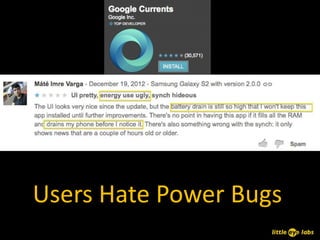
Users Hate Power Bugs
Understanding Common
     Power Bugs
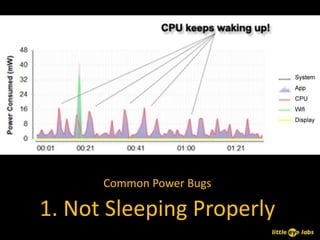
Common Power Bugs

1. Not Sleeping Properly
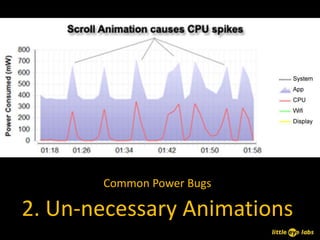
Common Power Bugs

2. Un-necessary Animations
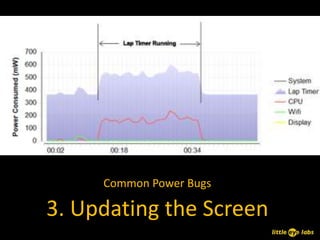
Common Power Bugs

3. Updating the Screen
Common Power Bugs

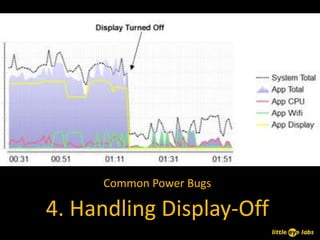
4. Handling Display-Off
Common Power Bugs

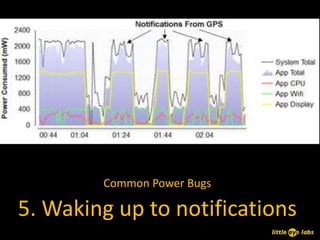
5. Waking up to notifications
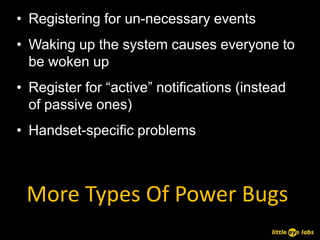
• Registering for un-necessary events
• Waking up the system causes everyone to
  be woken up
• Register for “active” notifications (instead
  of passive ones)
• Handset-specific problems


 More Types Of Power Bugs
Best Practices
(or how to avoid the dreaded battery drain)
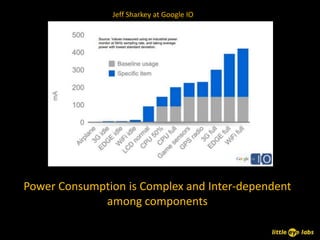
Jeff Sharkey at Google IO


Power Consumption is Complex and Inter-dependent
             among components
• prefetch data
  – to avoid switching states frequently, try and read as
    much data as possible
  – trade-off between too much pre-fetch and battery
    drain
  – google recommends pre-fetching data that you will
    initiate in the next 2 to 5 minutes, and in the order of
    1-5 MB size
• batch data
  – do data send/receive in batches rather than on-
    demand

      Best Practices - Network
  – eg: batch analytics information, rather than sending
    them as they are collected
• using inexact timers
  – AlarmManager.setInexactRepeating()
  – use ELAPSED_REALTIME instead of
    ELAPSED_REALTIME_WAKEUP
• detect network connection
  – avoid connection attempts if no network is active
• avoid polling and use GCM when possible
  – avoids multiple connections
  – reduces the number of device state changes

      Best Practices - Network
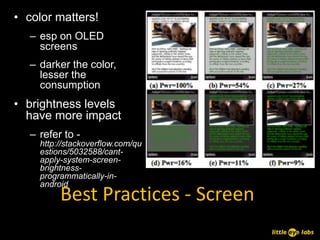
• color matters!
   – esp on OLED
     screens
   – darker the color,
     lesser the
     consumption
• brightness levels
  have more impact
   – refer to -
     http://stackoverflow.com/qu
     estions/5032588/cant-
     apply-system-screen-
     brightness-
     programmatically-in-
     android
          Best Practices - Screen
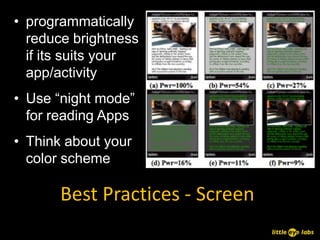
• programmatically
  reduce brightness
  if its suits your
  app/activity
• Use “night mode”
  for reading Apps
• Think about your
  color scheme

       Best Practices - Screen
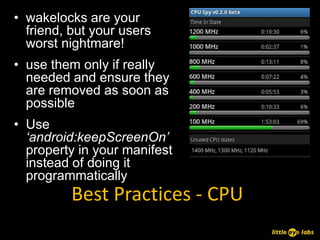
• wakelocks are your
  friend, but your users
  worst nightmare!
• use them only if really
  needed and ensure they
  are removed as soon as
  possible
• Use
  ‘android:keepScreenOn’
  property in your manifest
  instead of doing it
  programmatically
          Best Practices - CPU
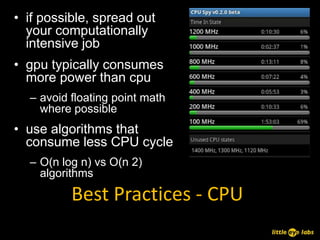
• if possible, spread out
  your computationally
  intensive job
• gpu typically consumes
  more power than cpu
  – avoid floating point math
    where possible
• use algorithms that
  consume less CPU cycle
  – O(n log n) vs O(n 2)
    algorithms

          Best Practices - CPU
Demo


Identifying power bugs with
          little eye
Optimized Apps = Better User Experience

       Thank You

   www.littleeye.co

        aditya@littleeye.co
       satyam@littleeye.co

Power bugs

  • 1.
    Understanding, Debugging andFixing Power Bugs Aditya & Satyam
  • 2.
    Apps are toblame the most for bad battery life Power Bugs
  • 3.
    • Bad codingpatterns cause power bugs • Specific behaviors of the Android Platform • App inter-dependencies! • Special Attention must be paid to optimize for power! Power Bugs
  • 4.
  • 5.
  • 6.
    Common Power Bugs 1.Not Sleeping Properly
  • 7.
    Common Power Bugs 2.Un-necessary Animations
  • 8.
    Common Power Bugs 3.Updating the Screen
  • 9.
    Common Power Bugs 4.Handling Display-Off
  • 10.
    Common Power Bugs 5.Waking up to notifications
  • 11.
    • Registering forun-necessary events • Waking up the system causes everyone to be woken up • Register for “active” notifications (instead of passive ones) • Handset-specific problems More Types Of Power Bugs
  • 12.
    Best Practices (or howto avoid the dreaded battery drain)
  • 13.
    Jeff Sharkey atGoogle IO Power Consumption is Complex and Inter-dependent among components
  • 14.
    • prefetch data – to avoid switching states frequently, try and read as much data as possible – trade-off between too much pre-fetch and battery drain – google recommends pre-fetching data that you will initiate in the next 2 to 5 minutes, and in the order of 1-5 MB size • batch data – do data send/receive in batches rather than on- demand Best Practices - Network – eg: batch analytics information, rather than sending them as they are collected
  • 15.
    • using inexacttimers – AlarmManager.setInexactRepeating() – use ELAPSED_REALTIME instead of ELAPSED_REALTIME_WAKEUP • detect network connection – avoid connection attempts if no network is active • avoid polling and use GCM when possible – avoids multiple connections – reduces the number of device state changes Best Practices - Network
  • 16.
    • color matters! – esp on OLED screens – darker the color, lesser the consumption • brightness levels have more impact – refer to - http://stackoverflow.com/qu estions/5032588/cant- apply-system-screen- brightness- programmatically-in- android Best Practices - Screen
  • 17.
    • programmatically reduce brightness if its suits your app/activity • Use “night mode” for reading Apps • Think about your color scheme Best Practices - Screen
  • 18.
    • wakelocks areyour friend, but your users worst nightmare! • use them only if really needed and ensure they are removed as soon as possible • Use ‘android:keepScreenOn’ property in your manifest instead of doing it programmatically Best Practices - CPU
  • 19.
    • if possible,spread out your computationally intensive job • gpu typically consumes more power than cpu – avoid floating point math where possible • use algorithms that consume less CPU cycle – O(n log n) vs O(n 2) algorithms Best Practices - CPU
  • 20.
  • 21.
    Optimized Apps =Better User Experience Thank You www.littleeye.co aditya@littleeye.co satyam@littleeye.co