PODCAST
/VIDCAST/PHOTOCAST
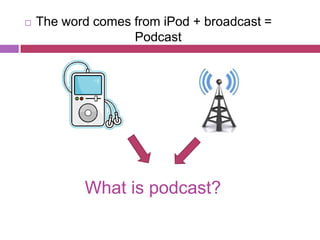
   The word comes from iPod + broadcast =
                   Podcast


           What is podcast?
   Online audio or video content like mp3 that can
    play either on the computer or any portable
    device; Apple iPod or Creative Zen

   Requirements :
       Microphone
       Audio editing software such as Audacity or Adobe
       Audition
         For Mac users, they may use Garageband and
          iLife software

   May distributed via RSS or Atom syndication for
    listening on devices
VidCast?
⚛   VidCast is creating and distributing the video
    podcast

⚛   Associated terms of vidcast :
    vlogs, vlogging, vodcast, vcast

⚛   Requirements :
     • Video camera
     • Microphone
     • Video editing software such as Sony
       Vegas, Adobe Premiere or Apple Final
       Cutpro
Photocast?

⚛   Sharing the photos accompanied by music or
    narrations

⚛   Subscribe to the photos, then the others will
    see them in iPhoto library exactly same as in
    ours
Types of Podcast

1. A basic podcast contains only audio and is
   the easiest to create and listen to.
2. An enhanced podcast has both
   audio, images, slides (narrated PowerPoint
   presentation or Keynote), embedded
   URLS, and chapters
3. A vodcast (or video podcast) contains video
   and audio and is most difficult to create
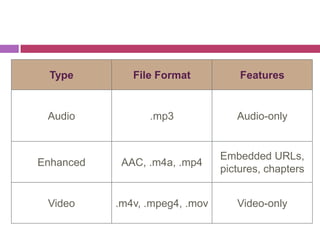
Type        File Format           Features


 Audio           .mp3              Audio-only


                                Embedded URLs,
Enhanced    AAC, .m4a, .mp4
                                pictures, chapters


 Video     .m4v, .mpeg4, .mov      Video-only
RSS ?
   Really Simple Syndication


 Format for syndicating content from the
Internet
 Choose what information to receive
 Get new content when it becomes
available
 Can be used to distribute files
 Keep users up to date on content
   Example : BearShare, iTunes, Juice, Youtube
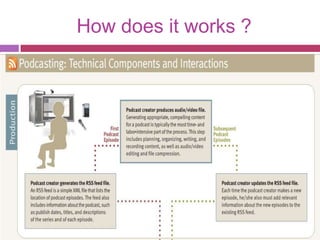
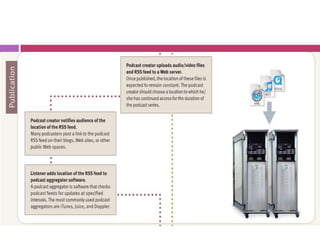
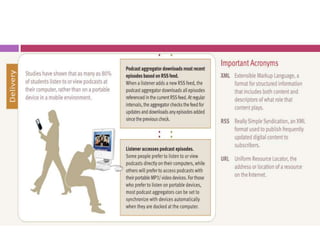
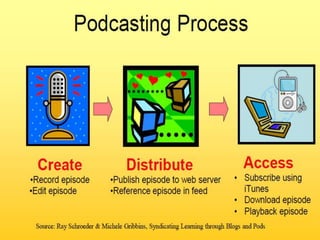
How does it works ?
Podcast in Education

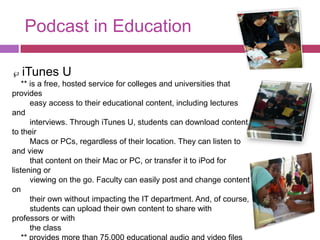
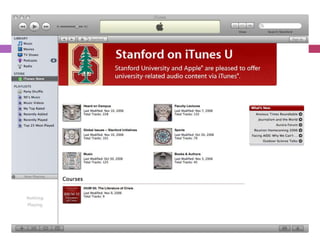
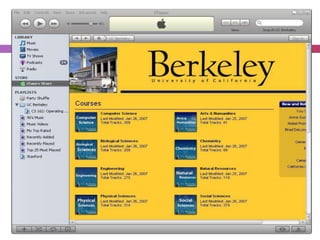
  iTunes U
    ** is a free, hosted service for colleges and universities that
provides
       easy access to their educational content, including lectures
and
       interviews. Through iTunes U, students can download content
to their
       Macs or PCs, regardless of their location. They can listen to
and view
       that content on their Mac or PC, or transfer it to iPod for
listening or
       viewing on the go. Faculty can easily post and change content
on
       their own without impacting the IT department. And, of course,
       students can upload their own content to share with
professors or with
       the class
The use of podcast in education
 Students can use podcasts in school to:

 ∂   Share information and research findings
 ∂   Debate issues and opposing view points
 ∂   Share poetry or creative writing
 ∂   Review literature
 ∂   Apply topics and concepts to the world events
 ∂   Communicate in foreign languages
Benefits of Podcasting
 Exciting new way to generate creative
  expression
 Greatly enhances the learning process

 Students are better able to visualize a specific

  topic
 Engages and motivates students to want to

  learn
 Student-created podcast can be subscribed
  to and viewed by parents and the community
 Podcasts can be viewed on any computer, an
Consideration of problems in
               podcasting
   Legal and Copyright issues
    - media content on the internet is
    copyrighted, associated with terms of use, laws of
    defamation.
    - school should be aware of the steps to ensure
    that their podcasts do not infringe any existing
    copyright or are considered offensive or libelous.
    - educators should always ask for permission and
    inform the parents when publishing students work
    on line. Assuring that the students identity are
    protected. Educators and parents ought to discuss
    regularly on the content of podcasting produced
    by students.
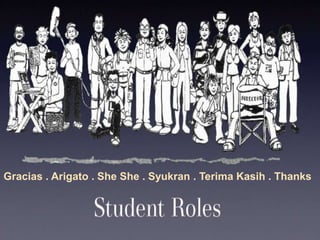
Gracias . Arigato . She She . Syukran . Terima Kasih . Thanks

Podcast

  • 1.
  • 2.
    The word comes from iPod + broadcast = Podcast What is podcast?
  • 3.
    Online audio or video content like mp3 that can play either on the computer or any portable device; Apple iPod or Creative Zen  Requirements :  Microphone  Audio editing software such as Audacity or Adobe Audition  For Mac users, they may use Garageband and iLife software  May distributed via RSS or Atom syndication for listening on devices
  • 4.
    VidCast? ⚛ VidCast is creating and distributing the video podcast ⚛ Associated terms of vidcast : vlogs, vlogging, vodcast, vcast ⚛ Requirements : • Video camera • Microphone • Video editing software such as Sony Vegas, Adobe Premiere or Apple Final Cutpro
  • 5.
    Photocast? ⚛ Sharing the photos accompanied by music or narrations ⚛ Subscribe to the photos, then the others will see them in iPhoto library exactly same as in ours
  • 6.
    Types of Podcast 1.A basic podcast contains only audio and is the easiest to create and listen to. 2. An enhanced podcast has both audio, images, slides (narrated PowerPoint presentation or Keynote), embedded URLS, and chapters 3. A vodcast (or video podcast) contains video and audio and is most difficult to create
  • 7.
    Type File Format Features Audio .mp3 Audio-only Embedded URLs, Enhanced AAC, .m4a, .mp4 pictures, chapters Video .m4v, .mpeg4, .mov Video-only
  • 8.
    RSS ? Really Simple Syndication Format for syndicating content from the Internet Choose what information to receive Get new content when it becomes available Can be used to distribute files Keep users up to date on content
  • 9.
    Example : BearShare, iTunes, Juice, Youtube
  • 10.
    How does itworks ?
  • 14.
    Podcast in Education iTunes U ** is a free, hosted service for colleges and universities that provides easy access to their educational content, including lectures and interviews. Through iTunes U, students can download content to their Macs or PCs, regardless of their location. They can listen to and view that content on their Mac or PC, or transfer it to iPod for listening or viewing on the go. Faculty can easily post and change content on their own without impacting the IT department. And, of course, students can upload their own content to share with professors or with the class
  • 17.
    The use ofpodcast in education Students can use podcasts in school to: ∂ Share information and research findings ∂ Debate issues and opposing view points ∂ Share poetry or creative writing ∂ Review literature ∂ Apply topics and concepts to the world events ∂ Communicate in foreign languages
  • 18.
    Benefits of Podcasting Exciting new way to generate creative expression  Greatly enhances the learning process  Students are better able to visualize a specific topic  Engages and motivates students to want to learn  Student-created podcast can be subscribed to and viewed by parents and the community  Podcasts can be viewed on any computer, an
  • 19.
    Consideration of problemsin podcasting  Legal and Copyright issues - media content on the internet is copyrighted, associated with terms of use, laws of defamation. - school should be aware of the steps to ensure that their podcasts do not infringe any existing copyright or are considered offensive or libelous. - educators should always ask for permission and inform the parents when publishing students work on line. Assuring that the students identity are protected. Educators and parents ought to discuss regularly on the content of podcasting produced by students.
  • 20.
    Gracias . Arigato. She She . Syukran . Terima Kasih . Thanks