


SONY54237_XDCAM-EX   4/4/08   8:52 AM   Page 1


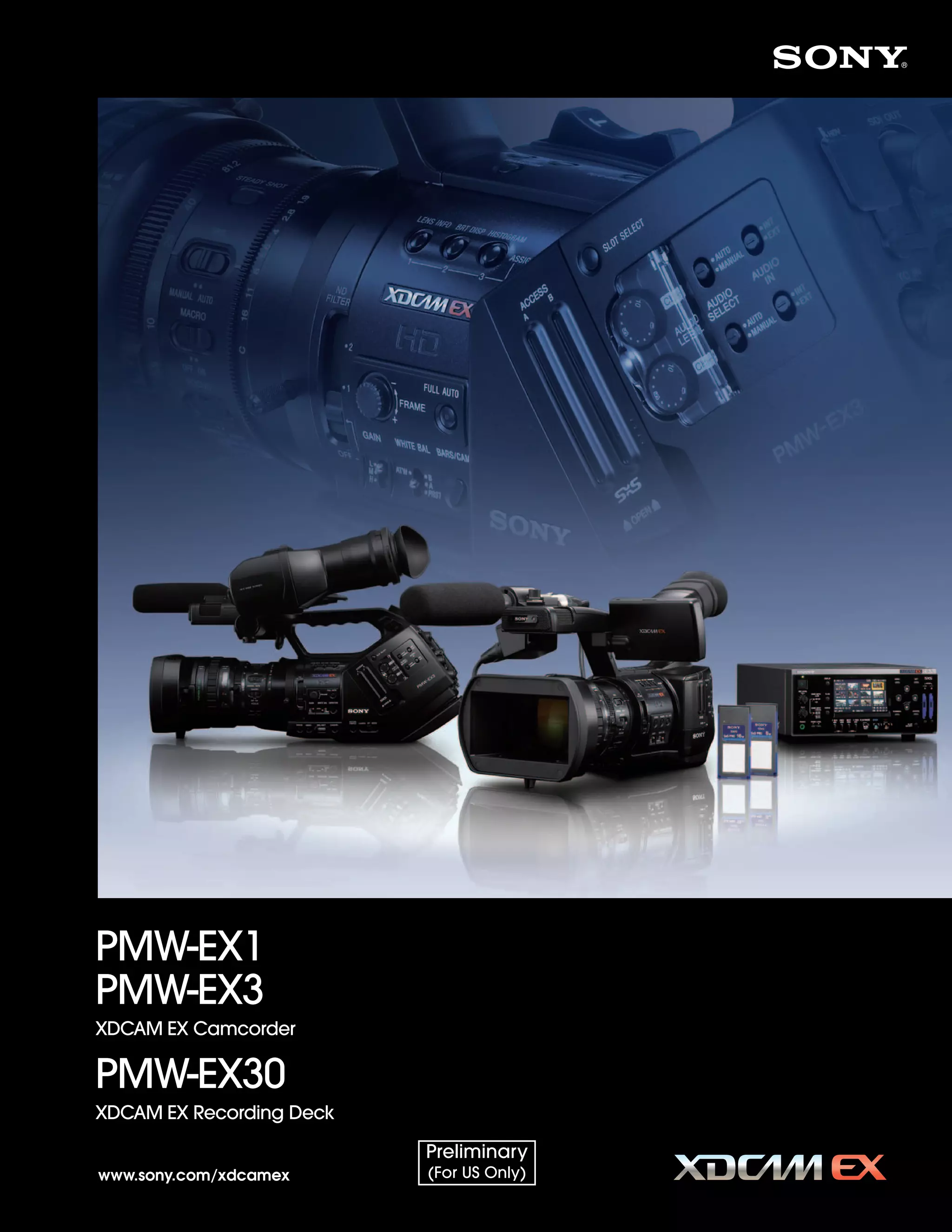
            PMW-EX1
            PMW-EX3
            XDCAM EX Camcorder

            PMW-EX30
            XDCAM EX Recording Deck

                                                 Preliminary
            www.sony.com/xdcamex                 (For US Only)
SONY54237_XDCAM-EX   4/4/08   8:52 AM   Page 2


           XDCAM EX - A Compact Full-HD
           Production System With Flash Memory
           Recording, for an Evolving HD Era

           In 2007, Sony introduced the revolutionary XDCAM EX™ handheld camcorder, the PMW-EX1 - the
           newest member of the Sony XDCAM® family of tapeless production systems - in response to growing
           demand for an affordable high definition (HD) production solution. This technological breakthrough
           camcorder - incorporating incredible feature sets such as three 1/2-inch type Full HD CMOS sensors,
           amazing 1920 x 1080 and 1280 x 720 HD recording capabilities plus flash memory recording in an
           extremely compact body - was achieved thanks to the extraordinary technical expertise and
           knowledge amassed when designing Sony's groundbreaking CineAlta™ family of products.
           Offering striking HD picture quality, extra mobility and great operational efficiency, the PMW-EX1
           camcorder has already been rapidly adopted around the world in a broad range of HD production
           applications and electronic cinematography.


           Now Sony evolves the XDCAM EX lineup further still, with the introduction of the PMW-EX3 camcorder
           and the PMW-EX30 deck. The PMW-EX3 compact camcorder incorporates an eagerly awaited
           1/2-inch type interchangeable lens system, providing enhanced creativity and flexibility with a broad
           choice of lenses. The PMW-EX30 is a compact recording deck that can be used for many different
           purposes such as recording, viewing, dubbing and source feeding to nonlinear editing systems.


           The XDCAM EX products use an SxS PRO™ memory card, which is based on the rapidly growing
           ExpressCard industry standard, as recording media. Combining the moderate bit rate of MPEG-2
           Long GOP compression adopted by XDCAM EX products with the SxS PRO memory card,
           the XDCAM EX series offers cost-effective long-form recording, coupled to nonlinear capabilities such
           as instantaneous random access and high-speed file-based operation.


           The full Sony XDCAM EX series offers stunning quality HD pictures and efficient nonlinear operation,
           expanding the possibilities for all types of HD video production at an affordable price.


           2
SONY54237_XDCAM-EX   4/4/08   8:52 AM   Page 3


                                                 XDCAM EX Camcorder

                                                 PMW-EX1


                                                 XDCAM EX Camcorder

                                                 PMW-EX3


                                                 XDCAM EX Recording Deck

                                                 PMW-EX30


                                                                      3
SONY54237_XDCAM-EX       4/9/08        8:07 AM    Page 4


         XDCAM EX – A New Generation of HD Recording System
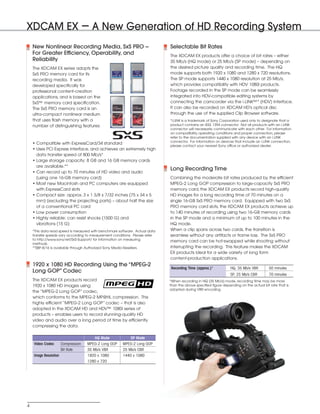
              New Nonlinear Recording Media, SxS PRO --                                Selectable Bit Rates
              For Greater Efficiency, Operability, and                                 The XDCAM EX products offer a choice of bit rates – either
              Reliability                                                              35 Mb/s (HQ mode) or 25 Mb/s (SP mode) – depending on
              The XDCAM EX series adopts the                                           the desired picture quality and recording time. The HQ
              SxS PRO memory card for its                                              mode supports both 1920 x 1080 and 1280 x 720 resolutions.
              recording media. It was                                                  The SP mode supports 1440 x 1080 resolution at 25 Mb/s,
              developed specifically for                                               which provides compatibility with HDV 1080i products.
              professional content-creation                                            Footage recorded in the SP mode can be seamlessly
              applications, and is based on the                                        integrated into HDV-compatible editing systems by
              SxS™ memory card specification.                                          connecting the camcorder via the i.LINK™* (HDV) interface.
              The SxS PRO memory card is an                                            It can also be recorded on XDCAM HD's optical disc
              ultra-compact nonlinear medium                                           through the use of the supplied Clip Browser software.
              that uses flash memory with a                                            *i.LINK is a trademark of Sony Corporation used only to designate that a
              number of distinguishing features:                                       product contains an IEEE 1394 connector. Not all products with an i.LINK
                                                                                       connector will necessarily communicate with each other. For information
                                                                                       on compatibility, operating conditions and proper connection, please
                                                                                       refer to the documentation supplied with any device with an i.LINK
                                                                                       connector. For information on devices that include an i.LINK connection,
              • Compatible with ExpressCard/34 standard
                                                                                       please contact your nearest Sony office or authorized dealer.
              • Uses PCI Express interface, and achieves an extremely high
                data transfer speed of 800 Mb/s*
              • Large storage capacity: 8 GB and 16 GB memory cards
                are available.**
                                                                                       Long Recording Time
              • Can record up to 70 minutes of HD video and audio
                (using one 16-GB memory card)                                          Combining the moderate bit rates produced by the efficient
              • Most new Macintosh and PC computers are equipped                       MPEG-2 Long GOP compression to large-capacity SxS PRO
                with ExpressCard slots                                                 memory card, the XDCAM EX products record high-quality
              • Compact size: approx. 3 x 1 3/8 x 7/32 inches (75 x 34 x 5             HD images for a long recording time of 70 minutes on a
                mm) (excluding the projecting parts) – about half the size             single 16-GB SxS PRO memory card. Equipped with two SxS
                of a conventional PC card                                              PRO memory card slots, the XDCAM EX products achieve up
              • Low power consumption                                                  to 140 minutes of recording using two 16-GB memory cards
              • Highly reliable: can resist shocks (1500 G) and                        in the SP mode and a minimum of up to 100 minutes in the
                vibrations (15 G)                                                      HQ mode.
              *This data read speed is measured with benchmark software. Actual data   When a clip spans across two cards, the transition is
              transfer speeds vary according to measurement conditions. Please refer   seamless without any artifacts or frame loss. The SxS PRO
              to http://www.sony.net/SxS-Support/ for information on measuring
                                                                                       memory card can be hot-swapped while shooting without
              methods.
              **SBP-8/16 is available through Authorized Sony Media Resellers.         interrupting the recording. This feature makes the XDCAM
                                                                                       EX products ideal for a wide variety of long form
                                                                                       content-production applications.
              1920 x 1080 HD Recording Using the “MPEG-2
                                                                                       Recording Time (approx.)*           HQ, 35 Mb/s VBR         50 minutes
              Long GOP” Codec
                                                                                                                           SP, 25 Mb/s CBR         70 minutes
              The XDCAM EX products record                                             *When recording in HQ (35 Mb/s) mode, recording time may be more
              1920 x 1080 HD images using                                              than the above specified figure depending on the actual bit rate that is
                                                                                       adopted during VBR encoding.
              the “MPEG-2 Long GOP” codec,
              which conforms to the MPEG-2 MP@HL compression. This
              highly efficient “MPEG-2 Long GOP” codec – that is also
              adopted in the XDCAM HD and HDV™ 1080i series of
              products – enables users to record stunning-quality HD
              video and audio over a long period of time by efficiently
              compressing the data.

                                                   HQ Mode           SP Mode
              Video Codec        Compression   MPEG-2 Long GOP   MPEG-2 Long GOP
                                 Bit Rate      35 Mb/s VBR       25 Mb/s CBR
              Image Resolution                 1920 x 1080       1440 x 1080
                                               1280 x 720


          4
SONY54237_XDCAM-EX      4/4/08        8:52 AM        Page 5


                                                                                                  XDCAM EX-A New Generation of HD Recording System


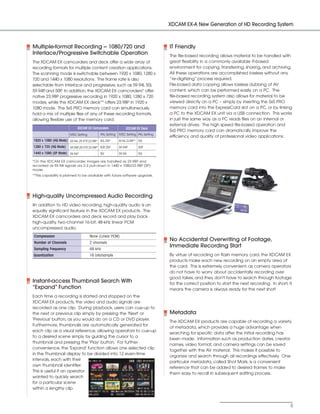
            Multiple-format Recording - 1080/720 and                                              IT Friendly
            Interlace/Progressive Switchable Operation                                            The file-based recording allows material to be handled with
            The XDCAM EX camcorders and deck offer a wide array of                                great flexibility in a commonly available IT-based
            recording formats for multiple content creation applications.                         environment for copying, transferring, sharing, and archiving.
            The scanning mode is switchable between 1920 x 1080, 1280 x                           All these operations are accomplished lossless without any
            720 and 1440 x 1080 resolutions. The frame rate is also                               ”re-digitizing” process required.
            selectable from interlace and progressive, such as 59.94i, 50i,                       File-based data copying allows lossless dubbing of AV
            59.94P and 50P In addition, the XDCAM EX camcorders* offer
                  ,         .                                                                     content, which can be performed easily on a PC. The
            native 23.98P progressive recording in 1920 x 1080, 1280 x 720                        file-based recording system also allows for material to be
            modes, while the XDCAM EX deck** offers 23.98P in 1920 x                              viewed directly on a PC – simply by inserting the SxS PRO
            1080 mode. The SxS PRO memory card can simultaneously                                 memory card into the ExpressCard slot on a PC, or by linking
            hold a mix of multiple files of any of these recording formats,                       a PC to the XDCAM EX unit via a USB connection. This works
            allowing flexible use of the memory card.                                             in just the same way as a PC reads files on an internal or
                                                                                                  external drives. The high speed file-based operation and
                                         XDCAM EX Camcorders                 XDCAM EX Deck
                                                                                                  SxS PRO memory card can dramatically improve the
                                    NTSC Setting         PAL Setting   NTSC Setting PAL Setting
                                                                                                  efficiency and quality of professional video applications.
            1920 x 1080 (HQ Mode) 59.94i, 29.97P 23.98P 50i, 25P
                                                ,                      59.94i, 23.98P** 50i
            1280 x 720 (HQ Mode)    59.94P 29.97P 23.98P 50P 25P
                                          ,      ,          ,          59.94P          50P
            1440 x 1080 (SP Mode) 59.94i*                50i           59.94i          50i

            *On the XDCAM EX camcorder, images are handled as 23.98P and
            recorded as 59.94i signals via 2-3 pull-down in 1440 x 1080/23.98P (SP)
            mode.
            **This capability is planned to be available with future software upgrade.


            High-quality Uncompressed Audio Recording
            IIn addition to HD video recording, high-quality audio is an
            equally significant feature in the XDCAM EX products. The
            XDCAM EX camcorders and deck record and play back
            high-quality, two-channel 16-bit, 48-kHz linear PCM
            uncompressed audio.
            Compression                            None (Linear PCM)
            Number of Channels                     2 channels
                                                                                                  No Accidental Overwriting of Footage,
                                                                                                  Immediate Recording Start
            Sampling Frequency                     48 kHz
            Quantization                           16 bits/sample                                 By virtue of recording on flash memory card, the XDCAM EX
                                                                                                  products make each new recording on an empty area of
                                                                                                  the card. This is extremely convenient, as camera operators
                                                                                                  do not have to worry about accidentally recording over
                                                                                                  good takes, and they don't have to search through footage
            Instant-access Thumbnail Search With                                                  for the correct position to start the next recording. In short, it
            “Expand” Function                                                                     means the camera is always ready for the next shot!
            Each time a recording is started and stopped on the
            XDCAM EX products, the video and audio signals are
            recorded as one clip. During playback, users can cue-up to
            the next or previous clip simply by pressing the 'Next' or                            Metadata
            'Previous' button, as you would do on a CD or DVD player.
                                                                                                  The XDCAM EX products are capable of recording a variety
            Furthermore, thumbnails are automatically generated for
                                                                                                  of metadata, which provides a huge advantage when
            each clip as a visual reference, allowing operators to cue-up
                                                                                                  searching for specific data after the initial recording has
            to a desired scene simply by guiding the cursor to a
                                                                                                  been made. Information such as production dates, creator
            thumbnail and pressing the 'Play' button. For further
                                                                                                  names, video format, and camera settings can be saved
            convenience, the 'Expand' function allows one selected clip
                                                                                                  together with the AV material. This makes it possible to
            in the Thumbnail display to be divided into 12 even-time
                                                                                                  organize and search through all recordings effectively. One
            intervals, each with their
                                                                                                  particular metadata, called Shot Mark, is a convenient
            own thumbnail identifier.
                                                                                                  reference that can be added to desired frames to make
            This is useful if an operator
                                                                                                  them easy to recall in subsequent editing process.
            wanted to quickly search
            for a particular scene
            within a lengthy clip.


                                                                                                                                                                   5
SONY54237_XDCAM-EX     4/4/08      8:52 AM       Page 6


              XDCAM EX Camcorders
              PMW-EX1
              PMW-EX3


                                                                                                                                              PMW-EX1


                                                                                                             PMW-EX3
                                                                                                                     The shotgun microphone is an optional accessory.


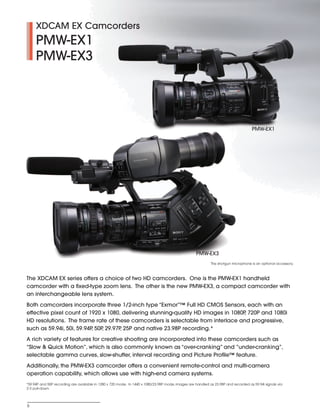
         The XDCAM EX series offers a choice of two HD camcorders. One is the PMW-EX1 handheld
         camcorder with a fixed-type zoom lens. The other is the new PMW-EX3, a compact camcorder with
         an interchangeable lens system.
         Both camcorders incorporate three 1/2-inch type “Exmor”™ Full HD CMOS Sensors, each with an
         effective pixel count of 1920 x 1080, delivering stunning-quality HD images in 1080P 720P and 1080i
                                                                                             ,
         HD resolutions. The frame rate of these camcorders is selectable from interlace and progressive,
         such as 59.94i, 50i, 59.94P 50P 29.97P 25P and native 23.98P recording.*
                                    ,   ,      ,
         A rich variety of features for creative shooting are incorporated into these camcorders such as
         “Slow & Quick Motion”, which is also commonly known as “over-cranking” and ”under-cranking”,
         selectable gamma curves, slow-shutter, interval recording and Picture Profile™ feature.
         Additionally, the PMW-EX3 camcorder offers a convenient remote-control and multi-camera
         operation capability, which allows use with high-end camera systems.
         *59.94P and 50P recording are available in 1280 x 720 mode. In 1440 x 1080/23.98P mode, images are handled as 23.98P and recorded as 59.94i signals via
         2-3 pull-down.


          6
SONY54237_XDCAM-EX      4/7/08       2:14 PM        Page 7


          Cutting-edge Camera Technology
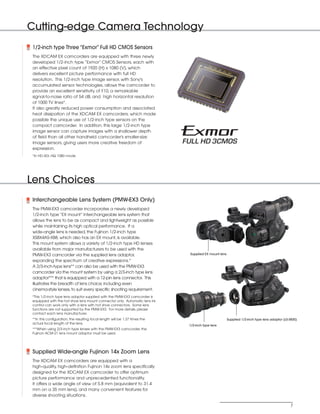
            1/2-inch type Three “Exmor” Full HD CMOS Sensors
            The XDCAM EX camcorders are equipped with three newly
            developed 1/2-inch type “Exmor” CMOS Sensors, each with
            an effective pixel count of 1920 (H) x 1080 (V), which
            delivers excellent picture performance with full HD
            resolution. This 1/2-inch type image sensor, with Sony's
            accumulated sensor technologies, allows the camcorder to
            provide an excellent sensitivity of F10, a remarkable
            signal-to-noise ratio of 54 dB, and high horizontal resolution
            of 1000 TV lines*.
            It also greatly reduced power consumption and associated
            heat dissipation of the XDCAM EX camcorders, which made
            possible the unique use of 1/2-inch type sensors on the
            compact camcorder. In addition, this large 1/2-inch type
            image sensor can capture images with a shallower depth
            of field than all other handheld camcorder's smaller-size
            image sensors, giving users more creative freedom of
            expression.
            *In HD-SDI, HQ 1080 mode


          Lens Choices
            Interchangeable Lens System (PMW-EX3 Only)
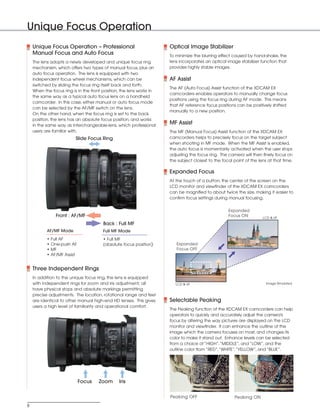
            The PMW-EX3 camcorder incorporates a newly developed
            1/2-inch type “EX mount” interchangeable lens system that
            allows the lens to be as compact and lightweight as possible
            while maintaining its high optical performance. If a
            wide-angle lens is needed, the Fujinon 1/2-inch type
            XS8X4AS-XB8, which also has an EX mount, is available.
            This mount system allows a variety of 1/2-inch type HD lenses
            available from major manufacturers to be used with the
            PMW-EX3 camcorder via the supplied lens adaptor,                             Supplied EX mount lens

            expanding the spectrum of creative expressions.*
            A 2/3-inch-type lens** can also be used with the PMW-EX3
            camcorder via the mount system by using a 2/3-inch type lens
            adaptor*** that is equipped with a 12-pin lens connector. This
            illustrates the breadth of lens choice, including even
            cinema-style lenses, to suit every specific shooting requirement.
            *This 1/2-inch type lens adaptor supplied with the PMW-EX3 camcorder is
            equipped with the hot shoe lens mount connector only. Automatic lens iris
            control can work only with a lens with hot shoe connectors. Some lens
            functions are not supported by the PMW-EX3. For more details, please
            contact each lens manufacturer.
            **In this configuration, the resulting focal length will be 1.37 times the                            Supplied 1/2-inch type lens adaptor (L0-3830)
            actual focal length of the lens.
                                                                                         1/2-inch type lens
            ***When using 2/3-inch type lenses with the PMW-EX3 camcorder, the
            Fujinon ACM-21 lens mount adaptor must be used.


            Supplied Wide-angle Fujinon 14x Zoom Lens
            The XDCAM EX camcorders are equipped with a
            high-quality, high-definition Fujinon 14x zoom lens specifically
            designed for the XDCAM EX camcorder to offer optimum
            picture performance and unprecedented functionality.
            It offers a wide angle of view of 5.8 mm (equivalent to 31.4
            mm on a 35 mm lens), and many convenient features for
            diverse shooting situations.

                                                                                                                                                          7
SONY54237_XDCAM-EX     4/4/08     9:30 AM     Page 8


          Unique Focus Operation
              Unique Focus Operation – Professional                             Optical Image Stabilizer
              Manual Focus and Auto Focus                                       To minimize the blurring effect caused by hand-shake, the
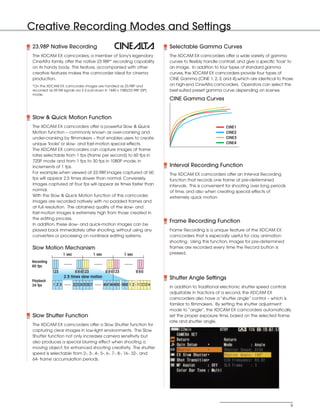
              The lens adopts a newly developed and unique focus ring           lens incorporates an optical image stabilizer function that
              mechanism, which offers two types of manual focus, plus an        provides highly stable images.
              auto focus operation. The lens is equipped with two
              independent focus wheel mechanisms, which can be                  AF Assist
              switched by sliding the focus ring itself back and forth.
                                                                                The AF (Auto Focus) Assist function of the XDCAM EX
              When the focus ring is in the front position, the lens works in
                                                                                camcorders enables operators to manually change focus
              the same way as a typical auto focus lens on a handheld
                                                                                positions using the focus ring during AF mode. This means
              camcorder. In this case, either manual or auto focus mode
                                                                                that AF reference focus positions can be positively shifted
              can be selected by the AF/MF switch on the lens.
                                                                                manually to a new position.
              On the other hand, when the focus ring is set to the back
              position, the lens has an absolute focus position, and works
              in the same way as interchangeable-lens, which professional
                                                                                MF Assist
              users are familiar with.                                          The MF (Manual Focus) Assist function of the XDCAM EX
                                    Slide Focus Ring                            camcorders helps to precisely focus on the target subject
                                                                                when shooting in MF mode. When the MF Assist is enabled,
                                                                                the auto focus is momentarily activated when the user stops
                                                                                adjusting the focus ring. The camera will then finely focus on
                                                                                the subject closest to the focal point of the lens at that time.

                                                                                Expanded Focus
                                                                                At the touch of a button, the center of the screen on the
                                                                                LCD monitor and viewfinder of the XDCAM EX camcorders
                                                                                can be magnified to about twice the size, making it easier to
                                                                                confirm focus settings during manual focusing.


                                                                                                              Expanded
                         Front : AF/MF                                                                        Focus ON          LCD & VF
                                                  Back : Full MF
                     AF/MF Mode                   Full MF Mode
                     • Full AF                    • Full MF
                     • One-push AF                (absolute focus position)        Expanded
                     • MF                                                          Focus OFF
                     • AF/MF Assist


              Three Independent Rings
              In addition to the unique focus ring, the lens is equipped
              with independent rings for zoom and iris adjustment; all             LCD & VF                                       Image Simulated
              have physical stops and absolute markings permitting
              precise adjustments. The location, rotational range and feel
              are identical to other manual high-end HD lenses. This gives      Selectable Peaking
              users a high level of familiarity and operational comfort.
                                                                                The Peaking function of the XDCAM EX camcorders can help
                                                                                operators to quickly and accurately adjust the camera's
                                                                                focus by altering the way pictures are displayed on the LCD
                                                                                monitor and viewfinder. It can enhance the outline of the
                                                                                image which the camera focuses on most, and changes its
                                                                                color to make it stand out. Enhance levels can be selected
                                                                                from a choice of “HIGH”,“MIDDLE”, and “LOW”, and the
                                                                                outline color from “RED”,“WHITE”,“YELLOW”, and “BLUE”.


                                      Focus    Zoom       Iris


                                                                                Peaking OFF                      Peaking ON
          8
SONY54237_XDCAM-EX      4/4/08      8:52 AM               Page 9


          Creative Recording Modes and Settings
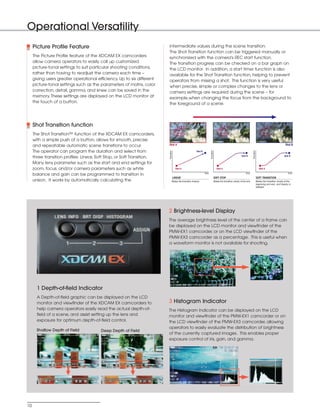
            23.98P Native Recording                                                                      Selectable Gamma Curves
            The XDCAM EX camcorders, a member of Sony's legendary                                        The XDCAM EX camcorders offer a wide variety of gamma
            CineAlta family, offer the native 23.98P* recording capability                               curves to flexibly handle contrast, and give a specific 'look' to
            on its handy body. This feature, accompanied with other                                      an image. In addition to four types of standard gamma
            creative features makes the camcorder ideal for cinema                                       curves, the XDCAM EX camcorders provide four types of
            production.                                                                                  CINE Gamma (CINE 1, 2, 3, and 4),which are identical to those
            *On the XDCAM EX camcorder, images are handled as 23.98P and                                 on high-end CineAlta camcorders. Operators can select the
            recorded as 59.94i signals via 2-3 pull-down in 1440 x 1080/23.98P (SP)                      best-suited preset gamma curve depending on scenes.
            mode.
                                                                                                         CINE Gamma Curves


            Slow & Quick Motion Function
            The XDCAM EX camcorders offer a powerful Slow & Quick                                                                     CINE1
            Motion function – commonly known as over-cranking and                                                                     CINE2
            under-cranking by filmmakers – that enables users to create                                                               CINE3
            unique 'looks' or slow- and fast-motion special effects.                                                                  CINE4
            The XDCAM EX camcorders can capture images at frame
            rates selectable from 1 fps (frame per second) to 60 fps in
            720P mode and from 1 fps to 30 fps in 1080P mode, in
            increments of 1 fps.                                                                         Interval Recording Function
            For example,when viewed at 23.98P images captured at 60
                                                 ,                                                       The XDCAM EX camcorders offer an Interval Recording
            fps will appear 2.5 times slower than normal. Conversely,                                    function that records one frame at pre-determined
            images captured at four fps will appear six times faster than                                intervals. This is convenient for shooting over long periods
            normal.                                                                                      of time, and also when creating special effects of
            With the Slow & Quick Motion function of this camcorder,                                     extremely quick motion.
            images are recorded natively with no padded frames and
            at full resolution. The obtained quality of the slow- and
            fast-motion images is extremely high from those created in
            the editing process.
                                                                                                         Frame Recording Function
            In addition, these slow- and quick-motion images can be
            played back immediately after shooting, without using any                                    Frame Recording is a unique feature of the XDCAM EX
            converters or processing on nonlinear editing systems.                                       camcorders that is especially useful for clay animation
                                                                                                         shooting. Using this function, images for pre-determined
            Slow Motion Mechanism                                                                        frames are recorded every time the Record button is
                              1 sec                       1 sec                   1 sec                  pressed.

            Recording
            60 fps
                        123            58 59 60 123                58 59 60 123            58 59 60
                               2.5 times slow motion                                                     Shutter Angle Settings
            Playback
            24 fps      123           22 23 24 25 26 27           46 47 48 49 50 59 60 1 2 11 12 13 14
                                                                                                         In addition to traditional electronic shutter speed controls
                                                                                                         adjustable in fractions of a second, the XDCAM EX
                                                                                                         camcorders also have a “shutter angle” control – which is
                                                                                                         familiar to filmmakers. By setting the shutter adjustment
                                                                                                         mode to “angle”, the XDCAM EX camcorders automatically
            Slow Shutter Function                                                                        set the proper exposure time, based on the selected frame
                                                                                                         rate and shutter angle.
            The XDCAM EX camcorders offer a Slow Shutter function for
            capturing clear images in low-light environments. The Slow
            Shutter function not only increases camera sensitivity but
            also produces a special blurring effect when shooting a
            moving object, for enhanced shooting creativity. The shutter
            speed is selectable from 2-, 3-, 4-, 5-, 6-, 7-, 8-, 16-, 32-, and
            64- frame accumulation periods.


                                                                                                                                                                        9
SONY54237_XDCAM-EX       4/4/08    8:52 AM     Page 10


          Operational Versatility
               Picture Profile Feature                                             intermediate values during the scene transition.
                                                                                   The Shot Transition function can be triggered manually or
               The Picture Profile feature of the XDCAM EX camcorders              synchronized with the camera's REC start function.
               allow camera operators to easily call up customized                 The transition progress can be checked on a bar graph on
               picture-tonal settings to suit particular shooting conditions,      the LCD monitor. In addition, a start timer function is also
               rather than having to readjust the camera each time –               available for the Shot Transition function, helping to prevent
               giving users greater operational efficiency. Up to six different    operators from missing a shot. This function is very useful
               picture-tonal settings such as the parameters of matrix, color      when precise, simple or complex changes to the lens or
               correction, detail, gamma, and knee can be saved in the             camera settings are required during the scene – for
               memory. These settings are displayed on the LCD monitor at          example,when changing the focus from the background to
               the touch of a button.                                              the foreground of a scene.


               Shot Transition function
               The Shot Transition™ function of the XDCAM EX camcorders,
               with a simple push of a button, allows for smooth, precise
               and repeatable automatic scene transitions to occur.                Shot A                                                                                                                                             Shot B

               The operator can program the duration and select from


                                                                                   Transition


                                                                                                                                      Transition


                                                                                                                                                                                             Transition
                                                                                                                      Shot B
                                                                                                                                                                                Shot B                                               Shot B
               three transition profiles: Linear, Soft Stop, or Soft Transition.
               Many lens parameter such as the start and end settings for
               zoom, focus, and/or camera parameters such as white                                Shot A                                              Shot A                                                 Shot A
                                                                                                                               time                                                  time                                                time
               balance and gain can be programmed to transition in
                                                                                                LINEAR                                             SOFT STOP                                              SOFT TRANSITION
               unison. It works by automatically calculating the                            Makes the transition linearly.                         Makes the transition slowly at the end.                Makes the transition slowly at the
                                                                                                                                                                                                          beginning and end, and linearly in
                                                                                                                                                                                                          between.


                                                                                   2 Brightness-level Display
                                                                                   The average brightness level of the center of a frame can
                                                                                   be displayed on the LCD monitor and viewfinder of the
                                                                                   PMW-EX1 camcorder, or on the LCD viewfinder of the
                                                                                   PMW-EX3 camcorder as a percentage. This is useful when
                                                                                   a waveform monitor is not available for shooting.


                 1 Depth-of-field Indicator
                 A Depth-of-field graphic can be displayed on the LCD
                 monitor and viewfinder of the XDCAM EX camcorders to              3 Histogram Indicator
                 help camera operators easily read the actual depth-of-            The Histogram Indicator can be displayed on the LCD
                 field of a scene, and assist setting up the lens and              monitor and viewfinder of the PMW-EX1 camcorder or on
                 exposure for optimum depth-of-field control.                      the LCD viewfinder of the PMW-EX3 camcorder, allowing
                                                                                   operators to easily evaluate the distribution of brightness
                 Shallow Depth of Field            Deep Depth of Field
                                                                                   of the currently captured images. This enables proper
                                                                                   exposure control of iris, gain, and gamma.


          10
SONY54237_XDCAM-EX         4/4/08      8:52 AM     Page 11


                                                                                                                             Operational Versatility


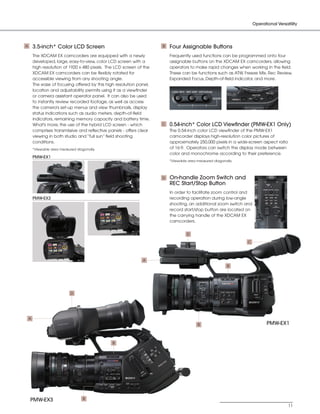
         A       3.5-inch* Color LCD Screen                                    B   Four Assignable Buttons
                 The XDCAM EX camcorders are equipped with a newly                 Frequently used functions can be programmed onto four
                 developed, large, easy-to-view, color LCD screen with a           assignable buttons on the XDCAM EX camcorders, allowing
                 high resolution of 1920 x 480 pixels. The LCD screen of the       operators to make rapid changes when working in the field.
                 XDCAM EX camcorders can be flexibly rotated for                   These can be functions such as ATW, Freeze Mix, Rec Review,
                 accessible viewing from any shooting angle.                       Expanded Focus, Depth-of-field indicator, and more.
                 The ease of focusing offered by this high resolution panel,
                 location and adjustability permits using it as a viewfinder
                 or camera assistant operator panel. It can also be used
                 to instantly review recorded footage, as well as access
                 the camera's set-up menus and view thumbnails, display
                 status indications such as audio meters, depth-of-field
                 indicators, remaining memory capacity and battery time.
                 What's more, the use of the hybrid LCD screen - which         C   0.54-inch* Color LCD Viewfinder (PMW-EX1 Only)
                 comprises transmissive and reflective panels - offers clear       The 0.54-inch color LCD viewfinder of the PMW-EX1
                 viewing in both studio and “full sun” field shooting              camcorder displays high-resolution color pictures of
                 conditions.                                                       approximately 250,000 pixels in a wide-screen aspect ratio
                 *Viewable area measured diagonally.                               of 16:9. Operators can switch the display mode between
                                                                                   color and monochrome according to their preference.
                 PMW-EX1
                                                                                   *Viewable area measured diagonally.


                                                                               D   On-handle Zoom Switch and
                                                                                   REC Start/Stop Button
                                                                                   In order to facilitate zoom control and
                 PMW-EX3                                                           recording operation during low-angle
                                                                                   shooting, an additional zoom switch and
                                                                                   record start/stop button are located on
                                                                                   the carrying handle of the XDCAM EX
                                                                                   camcorders.


                                                                                            D

                                                                                                                         C


                                                                        A
                                                                                                                   B


                                      D


             A
                                                                                                  B                                 PMW-EX1


                                                             B


             PMW-EX3                         B
                                                                                                                                                11
SONY54237_XDCAM-EX      4/4/08     8:52 AM   Page 12


         Operational Versatility


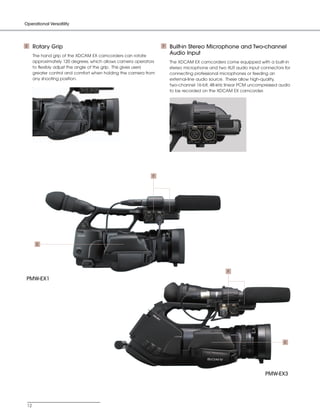
         E     Rotary Grip                                                  F   Built-in Stereo Microphone and Two-channel
               The hand grip of the XDCAM EX camcorders can rotate
                                                                                Audio Input
               approximately 120 degrees, which allows camera operators         The XDCAM EX camcorders come equipped with a built-in
               to flexibly adjust the angle of the grip. This gives users       stereo microphone and two XLR audio input connectors for
               greater control and comfort when holding the camera from         connecting professional microphones or feeding an
               any shooting position.                                           external-line audio source. These allow high-quality,
                                                                                two-channel 16-bit, 48-kHz linear PCM uncompressed audio
                                                                                to be recorded on the XDCAM EX camcorder.


                                                                        F


                E


                                                                                                          F

          PMW-EX1


                                                                                                                                     E


                                                                                                                            PMW-EX3


          12
SONY54237_XDCAM-EX   4/4/08       8:52 AM   Page 13


                                                                                                                             Operational Versatility


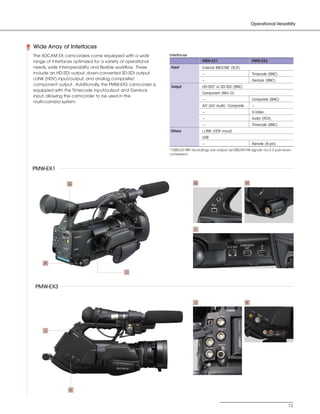
            Wide Array of Interfaces
            The XDCAM EX camcorders come equipped with a wide            Interfaces
            range of interfaces optimized for a variety of operational                      PMW-EX1                          PMW-EX3
            needs, wide interoperability and flexible workflow. These    Input              External MIC/LINE (XLR)
            include an HD-SDI output, down-converted SD-SDI output,                         -                                Timecode (BNC)
            i.LINK (HDV) input/output, and analog composite/                                -                                Genlock (BNC)
            component output. Additionally, the PMW-EX3 camcorder is
                                                                         Output             HD-SDI* or SD-SDI (BNC)
            equipped with the Timecode input/output and Genlock
                                                                                            Component (Mini D)
            input, allowing the camcorder to be used in the
                                                                                            -                                Composite (BNC)
            multi-camera system.
                                                                                            A/V (A/V multi): Composite       -
                                                                                            -                                S-Video
                                                                                            -                                Audio (RCA)
                                                                                            -                                Timecode (BNC)
                                                                         Others             i.LINK (HDV in/out)
                                                                                            USB
                                                                                            -                                Remote (8-pin)
                                                                         *1080/23.98P recordings are output as1080/59.94i signals via 2-3 pull-down
                                                                         conversion.


            PMW-EX1

                              G                                                        G                                 H


                                                                                        I


                 H

                                                        I


             PMW-EX3

                                                                                        J                                K


                 J


                              K


                                                                                                                                                 13
SONY54237_XDCAM-EX       4/4/08      8:52 AM     Page 14


          Operational Versatility


               Camera Remote Control (PMW-EX3 Only)                                  Other Features
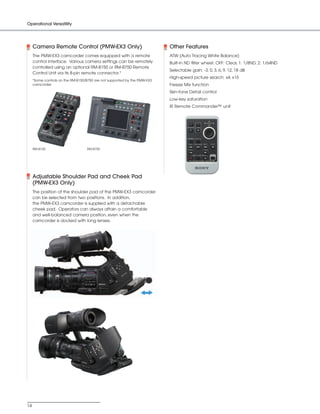
               The PMW-EX3 camcorder comes equipped with a remote                    ATW (Auto Tracing White Balance)
               control interface. Various camera settings can be remotely            Built-in ND filter wheel: OFF: Clear, 1: 1/8ND, 2: 1/64ND
               controlled using an optional RM-B150 or RM-B750 Remote
                                                                                     Selectable gain: -3, 0, 3, 6, 9, 12, 18 dB
               Control Unit via its 8-pin remote connector.*
                                                                                     High-speed picture search: x4, x15
               *Some controls on the RM-B150/B750 are not supported by the PMW-EX3
               camcorder.                                                            Freeze Mix function
                                                                                     Skin-tone Detail control
                                                                                     Low-key saturation
                                                                                     IR Remote Commander™ unit


               RM-B150                       RM-B750


               Adjustable Shoulder Pad and Cheek Pad
               (PMW-EX3 Only)
               The position of the shoulder pad of the PMW-EX3 camcorder
               can be selected from two positions. In addition,
               the PMW-EX3 camcorder is supplied with a detachable
               cheek pad. Operators can always attain a comfortable
               and well-balanced camera position, even when the
               camcorder is docked with long lenses.


          14
SONY54237_XDCAM-EX     4/4/08   8:52 AM       Page 15


              XDCAM EX Recording Deck
              PMW-EX30


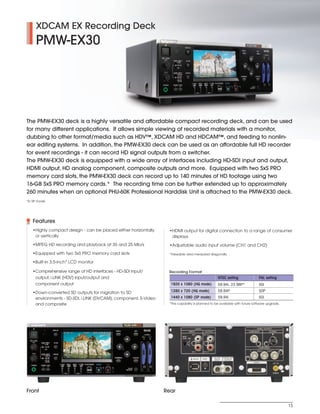
         The PMW-EX30 deck is a highly versatile and affordable compact recording deck, and can be used
         for many different applications. It allows simple viewing of recorded materials with a monitor,
         dubbing to other format/media such as HDV™, XDCAM HD and HDCAM™, and feeding to nonlin-
         ear editing systems. In addition, the PMW-EX30 deck can be used as an affordable full HD recorder
         for event recordings - it can record HD signal outputs from a switcher.
         The PMW-EX30 deck is equipped with a wide array of interfaces including HD-SDI input and output,
         HDMI output, HD analog component, composite outputs and more. Equipped with two SxS PRO
         memory card slots, the PMW-EX30 deck can record up to 140 minutes of HD footage using two
         16-GB SxS PRO memory cards.* The recording time can be further extended up to approximately
         260 minutes when an optional PHU-60K Professional Harddisk Unit is attached to the PMW-EX30 deck.
         *In SP mode


            Features
            •Highly compact design - can be placed either horizontally     •HDMI output for digital connection to a range of consumer
             or vertically                                                  displays
            •MPEG HD recording and playback at 35 and 25 Mb/s              •Adjustable audio input volume (CH1 and CH2)
            •Equipped with two SxS PRO memory card slots                   *Viewable area measured diagonally

            •Built-in 3.5-inch* LCD monitor

            •Comprehensive range of HD interfaces - HD-SDI input/         Recording Format
             output, i.LINK (HDV) input/output and                                                         NTSC setting               PAL setting
             component output                                              1920 x 1080 (HQ mode)           59.94i, 23.98P*            50i

            •Down-converted SD outputs for migration to SD                 1280 x 720 (HQ mode)            59.94P                     50P
             environments - SD-SDI, i.LINK (DVCAM), component, S-Video     1440 x 1080 (SP mode)           59.94i                     50i
             and composite                                                 *This capability is planned to be available with future software upgrade.


         Front                                                           Rear

                                                                                                                                                       15
SONY54237_XDCAM-EX        4/4/08     8:52 AM      Page 16


                 XDCAM EX Application Software
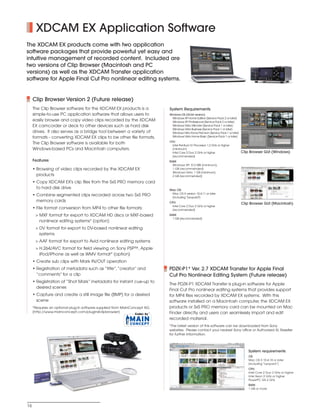
         The XDCAM EX products come with two application
         software packages that provide powerful yet easy and
         intuitive management of recorded content. Included are
         two versions of Clip Browser (Macintosh and PC
         versions) as well as the XDCAM Transfer application
         software for Apple Final Cut Pro nonlinear editing systems.


               Clip Browser Version 2 (Future release)
               The Clip Browser software for the XDCAM EX products is a               System Requirements
               simple-to-use PC application software that allows users to             Windows OS (32-bit version):
                                                                                        Windows XP Home Edition (Service Pack 2 or later)
               easily browse and copy video clips recorded by the XDCAM                 Windows XP Professional (Service Pack 2 or later)
               EX camcorder or deck to other devices such as hard disk                  Windows Vista Ultimate (Service Pack 1 or later)
                                                                                        Windows Vista Business (Service Pack 1 or later)
               drives. It also serves as a bridge tool between a variety of             Windows Vista Home Premium (Service Pack 1 or later)
               formats - converting XDCAM EX clips to be other file formats.            Windows Vista Home Basic (Service Pack 1 or later)
                                                                                      CPU:
               The Clip Browser software is available for both                          Intel Pentium IV Processor 1.2 GHz or higher
               Windows-based PCs and Macintosh computers.                               (minimum)
                                                                                        Intel Core 2 Duo 2 GHz or higher                       Clip Browser GUI (Windows)
                                                                                        (recommended)
               Features                                                               RAM:
                                                                                        Windows XP: 512 MB (minimum),
               • Browsing of video clips recorded by the XDCAM EX                       1 GB (recommended)
                                                                                        Windows Vista: 1 GB (minimum),
                 products                                                               2 GB (recommended)

               • Copy XDCAM EX's clip files from the SxS PRO memory card
                 to hard disk drive                                                   Mac OS:
                                                                                       Mac OS X version 10.4.11 or later
               • Combine segmented clips recorded across two SxS PRO                   (including "Leopard")
                 memory cards                                                         CPU:                                                     Clip Browser GUI (Macintosh)
                                                                                       Intel Core 2 Duo 2 GHz or higher
               • File format conversion from MP4 to other file formats:                (recommended)
                > MXF format for export to XDCAM HD discs or MXF-based                RAM:
                                                                                        1 GB (recommended)
                  nonlinear editing systems* (option)
                > DV format for export to DV-based nonlinear editing
                  systems
                > AAF format for export to Avid nonlinear editing systems
                > H.264/AVC format for field viewing on Sony PSP™, Apple
                  iPod/iPhone as well as WMV format* (option)
               • Create sub clips with Mark IN/OUT operation
               • Registration of metadata such as “title”,“creator” and               PDZK-P1* Ver. 2.7 XDCAM Transfer for Apple Final
                 “comments” for a clip                                                Cut Pro Nonlinear Editing System (Future release)
               • Registration of “Shot Mark” metadata for instant cue-up to
                                                                                      The PDZK-P1 XDCAM Transfer is plug-in software for Apple
                 desired scenes
                                                                                      Final Cut Pro nonlinear editing systems that provides support
               • Capture and create a still image file (BMP) for a desired            for MP4 files recorded by XDCAM EX systems. With this
                 scene                                                                software installed on a Macintosh computer, the XDCAM EX
               *Requires an optional plug-in software supplied from MainConcept AG.   products or SxS PRO memory card can be mounted on Mac
               (http://www.mainconcept.com/plugin4clipbrowser)                        Finder directly, and users can seamlessly import and edit
                                                                                      recorded material.
                                                                                      *The latest version of this software can be downloaded from Sony
                                                                                      websites. Please contact your nearest Sony office or Authorized XL Reseller
                                                                                      for further information.


                                                                                                                                                  System requirements
                                                                                                                                                  OS:
                                                                                                                                                  Mac OS X 10.4.10 or later
                                                                                                                                                  (including “Leopard”)
                                                                                                                                                  CPU:
                                                                                                                                                  Intel Core 2 Duo 2 GHz or higher
                                                                                                                                                  Intel Xeon 2 GHz or higher
                                                                                                                                                  PowerPC G5 2 GHz
                                                                                                                                                  RAM:
                                                                                                                                                  1 GB or more


          16
SONY54237_XDCAM-EX      4/4/08        8:52 AM        Page 17


              Optional Accessories
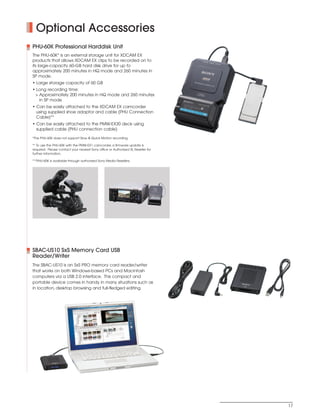
            PHU-60K Professional Harddisk Unit
            The PHU-60K* is an external storage unit for XDCAM EX
            products that allows XDCAM EX clips to be recorded on to
            its large-capacity 60-GB hard disk drive for up to
            approximately 200 minutes in HQ mode and 260 minutes in
            SP mode.
            • Large storage capacity of 60 GB
            • Long recording time:
             > Approximately 200 minutes in HQ mode and 260 minutes
               in SP mode
            • Can be easily attached to the XDCAM EX camcorder
              using supplied shoe adaptor and cable (PHU Connection
              Cable)**
            • Can be easily attached to the PMW-EX30 deck using
              supplied cable (PHU connection cable)

            *The PHU-60K does not support Slow & Quick Motion recording.

            ** To use the PHU-60K with the PMW-EX1 camcorder, a firmware update is
            required. Please contact your nearest Sony office or Authorized XL Reseller for
            further information.

            ***PHU-60K is available through authorized Sony Media Resellers.


            SBAC-US10 SxS Memory Card USB
            Reader/Writer
            The SBAC-US10 is an SxS PRO memory card reader/writer
            that works on both Windows-based PCs and Macintosh
            computers via a USB 2.0 interface. This compact and
            portable device comes in handy in many situations such as
            in location, desktop browsing and full-fledged editing.


                                                                                              17
SONY54237_XDCAM-EX       4/4/08       8:53 AM       Page 18


          Optional Accessories


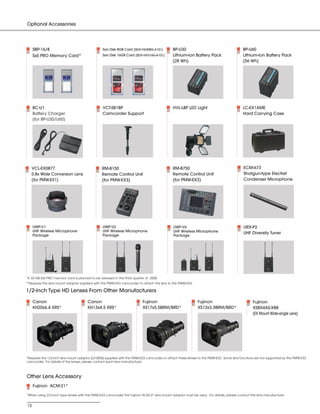
               SBP-16/8                                  San Disk 8GB Card (SDX-VS-008G-A101)         BP-U30                                       BP-U60
               SxS PRO Memory Card*                      San Disk 16GB Card (SDX-VS-016G-A101)        Lithium-ion Battery Pack                     Lithium-ion Battery Pack
                                                                                                      (28 Wh)                                      (56 Wh)


               BC-U1                                     VCT-SB1BP                                    HVL-LBP LED Light                            LC-EX1AME
               Battery Charger                           Camcorder Support                                                                         Hard Carrying Case
               (for BP-U30/U60)


             VCL-EX0877                                  RM-B150                                      RM-B750                                      ECM-673
             0.8x Wide Conversion Lens                   Remote Control Unit                          Remote Control Unit                          Shotgun-type Electret
             (for PMW-EX1)                               (for PMW-EX3)                                (for PMW-EX3)                                Condenser Microphone


               UWP-V1                                    UWP-V2                                        UWP-V6                                      URX-P2
               UHF Wireless Microphone                   UHF Wireless Microphone                       UHF Wireless Microphone                     UHF Diversity Tuner
               Package                                   Package                                       Package


         *A 32-GB SxS PRO memory card is planned to be released in the third quarter of 2008.
         **Requires the lens mount adaptor supplied with the PMW-EX3 camcorder to attach this lens to the PMW-EX3.

         1/2-inch Type HD Lenses From Other Manufacturers

               Canon                            Canon                              Fujinon                            Fujinon                            Fujinon
               KH20x6.4 KRS*                    KH13x4.5 KRS*                      XS17x5.5BRM/BRD*                   XS13x3.3BRM/BRD*                   XS8X4AS-XB8
                                                                                                                                                         (EX Mount Wide-angle Lens)


         *Requires the 1/2-inch lens mount adaptor (L0-3830) supplied with the PMW-EX3 camcorder to attach these lenses to the PMW-EX3. Some lens functions are not supported by the PMW-EX3
         camcorder. For details of the lenses, please contact each lens manufacturer.


          Other Lens Accessory
               Fujinon ACM-21*

          *When using 2/3-inch type lenses with the PMW-EX3 camcorder, the Fujinon ACM-21 lens mount adaptor must be used. For details, please contact the lens manufacturer.


          18
SONY54237_XDCAM-EX               4/7/08                          2:17 PM            Page 19


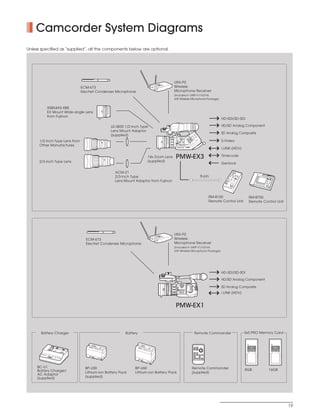
             Camcorder System Diagrams
         Unless specified as “supplied”, all the components below are optional.


                                                                                                                                      URX-P2
                                                                    ECM-673                                                           Wireless
                                                                    Electret Condenser Microphone                                     Microphone Receiver
                                                                                                                                      (included in UWP-V1/V2/V6
                                                                                                                                      UHF Wireless Microphone Package)


                     XS8X4AS-XB8
                     EX Mount Wide-angle Lens
                     from Fujinon
                                                                                                                                                                                                                HD-SDI/SD-SDI

                                                                                          L0-3830 1/2-inch Type                                                                                                 HD/SD Analog Component
                                                                                          Lens Mount Adaptor
                                                                                                                                                                                                                SD Analog Composite
                                                                                          (supplied)
                                                                                                                                                                  X3

               1/2-inch Type Lens from                                                                                                                       PM
                                                                                                                                                               W-E
                                                                                                                                                                                                                S-Video
               Other Manufactures
                                                                                                                                                                                                                i.LINK (HDV)

                                                                                                                      14x Zoom Lens    PMW-EX3                                                                  Timecode
               2/3-inch Type Lens                                                                                     (supplied)
                                                                                                                                                                                                                Genlock

                                                                                              ACM-21
                                                                                              2/3-inch Type                                                                                8-pin
                                                                                              Lens Mount Adaptor from Fujinon


                                                                                                                                                                                                          RM-B150                 RM-B750
                                                                                                                                                                                                          Remote Control Unit     Remote Control Unit


                                                                                                                                      URX-P2
                                                                      ECM-673                                                         Wireless
                                                                      Electret Condenser Microphone                                   Microphone Receiver
                                                                                                                                      (included in UWP-V1/V2/V6
                                                                                                                                      UHF Wireless Microphone Package)


                                                                                                                                                                                                                HD-SDI/SD-SDI

                                                                                                                                                                                                                HD/SD Analog Component

                                                                                                                                                                                                                SD Analog Composite
                                                                                                                                                                                                                i.LINK (HDV)


                                                                                                                                       PMW-EX1


                Battery Charger                                                                    Battery                                            Remote Commander                                                          SxS PRO Memory Card


                                                                           BP-S                                                                                                          PUSH SET
                                                                               30                            BP-S                                        1          T
                                                                                                                 30                                SHOTMARK        ZOOM

                                                                                                                                                         2          W
                                                                                                                                                                                                                                 SxS PRO   8GB    SxS PRO   16GB
                                                                                                                                                   THUMBNAIL   SUB CLIP


                                                                                                                                                     PREV      PLAY/PAUSE           NEXT        STOP

                                                                                                                                                     .             u                >               x
                     DC
                          OUT
                                                                                                                                                     FREV                           FFWD
                                CHAR
                                    GE
                                          0%                                                                                                          m                             M
                                          B TTE
                                           A        80                                                                                                       REC        REC PAUSE               PUSH AF
                                         B -U1 R
                                          C     YC         100
                                                  HAR
                                                     G R
                                                      E                                                                                                  z                           X


              BC-U1                                                   BP-U30                            BP-U60                                    Remote Commander
              Battery Charger/                                                                                                                                                                                                  8GB              16GB
                                                                      Lithium-ion Battery Pack          Lithium-ion Battery Pack                  (supplied)
              AC Adaptor
              (supplied)                                              (supplied)


                                                                                                                                                                                                                                                                   19
SONY54237_XDCAM-EX      4/4/08   8:53 AM              Page 20


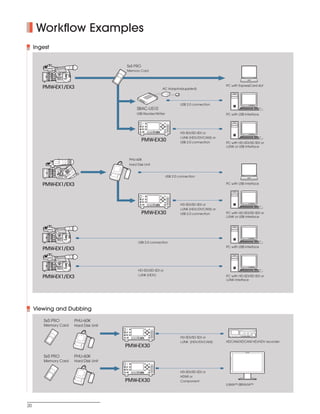
                Workflow Examples
               Ingest


                                                                               SxS PRO
                                                                               Memory Card


                                                                                                                                                                                                                                                                                                             PC with ExpressCard slot
                  PMW-EX1/EX3                                                                                                                                                                                                                            AC Adaptor(supplied)


                                                                                                                                                                                                                                                                                     USB 2.0 connection
                                                                                                                                SBAC-US10
                                                                                                                                USB Reader/Writer                                                                                                                                                            PC with USB interface

                                                                                                                                                                          DISPLAY                                                             MENU                SET
                                                                                                                                                1                                                                                                                       ACCESS

                                                                                                                                                                                                                                                                        A        B
                                                                                                                                             REC LEVEL
                                                                                                                                               CH-1                       TC/UB
                                                                                                                                                         VIDEO INPUT
                                                                                                                                                               iLINK
                                                                                                                                                               HD SDI
                                                                                                                                                               SD

                                                                                                                                               CH-2
                                                                                                                                                         AUDIO INPUT      STATUS
                                                                                                                                                               ANALOG
                                                                                                                                                               HD SDI                                                                        THUMBLAIL        CANCEL
                                                                                                                                                               CH-1/2
                                                                                                                                                               HD SDI
                                                                                                                                                               CH-3/4
                                                                                                                                                                                    F REV     PREV    NEXT   F FWD PLAY/PAUSE   STOP   REC
                                                                                                                                             PHONES      PHONE LEVEL                  m         .      >       M


                                                                                                                                                                                                                                                                                     HD-SDI/SD-SDI or
                                                                                                                                                                                                                                                           SLOT
                                                                                                                                                                                                                          u      x     z                 SELECT
                                                                                                                                                                                        TOP              END


                                                                                                                                                                                                                                                                                     i.LINK (HDV/DVCAM) or
                                                                                                                                                      PMW-EX30                                                                                                                       USB 2.0 connection      PC with HD-SDI/SD-SDI or
                                                                                                                                                                                                                                                                                                             i.LINK or USB interface


                                                                                          PHU-60K
                                                                                          Hard Disk Unit
                                       3
                                   W-EX
                                 PM


                                                                                                                                                                                                                                                                    USB 2.0 connection

                  PMW-EX1/EX3                                                                                                                                                                                                                                                                                PC with USB interface


                                                                                                                                                                          DISPLAY                                                             MENU                SET
                                                                                                                                                1                                                                                                                       ACCESS

                                                                                                                                                                                                                                                                        A        B
                                                                                                                                             REC LEVEL
                                                                                                                                               CH-1                       TC/UB
                                                                                                                                                         VIDEO INPUT
                                                                                                                                                               iLINK
                                                                                                                                                               HD SDI
                                                                                                                                                               SD

                                                                                                                                               CH-2
                                                                                                                                                         AUDIO INPUT      STATUS
                                                                                                                                                               ANALOG
                                                                                                                                                               HD SDI                                                                        THUMBLAIL        CANCEL
                                                                                                                                                               CH-1/2
                                                                                                                                                               HD SDI
                                                                                                                                                               CH-3/4


                                                                                                                                                                                                                                                                                     HD-SDI/SD-SDI or
                                                                                                                                                                                    F REV     PREV    NEXT   F FWD PLAY/PAUSE   STOP   REC
                                                                                                                                             PHONES      PHONE LEVEL                  m         .      >       M
                                                                                                                                                                                                                                                           SLOT
                                                                                                                                                                                                                          u      x     z                 SELECT
                                                                                                                                                                                        TOP              END


                                                                                                                                                                                                                                                                                     i.LINK (HDV/DVCAM) or
                                                                                                                                                      PMW-EX30                                                                                                                       USB 2.0 connection      PC with HD-SDI/SD-SDI or
                                                                                                                                                                                                                                                                                                             i.LINK or USB interface


                                                                                                                                        USB 2.0 connection
                                                                                                                                                                                                                                                                                                             PC with USB interface
                  PMW-EX1/EX3


                                                                                                                                        HD-SDI/SD-SDI or
                                                                                                                                        i.LINK (HDV)
                  PMW-EX1/EX3                                                                                                                                                                                                                                                                                PC with HD-SDI/SD-SDI or
                                                                                                                                                                                                                                                                                                             i.LINK interface


               Viewing and Dubbing

                   SxS PRO                 PHU-60K
                   Memory Card             Hard Disk Unit
                                                                                          DISPLAY                                                                       MENU                    SET
                                                                   1                                                                                                                                         ACCESS

                                                                                                                                                                                                             A        B
                                                                REC LEVEL
                                                                  CH-1                    TC/UB
                                                                            VIDEO INPUT
                                                                                 iLINK
                                                                                 HD SDI
                                                                                 SD

                                                                  CH-2
                                                                            AUDIO INPUT   STATUS
                                                                                 ANALOG
                                                                                 HD SDI                                                                             THUMBLAIL               CANCEL
                                                                                 CH-1/2
                                                                                 HD SDI
                                                                                 CH-3/4

                                                                PHONES      PHONE LEVEL
                                                                                                    F REV
                                                                                                      m


                                                                                                        TOP
                                                                                                            PREV
                                                                                                              .
                                                                                                                   NEXT
                                                                                                                    >


                                                                                                                      END
                                                                                                                          F FWD PLAY/PAUSE
                                                                                                                            M

                                                                                                                                    u
                                                                                                                                              STOP


                                                                                                                                               x
                                                                                                                                                         REC


                                                                                                                                                          z
                                                                                                                                                                                       SLOT
                                                                                                                                                                                     SELECT                                                                                          HD-SDI/SD-SDI or
                                                                                                                                                                                                                                                                                     i.LINK (HDV/DVCAM)      HDCAM/XDCAM HD/HDV recorder
                                                                         PMW-EX30

                   SxS PRO                 PHU-60K
                                                                                                                                                                                                                                                                                                                                     CONTR OL


                                                                                                                                                                                                                                                                                                               COMPOSITE

                                                                                                                                                                                                                                                                                                                                         +
                                                                                                                                                                                                                                                                                                                                     VOLUME

                                                                                                                                                                                                                                                                                                                  Y/C                    ñ
                                                                                                                                                                                                                                                                                                                 RGB
                                                                                                                                                                                                                                                                                                                                         +
                                                                                                                                                                                                                                                                                                               COMPONENT             CONTRAST


                   Memory Card             Hard Disk Unit
                                                                                                                                                                                                                                                                                                                                         ñ
                                                                                                                                                                                                                                                                                                                  A-1                    +
                                                                                                                                                                                                                                                                                                                                      PHASE

                                                                                                                                                                                                                                                                                                                  A-2                    ñ
                                                                                                                                                                                                                                                                                                                  B-1                    +
                                                                                          DISPLAY                                                                                                                                                                                                                                    CHR OMA

                                                                                                                                                                        MENU                    SET                                                                                                               B-2
                                                                                                                                                                                                                                                                                                                                         ñ
                                                                   1                                                                                                                                         ACCESS
                                                                                                                                                                                                                                                                                                                  HD-15                  +
                                                                                                                                                                                                                                                                                                                                     BRIGHT
                                                                                                                                                                                                             A        B
                                                                REC LEVEL
                                                                                                                                                                                                                                                                                                                  DVI
                                                                                                                                                                                                                                                                                                                                         ñ
                                                                  CH-1                    TC/UB
                                                                            VIDEO INPUT                                                                                                                                                                                                                                                 MENU
                                                                                 iLINK                                                                                                                                                                                                                             F1


                                                                                 HD SDI
                                                                                 SD
                                                                                                                                                                                                                                                                                                                   F2                    +
                                                                                                                                                                                                                                                                                                                   F3                    ñ
                                                                  CH-2
                                                                            AUDIO INPUT   STATUS                                                                                                                                                                                                                                      ENTER
                                                                                 ANALOG                                                                                                                                                                                                                            F4
                                                                                 HD SDI                                                                             THUMBLAIL               CANCEL
                                                                                 CH-1/2                                                                                                                                                                                                                                              RETURN


                                                                                 HD SDI
                                                                                 CH-3/4

                                                                PHONES      PHONE LEVEL
                                                                                                    F REV
                                                                                                      m


                                                                                                        TOP
                                                                                                            PREV
                                                                                                              .
                                                                                                                   NEXT
                                                                                                                    >


                                                                                                                      END
                                                                                                                          F FWD PLAY/PAUSE
                                                                                                                            M

                                                                                                                                    u
                                                                                                                                              STOP


                                                                                                                                               x
                                                                                                                                                         REC


                                                                                                                                                          z
                                                                                                                                                                                       SLOT
                                                                                                                                                                                     SELECT                                                                                          HD-SDI/SD-SDI or
                                                                                                                                                                                                                                                                                     HDMI or
                                                                         PMW-EX30                                                                                                                                                                                                    Component
                                                                                                                                                                                                                                                                                                             LUMA™/BRAVIA™


          20
SONY54237_XDCAM-EX    4/4/08                8:53 AM     Page 21


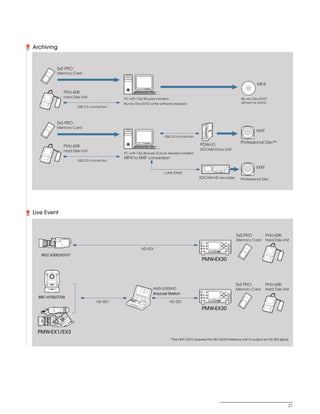
            Archiving


                              SxS PRO
                              Memory Card


                                                                                                                                                                                                                                                                    MP4
                                PHU-60K
                                Hard Disk Unit                     PC with Clip Browser installed                                                                                                                                                          Blu-ray Disc/DVD
                                                                   Blu-ray Disc/DVD writer software required                                                                                                                                               (stored as data)
                                              USB 2.0 connection


                              SxS PRO
                              Memory Card
                                                                                                                                                                                                                                                                    MXF
                                                                                              USB 2.0 connection
                                                                                                                                                                                                                                                           Professional Disc™
                                PHU-60K                                                                                PDW-U1
                                Hard Disk Unit                                                                         XDCAM Drive Unit
                                                                   PC with Clip Browser (Future release) installed
                                                                   MP4 to MXF conversion
                                              USB 2.0 connection

                                                                                                                                                                                                                                                                    MXF
                                                                                              i.LINK (FAM)
                                                                                                                      XDCAM HD recorder                                                                                                                    Professional Disc


            Live Event


                     12 3 4
                                                                                                                                                                                                                                                         SxS PRO          PHU-60K
                                                                                                                                                 DISPLAY                                                          MENU                SET
                                                                                                                                                                                                                                                         Memory Card      Hard Disk Unit
                                                                                                                          1                                                                                                                 ACCESS

                                                                                                                                                                                                                                            A        B
                                                                                                                       REC LEVEL
                                                                                                                         CH-1                    TC/UB
                                                                                                                                   VIDEO INPUT
                                                                                                                                        iLINK
                                                                                                                                        HD SDI
                                                                                                                                        SD


                                                                              HD-SDI
                                                                                                                         CH-2
                                                                                                                                   AUDIO INPUT   STATUS
                                                                                                                                        ANALOG
                                                                                                                                        HD SDI                                                                   THUMBLAIL        CANCEL
                                                                                                                                        CH-1/2
                                                                                                                                        HD SDI
                                                                                                                                        CH-3/4
                                                                                                                                                           F REV   PREV   NEXT   F FWD PLAY/PAUSE   STOP   REC
                                                                                                                       PHONES      PHONE LEVEL               m       .     >       M
                                                                                                                                                                                                                               SLOT
                                                                                                                                                                                           u         x     z                 SELECT
                                                                                                                                                               TOP           END


               HDC-X300/X310*
                                                                                                                                PMW-EX30


                                                                                                                                                                                                                                                         SxS PRO          PHU-60K
                                                                                      AWS-G500HD                                                 DISPLAY
                                                                                                                                                                                                                                                         Memory Card      Hard Disk Unit
                                                                                                                                                                                                                  MENU                SET
                                                                                                                          1


                                                                                      Anycast Station
                                                                                                                                                                                                                                            ACCESS

                                                                                                                                                                                                                                            A        B
                                                                                                                       REC LEVEL
                                                                                                                         CH-1                    TC/UB
                                                                                                                                   VIDEO INPUT
                                                                                                                                        iLINK
                                                                                                                                        HD SDI
                                                                                                                                        SD


              BRC-H700/Z700                                                                                              CH-2


                                                                                                                       PHONES
                                                                                                                                   AUDIO INPUT
                                                                                                                                        ANALOG
                                                                                                                                        HD SDI
                                                                                                                                        CH-1/2
                                                                                                                                        HD SDI
                                                                                                                                        CH-3/4

                                                                                                                                   PHONE LEVEL
                                                                                                                                                 STATUS


                                                                                                                                                           F REV
                                                                                                                                                             m
                                                                                                                                                                   PREV
                                                                                                                                                                     .
                                                                                                                                                                          NEXT
                                                                                                                                                                           >
                                                                                                                                                                                 F FWD PLAY/PAUSE
                                                                                                                                                                                   M
                                                                                                                                                                                                    STOP   REC
                                                                                                                                                                                                                 THUMBLAIL        CANCEL


                                                         HD-SDI                                     HD-SDI
                                                                                                                                                                                                                               SLOT
                                                                                                                                                                                           u         x     z                 SELECT
                                                                                                                                                               TOP           END


                                                                                                                                PMW-EX30
                                        3
                                    W-EX
                                  PM


              PMW-EX1/EX3
                                                                                                    *The HDC-X310 requires the HFU-X310 interface unit to output an HD-SDI signal.


                                                                                                                                                                                                                                                                                       21
SONY54237_XDCAM-EX            4/4/08            8:53 AM        Page 22


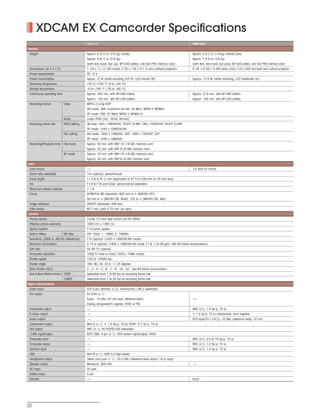
                  XDCAM EX Camcorder Specifications
                                                       PMW-EX1                                                                          PMW-EX3
          General
           Weight                                      Approx. 5 lb 4 oz (2.4 kg) (body)                                                Approx. 4 lb 2 oz (1.9 kg) (without lens)
                                                       Approx. 6 lb 2 oz (2.8 kg)                                                       Approx. 7 lb 9 oz (3.6 kg)
                                                       (with lens hood, eye cup, BP-U30 battery, one SxS PRO memory card)               (with lens, lens hood, eye piece, BP-U30 battery, one SxS PRO memory card)
           Dimensions (W x H x D)                      7 1/8 x 7 x 12 3/8 inches (178 x 176 x 311.5 mm) without projection              9 7/8 x 8 2/8 x 15 6/8 inches (250 x 210 x 400 mm)(with lens) without projection
           Power requirements                          DC 12 V
           Power consumption                           Approx. 12 W (while recording, EVF On, LCD monitor Off)                          Approx. 13.5 W (while recording, LCD viewfinder On)
           Operating temperature                       +32 to +104 °F (0 to +40 °C)
           Storage temperature                         -4 to +140 °F (-20 to +60 °C)
           Continuous operating time                   Approx. 240 min. with BP-U60 battery                                             Approx. 210 min. with BP-U60 battery
                                                       Approx. 120 min. with BP-U30 battery                                             Approx. 100 min. with BP-U30 battery
           Recording format             Video          MPEG-2 Long GOP
                                                       HQ mode: VBR, maximum bit rate: 35 Mb/s, MPEG-2 MP@HL
                                                       SP mode: CBR, 25 Mb/s, MPEG-2 MP@H14
                                        Audio          Linear PCM (2ch, 16-bit, 48-kHz)
           Recording frame rate         NTSC setting   HQ mode: 1920 x 1080/59.94i, 29.97P, 23.98P, 1280 x 720/59.94P, 29.97P, 23.98P
                                                       SP mode: 1440 x 1080/59.94i
                                        PAL setting    HQ mode: 1920 x 1080/50i, 25P, 1280 x 720/50P, 25P
                                                       SP mode: 1440 x 1080/50i
           Recording/Playback time      HQ mode        Approx. 50 min. with SBP-16 (16 GB) memory card
                                                       Approx. 25 min. with SBP-8 (8 GB) memory card
                                        SP mode        Approx. 70 min. with SBP-16 (16 GB) memory card
                                                       Approx. 35 min. with SBP-8 (8 GB) memory card
          Lens
           Lens mount                                  -                                                                                1/2-inch EX mount
           Zoom ratio selectable                       14x (optical), servo/manual
           Focal length                                f = 5.8 to 81.2 mm (equivalent to 31.4 to 439 mm on 35 mm lens)
           Iris                                        F1.9 to F16 and Close, servo/manual selectable
           Maximum relative aperture                   1:1.9
           Focus                                       AF/MF/Full MF selectable, 800 mm to ∞ (MACRO OFF),
                                                       50 mm to ∞ (MACRO ON, Wide), 735 to ∞ (MACRO ON, Tele)
           Image stabilizer                            ON/OFF selectable, shift lens
           Filter thread                               M77 mm, pitch 0.75 mm (on lens)
          Camera
           Pickup device                               3-chip 1/2-inch type Exmor Full HD CMOS
           Effective picture elements                  1920 (H) x 1080 (V)
           Optical system                              F1.6 prism system
           Built-in filters             ND filter      OFF: Clear, 1: 1/8ND, 2: 1/64ND
           Sensitivity (2000 lx, 89.9% reflectance)    F10 (typical) (1920 x 1080/59.94i mode)
           Minimum illumination                        0.14 lx (typical) (1920 x 1080/59.94i mode, F1.9, +18 dB gain, with 64-frame accumulation)
           S/N ratio                                   54 dB (Y) (typical)
           Horizontal resolution                       1000 TV lines or more (1920 x 1080i mode)
           Shutter speed                               1/33 to 1/2000 sec.
           Shutter angle                               180, 90, 45, 22.5, 11.25 degrees
           Slow Shutter (SLS)                          2-, 3-, 4-, 5-, 6-, 7-, 8-, 16-, 32-, and 64-frame accumulation
           Slow & Quick Motion function 720P           Selectable from 1 to 60 fps as recording frame rate
                                        1080P          Selectable from 1 to 30 fps as recording frame rate
          Signal inputs/outputs
           Audio input                                 XLR-3-pin (female) (x 2), line/mic/mic +48 V selectable
           A/V output                                  AV multi (x 1)
                                                       Audio: -10 dBu (47 kΩ load, reference level)                                     -
                                                       Analog composite/YC signals: NTSC or PAL
           Composite output                            -                                                                                BNC (x1), 1.0 Vp-p, 75 Ω
           S-Video output                              -                                                                                Y: 1.0 Vp-p, 75 Ω unbalanced, sync negative
           Audio output                                -                                                                                RCA type(CH-1,CH-2),-10 dBu (reference level), 47 k Ω
           Component output                            Mini D (x 1) Y: 1.0 Vp-p, 75 Ω, Pb/Pr: 0.7 Vp-p, 75 Ω
           SDI output                                  BNC (x 1), HD-SDI/SD-SDI selectable
           i.LINK input/output                         IEEE1394, 4-pin (x 1), HDV stream input/output, S400
           Timecode input                              -                                                                                BNC (x1), 0.5 to 18 Vp-p, 10 Ω
           Timecode output                             -                                                                                BNC (x1), 1.0 Vp-p, 75 Ω
           Genlock input                               -                                                                                BNC (x1), 1.0 Vp-p, 75 Ω
           USB                                         Mini-B (x 1), USB 2.0 High-speed
           Headphone output                            Stereo mini-jack (x 1), -20.5 dBu (reference level output, 16 Ω load)
           Speaker output                              Monaural, 300 mW                                                                 -
           DC input                                    DC jack
           Battery input                               5-pin
           Remote                                      -                                                                                8-pin


          22
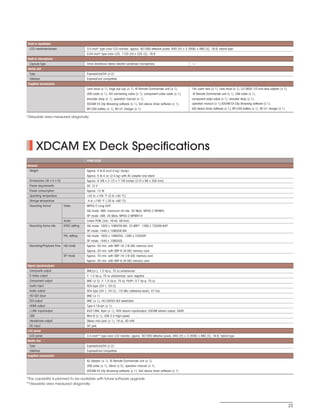
SONY54237_XDCAM-EX              4/4/08       8:53 AM     Page 23


          Built-in viewfinder
           LCD viewfinder/screen                    3.5-inch* type color LCD monitor, approx. 921000 effective pixels, 640 (H) x 3 (RGB) x 480 (V), 16:9, hybrid type
                                                    0.54-inch* type color LCD, 1120 (H) x 225 (V), 16:9
          Built-in microphone
           Capsule type                             Omni-directional stereo electret condenser microphone,                           -
          Media slot
           Type                                     ExpressCard/34 (x 2)
           Interface                                ExpressCard compatible
          Supplied accessories
                                                    Lens hood (x 1), large eye cup (x 1), IR Remote Commander unit (x 1),            14x zoom lens (x 1), Lens hood (x 1), LO-3830 1/2-inch lens adaptor (x 1),
                                                    USB cable (x 1), A/V connecting cable (x 1), component video cable (x 1),        IR Remote Commander unit (x 1), USB cable (x 1),
                                                    shoulder strap (x 1), operation manual (x 1),                                    component video cable (x 1), shoulder strap (x 1),
                                                    XDCAM EX Clip Browsing software (x 1), SxS device driver software (x 1),         operation manual (x 1),XDCAM EX Clip Browsing software (x 1),
                                                    BP-U30 battery (x 1), BC-U1 charger (x 1)                                        SxS device driver software (x 1), BP-U30 battery (x 1), BC-U1 charger (x 1)

         *Viewable area measured diagonally.


                  XDCAM EX Deck Specifications
                                                    PMW-EX30
          General
           Weight                                   Approx. 4 lb 6 oz(2.0 kg) (body)
                                                    Approx. 5 lb 4 oz (2.4 kg) with AC adaptor and stand
           Dimensions (W x H x D)                   Approx. 8 3/8 x 3 1/2 x 7 7/8 inches (210 x 88 x 200 mm)
           Power requirements                       DC 12 V
           Power consumption                        Approx. 12 W
           Operating temperature                    +32 to +104 °F (5 to +40 °C)
           Storage temperature                      -4 to +140 °F (-20 to +60 °C)
           Recording format          Video          MPEG-2 Long GOP
                                                    HQ mode: VBR, maximum bit rate: 35 Mb/s, MPEG-2 MP@HL
                                                    SP mode: CBR, 25 Mb/s, MPEG-2 MP@H14
                                     Audio          Linear PCM (2ch, 16-bit, 48-kHz)
           Recording frame rate      NTSC setting   HQ mode: 1920 x 1080/59.94i, 23.98P*, 1280 x 720/59.94P
                                                    SP mode: 1440 x 1080/59.94i
                                     PAL setting    HQ mode: 1920 x 1080/50i, 1280 x 720/50P
                                                    SP mode: 1440 x 1080/50i
           Recording/Playback time   HQ mode        Approx. 50 min. with SBP-16 (16 GB) memory card
                                                    Approx. 25 min. with SBP-8 (8 GB) memory card
                                     SP mode        Approx. 70 min. with SBP-16 (16 GB) memory card
                                                    Approx. 35 min. with SBP-8 (8 GB) memory card
          Signal inputs/outputs
           Composite output                         BNC(x1), 1.0 Vp-p, 75 Ω unbalanced
           S-Video output                           Y: 1.0 Vp-p, 75 Ω unbalanced, sync negative
           Component output                         BNC (x 3), Y: 1.0 Vp-p, 75 Ω, Pb/Pr: 0.7 Vp-p, 75 Ω
           Audio input                              RCA type (CH-1, CH-2)
           Audio output                             RCA type (CH-1, CH-2), -10 dBu (reference level), 47 k Ω
           HD-SDI input                             BNC (x 1)
           SDI output                               BNC (x 1), HD-SDI/SD-SDI selectable
           HDMI output                              Type A 19-pin (x 1)
           i.LINK input/output                      IEEE1394, 6pin (x 1), HDV stream input/output, DVCAM stream output, S400
           USB                                      Mini-B (x 1), USB 2.0 High-speed
           Headphone output                         Stereo mini-jack (x 1), 16 Ω, 30 mW
           DC input                                 DC jack
          LCD panel
           LCD panel                                3.5-inch** type color LCD monitor, approx. 921000 effective pixels, 640 (H) x 3 (RGB) x 480 (V), 16:9, hybrid type
          Media slot
           Type                                     ExpressCard/34 (x 2)
           Interface                                ExpressCard compatible
          Supplied accessories
                                                    AC Adaptor (x 1), IR Remote Commander unit (x 1),
                                                    USB cable (x 1), Stand (x 2), operation manual (x 1),
                                                    XDCAM EX Clip Browsing software (x 1), SxS device driver software (x 1)

         *This capability is planned to be available with future software upgrade.
         **Viewable area measured diagonally.


                                                                                                                                                                                                                   23
SONY54237_XDCAM-EX         4/4/08   8:52 AM   Page 16


                                                                                                        © 2008 Sony Electronics Inc. All rights reserved.
                                                                            Reproduction in whole or in part without written permissions is prohibited.
                                                                           Features, design and specifications are subject to change without notice.
                                                                  All non-metric weights and measurements are approximate.PSP is a trademark of
      Sony Electronics Inc.                             Sony Computer Entertainment, Inc. Sony, XDCAM EX, XDCAM, CineAlta, SxS PRO, SxS, Exmor,
      1 Sony Drive                                      Picture Profile, Shot Transition, Remote Commander, i.LINK, Professional Disc, HDCAM, LUMA,
      Park Ridge, NJ 07656                                 BRAVIA and DVCAM are trademarks of Sony. HDV and HDV logo are trademarks of Sony
                                                                                            Corporation and Victor Company of Japan, Limited (JVC).
      www.sony.com/xdcamex
                                                                                      All other trademarks are the property of their respective owners.
      V-2416 (MK10481V1)
                                                                                                                                   Printed in USA (4/08)

PMW-EX3

  • 1.
    SONY54237_XDCAM-EX 4/4/08 8:52 AM Page 1 PMW-EX1 PMW-EX3 XDCAM EX Camcorder PMW-EX30 XDCAM EX Recording Deck Preliminary www.sony.com/xdcamex (For US Only)
  • 2.
    SONY54237_XDCAM-EX 4/4/08 8:52 AM Page 2 XDCAM EX - A Compact Full-HD Production System With Flash Memory Recording, for an Evolving HD Era In 2007, Sony introduced the revolutionary XDCAM EX™ handheld camcorder, the PMW-EX1 - the newest member of the Sony XDCAM® family of tapeless production systems - in response to growing demand for an affordable high definition (HD) production solution. This technological breakthrough camcorder - incorporating incredible feature sets such as three 1/2-inch type Full HD CMOS sensors, amazing 1920 x 1080 and 1280 x 720 HD recording capabilities plus flash memory recording in an extremely compact body - was achieved thanks to the extraordinary technical expertise and knowledge amassed when designing Sony's groundbreaking CineAlta™ family of products. Offering striking HD picture quality, extra mobility and great operational efficiency, the PMW-EX1 camcorder has already been rapidly adopted around the world in a broad range of HD production applications and electronic cinematography. Now Sony evolves the XDCAM EX lineup further still, with the introduction of the PMW-EX3 camcorder and the PMW-EX30 deck. The PMW-EX3 compact camcorder incorporates an eagerly awaited 1/2-inch type interchangeable lens system, providing enhanced creativity and flexibility with a broad choice of lenses. The PMW-EX30 is a compact recording deck that can be used for many different purposes such as recording, viewing, dubbing and source feeding to nonlinear editing systems. The XDCAM EX products use an SxS PRO™ memory card, which is based on the rapidly growing ExpressCard industry standard, as recording media. Combining the moderate bit rate of MPEG-2 Long GOP compression adopted by XDCAM EX products with the SxS PRO memory card, the XDCAM EX series offers cost-effective long-form recording, coupled to nonlinear capabilities such as instantaneous random access and high-speed file-based operation. The full Sony XDCAM EX series offers stunning quality HD pictures and efficient nonlinear operation, expanding the possibilities for all types of HD video production at an affordable price. 2
  • 3.
    SONY54237_XDCAM-EX 4/4/08 8:52 AM Page 3 XDCAM EX Camcorder PMW-EX1 XDCAM EX Camcorder PMW-EX3 XDCAM EX Recording Deck PMW-EX30 3
  • 4.
    SONY54237_XDCAM-EX 4/9/08 8:07 AM Page 4 XDCAM EX – A New Generation of HD Recording System New Nonlinear Recording Media, SxS PRO -- Selectable Bit Rates For Greater Efficiency, Operability, and The XDCAM EX products offer a choice of bit rates – either Reliability 35 Mb/s (HQ mode) or 25 Mb/s (SP mode) – depending on The XDCAM EX series adopts the the desired picture quality and recording time. The HQ SxS PRO memory card for its mode supports both 1920 x 1080 and 1280 x 720 resolutions. recording media. It was The SP mode supports 1440 x 1080 resolution at 25 Mb/s, developed specifically for which provides compatibility with HDV 1080i products. professional content-creation Footage recorded in the SP mode can be seamlessly applications, and is based on the integrated into HDV-compatible editing systems by SxS™ memory card specification. connecting the camcorder via the i.LINK™* (HDV) interface. The SxS PRO memory card is an It can also be recorded on XDCAM HD's optical disc ultra-compact nonlinear medium through the use of the supplied Clip Browser software. that uses flash memory with a *i.LINK is a trademark of Sony Corporation used only to designate that a number of distinguishing features: product contains an IEEE 1394 connector. Not all products with an i.LINK connector will necessarily communicate with each other. For information on compatibility, operating conditions and proper connection, please refer to the documentation supplied with any device with an i.LINK connector. For information on devices that include an i.LINK connection, • Compatible with ExpressCard/34 standard please contact your nearest Sony office or authorized dealer. • Uses PCI Express interface, and achieves an extremely high data transfer speed of 800 Mb/s* • Large storage capacity: 8 GB and 16 GB memory cards are available.** Long Recording Time • Can record up to 70 minutes of HD video and audio (using one 16-GB memory card) Combining the moderate bit rates produced by the efficient • Most new Macintosh and PC computers are equipped MPEG-2 Long GOP compression to large-capacity SxS PRO with ExpressCard slots memory card, the XDCAM EX products record high-quality • Compact size: approx. 3 x 1 3/8 x 7/32 inches (75 x 34 x 5 HD images for a long recording time of 70 minutes on a mm) (excluding the projecting parts) – about half the size single 16-GB SxS PRO memory card. Equipped with two SxS of a conventional PC card PRO memory card slots, the XDCAM EX products achieve up • Low power consumption to 140 minutes of recording using two 16-GB memory cards • Highly reliable: can resist shocks (1500 G) and in the SP mode and a minimum of up to 100 minutes in the vibrations (15 G) HQ mode. *This data read speed is measured with benchmark software. Actual data When a clip spans across two cards, the transition is transfer speeds vary according to measurement conditions. Please refer seamless without any artifacts or frame loss. The SxS PRO to http://www.sony.net/SxS-Support/ for information on measuring memory card can be hot-swapped while shooting without methods. **SBP-8/16 is available through Authorized Sony Media Resellers. interrupting the recording. This feature makes the XDCAM EX products ideal for a wide variety of long form content-production applications. 1920 x 1080 HD Recording Using the “MPEG-2 Recording Time (approx.)* HQ, 35 Mb/s VBR 50 minutes Long GOP” Codec SP, 25 Mb/s CBR 70 minutes The XDCAM EX products record *When recording in HQ (35 Mb/s) mode, recording time may be more 1920 x 1080 HD images using than the above specified figure depending on the actual bit rate that is adopted during VBR encoding. the “MPEG-2 Long GOP” codec, which conforms to the MPEG-2 MP@HL compression. This highly efficient “MPEG-2 Long GOP” codec – that is also adopted in the XDCAM HD and HDV™ 1080i series of products – enables users to record stunning-quality HD video and audio over a long period of time by efficiently compressing the data. HQ Mode SP Mode Video Codec Compression MPEG-2 Long GOP MPEG-2 Long GOP Bit Rate 35 Mb/s VBR 25 Mb/s CBR Image Resolution 1920 x 1080 1440 x 1080 1280 x 720 4
  • 5.
    SONY54237_XDCAM-EX 4/4/08 8:52 AM Page 5 XDCAM EX-A New Generation of HD Recording System Multiple-format Recording - 1080/720 and IT Friendly Interlace/Progressive Switchable Operation The file-based recording allows material to be handled with The XDCAM EX camcorders and deck offer a wide array of great flexibility in a commonly available IT-based recording formats for multiple content creation applications. environment for copying, transferring, sharing, and archiving. The scanning mode is switchable between 1920 x 1080, 1280 x All these operations are accomplished lossless without any 720 and 1440 x 1080 resolutions. The frame rate is also ”re-digitizing” process required. selectable from interlace and progressive, such as 59.94i, 50i, File-based data copying allows lossless dubbing of AV 59.94P and 50P In addition, the XDCAM EX camcorders* offer , . content, which can be performed easily on a PC. The native 23.98P progressive recording in 1920 x 1080, 1280 x 720 file-based recording system also allows for material to be modes, while the XDCAM EX deck** offers 23.98P in 1920 x viewed directly on a PC – simply by inserting the SxS PRO 1080 mode. The SxS PRO memory card can simultaneously memory card into the ExpressCard slot on a PC, or by linking hold a mix of multiple files of any of these recording formats, a PC to the XDCAM EX unit via a USB connection. This works allowing flexible use of the memory card. in just the same way as a PC reads files on an internal or external drives. The high speed file-based operation and XDCAM EX Camcorders XDCAM EX Deck SxS PRO memory card can dramatically improve the NTSC Setting PAL Setting NTSC Setting PAL Setting efficiency and quality of professional video applications. 1920 x 1080 (HQ Mode) 59.94i, 29.97P 23.98P 50i, 25P , 59.94i, 23.98P** 50i 1280 x 720 (HQ Mode) 59.94P 29.97P 23.98P 50P 25P , , , 59.94P 50P 1440 x 1080 (SP Mode) 59.94i* 50i 59.94i 50i *On the XDCAM EX camcorder, images are handled as 23.98P and recorded as 59.94i signals via 2-3 pull-down in 1440 x 1080/23.98P (SP) mode. **This capability is planned to be available with future software upgrade. High-quality Uncompressed Audio Recording IIn addition to HD video recording, high-quality audio is an equally significant feature in the XDCAM EX products. The XDCAM EX camcorders and deck record and play back high-quality, two-channel 16-bit, 48-kHz linear PCM uncompressed audio. Compression None (Linear PCM) Number of Channels 2 channels No Accidental Overwriting of Footage, Immediate Recording Start Sampling Frequency 48 kHz Quantization 16 bits/sample By virtue of recording on flash memory card, the XDCAM EX products make each new recording on an empty area of the card. This is extremely convenient, as camera operators do not have to worry about accidentally recording over good takes, and they don't have to search through footage Instant-access Thumbnail Search With for the correct position to start the next recording. In short, it “Expand” Function means the camera is always ready for the next shot! Each time a recording is started and stopped on the XDCAM EX products, the video and audio signals are recorded as one clip. During playback, users can cue-up to the next or previous clip simply by pressing the 'Next' or Metadata 'Previous' button, as you would do on a CD or DVD player. The XDCAM EX products are capable of recording a variety Furthermore, thumbnails are automatically generated for of metadata, which provides a huge advantage when each clip as a visual reference, allowing operators to cue-up searching for specific data after the initial recording has to a desired scene simply by guiding the cursor to a been made. Information such as production dates, creator thumbnail and pressing the 'Play' button. For further names, video format, and camera settings can be saved convenience, the 'Expand' function allows one selected clip together with the AV material. This makes it possible to in the Thumbnail display to be divided into 12 even-time organize and search through all recordings effectively. One intervals, each with their particular metadata, called Shot Mark, is a convenient own thumbnail identifier. reference that can be added to desired frames to make This is useful if an operator them easy to recall in subsequent editing process. wanted to quickly search for a particular scene within a lengthy clip. 5
  • 6.
    SONY54237_XDCAM-EX 4/4/08 8:52 AM Page 6 XDCAM EX Camcorders PMW-EX1 PMW-EX3 PMW-EX1 PMW-EX3 The shotgun microphone is an optional accessory. The XDCAM EX series offers a choice of two HD camcorders. One is the PMW-EX1 handheld camcorder with a fixed-type zoom lens. The other is the new PMW-EX3, a compact camcorder with an interchangeable lens system. Both camcorders incorporate three 1/2-inch type “Exmor”™ Full HD CMOS Sensors, each with an effective pixel count of 1920 x 1080, delivering stunning-quality HD images in 1080P 720P and 1080i , HD resolutions. The frame rate of these camcorders is selectable from interlace and progressive, such as 59.94i, 50i, 59.94P 50P 29.97P 25P and native 23.98P recording.* , , , A rich variety of features for creative shooting are incorporated into these camcorders such as “Slow & Quick Motion”, which is also commonly known as “over-cranking” and ”under-cranking”, selectable gamma curves, slow-shutter, interval recording and Picture Profile™ feature. Additionally, the PMW-EX3 camcorder offers a convenient remote-control and multi-camera operation capability, which allows use with high-end camera systems. *59.94P and 50P recording are available in 1280 x 720 mode. In 1440 x 1080/23.98P mode, images are handled as 23.98P and recorded as 59.94i signals via 2-3 pull-down. 6
  • 7.
    SONY54237_XDCAM-EX 4/7/08 2:14 PM Page 7 Cutting-edge Camera Technology 1/2-inch type Three “Exmor” Full HD CMOS Sensors The XDCAM EX camcorders are equipped with three newly developed 1/2-inch type “Exmor” CMOS Sensors, each with an effective pixel count of 1920 (H) x 1080 (V), which delivers excellent picture performance with full HD resolution. This 1/2-inch type image sensor, with Sony's accumulated sensor technologies, allows the camcorder to provide an excellent sensitivity of F10, a remarkable signal-to-noise ratio of 54 dB, and high horizontal resolution of 1000 TV lines*. It also greatly reduced power consumption and associated heat dissipation of the XDCAM EX camcorders, which made possible the unique use of 1/2-inch type sensors on the compact camcorder. In addition, this large 1/2-inch type image sensor can capture images with a shallower depth of field than all other handheld camcorder's smaller-size image sensors, giving users more creative freedom of expression. *In HD-SDI, HQ 1080 mode Lens Choices Interchangeable Lens System (PMW-EX3 Only) The PMW-EX3 camcorder incorporates a newly developed 1/2-inch type “EX mount” interchangeable lens system that allows the lens to be as compact and lightweight as possible while maintaining its high optical performance. If a wide-angle lens is needed, the Fujinon 1/2-inch type XS8X4AS-XB8, which also has an EX mount, is available. This mount system allows a variety of 1/2-inch type HD lenses available from major manufacturers to be used with the PMW-EX3 camcorder via the supplied lens adaptor, Supplied EX mount lens expanding the spectrum of creative expressions.* A 2/3-inch-type lens** can also be used with the PMW-EX3 camcorder via the mount system by using a 2/3-inch type lens adaptor*** that is equipped with a 12-pin lens connector. This illustrates the breadth of lens choice, including even cinema-style lenses, to suit every specific shooting requirement. *This 1/2-inch type lens adaptor supplied with the PMW-EX3 camcorder is equipped with the hot shoe lens mount connector only. Automatic lens iris control can work only with a lens with hot shoe connectors. Some lens functions are not supported by the PMW-EX3. For more details, please contact each lens manufacturer. **In this configuration, the resulting focal length will be 1.37 times the Supplied 1/2-inch type lens adaptor (L0-3830) actual focal length of the lens. 1/2-inch type lens ***When using 2/3-inch type lenses with the PMW-EX3 camcorder, the Fujinon ACM-21 lens mount adaptor must be used. Supplied Wide-angle Fujinon 14x Zoom Lens The XDCAM EX camcorders are equipped with a high-quality, high-definition Fujinon 14x zoom lens specifically designed for the XDCAM EX camcorder to offer optimum picture performance and unprecedented functionality. It offers a wide angle of view of 5.8 mm (equivalent to 31.4 mm on a 35 mm lens), and many convenient features for diverse shooting situations. 7
  • 8.
    SONY54237_XDCAM-EX 4/4/08 9:30 AM Page 8 Unique Focus Operation Unique Focus Operation – Professional Optical Image Stabilizer Manual Focus and Auto Focus To minimize the blurring effect caused by hand-shake, the The lens adopts a newly developed and unique focus ring lens incorporates an optical image stabilizer function that mechanism, which offers two types of manual focus, plus an provides highly stable images. auto focus operation. The lens is equipped with two independent focus wheel mechanisms, which can be AF Assist switched by sliding the focus ring itself back and forth. The AF (Auto Focus) Assist function of the XDCAM EX When the focus ring is in the front position, the lens works in camcorders enables operators to manually change focus the same way as a typical auto focus lens on a handheld positions using the focus ring during AF mode. This means camcorder. In this case, either manual or auto focus mode that AF reference focus positions can be positively shifted can be selected by the AF/MF switch on the lens. manually to a new position. On the other hand, when the focus ring is set to the back position, the lens has an absolute focus position, and works in the same way as interchangeable-lens, which professional MF Assist users are familiar with. The MF (Manual Focus) Assist function of the XDCAM EX Slide Focus Ring camcorders helps to precisely focus on the target subject when shooting in MF mode. When the MF Assist is enabled, the auto focus is momentarily activated when the user stops adjusting the focus ring. The camera will then finely focus on the subject closest to the focal point of the lens at that time. Expanded Focus At the touch of a button, the center of the screen on the LCD monitor and viewfinder of the XDCAM EX camcorders can be magnified to about twice the size, making it easier to confirm focus settings during manual focusing. Expanded Front : AF/MF Focus ON LCD & VF Back : Full MF AF/MF Mode Full MF Mode • Full AF • Full MF • One-push AF (absolute focus position) Expanded • MF Focus OFF • AF/MF Assist Three Independent Rings In addition to the unique focus ring, the lens is equipped with independent rings for zoom and iris adjustment; all LCD & VF Image Simulated have physical stops and absolute markings permitting precise adjustments. The location, rotational range and feel are identical to other manual high-end HD lenses. This gives Selectable Peaking users a high level of familiarity and operational comfort. The Peaking function of the XDCAM EX camcorders can help operators to quickly and accurately adjust the camera's focus by altering the way pictures are displayed on the LCD monitor and viewfinder. It can enhance the outline of the image which the camera focuses on most, and changes its color to make it stand out. Enhance levels can be selected from a choice of “HIGH”,“MIDDLE”, and “LOW”, and the outline color from “RED”,“WHITE”,“YELLOW”, and “BLUE”. Focus Zoom Iris Peaking OFF Peaking ON 8
  • 9.
    SONY54237_XDCAM-EX 4/4/08 8:52 AM Page 9 Creative Recording Modes and Settings 23.98P Native Recording Selectable Gamma Curves The XDCAM EX camcorders, a member of Sony's legendary The XDCAM EX camcorders offer a wide variety of gamma CineAlta family, offer the native 23.98P* recording capability curves to flexibly handle contrast, and give a specific 'look' to on its handy body. This feature, accompanied with other an image. In addition to four types of standard gamma creative features makes the camcorder ideal for cinema curves, the XDCAM EX camcorders provide four types of production. CINE Gamma (CINE 1, 2, 3, and 4),which are identical to those *On the XDCAM EX camcorder, images are handled as 23.98P and on high-end CineAlta camcorders. Operators can select the recorded as 59.94i signals via 2-3 pull-down in 1440 x 1080/23.98P (SP) best-suited preset gamma curve depending on scenes. mode. CINE Gamma Curves Slow & Quick Motion Function The XDCAM EX camcorders offer a powerful Slow & Quick CINE1 Motion function – commonly known as over-cranking and CINE2 under-cranking by filmmakers – that enables users to create CINE3 unique 'looks' or slow- and fast-motion special effects. CINE4 The XDCAM EX camcorders can capture images at frame rates selectable from 1 fps (frame per second) to 60 fps in 720P mode and from 1 fps to 30 fps in 1080P mode, in increments of 1 fps. Interval Recording Function For example,when viewed at 23.98P images captured at 60 , The XDCAM EX camcorders offer an Interval Recording fps will appear 2.5 times slower than normal. Conversely, function that records one frame at pre-determined images captured at four fps will appear six times faster than intervals. This is convenient for shooting over long periods normal. of time, and also when creating special effects of With the Slow & Quick Motion function of this camcorder, extremely quick motion. images are recorded natively with no padded frames and at full resolution. The obtained quality of the slow- and fast-motion images is extremely high from those created in the editing process. Frame Recording Function In addition, these slow- and quick-motion images can be played back immediately after shooting, without using any Frame Recording is a unique feature of the XDCAM EX converters or processing on nonlinear editing systems. camcorders that is especially useful for clay animation shooting. Using this function, images for pre-determined Slow Motion Mechanism frames are recorded every time the Record button is 1 sec 1 sec 1 sec pressed. Recording 60 fps 123 58 59 60 123 58 59 60 123 58 59 60 2.5 times slow motion Shutter Angle Settings Playback 24 fps 123 22 23 24 25 26 27 46 47 48 49 50 59 60 1 2 11 12 13 14 In addition to traditional electronic shutter speed controls adjustable in fractions of a second, the XDCAM EX camcorders also have a “shutter angle” control – which is familiar to filmmakers. By setting the shutter adjustment mode to “angle”, the XDCAM EX camcorders automatically Slow Shutter Function set the proper exposure time, based on the selected frame rate and shutter angle. The XDCAM EX camcorders offer a Slow Shutter function for capturing clear images in low-light environments. The Slow Shutter function not only increases camera sensitivity but also produces a special blurring effect when shooting a moving object, for enhanced shooting creativity. The shutter speed is selectable from 2-, 3-, 4-, 5-, 6-, 7-, 8-, 16-, 32-, and 64- frame accumulation periods. 9
  • 10.
    SONY54237_XDCAM-EX 4/4/08 8:52 AM Page 10 Operational Versatility Picture Profile Feature intermediate values during the scene transition. The Shot Transition function can be triggered manually or The Picture Profile feature of the XDCAM EX camcorders synchronized with the camera's REC start function. allow camera operators to easily call up customized The transition progress can be checked on a bar graph on picture-tonal settings to suit particular shooting conditions, the LCD monitor. In addition, a start timer function is also rather than having to readjust the camera each time – available for the Shot Transition function, helping to prevent giving users greater operational efficiency. Up to six different operators from missing a shot. This function is very useful picture-tonal settings such as the parameters of matrix, color when precise, simple or complex changes to the lens or correction, detail, gamma, and knee can be saved in the camera settings are required during the scene – for memory. These settings are displayed on the LCD monitor at example,when changing the focus from the background to the touch of a button. the foreground of a scene. Shot Transition function The Shot Transition™ function of the XDCAM EX camcorders, with a simple push of a button, allows for smooth, precise and repeatable automatic scene transitions to occur. Shot A Shot B The operator can program the duration and select from Transition Transition Transition Shot B Shot B Shot B three transition profiles: Linear, Soft Stop, or Soft Transition. Many lens parameter such as the start and end settings for zoom, focus, and/or camera parameters such as white Shot A Shot A Shot A time time time balance and gain can be programmed to transition in LINEAR SOFT STOP SOFT TRANSITION unison. It works by automatically calculating the Makes the transition linearly. Makes the transition slowly at the end. Makes the transition slowly at the beginning and end, and linearly in between. 2 Brightness-level Display The average brightness level of the center of a frame can be displayed on the LCD monitor and viewfinder of the PMW-EX1 camcorder, or on the LCD viewfinder of the PMW-EX3 camcorder as a percentage. This is useful when a waveform monitor is not available for shooting. 1 Depth-of-field Indicator A Depth-of-field graphic can be displayed on the LCD monitor and viewfinder of the XDCAM EX camcorders to 3 Histogram Indicator help camera operators easily read the actual depth-of- The Histogram Indicator can be displayed on the LCD field of a scene, and assist setting up the lens and monitor and viewfinder of the PMW-EX1 camcorder or on exposure for optimum depth-of-field control. the LCD viewfinder of the PMW-EX3 camcorder, allowing operators to easily evaluate the distribution of brightness Shallow Depth of Field Deep Depth of Field of the currently captured images. This enables proper exposure control of iris, gain, and gamma. 10
  • 11.
    SONY54237_XDCAM-EX 4/4/08 8:52 AM Page 11 Operational Versatility A 3.5-inch* Color LCD Screen B Four Assignable Buttons The XDCAM EX camcorders are equipped with a newly Frequently used functions can be programmed onto four developed, large, easy-to-view, color LCD screen with a assignable buttons on the XDCAM EX camcorders, allowing high resolution of 1920 x 480 pixels. The LCD screen of the operators to make rapid changes when working in the field. XDCAM EX camcorders can be flexibly rotated for These can be functions such as ATW, Freeze Mix, Rec Review, accessible viewing from any shooting angle. Expanded Focus, Depth-of-field indicator, and more. The ease of focusing offered by this high resolution panel, location and adjustability permits using it as a viewfinder or camera assistant operator panel. It can also be used to instantly review recorded footage, as well as access the camera's set-up menus and view thumbnails, display status indications such as audio meters, depth-of-field indicators, remaining memory capacity and battery time. What's more, the use of the hybrid LCD screen - which C 0.54-inch* Color LCD Viewfinder (PMW-EX1 Only) comprises transmissive and reflective panels - offers clear The 0.54-inch color LCD viewfinder of the PMW-EX1 viewing in both studio and “full sun” field shooting camcorder displays high-resolution color pictures of conditions. approximately 250,000 pixels in a wide-screen aspect ratio *Viewable area measured diagonally. of 16:9. Operators can switch the display mode between color and monochrome according to their preference. PMW-EX1 *Viewable area measured diagonally. D On-handle Zoom Switch and REC Start/Stop Button In order to facilitate zoom control and PMW-EX3 recording operation during low-angle shooting, an additional zoom switch and record start/stop button are located on the carrying handle of the XDCAM EX camcorders. D C A B D A B PMW-EX1 B PMW-EX3 B 11
  • 12.
    SONY54237_XDCAM-EX 4/4/08 8:52 AM Page 12 Operational Versatility E Rotary Grip F Built-in Stereo Microphone and Two-channel The hand grip of the XDCAM EX camcorders can rotate Audio Input approximately 120 degrees, which allows camera operators The XDCAM EX camcorders come equipped with a built-in to flexibly adjust the angle of the grip. This gives users stereo microphone and two XLR audio input connectors for greater control and comfort when holding the camera from connecting professional microphones or feeding an any shooting position. external-line audio source. These allow high-quality, two-channel 16-bit, 48-kHz linear PCM uncompressed audio to be recorded on the XDCAM EX camcorder. F E F PMW-EX1 E PMW-EX3 12
  • 13.
    SONY54237_XDCAM-EX 4/4/08 8:52 AM Page 13 Operational Versatility Wide Array of Interfaces The XDCAM EX camcorders come equipped with a wide Interfaces range of interfaces optimized for a variety of operational PMW-EX1 PMW-EX3 needs, wide interoperability and flexible workflow. These Input External MIC/LINE (XLR) include an HD-SDI output, down-converted SD-SDI output, - Timecode (BNC) i.LINK (HDV) input/output, and analog composite/ - Genlock (BNC) component output. Additionally, the PMW-EX3 camcorder is Output HD-SDI* or SD-SDI (BNC) equipped with the Timecode input/output and Genlock Component (Mini D) input, allowing the camcorder to be used in the - Composite (BNC) multi-camera system. A/V (A/V multi): Composite - - S-Video - Audio (RCA) - Timecode (BNC) Others i.LINK (HDV in/out) USB - Remote (8-pin) *1080/23.98P recordings are output as1080/59.94i signals via 2-3 pull-down conversion. PMW-EX1 G G H I H I PMW-EX3 J K J K 13
  • 14.
    SONY54237_XDCAM-EX 4/4/08 8:52 AM Page 14 Operational Versatility Camera Remote Control (PMW-EX3 Only) Other Features The PMW-EX3 camcorder comes equipped with a remote ATW (Auto Tracing White Balance) control interface. Various camera settings can be remotely Built-in ND filter wheel: OFF: Clear, 1: 1/8ND, 2: 1/64ND controlled using an optional RM-B150 or RM-B750 Remote Selectable gain: -3, 0, 3, 6, 9, 12, 18 dB Control Unit via its 8-pin remote connector.* High-speed picture search: x4, x15 *Some controls on the RM-B150/B750 are not supported by the PMW-EX3 camcorder. Freeze Mix function Skin-tone Detail control Low-key saturation IR Remote Commander™ unit RM-B150 RM-B750 Adjustable Shoulder Pad and Cheek Pad (PMW-EX3 Only) The position of the shoulder pad of the PMW-EX3 camcorder can be selected from two positions. In addition, the PMW-EX3 camcorder is supplied with a detachable cheek pad. Operators can always attain a comfortable and well-balanced camera position, even when the camcorder is docked with long lenses. 14
  • 15.
    SONY54237_XDCAM-EX 4/4/08 8:52 AM Page 15 XDCAM EX Recording Deck PMW-EX30 The PMW-EX30 deck is a highly versatile and affordable compact recording deck, and can be used for many different applications. It allows simple viewing of recorded materials with a monitor, dubbing to other format/media such as HDV™, XDCAM HD and HDCAM™, and feeding to nonlin- ear editing systems. In addition, the PMW-EX30 deck can be used as an affordable full HD recorder for event recordings - it can record HD signal outputs from a switcher. The PMW-EX30 deck is equipped with a wide array of interfaces including HD-SDI input and output, HDMI output, HD analog component, composite outputs and more. Equipped with two SxS PRO memory card slots, the PMW-EX30 deck can record up to 140 minutes of HD footage using two 16-GB SxS PRO memory cards.* The recording time can be further extended up to approximately 260 minutes when an optional PHU-60K Professional Harddisk Unit is attached to the PMW-EX30 deck. *In SP mode Features •Highly compact design - can be placed either horizontally •HDMI output for digital connection to a range of consumer or vertically displays •MPEG HD recording and playback at 35 and 25 Mb/s •Adjustable audio input volume (CH1 and CH2) •Equipped with two SxS PRO memory card slots *Viewable area measured diagonally •Built-in 3.5-inch* LCD monitor •Comprehensive range of HD interfaces - HD-SDI input/ Recording Format output, i.LINK (HDV) input/output and NTSC setting PAL setting component output 1920 x 1080 (HQ mode) 59.94i, 23.98P* 50i •Down-converted SD outputs for migration to SD 1280 x 720 (HQ mode) 59.94P 50P environments - SD-SDI, i.LINK (DVCAM), component, S-Video 1440 x 1080 (SP mode) 59.94i 50i and composite *This capability is planned to be available with future software upgrade. Front Rear 15
  • 16.
    SONY54237_XDCAM-EX 4/4/08 8:52 AM Page 16 XDCAM EX Application Software The XDCAM EX products come with two application software packages that provide powerful yet easy and intuitive management of recorded content. Included are two versions of Clip Browser (Macintosh and PC versions) as well as the XDCAM Transfer application software for Apple Final Cut Pro nonlinear editing systems. Clip Browser Version 2 (Future release) The Clip Browser software for the XDCAM EX products is a System Requirements simple-to-use PC application software that allows users to Windows OS (32-bit version): Windows XP Home Edition (Service Pack 2 or later) easily browse and copy video clips recorded by the XDCAM Windows XP Professional (Service Pack 2 or later) EX camcorder or deck to other devices such as hard disk Windows Vista Ultimate (Service Pack 1 or later) Windows Vista Business (Service Pack 1 or later) drives. It also serves as a bridge tool between a variety of Windows Vista Home Premium (Service Pack 1 or later) formats - converting XDCAM EX clips to be other file formats. Windows Vista Home Basic (Service Pack 1 or later) CPU: The Clip Browser software is available for both Intel Pentium IV Processor 1.2 GHz or higher Windows-based PCs and Macintosh computers. (minimum) Intel Core 2 Duo 2 GHz or higher Clip Browser GUI (Windows) (recommended) Features RAM: Windows XP: 512 MB (minimum), • Browsing of video clips recorded by the XDCAM EX 1 GB (recommended) Windows Vista: 1 GB (minimum), products 2 GB (recommended) • Copy XDCAM EX's clip files from the SxS PRO memory card to hard disk drive Mac OS: Mac OS X version 10.4.11 or later • Combine segmented clips recorded across two SxS PRO (including "Leopard") memory cards CPU: Clip Browser GUI (Macintosh) Intel Core 2 Duo 2 GHz or higher • File format conversion from MP4 to other file formats: (recommended) > MXF format for export to XDCAM HD discs or MXF-based RAM: 1 GB (recommended) nonlinear editing systems* (option) > DV format for export to DV-based nonlinear editing systems > AAF format for export to Avid nonlinear editing systems > H.264/AVC format for field viewing on Sony PSP™, Apple iPod/iPhone as well as WMV format* (option) • Create sub clips with Mark IN/OUT operation • Registration of metadata such as “title”,“creator” and PDZK-P1* Ver. 2.7 XDCAM Transfer for Apple Final “comments” for a clip Cut Pro Nonlinear Editing System (Future release) • Registration of “Shot Mark” metadata for instant cue-up to The PDZK-P1 XDCAM Transfer is plug-in software for Apple desired scenes Final Cut Pro nonlinear editing systems that provides support • Capture and create a still image file (BMP) for a desired for MP4 files recorded by XDCAM EX systems. With this scene software installed on a Macintosh computer, the XDCAM EX *Requires an optional plug-in software supplied from MainConcept AG. products or SxS PRO memory card can be mounted on Mac (http://www.mainconcept.com/plugin4clipbrowser) Finder directly, and users can seamlessly import and edit recorded material. *The latest version of this software can be downloaded from Sony websites. Please contact your nearest Sony office or Authorized XL Reseller for further information. System requirements OS: Mac OS X 10.4.10 or later (including “Leopard”) CPU: Intel Core 2 Duo 2 GHz or higher Intel Xeon 2 GHz or higher PowerPC G5 2 GHz RAM: 1 GB or more 16
  • 17.
    SONY54237_XDCAM-EX 4/4/08 8:52 AM Page 17 Optional Accessories PHU-60K Professional Harddisk Unit The PHU-60K* is an external storage unit for XDCAM EX products that allows XDCAM EX clips to be recorded on to its large-capacity 60-GB hard disk drive for up to approximately 200 minutes in HQ mode and 260 minutes in SP mode. • Large storage capacity of 60 GB • Long recording time: > Approximately 200 minutes in HQ mode and 260 minutes in SP mode • Can be easily attached to the XDCAM EX camcorder using supplied shoe adaptor and cable (PHU Connection Cable)** • Can be easily attached to the PMW-EX30 deck using supplied cable (PHU connection cable) *The PHU-60K does not support Slow & Quick Motion recording. ** To use the PHU-60K with the PMW-EX1 camcorder, a firmware update is required. Please contact your nearest Sony office or Authorized XL Reseller for further information. ***PHU-60K is available through authorized Sony Media Resellers. SBAC-US10 SxS Memory Card USB Reader/Writer The SBAC-US10 is an SxS PRO memory card reader/writer that works on both Windows-based PCs and Macintosh computers via a USB 2.0 interface. This compact and portable device comes in handy in many situations such as in location, desktop browsing and full-fledged editing. 17
  • 18.
    SONY54237_XDCAM-EX 4/4/08 8:53 AM Page 18 Optional Accessories SBP-16/8 San Disk 8GB Card (SDX-VS-008G-A101) BP-U30 BP-U60 SxS PRO Memory Card* San Disk 16GB Card (SDX-VS-016G-A101) Lithium-ion Battery Pack Lithium-ion Battery Pack (28 Wh) (56 Wh) BC-U1 VCT-SB1BP HVL-LBP LED Light LC-EX1AME Battery Charger Camcorder Support Hard Carrying Case (for BP-U30/U60) VCL-EX0877 RM-B150 RM-B750 ECM-673 0.8x Wide Conversion Lens Remote Control Unit Remote Control Unit Shotgun-type Electret (for PMW-EX1) (for PMW-EX3) (for PMW-EX3) Condenser Microphone UWP-V1 UWP-V2 UWP-V6 URX-P2 UHF Wireless Microphone UHF Wireless Microphone UHF Wireless Microphone UHF Diversity Tuner Package Package Package *A 32-GB SxS PRO memory card is planned to be released in the third quarter of 2008. **Requires the lens mount adaptor supplied with the PMW-EX3 camcorder to attach this lens to the PMW-EX3. 1/2-inch Type HD Lenses From Other Manufacturers Canon Canon Fujinon Fujinon Fujinon KH20x6.4 KRS* KH13x4.5 KRS* XS17x5.5BRM/BRD* XS13x3.3BRM/BRD* XS8X4AS-XB8 (EX Mount Wide-angle Lens) *Requires the 1/2-inch lens mount adaptor (L0-3830) supplied with the PMW-EX3 camcorder to attach these lenses to the PMW-EX3. Some lens functions are not supported by the PMW-EX3 camcorder. For details of the lenses, please contact each lens manufacturer. Other Lens Accessory Fujinon ACM-21* *When using 2/3-inch type lenses with the PMW-EX3 camcorder, the Fujinon ACM-21 lens mount adaptor must be used. For details, please contact the lens manufacturer. 18
  • 19.
    SONY54237_XDCAM-EX 4/7/08 2:17 PM Page 19 Camcorder System Diagrams Unless specified as “supplied”, all the components below are optional. URX-P2 ECM-673 Wireless Electret Condenser Microphone Microphone Receiver (included in UWP-V1/V2/V6 UHF Wireless Microphone Package) XS8X4AS-XB8 EX Mount Wide-angle Lens from Fujinon HD-SDI/SD-SDI L0-3830 1/2-inch Type HD/SD Analog Component Lens Mount Adaptor SD Analog Composite (supplied) X3 1/2-inch Type Lens from PM W-E S-Video Other Manufactures i.LINK (HDV) 14x Zoom Lens PMW-EX3 Timecode 2/3-inch Type Lens (supplied) Genlock ACM-21 2/3-inch Type 8-pin Lens Mount Adaptor from Fujinon RM-B150 RM-B750 Remote Control Unit Remote Control Unit URX-P2 ECM-673 Wireless Electret Condenser Microphone Microphone Receiver (included in UWP-V1/V2/V6 UHF Wireless Microphone Package) HD-SDI/SD-SDI HD/SD Analog Component SD Analog Composite i.LINK (HDV) PMW-EX1 Battery Charger Battery Remote Commander SxS PRO Memory Card BP-S PUSH SET 30 BP-S 1 T 30 SHOTMARK ZOOM 2 W SxS PRO 8GB SxS PRO 16GB THUMBNAIL SUB CLIP PREV PLAY/PAUSE NEXT STOP . u > x DC OUT FREV FFWD CHAR GE 0% m M B TTE A 80 REC REC PAUSE PUSH AF B -U1 R C YC 100 HAR G R E z X BC-U1 BP-U30 BP-U60 Remote Commander Battery Charger/ 8GB 16GB Lithium-ion Battery Pack Lithium-ion Battery Pack (supplied) AC Adaptor (supplied) (supplied) 19
  • 20.
    SONY54237_XDCAM-EX 4/4/08 8:53 AM Page 20 Workflow Examples Ingest SxS PRO Memory Card PC with ExpressCard slot PMW-EX1/EX3 AC Adaptor(supplied) USB 2.0 connection SBAC-US10 USB Reader/Writer PC with USB interface DISPLAY MENU SET 1 ACCESS A B REC LEVEL CH-1 TC/UB VIDEO INPUT iLINK HD SDI SD CH-2 AUDIO INPUT STATUS ANALOG HD SDI THUMBLAIL CANCEL CH-1/2 HD SDI CH-3/4 F REV PREV NEXT F FWD PLAY/PAUSE STOP REC PHONES PHONE LEVEL m . > M HD-SDI/SD-SDI or SLOT u x z SELECT TOP END i.LINK (HDV/DVCAM) or PMW-EX30 USB 2.0 connection PC with HD-SDI/SD-SDI or i.LINK or USB interface PHU-60K Hard Disk Unit 3 W-EX PM USB 2.0 connection PMW-EX1/EX3 PC with USB interface DISPLAY MENU SET 1 ACCESS A B REC LEVEL CH-1 TC/UB VIDEO INPUT iLINK HD SDI SD CH-2 AUDIO INPUT STATUS ANALOG HD SDI THUMBLAIL CANCEL CH-1/2 HD SDI CH-3/4 HD-SDI/SD-SDI or F REV PREV NEXT F FWD PLAY/PAUSE STOP REC PHONES PHONE LEVEL m . > M SLOT u x z SELECT TOP END i.LINK (HDV/DVCAM) or PMW-EX30 USB 2.0 connection PC with HD-SDI/SD-SDI or i.LINK or USB interface USB 2.0 connection PC with USB interface PMW-EX1/EX3 HD-SDI/SD-SDI or i.LINK (HDV) PMW-EX1/EX3 PC with HD-SDI/SD-SDI or i.LINK interface Viewing and Dubbing SxS PRO PHU-60K Memory Card Hard Disk Unit DISPLAY MENU SET 1 ACCESS A B REC LEVEL CH-1 TC/UB VIDEO INPUT iLINK HD SDI SD CH-2 AUDIO INPUT STATUS ANALOG HD SDI THUMBLAIL CANCEL CH-1/2 HD SDI CH-3/4 PHONES PHONE LEVEL F REV m TOP PREV . NEXT > END F FWD PLAY/PAUSE M u STOP x REC z SLOT SELECT HD-SDI/SD-SDI or i.LINK (HDV/DVCAM) HDCAM/XDCAM HD/HDV recorder PMW-EX30 SxS PRO PHU-60K CONTR OL COMPOSITE + VOLUME Y/C ñ RGB + COMPONENT CONTRAST Memory Card Hard Disk Unit ñ A-1 + PHASE A-2 ñ B-1 + DISPLAY CHR OMA MENU SET B-2 ñ 1 ACCESS HD-15 + BRIGHT A B REC LEVEL DVI ñ CH-1 TC/UB VIDEO INPUT MENU iLINK F1 HD SDI SD F2 + F3 ñ CH-2 AUDIO INPUT STATUS ENTER ANALOG F4 HD SDI THUMBLAIL CANCEL CH-1/2 RETURN HD SDI CH-3/4 PHONES PHONE LEVEL F REV m TOP PREV . NEXT > END F FWD PLAY/PAUSE M u STOP x REC z SLOT SELECT HD-SDI/SD-SDI or HDMI or PMW-EX30 Component LUMA™/BRAVIA™ 20
  • 21.
    SONY54237_XDCAM-EX 4/4/08 8:53 AM Page 21 Archiving SxS PRO Memory Card MP4 PHU-60K Hard Disk Unit PC with Clip Browser installed Blu-ray Disc/DVD Blu-ray Disc/DVD writer software required (stored as data) USB 2.0 connection SxS PRO Memory Card MXF USB 2.0 connection Professional Disc™ PHU-60K PDW-U1 Hard Disk Unit XDCAM Drive Unit PC with Clip Browser (Future release) installed MP4 to MXF conversion USB 2.0 connection MXF i.LINK (FAM) XDCAM HD recorder Professional Disc Live Event 12 3 4 SxS PRO PHU-60K DISPLAY MENU SET Memory Card Hard Disk Unit 1 ACCESS A B REC LEVEL CH-1 TC/UB VIDEO INPUT iLINK HD SDI SD HD-SDI CH-2 AUDIO INPUT STATUS ANALOG HD SDI THUMBLAIL CANCEL CH-1/2 HD SDI CH-3/4 F REV PREV NEXT F FWD PLAY/PAUSE STOP REC PHONES PHONE LEVEL m . > M SLOT u x z SELECT TOP END HDC-X300/X310* PMW-EX30 SxS PRO PHU-60K AWS-G500HD DISPLAY Memory Card Hard Disk Unit MENU SET 1 Anycast Station ACCESS A B REC LEVEL CH-1 TC/UB VIDEO INPUT iLINK HD SDI SD BRC-H700/Z700 CH-2 PHONES AUDIO INPUT ANALOG HD SDI CH-1/2 HD SDI CH-3/4 PHONE LEVEL STATUS F REV m PREV . NEXT > F FWD PLAY/PAUSE M STOP REC THUMBLAIL CANCEL HD-SDI HD-SDI SLOT u x z SELECT TOP END PMW-EX30 3 W-EX PM PMW-EX1/EX3 *The HDC-X310 requires the HFU-X310 interface unit to output an HD-SDI signal. 21
  • 22.
    SONY54237_XDCAM-EX 4/4/08 8:53 AM Page 22 XDCAM EX Camcorder Specifications PMW-EX1 PMW-EX3 General Weight Approx. 5 lb 4 oz (2.4 kg) (body) Approx. 4 lb 2 oz (1.9 kg) (without lens) Approx. 6 lb 2 oz (2.8 kg) Approx. 7 lb 9 oz (3.6 kg) (with lens hood, eye cup, BP-U30 battery, one SxS PRO memory card) (with lens, lens hood, eye piece, BP-U30 battery, one SxS PRO memory card) Dimensions (W x H x D) 7 1/8 x 7 x 12 3/8 inches (178 x 176 x 311.5 mm) without projection 9 7/8 x 8 2/8 x 15 6/8 inches (250 x 210 x 400 mm)(with lens) without projection Power requirements DC 12 V Power consumption Approx. 12 W (while recording, EVF On, LCD monitor Off) Approx. 13.5 W (while recording, LCD viewfinder On) Operating temperature +32 to +104 °F (0 to +40 °C) Storage temperature -4 to +140 °F (-20 to +60 °C) Continuous operating time Approx. 240 min. with BP-U60 battery Approx. 210 min. with BP-U60 battery Approx. 120 min. with BP-U30 battery Approx. 100 min. with BP-U30 battery Recording format Video MPEG-2 Long GOP HQ mode: VBR, maximum bit rate: 35 Mb/s, MPEG-2 MP@HL SP mode: CBR, 25 Mb/s, MPEG-2 MP@H14 Audio Linear PCM (2ch, 16-bit, 48-kHz) Recording frame rate NTSC setting HQ mode: 1920 x 1080/59.94i, 29.97P, 23.98P, 1280 x 720/59.94P, 29.97P, 23.98P SP mode: 1440 x 1080/59.94i PAL setting HQ mode: 1920 x 1080/50i, 25P, 1280 x 720/50P, 25P SP mode: 1440 x 1080/50i Recording/Playback time HQ mode Approx. 50 min. with SBP-16 (16 GB) memory card Approx. 25 min. with SBP-8 (8 GB) memory card SP mode Approx. 70 min. with SBP-16 (16 GB) memory card Approx. 35 min. with SBP-8 (8 GB) memory card Lens Lens mount - 1/2-inch EX mount Zoom ratio selectable 14x (optical), servo/manual Focal length f = 5.8 to 81.2 mm (equivalent to 31.4 to 439 mm on 35 mm lens) Iris F1.9 to F16 and Close, servo/manual selectable Maximum relative aperture 1:1.9 Focus AF/MF/Full MF selectable, 800 mm to ∞ (MACRO OFF), 50 mm to ∞ (MACRO ON, Wide), 735 to ∞ (MACRO ON, Tele) Image stabilizer ON/OFF selectable, shift lens Filter thread M77 mm, pitch 0.75 mm (on lens) Camera Pickup device 3-chip 1/2-inch type Exmor Full HD CMOS Effective picture elements 1920 (H) x 1080 (V) Optical system F1.6 prism system Built-in filters ND filter OFF: Clear, 1: 1/8ND, 2: 1/64ND Sensitivity (2000 lx, 89.9% reflectance) F10 (typical) (1920 x 1080/59.94i mode) Minimum illumination 0.14 lx (typical) (1920 x 1080/59.94i mode, F1.9, +18 dB gain, with 64-frame accumulation) S/N ratio 54 dB (Y) (typical) Horizontal resolution 1000 TV lines or more (1920 x 1080i mode) Shutter speed 1/33 to 1/2000 sec. Shutter angle 180, 90, 45, 22.5, 11.25 degrees Slow Shutter (SLS) 2-, 3-, 4-, 5-, 6-, 7-, 8-, 16-, 32-, and 64-frame accumulation Slow & Quick Motion function 720P Selectable from 1 to 60 fps as recording frame rate 1080P Selectable from 1 to 30 fps as recording frame rate Signal inputs/outputs Audio input XLR-3-pin (female) (x 2), line/mic/mic +48 V selectable A/V output AV multi (x 1) Audio: -10 dBu (47 kΩ load, reference level) - Analog composite/YC signals: NTSC or PAL Composite output - BNC (x1), 1.0 Vp-p, 75 Ω S-Video output - Y: 1.0 Vp-p, 75 Ω unbalanced, sync negative Audio output - RCA type(CH-1,CH-2),-10 dBu (reference level), 47 k Ω Component output Mini D (x 1) Y: 1.0 Vp-p, 75 Ω, Pb/Pr: 0.7 Vp-p, 75 Ω SDI output BNC (x 1), HD-SDI/SD-SDI selectable i.LINK input/output IEEE1394, 4-pin (x 1), HDV stream input/output, S400 Timecode input - BNC (x1), 0.5 to 18 Vp-p, 10 Ω Timecode output - BNC (x1), 1.0 Vp-p, 75 Ω Genlock input - BNC (x1), 1.0 Vp-p, 75 Ω USB Mini-B (x 1), USB 2.0 High-speed Headphone output Stereo mini-jack (x 1), -20.5 dBu (reference level output, 16 Ω load) Speaker output Monaural, 300 mW - DC input DC jack Battery input 5-pin Remote - 8-pin 22
  • 23.
    SONY54237_XDCAM-EX 4/4/08 8:53 AM Page 23 Built-in viewfinder LCD viewfinder/screen 3.5-inch* type color LCD monitor, approx. 921000 effective pixels, 640 (H) x 3 (RGB) x 480 (V), 16:9, hybrid type 0.54-inch* type color LCD, 1120 (H) x 225 (V), 16:9 Built-in microphone Capsule type Omni-directional stereo electret condenser microphone, - Media slot Type ExpressCard/34 (x 2) Interface ExpressCard compatible Supplied accessories Lens hood (x 1), large eye cup (x 1), IR Remote Commander unit (x 1), 14x zoom lens (x 1), Lens hood (x 1), LO-3830 1/2-inch lens adaptor (x 1), USB cable (x 1), A/V connecting cable (x 1), component video cable (x 1), IR Remote Commander unit (x 1), USB cable (x 1), shoulder strap (x 1), operation manual (x 1), component video cable (x 1), shoulder strap (x 1), XDCAM EX Clip Browsing software (x 1), SxS device driver software (x 1), operation manual (x 1),XDCAM EX Clip Browsing software (x 1), BP-U30 battery (x 1), BC-U1 charger (x 1) SxS device driver software (x 1), BP-U30 battery (x 1), BC-U1 charger (x 1) *Viewable area measured diagonally. XDCAM EX Deck Specifications PMW-EX30 General Weight Approx. 4 lb 6 oz(2.0 kg) (body) Approx. 5 lb 4 oz (2.4 kg) with AC adaptor and stand Dimensions (W x H x D) Approx. 8 3/8 x 3 1/2 x 7 7/8 inches (210 x 88 x 200 mm) Power requirements DC 12 V Power consumption Approx. 12 W Operating temperature +32 to +104 °F (5 to +40 °C) Storage temperature -4 to +140 °F (-20 to +60 °C) Recording format Video MPEG-2 Long GOP HQ mode: VBR, maximum bit rate: 35 Mb/s, MPEG-2 MP@HL SP mode: CBR, 25 Mb/s, MPEG-2 MP@H14 Audio Linear PCM (2ch, 16-bit, 48-kHz) Recording frame rate NTSC setting HQ mode: 1920 x 1080/59.94i, 23.98P*, 1280 x 720/59.94P SP mode: 1440 x 1080/59.94i PAL setting HQ mode: 1920 x 1080/50i, 1280 x 720/50P SP mode: 1440 x 1080/50i Recording/Playback time HQ mode Approx. 50 min. with SBP-16 (16 GB) memory card Approx. 25 min. with SBP-8 (8 GB) memory card SP mode Approx. 70 min. with SBP-16 (16 GB) memory card Approx. 35 min. with SBP-8 (8 GB) memory card Signal inputs/outputs Composite output BNC(x1), 1.0 Vp-p, 75 Ω unbalanced S-Video output Y: 1.0 Vp-p, 75 Ω unbalanced, sync negative Component output BNC (x 3), Y: 1.0 Vp-p, 75 Ω, Pb/Pr: 0.7 Vp-p, 75 Ω Audio input RCA type (CH-1, CH-2) Audio output RCA type (CH-1, CH-2), -10 dBu (reference level), 47 k Ω HD-SDI input BNC (x 1) SDI output BNC (x 1), HD-SDI/SD-SDI selectable HDMI output Type A 19-pin (x 1) i.LINK input/output IEEE1394, 6pin (x 1), HDV stream input/output, DVCAM stream output, S400 USB Mini-B (x 1), USB 2.0 High-speed Headphone output Stereo mini-jack (x 1), 16 Ω, 30 mW DC input DC jack LCD panel LCD panel 3.5-inch** type color LCD monitor, approx. 921000 effective pixels, 640 (H) x 3 (RGB) x 480 (V), 16:9, hybrid type Media slot Type ExpressCard/34 (x 2) Interface ExpressCard compatible Supplied accessories AC Adaptor (x 1), IR Remote Commander unit (x 1), USB cable (x 1), Stand (x 2), operation manual (x 1), XDCAM EX Clip Browsing software (x 1), SxS device driver software (x 1) *This capability is planned to be available with future software upgrade. **Viewable area measured diagonally. 23
  • 24.
    SONY54237_XDCAM-EX 4/4/08 8:52 AM Page 16 © 2008 Sony Electronics Inc. All rights reserved. Reproduction in whole or in part without written permissions is prohibited. Features, design and specifications are subject to change without notice. All non-metric weights and measurements are approximate.PSP is a trademark of Sony Electronics Inc. Sony Computer Entertainment, Inc. Sony, XDCAM EX, XDCAM, CineAlta, SxS PRO, SxS, Exmor, 1 Sony Drive Picture Profile, Shot Transition, Remote Commander, i.LINK, Professional Disc, HDCAM, LUMA, Park Ridge, NJ 07656 BRAVIA and DVCAM are trademarks of Sony. HDV and HDV logo are trademarks of Sony Corporation and Victor Company of Japan, Limited (JVC). www.sony.com/xdcamex All other trademarks are the property of their respective owners. V-2416 (MK10481V1) Printed in USA (4/08)