The Exciting World of
Project Management
Carlos R. Cruz
Gayle Moxness
Agenda
I. Common Problems
II. What is Project Management
III. Project Management Cycle
IV. Documents
V. Software
VI. Benefits
VII. Questions or Comments
Common Problems
• Have you EVER experienced a project where something
goes wrong?
Common Problems
• Some common mistakes … and how to avoid them
Common Problems
Common Problems
• Ways to avoid project problems:
I. Project team with the right people / right skillset
II. Clarity in scope: what is inside vs outside
III. Understandable project specifications
IV. Buy-in from stakeholders
V. Spend time planning – planning IS real work
VI. Uncover dependencies
VII. Risk assessment
VIII.Assess the impact of changes
IX. Communications catered to audience /
X. Frequent communications managing progress
XI. Address problems promptly and clearly
What is Project Management
Project management history…
•It has always been practiced informally, but began to emerge as a
distinct profession in the mid-20th century.
•Two forefathers of project management:
– Henry Gantt, called the father of planning and control
techniques, famous for his use of the Gantt chart as a project
management tool;
– Henri Fayol for his creation of the five management functions
that form the foundation of the body of knowledge associated
with project and program management.
What is Project Management
Project management is..
•The application of knowledge, skills, and techniques to execute
projects effectively and efficiently.
•A strategic competency for organizations, enabling them to tie
project results to business goals.
•Brings a unique focus shaped by the goals, resources, and schedule
of each unique project.
Project management processes fall into five groups:
•Initiating
•Planning
•Executing
•Monitoring, and Controlling
•Closing
The Project Management Cycle
Documents
I. Project Charter
II. Scope of Work
III. Requirements Document
IV. Resource Plan
V. Financial Plan
VI. Communications Plan
VII. Project Plan Overview
VIII.Change Control
IX. Detailed Project Plan
X. Lessons Learned
Documents
• A closer look at a Project Charter
– Project Goal
– Project Definition
– Project Organization
• Customers/End Users
• Stakeholders
• Project Sponsor
• Project Manager
– Considerations – Risks, Assumptions, Constraints
– Overall Project Plan
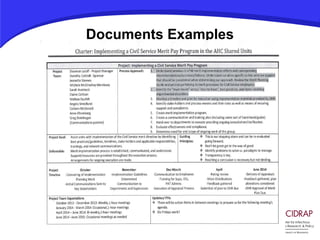
Documents Examples
Software
• Project Management = Software?
• Which software is best?
I. For what purpose
II. Size of team
III. Complexity needed
IV. Consider learning curve
V. Integration with other standard systems used e.g.
email
VI. Cost of software
VII. Not one right answer
Software
• What do you need help doing?
I. Plan projects
II. Visualize task dependencies
III. Critical path analysis
IV. Collaborate on document development and
sharing
V. Share calendars, contacts, schedules
VI. Manage progress, timeline, costs, work time
VII. Produce reports for stakeholders
VIII.Identify over-expended resources
IX. Centralized information
X. Project prioritization
Software
• Closer look at a critical path analysis
Software
• Many, many software tools available
I. MS Project
II. BaseCamp
III. Trello
IV. Smartsheet
V. Others: Has anybody used anything else?
Software
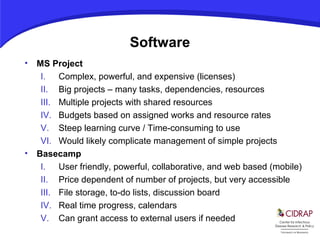
• MS Project
I. Complex, powerful, and expensive (licenses)
II. Big projects – many tasks, dependencies, resources
III. Multiple projects with shared resources
IV. Budgets based on assigned works and resource rates
V. Steep learning curve / Time-consuming to use
VI. Would likely complicate management of simple projects
• Basecamp
I. User friendly, powerful, collaborative, and web based (mobile)
II. Price dependent of number of projects, but very accessible
III. File storage, to-do lists, discussion board
IV. Real time progress, calendars
V. Can grant access to external users if needed
Software – MS Project
Software – Basecamp
• https://launchpad.37signals.com/basecamp
Benefits of Project Management
I. Work smarter
II. Increase efficiency
III. Improve customer satisfaction (internal & external)
IV. Meet project deliverables
V. Improve team performance
VI. Higher team morale
VII. Documentation
VIII.Minimize impact on other projects
IX. Increase collaboration and communication
X. Increase project control
XI. Reduce risk
XII. Minimize what can go wrong
Questions
Does it always works? Not always…
Questions or Comments?

Pm presentation v2

  • 1.
    The Exciting Worldof Project Management Carlos R. Cruz Gayle Moxness
  • 2.
    Agenda I. Common Problems II.What is Project Management III. Project Management Cycle IV. Documents V. Software VI. Benefits VII. Questions or Comments
  • 3.
    Common Problems • Haveyou EVER experienced a project where something goes wrong?
  • 4.
    Common Problems • Somecommon mistakes … and how to avoid them
  • 5.
  • 6.
    Common Problems • Waysto avoid project problems: I. Project team with the right people / right skillset II. Clarity in scope: what is inside vs outside III. Understandable project specifications IV. Buy-in from stakeholders V. Spend time planning – planning IS real work VI. Uncover dependencies VII. Risk assessment VIII.Assess the impact of changes IX. Communications catered to audience / X. Frequent communications managing progress XI. Address problems promptly and clearly
  • 7.
    What is ProjectManagement Project management history… •It has always been practiced informally, but began to emerge as a distinct profession in the mid-20th century. •Two forefathers of project management: – Henry Gantt, called the father of planning and control techniques, famous for his use of the Gantt chart as a project management tool; – Henri Fayol for his creation of the five management functions that form the foundation of the body of knowledge associated with project and program management.
  • 8.
    What is ProjectManagement Project management is.. •The application of knowledge, skills, and techniques to execute projects effectively and efficiently. •A strategic competency for organizations, enabling them to tie project results to business goals. •Brings a unique focus shaped by the goals, resources, and schedule of each unique project. Project management processes fall into five groups: •Initiating •Planning •Executing •Monitoring, and Controlling •Closing
  • 9.
  • 10.
    Documents I. Project Charter II.Scope of Work III. Requirements Document IV. Resource Plan V. Financial Plan VI. Communications Plan VII. Project Plan Overview VIII.Change Control IX. Detailed Project Plan X. Lessons Learned
  • 11.
    Documents • A closerlook at a Project Charter – Project Goal – Project Definition – Project Organization • Customers/End Users • Stakeholders • Project Sponsor • Project Manager – Considerations – Risks, Assumptions, Constraints – Overall Project Plan
  • 12.
  • 13.
    Software • Project Management= Software? • Which software is best? I. For what purpose II. Size of team III. Complexity needed IV. Consider learning curve V. Integration with other standard systems used e.g. email VI. Cost of software VII. Not one right answer
  • 14.
    Software • What doyou need help doing? I. Plan projects II. Visualize task dependencies III. Critical path analysis IV. Collaborate on document development and sharing V. Share calendars, contacts, schedules VI. Manage progress, timeline, costs, work time VII. Produce reports for stakeholders VIII.Identify over-expended resources IX. Centralized information X. Project prioritization
  • 15.
    Software • Closer lookat a critical path analysis
  • 16.
    Software • Many, manysoftware tools available I. MS Project II. BaseCamp III. Trello IV. Smartsheet V. Others: Has anybody used anything else?
  • 17.
    Software • MS Project I.Complex, powerful, and expensive (licenses) II. Big projects – many tasks, dependencies, resources III. Multiple projects with shared resources IV. Budgets based on assigned works and resource rates V. Steep learning curve / Time-consuming to use VI. Would likely complicate management of simple projects • Basecamp I. User friendly, powerful, collaborative, and web based (mobile) II. Price dependent of number of projects, but very accessible III. File storage, to-do lists, discussion board IV. Real time progress, calendars V. Can grant access to external users if needed
  • 18.
  • 19.
    Software – Basecamp •https://launchpad.37signals.com/basecamp
  • 20.
    Benefits of ProjectManagement I. Work smarter II. Increase efficiency III. Improve customer satisfaction (internal & external) IV. Meet project deliverables V. Improve team performance VI. Higher team morale VII. Documentation VIII.Minimize impact on other projects IX. Increase collaboration and communication X. Increase project control XI. Reduce risk XII. Minimize what can go wrong
  • 21.
    Questions Does it alwaysworks? Not always…
  • 22.