“Real time” collaboration inside
a Word document using Alfresco
          Alfresco Tech Talk
             26 June 2009
                  by

         Jason Harrop, Plutext
Agenda

• Part 1: Collaboration inside a Word document
• Part 2: Inline editing
About Plutext

• We help organisations exploit their Word documents,
  outside the Microsoft silo (eg in Java, or sans SharePoint)
• Core product:
   – Plutext collaboration in Word (on Alfresco)
• Components:
   – docx4all – embeddable Java application/applet
   – docx4j open source project
             +     =
• Prototypes:
   – Alfresco inline docx editors
   – docx wiki (in Alfresco)
Part 1:

COLLABORATION INSIDE A WORD DOCUMENT
The problem with Word today

• It doesn’t matter how you try to open the document…
   – Choose offline editing in Alfresco Explorer (or Share)
   – Via CIFS or WebDAV (and with or without Alfresco’s Word Add-In)
   – Via the SharePoint API
• Only one user can be in “the document” at any time
• Fundamental limitation of Microsoft Word
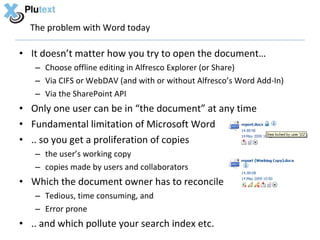
• .. so you get a proliferation of copies
   – the user’s working copy
   – copies made by users and collaborators
• Which the document owner has to reconcile
   – Tedious, time consuming, and
   – Error prone
• .. and which pollute your search index etc.
Basic Demo


 pdates/adds/moves/deletes

 onflict handling
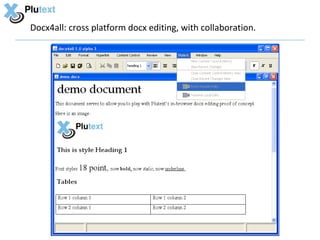
Docx4all: cross platform docx editing, with collaboration.
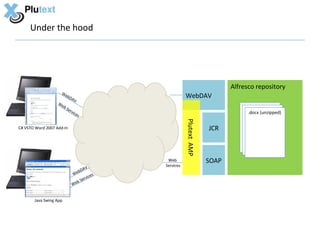
Under the hood


                                                                            Alfresco repository
                    We
                       bD
                           AV
                                                       WebDAV
                   We
                      bS
                         erv
                            ice                                                   .docx (unzipped)
                               s


                                                       Plutext AMP
C# VSTO Word 2007 Add-In                                             JCR


                                             Web                     SOAP
                                            Services
                                AV
                              bD
                           We           s
                                   vice
                             b Ser
                           We


       Java Swing App
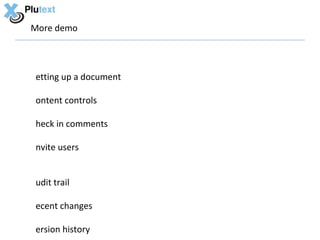
More demo


etting up a document

ontent controls

heck in comments

nvite users


udit trail

ecent changes

ersion history
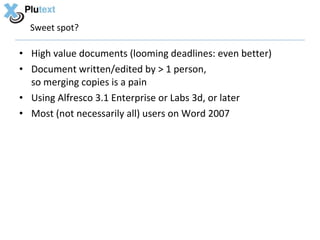
Sweet spot?

• High value documents (looming deadlines: even better)
• Document written/edited by > 1 person,
  so merging copies is a pain
• Using Alfresco 3.1 Enterprise or Labs 3d, or later
• Most (not necessarily all) users on Word 2007
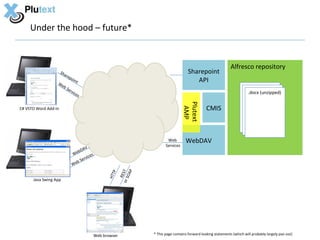
Under the hood – future*


                                                                                                                        Alfresco repository
                      Sha
                            rep
                                                                                             Sharepoint
                  We
                                  o in
                                         t                                                      API
                     b      Se
                              rvi                                                                                                 .docx (unzipped)
                                    ces


                                                                                           Plutext
                                                                                                         CMIS


                                                                                            AMP
C# VSTO Word Add-In


                                                                                 Web        WebDAV
                                                                                Services
                                       AV
                                  W ebD
                                               s
                                          vice
                                    b Ser
                                  We
                                                                     P
                                                             o r S ST
                                                        P


                                                                  OA
                                                     HTT

                                                                 RE


      Java Swing App


                                               Web browser               * This page contains forward looking statements (which will probably largely pan out)
Part 2:

INLINE EDITING
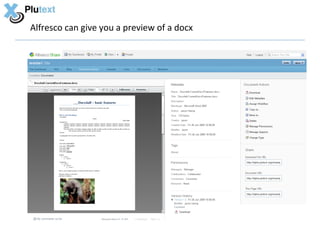
Alfresco can give you a preview of a docx
How did we do that?

• Labs (current svn tip = r14939), with
   – OpenOffice 3.1
   – pdf2swf


• api/node/noderef/content/thumbnails/webpreview does
  what it should, as long as web-preview.js invokes it
• need node.previews to include “webpreview”
  so Alfresco.WebPreview gets that value.
  (.. I just hard coded it in web-preview.get.html.ftl )
.. however this is not inline editable

• There are a number of solutions around for editing documents in
  the web browser, including:
   – Google Docs
   – Zoho
• The problem with these is that:
   – On load (import), they convert your Office document to their own internal
     format, and
   – On save (export), they convert it back to the Microsoft format
   Result: two conversions; many documents will lose formatting or their “in-
     process” state. (This is why OpenOffice never displaced M$ Office)
• Key Requirement: an inline editor’s native format needs to be
  Microsoft’s “Open XML” Office format – now an ISO standard.

  This is the only way to ensure nothing gets lost!
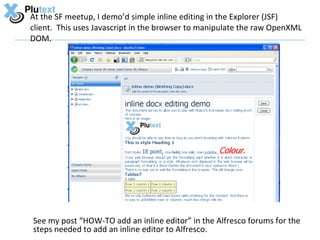
At the SF meetup, I demo’d simple inline editing in the Explorer (JSF)
client. This uses Javascript in the browser to manipulate the raw OpenXML
DOM.


See my post “HOW-TO add an inline editor” in the Alfresco forums for the
steps needed to add an inline editor to Alfresco.
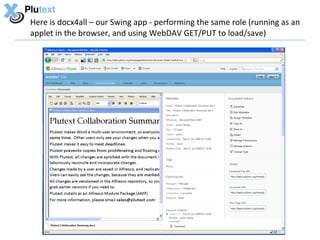
Here is docx4all – our Swing app - performing the same role (running as an
applet in the browser, and using WebDAV GET/PUT to load/save)
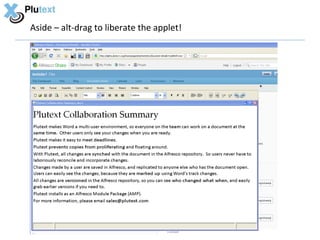
Aside – alt-drag to liberate the applet!
You can have a wiki of docx documents

Ingredients:
• Display docx inline in web browser
• Edit inline
• Hyperlinks:
   – Click to follow
   – Creating one (via the browser or Word) creates target docx (if nec)
Why?
• Knowledge workers can publish Office documents directly to the
  wiki, and edit them any conversions
• Cut/paste wiki content into new documents, without loss of
  formatting
• No need to learn new editing tools
   – Create/edit wiki pages in Word 2007 (or your web browser)
• A single standard for corporate document formats
   – Open XML ISO standard documents
Feedback please!


Please let me know which bits you think would be most useful.

                                jason@plutext.org

                                       Thanks!

                                -------------------------

•   Blog:           http://dev.plutext.org/blog
•   Collaboration test drive: http://alpha.plutext.org/alfresco/register.html
•   Docx4j download, forums: http://dev.plutext.org/
•   Docx4all:                 http://dev.plutext.org/trac/docx4all/wiki/Collaboration
•   Twitter:                  jasonharrop

Plutext Alfresco Tech Talk

  • 1.
    “Real time” collaborationinside a Word document using Alfresco Alfresco Tech Talk 26 June 2009 by Jason Harrop, Plutext
  • 2.
    Agenda • Part 1:Collaboration inside a Word document • Part 2: Inline editing
  • 3.
    About Plutext • Wehelp organisations exploit their Word documents, outside the Microsoft silo (eg in Java, or sans SharePoint) • Core product: – Plutext collaboration in Word (on Alfresco) • Components: – docx4all – embeddable Java application/applet – docx4j open source project + = • Prototypes: – Alfresco inline docx editors – docx wiki (in Alfresco)
  • 4.
  • 5.
    The problem withWord today • It doesn’t matter how you try to open the document… – Choose offline editing in Alfresco Explorer (or Share) – Via CIFS or WebDAV (and with or without Alfresco’s Word Add-In) – Via the SharePoint API • Only one user can be in “the document” at any time • Fundamental limitation of Microsoft Word • .. so you get a proliferation of copies – the user’s working copy – copies made by users and collaborators • Which the document owner has to reconcile – Tedious, time consuming, and – Error prone • .. and which pollute your search index etc.
  • 6.
  • 7.
    Docx4all: cross platformdocx editing, with collaboration.
  • 8.
    Under the hood Alfresco repository We bD AV WebDAV We bS erv ice .docx (unzipped) s Plutext AMP C# VSTO Word 2007 Add-In JCR Web SOAP Services AV bD We s vice b Ser We Java Swing App
  • 9.
    More demo etting upa document ontent controls heck in comments nvite users udit trail ecent changes ersion history
  • 10.
    Sweet spot? • Highvalue documents (looming deadlines: even better) • Document written/edited by > 1 person, so merging copies is a pain • Using Alfresco 3.1 Enterprise or Labs 3d, or later • Most (not necessarily all) users on Word 2007
  • 11.
    Under the hood– future* Alfresco repository Sha rep Sharepoint We o in t API b Se rvi .docx (unzipped) ces Plutext CMIS AMP C# VSTO Word Add-In Web WebDAV Services AV W ebD s vice b Ser We P o r S ST P OA HTT RE Java Swing App Web browser * This page contains forward looking statements (which will probably largely pan out)
  • 12.
  • 13.
    Alfresco can giveyou a preview of a docx
  • 14.
    How did wedo that? • Labs (current svn tip = r14939), with – OpenOffice 3.1 – pdf2swf • api/node/noderef/content/thumbnails/webpreview does what it should, as long as web-preview.js invokes it • need node.previews to include “webpreview” so Alfresco.WebPreview gets that value. (.. I just hard coded it in web-preview.get.html.ftl )
  • 15.
    .. however thisis not inline editable • There are a number of solutions around for editing documents in the web browser, including: – Google Docs – Zoho • The problem with these is that: – On load (import), they convert your Office document to their own internal format, and – On save (export), they convert it back to the Microsoft format Result: two conversions; many documents will lose formatting or their “in- process” state. (This is why OpenOffice never displaced M$ Office) • Key Requirement: an inline editor’s native format needs to be Microsoft’s “Open XML” Office format – now an ISO standard. This is the only way to ensure nothing gets lost!
  • 16.
    At the SFmeetup, I demo’d simple inline editing in the Explorer (JSF) client. This uses Javascript in the browser to manipulate the raw OpenXML DOM. See my post “HOW-TO add an inline editor” in the Alfresco forums for the steps needed to add an inline editor to Alfresco.
  • 17.
    Here is docx4all– our Swing app - performing the same role (running as an applet in the browser, and using WebDAV GET/PUT to load/save)
  • 18.
    Aside – alt-dragto liberate the applet!
  • 19.
    You can havea wiki of docx documents Ingredients: • Display docx inline in web browser • Edit inline • Hyperlinks: – Click to follow – Creating one (via the browser or Word) creates target docx (if nec) Why? • Knowledge workers can publish Office documents directly to the wiki, and edit them any conversions • Cut/paste wiki content into new documents, without loss of formatting • No need to learn new editing tools – Create/edit wiki pages in Word 2007 (or your web browser) • A single standard for corporate document formats – Open XML ISO standard documents
  • 20.
    Feedback please! Please letme know which bits you think would be most useful. jason@plutext.org Thanks! ------------------------- • Blog: http://dev.plutext.org/blog • Collaboration test drive: http://alpha.plutext.org/alfresco/register.html • Docx4j download, forums: http://dev.plutext.org/ • Docx4all: http://dev.plutext.org/trac/docx4all/wiki/Collaboration • Twitter: jasonharrop