Marcos Lin
@marcoseu
HTML5 Code Show
Roma
Rome, 24 Apr 2014
Playing with Maps
using AngularJS
http://www.energy-car.com
Catalyst for
Electric Vehicle
Market
http://goo.gl/39bCsm
@
https://github.com/marcoslin/angularAMD
Let’s Talk About Maps
Google Maps
OpenStreetMap
Apple Maps
Yahoo! Maps
Bing Maps
Nokia Here
..
http://en.wikipedia.org/wiki/Comparison_of_web_map_services
https://developers.google.com/maps/documentation/javascript/
Google Maps Javascript API
http://dev.openlayers.org/apidocs
Open Layers
https://developer.mozilla.org/en-US/Apps/Build/
gather_and_modify_data/Plotting_yourself_on_the_map
Plotting yourself on the map
http://goo.gl/FVhr5L
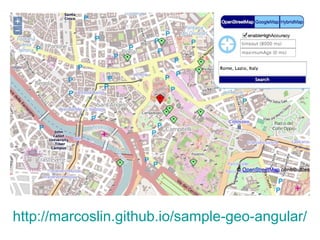
http://marcoslin.github.io/sample-geo-angular/
OpenStreetMap
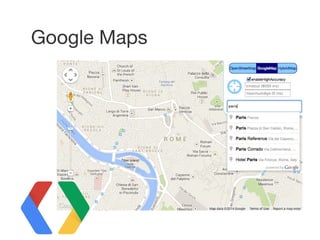
Google Maps
Hybrid Map
Show Me the Code!!!
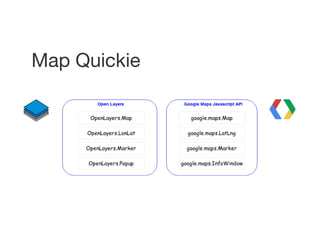
Map Quickie
Live Code: Map Quickies
step01
map.mapTypes.set(
"OSM",
new google.maps.ImageMapType({
getTileUrl: function(coord, zoom) {
return "http://tile.openstreetmap.org/" + zoom + "/" + coord.x + "/" +
coord.y + ".png";
},
tileSize: new google.maps.Size(256, 256),
name: "OpenStreetMap",
maxZoom: 18
})
);
Hybrid Map
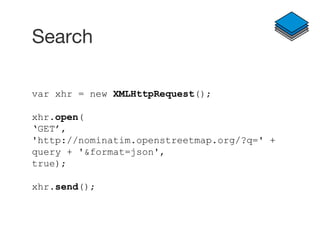
Search
var xhr = new XMLHttpRequest();
xhr.open(
‘GET’,
'http://nominatim.openstreetmap.org/?q=' +
query + '&format=json',
true);
xhr.send();
Search
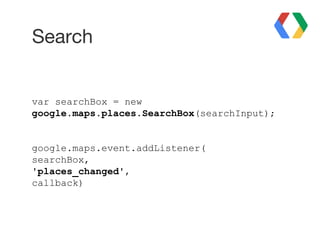
var searchBox = new
google.maps.places.SearchBox(searchInput);
google.maps.event.addListener(
searchBox,
'places_changed',
callback)
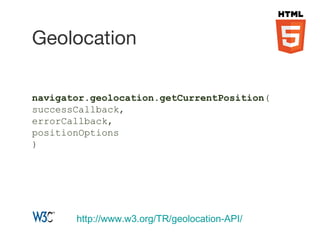
navigator.geolocation.getCurrentPosition(
successCallback,
errorCallback,
positionOptions
)
Geolocation
http://www.w3.org/TR/geolocation-API/
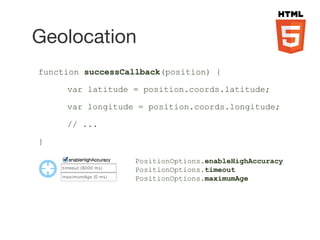
PositionOptions.enableHighAccuracy
PositionOptions.timeout
PositionOptions.maximumAge
Geolocation
function successCallback(position) {
var latitude = position.coords.latitude;
var longitude = position.coords.longitude;
// ...
}
The Main Course...
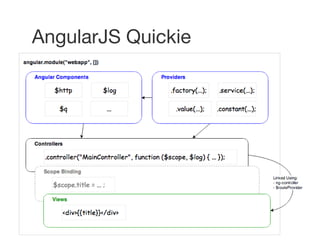
AngularJS Quickie
Live Code: AngularJS Quickies
step02
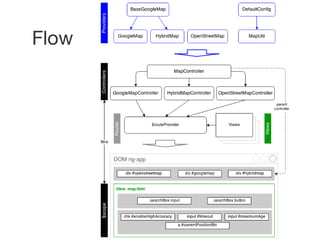
Flow
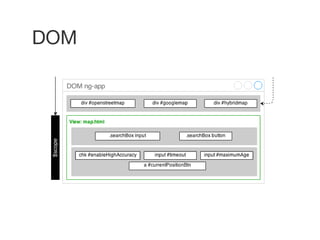
DOM
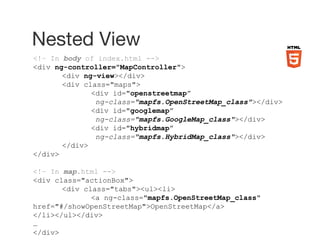
Nested View
<!– In body of index.html -->
<div ng-controller="MapController">
<div ng-view></div>
<div class="maps">
<div id="openstreetmap”
ng-class="mapfs.OpenStreetMap_class"></div>
<div id="googlemap”
ng-class="mapfs.GoogleMap_class"></div>
<div id="hybridmap”
ng-class="mapfs.HybridMap_class"></div>
</div>
</div>
<!– In map.html -->
<div class="actionBox">
<div class="tabs"><ul><li>
<a ng-class="mapfs.OpenStreetMap_class"
href="#/showOpenStreetMap">OpenStreetMap</a>
</li></ul></div>
…
</div>
var app = angular.module("geoapp", ['ngRoute']);
app.config(function ($routeProvider) {
$routeProvider
.when('/showOpenStreetMap', {
templateUrl: "views/map.html",
controller: "OpenStreetMapController"}
)
...
.otherwise({redirectTo: '/showOpenStreetMap'})
;
});
Route Definition
Controllers
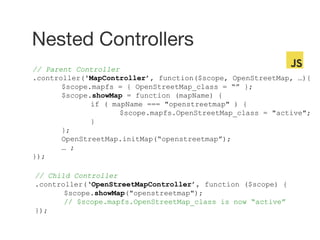
Nested Controllers
// Parent Controller
.controller('MapController’, function($scope, OpenStreetMap, …){
$scope.mapfs = { OpenStreetMap_class = “” };
$scope.showMap = function (mapName) {
if ( mapName === "openstreetmap" ) {
$scope.mapfs.OpenStreetMap_class = "active";
}
};
OpenStreetMap.initMap(“openstreetmap”);
… ;
});
// Child Controller
.controller(‘OpenStreetMapController’, function ($scope) {
$scope.showMap("openstreetmap");
// $scope.mapfs.OpenStreetMap_class is now “active”
});
Live Code: Nested Controllers
step03
Providers
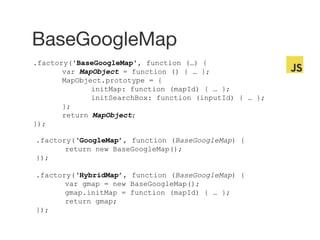
BaseGoogleMap
.factory('BaseGoogleMap', function (…) {
var MapObject = function () { … };
MapObject.prototype = {
initMap: function (mapId) { … };
initSearchBox: function (inputId) { … };
};
return MapObject;
});
.factory(‘GoogleMap’, function (BaseGoogleMap) {
return new BaseGoogleMap();
});
.factory(‘HybridMap’, function (BaseGoogleMap) {
var gmap = new BaseGoogleMap();
gmap.initMap = function (mapId) { … };
return gmap;
});
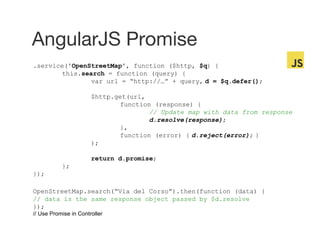
AngularJS Promise
.service('OpenStreetMap', function ($http, $q) {
this.search = function (query) {
var url = “http://…” + query, d = $q.defer();
$http.get(url,
function (response) {
// Update map with data from response
d.resolve(response);
},
function (error) { d.reject(error); }
);
return d.promise;
};
});
OpenStreetMap.search(“Via del Corso”).then(function (data) {
// data is the same response object passed by $d.resolve
});
// Use Promise in Controller
Live Code: AngularJS Promise
step04
https://github.com/marcoslin/sample-geo-angular
http://www.flickr.com/photos/vividbreeze/48

Playing with Maps using AngularJS

Editor's Notes

  • #2 Per quelli che non mi conosci, “Pardon my Italian” In this talk, I will: A very quick walk through how to use the Maps How I converted a Map application to AngularJS Simple demo throughout the talk to illustrate the key concepts
  • #4 Sono un Startupper lavorando su progetto EnergyCar che sara catalizzatore per le il mercato delle macchine elettriche, dando la possibilita a persone che non ha il box a carrigare il loro machine electrique
  • #5 Sono uno dei manager di comunita Code Invaders e me trove su il nosso Google+ community
  • #6 E svillupatore AngularJS. Ho creato “angularAMD”, pacchetto open source per rendere piu facile il uso de RequireJS con AngularJS.
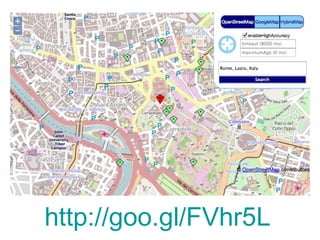
  • #12 So, a quick recap the app: three links a Geolocation button and config A search section and finally, the map 2 problems: I wanted to use ngRoute to make this more Angular like, but… Creating a map on every route change creates memory leak There is a lot of work involved in destroy the map instance, and still potential memory leak
  • #25 A quick review on what is AngularJS. It starts with ngApp, created using angular.module Highlight the 3 key areas: Providers (in blue), Controller (in Black) and Views (in green) Base on these 3 key areas, here is what I came up with
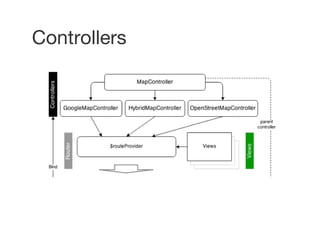
  • #27 Quickly re-show the 3 key areas: Providers (in blue), Controller (in Black) and Views (in green). Controller and Views are combined by Router, except for MapController, which stays the same regardless of the route chosen. Detail to be discussed later next few slides
  • #28 The div that holds the map is coded in index.html the input boxes on the other hand, is coded inside a view.
  • #29 Notice how the mapfs.OpenStreetMap_class is used in both index.html and map.html
  • #30 This is done at very beginning of the app, under app.js
  • #31 Notice that MapController is set as parent controller. When you have nested controllers, $scope of child controller is prototype inherited from the parent
  • #32 Note that if mapfs is set in child controller, it can override the parent version.
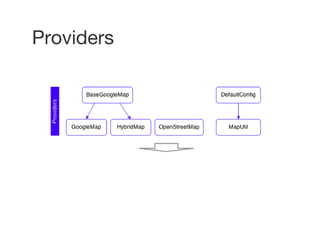
  • #34 BaseGoogleMap is base class for both GoogleMap and HybridMap as they share much of the code in common except the .initMap method OpenStreetMap on the other hand, does not really share anything in common with BaseGoogleMap hence not using created from a Base Class DefaultConfig are constants, meaning that changing it in module does not impact it’s value in another MapUtil contains the logic for Geolocation
  • #35 Notice the use of .prototype in BaseGoogleMap as 2 instances is going to be created. In HybridMap, the .initMap is simple overridden so that Google map would use tiles from OpenStreetMap Remeber that all AngularJS provider are Singleton.
  • #36 A typical thing to do in a Provider is to access data from external source. Promise is used in the AJAX call to OpenStreetMap when search for address. However, in this case, I wanted to keep all Map related code, such as creation of the marker and POI, in the OpenStreetMap service. The AJAX response needs to be returned as controller need to display the return address in the view. This is a simplified version of the real code. Please note AngularJS’ $http already return a promise normally you would just return the $http.get() object.
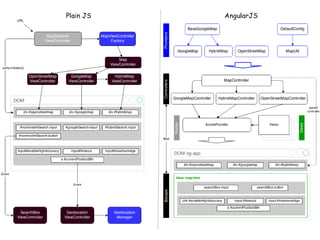
  • #39 As you can see, the Plain JS is tightly coupled with DOM, where code are implemented based on element that exists in htmls Angular, on the other hands, the flow is much more top down, from Providers down to rendered view Why? Basically, AngularJS achieve loose coupling between Controller and View using: 1. $scope that establishes two way binding 2. Dependency Injection Pattern of Providers (controllers, factory, service, etc) without polluting the Global namespace. The result are: Separation of concern as per MVC pattern, segregating your data logic in Models and your display logic in Views, resulting in code that is easier to read and thus maintain Encourage the re-use of Provider created. OpenStreetMap in my example can be easily copied into another project without any modification. Unit Testing -- Topic for a future talk Other notable differences are: Support of $routeProvider instead of MapSwitcherViewController with a simpler way to switch views Consistent use of Promises that removes the ugly and confusion multi-level callback Wrapper around common DOM methods such as $log, $timeout, $window to further decouple your code from DOM.