Introduction to PL/SQL
Objectives
• After completing this lesson, you should
be able to do the following:
– Explain the need for PL/SQL
– Explain the benefits of PL/SQL
– Identify the different types of PL/SQL
blocks
– Output messages in PL/SQL
About PL/SQL
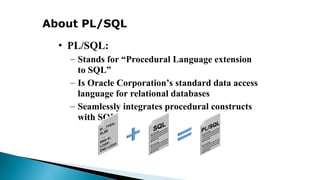
• PL/SQL:
– Stands for “Procedural Language extension
to SQL”
– Is Oracle Corporation’s standard data access
language for relational databases
– Seamlessly integrates procedural constructs
with SQL
About PL/SQL
• PL/SQL:
– Provides a block structure for executable
units of code. Maintenance of code is made
easier with such a well-defined structure.
– Provides procedural constructs such as:
• Variables, constants, and data types
• Control structures such as conditional statements
and loops
• Reusable program units that are written once and
executed many times
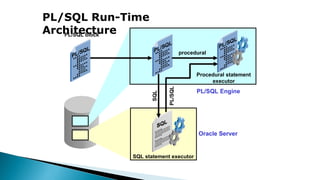
PL/SQL Run-Time
Architecture
SQL
PL/SQL
PL/SQL block
procedural
Procedural statement
executor
SQL statement executor
Oracle Server
PL/SQL Engine
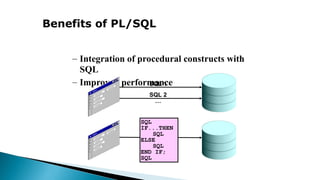
Benefits of PL/SQL
– Integration of procedural constructs with
SQL
– Improved performance
SQL
IF...THEN
SQL
ELSE
SQL
END IF;
SQL
SQL 1
SQL 2
…
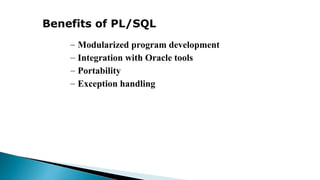
Benefits of PL/SQL
– Modularized program development
– Integration with Oracle tools
– Portability
– Exception handling
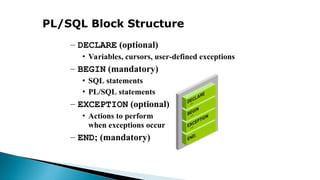
PL/SQL Block Structure
– DECLARE (optional)
• Variables, cursors, user-defined exceptions
– BEGIN (mandatory)
• SQL statements
• PL/SQL statements
– EXCEPTION (optional)
• Actions to perform
when exceptions occur
– END; (mandatory)
Block Types
Procedure Function Anonymous
PROCEDURE name
IS
BEGIN
--statements
[EXCEPTION]
END;
FUNCTION name
RETURN datatype
IS
BEGIN
--statements
RETURN value;
[EXCEPTION]
END;
[DECLARE]
BEGIN
--statements
[EXCEPTION]
END;
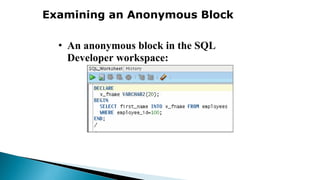
Examining an Anonymous Block
• An anonymous block in the SQL
Developer workspace:
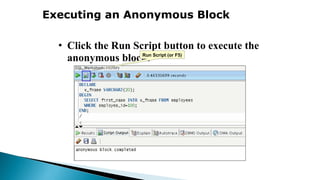
Executing an Anonymous Block
• Click the Run Script button to execute the
anonymous block:
Run Script (or F5)
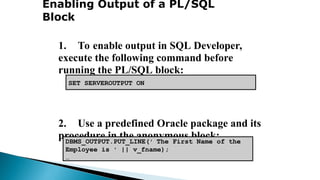
Enabling Output of a PL/SQL
Block
1. To enable output in SQL Developer,
execute the following command before
running the PL/SQL block:
2. Use a predefined Oracle package and its
procedure in the anonymous block:
• DBMS_OUTPUT.PUT_LINE
DBMS_OUTPUT.PUT_LINE(' The First Name of the
Employee is ' || v_fname);
…
SET SERVEROUTPUT ON

This is regarding to introduction of PL SQL

  • 1.
  • 2.
    Objectives • After completingthis lesson, you should be able to do the following: – Explain the need for PL/SQL – Explain the benefits of PL/SQL – Identify the different types of PL/SQL blocks – Output messages in PL/SQL
  • 3.
    About PL/SQL • PL/SQL: –Stands for “Procedural Language extension to SQL” – Is Oracle Corporation’s standard data access language for relational databases – Seamlessly integrates procedural constructs with SQL
  • 4.
    About PL/SQL • PL/SQL: –Provides a block structure for executable units of code. Maintenance of code is made easier with such a well-defined structure. – Provides procedural constructs such as: • Variables, constants, and data types • Control structures such as conditional statements and loops • Reusable program units that are written once and executed many times
  • 5.
    PL/SQL Run-Time Architecture SQL PL/SQL PL/SQL block procedural Proceduralstatement executor SQL statement executor Oracle Server PL/SQL Engine
  • 6.
    Benefits of PL/SQL –Integration of procedural constructs with SQL – Improved performance SQL IF...THEN SQL ELSE SQL END IF; SQL SQL 1 SQL 2 …
  • 7.
    Benefits of PL/SQL –Modularized program development – Integration with Oracle tools – Portability – Exception handling
  • 8.
    PL/SQL Block Structure –DECLARE (optional) • Variables, cursors, user-defined exceptions – BEGIN (mandatory) • SQL statements • PL/SQL statements – EXCEPTION (optional) • Actions to perform when exceptions occur – END; (mandatory)
  • 9.
    Block Types Procedure FunctionAnonymous PROCEDURE name IS BEGIN --statements [EXCEPTION] END; FUNCTION name RETURN datatype IS BEGIN --statements RETURN value; [EXCEPTION] END; [DECLARE] BEGIN --statements [EXCEPTION] END;
  • 10.
    Examining an AnonymousBlock • An anonymous block in the SQL Developer workspace:
  • 11.
    Executing an AnonymousBlock • Click the Run Script button to execute the anonymous block: Run Script (or F5)
  • 12.
    Enabling Output ofa PL/SQL Block 1. To enable output in SQL Developer, execute the following command before running the PL/SQL block: 2. Use a predefined Oracle package and its procedure in the anonymous block: • DBMS_OUTPUT.PUT_LINE DBMS_OUTPUT.PUT_LINE(' The First Name of the Employee is ' || v_fname); … SET SERVEROUTPUT ON