PL/SQL : INTRODUCTION
PRESENTED BY
GUNAVATHY.K.S
PL/SQL
• PL/SQL is Oracle's procedural language
extension to SQL, the non-procedural
relational database language.
• With PL/SQL, you can use SQL statements to
manipulate ORACLE data and the flow of
control statements to process the data.
Moreover, you can declare constants and
variables, define subprograms (procedures
and functions), and trap runtime errors. Thus,
PL/SQL combines the data manipulating
power of SQL with the data processing power
of procedural languages.
PL/SQL
• Many Oracle applications are built using client-
server architecture. The Oracle database resides
on the server.
• The program that makes requests against this
database resides on the client machine.
• This program can be written in C, Java, or PL/SQL.
• While PL/SQL is just like any other programming
language, it has syntax and rules that determine
how programming statements work together. It is
important for you to realize that PL/SQL is not a
stand-alone programming language.
• PL/SQL is a part of the Oracle RDBMS, and it can
reside in two environments, the client and the
server.
PL/SQL
• As a result, it is very easy to move PL/SQL
modules between server-side and client-side
applications.
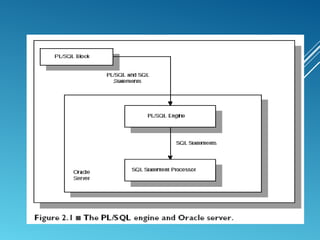
• When the PL/SQL engine is located on the server, the
whole PL/SQL block is passed to the PL/SQL engine
on the Oracle server.
• The PL/SQL engine processes the block according to
the Figure 2.1.
PL/SQL
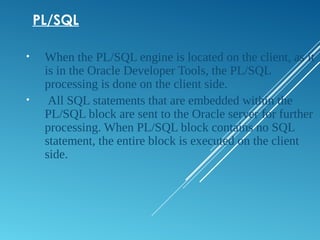
• When the PL/SQL engine is located on the client, as it
is in the Oracle Developer Tools, the PL/SQL
processing is done on the client side.
• All SQL statements that are embedded within the
PL/SQL block are sent to the Oracle server for further
processing. When PL/SQL block contains no SQL
statement, the entire block is executed on the client
side.
DIFFERENCE BETWEEN PL/SQL AND SQL
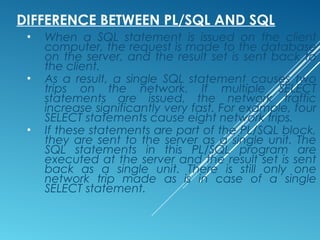
• When a SQL statement is issued on the client
computer, the request is made to the database
on the server, and the result set is sent back to
the client.
• As a result, a single SQL statement causes two
trips on the network. If multiple SELECT
statements are issued, the network traffic
increase significantly very fast. For example, four
SELECT statements cause eight network trips.
• If these statements are part of the PL/SQL block,
they are sent to the server as a single unit. The
SQL statements in this PL/SQL program are
executed at the server and the result set is sent
back as a single unit. There is still only one
network trip made as is in case of a single
SELECT statement.
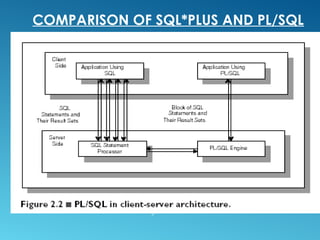
COMPARISON OF SQL*PLUS AND PL/SQL
PL/SQL BLOCKS
• PL/SQL blocks can be divided into two groups:
1. Named and
2. Anonymous.
• Named blocks are used when creating
subroutines. These subroutines are procedures,
functions, and packages.
• The subroutines can be stored in the database
and referenced by their names later on.
• In addition, subroutines can be defined within
the anonymous PL/SQL block.
• Anonymous PL/SQL blocks do not have names.
As a result,they cannot be stored in the
database and referenced later.
PL/SQL BLOCK STRUCTURE
• PL/SQL blocks contain three sections
1. Declare section
2. Executable section and
3. Exception-handling section.
• The executable section is the only
mandatory section of the block.
• Both the declaration and exception-
handling sections are optional.
PL/SQL BLOCK STRUCTURE
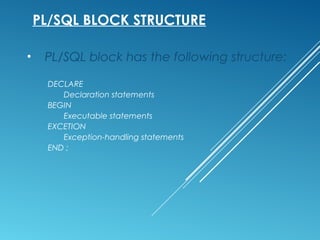
• PL/SQL block has the following structure:
DECLARE
Declaration statements
BEGIN
Executable statements
EXCETION
Exception-handling statements
END ;
DECLARATION SECTION
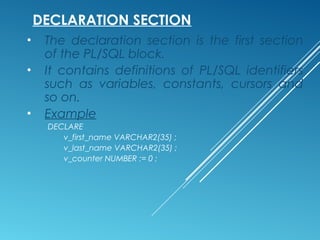
• The declaration section is the first section
of the PL/SQL block.
• It contains definitions of PL/SQL identifiers
such as variables, constants, cursors and
so on.
• Example
DECLARE
v_first_name VARCHAR2(35) ;
v_last_name VARCHAR2(35) ;
v_counter NUMBER := 0 ;
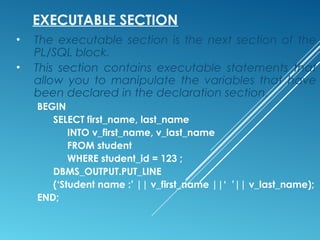
EXECUTABLE SECTION
• The executable section is the next section of the
PL/SQL block.
• This section contains executable statements that
allow you to manipulate the variables that have
been declared in the declaration section.
BEGIN
SELECT first_name, last_name
INTO v_first_name, v_last_name
FROM student
WHERE student_id = 123 ;
DBMS_OUTPUT.PUT_LINE
(‘Student name :’ || v_first_name ||‘ ’|| v_last_name);
END;
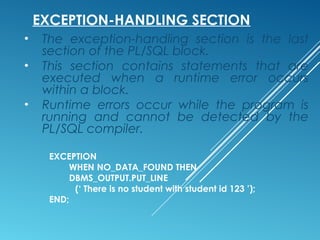
EXCEPTION-HANDLING SECTION
• The exception-handling section is the last
section of the PL/SQL block.
• This section contains statements that are
executed when a runtime error occurs
within a block.
• Runtime errors occur while the program is
running and cannot be detected by the
PL/SQL compiler.
EXCEPTION
WHEN NO_DATA_FOUND THEN
DBMS_OUTPUT.PUT_LINE
(‘ There is no student with student id 123 ’);
END;
HOW PL/SQL GETS EXECUTED
• Every time an anonymous block is executed,
the code is sent to the PL/SQL engine on the
server where it is compiled.
• The named PL/SQL block is compiled only at
the time of its creation, or if it has been
changed.
• The compilation process includes syntax
checking, binding and p-code generation.
• Syntax checking involves checking PL/SQL
code for syntax or compilation errors.
• Once the programmer corrects syntax errors,
the compiler can assign a storage address to
program variables that are used to hold data
for Oracle. This process is called Binding.
HOW PL/SQL GETS EXECUTED
• After binding, p-code is generated for the
PL/SQL block.
• P-code is a list of instructions to the PL/SQL
engine.
• For named blocks, p-code is stored in the
database, and it is used the next time the
program is executed.
• Once the process of compilation has
completed successfully, the status for a
named PL/SQL block is set to VALID, and
also stored in the database.
• If the compilation process was not
successful, the status for a named PL/SQL
block is set to INVALID.
Thank You

PL/SQL

  • 1.
  • 2.
    PL/SQL • PL/SQL isOracle's procedural language extension to SQL, the non-procedural relational database language. • With PL/SQL, you can use SQL statements to manipulate ORACLE data and the flow of control statements to process the data. Moreover, you can declare constants and variables, define subprograms (procedures and functions), and trap runtime errors. Thus, PL/SQL combines the data manipulating power of SQL with the data processing power of procedural languages.
  • 3.
    PL/SQL • Many Oracleapplications are built using client- server architecture. The Oracle database resides on the server. • The program that makes requests against this database resides on the client machine. • This program can be written in C, Java, or PL/SQL. • While PL/SQL is just like any other programming language, it has syntax and rules that determine how programming statements work together. It is important for you to realize that PL/SQL is not a stand-alone programming language. • PL/SQL is a part of the Oracle RDBMS, and it can reside in two environments, the client and the server.
  • 4.
    PL/SQL • As aresult, it is very easy to move PL/SQL modules between server-side and client-side applications. • When the PL/SQL engine is located on the server, the whole PL/SQL block is passed to the PL/SQL engine on the Oracle server. • The PL/SQL engine processes the block according to the Figure 2.1.
  • 6.
    PL/SQL • When thePL/SQL engine is located on the client, as it is in the Oracle Developer Tools, the PL/SQL processing is done on the client side. • All SQL statements that are embedded within the PL/SQL block are sent to the Oracle server for further processing. When PL/SQL block contains no SQL statement, the entire block is executed on the client side.
  • 7.
    DIFFERENCE BETWEEN PL/SQLAND SQL • When a SQL statement is issued on the client computer, the request is made to the database on the server, and the result set is sent back to the client. • As a result, a single SQL statement causes two trips on the network. If multiple SELECT statements are issued, the network traffic increase significantly very fast. For example, four SELECT statements cause eight network trips. • If these statements are part of the PL/SQL block, they are sent to the server as a single unit. The SQL statements in this PL/SQL program are executed at the server and the result set is sent back as a single unit. There is still only one network trip made as is in case of a single SELECT statement.
  • 8.
  • 9.
    PL/SQL BLOCKS • PL/SQLblocks can be divided into two groups: 1. Named and 2. Anonymous. • Named blocks are used when creating subroutines. These subroutines are procedures, functions, and packages. • The subroutines can be stored in the database and referenced by their names later on. • In addition, subroutines can be defined within the anonymous PL/SQL block. • Anonymous PL/SQL blocks do not have names. As a result,they cannot be stored in the database and referenced later.
  • 10.
    PL/SQL BLOCK STRUCTURE •PL/SQL blocks contain three sections 1. Declare section 2. Executable section and 3. Exception-handling section. • The executable section is the only mandatory section of the block. • Both the declaration and exception- handling sections are optional.
  • 11.
    PL/SQL BLOCK STRUCTURE •PL/SQL block has the following structure: DECLARE Declaration statements BEGIN Executable statements EXCETION Exception-handling statements END ;
  • 12.
    DECLARATION SECTION • Thedeclaration section is the first section of the PL/SQL block. • It contains definitions of PL/SQL identifiers such as variables, constants, cursors and so on. • Example DECLARE v_first_name VARCHAR2(35) ; v_last_name VARCHAR2(35) ; v_counter NUMBER := 0 ;
  • 13.
    EXECUTABLE SECTION • Theexecutable section is the next section of the PL/SQL block. • This section contains executable statements that allow you to manipulate the variables that have been declared in the declaration section. BEGIN SELECT first_name, last_name INTO v_first_name, v_last_name FROM student WHERE student_id = 123 ; DBMS_OUTPUT.PUT_LINE (‘Student name :’ || v_first_name ||‘ ’|| v_last_name); END;
  • 14.
    EXCEPTION-HANDLING SECTION • Theexception-handling section is the last section of the PL/SQL block. • This section contains statements that are executed when a runtime error occurs within a block. • Runtime errors occur while the program is running and cannot be detected by the PL/SQL compiler. EXCEPTION WHEN NO_DATA_FOUND THEN DBMS_OUTPUT.PUT_LINE (‘ There is no student with student id 123 ’); END;
  • 15.
    HOW PL/SQL GETSEXECUTED • Every time an anonymous block is executed, the code is sent to the PL/SQL engine on the server where it is compiled. • The named PL/SQL block is compiled only at the time of its creation, or if it has been changed. • The compilation process includes syntax checking, binding and p-code generation. • Syntax checking involves checking PL/SQL code for syntax or compilation errors. • Once the programmer corrects syntax errors, the compiler can assign a storage address to program variables that are used to hold data for Oracle. This process is called Binding.
  • 16.
    HOW PL/SQL GETSEXECUTED • After binding, p-code is generated for the PL/SQL block. • P-code is a list of instructions to the PL/SQL engine. • For named blocks, p-code is stored in the database, and it is used the next time the program is executed. • Once the process of compilation has completed successfully, the status for a named PL/SQL block is set to VALID, and also stored in the database. • If the compilation process was not successful, the status for a named PL/SQL block is set to INVALID.
  • 17.