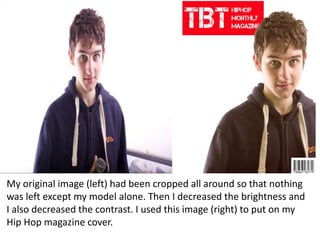
The original image was cropped so only the model remained. The brightness and contrast were decreased. This edited image was used on a Hip Hop magazine cover.
My original image(left) had been cropped all around so that nothing
was left except my model alone. Then I decreased the brightness and
I also decreased the contrast. I used this image (right) to put on my
Hip Hop magazine cover.
2.
The image ofmy model on the left was taken and edited on Photoshop. The
model within the image was cropped and made taller through the use of
decreasing the width of the the image. This image is used in my contents page
and was made larger through the use of manipulation of the size of the image.
The way I manipulated the size of this image on Photoshop is that I right clicked
on the image and held the ‘command’ button and hit the ‘T’ key, then it gave
give me the option of increasing or decreasing the size of the image.
3.
The image onthe left was taken by a camera and the
image was cropped and made slightly wider. This is what
was done to the image in order so that it may fit in with
the double page spread in which I used it in.
4.
The image onthe left has my model on it. This image was
cropped using Photoshop to the point where the medium
shot now looks like a close up shot. The image was placed
on a polaroid and made one with the polaroid.
5.
The image onthe right has two models, however, this image
was cropped using Photoshop to the point where only one of
the model’s face is visible. The image was then put on a
polaroid and was made one with the polaroid. It was then
placed on my magazine cover and used as a secondary image.
6.
Photoshop was usedto edit the image on the left, it was
put on a polaroid and was made one with the polaroid.
The image on the left is on my Hip Hop magazine cover.
It was tilted through the use of manipulation of image
on Photoshop.