


Prepared By:
Krushnakant A. Solanki
OVERVIEW
 What is PhoneGap?
 Architecture
 How PhoneGap Works?
 Why PhoneGap?
 Features
 Applications
 Use PhoneGap in Android


                            2
INTRODUCTION
      TO
   PhoneGap


               3
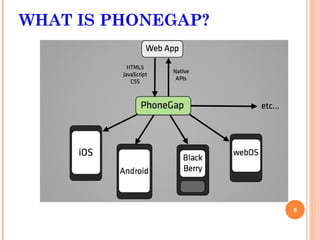
WHAT IS PHONEGAP?

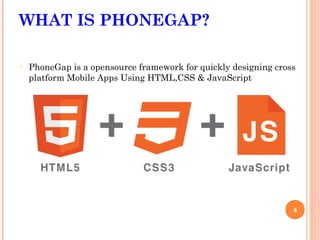
o   PhoneGap is a opensource framework for quickly designing cross
    platform Mobile Apps Using HTML,CSS & JavaScript


                                                                 4
WHAT IS PHONEGAP?

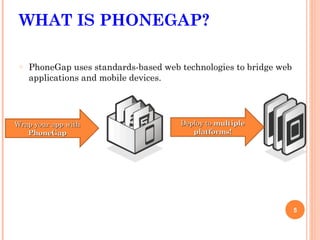
 o   PhoneGap uses standards-based web technologies to bridge web
     applications and mobile devices.


Wrap your app with                     Deploy to multiple
   PhoneGap                               platforms!


                                                                    5
WHAT IS PHONEGAP?


                    6
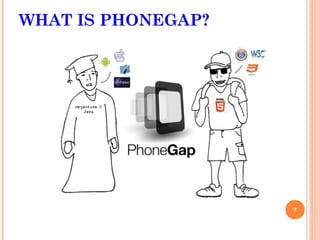
WHAT IS PHONEGAP?


                    7
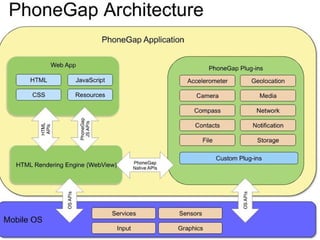
PHONEGAP ARCHITECTURE


                        8
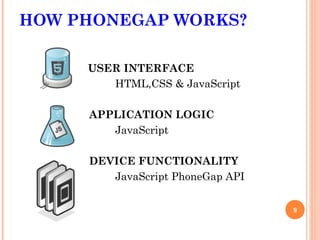
HOW PHONEGAP WORKS?

     USER INTERFACE
        HTML,CSS & JavaScript

     APPLICATION LOGIC
        JavaScript

     DEVICE FUNCTIONALITY
        JavaScript PhoneGap API


                                  9
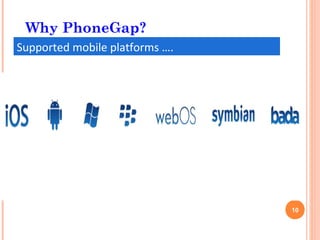
Why PhoneGap?
Supported mobile platforms ….


                                10
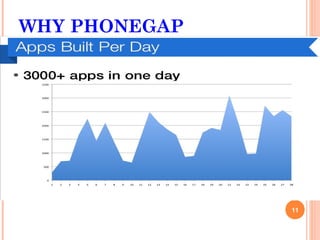
WHY PHONEGAP
 July 2005
  Google acquired Android Inc.
 5 Nov 2007

  Open HandSet Alliance formed-
  Google, HTC, Intel, Motorola, Qualcomm,T-Mobile
 Android is the OHA first product

 12 Nov 2007

  OHA released a preview of the Android OHA


                                                    11
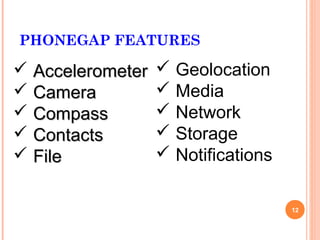
PHONEGAP FEATURES

 Accelerometer    Geolocation
 Camera           Media
 Compass          Network
 Contacts         Storage
 File             Notifications

                                    12
PHONEGAP APPS


    3 Card Poker        Diary      Orbium Puzzle


Logitech Squeezebox     Chess      City Touch
USE PHONEGAP IN ANDROID
 Download phonegap.zip from phonegap.com.
 Extract zip and Put phonegap.jar(corodova.jar)
 file into Buid path or into libs folder

   Now create new folder www into asset folder
    and put the phonegap.js file in www folder.

   Create an index.html file in /assets/www and write you
    code there.


                                                             14
USE PHONEGAP IN ANDROID
    Make a few adjustments to the project's main
    Java file
     Change  the class's extend from Activity to DroidGap
     Replace the setContentView() line with
      super.loadUrl("file:///android_asset/www/index.html")

     Add import com.phonegap.*
     Remove import android.app.Activity


                                                              15
THANK YOU

Any Question?

Phonegap

  • 1.
  • 2.
    OVERVIEW  What isPhoneGap?  Architecture  How PhoneGap Works?  Why PhoneGap?  Features  Applications  Use PhoneGap in Android 2
  • 3.
    INTRODUCTION TO PhoneGap 3
  • 4.
    WHAT IS PHONEGAP? o PhoneGap is a opensource framework for quickly designing cross platform Mobile Apps Using HTML,CSS & JavaScript 4
  • 5.
    WHAT IS PHONEGAP? o PhoneGap uses standards-based web technologies to bridge web applications and mobile devices. Wrap your app with Deploy to multiple PhoneGap platforms! 5
  • 6.
  • 7.
  • 8.
  • 9.
    HOW PHONEGAP WORKS? USER INTERFACE HTML,CSS & JavaScript APPLICATION LOGIC JavaScript DEVICE FUNCTIONALITY JavaScript PhoneGap API 9
  • 10.
  • 11.
    WHY PHONEGAP  July2005 Google acquired Android Inc.  5 Nov 2007 Open HandSet Alliance formed- Google, HTC, Intel, Motorola, Qualcomm,T-Mobile  Android is the OHA first product  12 Nov 2007 OHA released a preview of the Android OHA 11
  • 12.
    PHONEGAP FEATURES  Accelerometer  Geolocation  Camera  Media  Compass  Network  Contacts  Storage  File  Notifications 12
  • 13.
    PHONEGAP APPS 3 Card Poker Diary Orbium Puzzle Logitech Squeezebox Chess City Touch
  • 14.
    USE PHONEGAP INANDROID  Download phonegap.zip from phonegap.com.  Extract zip and Put phonegap.jar(corodova.jar) file into Buid path or into libs folder  Now create new folder www into asset folder and put the phonegap.js file in www folder.  Create an index.html file in /assets/www and write you code there. 14
  • 15.
    USE PHONEGAP INANDROID  Make a few adjustments to the project's main Java file  Change the class's extend from Activity to DroidGap  Replace the setContentView() line with super.loadUrl("file:///android_asset/www/index.html")  Add import com.phonegap.*  Remove import android.app.Activity 15
  • 16.