pfSense
M.M Joy
mmjoy13@gmail.com
pfSense
• pfSense is an open source firewall and router, computer software distribution
based on FreeBSD 11.1
• FreeBSD is a popular free and open source operating system that is based on the
Berkeley Software Distribution (BSD) version of the Unix operating system.
• It means run on processors such as the Pentium that are compatible with
Intel's x86 architecture and also on amd64, Alpha/AXP, IA-64, PC-98 and
UltraSPARC processors.
• FreeBSD Support Hardware :
https://www.freebsd.org/releases/11.1R/hardware.html
Virtualization
• pfSense supports a variety of Type-1 (bare metal/native) and Type-2 (hosted)
virtualiztion environments, such as VMware (vSphere, Fusion or Workstation),
Proxmox, VirtualBox, Xen, KVM, Hyper-V and so on….
Virtualizing pfSense with
Oracle VM VirtualBox
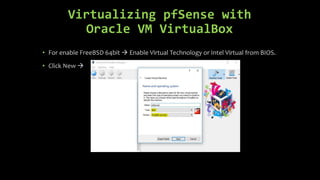
• For enable FreeBSD 64bit  Enable Virtual Technology or Intel Virtual from BIOS.
• Click New 
Virtualizing pfSense with
Oracle VM VirtualBox
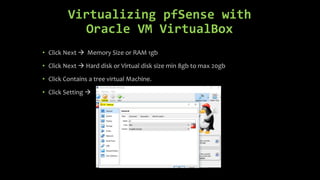
• Click Next  Memory Size or RAM 1gb
• Click Next  Hard disk or Virtual disk size min 8gb to max 20gb
• Click Contains a tree virtual Machine.
• Click Setting 
Virtualizing pfSense with
Oracle VM VirtualBox
• Click Network  Enable two Adapter  Adapter 1 attached to NAT  Adapter 2
attached to Internal Network [Adapter 1 for Psychical PC Network , Adapter 2 for
second virtual Machine]
Virtualizing pfSense with
Oracle VM VirtualBox
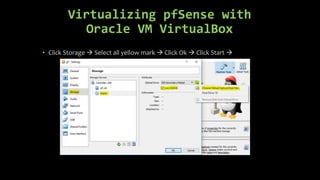
• Click Storage  Select all yellow mark  Click Ok  Click Start 

Pf sense oracle vm part01

  • 1.
  • 2.
    pfSense • pfSense isan open source firewall and router, computer software distribution based on FreeBSD 11.1 • FreeBSD is a popular free and open source operating system that is based on the Berkeley Software Distribution (BSD) version of the Unix operating system. • It means run on processors such as the Pentium that are compatible with Intel's x86 architecture and also on amd64, Alpha/AXP, IA-64, PC-98 and UltraSPARC processors. • FreeBSD Support Hardware : https://www.freebsd.org/releases/11.1R/hardware.html
  • 3.
    Virtualization • pfSense supportsa variety of Type-1 (bare metal/native) and Type-2 (hosted) virtualiztion environments, such as VMware (vSphere, Fusion or Workstation), Proxmox, VirtualBox, Xen, KVM, Hyper-V and so on….
  • 4.
    Virtualizing pfSense with OracleVM VirtualBox • For enable FreeBSD 64bit  Enable Virtual Technology or Intel Virtual from BIOS. • Click New 
  • 5.
    Virtualizing pfSense with OracleVM VirtualBox • Click Next  Memory Size or RAM 1gb • Click Next  Hard disk or Virtual disk size min 8gb to max 20gb • Click Contains a tree virtual Machine. • Click Setting 
  • 6.
    Virtualizing pfSense with OracleVM VirtualBox • Click Network  Enable two Adapter  Adapter 1 attached to NAT  Adapter 2 attached to Internal Network [Adapter 1 for Psychical PC Network , Adapter 2 for second virtual Machine]
  • 7.
    Virtualizing pfSense with OracleVM VirtualBox • Click Storage  Select all yellow mark  Click Ok  Click Start 