The Roadmap to ensure your PeopleSoft
system stays ‘Best of Breed’
Liz Derrer
Duncan Davies
The Cloud is Coming
They’re not mountains
… they’re waves
Interstellar (2014)
Uptake of Cloud HCM Applications
 Source: “How Modern is HR” survey, Aug 2014
17%
15%
68%
Have you deployed HCM Apps in the
Cloud?
 17% - Have HR Cloud Apps
 15% - Moving to Cloud Apps
 68% - No Cloud Apps
 Survey of 170 HR Professionals, 74%
from the UK
 Note: Recruitment software excluded
Uptake of Cloud HCM Applications - 2
 Source: “How Modern is HR” survey, Aug 2014
32%
27%
41%
Plans to deploy HCM Apps in the
Cloud?
 32% - Have HR Cloud Apps
 27% - Have Plans to Move
 41% - No Cloud Apps
The Benefits of the Cloud
 Better UI
 Mobile Access
 Greater Flexibility of Infrastructure
 Cloud-style Operations
 Easier and More Frequent Updates
 Enhanced Security / Resilience
 Reduced Ongoing Cost
 No Upfront Licence Cost
How Do I Get Those Cloud
Benefits With PeopleSoft?
The Benefits of the Cloud
 Better UI
 Mobile Access
 Greater Flexibility of Infrastructure
 Cloud-style Operations
 Easier and More Frequent Updates
 Enhanced Security / Resilience
 Reduced Ongoing Cost
 No Upfront Licence Cost
9.2 - Improved Experience
for Users?
Better UI
PeopleSoft is moving towards a 2-Tier User Interface:
 The Classic UI
 Designed for Power Users, back-office admins
 Information dense, lots of fields, data, analytics
 The Fluid UI
 Designed for Self Service Users
 Simplified layouts, fewer fields
 Less training needed
Better UI
Better UI - Work Centres
 Role-based Home Page:
 What you need to DO
 Where you need to GO
 How you DO IT
 Simplified Navigation
 Reduced user Training
 Ultimately, allows more work to be done in less time
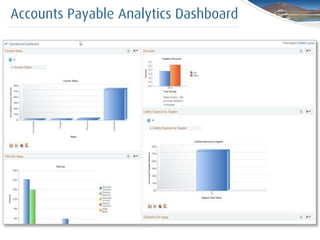
Accounts Payable Work Centre
Accounts Payable Analytics Dashboard
Classic Tabs and Big Buttons
Company Branding
Better UI – Activity Guides
 Guided navigation steps to complete end-to-end
business process
 Simplified Navigation
 Reduced user Training
 Consistency
 ‘Train Stops’ show where in the process you are
HR Admin Guided Processes
The Benefits of the Cloud
 Better UI
 Mobile Access
 Greater Flexibility of Infrastructure
 Cloud-style Operations
 Easier and More Frequent Updates
 Enhanced Security / Resilience
 Reduced Ongoing Cost
 No Upfront Licence Cost
Fluid UI on a Smart Phone
Fluid UI on an iPad
Fluid UI – Diversity Analytics
Better UI - 3
Cedar’s Recommendations:
 This is the PeopleSoft direction for Self Service and
mobile, so it’s crucially important.
 Developers need some HTML and CSS skills
 Don’t try to ‘convert’ classic pages to Fluid. They should
be simplified versions for light-touch transactions.
 Browser debugging tools are invaluable
The Benefits of the Cloud
 Better UI
 Mobile Access
 Greater Flexibility of Infrastructure
 Cloud-style Operations
 Easier and More Frequent Updates
 Enhanced Security / Resilience
 Reduced Ongoing Cost
 No Upfront Licence Cost
Greater Flexibility of Infrastructure
 Purchase servers at the start but then stuck with them
 Virtualisation only gave some improvements
 Cloud vendors give you elasticity of infrastructure
Here’s some idea of the agility that you can gain …
SystemLoad
Monday Tuesday Wednesday Thursday Friday
Traditional
hardware
sizing/costs
to peak
usage
Cloud
baseline
‘Elastically’
burst
hardware
where
required
Greater Flexibility of Infrastructure - 2
The Benefits of the Cloud
 Better UI
 Mobile Access
 Greater Flexibility of Infrastructure
 Cloud-style Operations
 Easier and More Frequent Updates
 Enhanced Security / Resilience
 Reduced Ongoing Cost
 No Upfront Licence Cost
Cloud-style Operations
Use Developer Skills (i.e. coding) and a free automation
platform to reduce SysAdmin/DBA effort
 Boot/Shut-down non-Prod environments on schedule
 Automate refresh of Test environment from Prod
 Backups and automated cache-clears available ad-hoc
 Proactive Monitoring:
 Is the PIA Responsive?
 Do I have failed/queued jobs?
 Is the Payroll taking longer than usual?
Cloud-style Operations - 2
Production
Managers/
Backoffice
Self-Service
Pilot User
Pilot User Pilot Users
Normal Users
The Benefits of the Cloud
 Better UI
 Mobile Access
 Greater Flexibility of Infrastructure
 Cloud-style Operations
 Easier and More Frequent Updates
 Enhanced Security / Resilience
 Reduced Ongoing Cost
 No Upfront Licence Cost
Easier and More Frequent Updates
PeopleSoft Selective Adoption:
 The process has changed. No more big upgrades.
 The images deliver fixes and new functionality.
 You need to plan for this:
 the effort to apply the patches,
 and how the system will change for the users
 If you do nothing, you’ll end up with a big upgrade 3, 4
or 5 years down the line
Easier and More Frequent Updates - 2
 “Always stay current” and “You must apply bundles in
sequence”
 New functionality every 3 years
 Apply patches on your schedule
 New functionality every few months
Easier and More Frequent Updates - 3
“PeopleSoft used to recommend we stay current and apply
all maintenance, but we didn’t because it was too difficult.
Now they say we don’t have to, but we do because it’s so
easy.”
PeopleSoft Customer Advisory Board
Easier and More Frequent Updates - 4
Questions:
 Can I avoid an upgrade by doing nothing?
 The longer you leave it the larger the catch-up effort will be. Leave it too
long and it could be as significant as a major upgrade. Avoid this by
running a scheduled maintenance program.
 What is a ‘get current’ Change Package?
 It applies all available but not yet applied patches to bring your system up-
to-date.
 Will there really never be a v9.3?
 It certainly looks that way. Selective Adoption fits much better with the
twice yearly updates that cloud vendors enforce.
Easier and More Frequent Updates - 5
Other tips:
 Use the CFO Tool to show the differences between images
 Customer must be on a currently supported version of
PeopleTools to use Selective Adoption
 Some newer functionality may require a certain level and patch
of PeopleTools however
 Plan for how you will host the images (VirtualBox etc)
 PUM has matured and improved since it was first released
 If you run on Oracle databases, the Image replaces DMO
 Watch out for PRPs and POCs
Easier and More Frequent Updates - 6
Cedar’s Recommendations:
 If you’re not on 9.2, starting planning the upgrade. It’s the last
upgrade you’ll have to do
 Plan a schedule for applying the update images that suits you,
maybe two or three times a year with an annual ‘get current’
 Plan a schedule for applying PeopleTools patches, maybe one
every 9 months
 Consider increasing your usage of PeopleSoft Test Framework, as
it’ll reduce the burden testing of the updates
The Benefits of the Cloud
 Better UI
 Mobile Access
 Greater Flexibility of Infrastructure
 Cloud-style Operations
 Easier and More Frequent Updates
 Enhanced Security / Resilience
 Reduced Ongoing Cost
 No Upfront Licence Cost
Cloud Security / Resilience
 Firewalled by default
 Control which IP Ranges have access
 Virtual Private Cloud – site-to-site VPN
 Military grade protection at Data Centres
 Customers’ databases kept separate
 Multiple datacentres make failover simpler
The Benefits of the Cloud
 Better UI
 Mobile Access
 Greater Flexibility of Infrastructure
 Cloud-style Operations
 Easier and More Frequent Updates
 Enhanced Security / Resilience
 Reduced Ongoing Cost
 No Upfront Licence Cost
The Cloud is very cheap:
Medium Large Extra Large
Processors 2 4 8
Memory ~4GB ~8GB ~16GB
Price/hr 14p 28p 56p
Price/yr £718 £1,447 £2,890
Prices are for Windows instances in Ireland/EU data-centre using exchange rate as of 20th Feb 2015
Hourly prices are ‘on-demand’ instances.
Yearly prices are ‘reserved instances’ on 3 year terms, paid upfront.
Reduced Ongoing Cost - 1
Reduced Ongoing Cost - 2
 Production (Database server, App/Web)
 Non-Production (4 Envs, Database server, App/Web)
 PUM and Jenkins
 Plus
 All storage
 All backups
 Support
 Windows licences
 Database licences
Reduced Ongoing Cost - 3
 Production (Database server, 2x App, 2x Web, SES, Load
Balancer)
 Non-Production (Database, App, Web, SES)
 Failover (Database, App, Web, SES)
 Plus
 All storage
 All backups
 Support
 PUM and Jenkins
The Benefits of the Cloud
 Better UI
 Mobile Access
 Greater Flexibility of Infrastructure
 Cloud-style Operations
 Easier and More Frequent Updates
 Enhanced Security / Resilience
 Reduced Ongoing Cost
 No Upfront Licence Cost
No Upfront Licence Cost
 Historically PeopleSoft (and other ERPs) has been sold
with an upfront licence fee and an Annual Support fee.
Cedar can offer PeopleSoft as a BPO licence:
 No up-front fee
 Pay monthly
 Even just have BPO for individual modules
You can pay for PeopleSoft like a SaaS product
What do the Analysts Say?
It’s Good to be King
I know many analysts feel sorry for customers who appear trapped in their on-
premise cages – PeopleSoft, Siebel, JD Edwards etc.
Actually, they are in the driver’s seat:
a) Oracle keeps supporting them as part of its Apps Unlimited initiative
b) They can move onto the Cloud/IaaS, and use the managed support model if
they choose
c) They can “ring fence” their core functionality with cloud extensions like Taleo
d) When they are ready to move more fully into the cloud, they can choose
between a number of products
No wonder most of them seem content to stay where they are.
Vinnie Mirchandani, Sept 2014
Key Take-Aways
Key Take-Aways
 PeopleSoft is changing to adapt to the Cloud World
 Selective Adoption, Fluid UI
 You need to adapt also
 Get to PeopleSoft v9.2, Schedule updates, Adopt Fluid UI
 PeopleSoft in the Cloud offers many business benefits
 Cost (both upfront and ongoing), Flexibility
 Even if you stay on-premise, there are some cloud practices that
you can take advantage of
 Automation and proactive monitoring, PeopleSoft Progressive Rollout
 Administration tasks moved away from HR to Managers and
employees
 HR freed up for more strategic / business partner initiatives
Thank you for your
attention
We’re happy to answer
questions now, or
throughout the day
Agenda: 12:20 – 13:00
 Hays HR, Payroll and Financials Upgrade
(Knightsbridge room)
 HCM Cloud: Are you considering moving your HR
applications to the Cloud?
(Waterloo room)
 British American Tobacco Payroll Upgrade
(Mayfair room)
What’s Next?

A PeopleSoft Roadmap

  • 1.
    The Roadmap toensure your PeopleSoft system stays ‘Best of Breed’ Liz Derrer Duncan Davies
  • 2.
  • 3.
    They’re not mountains …they’re waves Interstellar (2014)
  • 4.
    Uptake of CloudHCM Applications  Source: “How Modern is HR” survey, Aug 2014 17% 15% 68% Have you deployed HCM Apps in the Cloud?  17% - Have HR Cloud Apps  15% - Moving to Cloud Apps  68% - No Cloud Apps  Survey of 170 HR Professionals, 74% from the UK  Note: Recruitment software excluded
  • 5.
    Uptake of CloudHCM Applications - 2  Source: “How Modern is HR” survey, Aug 2014 32% 27% 41% Plans to deploy HCM Apps in the Cloud?  32% - Have HR Cloud Apps  27% - Have Plans to Move  41% - No Cloud Apps
  • 6.
    The Benefits ofthe Cloud
  • 7.
    The Benefits ofthe Cloud  Better UI  Mobile Access  Greater Flexibility of Infrastructure  Cloud-style Operations  Easier and More Frequent Updates  Enhanced Security / Resilience  Reduced Ongoing Cost  No Upfront Licence Cost
  • 8.
    How Do IGet Those Cloud Benefits With PeopleSoft?
  • 9.
    The Benefits ofthe Cloud  Better UI  Mobile Access  Greater Flexibility of Infrastructure  Cloud-style Operations  Easier and More Frequent Updates  Enhanced Security / Resilience  Reduced Ongoing Cost  No Upfront Licence Cost
  • 10.
    9.2 - ImprovedExperience for Users?
  • 11.
    Better UI PeopleSoft ismoving towards a 2-Tier User Interface:  The Classic UI  Designed for Power Users, back-office admins  Information dense, lots of fields, data, analytics  The Fluid UI  Designed for Self Service Users  Simplified layouts, fewer fields  Less training needed
  • 12.
  • 13.
    Better UI -Work Centres  Role-based Home Page:  What you need to DO  Where you need to GO  How you DO IT  Simplified Navigation  Reduced user Training  Ultimately, allows more work to be done in less time
  • 14.
  • 15.
  • 16.
    Classic Tabs andBig Buttons
  • 17.
  • 18.
    Better UI –Activity Guides  Guided navigation steps to complete end-to-end business process  Simplified Navigation  Reduced user Training  Consistency  ‘Train Stops’ show where in the process you are
  • 19.
    HR Admin GuidedProcesses
  • 20.
    The Benefits ofthe Cloud  Better UI  Mobile Access  Greater Flexibility of Infrastructure  Cloud-style Operations  Easier and More Frequent Updates  Enhanced Security / Resilience  Reduced Ongoing Cost  No Upfront Licence Cost
  • 21.
    Fluid UI ona Smart Phone
  • 22.
    Fluid UI onan iPad
  • 23.
    Fluid UI –Diversity Analytics
  • 24.
    Fluid UI –Diversity Analytics
  • 25.
    Fluid UI –Diversity Analytics
  • 26.
    Fluid UI –Diversity Analytics
  • 27.
    Better UI -3 Cedar’s Recommendations:  This is the PeopleSoft direction for Self Service and mobile, so it’s crucially important.  Developers need some HTML and CSS skills  Don’t try to ‘convert’ classic pages to Fluid. They should be simplified versions for light-touch transactions.  Browser debugging tools are invaluable
  • 29.
    The Benefits ofthe Cloud  Better UI  Mobile Access  Greater Flexibility of Infrastructure  Cloud-style Operations  Easier and More Frequent Updates  Enhanced Security / Resilience  Reduced Ongoing Cost  No Upfront Licence Cost
  • 30.
    Greater Flexibility ofInfrastructure  Purchase servers at the start but then stuck with them  Virtualisation only gave some improvements  Cloud vendors give you elasticity of infrastructure Here’s some idea of the agility that you can gain …
  • 31.
    SystemLoad Monday Tuesday WednesdayThursday Friday Traditional hardware sizing/costs to peak usage Cloud baseline ‘Elastically’ burst hardware where required Greater Flexibility of Infrastructure - 2
  • 32.
    The Benefits ofthe Cloud  Better UI  Mobile Access  Greater Flexibility of Infrastructure  Cloud-style Operations  Easier and More Frequent Updates  Enhanced Security / Resilience  Reduced Ongoing Cost  No Upfront Licence Cost
  • 33.
    Cloud-style Operations Use DeveloperSkills (i.e. coding) and a free automation platform to reduce SysAdmin/DBA effort  Boot/Shut-down non-Prod environments on schedule  Automate refresh of Test environment from Prod  Backups and automated cache-clears available ad-hoc  Proactive Monitoring:  Is the PIA Responsive?  Do I have failed/queued jobs?  Is the Payroll taking longer than usual?
  • 34.
    Cloud-style Operations -2 Production Managers/ Backoffice Self-Service Pilot User Pilot User Pilot Users Normal Users
  • 35.
    The Benefits ofthe Cloud  Better UI  Mobile Access  Greater Flexibility of Infrastructure  Cloud-style Operations  Easier and More Frequent Updates  Enhanced Security / Resilience  Reduced Ongoing Cost  No Upfront Licence Cost
  • 36.
    Easier and MoreFrequent Updates PeopleSoft Selective Adoption:  The process has changed. No more big upgrades.  The images deliver fixes and new functionality.  You need to plan for this:  the effort to apply the patches,  and how the system will change for the users  If you do nothing, you’ll end up with a big upgrade 3, 4 or 5 years down the line
  • 37.
    Easier and MoreFrequent Updates - 2  “Always stay current” and “You must apply bundles in sequence”  New functionality every 3 years  Apply patches on your schedule  New functionality every few months
  • 38.
    Easier and MoreFrequent Updates - 3 “PeopleSoft used to recommend we stay current and apply all maintenance, but we didn’t because it was too difficult. Now they say we don’t have to, but we do because it’s so easy.” PeopleSoft Customer Advisory Board
  • 39.
    Easier and MoreFrequent Updates - 4 Questions:  Can I avoid an upgrade by doing nothing?  The longer you leave it the larger the catch-up effort will be. Leave it too long and it could be as significant as a major upgrade. Avoid this by running a scheduled maintenance program.  What is a ‘get current’ Change Package?  It applies all available but not yet applied patches to bring your system up- to-date.  Will there really never be a v9.3?  It certainly looks that way. Selective Adoption fits much better with the twice yearly updates that cloud vendors enforce.
  • 40.
    Easier and MoreFrequent Updates - 5 Other tips:  Use the CFO Tool to show the differences between images  Customer must be on a currently supported version of PeopleTools to use Selective Adoption  Some newer functionality may require a certain level and patch of PeopleTools however  Plan for how you will host the images (VirtualBox etc)  PUM has matured and improved since it was first released  If you run on Oracle databases, the Image replaces DMO  Watch out for PRPs and POCs
  • 41.
    Easier and MoreFrequent Updates - 6 Cedar’s Recommendations:  If you’re not on 9.2, starting planning the upgrade. It’s the last upgrade you’ll have to do  Plan a schedule for applying the update images that suits you, maybe two or three times a year with an annual ‘get current’  Plan a schedule for applying PeopleTools patches, maybe one every 9 months  Consider increasing your usage of PeopleSoft Test Framework, as it’ll reduce the burden testing of the updates
  • 42.
    The Benefits ofthe Cloud  Better UI  Mobile Access  Greater Flexibility of Infrastructure  Cloud-style Operations  Easier and More Frequent Updates  Enhanced Security / Resilience  Reduced Ongoing Cost  No Upfront Licence Cost
  • 43.
    Cloud Security /Resilience  Firewalled by default  Control which IP Ranges have access  Virtual Private Cloud – site-to-site VPN  Military grade protection at Data Centres  Customers’ databases kept separate  Multiple datacentres make failover simpler
  • 44.
    The Benefits ofthe Cloud  Better UI  Mobile Access  Greater Flexibility of Infrastructure  Cloud-style Operations  Easier and More Frequent Updates  Enhanced Security / Resilience  Reduced Ongoing Cost  No Upfront Licence Cost
  • 45.
    The Cloud isvery cheap: Medium Large Extra Large Processors 2 4 8 Memory ~4GB ~8GB ~16GB Price/hr 14p 28p 56p Price/yr £718 £1,447 £2,890 Prices are for Windows instances in Ireland/EU data-centre using exchange rate as of 20th Feb 2015 Hourly prices are ‘on-demand’ instances. Yearly prices are ‘reserved instances’ on 3 year terms, paid upfront. Reduced Ongoing Cost - 1
  • 46.
    Reduced Ongoing Cost- 2  Production (Database server, App/Web)  Non-Production (4 Envs, Database server, App/Web)  PUM and Jenkins  Plus  All storage  All backups  Support  Windows licences  Database licences
  • 47.
    Reduced Ongoing Cost- 3  Production (Database server, 2x App, 2x Web, SES, Load Balancer)  Non-Production (Database, App, Web, SES)  Failover (Database, App, Web, SES)  Plus  All storage  All backups  Support  PUM and Jenkins
  • 48.
    The Benefits ofthe Cloud  Better UI  Mobile Access  Greater Flexibility of Infrastructure  Cloud-style Operations  Easier and More Frequent Updates  Enhanced Security / Resilience  Reduced Ongoing Cost  No Upfront Licence Cost
  • 49.
    No Upfront LicenceCost  Historically PeopleSoft (and other ERPs) has been sold with an upfront licence fee and an Annual Support fee. Cedar can offer PeopleSoft as a BPO licence:  No up-front fee  Pay monthly  Even just have BPO for individual modules You can pay for PeopleSoft like a SaaS product
  • 50.
    What do theAnalysts Say?
  • 51.
    It’s Good tobe King I know many analysts feel sorry for customers who appear trapped in their on- premise cages – PeopleSoft, Siebel, JD Edwards etc. Actually, they are in the driver’s seat: a) Oracle keeps supporting them as part of its Apps Unlimited initiative b) They can move onto the Cloud/IaaS, and use the managed support model if they choose c) They can “ring fence” their core functionality with cloud extensions like Taleo d) When they are ready to move more fully into the cloud, they can choose between a number of products No wonder most of them seem content to stay where they are. Vinnie Mirchandani, Sept 2014
  • 52.
  • 53.
    Key Take-Aways  PeopleSoftis changing to adapt to the Cloud World  Selective Adoption, Fluid UI  You need to adapt also  Get to PeopleSoft v9.2, Schedule updates, Adopt Fluid UI  PeopleSoft in the Cloud offers many business benefits  Cost (both upfront and ongoing), Flexibility  Even if you stay on-premise, there are some cloud practices that you can take advantage of  Automation and proactive monitoring, PeopleSoft Progressive Rollout  Administration tasks moved away from HR to Managers and employees  HR freed up for more strategic / business partner initiatives
  • 54.
    Thank you foryour attention We’re happy to answer questions now, or throughout the day
  • 55.
    Agenda: 12:20 –13:00  Hays HR, Payroll and Financials Upgrade (Knightsbridge room)  HCM Cloud: Are you considering moving your HR applications to the Cloud? (Waterloo room)  British American Tobacco Payroll Upgrade (Mayfair room) What’s Next?