OBSTACLE
AVOIDING ROBOT
ADVANCED CONTROL THEORY
(EEE 4018)
GROUP
MEMBER
NISHANT KAMAL (15BEE0247)
ABHINAV PRAKASH (15BEE0066)
RAJEEV RANJAN (15BEE0078)
HARDWARES
AND
SOFTWARES
COMPONENTS
REQUIRED
1.)Arduino Uno
2.)Ultrasonic Range Finder Sensor – HC – SR04
3.)Motor Driver IC – L293D
4.)Servo Motor (Tower Pro SG90)
5.)Geared Motors x 2
6.)Robot Chassis
7.)Power Supply
8.)Keil µVision IDE
9.)MC Programming Language: Embedded C
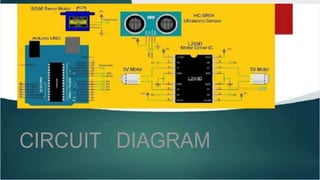
CIRCUIT DIAGRAM
Component Description
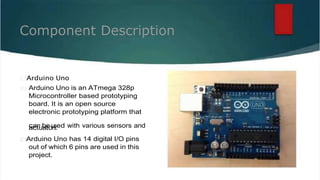
Arduino Uno
Arduino Uno is an ATmega 328p
Microcontroller based prototyping
board. It is an open source
electronic prototyping platform that
c
aa
cn
tub
ae
to
u
rs
s.ed with various sensors and
Arduino Uno has 14 digital I/O pins
out of which 6 pins are used in this
project.
Component Description
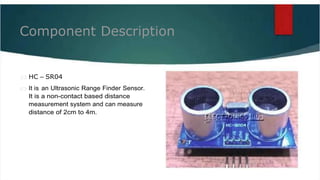
HC – SR04
It is an Ultrasonic Range Finder Sensor.
It is a non-contact based distance
measurement system and can measure
distance of 2cm to 4m.
Component
Description
L293D
It is a motor driver which can provide bi-
directional drive current for two motors.
Servo Motor
The Tower Pro SG90 is a simple Servo Motor
which can rotate 90 degrees in each
direction (approximately 180 degrees in
total).
Arduino is the main processing unit of the robot. Out of the 14
available digital I/O pins, 7 pins are used in this project design.
D
Oe
bs
sitg
an
clo
ef
Avoiding
Robot using
Arduino
The ultrasonic sensor has 4 pins: Vcc, Trig, Echo and Gnd. Vcc
and Gnd are connected to the +5v and GND pins of the
Arduino. Trig (Trigger) is connected to the 9th pin and Echo is
connected to 8th pin of the Arduino UNO respectively.
A Servo Motor is used to rotate the Ultrasonic Sensor to scan for
obstacles. It has three pins namely Control, VCC and GND. The
Servo Control Pin is connected to pin 11 of Arduino while the
VCC and GND are connected to +5V and GND.
L293D is a 16 pin IC. Pins 1 and 9 are the enable pins. These pins
are connected to +5V. Pins 2 and 7 are control inputs from
microcontroller for first motor. They are connected to pins 6 and
7 of Arduino respectively.
Similarly, pins 10 and 15 are control inputs from
microcontroller for second motor. They are connected to
pins 5 and 4 of Arduino. Pins 4, 5, 12 and 13 of L293D are
ground pins and are connected to Gnd.
D
Oe
bsitg
an
clo
ef
Avoiding
Robot using
Arduino
First motor (consider this as the motor for left wheel) is
connected across the pins 3 and 6 of L293D. The second
motor, which acts as the right wheel motor, is connected to
11 and 14 pins of L293D.
The 16th pin of L293D is Vcc1. This is connected to +5V. The
8th pins is Vcc2. This is the motor supply voltage. This can be
c
po
inn8
ne
ifc
L2
te
9d
3D
an
isy
c
w
oh
ne
nre
ec
b
ted
tw
to
ee
+
n
5V
4.7
su
V
p
a
p
n
ly
d
. 36V. In this project,
Motor Driver boards are available with on – board 5V
voltage regulator. A similar one is used in the project.
Before going to working of the project, it is important to
understand how the ultrasonic sensor works. The basic
principle behind the working of ultrasonic sensor is as follows:
Working
Using an external trigger signal, the Trig pin on ultrasonic
sensor is made logic high for at least 10µs. A sonic burst from
the transmitter module is sent. This consists of 8 pulses of
40KHz.
The signals return back after hitting a surface and the
receiver detects this signal. The Echo pin is high from the
c
t
t
c
im
on
e
vo
ef
rts
e
e
d
nd
to
ind
gistth
a
e
nc
sie
gn
u
a
siln
a
g
na
dp
re
pc
ro
e
p
iv
ria
ng
teitc
. a
Th
lc
isutlia
m
tie
on
cs
a
. n be
The aim of this project is to implement an obstacle avoiding
robot using ultrasonic sensor and Arduino. All the
connections are made as per the circuit diagram. The
working of the project is explained below.
When the robot is powered on, both the motors of the robot will
run normally and the robot moves forward. During this time, the
ultrasonic sensor continuously calculate the distance between the
robot and the reflective surface.
WORKING
This information is processed by the Arduino. If the distance
between the robot and the obstacle is less than 15cm, the Robot
stops and scans in left and right directions for new distance using
Servo Motor and Ultrasonic Sensor. If the distance towards the left
side is more than that of the right side, the robot will prepare for a
left turn. But first, it backs up a little bit and then activates the Left
Wheel Motor in reversed in direction.
Similarly, if the right distance is more than that of the left distance,
the Robot prepares right rotation. This process continues forever
and the robot keeps on moving without hitting any obstacle.
Obstacle avoiding robots can be used in
almost all mobile robot navigation systems.
They can be used for household work like
automatic vacuum cleaning.
They can also be used in dangerous
environments, where human penetration
could be fatal.
Applications
CODE
// forward - 3 and 6
// backward - 5 and 11
// ultrasonic - trig - 9 and echo - 10
const int TRIG_PIN = 9;
const int ECHO_PIN = 10;
void setup() {
Serial.begin(9600);
pinMode(TRIG_PIN,OUTPUT);
pinMode(ECHO_PIN,INPUT);
pinMode(3,OUTPUT);
pinMode(5,OUTPUT);
pinMode(6,OUTPUT);
pinMode(11,OUTPUT);
}
void loop()
{
long duration, dcm;//duration1, distanceCm1;
digitalWrite(TRIG_PIN, LOW);
CODE
delayMicroseconds(2);
digitalWrite(TRIG_PIN, HIGH);
delayMicroseconds(10);
digitalWrite(TRIG_PIN, LOW);
duration = pulseIn(ECHO_PIN,HIGH);
dcm = duration / 29.1 / 2 ;
Serial.print(dcm);
Serial.print("cm , ");
Serial.println();
if (dcm<30)
{
digitalWrite(3,HIGH);
digitalWrite(6,LOW);
digitalWrite(5,LOW);
digitalWrite(11,LOW);
delay(500);
digitalWrite(3,LOW);
digitalWrite(6,LOW);
digitalWrite(5,LOW);
digitalWrite(11,LOW);
}
else
{
digitalWrite(3,HIGH);
digitalWrite(6,HIGH);
digitalWrite(5,LOW);
digitalWrite(11,LOW);
}
delay(10);
}
CODE
www.instructables.com
www.electronicshub.org
nevonprojects.com
REFERENCES
https://tech.endeepak.com/blog/2016/01/02/simple-
obstacle-avoiding-robot-using-arduino/
http://www.instructables.com/id/Arduino-Ultimate-
Obstacle-Avoiding-Robot/
pdf-obstacle-avoiding-robot.docx

pdf-obstacle-avoiding-robot.docx

  • 1.
  • 2.
    GROUP MEMBER NISHANT KAMAL (15BEE0247) ABHINAVPRAKASH (15BEE0066) RAJEEV RANJAN (15BEE0078)
  • 3.
    HARDWARES AND SOFTWARES COMPONENTS REQUIRED 1.)Arduino Uno 2.)Ultrasonic RangeFinder Sensor – HC – SR04 3.)Motor Driver IC – L293D 4.)Servo Motor (Tower Pro SG90) 5.)Geared Motors x 2 6.)Robot Chassis 7.)Power Supply 8.)Keil µVision IDE 9.)MC Programming Language: Embedded C
  • 4.
  • 5.
    Component Description Arduino Uno ArduinoUno is an ATmega 328p Microcontroller based prototyping board. It is an open source electronic prototyping platform that c aa cn tub ae to u rs s.ed with various sensors and Arduino Uno has 14 digital I/O pins out of which 6 pins are used in this project.
  • 6.
    Component Description HC –SR04 It is an Ultrasonic Range Finder Sensor. It is a non-contact based distance measurement system and can measure distance of 2cm to 4m.
  • 7.
    Component Description L293D It is amotor driver which can provide bi- directional drive current for two motors. Servo Motor The Tower Pro SG90 is a simple Servo Motor which can rotate 90 degrees in each direction (approximately 180 degrees in total).
  • 8.
    Arduino is themain processing unit of the robot. Out of the 14 available digital I/O pins, 7 pins are used in this project design. D Oe bs sitg an clo ef Avoiding Robot using Arduino The ultrasonic sensor has 4 pins: Vcc, Trig, Echo and Gnd. Vcc and Gnd are connected to the +5v and GND pins of the Arduino. Trig (Trigger) is connected to the 9th pin and Echo is connected to 8th pin of the Arduino UNO respectively. A Servo Motor is used to rotate the Ultrasonic Sensor to scan for obstacles. It has three pins namely Control, VCC and GND. The Servo Control Pin is connected to pin 11 of Arduino while the VCC and GND are connected to +5V and GND. L293D is a 16 pin IC. Pins 1 and 9 are the enable pins. These pins are connected to +5V. Pins 2 and 7 are control inputs from microcontroller for first motor. They are connected to pins 6 and 7 of Arduino respectively.
  • 9.
    Similarly, pins 10and 15 are control inputs from microcontroller for second motor. They are connected to pins 5 and 4 of Arduino. Pins 4, 5, 12 and 13 of L293D are ground pins and are connected to Gnd. D Oe bsitg an clo ef Avoiding Robot using Arduino First motor (consider this as the motor for left wheel) is connected across the pins 3 and 6 of L293D. The second motor, which acts as the right wheel motor, is connected to 11 and 14 pins of L293D. The 16th pin of L293D is Vcc1. This is connected to +5V. The 8th pins is Vcc2. This is the motor supply voltage. This can be c po inn8 ne ifc L2 te 9d 3D an isy c w oh ne nre ec b ted tw to ee + n 5V 4.7 su V p a p n ly d . 36V. In this project, Motor Driver boards are available with on – board 5V voltage regulator. A similar one is used in the project.
  • 10.
    Before going toworking of the project, it is important to understand how the ultrasonic sensor works. The basic principle behind the working of ultrasonic sensor is as follows: Working Using an external trigger signal, the Trig pin on ultrasonic sensor is made logic high for at least 10µs. A sonic burst from the transmitter module is sent. This consists of 8 pulses of 40KHz. The signals return back after hitting a surface and the receiver detects this signal. The Echo pin is high from the c t t c im on e vo ef rts e e d nd to ind gistth a e nc sie gn u a siln a g na dp re pc ro e p iv ria ng teitc . a Th lc isutlia m tie on cs a . n be The aim of this project is to implement an obstacle avoiding robot using ultrasonic sensor and Arduino. All the connections are made as per the circuit diagram. The working of the project is explained below.
  • 11.
    When the robotis powered on, both the motors of the robot will run normally and the robot moves forward. During this time, the ultrasonic sensor continuously calculate the distance between the robot and the reflective surface. WORKING This information is processed by the Arduino. If the distance between the robot and the obstacle is less than 15cm, the Robot stops and scans in left and right directions for new distance using Servo Motor and Ultrasonic Sensor. If the distance towards the left side is more than that of the right side, the robot will prepare for a left turn. But first, it backs up a little bit and then activates the Left Wheel Motor in reversed in direction. Similarly, if the right distance is more than that of the left distance, the Robot prepares right rotation. This process continues forever and the robot keeps on moving without hitting any obstacle.
  • 12.
    Obstacle avoiding robotscan be used in almost all mobile robot navigation systems. They can be used for household work like automatic vacuum cleaning. They can also be used in dangerous environments, where human penetration could be fatal. Applications
  • 13.
    CODE // forward -3 and 6 // backward - 5 and 11 // ultrasonic - trig - 9 and echo - 10 const int TRIG_PIN = 9; const int ECHO_PIN = 10; void setup() { Serial.begin(9600); pinMode(TRIG_PIN,OUTPUT); pinMode(ECHO_PIN,INPUT); pinMode(3,OUTPUT); pinMode(5,OUTPUT); pinMode(6,OUTPUT); pinMode(11,OUTPUT); } void loop() { long duration, dcm;//duration1, distanceCm1;
  • 14.
    digitalWrite(TRIG_PIN, LOW); CODE delayMicroseconds(2); digitalWrite(TRIG_PIN, HIGH); delayMicroseconds(10); digitalWrite(TRIG_PIN,LOW); duration = pulseIn(ECHO_PIN,HIGH); dcm = duration / 29.1 / 2 ; Serial.print(dcm); Serial.print("cm , "); Serial.println(); if (dcm<30) { digitalWrite(3,HIGH); digitalWrite(6,LOW); digitalWrite(5,LOW); digitalWrite(11,LOW); delay(500); digitalWrite(3,LOW); digitalWrite(6,LOW); digitalWrite(5,LOW);
  • 15.
  • 16.