pcFinancial
A Performance Canvas product
Prescriptive
(what
actions
should be
taken)
Predictive
(What likely
to happen)
Forecasting
(What Might
Happen)
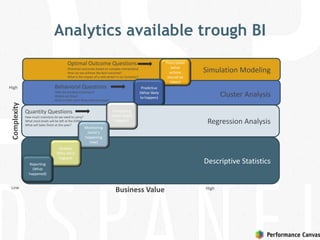
Analytics available trough BI
Monitoring
(what’s
happening
now)
Analysis
(Why did it
happen)
Complexity
Business Value High
High
Low
Reporting
(What
happened)
Descriptive Statistics
Simulation Modeling
Cluster Analysis
Regression Analysis
Optimal Outcome Questions
(Potential outcomes based on complex interactions)
How can we achieve the best outcome?
What is the impact of a cold winter in our business?
Quantity Questions
How much inventory do we need to carry?
What stock levels will be left at the EOM?
What will Sales finish at this year?
Behavioral Questions
Who are my best customers?
Where are they?
What is their most likely next purchase?
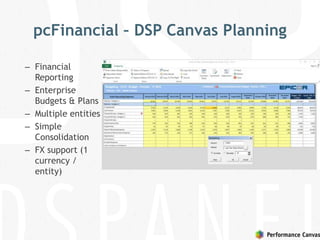
pcFinancial – DSP Canvas Planning
– Financial
Reporting
– Enterprise
Budgets & Plans
– Multiple entities
– Simple
Consolidation
– FX support (1
currency /
entity)
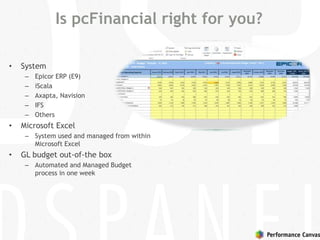
Is pcFinancial right for you?
• System
– Epicor ERP (E9)
– iScala
– Axapta, Navision
– IFS
– Others
• Microsoft Excel
– System used and managed from within
Microsoft Excel
• GL budget out-of-the box
– Automated and Managed Budget
process in one week
pcFinancial Structured Planning approach
• Robust Microsoft SQL Server storage
– One version of the Business Model and Data
– Focused and less complex Excel sheets
• Finance Users still use Microsoft Excel in its full glory!
– Leverage your Excel skills
– Limited training needs
– Empowers Finance and Business users
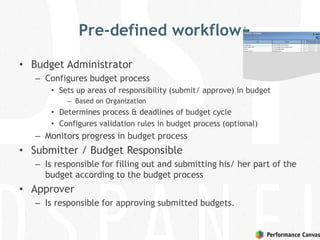
Pre-defined workflow
• Budget Administrator
– Configures budget process
• Sets up areas of responsibility (submit/ approve) in budget
– Based on Organization
• Determines process & deadlines of budget cycle
• Configures validation rules in budget process (optional)
– Monitors progress in budget process
• Submitter / Budget Responsible
– Is responsible for filling out and submitting his/ her part of the
budget according to the budget process
• Approver
– Is responsible for approving submitted budgets.
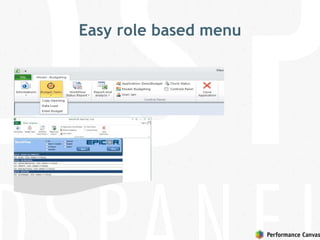
Easy role based menu
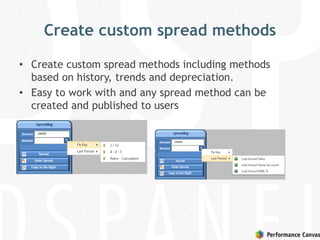
Create custom spread methods
• Create custom spread methods including methods
based on history, trends and depreciation.
• Easy to work with and any spread method can be
created and published to users
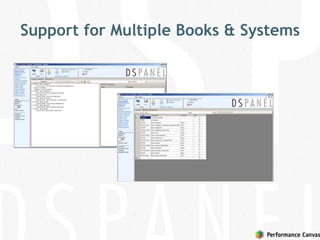
Support for Multiple Books & Systems
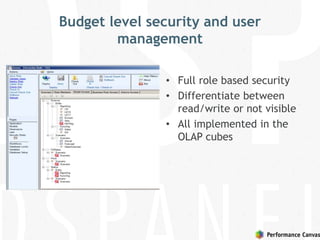
Budget level security and user
management
• Full role based security
• Differentiate between
read/write or not visible
• All implemented in the
OLAP cubes
pcFinancial Key Facts
•The DSP Financial Planning Difference
 Unified Budgeting…
 Spanning over multiple systems
 Multiple scenarios
 Multi-company and Multi-currency
 Using Microsoft Excel as the main tool
 Integrated Reporting
 The flexibility of…
 Using Microsoft SQL Server AS for high performance
queries
 Data and Model stored in robust server
 Unlimited upgrade path with EPM
 Mobile Use
 Advanced multi-model applications
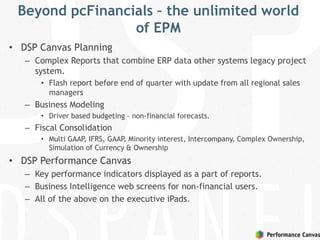
Beyond pcFinancials – the unlimited world
of EPM
• DSP Canvas Planning
– Complex Reports that combine ERP data other systems legacy project
system.
• Flash report before end of quarter with update from all regional sales
managers
– Business Modeling
• Driver based budgeting – non-financial forecasts.
– Fiscal Consolidation
• Multi GAAP, IFRS, GAAP, Minority interest, Intercompany, Complex Ownership,
Simulation of Currency & Ownership
• DSP Performance Canvas
– Key performance indicators displayed as a part of reports.
– Business Intelligence web screens for non-financial users.
– All of the above on the executive iPads.
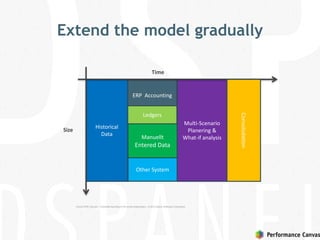
Extend the model gradually
ERP Accounting
Manuellt
Entered Data
Other System
Ledgers
Historical
Data
Multi-Scenario
Planering &
What-if analysis
Time
Size
Consolodation
Epicor EPM Canvas – Complete reporting to the whole organization, © 2012 Epicor Software Corporation.
Line of Business
Apps
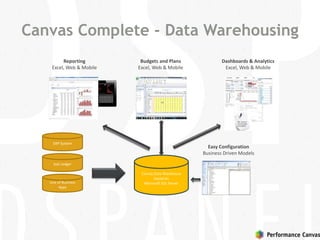
Canvas Complete - Data Warehousing
Canvas Data Warehouse
based on
Microsoft SQL Server
Sub Ledger
Budgets and Plans
Excel, Web & Mobile
Reporting
Excel, Web & Mobile
Dashboards & Analytics
Excel, Web & Mobile
Easy Configuration
Business Driven Models
ERP System
Reporting
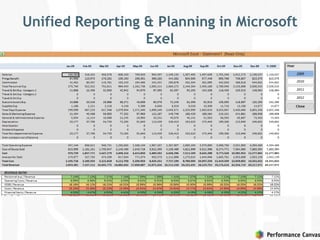
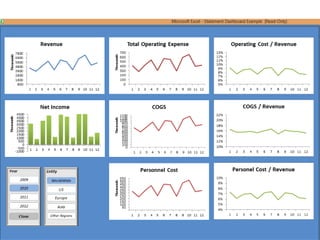
Unified Reporting & Planning in Microsoft
Exel
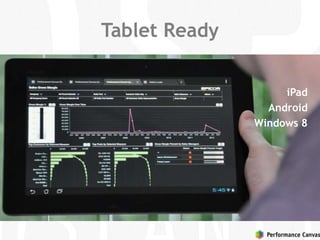
Tablet Ready
iPad
Android
Windows 8
Advanced Financials Performance
Management
• DSP Canvas Planning adds
– CAPEX planning
– AR/AP Analysis
– Profitability Analysis / Expense allocation
– Advanced Cashflow planning
– FX Analysis (multiple currencies / entity, transaction
currencies)
Sales Performance Management
• Sales Reporting & Planning
• Territory Planning
• Quota Management
• Incentive compensation
• Sales Forecasting
– Pipeline Analysis
Project Performance Management
• Project Analysis
– Progress Analysis
– Cost Analysis
– Quality Management
– Closure
• WIP Analysis and Reporting
• WBS – Work Breakdown Structure
• Project Forecasting
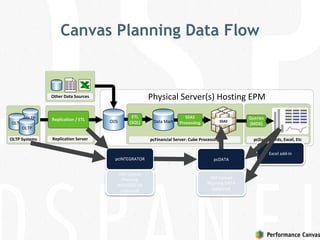
Canvas Planning Data Flow
Physical Server(s) Hosting EPM
OLTP
OLTP
OLTP
ODS
ETL
(SQL)
pcDashboards, Excel, EtcpcFinancial Server: Cube ProcessingOLTP Systems
Replication / ETL Data Mart SSAS
Queries
(MDX)
SSAS
Processing
Replication Server
Other Data Sources
pcINTEGRATOR pcDATA
DSP Canvas
Planning
INTEGRATOR
(optional)
DSP Canvas
Planning DATA
(optional)
Excel add-in
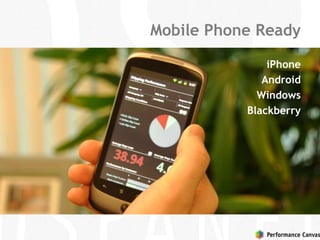
Mobile Phone Ready
iPhone
Android
Windows
Blackberry
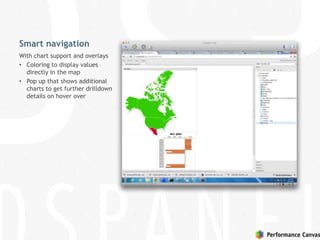
Smart navigation
With chart support and overlays
• Coloring to display values
directly in the map
• Pop up that shows additional
charts to get further drilldown
details on hover over
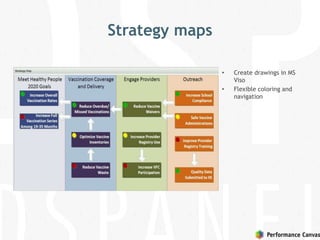
Strategy maps
• Create drawings in MS
Viso
• Flexible coloring and
navigation
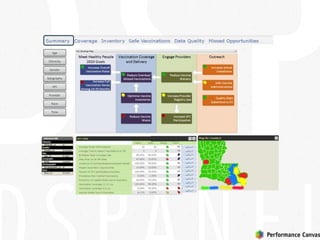
Smart Summary Page
Age
Ethnicity
Gender
Geography
Provider
Race
Time
KPI
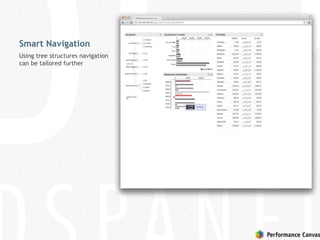
Smart Navigation
Using tree structures navigation
can be tailored further
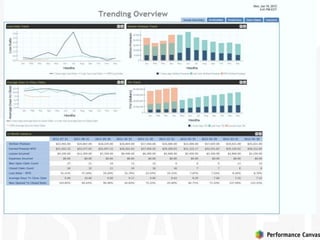
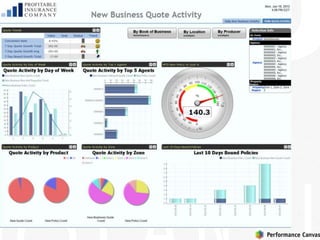
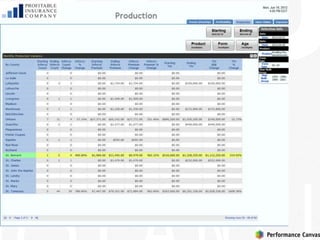
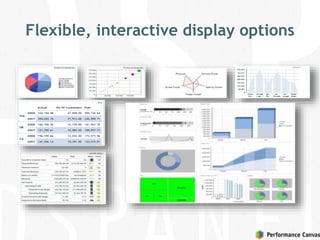
Flexible, interactive display options
AccessDataLayerApplication
Architecture
Performance canvas CanvasPlanning
ERP
Ipad
Desktop
browser
Smart
phon
e
ExcelPdf
Dashboard
Drilldown
Designing Graphs,
Dashboards
Sharepoint
Data
modelling
OLAP
OLAP
Integration
Custom
Excel
client
OLAP
OLAP
Relational
data sources
OLAP
OLAP
Tabular,
CSV/Excel
data
Data
editorial
MS SQL Server
various
OLAP sources
Analysis
Ad hoc querying One-click publish to all devices
Collaborative
Volume planning
Budget planning
What-if scenarios
in excel and online Scripting
Online
planning gems
Fine grained data
access controls
BI for your Business

BI for your Business

  • 1.
  • 2.
    Prescriptive (what actions should be taken) Predictive (What likely tohappen) Forecasting (What Might Happen) Analytics available trough BI Monitoring (what’s happening now) Analysis (Why did it happen) Complexity Business Value High High Low Reporting (What happened) Descriptive Statistics Simulation Modeling Cluster Analysis Regression Analysis Optimal Outcome Questions (Potential outcomes based on complex interactions) How can we achieve the best outcome? What is the impact of a cold winter in our business? Quantity Questions How much inventory do we need to carry? What stock levels will be left at the EOM? What will Sales finish at this year? Behavioral Questions Who are my best customers? Where are they? What is their most likely next purchase?
  • 3.
    pcFinancial – DSPCanvas Planning – Financial Reporting – Enterprise Budgets & Plans – Multiple entities – Simple Consolidation – FX support (1 currency / entity)
  • 4.
    Is pcFinancial rightfor you? • System – Epicor ERP (E9) – iScala – Axapta, Navision – IFS – Others • Microsoft Excel – System used and managed from within Microsoft Excel • GL budget out-of-the box – Automated and Managed Budget process in one week
  • 5.
    pcFinancial Structured Planningapproach • Robust Microsoft SQL Server storage – One version of the Business Model and Data – Focused and less complex Excel sheets • Finance Users still use Microsoft Excel in its full glory! – Leverage your Excel skills – Limited training needs – Empowers Finance and Business users
  • 6.
    Pre-defined workflow • BudgetAdministrator – Configures budget process • Sets up areas of responsibility (submit/ approve) in budget – Based on Organization • Determines process & deadlines of budget cycle • Configures validation rules in budget process (optional) – Monitors progress in budget process • Submitter / Budget Responsible – Is responsible for filling out and submitting his/ her part of the budget according to the budget process • Approver – Is responsible for approving submitted budgets.
  • 7.
  • 8.
    Create custom spreadmethods • Create custom spread methods including methods based on history, trends and depreciation. • Easy to work with and any spread method can be created and published to users
  • 9.
    Support for MultipleBooks & Systems
  • 10.
    Budget level securityand user management • Full role based security • Differentiate between read/write or not visible • All implemented in the OLAP cubes
  • 11.
    pcFinancial Key Facts •TheDSP Financial Planning Difference  Unified Budgeting…  Spanning over multiple systems  Multiple scenarios  Multi-company and Multi-currency  Using Microsoft Excel as the main tool  Integrated Reporting  The flexibility of…  Using Microsoft SQL Server AS for high performance queries  Data and Model stored in robust server  Unlimited upgrade path with EPM  Mobile Use  Advanced multi-model applications
  • 12.
    Beyond pcFinancials –the unlimited world of EPM • DSP Canvas Planning – Complex Reports that combine ERP data other systems legacy project system. • Flash report before end of quarter with update from all regional sales managers – Business Modeling • Driver based budgeting – non-financial forecasts. – Fiscal Consolidation • Multi GAAP, IFRS, GAAP, Minority interest, Intercompany, Complex Ownership, Simulation of Currency & Ownership • DSP Performance Canvas – Key performance indicators displayed as a part of reports. – Business Intelligence web screens for non-financial users. – All of the above on the executive iPads.
  • 13.
    Extend the modelgradually ERP Accounting Manuellt Entered Data Other System Ledgers Historical Data Multi-Scenario Planering & What-if analysis Time Size Consolodation Epicor EPM Canvas – Complete reporting to the whole organization, © 2012 Epicor Software Corporation.
  • 14.
    Line of Business Apps CanvasComplete - Data Warehousing Canvas Data Warehouse based on Microsoft SQL Server Sub Ledger Budgets and Plans Excel, Web & Mobile Reporting Excel, Web & Mobile Dashboards & Analytics Excel, Web & Mobile Easy Configuration Business Driven Models ERP System
  • 15.
  • 16.
    Unified Reporting &Planning in Microsoft Exel
  • 18.
  • 19.
    Advanced Financials Performance Management •DSP Canvas Planning adds – CAPEX planning – AR/AP Analysis – Profitability Analysis / Expense allocation – Advanced Cashflow planning – FX Analysis (multiple currencies / entity, transaction currencies)
  • 20.
    Sales Performance Management •Sales Reporting & Planning • Territory Planning • Quota Management • Incentive compensation • Sales Forecasting – Pipeline Analysis
  • 21.
    Project Performance Management •Project Analysis – Progress Analysis – Cost Analysis – Quality Management – Closure • WIP Analysis and Reporting • WBS – Work Breakdown Structure • Project Forecasting
  • 22.
    Canvas Planning DataFlow Physical Server(s) Hosting EPM OLTP OLTP OLTP ODS ETL (SQL) pcDashboards, Excel, EtcpcFinancial Server: Cube ProcessingOLTP Systems Replication / ETL Data Mart SSAS Queries (MDX) SSAS Processing Replication Server Other Data Sources pcINTEGRATOR pcDATA DSP Canvas Planning INTEGRATOR (optional) DSP Canvas Planning DATA (optional) Excel add-in
  • 23.
  • 25.
    Smart navigation With chartsupport and overlays • Coloring to display values directly in the map • Pop up that shows additional charts to get further drilldown details on hover over
  • 26.
    Strategy maps • Createdrawings in MS Viso • Flexible coloring and navigation
  • 27.
  • 31.
    Smart Navigation Using treestructures navigation can be tailored further
  • 32.
  • 33.
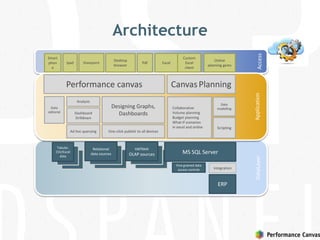
    AccessDataLayerApplication Architecture Performance canvas CanvasPlanning ERP Ipad Desktop browser Smart phon e ExcelPdf Dashboard Drilldown DesigningGraphs, Dashboards Sharepoint Data modelling OLAP OLAP Integration Custom Excel client OLAP OLAP Relational data sources OLAP OLAP Tabular, CSV/Excel data Data editorial MS SQL Server various OLAP sources Analysis Ad hoc querying One-click publish to all devices Collaborative Volume planning Budget planning What-if scenarios in excel and online Scripting Online planning gems Fine grained data access controls

Editor's Notes

  • #12 11
  • #32 Consistent slicers: Age Ethnicity Gender Geography Provider (EntityAdmin) Race Time Special slicer KPI Top horizontal menu bar: Drives navigation Left vertical menu bar: Slicers All slicers are supported by population data, except for KPI KPI slicer uses account to project figures onto MAP GEM Strategy map: - Should have a hyperlink attached to each goal, defined by STC KPI Table: Timeseries need to be resolved. STC agree to 12 periods, regardless of Time-level No selection to be enabled on KPI table Geo Map: - 3 levels with colors: -1 = RED 0 = YELLOW 1 = GREEN Drives Geography slicers by left-click menu Drill-down Drill-up Headline must show currently selected KPI, which is the current projection on MAP