Personal Computer Energy
Conservation
By Keith L. Phillips
Senior Engineer (Retired)
July 26, 2012
PC POWER USAGE
2
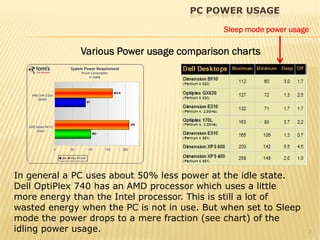
Various Power usage comparison charts
In general a PC uses about 50% less power at the idle state.
Dell OptiPlex 740 has an AMD processor which uses a little
more energy than the Intel processor. This is still a lot of
wasted energy when the PC is not in use. But when set to Sleep
mode the power drops to a mere fraction (see chart) of the
idling power usage.
Sleep mode power usage
MONITOR POWER USAGE
3
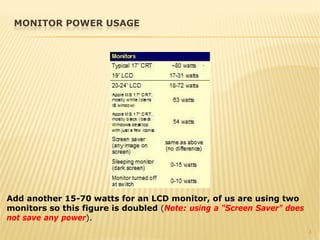
Add another 15-70 watts for an LCD monitor, of us are using two
monitors so this figure is doubled (Note: using a “Screen Saver” does
not save any power).
4
The savings in energy from one PC at idle power of (approximately 120
watts) to about 3 watts when the PC is in the Sleep mode this is
considerable. Note a screen saver does not save any additional power
over a PC at the idle state. If a PC was in Sleep mode during non-work
hours (12 hours) this would be approximately 1.4 kWh times by 365 days
which would equal 512 kW’s. The average cost per kilowatt hour was 11
cents in April 2008 across the United States. (A kilowatt hour is if a
kilowatt is being used continuously for one hour.) So for one PC the cost
savings per year would be $56, Now multiply that times the number of
PC’s company wide (for example 200 PC’s would equal $11,264 per year
in savings).
ENERGY SAVINGS
5
Consider that in 2010, the average annual electricity consumption for
a U.S. residential utility customer was 11,496 kWh, an average of 958
kilowatt-hours (kWh) per month. The energy saved from 200 PCs
could furnish 8.9 residential homes for a year.
OR
For every kWh of electricity produced there is an average of 2 lbs of
co2 put into the atmosphere from a coal fired power plant, for 200
PCs this mean 102 tons less of co2 released each year. There are also
many other waste byproducts which come from power production
which effect the environment.
TO PUT IT DIFFERENTLY
6
As you can see our PC’s do consume a lot of power weather we are
using them or not. To conserve on our PC power usage there are
several steps we can take. It will take a few steps to setup a PC in
Sleep mode, the next screens will take you through the actual setup
procedure.
CONFIGURING YOUR PC IN THE SLEEP MODE
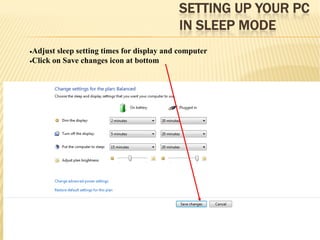
SETTING UP YOUR PC
IN SLEEP MODE
7
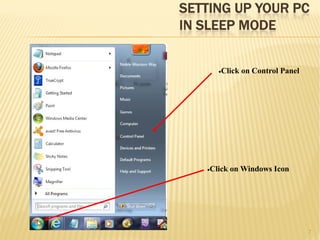
•Click on Windows Icon
•Click on Control Panel
SETTING UP YOUR PC
IN SLEEP MODE
8
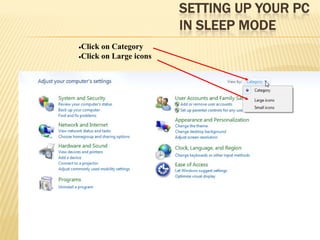
•Click on Category
•Click on Large icons
SETTING UP YOUR PC
IN SLEEP MODE
9
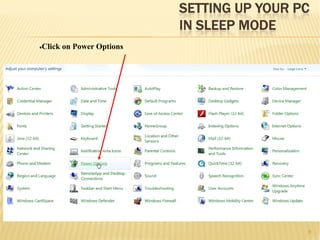
•Click on Power Options
SETTING UP YOUR PC
IN SLEEP MODE
10
•Adjust sleep setting times for display and computer
•Click on Save changes icon at bottom
11
Corporate networks occasionally need to update networked PCs
during off hours, this can be an issue if the PCs are in the Sleep
mode. But there are solutions to this, the network server will need to
send a wake message to the PCs before the update and after the PCs
are updated put the PCs back in the Sleep mode. This message
(believe it or not) is called a “Magic Packet” by the computer industry.
The IT shop can either write their own code (which is not difficult) or
there are commercially available software which can do this.
CORPORATE NETWORK UPDATES

Pc energy conservation meijer

  • 1.
    Personal Computer Energy Conservation ByKeith L. Phillips Senior Engineer (Retired) July 26, 2012
  • 2.
    PC POWER USAGE 2 VariousPower usage comparison charts In general a PC uses about 50% less power at the idle state. Dell OptiPlex 740 has an AMD processor which uses a little more energy than the Intel processor. This is still a lot of wasted energy when the PC is not in use. But when set to Sleep mode the power drops to a mere fraction (see chart) of the idling power usage. Sleep mode power usage
  • 3.
    MONITOR POWER USAGE 3 Addanother 15-70 watts for an LCD monitor, of us are using two monitors so this figure is doubled (Note: using a “Screen Saver” does not save any power).
  • 4.
    4 The savings inenergy from one PC at idle power of (approximately 120 watts) to about 3 watts when the PC is in the Sleep mode this is considerable. Note a screen saver does not save any additional power over a PC at the idle state. If a PC was in Sleep mode during non-work hours (12 hours) this would be approximately 1.4 kWh times by 365 days which would equal 512 kW’s. The average cost per kilowatt hour was 11 cents in April 2008 across the United States. (A kilowatt hour is if a kilowatt is being used continuously for one hour.) So for one PC the cost savings per year would be $56, Now multiply that times the number of PC’s company wide (for example 200 PC’s would equal $11,264 per year in savings). ENERGY SAVINGS
  • 5.
    5 Consider that in2010, the average annual electricity consumption for a U.S. residential utility customer was 11,496 kWh, an average of 958 kilowatt-hours (kWh) per month. The energy saved from 200 PCs could furnish 8.9 residential homes for a year. OR For every kWh of electricity produced there is an average of 2 lbs of co2 put into the atmosphere from a coal fired power plant, for 200 PCs this mean 102 tons less of co2 released each year. There are also many other waste byproducts which come from power production which effect the environment. TO PUT IT DIFFERENTLY
  • 6.
    6 As you cansee our PC’s do consume a lot of power weather we are using them or not. To conserve on our PC power usage there are several steps we can take. It will take a few steps to setup a PC in Sleep mode, the next screens will take you through the actual setup procedure. CONFIGURING YOUR PC IN THE SLEEP MODE
  • 7.
    SETTING UP YOURPC IN SLEEP MODE 7 •Click on Windows Icon •Click on Control Panel
  • 8.
    SETTING UP YOURPC IN SLEEP MODE 8 •Click on Category •Click on Large icons
  • 9.
    SETTING UP YOURPC IN SLEEP MODE 9 •Click on Power Options
  • 10.
    SETTING UP YOURPC IN SLEEP MODE 10 •Adjust sleep setting times for display and computer •Click on Save changes icon at bottom
  • 11.
    11 Corporate networks occasionallyneed to update networked PCs during off hours, this can be an issue if the PCs are in the Sleep mode. But there are solutions to this, the network server will need to send a wake message to the PCs before the update and after the PCs are updated put the PCs back in the Sleep mode. This message (believe it or not) is called a “Magic Packet” by the computer industry. The IT shop can either write their own code (which is not difficult) or there are commercially available software which can do this. CORPORATE NETWORK UPDATES