PASSWORD
MANAGEMENT SYSTEM
2023
Radhika Gupta (2100290110123)
Khusbhoo Chaturvedi (2100290110)
Nidhi (2100290110100)
The objective of this interface is to manage passwords
for different accounts on the internet. The user shall
be able to save all the username and passwords
information of the accounts he holds on the internet
using this application. These details shall be saved in
the database in encrypted format. This will help the
user to remember different usernames and
passwords for accounts on the internet. The user shall
be able to add account, edit and delete account using
the system. The user has to login to the system in
order to use this tool. It takes user login and
password. It allows user to change the password for
the tool being used. This interface is developed using
Visual Basic. The tool will allow the user to view all
the different accounts he holds in a list view on the
left screen. All the details related to the account like
the user name, password etc shall be displayed on the
right screen. The password is visible in encrypted
format. The user can unhide the password and view
the password details. The user can save any number
of account information using this tool.
Presentation Title 2
Objective
2023
The password management was done
manually. Users had to remember the list of
passwords for different accounts on the
internet. The user had to manually maintain
a list of all usernames and passwords. This
task was very tedious. In cases where privacy
for user accounts was required, it was
difficult to manually maintain this list of
passwords. The user had to save password
details list in some word format so that it will
help him to remember the username and
passwords for different accounts on the
internet.
Presentation Title 3
Existing System
2023
This is simple graphical user interface developed
using visual Basic. It allows the user to add account
information for different accounts he holdson the
internet. It basically stores the user name and
password details in an encrypted format in the
database. The encryption is managed by blowfish
algorithm. The user has to login to the system. It
checks for the validity of the user. The user shall be
able to add account. The user can add user name and
password details and save to the database. The list of
accounts held by the user is displayed on the left
screen. When the user selects the particular account
on the left panel, the details of the account gets
displayed on the right screen. The password shall be
displayed in encrypted format. Once the user selects
unhide option, he shall be able to view the password
on screen. The user can add any number of accounts
using this application. The encryption algorithm is
very robust and uses the symmetric key block cipher
which is very effective way of handling passwords.
Presentation Title 4
Proposed System
2023
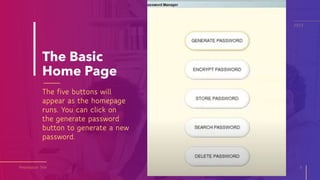
The Basic
Home Page
The five buttons will
appear as the homepage
runs. You can click on
the generate password
button to generate a new
password.
Presentation Title 5
2023
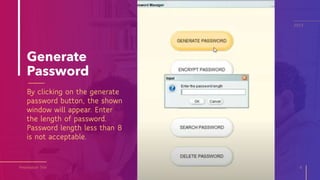
Generate
Password
By clicking on the generate
password button, the shown
window will appear. Enter
the length of password.
Password length less than 8
is not acceptable.
Presentation Title 6
2023
Generated
Password
This is the password
generated by the System.
Presentation Title 7
2023
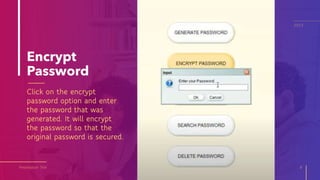
Encrypt
Password
Click on the encrypt
password option and enter
the password that was
generated. It will encrypt
the password so that the
original password is secured.
Presentation Title 8
2023
Encrypted
Password
Click on the encrypt
password option and enter
the password that was
generated. It will encrypt
the password so that the
original password is secured.
Presentation Title 9
2023
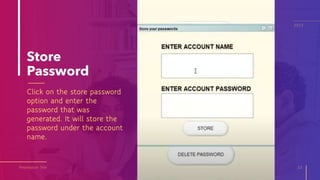
Store
Password
Click on the store password
option and enter the
password that was
generated. It will store the
password under the account
name.
Presentation Title 10
2023
Store
Password
Click on the store password
option and enter the
password that was
generated. It will store the
password under the account
name.
Presentation Title 11
2023
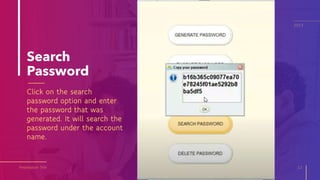
Search
Password
Click on the search
password option and enter
the password that was
generated. It will search the
password under the account
name.
Presentation Title 12
2023
Delete
Password
Click on the delete password
option and enter the
account name ehose
password needs to be
deleted. It will delete the
password under the account
name.
Presentation Title 13
2023
1. Less to Remember
It cuts down on the number of
passwords you need to remember.
This is because the master password
allows you access to the password
vault.
A password manager effectively
eliminates the need for you to
remember countless other passwords.
2. Increased Security
Passwords generated by a password
manager are also more secure. This is
particularly true if a user selects an
autogenerated password. The
combinations of letters and numbers
produced are virtually impossible to
guess.
Presentation Title 14
Benefits
2023
3. Access Your Passwords Anywhere
A password management service
stores your passwords on its network.
This means that no matter where in
the world you log into it from, you will
be able to access your passwords.
4. Protect You From Scams
Scams like phishing try to acquire your
personal info by sending fake emails
that look like they have been sent by a
legitimate person you know. A
password manager will recognize this.
It will also refuse to autocomplete the
necessary fields with your personal
information. You will then be alerted to
the scam, without losing any of your
personal information.
Presentation Title 15
Benefits
2023
THANK YOU!
2023

PASSWORD MANAGEMENT SYSTEM (1).pptx

  • 1.
    PASSWORD MANAGEMENT SYSTEM 2023 Radhika Gupta(2100290110123) Khusbhoo Chaturvedi (2100290110) Nidhi (2100290110100)
  • 2.
    The objective ofthis interface is to manage passwords for different accounts on the internet. The user shall be able to save all the username and passwords information of the accounts he holds on the internet using this application. These details shall be saved in the database in encrypted format. This will help the user to remember different usernames and passwords for accounts on the internet. The user shall be able to add account, edit and delete account using the system. The user has to login to the system in order to use this tool. It takes user login and password. It allows user to change the password for the tool being used. This interface is developed using Visual Basic. The tool will allow the user to view all the different accounts he holds in a list view on the left screen. All the details related to the account like the user name, password etc shall be displayed on the right screen. The password is visible in encrypted format. The user can unhide the password and view the password details. The user can save any number of account information using this tool. Presentation Title 2 Objective 2023
  • 3.
    The password managementwas done manually. Users had to remember the list of passwords for different accounts on the internet. The user had to manually maintain a list of all usernames and passwords. This task was very tedious. In cases where privacy for user accounts was required, it was difficult to manually maintain this list of passwords. The user had to save password details list in some word format so that it will help him to remember the username and passwords for different accounts on the internet. Presentation Title 3 Existing System 2023
  • 4.
    This is simplegraphical user interface developed using visual Basic. It allows the user to add account information for different accounts he holdson the internet. It basically stores the user name and password details in an encrypted format in the database. The encryption is managed by blowfish algorithm. The user has to login to the system. It checks for the validity of the user. The user shall be able to add account. The user can add user name and password details and save to the database. The list of accounts held by the user is displayed on the left screen. When the user selects the particular account on the left panel, the details of the account gets displayed on the right screen. The password shall be displayed in encrypted format. Once the user selects unhide option, he shall be able to view the password on screen. The user can add any number of accounts using this application. The encryption algorithm is very robust and uses the symmetric key block cipher which is very effective way of handling passwords. Presentation Title 4 Proposed System 2023
  • 5.
    The Basic Home Page Thefive buttons will appear as the homepage runs. You can click on the generate password button to generate a new password. Presentation Title 5 2023
  • 6.
    Generate Password By clicking onthe generate password button, the shown window will appear. Enter the length of password. Password length less than 8 is not acceptable. Presentation Title 6 2023
  • 7.
    Generated Password This is thepassword generated by the System. Presentation Title 7 2023
  • 8.
    Encrypt Password Click on theencrypt password option and enter the password that was generated. It will encrypt the password so that the original password is secured. Presentation Title 8 2023
  • 9.
    Encrypted Password Click on theencrypt password option and enter the password that was generated. It will encrypt the password so that the original password is secured. Presentation Title 9 2023
  • 10.
    Store Password Click on thestore password option and enter the password that was generated. It will store the password under the account name. Presentation Title 10 2023
  • 11.
    Store Password Click on thestore password option and enter the password that was generated. It will store the password under the account name. Presentation Title 11 2023
  • 12.
    Search Password Click on thesearch password option and enter the password that was generated. It will search the password under the account name. Presentation Title 12 2023
  • 13.
    Delete Password Click on thedelete password option and enter the account name ehose password needs to be deleted. It will delete the password under the account name. Presentation Title 13 2023
  • 14.
    1. Less toRemember It cuts down on the number of passwords you need to remember. This is because the master password allows you access to the password vault. A password manager effectively eliminates the need for you to remember countless other passwords. 2. Increased Security Passwords generated by a password manager are also more secure. This is particularly true if a user selects an autogenerated password. The combinations of letters and numbers produced are virtually impossible to guess. Presentation Title 14 Benefits 2023
  • 15.
    3. Access YourPasswords Anywhere A password management service stores your passwords on its network. This means that no matter where in the world you log into it from, you will be able to access your passwords. 4. Protect You From Scams Scams like phishing try to acquire your personal info by sending fake emails that look like they have been sent by a legitimate person you know. A password manager will recognize this. It will also refuse to autocomplete the necessary fields with your personal information. You will then be alerted to the scam, without losing any of your personal information. Presentation Title 15 Benefits 2023
  • 16.