1
| Copyright © 2015 Tata Consultancy Services Limited
Microsoft APS based EDW
Sustaining Strategic Growth
Implementing partitioning
2
Presented by: Leo Khaskin, Solution Architected
Agenda
 Use Case
 Best Practices
 Future State Architecture
 Live Demo
 Partitioning based process template
 Partition Switch Mechanics
 Compare Existing vs Test Environment
 Prototype Design
 Performance Statistics
 Considerations
 Benefits
 Scalability
 Process Control
 Maintainability
 Flexibility
 Next Step - Implementation
3
Presented by: Leo Khaskin, Solution Architected
Use Case
When EDW on APS platform becomes matured with hundreds of data flows
pumping data into thousands of tables, production teams often times observe
slowdown in query performance and queuing of SQL queries, which leads to
significant delays in data delivery.
If updates to fact table are not limited to any point in time in the the recommended
method is CTAS which creates new table implementing relevant business rules,
drops existing table and renames temp table into original name.
With significant number of records (1B +) and complex rules the query becomes
heavy and might take significant time, consuming much of the appliance
resources, this blocking other queries from execution.
Also, SSAS model, sourced from the fact table will require Full Process, which
consumes significant time.
When CTAS execution time becomes close to SLA - it's right time to evaluate
Partition Switch option.
4
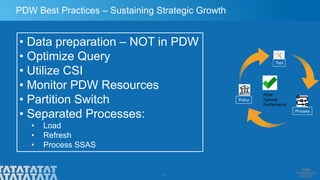
PDW Best Practices – Sustaining Strategic Growth
• Data preparation – NOT in PDW
• Optimize Query
• Utilize CSI
• Monitor PDW Resources
• Partition Switch
• Separated Processes:
• Load
• Refresh
• Process SSAS
Process
Policy
Tool
PDW
Optimal
Performance
5
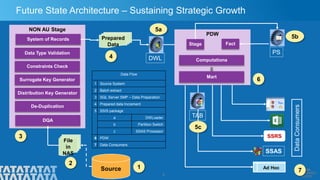
Future State Architecture – Sustaining Strategic Growth
Source
File
in
NAS
SSRS
1
2
3
7
Data Flow
1 Source System
2 Batch extract
3 SQL Server SMP – Data Preparation
4 Prepared data Increment
5 SSIS package
a DWLoader
b Partition Switch
c SSAS Processor
6 PDW
7 Data Consumers
Ad Hoc
DataConsumers
NON AU Stage
DQA
Data Type Validation
Constraints Check
Surrogate Key Generator
Distribution Key Generator
De-Duplication
System of Records Prepared
Data
4
5a
6
PDW
Computations
Mart
Stage Fact
SSAS
DWL
PS
TAB
5b
5c
6
Presented by: Leo Khaskin, Solution Architected
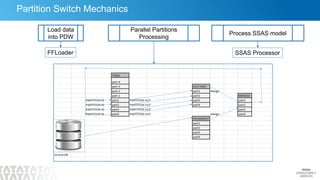
Partition Switch Mechanics
Load data
into PDW
FFLoader
Parallel Partitions
Processing
Process SSAS model
SSAS Processor
7
Presented by: Leo Khaskin, Solution Architected
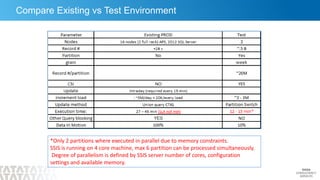
Compare Existing vs Test Environment
*Only 2 partitions where executed in parallel due to memory constraints.
SSIS is running on 4 core machine, max 6 partition can be processed simultaneously.
Degree of parallelism is defined by SSIS server number of cores, configuration
settings and available memory.
8
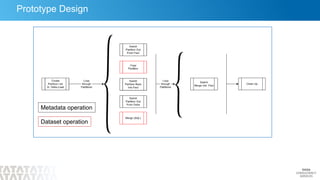
Prototype Design
Metadata operation
Dataset operation
Presented by: Leo Khaskin, Solution Architected
9
Presented by: Leo Khaskin, Solution Architected
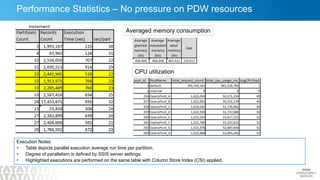
Performance Statistics – No pressure on PDW resources
Execution Notes:
 Table depicts parallel execution average run time per partition.
 Degree of parallelism is defined by SSIS server settings.
 Highlighted executions are performed on the same table with Column Store Index (CSI) applied.
Averaged memory consumption
CPU utilization
10
Presented by: Leo Khaskin, Solution Architected
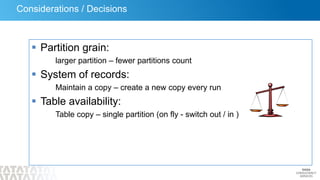
Considerations / Decisions
 Partition grain:
larger partition – fewer partitions count
 System of records:
Maintain a copy – create a new copy every run
 Table availability:
Table copy – single partition (on fly - switch out / in )
11
Presented by: Leo Khaskin, Solution Architected
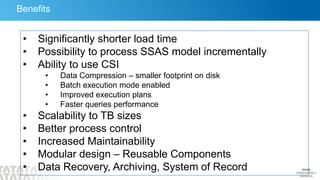
Benefits
• Significantly shorter load time
• Possibility to process SSAS model incrementally
• Ability to use CSI
• Data Compression – smaller footprint on disk
• Batch execution mode enabled
• Improved execution plans
• Faster queries performance
• Scalability to TB sizes
• Better process control
• Increased Maintainability
• Modular design – Reusable Components
• Data Recovery, Archiving, System of Record
12
Next Step - Implementation
 Environment
 Data
 Contact us for evaluation:
 Leo Khaskin, l.khaskin@tcs.com
 Huzeifa Nasir, huzeifa.nasir@tcs.com

Partition Switch based data loads

  • 1.
    1 | Copyright ©2015 Tata Consultancy Services Limited Microsoft APS based EDW Sustaining Strategic Growth Implementing partitioning
  • 2.
    2 Presented by: LeoKhaskin, Solution Architected Agenda  Use Case  Best Practices  Future State Architecture  Live Demo  Partitioning based process template  Partition Switch Mechanics  Compare Existing vs Test Environment  Prototype Design  Performance Statistics  Considerations  Benefits  Scalability  Process Control  Maintainability  Flexibility  Next Step - Implementation
  • 3.
    3 Presented by: LeoKhaskin, Solution Architected Use Case When EDW on APS platform becomes matured with hundreds of data flows pumping data into thousands of tables, production teams often times observe slowdown in query performance and queuing of SQL queries, which leads to significant delays in data delivery. If updates to fact table are not limited to any point in time in the the recommended method is CTAS which creates new table implementing relevant business rules, drops existing table and renames temp table into original name. With significant number of records (1B +) and complex rules the query becomes heavy and might take significant time, consuming much of the appliance resources, this blocking other queries from execution. Also, SSAS model, sourced from the fact table will require Full Process, which consumes significant time. When CTAS execution time becomes close to SLA - it's right time to evaluate Partition Switch option.
  • 4.
    4 PDW Best Practices– Sustaining Strategic Growth • Data preparation – NOT in PDW • Optimize Query • Utilize CSI • Monitor PDW Resources • Partition Switch • Separated Processes: • Load • Refresh • Process SSAS Process Policy Tool PDW Optimal Performance
  • 5.
    5 Future State Architecture– Sustaining Strategic Growth Source File in NAS SSRS 1 2 3 7 Data Flow 1 Source System 2 Batch extract 3 SQL Server SMP – Data Preparation 4 Prepared data Increment 5 SSIS package a DWLoader b Partition Switch c SSAS Processor 6 PDW 7 Data Consumers Ad Hoc DataConsumers NON AU Stage DQA Data Type Validation Constraints Check Surrogate Key Generator Distribution Key Generator De-Duplication System of Records Prepared Data 4 5a 6 PDW Computations Mart Stage Fact SSAS DWL PS TAB 5b 5c
  • 6.
    6 Presented by: LeoKhaskin, Solution Architected Partition Switch Mechanics Load data into PDW FFLoader Parallel Partitions Processing Process SSAS model SSAS Processor
  • 7.
    7 Presented by: LeoKhaskin, Solution Architected Compare Existing vs Test Environment *Only 2 partitions where executed in parallel due to memory constraints. SSIS is running on 4 core machine, max 6 partition can be processed simultaneously. Degree of parallelism is defined by SSIS server number of cores, configuration settings and available memory.
  • 8.
    8 Prototype Design Metadata operation Datasetoperation Presented by: Leo Khaskin, Solution Architected
  • 9.
    9 Presented by: LeoKhaskin, Solution Architected Performance Statistics – No pressure on PDW resources Execution Notes:  Table depicts parallel execution average run time per partition.  Degree of parallelism is defined by SSIS server settings.  Highlighted executions are performed on the same table with Column Store Index (CSI) applied. Averaged memory consumption CPU utilization
  • 10.
    10 Presented by: LeoKhaskin, Solution Architected Considerations / Decisions  Partition grain: larger partition – fewer partitions count  System of records: Maintain a copy – create a new copy every run  Table availability: Table copy – single partition (on fly - switch out / in )
  • 11.
    11 Presented by: LeoKhaskin, Solution Architected Benefits • Significantly shorter load time • Possibility to process SSAS model incrementally • Ability to use CSI • Data Compression – smaller footprint on disk • Batch execution mode enabled • Improved execution plans • Faster queries performance • Scalability to TB sizes • Better process control • Increased Maintainability • Modular design – Reusable Components • Data Recovery, Archiving, System of Record
  • 12.
    12 Next Step -Implementation  Environment  Data  Contact us for evaluation:  Leo Khaskin, l.khaskin@tcs.com  Huzeifa Nasir, huzeifa.nasir@tcs.com