Creating a  Parent Connection Account
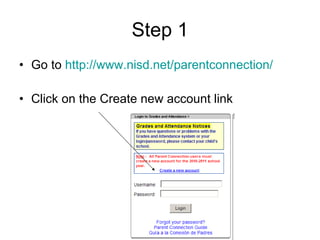
Step 1 Go to  http://www.nisd.net/parentconnection/ Click on the Create new account link
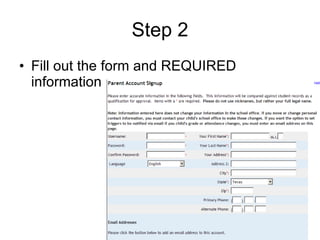
Step 2 Fill out the form and REQUIRED information
Step 3 Scroll down and add an email  (optional) Check mark the “I agree to the terms” box Click the sign up link. An email is ONLY needed if you want to set up email triggers for your student.
Step 4 Click the Manage Student link
Step 5 Click the Add Students button
Step 6 Enter your student’s ID# (school ID) Select the campus Enter student pin: first four of last name and last four of social security # (Your student should know this information.) Click submit when you finish
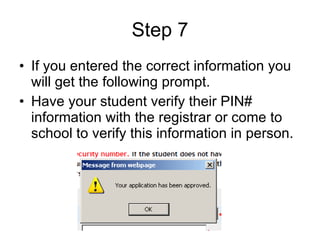
Step 7 If you entered the correct information you will get the following prompt. Have your student verify their PIN# information with the registrar or come to school to verify this information in person.
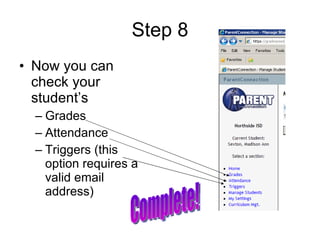
Step 8 Now you can check your student’s  Grades Attendance Triggers (this option requires a valid email address) Complete!

Parent connection account

  • 1.
    Creating a Parent Connection Account
  • 2.
    Step 1 Goto http://www.nisd.net/parentconnection/ Click on the Create new account link
  • 3.
    Step 2 Fillout the form and REQUIRED information
  • 4.
    Step 3 Scrolldown and add an email (optional) Check mark the “I agree to the terms” box Click the sign up link. An email is ONLY needed if you want to set up email triggers for your student.
  • 5.
    Step 4 Clickthe Manage Student link
  • 6.
    Step 5 Clickthe Add Students button
  • 7.
    Step 6 Enteryour student’s ID# (school ID) Select the campus Enter student pin: first four of last name and last four of social security # (Your student should know this information.) Click submit when you finish
  • 8.
    Step 7 Ifyou entered the correct information you will get the following prompt. Have your student verify their PIN# information with the registrar or come to school to verify this information in person.
  • 9.
    Step 8 Nowyou can check your student’s Grades Attendance Triggers (this option requires a valid email address) Complete!