Parallel builds in Eclipse IDE Workspace
Value, making-of and optimal usages
Mickael Istria - @mickaelistria CC0 – No rights reserved
Advertisement: OpenShift.io
Parallel builds in Eclipse IDE Workspace
Value, making-of and optimal usages
Mickael Istria - @mickaelistria CC0 – No rights reserved
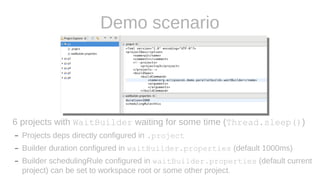
Demo scenario
6 projects with WaitBuilder waiting for some time (Thread.sleep())
– Projects deps directly configured in .project
– Builder duration configured in waitBuilder.properties (default 1000ms)
– Builder schedulingRule configured in waitBuilder.properties (default current
project) can be set to workspace root or some other project.
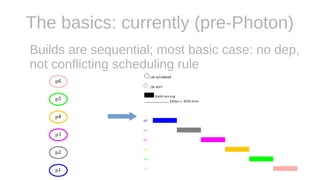
The basics: currently (pre-Photon)
Builds are sequential; most basic case: no dep,
not conflicting scheduling rule
The basics: Parallelizing
● Create 1 job per build
● Throttle on limited amount of
threads using JobGroup API
● Preference used by ”legacy”
Workspace.build() API
● Default in Photon is
disabled (value == 1)
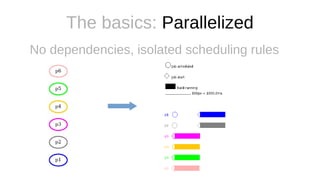
The basics: Parallelized
No dependencies, isolated scheduling rules
The basics: Benefits
● Shorter full time to completion (& less energy
consumed)
● Faster availability of each project
– A long project build doesn’t block for too long
– If you have handlers on project builds completion,
they’re called way earlier
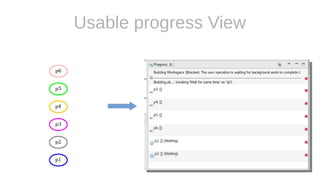
Usable progress View
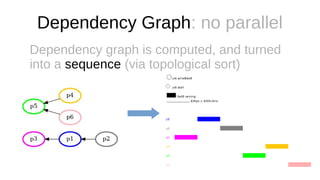
Dependency Graph: no parallel
Dependency graph is computed, and turned
into a sequence (via topological sort)
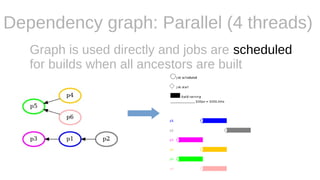
Dependency graph: Parallel (4 threads)
Graph is used directly and jobs are scheduled
for builds when all ancestors are built
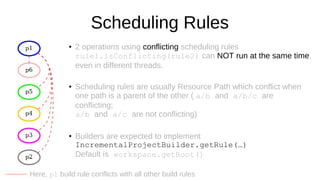
Scheduling Rules
● 2 operations using conflicting scheduling rules
rule1.isConflicting(rule2) can NOT run at the same time,
even in different threads.
●
Scheduling rules are usually Resource Path which conflict when
one path is a parent of the other ( a/b and a/b/c are
conflicting;
a/b and a/c are not conflicting)
●
Builders are expected to implement
IncrementalProjectBuilder.getRule(…)
Default is workspace.getRoot()
Here, p1 build rule conflicts with all other build rules
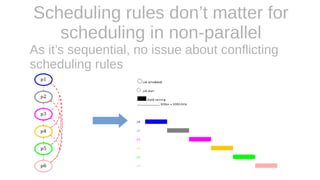
Scheduling rules don’t matter for
scheduling in non-parallel
As it’s sequential, no issue about conflicting
scheduling rules
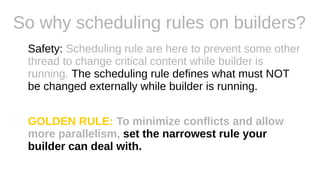
So why scheduling rules on builders?
Safety: Scheduling rule are here to prevent some other
thread to change critical content while builder is
running. The scheduling rule defines what must NOT
be changed externally while builder is running.
GOLDEN RULE: To minimize conflicts and allow
more parallelism, set the narrowest rule your
builder can deal with.
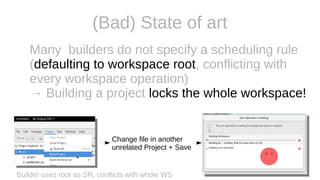
(Bad) State of art
Many builders do not specify a scheduling rule
(defaulting to workspace root, conflicting with
every workspace operation)
→ Building a project locks the whole workspace!
Builder uses root as SR, conflicts with whole WS
Change file in another
unrelated Project + Save
(Bad) examples
● JDT Builder https://bugs.eclipse.org/bugs/show_bug.cgi?id=531554
● PDE Builder https://bugs.eclipse.org/bugs/show_bug.cgi?id=531555
● M2E Builder
…
Use default workspace scheduling rule,
preventing parallel execution and blocking user
actions in unrelated files!
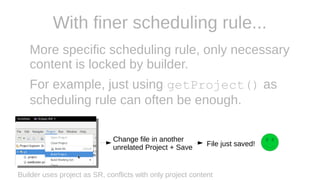
With finer scheduling rule...
More specific scheduling rule, only necessary
content is locked by builder.
For example, just using getProject() as
scheduling rule can often be enough.
Builder uses project as SR, conflicts with only project content
Change file in another
unrelated Project + Save File just saved!
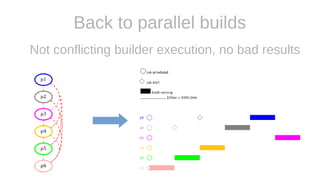
Back to parallel builds
Not conflicting builder execution, no bad results
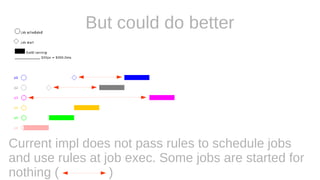
Current impl does not pass rules to schedule jobs
and use rules at job exec. Some jobs are started for
nothing ( )
But could do better
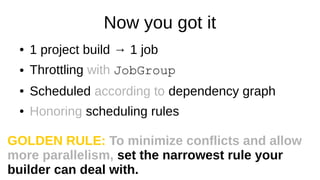
Now you got it
● 1 project build → 1 job
● Throttling with JobGroup
● Scheduled according to dependency graph
● Honoring scheduling rules
GOLDEN RULE: To minimize conflicts and allow
more parallelism, set the narrowest rule your
builder can deal with.
Highlighted cases
● Long build chain vs standalone projet
● Depedency cycles
● 1 project builder uses workspace root as
scheduling rule
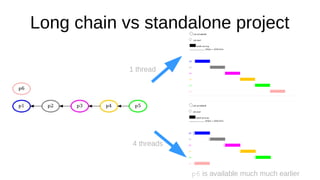
Long chain vs standalone project
1 thread
4 threads
p6 is available much much earlier
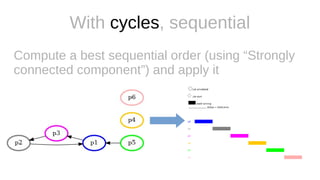
With cycles, sequential
Compute a best sequential order (using “Strongly
connected component”) and apply it
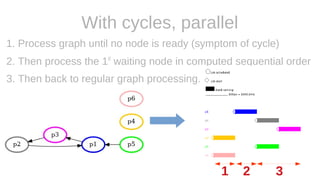
With cycles, parallel
1. Process graph until no node is ready (symptom of cycle)
2. Then process the 1st
waiting node in computed sequential order
3. Then back to regular graph processing.
1 2 3
Workspace root scheduling rule
● For backward compatibility, if any builder use workspace
root scheduling rule, disable parallel builds (as the
scheduler will use this rule in its thread)
● Anyway, workspace root would conflict with about
everything…
● So most builders currently prevents parallel builds
GOLDEN RULE:
To minimize conflicts and allow more parallelism,
set the narrowest rule your builder can deal with.
Case studies
1. dotnet build builder
2. JavaBuilder (JDT)
Case Study #1
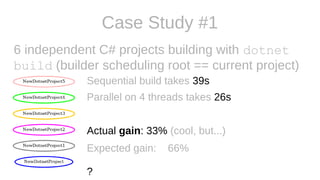
6 independent C# projects building with dotnet
build (builder scheduling root == current project)
Sequential build takes 39s
Parallel on 4 threads takes 26s
Actual gain: 33% (cool, but...)
Expected gain: 66%
?
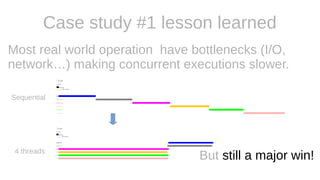
Case study #1 lesson learned
Most real world operation have bottlenecks (I/O,
network…) making concurrent executions slower.
Sequential
4 threads
But still a major win!
Case study #2: JDT
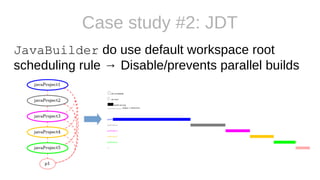
JavaBuilder do use default workspace root
scheduling rule → Disable/prevents parallel builds
GOLDEN RULE:
To minimize conflicts and allow more parallelism,
set the narrowest rule your builder can deal with.
Case study #2: JavaBuilder’s scheduling rule
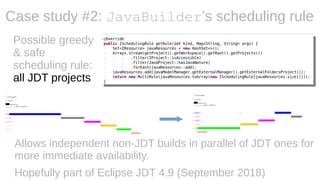
Allows independent non-JDT builds in parallel of JDT ones for
more immediate availability.
Hopefully part of Eclipse JDT 4.9 (September 2018)
Possible greedy
& safe
scheduling rule:
all JDT projects
Finding the minimal scheduling rule (ie apply the GOLDEN
RULE) would require a thourough analysis of JavaBuilder.
– What can be done in parallel?
– What needs to be synchronized and how?
– ...
Probably very worth the effort as it’d speed up build in IDE and
JDT.LS, but maybe not if there are major bottlenecks...
Case study #2: JavaBuilder’s scheduling rule
Many builders similar to JDT
All the same issues and possible improvements
applies to other parts of the IDE (PDE, m2e,
WTP, PDT...)
Mickael Istria - @mickaelistria CC0 – No rights reserved
And remember GOLDEN RULE:
To minimize conflicts and allow more parallelism,
set the narrowest rule your builder can deal with.
Questions?

Parallel builds in Eclipse IDE workspace

  • 1.
    Parallel builds inEclipse IDE Workspace Value, making-of and optimal usages Mickael Istria - @mickaelistria CC0 – No rights reserved
  • 2.
  • 3.
    Parallel builds inEclipse IDE Workspace Value, making-of and optimal usages Mickael Istria - @mickaelistria CC0 – No rights reserved
  • 4.
    Demo scenario 6 projectswith WaitBuilder waiting for some time (Thread.sleep()) – Projects deps directly configured in .project – Builder duration configured in waitBuilder.properties (default 1000ms) – Builder schedulingRule configured in waitBuilder.properties (default current project) can be set to workspace root or some other project.
  • 5.
    The basics: currently(pre-Photon) Builds are sequential; most basic case: no dep, not conflicting scheduling rule
  • 6.
    The basics: Parallelizing ●Create 1 job per build ● Throttle on limited amount of threads using JobGroup API ● Preference used by ”legacy” Workspace.build() API ● Default in Photon is disabled (value == 1)
  • 7.
    The basics: Parallelized Nodependencies, isolated scheduling rules
  • 8.
    The basics: Benefits ●Shorter full time to completion (& less energy consumed) ● Faster availability of each project – A long project build doesn’t block for too long – If you have handlers on project builds completion, they’re called way earlier
  • 9.
  • 10.
    Dependency Graph: noparallel Dependency graph is computed, and turned into a sequence (via topological sort)
  • 11.
    Dependency graph: Parallel(4 threads) Graph is used directly and jobs are scheduled for builds when all ancestors are built
  • 12.
    Scheduling Rules ● 2operations using conflicting scheduling rules rule1.isConflicting(rule2) can NOT run at the same time, even in different threads. ● Scheduling rules are usually Resource Path which conflict when one path is a parent of the other ( a/b and a/b/c are conflicting; a/b and a/c are not conflicting) ● Builders are expected to implement IncrementalProjectBuilder.getRule(…) Default is workspace.getRoot() Here, p1 build rule conflicts with all other build rules
  • 13.
    Scheduling rules don’tmatter for scheduling in non-parallel As it’s sequential, no issue about conflicting scheduling rules
  • 14.
    So why schedulingrules on builders? Safety: Scheduling rule are here to prevent some other thread to change critical content while builder is running. The scheduling rule defines what must NOT be changed externally while builder is running. GOLDEN RULE: To minimize conflicts and allow more parallelism, set the narrowest rule your builder can deal with.
  • 15.
    (Bad) State ofart Many builders do not specify a scheduling rule (defaulting to workspace root, conflicting with every workspace operation) → Building a project locks the whole workspace! Builder uses root as SR, conflicts with whole WS Change file in another unrelated Project + Save
  • 16.
    (Bad) examples ● JDTBuilder https://bugs.eclipse.org/bugs/show_bug.cgi?id=531554 ● PDE Builder https://bugs.eclipse.org/bugs/show_bug.cgi?id=531555 ● M2E Builder … Use default workspace scheduling rule, preventing parallel execution and blocking user actions in unrelated files!
  • 17.
    With finer schedulingrule... More specific scheduling rule, only necessary content is locked by builder. For example, just using getProject() as scheduling rule can often be enough. Builder uses project as SR, conflicts with only project content Change file in another unrelated Project + Save File just saved!
  • 18.
    Back to parallelbuilds Not conflicting builder execution, no bad results
  • 19.
    Current impl doesnot pass rules to schedule jobs and use rules at job exec. Some jobs are started for nothing ( ) But could do better
  • 20.
    Now you gotit ● 1 project build → 1 job ● Throttling with JobGroup ● Scheduled according to dependency graph ● Honoring scheduling rules GOLDEN RULE: To minimize conflicts and allow more parallelism, set the narrowest rule your builder can deal with.
  • 21.
    Highlighted cases ● Longbuild chain vs standalone projet ● Depedency cycles ● 1 project builder uses workspace root as scheduling rule
  • 22.
    Long chain vsstandalone project 1 thread 4 threads p6 is available much much earlier
  • 23.
    With cycles, sequential Computea best sequential order (using “Strongly connected component”) and apply it
  • 24.
    With cycles, parallel 1.Process graph until no node is ready (symptom of cycle) 2. Then process the 1st waiting node in computed sequential order 3. Then back to regular graph processing. 1 2 3
  • 25.
    Workspace root schedulingrule ● For backward compatibility, if any builder use workspace root scheduling rule, disable parallel builds (as the scheduler will use this rule in its thread) ● Anyway, workspace root would conflict with about everything… ● So most builders currently prevents parallel builds
  • 26.
    GOLDEN RULE: To minimizeconflicts and allow more parallelism, set the narrowest rule your builder can deal with.
  • 27.
    Case studies 1. dotnetbuild builder 2. JavaBuilder (JDT)
  • 28.
    Case Study #1 6independent C# projects building with dotnet build (builder scheduling root == current project) Sequential build takes 39s Parallel on 4 threads takes 26s Actual gain: 33% (cool, but...) Expected gain: 66% ?
  • 29.
    Case study #1lesson learned Most real world operation have bottlenecks (I/O, network…) making concurrent executions slower. Sequential 4 threads But still a major win!
  • 30.
    Case study #2:JDT JavaBuilder do use default workspace root scheduling rule → Disable/prevents parallel builds
  • 31.
    GOLDEN RULE: To minimizeconflicts and allow more parallelism, set the narrowest rule your builder can deal with.
  • 32.
    Case study #2:JavaBuilder’s scheduling rule Allows independent non-JDT builds in parallel of JDT ones for more immediate availability. Hopefully part of Eclipse JDT 4.9 (September 2018) Possible greedy & safe scheduling rule: all JDT projects
  • 33.
    Finding the minimalscheduling rule (ie apply the GOLDEN RULE) would require a thourough analysis of JavaBuilder. – What can be done in parallel? – What needs to be synchronized and how? – ... Probably very worth the effort as it’d speed up build in IDE and JDT.LS, but maybe not if there are major bottlenecks... Case study #2: JavaBuilder’s scheduling rule
  • 34.
    Many builders similarto JDT All the same issues and possible improvements applies to other parts of the IDE (PDE, m2e, WTP, PDT...)
  • 35.
    Mickael Istria -@mickaelistria CC0 – No rights reserved And remember GOLDEN RULE: To minimize conflicts and allow more parallelism, set the narrowest rule your builder can deal with. Questions?

Editor's Notes

  • #2 Pre-reqs: Eclipse IDE workspace with org.eclipsecon.editor in it open Build Jobs == 1 Project Explorer + (empty) editor area + progress view JDT tweaked to enable graphical report
  • #3 Go to our booth