How Google’s
“Page Experience Update”
Impacts Your Website’s SEO
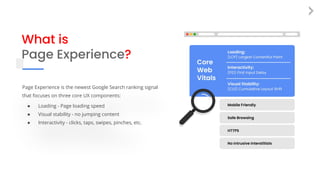
What is
Page Experience?
Page Experience is the newest Google Search ranking signal
that focuses on three core UX components:
● Loading - Page loading speed
● Visual stability - no jumping content
● Interactivity - clicks, taps, swipes, pinches, etc.
Why Does Google Care?
● User experience has become a true Google priority
● Google wants SERPs to only show the best websites that
can answer the search query
● Google must look at factors beyond content to differentiate
the top-ranked sites for competitive keywords
● Google wants recommended sites to perform well for
visitors that may have low bandwidth due to poor
connectivity or aging broadband networks
CrUX Logo
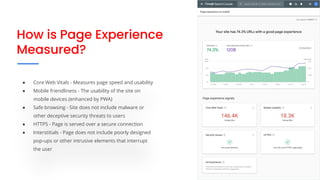
How is Page Experience
Measured?
● Core Web Vitals - Measures page speed and usability
● Mobile friendliness - The usability of the site on
mobile devices (enhanced by PWA)
● Safe browsing - Site does not include malware or
other deceptive security threats to users
● HTTPS - Page is served over a secure connection
● Interstitials - Page does not include poorly designed
pop-ups or other intrusive elements that interrupt
the user
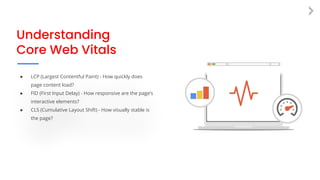
Understanding
Core Web Vitals
● LCP (Largest Contentful Paint) - How quickly does
page content load?
● FID (First Input Delay) - How responsive are the page’s
interactive elements?
● CLS (Cumulative Layout Shift) - How visually stable is
the page?
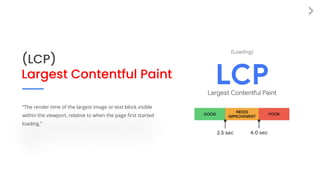
(LCP)
Largest Contentful Paint
“The render time of the largest image or text block visible
within the viewport, relative to when the page first started
loading.”
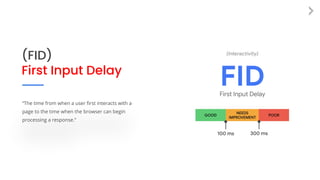
(FID)
First Input Delay
“The time from when a user first interacts with a
page to the time when the browser can begin
processing a response.”
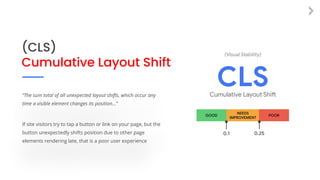
(CLS)
Cumulative Layout Shift
“The sum total of all unexpected layout shifts, which occur any
time a visible element changes its position...”
If site visitors try to tap a button or link on your page, but the
button unexpectedly shifts position due to other page
elements rendering late, that is a poor user experience
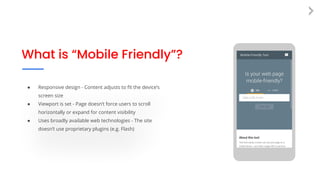
What is “Mobile Friendly”?
● Responsive design - Content adjusts to fit the device’s
screen size
● Viewport is set - Page doesn’t force users to scroll
horizontally or expand for content visibility
● Uses broadly available web technologies - The site
doesn’t use proprietary plugins (e.g. Flash)
Steps You Can Take
to Avoid Losing
Search Rankings
● Conduct a website audit
● Train your developers to build sites according to
Google benchmarks
● Make your website accessible
● Speak with an SEO agency or consultant
Free Tools for
Measuring & Monitoring
Page Experience
Lighthouse Audit
PageSpeed Insights
Google Search Console
Lighthouse Audit Tool
● Easy to test from Chrome browser window
● Returns scores for
● Performance (speed)
● Best Practices (security)
● SEO
● Accessibility
● PWA (if developed as Progressive Web App)
PageSpeed Insights
● For non-technical folks - Gets quick Core Web Vitals
scores for pages
● For developers - Gets detailed reporting on what
page elements might be hurting scores
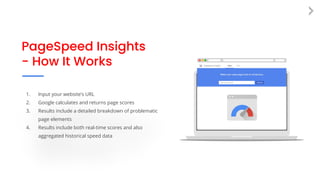
PageSpeed Insights
- How It Works
1. Input your website’s URL
2. Google calculates and returns page scores
3. Results include a detailed breakdown of problematic
page elements
4. Results include both real-time scores and also
aggregated historical speed data
Google Search Console
● Tool for managing website presence on Google
● Page Experience report shows percentage of site
pages that meet Google thresholds
● Core Web Vitals report scores all website pages
(mobile and desktop versions):
○ Good
○ Needs Improvement
○ Poor
Four Big Takeaways
1. Page Experience is a major update–it may go down as the
biggest Google Search update in years.
2. User experience has become more important than ever for
optimal Google Search performance–especially for mobile sites.
3. Core Web Vitals signal Google’s intent to prioritize a variety of
user-centric page experience metrics moving forward.
4. Website owners need deep web development expertise to
achieve Google’s latest performance benchmarks.
www.dbsinteractive.com
Read More on Our Blog
● Go in-depth on Core Web Vitals
● Get more details about Google updates
● Read more on what “mobile-first” really means
● Connect with us about our Technical SEO services
www.dbsinteractive.com/blog/google-page-experience-seo
Sources
● https://developers.google.com/search/docs/guides/page-experience
● https://developers.google.com/search/blog/2021/04/more-details-page-experience
● https://developers.google.com/search/blog/2020/11/timing-for-page-experience
● https://developers.google.com/search/blog/2020/05/evaluating-page-experience
● https://web.dev/vitals/

Page Experience: Google's New Search Algorithm Update

  • 1.
    How Google’s “Page ExperienceUpdate” Impacts Your Website’s SEO
  • 2.
    What is Page Experience? PageExperience is the newest Google Search ranking signal that focuses on three core UX components: ● Loading - Page loading speed ● Visual stability - no jumping content ● Interactivity - clicks, taps, swipes, pinches, etc.
  • 3.
    Why Does GoogleCare? ● User experience has become a true Google priority ● Google wants SERPs to only show the best websites that can answer the search query ● Google must look at factors beyond content to differentiate the top-ranked sites for competitive keywords ● Google wants recommended sites to perform well for visitors that may have low bandwidth due to poor connectivity or aging broadband networks CrUX Logo
  • 4.
    How is PageExperience Measured? ● Core Web Vitals - Measures page speed and usability ● Mobile friendliness - The usability of the site on mobile devices (enhanced by PWA) ● Safe browsing - Site does not include malware or other deceptive security threats to users ● HTTPS - Page is served over a secure connection ● Interstitials - Page does not include poorly designed pop-ups or other intrusive elements that interrupt the user
  • 5.
    Understanding Core Web Vitals ●LCP (Largest Contentful Paint) - How quickly does page content load? ● FID (First Input Delay) - How responsive are the page’s interactive elements? ● CLS (Cumulative Layout Shift) - How visually stable is the page?
  • 6.
    (LCP) Largest Contentful Paint “Therender time of the largest image or text block visible within the viewport, relative to when the page first started loading.”
  • 7.
    (FID) First Input Delay “Thetime from when a user first interacts with a page to the time when the browser can begin processing a response.”
  • 8.
    (CLS) Cumulative Layout Shift “Thesum total of all unexpected layout shifts, which occur any time a visible element changes its position...” If site visitors try to tap a button or link on your page, but the button unexpectedly shifts position due to other page elements rendering late, that is a poor user experience
  • 9.
    What is “MobileFriendly”? ● Responsive design - Content adjusts to fit the device’s screen size ● Viewport is set - Page doesn’t force users to scroll horizontally or expand for content visibility ● Uses broadly available web technologies - The site doesn’t use proprietary plugins (e.g. Flash)
  • 10.
    Steps You CanTake to Avoid Losing Search Rankings ● Conduct a website audit ● Train your developers to build sites according to Google benchmarks ● Make your website accessible ● Speak with an SEO agency or consultant
  • 11.
    Free Tools for Measuring& Monitoring Page Experience Lighthouse Audit PageSpeed Insights Google Search Console
  • 12.
    Lighthouse Audit Tool ●Easy to test from Chrome browser window ● Returns scores for ● Performance (speed) ● Best Practices (security) ● SEO ● Accessibility ● PWA (if developed as Progressive Web App)
  • 13.
    PageSpeed Insights ● Fornon-technical folks - Gets quick Core Web Vitals scores for pages ● For developers - Gets detailed reporting on what page elements might be hurting scores
  • 14.
    PageSpeed Insights - HowIt Works 1. Input your website’s URL 2. Google calculates and returns page scores 3. Results include a detailed breakdown of problematic page elements 4. Results include both real-time scores and also aggregated historical speed data
  • 15.
    Google Search Console ●Tool for managing website presence on Google ● Page Experience report shows percentage of site pages that meet Google thresholds ● Core Web Vitals report scores all website pages (mobile and desktop versions): ○ Good ○ Needs Improvement ○ Poor
  • 16.
    Four Big Takeaways 1.Page Experience is a major update–it may go down as the biggest Google Search update in years. 2. User experience has become more important than ever for optimal Google Search performance–especially for mobile sites. 3. Core Web Vitals signal Google’s intent to prioritize a variety of user-centric page experience metrics moving forward. 4. Website owners need deep web development expertise to achieve Google’s latest performance benchmarks. www.dbsinteractive.com
  • 17.
    Read More onOur Blog ● Go in-depth on Core Web Vitals ● Get more details about Google updates ● Read more on what “mobile-first” really means ● Connect with us about our Technical SEO services www.dbsinteractive.com/blog/google-page-experience-seo
  • 18.
    Sources ● https://developers.google.com/search/docs/guides/page-experience ● https://developers.google.com/search/blog/2021/04/more-details-page-experience ●https://developers.google.com/search/blog/2020/11/timing-for-page-experience ● https://developers.google.com/search/blog/2020/05/evaluating-page-experience ● https://web.dev/vitals/