Android APK RE
-Tushar Kulkarni
$whoami
• Chapter Leader (OWASP
Nagpur)
• Co-Founder CTZ Lab
• Rare-Time Bug Hunter
xD
• Web Application
Developer.
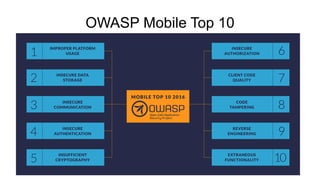
OWASP Mobile Top 10
$android
• Founded By Andy Rubin.
• Acquired by Google Later.
• Open Source through AOSP.
$why -RE
• Helpful in Static Analysis
• Gain Insights on the any app that you want.
• May help you recover logics of a lost project.
• Can Also help in the surgery of the grape. #kidding.
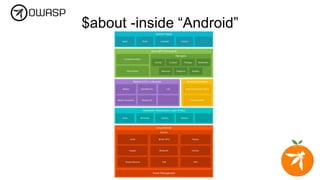
$about -inside “Android”
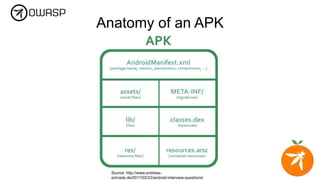
Anatomy of an APK
Source :http://www.andreas-
schrade.de/2017/02/23/android-interview-questions/
Tools
• dex2jar
https://github.com/pxb1988/dex2jar
• adb
• apktool
https://ibotpeaches.github.io/Apktool/install/
• jarsigner
https://www.oracle.com/technetwork/java/javase/downloads/index.html
• jd-gui
http://jd.benow.ca/
• zipalign
https://pkgs.org/download/zipalign
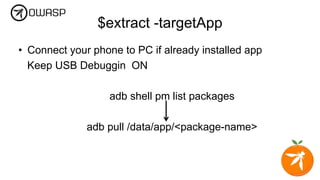
$extract -targetApp
• Connect your phone to PC if already installed app
Keep USB Debuggin ON
adb shell pm list packages
adb pull /data/app/<package-name>
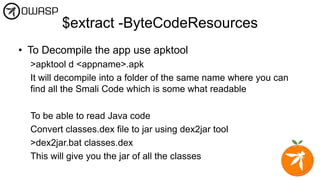
$extract -ByteCodeResources
• To Decompile the app use apktool
>apktool d <appname>.apk
It will decompile into a folder of the same name where you can
find all the Smali Code which is some what readable
To be able to read Java code
Convert classes.dex file to jar using dex2jar tool
>dex2jar.bat classes.dex
This will give you the jar of all the classes
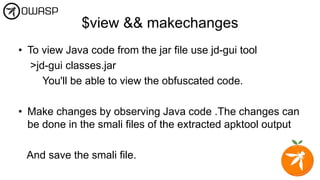
$view && makechanges
• To view Java code from the jar file use jd-gui tool
>jd-gui classes.jar
You'll be able to view the obfuscated code.
• Make changes by observing Java code .The changes can
be done in the smali files of the extracted apktool output
And save the smali file.
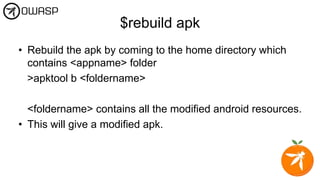
$rebuild apk
• Rebuild the apk by coming to the home directory which
contains <appname> folder
>apktool b <foldername>
<foldername> contains all the modified android resources.
• This will give a modified apk.
Zip Align
• To make sure the apk works properly first align it using
the tool
>zipalign -c 4 <modifiedapkname>.apk
Signing the APK
• First create a key using :
>keytool -genkey -v -keystore my-release-key.keystore -
alias your_name -keyalg RSA -keysize 2048 -validity 10000
And Sign using
>jarsigner -verbose -sigalg SHA1withRSA -digestalg SHA1
-keystore my-release-key.keystore
<zipalignedmodapk>.apk your_name
Thank you for listening.
• Q&A.
• Find me:
Twitter: @vk_tushar
Github: @roottusk
Email :tushar.kulkarni@owasp.org

OWASP Nagpur Meet #3 Android RE

  • 1.
  • 2.
    $whoami • Chapter Leader(OWASP Nagpur) • Co-Founder CTZ Lab • Rare-Time Bug Hunter xD • Web Application Developer.
  • 4.
  • 5.
    $android • Founded ByAndy Rubin. • Acquired by Google Later. • Open Source through AOSP.
  • 6.
    $why -RE • Helpfulin Static Analysis • Gain Insights on the any app that you want. • May help you recover logics of a lost project. • Can Also help in the surgery of the grape. #kidding.
  • 7.
  • 8.
    Anatomy of anAPK Source :http://www.andreas- schrade.de/2017/02/23/android-interview-questions/
  • 9.
    Tools • dex2jar https://github.com/pxb1988/dex2jar • adb •apktool https://ibotpeaches.github.io/Apktool/install/ • jarsigner https://www.oracle.com/technetwork/java/javase/downloads/index.html • jd-gui http://jd.benow.ca/ • zipalign https://pkgs.org/download/zipalign
  • 10.
    $extract -targetApp • Connectyour phone to PC if already installed app Keep USB Debuggin ON adb shell pm list packages adb pull /data/app/<package-name>
  • 11.
    $extract -ByteCodeResources • ToDecompile the app use apktool >apktool d <appname>.apk It will decompile into a folder of the same name where you can find all the Smali Code which is some what readable To be able to read Java code Convert classes.dex file to jar using dex2jar tool >dex2jar.bat classes.dex This will give you the jar of all the classes
  • 12.
    $view && makechanges •To view Java code from the jar file use jd-gui tool >jd-gui classes.jar You'll be able to view the obfuscated code. • Make changes by observing Java code .The changes can be done in the smali files of the extracted apktool output And save the smali file.
  • 13.
    $rebuild apk • Rebuildthe apk by coming to the home directory which contains <appname> folder >apktool b <foldername> <foldername> contains all the modified android resources. • This will give a modified apk.
  • 14.
    Zip Align • Tomake sure the apk works properly first align it using the tool >zipalign -c 4 <modifiedapkname>.apk
  • 15.
    Signing the APK •First create a key using : >keytool -genkey -v -keystore my-release-key.keystore - alias your_name -keyalg RSA -keysize 2048 -validity 10000 And Sign using >jarsigner -verbose -sigalg SHA1withRSA -digestalg SHA1 -keystore my-release-key.keystore <zipalignedmodapk>.apk your_name
  • 16.
    Thank you forlistening. • Q&A. • Find me: Twitter: @vk_tushar Github: @roottusk Email :tushar.kulkarni@owasp.org