Test.Security(Flash); Lavakumar K GISA, Royal Bank of Scotland Lavakumar[dot]in[at]gmail[dot]com 21 st  March, 2009
About me: Have been doing security auditing for 3 years Performed more than 100 penetration tests Perl and C# programmer I write code for pleasure And break code at work  
Imagine you are testing a web application and it has flash content. What would you do? Ignore the flash content Enjoy the flash videos and get back to testing the rest of the application Badmouth the developers for using silly programs like flash in a serious application Include the flash app in your test scope If you answer is a/b/c then listen carefully…
Agenda Introduce the bare minimum that every developer and Penetration tester should know about flash security
What is Flash Multimedia platform from Adobe(Macromedia) Ideal for animations and graphics Files have .swf extension Flash embedded in web pages is played by the Flash player plug-in of the browser
The moment of truth Who hasn’t played flash games at work????
Logic in Flash Logic can be built in to Flash applications with  ACTIONSCRIPT Actionscript is the programming language for Flash applications This is what powers your favorite flash game. ActionScript 3.0 is the latest version. We will talk about ActionScript 2.0, its more widely used
Flash is powerful Flash applications can: Send HTTP requests to third-party domains Create XML socket connections Store data on the file system permanently (LocalSharedObjects) Can access the DOM of the page Execute JavaScript
Areas of focus Cross-site scripting in flash Cross-site Flashing Crossdomain concerns Sensitive data storage Encryption in flash Attacking the server
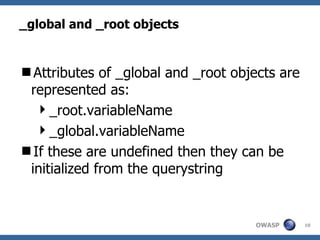
_global and _root objects Attributes of _global and _root objects are represented as: _root.variableName _global.variableName If these are undefined then they can be initialized from the querystring
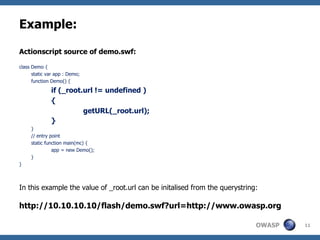
Example: Actionscript source of demo.swf: class Demo { static var app : Demo; function Demo() { if (_root.url != undefined ) { getURL(_root.url); } } // entry point static function main(mc) { app = new Demo(); } } In this example the value of _root.url can be initalised from the querystring: http://10.10.10.10/flash/demo.swf?url=http://www.owasp.org
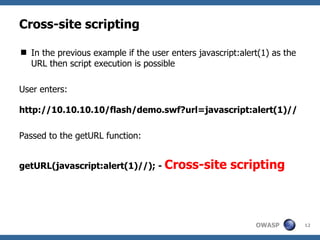
Cross-site scripting In the previous example if the user enters javascript:alert(1) as the URL then script execution is possible User enters: http://10.10.10.10/flash/demo.swf?url=javascript:alert(1)// Passed to the getURL function: getURL(javascript:alert(1)//); -  Cross-site scripting
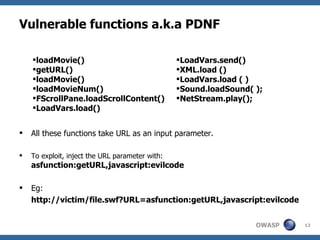
Vulnerable functions a.k.a PDNF All these functions take URL as an input parameter. To exploit, inject the URL parameter with:  asfunction:getURL,javascript:evilcode Eg:  http://victim/file.swf?URL=asfunction:getURL,javascript:evilcode  loadMovie() getURL() loadMovie() loadMovieNum() FScrollPane.loadScrollContent() LoadVars.load() LoadVars.send() XML.load () LoadVars.load ( ) Sound.loadSound( ); NetStream.play();
Other means of Cross-site scripting Text fields in flash can be injected with HTML textfield.html = true textfield.htmlText = ’ <a href='javascript:alert(1)' >’ flash.external.ExternalInterface.call(); This function can call JavaScript methods. Method Description:  public static call(methodName:String, [parameter1:Object]) : Object
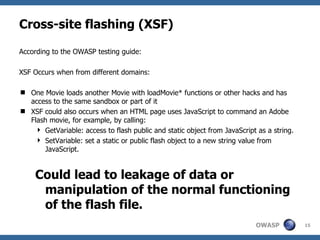
Cross-site flashing (XSF) According to the OWASP testing guide: XSF Occurs when from different domains:  One Movie loads another Movie with loadMovie* functions or other hacks and has access to the same sandbox or part of it  XSF could also occurs when an HTML page uses JavaScript to command an Adobe Flash movie, for example, by calling:  GetVariable: access to flash public and static object from JavaScript as a string.  SetVariable: set a static or public flash object to a new string value from JavaScript.  Could lead to leakage of data or manipulation of the normal functioning of the flash file.
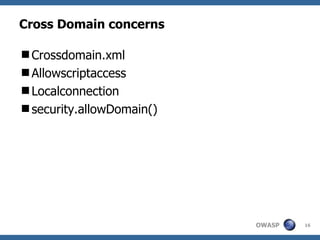
Cross Domain concerns Crossdomain.xml Allowscriptaccess Localconnection security.allowDomain()
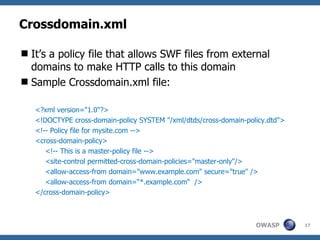
Crossdomain.xml It’s a policy file that allows SWF files from external domains to make HTTP calls to this domain Sample Crossdomain.xml file: <?xml version=&quot;1.0&quot;?> <!DOCTYPE cross-domain-policy SYSTEM &quot;/xml/dtds/cross-domain-policy.dtd&quot;> <!-- Policy file for mysite.com --> <cross-domain-policy>  <!-- This is a master-policy file -->  <site-control permitted-cross-domain-policies=&quot;master-only&quot;/>  <allow-access-from domain=&quot;www.example.com&quot; secure=&quot;true&quot; />  <allow-access-from domain=“*.example.com“  />  </cross-domain-policy>
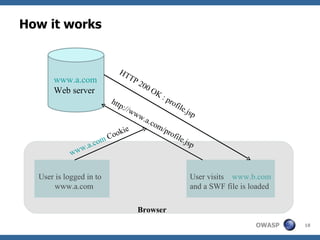
How it works User is logged in to  www.a.com User visits  www.b.com and a SWF file is loaded  www.a.com Web server Browser http://www.a.com/profile.jsp www.a.com  Cookie HTTP 200 OK : profile.jsp
Crossdomain.xml Sites relying on cookies for session management should be careful about allow external sites Never use the universal allow wildcard - * -  Dangerous!! Even sites on the intranet should have strict crossdomain.xml files Secure attribute should always be set for HTTPS content Permitted-cross-domain-policies should always be set to ‘master-only’
Allowscript access Embedding swf files in HTML <object id='MyMovie.swf' classid='clsid:D27CDB6E-AE6D-11cf-96B8-444553540000' codebase='http://download.adobe.com/pub/shockwave/cabs/flash/swflash.cab#version=9,0,0,0' height='100%' width='100%'>  <param  name='allowScriptAccess' value=‘sameDomain' /> <param name='src' value=''MyMovie.swf'/> <embed name='MyMovie.swf' pluginspage='/go/getflashplayer' src='MyMovie.swf' height='100%' width='100%'  allowScriptAccess=‘sameDomain' /> </object>
What it does The value of this setting determines the script access to the SWF Possible values: never – No script access allowed.(Deprecated) sameDomain – SWF from same domain have script    access always – SWFs from external domains also have    script access –  Dangerous!!
Localconnection Used for interprocess communication between flash files One flash file can call methods in another flash file using this even if they are from different domains Access control is enforced using the LocalConnection.allowDomain() method LocalConnection.allowDomain(‘*’) allows SWF files from all domain –  Dangerous!!
Security.allowDomain() Normally SWF loaded from  www.a.com  cannot access the variable, objects, properties and methods of SWF loaded from  www.b.com But Security.allowDomain() can be used to bypass this security restriction. HTTP to HTTPS restriction can be overcome using System.security.allowInsecureDomain() -  Dangerous!! System.security.allowDomain(&quot;*&quot;) –  Dangerous!!
Sensitive data storage Any hard-coded password or other sensitive information in the SWF file is a major risk SWF files can be decompiled easily SharedLocalObjects are like cookies in flash They are used to store information on the client-side This information is stored in clear-text HTTP to HTTPS access is restricted with ‘secure’ flag var mySO = SharedObject.getLocal(&quot;userInfo&quot;, null,  false );  -  Dangerous!!
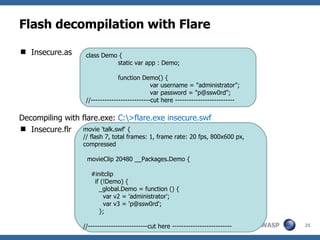
Flash decompilation with Flare Insecure.as Decompiling with flare.exe:  C:\>flare.exe insecure.swf Insecure.flr class Demo { static var app : Demo; function Demo() { var username = &quot;administrator&quot;; var password = &quot;p@ssw0rd&quot;; //--------------------------cut here -------------------------- movie 'talk.swf' { // flash 7, total frames: 1, frame rate: 20 fps, 800x600 px, compressed movieClip 20480 __Packages.Demo { #initclip if (!Demo) { _global.Demo = function () { var v2 = 'administrator'; var v3 = 'p@ssw0rd'; }; //--------------------------cut here --------------------------
Encryption in Flash Any attempts at client-side encryption is a bad idea Key has to be hard-coded and can be stolen Even if the SWF file uses HTTPS, serving the file over HTTP is very  dumb!! Best way to ensure data security is to serve the SWF file over HTTPS If you see anything else happening then its surely a broken security model
Attacking the server There could be two-way communication between SWF file and the server Data form the SWF file could be used in SQL queries or other potentially dangerous system commands Since the data is coming from the SWF file, developers tend to consider it to be safe and fail to validate it properly Identify data sent to the server and fuzz them for common injection vulnerabilties
Credits, References and further reading OWASP testing guide V3  http://www.owasp.org/images/5/56/OWASP_Testing_Guide_v3.pdf Creating more secure SWF web apps  http://www.adobe.com/devnet/flashplayer/articles/secure_swf_apps.html https://www.flashsec.org/ Stefano Di Paola,  OWASP Flash Security Project Flare,  http://www.nowrap.de/flare.html
? Thank You

Flash Security, OWASP Chennai

  • 1.
    Test.Security(Flash); Lavakumar KGISA, Royal Bank of Scotland Lavakumar[dot]in[at]gmail[dot]com 21 st March, 2009
  • 2.
    About me: Havebeen doing security auditing for 3 years Performed more than 100 penetration tests Perl and C# programmer I write code for pleasure And break code at work 
  • 3.
    Imagine you aretesting a web application and it has flash content. What would you do? Ignore the flash content Enjoy the flash videos and get back to testing the rest of the application Badmouth the developers for using silly programs like flash in a serious application Include the flash app in your test scope If you answer is a/b/c then listen carefully…
  • 4.
    Agenda Introduce thebare minimum that every developer and Penetration tester should know about flash security
  • 5.
    What is FlashMultimedia platform from Adobe(Macromedia) Ideal for animations and graphics Files have .swf extension Flash embedded in web pages is played by the Flash player plug-in of the browser
  • 6.
    The moment oftruth Who hasn’t played flash games at work????
  • 7.
    Logic in FlashLogic can be built in to Flash applications with ACTIONSCRIPT Actionscript is the programming language for Flash applications This is what powers your favorite flash game. ActionScript 3.0 is the latest version. We will talk about ActionScript 2.0, its more widely used
  • 8.
    Flash is powerfulFlash applications can: Send HTTP requests to third-party domains Create XML socket connections Store data on the file system permanently (LocalSharedObjects) Can access the DOM of the page Execute JavaScript
  • 9.
    Areas of focusCross-site scripting in flash Cross-site Flashing Crossdomain concerns Sensitive data storage Encryption in flash Attacking the server
  • 10.
    _global and _rootobjects Attributes of _global and _root objects are represented as: _root.variableName _global.variableName If these are undefined then they can be initialized from the querystring
  • 11.
    Example: Actionscript sourceof demo.swf: class Demo { static var app : Demo; function Demo() { if (_root.url != undefined ) { getURL(_root.url); } } // entry point static function main(mc) { app = new Demo(); } } In this example the value of _root.url can be initalised from the querystring: http://10.10.10.10/flash/demo.swf?url=http://www.owasp.org
  • 12.
    Cross-site scripting Inthe previous example if the user enters javascript:alert(1) as the URL then script execution is possible User enters: http://10.10.10.10/flash/demo.swf?url=javascript:alert(1)// Passed to the getURL function: getURL(javascript:alert(1)//); - Cross-site scripting
  • 13.
    Vulnerable functions a.k.aPDNF All these functions take URL as an input parameter. To exploit, inject the URL parameter with: asfunction:getURL,javascript:evilcode Eg: http://victim/file.swf?URL=asfunction:getURL,javascript:evilcode loadMovie() getURL() loadMovie() loadMovieNum() FScrollPane.loadScrollContent() LoadVars.load() LoadVars.send() XML.load () LoadVars.load ( ) Sound.loadSound( ); NetStream.play();
  • 14.
    Other means ofCross-site scripting Text fields in flash can be injected with HTML textfield.html = true textfield.htmlText = ’ <a href='javascript:alert(1)' >’ flash.external.ExternalInterface.call(); This function can call JavaScript methods. Method Description: public static call(methodName:String, [parameter1:Object]) : Object
  • 15.
    Cross-site flashing (XSF)According to the OWASP testing guide: XSF Occurs when from different domains: One Movie loads another Movie with loadMovie* functions or other hacks and has access to the same sandbox or part of it XSF could also occurs when an HTML page uses JavaScript to command an Adobe Flash movie, for example, by calling: GetVariable: access to flash public and static object from JavaScript as a string. SetVariable: set a static or public flash object to a new string value from JavaScript. Could lead to leakage of data or manipulation of the normal functioning of the flash file.
  • 16.
    Cross Domain concernsCrossdomain.xml Allowscriptaccess Localconnection security.allowDomain()
  • 17.
    Crossdomain.xml It’s apolicy file that allows SWF files from external domains to make HTTP calls to this domain Sample Crossdomain.xml file: <?xml version=&quot;1.0&quot;?> <!DOCTYPE cross-domain-policy SYSTEM &quot;/xml/dtds/cross-domain-policy.dtd&quot;> <!-- Policy file for mysite.com --> <cross-domain-policy> <!-- This is a master-policy file --> <site-control permitted-cross-domain-policies=&quot;master-only&quot;/> <allow-access-from domain=&quot;www.example.com&quot; secure=&quot;true&quot; /> <allow-access-from domain=“*.example.com“ /> </cross-domain-policy>
  • 18.
    How it worksUser is logged in to www.a.com User visits www.b.com and a SWF file is loaded www.a.com Web server Browser http://www.a.com/profile.jsp www.a.com Cookie HTTP 200 OK : profile.jsp
  • 19.
    Crossdomain.xml Sites relyingon cookies for session management should be careful about allow external sites Never use the universal allow wildcard - * - Dangerous!! Even sites on the intranet should have strict crossdomain.xml files Secure attribute should always be set for HTTPS content Permitted-cross-domain-policies should always be set to ‘master-only’
  • 20.
    Allowscript access Embeddingswf files in HTML <object id='MyMovie.swf' classid='clsid:D27CDB6E-AE6D-11cf-96B8-444553540000' codebase='http://download.adobe.com/pub/shockwave/cabs/flash/swflash.cab#version=9,0,0,0' height='100%' width='100%'> <param name='allowScriptAccess' value=‘sameDomain' /> <param name='src' value=''MyMovie.swf'/> <embed name='MyMovie.swf' pluginspage='/go/getflashplayer' src='MyMovie.swf' height='100%' width='100%' allowScriptAccess=‘sameDomain' /> </object>
  • 21.
    What it doesThe value of this setting determines the script access to the SWF Possible values: never – No script access allowed.(Deprecated) sameDomain – SWF from same domain have script access always – SWFs from external domains also have script access – Dangerous!!
  • 22.
    Localconnection Used forinterprocess communication between flash files One flash file can call methods in another flash file using this even if they are from different domains Access control is enforced using the LocalConnection.allowDomain() method LocalConnection.allowDomain(‘*’) allows SWF files from all domain – Dangerous!!
  • 23.
    Security.allowDomain() Normally SWFloaded from www.a.com cannot access the variable, objects, properties and methods of SWF loaded from www.b.com But Security.allowDomain() can be used to bypass this security restriction. HTTP to HTTPS restriction can be overcome using System.security.allowInsecureDomain() - Dangerous!! System.security.allowDomain(&quot;*&quot;) – Dangerous!!
  • 24.
    Sensitive data storageAny hard-coded password or other sensitive information in the SWF file is a major risk SWF files can be decompiled easily SharedLocalObjects are like cookies in flash They are used to store information on the client-side This information is stored in clear-text HTTP to HTTPS access is restricted with ‘secure’ flag var mySO = SharedObject.getLocal(&quot;userInfo&quot;, null, false ); - Dangerous!!
  • 25.
    Flash decompilation withFlare Insecure.as Decompiling with flare.exe: C:\>flare.exe insecure.swf Insecure.flr class Demo { static var app : Demo; function Demo() { var username = &quot;administrator&quot;; var password = &quot;p@ssw0rd&quot;; //--------------------------cut here -------------------------- movie 'talk.swf' { // flash 7, total frames: 1, frame rate: 20 fps, 800x600 px, compressed movieClip 20480 __Packages.Demo { #initclip if (!Demo) { _global.Demo = function () { var v2 = 'administrator'; var v3 = 'p@ssw0rd'; }; //--------------------------cut here --------------------------
  • 26.
    Encryption in FlashAny attempts at client-side encryption is a bad idea Key has to be hard-coded and can be stolen Even if the SWF file uses HTTPS, serving the file over HTTP is very dumb!! Best way to ensure data security is to serve the SWF file over HTTPS If you see anything else happening then its surely a broken security model
  • 27.
    Attacking the serverThere could be two-way communication between SWF file and the server Data form the SWF file could be used in SQL queries or other potentially dangerous system commands Since the data is coming from the SWF file, developers tend to consider it to be safe and fail to validate it properly Identify data sent to the server and fuzz them for common injection vulnerabilties
  • 28.
    Credits, References andfurther reading OWASP testing guide V3 http://www.owasp.org/images/5/56/OWASP_Testing_Guide_v3.pdf Creating more secure SWF web apps http://www.adobe.com/devnet/flashplayer/articles/secure_swf_apps.html https://www.flashsec.org/ Stefano Di Paola, OWASP Flash Security Project Flare, http://www.nowrap.de/flare.html
  • 29.