Version 1.0 Umoja Training 1/34
How-to
Guide
Outbound Delivery Processing for Stock Transport Orders
Contents
Objective......................................................................................................................................... 1
Trigger............................................................................................................................................. 1
Overview......................................................................................................................................... 2
Outbound Delivery Structure.......................................................................................................... 2
Item Overview Tab.................................................................................................................. 2
Picking Tab .............................................................................................................................. 3
Transport Tab.......................................................................................................................... 4
Goods Movement Tab ............................................................................................................ 4
Status Overview Tab ............................................................................................................... 5
Dates in Outbound Delivery.................................................................................................... 5
Outbound Delivery Processing for STOs......................................................................................... 6
Create Outbound Delivery.......................................................................................................... 6
Change Outbound Delivery......................................................................................................... 9
List Outbound Deliveries for Picking......................................................................................... 11
Create Transfer Order with reference to the Outbound Delivery............................................ 14
List and Print Transfer Order .................................................................................................... 15
Confirm Transfer Order............................................................................................................. 16
Perform Packing on an Outbound Delivery.............................................................................. 16
Review / Printing the Packing List............................................................................................. 19
Different Packing Options and Multilevel Packing ................................................................... 22
Post Goods Issue for the Outbound Delivery ........................................................................... 28
Monitor Outbound Delivery for Goods Receipt ....................................................................... 30
Post Goods Receipt against the Outbound Delivery ................................................................ 33
Objective
To provide a step-by-step how-to guide for Logistics Users who are creating and processing Outbound
Deliveries with reference to Stock transfer Orders (STO), to plan the transfer of the inventory items from
the supplying plant/storage location to the receiving plant/storage location. This document is also
intended for Receiving Users responsible for performing the goods receipt against the Outbound
Delivery in the receiving mission.
Trigger
The Stock Transport Order process is triggered by the requirement of goods not available in the mission
inventory. The Outbound Delivery is created by the Logistics User in a Mission with reference to an
approved Stock Transport Order. The delivery items are received by the Receiving User with reference to
the Outbound Delivery in the receiving mission.
Version 1.0 Umoja Training 2/34
How-to
Guide
Outbound Delivery Processing for Stock Transport Orders
Overview
In Umoja, the transferring of supplies, materials, and equipment is accomplished through the Stock
Transport Order (STO) process. The STO is a special procurement type that is used to transfer goods
from one mission to another mission. The STO is used to capture costs, collect funding from the
requesting mission, track the shipment, and generate the required accounting entries. The Outbound
Delivery is created by the Logistics User with reference to an approved STO in the sending Mission. The
Warehouse Senior / User in the issuing mission performs the picking and packing for the Outbound
Delivery. The Receiving User in the requesting Mission posts the goods receipt with reference to the
Outbound Delivery.
Outbound Delivery Structure
The Outbound Delivery is a document with 3 main components:
Header Section – with values that apply to all items; the Delivery header is subdivided in
multiple Tabs.
Items Overview Section – with an overview of the detailed information at the item level; it is
subdivided in multiple Tabs.
Items Details Section – with details specific for each item; it is subdivided in multiple Tabs.
Here below are described the main tabs of the Item Overview Section.
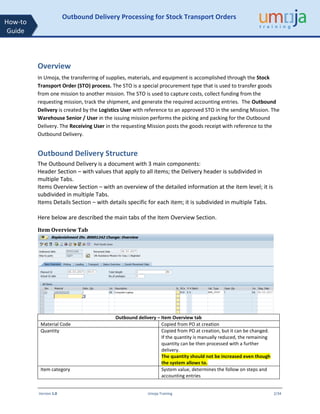
Item Overview Tab
Outbound delivery – Item Overview tab
Material Code Copied from PO at creation
Quantity Copied from PO at creation, but it can be changed.
If the quantity is manually reduced, the remaining
quantity can be then processed with a further
delivery.
The quantity should not be increased even though
the system allows to.
Item category System value, determines the follow on steps and
accounting entries
Version 1.0 Umoja Training 3/34
How-to
Guide
Outbound Delivery Processing for Stock Transport Orders
Valuation Type Relevant only if material is split valuated. See Annex 1
table with the cases that have to be considered.
Open quantity Not used
Staging Date System automatically populates it. Not currently
used.
Material Staging/Availability Date
The date by which sufficient quantities of the item
must be available for picking to begin.
Other relevant fields:
Plant / Storage Location
These are the issuing plant / storage location,
automatically copied from the PO.
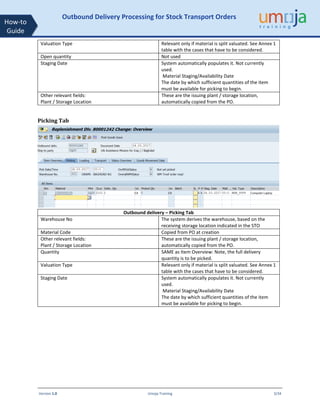
Picking Tab
Outbound delivery – Picking Tab
Warehouse No The system derives the warehouse, based on the
receiving storage location indicated in the STO
Material Code Copied from PO at creation
Other relevant fields:
Plant / Storage Location
These are the issuing plant / storage location,
automatically copied from the PO.
Quantity SAME as Item Overview: Note, the full delivery
quantity is to be picked.
Valuation Type Relevant only if material is split valuated. See Annex 1
table with the cases that have to be considered.
Staging Date System automatically populates it. Not currently
used.
Material Staging/Availability Date
The date by which sufficient quantities of the item
must be available for picking to begin.
Version 1.0 Umoja Training 4/34
How-to
Guide
Outbound Delivery Processing for Stock Transport Orders
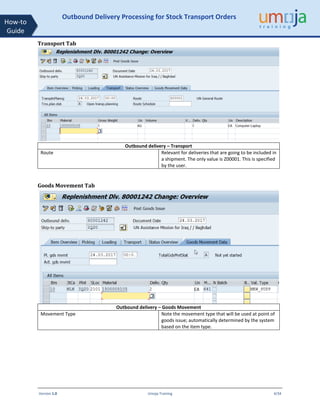
Transport Tab
Outbound delivery – Transport
Route Relevant for deliveries that are going to be included in
a shipment. The only value is Z00001. This is specified
by the user.
Goods Movement Tab
Outbound delivery – Goods Movement
Movement Type Note the movement type that will be used at point of
goods issue; automatically determined by the system
based on the item type.
Version 1.0 Umoja Training 5/34
How-to
Guide
Outbound Delivery Processing for Stock Transport Orders
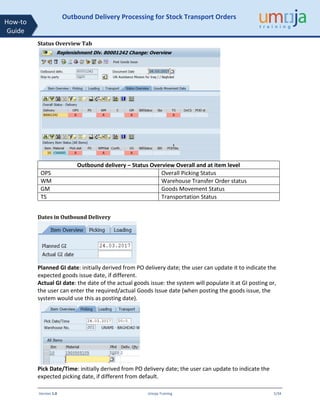
Status Overview Tab
Outbound delivery – Status Overview Overall and at item level
OPS Overall Picking Status
WM Warehouse Transfer Order status
GM Goods Movement Status
TS Transportation Status
Dates in Outbound Delivery
Planned GI date: initially derived from PO delivery date; the user can update it to indicate the
expected goods issue date, if different.
Actual GI date: the date of the actual goods issue: the system will populate it at GI posting or,
the user can enter the required/actual Goods Issue date (when posting the goods issue, the
system would use this as posting date).
Pick Date/Time: initially derived from PO delivery date; the user can update to indicate the
expected picking date, if different from default.
Version 1.0 Umoja Training 6/34
How-to
Guide
Outbound Delivery Processing for Stock Transport Orders
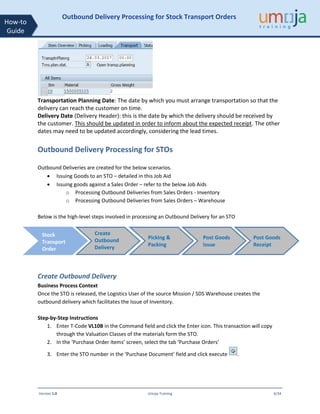
Transportation Planning Date: The date by which you must arrange transportation so that the
delivery can reach the customer on time.
Delivery Date (Delivery Header): this is the date by which the delivery should be received by
the customer. This should be updated in order to inform about the expected receipt. The other
dates may need to be updated accordingly, considering the lead times.
Outbound Delivery Processing for STOs
Outbound Deliveries are created for the below scenarios.
• Issuing Goods to an STO – detailed in this Job Aid
• Issuing goods against a Sales Order – refer to the below Job Aids
o Processing Outbound Deliveries from Sales Orders - Inventory
o Processing Outbound Deliveries from Sales Orders – Warehouse
Below is the high-level steps involved in processing an Outbound Delivery for an STO
Create Outbound Delivery
Business Process Context
Once the STO is released, the Logistics User of the source Mission / SDS Warehouse creates the
outbound delivery which facilitates the Issue of Inventory.
Step-by-Step Instructions
1. Enter T-Code VL10B in the Command field and click the Enter icon. This transaction will copy
through the Valuation Classes of the materials form the STO.
2. In the ‘Purchase Order Items’ screen, select the tab ‘Purchase Orders’
3. Enter the STO number in the ‘Purchase Document’ field and click execute .
Create
Outbound
Delivery
Picking &
Packing
Post Goods
Issue
Post Goods
Receipt
Stock
Transport
Order
Version 1.0 Umoja Training 7/34
How-to
Guide
Outbound Delivery Processing for Stock Transport Orders
Note : Since that the Delivery Date (Deliv. Date) of the STO needs to be within the date range
specified on ‘Deliv. Creation Date’ of the above screen, change this date range accordingly.
4. On the ‘Activities Due for Shipping “Purchase Orders, Fast Display’ screen, the STO will be
displayed. This is at the header level.
5. Select the line and click the Background button [ ].
6. An additional line will be added to the bottom of the line for the Delivery created. If the
Outbound Deliveries were created successfully, a green indicator will be displayed at the
beginning of the line.
Note : One Outbound Delivery will have only one STO.
7. To display the Outbound Delivery Numbers created, click on the ‘Show/Hide Delivery’ button
. The Outbound Delivery Number will be displayed under the SD Doc. column
Version 1.0 Umoja Training 8/34
How-to
Guide
Outbound Delivery Processing for Stock Transport Orders
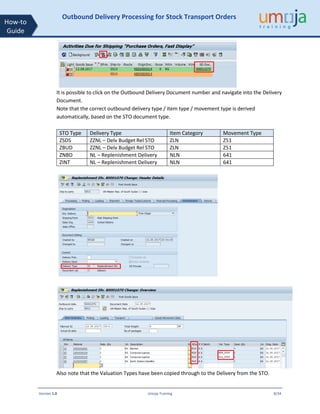
It is possible to click on the Outbound Delivery Document number and navigate into the Delivery
Document.
Note that the correct outbound delivery type / item type / movement type is derived
automatically, based on the STO document type.
STO Type Delivery Type Item Category Movement Type
ZSDS ZZNL – Delv Budget Rel STO ZLN Z51
ZBUD ZZNL – Delv Budget Rel STO ZLN Z51
ZNBD NL – Replenishment Delivery NLN 641
ZINT NL – Replenishment Delivery NLN 641
Also note that the Valuation Types have been copied through to the Delivery from the STO.
Version 1.0 Umoja Training 9/34
How-to
Guide
Outbound Delivery Processing for Stock Transport Orders
Change Outbound Delivery
8. In the change mode of the Outbound Delivery (or using the T-Code VL02N – Change Outbound
Delivery), click the ‘Header Details’ button [ ] and go to the ‘Shipment’ tab.
• Route : Enter Z00001 – ‘UN General Route’ (required to include the delivery in transport
document)
• BillOfLad. : Enter the Bill of Lading of the delivery
In the Shipment Tab, the Logistics User can specify the estimated delivery date at receiving
plant. This will be used by the R&I department in the receiving plant for monitoring incoming
goods from stock transfers:
Once these are entered, click the back button to get to the ‘Overview’ screen
Version 1.0 Umoja Training 10/34
How-to
Guide
Outbound Delivery Processing for Stock Transport Orders
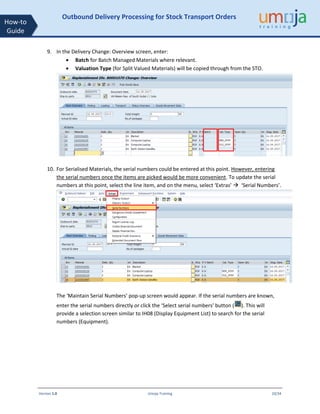
9. In the Delivery Change: Overview screen, enter:
• Batch for Batch Managed Materials where relevant.
• Valuation Type (for Split Valued Materials) will be copied through from the STO.
10. For Serialised Materials, the serial numbers could be entered at this point. However, entering
the serial numbers once the items are picked would be more convenient. To update the serial
numbers at this point, select the line item, and on the menu, select ‘Extras’  ‘Serial Numbers’.
The ‘Maintain Serial Numbers’ pop-up screen would appear. If the serial numbers are known,
enter the serial numbers directly or click the ‘Select serial numbers’ button ( ). This will
provide a selection screen similar to IH08 (Display Equipment List) to search for the serial
numbers (Equipment).
Version 1.0 Umoja Training 11/34
How-to
Guide
Outbound Delivery Processing for Stock Transport Orders
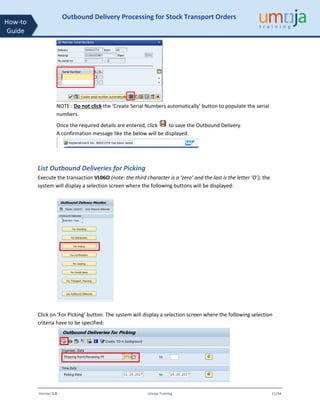
NOTE : Do not click the ‘Create Serial Numbers automatically’ button to populate the serial
numbers.
Once the required details are entered, click to save the Outbound Delivery.
A confirmation message like the below will be displayed.
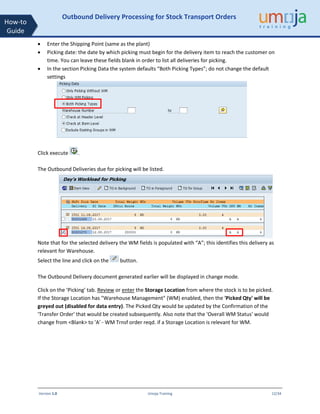
List Outbound Deliveries for Picking
Execute the transaction VL06O (note: the third character is a ‘zero’ and the last is the letter ‘O’); the
system will display a selection screen where the following buttons will be displayed:
Click on ‘For Picking’ button. The system will display a selection screen where the following selection
criteria have to be specified:
Version 1.0 Umoja Training 12/34
How-to
Guide
Outbound Delivery Processing for Stock Transport Orders
• Enter the Shipping Point (same as the plant)
• Picking date: the date by which picking must begin for the delivery item to reach the customer on
time. You can leave these fields blank in order to list all deliveries for picking.
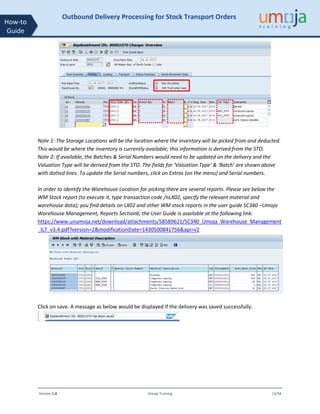
• In the section Picking Data the system defaults “Both Picking Types”; do not change the default
settings
Click execute .
The Outbound Deliveries due for picking will be listed.
Note that for the selected delivery the WM fields is populated with “A”; this identifies this delivery as
relevant for Warehouse.
Select the line and click on the button.
The Outbound Delivery document generated earlier will be displayed in change mode.
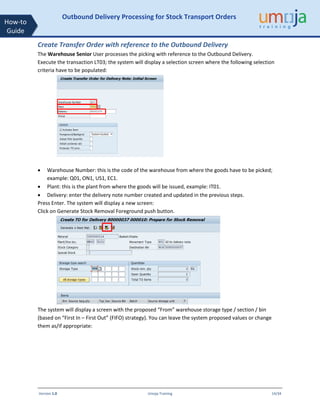
Click on the ‘Picking’ tab. Review or enter the Storage Location from where the stock is to be picked.
If the Storage Location has "Warehouse Management" (WM) enabled, then the 'Picked Qty' will be
greyed out (disabled for data entry). The Picked Qty would be updated by the Confirmation of the
'Transfer Order' that would be created subsequently. Also note that the 'Overall WM Status' would
change from <Blank> to 'A' - WM Trnsf order reqd. if a Storage Location is relevant for WM.
Version 1.0 Umoja Training 13/34
How-to
Guide
Outbound Delivery Processing for Stock Transport Orders
Note 1: The Storage Locations will be the location where the inventory will be picked from and deducted.
This would be where the inventory is currently available; this information is derived from the STO.
Note 2: If available, the Batches & Serial Numbers would need to be updated on the delivery and the
Valuation Type will be derived from the STO. The fields for ‘Valuation Type’ & ‘Batch’ are shown above
with dotted lines. To update the Serial numbers, click on Extras (on the menu) and Serial numbers.
In order to identify the Warehouse Location for picking there are several reports. Please see below the
WM Stock report (to execute it, type transaction code /nLX02, specify the relevant material and
warehouse data); you find details on LX02 and other WM stock reports in the user guide SC340 –Umoja
Warehouse Management, Reports Section6; the User Guide is available at the following link:
https://www.unumoja.net/download/attachments/58589621/SC340_Umoja_Warehouse_Management
_ILT_v3.4.pdf?version=2&modificationDate=1430500841756&api=v2
Click on save. A message as below would be displayed if the delivery was saved successfully.
Version 1.0 Umoja Training 14/34
How-to
Guide
Outbound Delivery Processing for Stock Transport Orders
Create Transfer Order with reference to the Outbound Delivery
The Warehouse Senior User processes the picking with reference to the Outbound Delivery.
Execute the transaction LT03; the system will display a selection screen where the following selection
criteria have to be populated:
• Warehouse Number: this is the code of the warehouse from where the goods have to be picked;
example: Q01, ON1, US1, EC1.
• Plant: this is the plant from where the goods will be issued, example: IT01.
• Delivery: enter the delivery note number created and updated in the previous steps.
Press Enter. The system will display a new screen:
Click on Generate Stock Removal Foreground push button.
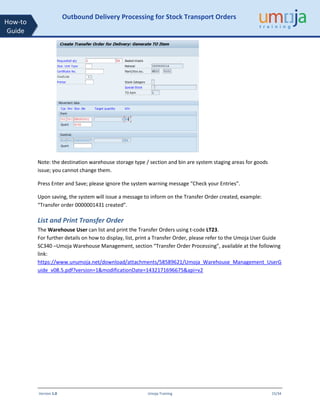
The system will display a screen with the proposed “From” warehouse storage type / section / bin
(based on “First In – First Out” (FIFO) strategy). You can leave the system proposed values or change
them as/if appropriate:
Version 1.0 Umoja Training 15/34
How-to
Guide
Outbound Delivery Processing for Stock Transport Orders
Note: the destination warehouse storage type / section and bin are system staging areas for goods
issue; you cannot change them.
Press Enter and Save; please ignore the system warning message “Check your Entries”.
Upon saving, the system will issue a message to inform on the Transfer Order created, example:
“Transfer order 0000001431 created”.
List and Print Transfer Order
The Warehouse User can list and print the Transfer Orders using t-code LT23.
For further details on how to display, list, print a Transfer Order, please refer to the Umoja User Guide
SC340 –Umoja Warehouse Management, section “Transfer Order Processing”, available at the following
link:
https://www.unumoja.net/download/attachments/58589621/Umoja_Warehouse_Management_UserG
uide_v08.5.pdf?version=1&modificationDate=1432171696675&api=v2
Version 1.0 Umoja Training 16/34
How-to
Guide
Outbound Delivery Processing for Stock Transport Orders
Confirm Transfer Order
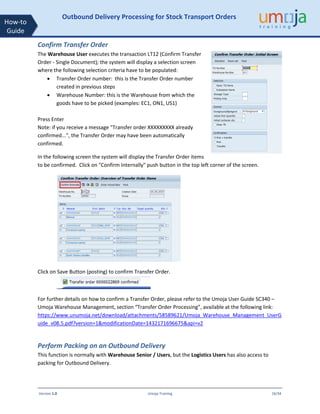
The Warehouse User executes the transaction LT12 (Confirm Transfer
Order - Single Document); the system will display a selection screen
where the following selection criteria have to be populated:
• Transfer Order number: this is the Transfer Order number
created in previous steps
• Warehouse Number: this is the Warehouse from which the
goods have to be picked (examples: EC1, ON1, US1)
Press Enter
Note: if you receive a message "Transfer order XXXXXXXXX already
confirmed...", the Transfer Order may have been automatically
confirmed.
In the following screen the system will display the Transfer Order items
to be confirmed. Click on "Confirm Internally" push button in the top left corner of the screen.
Click on Save Button (posting) to confirm Transfer Order.
For further details on how to confirm a Transfer Order, please refer to the Umoja User Guide SC340 –
Umoja Warehouse Management, section “Transfer Order Processing”, available at the following link:
https://www.unumoja.net/download/attachments/58589621/Umoja_Warehouse_Management_UserG
uide_v08.5.pdf?version=1&modificationDate=1432171696675&api=v2
Perform Packing on an Outbound Delivery
This function is normally with Warehouse Senior / Users, but the Logistics Users has also access to
packing for Outbound Delivery.
Version 1.0 Umoja Training 17/34
How-to
Guide
Outbound Delivery Processing for Stock Transport Orders
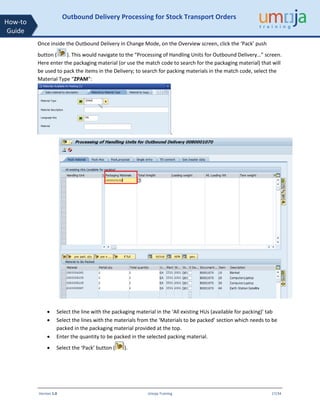
Once inside the Outbound Delivery in Change Mode, on the Overview screen, click the ‘Pack’ push
button ( ). This would navigate to the “Processing of Handling Units for Outbound Delivery…” screen.
Here enter the packaging material (or use the match code to search for the packaging material) that will
be used to pack the items in the Delivery; to search for packing materials in the match code, select the
Material Type “ZPAM”:
.
• Select the line with the packaging material in the ‘All existing HUs (available for packing)’ tab
• Select the lines with the materials from the ‘Materials to be packed’ section which needs to be
packed in the packaging material provided at the top.
• Enter the quantity to be packed in the selected packing material.
• Select the ‘Pack’ button ( ).
Version 1.0 Umoja Training 18/34
How-to
Guide
Outbound Delivery Processing for Stock Transport Orders
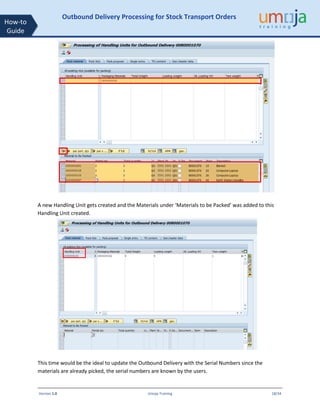
A new Handling Unit gets created and the Materials under ‘Materials to be Packed’ was added to this
Handling Unit created.
This time would be the ideal to update the Outbound Delivery with the Serial Numbers since the
materials are already picked, the serial numbers are known by the users.
Version 1.0 Umoja Training 19/34
How-to
Guide
Outbound Delivery Processing for Stock Transport Orders
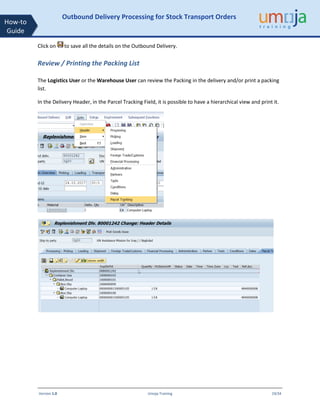
Click on to save all the details on the Outbound Delivery.
Review / Printing the Packing List
The Logistics User or the Warehouse User can review the Packing in the delivery and/or print a packing
list.
In the Delivery Header, in the Parcel Tracking Field, it is possible to have a hierarchical view and print it.
Version 1.0 Umoja Training 20/34
How-to
Guide
Outbound Delivery Processing for Stock Transport Orders
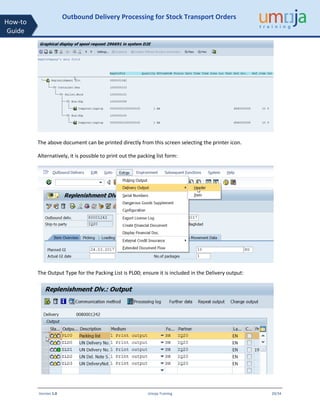
The above document can be printed directly from this screen selecting the printer icon.
Alternatively, it is possible to print out the packing list form:
The Output Type for the Packing List is PL00; ensure it is included in the Delivery output:
Version 1.0 Umoja Training 21/34
How-to
Guide
Outbound Delivery Processing for Stock Transport Orders
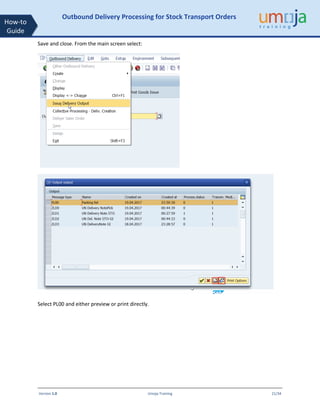
Save and close. From the main screen select:
Select PL00 and either preview or print directly.
Version 1.0 Umoja Training 22/34
How-to
Guide
Outbound Delivery Processing for Stock Transport Orders
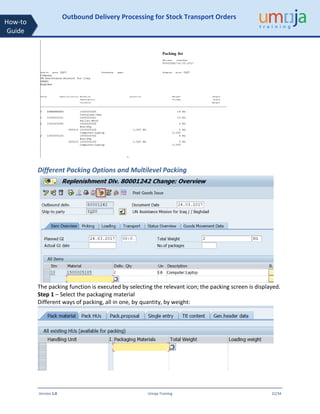
Different Packing Options and Multilevel Packing
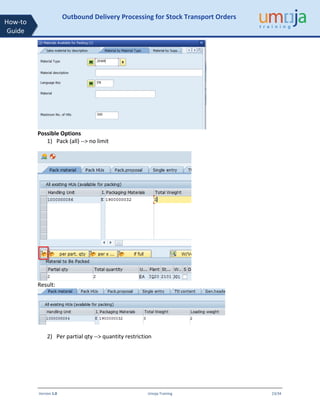
The packing function is executed by selecting the relevant icon; the packing screen is displayed.
Step 1 – Select the packaging material
Different ways of packing, all in one, by quantity, by weight:
Version 1.0 Umoja Training 23/34
How-to
Guide
Outbound Delivery Processing for Stock Transport Orders
Possible Options
1) Pack (all) --> no limit
Result:
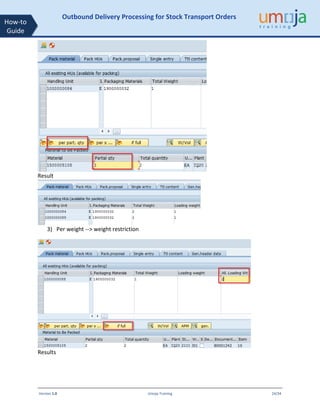
2) Per partial qty --> quantity restriction
Version 1.0 Umoja Training 24/34
How-to
Guide
Outbound Delivery Processing for Stock Transport Orders
Result
3) Per weight --> weight restriction
Results
Version 1.0 Umoja Training 25/34
How-to
Guide
Outbound Delivery Processing for Stock Transport Orders
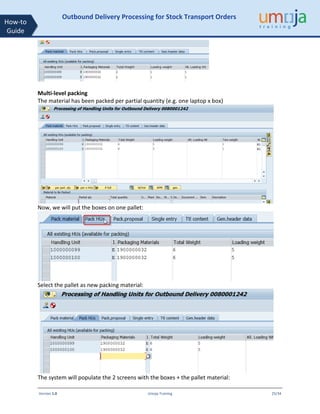
Multi-level packing
The material has been packed per partial quantity (e.g. one laptop x box)
Now, we will put the boxes on one pallet:
Select the pallet as new packing material:
The system will populate the 2 screens with the boxes + the pallet material:
Version 1.0 Umoja Training 26/34
How-to
Guide
Outbound Delivery Processing for Stock Transport Orders
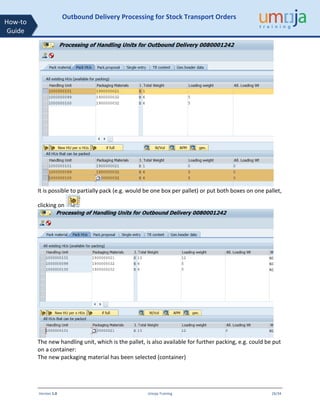
It is possible to partially pack (e.g. would be one box per pallet) or put both boxes on one pallet,
clicking on
The new handling unit, which is the pallet, is also available for further packing, e.g. could be put
on a container:
The new packaging material has been selected (container)
Version 1.0 Umoja Training 27/34
How-to
Guide
Outbound Delivery Processing for Stock Transport Orders
So now it is possible to put the pallet in the container:
In the Ttl Content tab, it is possible to see all packed materials
Version 1.0 Umoja Training 28/34
How-to
Guide
Outbound Delivery Processing for Stock Transport Orders
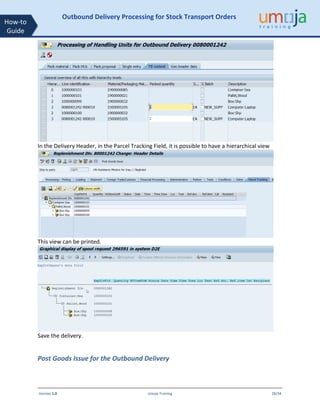
In the Delivery Header, in the Parcel Tracking Field, it is possible to have a hierarchical view
This view can be printed.
Save the delivery.
Post Goods Issue for the Outbound Delivery
Version 1.0 Umoja Training 29/34
How-to
Guide
Outbound Delivery Processing for Stock Transport Orders
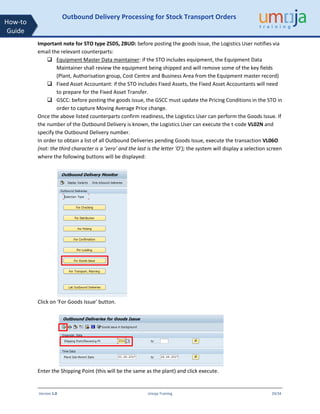
Important note for STO type ZSDS, ZBUD: before posting the goods issue, the Logistics User notifies via
email the relevant counterparts:
 Equipment Master Data maintainer: if the STO includes equipment, the Equipment Data
Maintainer shall review the equipment being shipped and will remove some of the key fields
(Plant, Authorisation group, Cost Centre and Business Area from the Equipment master record)
 Fixed Asset Accountant: if the STO includes Fixed Assets, the Fixed Asset Accountants will need
to prepare for the Fixed Asset Transfer.
 GSCC: before posting the goods issue, the GSCC must update the Pricing Conditions in the STO in
order to capture Moving Average Price change.
Once the above listed counterparts confirm readiness, the Logistics User can perform the Goods Issue. If
the number of the Outbound Delivery is known, the Logistics User can execute the t-code VL02N and
specify the Outbound Delivery number.
In order to obtain a list of all Outbound Deliveries pending Goods Issue, execute the transaction VL06O
(not: the third character is a ‘zero’ and the last is the letter ‘O’); the system will display a selection screen
where the following buttons will be displayed:
Click on ‘For Goods Issue’ button.
Enter the Shipping Point (this will be the same as the plant) and click execute.
Version 1.0 Umoja Training 30/34
How-to
Guide
Outbound Delivery Processing for Stock Transport Orders
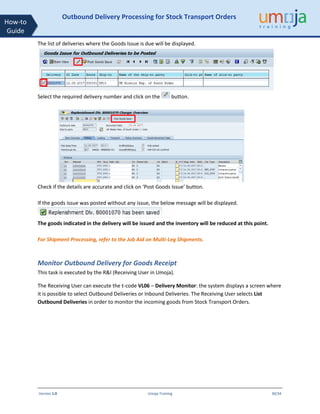
The list of deliveries where the Goods Issue is due will be displayed.
Select the required delivery number and click on the button.
Check if the details are accurate and click on ‘Post Goods Issue’ button.
If the goods issue was posted without any issue, the below message will be displayed.
The goods indicated in the delivery will be issued and the inventory will be reduced at this point.
For Shipment Processing, refer to the Job Aid on Multi-Leg Shipments.
Monitor Outbound Delivery for Goods Receipt
This task is executed by the R&I (Receiving User in Umoja).
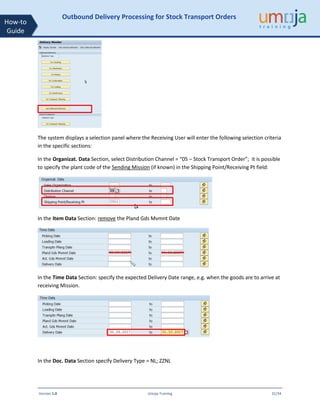
The Receiving User can execute the t-code VL06 – Delivery Monitor: the system displays a screen where
it is possible to select Outbound Deliveries or Inbound Deliveries. The Receiving User selects List
Outbound Deliveries in order to monitor the incoming goods from Stock Transport Orders.
Version 1.0 Umoja Training 31/34
How-to
Guide
Outbound Delivery Processing for Stock Transport Orders
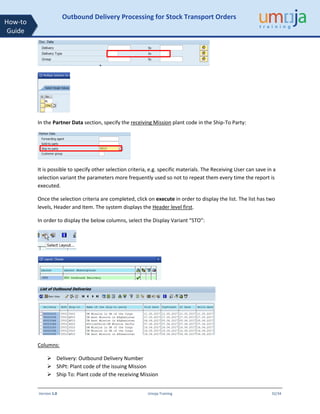
The system displays a selection panel where the Receiving User will enter the following selection criteria
in the specific sections:
In the Organizat. Data Section, select Distribution Channel = “05 – Stock Transport Order”; it is possible
to specify the plant code of the Sending Mission (if known) in the Shipping Point/Receiving Pt field:
In the Item Data Section: remove the Pland Gds Mvmnt Date
In the Time Data Section: specify the expected Delivery Date range, e.g. when the goods are to arrive at
receiving Mission.
In the Doc. Data Section specify Delivery Type = NL; ZZNL
Version 1.0 Umoja Training 32/34
How-to
Guide
Outbound Delivery Processing for Stock Transport Orders
In the Partner Data section, specify the receiving Mission plant code in the Ship-To Party:
It is possible to specify other selection criteria, e.g. specific materials. The Receiving User can save in a
selection variant the parameters more frequently used so not to repeat them every time the report is
executed.
Once the selection criteria are completed, click on execute in order to display the list. The list has two
levels, Header and Item. The system displays the Header level first.
In order to display the below columns, select the Display Variant “STO”:
Columns:
➢ Delivery: Outbound Delivery Number
➢ ShPt: Plant code of the issuing Mission
➢ Ship To: Plant code of the receiving Mission
Version 1.0 Umoja Training 33/34
How-to
Guide
Outbound Delivery Processing for Stock Transport Orders
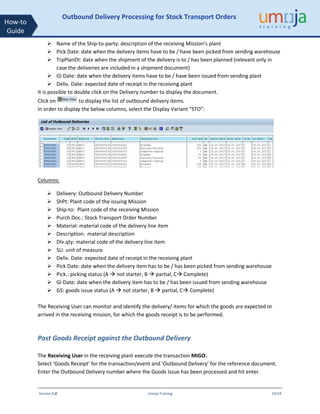
➢ Name of the Ship-to-party: description of the receiving Mission’s plant
➢ Pick Date: date when the delivery items have to be / have been picked from sending warehouse
➢ TrpPlanDt: date when the shipment of the delivery is to / has been planned (relevant only in
case the deliveries are included in a shipment document)
➢ GI Date: date when the delivery items have to be / have been issued from sending plant
➢ Deliv. Date: expected date of receipt in the receiving plant
It is possible to double click on the Delivery number to display the document.
Click on to display the list of outbound delivery items.
In order to display the below columns, select the Display Variant “STO”:
Columns:
➢ Delivery: Outbound Delivery Number
➢ ShPt: Plant code of the issuing Mission
➢ Ship-to: Plant code of the receiving Mission
➢ Purch.Doc.: Stock Transport Order Number
➢ Material: material code of the delivery line item
➢ Description: material description
➢ Dlv.qty: material code of the delivery line item
➢ SU: unit of measure
➢ Deliv. Date: expected date of receipt in the receiving plant
➢ Pick Date: date when the delivery item has to be / has been picked from sending warehouse
➢ Pick.: picking status (A  not starter, B  partial, C Complete)
➢ GI Date: date when the delivery item has to be / has been issued from sending warehouse
➢ GS: goods issue status (A  not starter, B  partial, C Complete)
The Receiving User can monitor and identify the delivery/ items for which the goods are expected or
arrived in the receiving mission, for which the goods receipt is to be performed.
Post Goods Receipt against the Outbound Delivery
The Receiving User in the receiving plant execute the transaction MIGO.
Select ‘Goods Receipt’ for the transaction/event and ‘Outbound Delivery’ for the reference document.
Enter the Outbound Delivery number where the Goods Issue has been processed and hit enter.
Version 1.0 Umoja Training 34/34
How-to
Guide
Outbound Delivery Processing for Stock Transport Orders
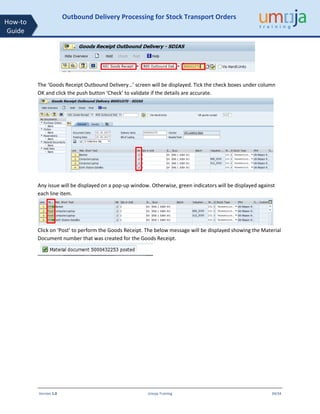
The ‘Goods Receipt Outbound Delivery…’ screen will be displayed. Tick the check boxes under column
OK and click the push button ‘Check’ to validate if the details are accurate.
Any issue will be displayed on a pop-up window. Otherwise, green indicators will be displayed against
each line item.
Click on ‘Post’ to perform the Goods Receipt. The below message will be displayed showing the Material
Document number that was created for the Goods Receipt.

outbound_delivery_processing_for_stos_v1.1.pdf

  • 1.
    Version 1.0 UmojaTraining 1/34 How-to Guide Outbound Delivery Processing for Stock Transport Orders Contents Objective......................................................................................................................................... 1 Trigger............................................................................................................................................. 1 Overview......................................................................................................................................... 2 Outbound Delivery Structure.......................................................................................................... 2 Item Overview Tab.................................................................................................................. 2 Picking Tab .............................................................................................................................. 3 Transport Tab.......................................................................................................................... 4 Goods Movement Tab ............................................................................................................ 4 Status Overview Tab ............................................................................................................... 5 Dates in Outbound Delivery.................................................................................................... 5 Outbound Delivery Processing for STOs......................................................................................... 6 Create Outbound Delivery.......................................................................................................... 6 Change Outbound Delivery......................................................................................................... 9 List Outbound Deliveries for Picking......................................................................................... 11 Create Transfer Order with reference to the Outbound Delivery............................................ 14 List and Print Transfer Order .................................................................................................... 15 Confirm Transfer Order............................................................................................................. 16 Perform Packing on an Outbound Delivery.............................................................................. 16 Review / Printing the Packing List............................................................................................. 19 Different Packing Options and Multilevel Packing ................................................................... 22 Post Goods Issue for the Outbound Delivery ........................................................................... 28 Monitor Outbound Delivery for Goods Receipt ....................................................................... 30 Post Goods Receipt against the Outbound Delivery ................................................................ 33 Objective To provide a step-by-step how-to guide for Logistics Users who are creating and processing Outbound Deliveries with reference to Stock transfer Orders (STO), to plan the transfer of the inventory items from the supplying plant/storage location to the receiving plant/storage location. This document is also intended for Receiving Users responsible for performing the goods receipt against the Outbound Delivery in the receiving mission. Trigger The Stock Transport Order process is triggered by the requirement of goods not available in the mission inventory. The Outbound Delivery is created by the Logistics User in a Mission with reference to an approved Stock Transport Order. The delivery items are received by the Receiving User with reference to the Outbound Delivery in the receiving mission.
  • 2.
    Version 1.0 UmojaTraining 2/34 How-to Guide Outbound Delivery Processing for Stock Transport Orders Overview In Umoja, the transferring of supplies, materials, and equipment is accomplished through the Stock Transport Order (STO) process. The STO is a special procurement type that is used to transfer goods from one mission to another mission. The STO is used to capture costs, collect funding from the requesting mission, track the shipment, and generate the required accounting entries. The Outbound Delivery is created by the Logistics User with reference to an approved STO in the sending Mission. The Warehouse Senior / User in the issuing mission performs the picking and packing for the Outbound Delivery. The Receiving User in the requesting Mission posts the goods receipt with reference to the Outbound Delivery. Outbound Delivery Structure The Outbound Delivery is a document with 3 main components: Header Section – with values that apply to all items; the Delivery header is subdivided in multiple Tabs. Items Overview Section – with an overview of the detailed information at the item level; it is subdivided in multiple Tabs. Items Details Section – with details specific for each item; it is subdivided in multiple Tabs. Here below are described the main tabs of the Item Overview Section. Item Overview Tab Outbound delivery – Item Overview tab Material Code Copied from PO at creation Quantity Copied from PO at creation, but it can be changed. If the quantity is manually reduced, the remaining quantity can be then processed with a further delivery. The quantity should not be increased even though the system allows to. Item category System value, determines the follow on steps and accounting entries
  • 3.
    Version 1.0 UmojaTraining 3/34 How-to Guide Outbound Delivery Processing for Stock Transport Orders Valuation Type Relevant only if material is split valuated. See Annex 1 table with the cases that have to be considered. Open quantity Not used Staging Date System automatically populates it. Not currently used. Material Staging/Availability Date The date by which sufficient quantities of the item must be available for picking to begin. Other relevant fields: Plant / Storage Location These are the issuing plant / storage location, automatically copied from the PO. Picking Tab Outbound delivery – Picking Tab Warehouse No The system derives the warehouse, based on the receiving storage location indicated in the STO Material Code Copied from PO at creation Other relevant fields: Plant / Storage Location These are the issuing plant / storage location, automatically copied from the PO. Quantity SAME as Item Overview: Note, the full delivery quantity is to be picked. Valuation Type Relevant only if material is split valuated. See Annex 1 table with the cases that have to be considered. Staging Date System automatically populates it. Not currently used. Material Staging/Availability Date The date by which sufficient quantities of the item must be available for picking to begin.
  • 4.
    Version 1.0 UmojaTraining 4/34 How-to Guide Outbound Delivery Processing for Stock Transport Orders Transport Tab Outbound delivery – Transport Route Relevant for deliveries that are going to be included in a shipment. The only value is Z00001. This is specified by the user. Goods Movement Tab Outbound delivery – Goods Movement Movement Type Note the movement type that will be used at point of goods issue; automatically determined by the system based on the item type.
  • 5.
    Version 1.0 UmojaTraining 5/34 How-to Guide Outbound Delivery Processing for Stock Transport Orders Status Overview Tab Outbound delivery – Status Overview Overall and at item level OPS Overall Picking Status WM Warehouse Transfer Order status GM Goods Movement Status TS Transportation Status Dates in Outbound Delivery Planned GI date: initially derived from PO delivery date; the user can update it to indicate the expected goods issue date, if different. Actual GI date: the date of the actual goods issue: the system will populate it at GI posting or, the user can enter the required/actual Goods Issue date (when posting the goods issue, the system would use this as posting date). Pick Date/Time: initially derived from PO delivery date; the user can update to indicate the expected picking date, if different from default.
  • 6.
    Version 1.0 UmojaTraining 6/34 How-to Guide Outbound Delivery Processing for Stock Transport Orders Transportation Planning Date: The date by which you must arrange transportation so that the delivery can reach the customer on time. Delivery Date (Delivery Header): this is the date by which the delivery should be received by the customer. This should be updated in order to inform about the expected receipt. The other dates may need to be updated accordingly, considering the lead times. Outbound Delivery Processing for STOs Outbound Deliveries are created for the below scenarios. • Issuing Goods to an STO – detailed in this Job Aid • Issuing goods against a Sales Order – refer to the below Job Aids o Processing Outbound Deliveries from Sales Orders - Inventory o Processing Outbound Deliveries from Sales Orders – Warehouse Below is the high-level steps involved in processing an Outbound Delivery for an STO Create Outbound Delivery Business Process Context Once the STO is released, the Logistics User of the source Mission / SDS Warehouse creates the outbound delivery which facilitates the Issue of Inventory. Step-by-Step Instructions 1. Enter T-Code VL10B in the Command field and click the Enter icon. This transaction will copy through the Valuation Classes of the materials form the STO. 2. In the ‘Purchase Order Items’ screen, select the tab ‘Purchase Orders’ 3. Enter the STO number in the ‘Purchase Document’ field and click execute . Create Outbound Delivery Picking & Packing Post Goods Issue Post Goods Receipt Stock Transport Order
  • 7.
    Version 1.0 UmojaTraining 7/34 How-to Guide Outbound Delivery Processing for Stock Transport Orders Note : Since that the Delivery Date (Deliv. Date) of the STO needs to be within the date range specified on ‘Deliv. Creation Date’ of the above screen, change this date range accordingly. 4. On the ‘Activities Due for Shipping “Purchase Orders, Fast Display’ screen, the STO will be displayed. This is at the header level. 5. Select the line and click the Background button [ ]. 6. An additional line will be added to the bottom of the line for the Delivery created. If the Outbound Deliveries were created successfully, a green indicator will be displayed at the beginning of the line. Note : One Outbound Delivery will have only one STO. 7. To display the Outbound Delivery Numbers created, click on the ‘Show/Hide Delivery’ button . The Outbound Delivery Number will be displayed under the SD Doc. column
  • 8.
    Version 1.0 UmojaTraining 8/34 How-to Guide Outbound Delivery Processing for Stock Transport Orders It is possible to click on the Outbound Delivery Document number and navigate into the Delivery Document. Note that the correct outbound delivery type / item type / movement type is derived automatically, based on the STO document type. STO Type Delivery Type Item Category Movement Type ZSDS ZZNL – Delv Budget Rel STO ZLN Z51 ZBUD ZZNL – Delv Budget Rel STO ZLN Z51 ZNBD NL – Replenishment Delivery NLN 641 ZINT NL – Replenishment Delivery NLN 641 Also note that the Valuation Types have been copied through to the Delivery from the STO.
  • 9.
    Version 1.0 UmojaTraining 9/34 How-to Guide Outbound Delivery Processing for Stock Transport Orders Change Outbound Delivery 8. In the change mode of the Outbound Delivery (or using the T-Code VL02N – Change Outbound Delivery), click the ‘Header Details’ button [ ] and go to the ‘Shipment’ tab. • Route : Enter Z00001 – ‘UN General Route’ (required to include the delivery in transport document) • BillOfLad. : Enter the Bill of Lading of the delivery In the Shipment Tab, the Logistics User can specify the estimated delivery date at receiving plant. This will be used by the R&I department in the receiving plant for monitoring incoming goods from stock transfers: Once these are entered, click the back button to get to the ‘Overview’ screen
  • 10.
    Version 1.0 UmojaTraining 10/34 How-to Guide Outbound Delivery Processing for Stock Transport Orders 9. In the Delivery Change: Overview screen, enter: • Batch for Batch Managed Materials where relevant. • Valuation Type (for Split Valued Materials) will be copied through from the STO. 10. For Serialised Materials, the serial numbers could be entered at this point. However, entering the serial numbers once the items are picked would be more convenient. To update the serial numbers at this point, select the line item, and on the menu, select ‘Extras’  ‘Serial Numbers’. The ‘Maintain Serial Numbers’ pop-up screen would appear. If the serial numbers are known, enter the serial numbers directly or click the ‘Select serial numbers’ button ( ). This will provide a selection screen similar to IH08 (Display Equipment List) to search for the serial numbers (Equipment).
  • 11.
    Version 1.0 UmojaTraining 11/34 How-to Guide Outbound Delivery Processing for Stock Transport Orders NOTE : Do not click the ‘Create Serial Numbers automatically’ button to populate the serial numbers. Once the required details are entered, click to save the Outbound Delivery. A confirmation message like the below will be displayed. List Outbound Deliveries for Picking Execute the transaction VL06O (note: the third character is a ‘zero’ and the last is the letter ‘O’); the system will display a selection screen where the following buttons will be displayed: Click on ‘For Picking’ button. The system will display a selection screen where the following selection criteria have to be specified:
  • 12.
    Version 1.0 UmojaTraining 12/34 How-to Guide Outbound Delivery Processing for Stock Transport Orders • Enter the Shipping Point (same as the plant) • Picking date: the date by which picking must begin for the delivery item to reach the customer on time. You can leave these fields blank in order to list all deliveries for picking. • In the section Picking Data the system defaults “Both Picking Types”; do not change the default settings Click execute . The Outbound Deliveries due for picking will be listed. Note that for the selected delivery the WM fields is populated with “A”; this identifies this delivery as relevant for Warehouse. Select the line and click on the button. The Outbound Delivery document generated earlier will be displayed in change mode. Click on the ‘Picking’ tab. Review or enter the Storage Location from where the stock is to be picked. If the Storage Location has "Warehouse Management" (WM) enabled, then the 'Picked Qty' will be greyed out (disabled for data entry). The Picked Qty would be updated by the Confirmation of the 'Transfer Order' that would be created subsequently. Also note that the 'Overall WM Status' would change from <Blank> to 'A' - WM Trnsf order reqd. if a Storage Location is relevant for WM.
  • 13.
    Version 1.0 UmojaTraining 13/34 How-to Guide Outbound Delivery Processing for Stock Transport Orders Note 1: The Storage Locations will be the location where the inventory will be picked from and deducted. This would be where the inventory is currently available; this information is derived from the STO. Note 2: If available, the Batches & Serial Numbers would need to be updated on the delivery and the Valuation Type will be derived from the STO. The fields for ‘Valuation Type’ & ‘Batch’ are shown above with dotted lines. To update the Serial numbers, click on Extras (on the menu) and Serial numbers. In order to identify the Warehouse Location for picking there are several reports. Please see below the WM Stock report (to execute it, type transaction code /nLX02, specify the relevant material and warehouse data); you find details on LX02 and other WM stock reports in the user guide SC340 –Umoja Warehouse Management, Reports Section6; the User Guide is available at the following link: https://www.unumoja.net/download/attachments/58589621/SC340_Umoja_Warehouse_Management _ILT_v3.4.pdf?version=2&modificationDate=1430500841756&api=v2 Click on save. A message as below would be displayed if the delivery was saved successfully.
  • 14.
    Version 1.0 UmojaTraining 14/34 How-to Guide Outbound Delivery Processing for Stock Transport Orders Create Transfer Order with reference to the Outbound Delivery The Warehouse Senior User processes the picking with reference to the Outbound Delivery. Execute the transaction LT03; the system will display a selection screen where the following selection criteria have to be populated: • Warehouse Number: this is the code of the warehouse from where the goods have to be picked; example: Q01, ON1, US1, EC1. • Plant: this is the plant from where the goods will be issued, example: IT01. • Delivery: enter the delivery note number created and updated in the previous steps. Press Enter. The system will display a new screen: Click on Generate Stock Removal Foreground push button. The system will display a screen with the proposed “From” warehouse storage type / section / bin (based on “First In – First Out” (FIFO) strategy). You can leave the system proposed values or change them as/if appropriate:
  • 15.
    Version 1.0 UmojaTraining 15/34 How-to Guide Outbound Delivery Processing for Stock Transport Orders Note: the destination warehouse storage type / section and bin are system staging areas for goods issue; you cannot change them. Press Enter and Save; please ignore the system warning message “Check your Entries”. Upon saving, the system will issue a message to inform on the Transfer Order created, example: “Transfer order 0000001431 created”. List and Print Transfer Order The Warehouse User can list and print the Transfer Orders using t-code LT23. For further details on how to display, list, print a Transfer Order, please refer to the Umoja User Guide SC340 –Umoja Warehouse Management, section “Transfer Order Processing”, available at the following link: https://www.unumoja.net/download/attachments/58589621/Umoja_Warehouse_Management_UserG uide_v08.5.pdf?version=1&modificationDate=1432171696675&api=v2
  • 16.
    Version 1.0 UmojaTraining 16/34 How-to Guide Outbound Delivery Processing for Stock Transport Orders Confirm Transfer Order The Warehouse User executes the transaction LT12 (Confirm Transfer Order - Single Document); the system will display a selection screen where the following selection criteria have to be populated: • Transfer Order number: this is the Transfer Order number created in previous steps • Warehouse Number: this is the Warehouse from which the goods have to be picked (examples: EC1, ON1, US1) Press Enter Note: if you receive a message "Transfer order XXXXXXXXX already confirmed...", the Transfer Order may have been automatically confirmed. In the following screen the system will display the Transfer Order items to be confirmed. Click on "Confirm Internally" push button in the top left corner of the screen. Click on Save Button (posting) to confirm Transfer Order. For further details on how to confirm a Transfer Order, please refer to the Umoja User Guide SC340 – Umoja Warehouse Management, section “Transfer Order Processing”, available at the following link: https://www.unumoja.net/download/attachments/58589621/Umoja_Warehouse_Management_UserG uide_v08.5.pdf?version=1&modificationDate=1432171696675&api=v2 Perform Packing on an Outbound Delivery This function is normally with Warehouse Senior / Users, but the Logistics Users has also access to packing for Outbound Delivery.
  • 17.
    Version 1.0 UmojaTraining 17/34 How-to Guide Outbound Delivery Processing for Stock Transport Orders Once inside the Outbound Delivery in Change Mode, on the Overview screen, click the ‘Pack’ push button ( ). This would navigate to the “Processing of Handling Units for Outbound Delivery…” screen. Here enter the packaging material (or use the match code to search for the packaging material) that will be used to pack the items in the Delivery; to search for packing materials in the match code, select the Material Type “ZPAM”: . • Select the line with the packaging material in the ‘All existing HUs (available for packing)’ tab • Select the lines with the materials from the ‘Materials to be packed’ section which needs to be packed in the packaging material provided at the top. • Enter the quantity to be packed in the selected packing material. • Select the ‘Pack’ button ( ).
  • 18.
    Version 1.0 UmojaTraining 18/34 How-to Guide Outbound Delivery Processing for Stock Transport Orders A new Handling Unit gets created and the Materials under ‘Materials to be Packed’ was added to this Handling Unit created. This time would be the ideal to update the Outbound Delivery with the Serial Numbers since the materials are already picked, the serial numbers are known by the users.
  • 19.
    Version 1.0 UmojaTraining 19/34 How-to Guide Outbound Delivery Processing for Stock Transport Orders Click on to save all the details on the Outbound Delivery. Review / Printing the Packing List The Logistics User or the Warehouse User can review the Packing in the delivery and/or print a packing list. In the Delivery Header, in the Parcel Tracking Field, it is possible to have a hierarchical view and print it.
  • 20.
    Version 1.0 UmojaTraining 20/34 How-to Guide Outbound Delivery Processing for Stock Transport Orders The above document can be printed directly from this screen selecting the printer icon. Alternatively, it is possible to print out the packing list form: The Output Type for the Packing List is PL00; ensure it is included in the Delivery output:
  • 21.
    Version 1.0 UmojaTraining 21/34 How-to Guide Outbound Delivery Processing for Stock Transport Orders Save and close. From the main screen select: Select PL00 and either preview or print directly.
  • 22.
    Version 1.0 UmojaTraining 22/34 How-to Guide Outbound Delivery Processing for Stock Transport Orders Different Packing Options and Multilevel Packing The packing function is executed by selecting the relevant icon; the packing screen is displayed. Step 1 – Select the packaging material Different ways of packing, all in one, by quantity, by weight:
  • 23.
    Version 1.0 UmojaTraining 23/34 How-to Guide Outbound Delivery Processing for Stock Transport Orders Possible Options 1) Pack (all) --> no limit Result: 2) Per partial qty --> quantity restriction
  • 24.
    Version 1.0 UmojaTraining 24/34 How-to Guide Outbound Delivery Processing for Stock Transport Orders Result 3) Per weight --> weight restriction Results
  • 25.
    Version 1.0 UmojaTraining 25/34 How-to Guide Outbound Delivery Processing for Stock Transport Orders Multi-level packing The material has been packed per partial quantity (e.g. one laptop x box) Now, we will put the boxes on one pallet: Select the pallet as new packing material: The system will populate the 2 screens with the boxes + the pallet material:
  • 26.
    Version 1.0 UmojaTraining 26/34 How-to Guide Outbound Delivery Processing for Stock Transport Orders It is possible to partially pack (e.g. would be one box per pallet) or put both boxes on one pallet, clicking on The new handling unit, which is the pallet, is also available for further packing, e.g. could be put on a container: The new packaging material has been selected (container)
  • 27.
    Version 1.0 UmojaTraining 27/34 How-to Guide Outbound Delivery Processing for Stock Transport Orders So now it is possible to put the pallet in the container: In the Ttl Content tab, it is possible to see all packed materials
  • 28.
    Version 1.0 UmojaTraining 28/34 How-to Guide Outbound Delivery Processing for Stock Transport Orders In the Delivery Header, in the Parcel Tracking Field, it is possible to have a hierarchical view This view can be printed. Save the delivery. Post Goods Issue for the Outbound Delivery
  • 29.
    Version 1.0 UmojaTraining 29/34 How-to Guide Outbound Delivery Processing for Stock Transport Orders Important note for STO type ZSDS, ZBUD: before posting the goods issue, the Logistics User notifies via email the relevant counterparts:  Equipment Master Data maintainer: if the STO includes equipment, the Equipment Data Maintainer shall review the equipment being shipped and will remove some of the key fields (Plant, Authorisation group, Cost Centre and Business Area from the Equipment master record)  Fixed Asset Accountant: if the STO includes Fixed Assets, the Fixed Asset Accountants will need to prepare for the Fixed Asset Transfer.  GSCC: before posting the goods issue, the GSCC must update the Pricing Conditions in the STO in order to capture Moving Average Price change. Once the above listed counterparts confirm readiness, the Logistics User can perform the Goods Issue. If the number of the Outbound Delivery is known, the Logistics User can execute the t-code VL02N and specify the Outbound Delivery number. In order to obtain a list of all Outbound Deliveries pending Goods Issue, execute the transaction VL06O (not: the third character is a ‘zero’ and the last is the letter ‘O’); the system will display a selection screen where the following buttons will be displayed: Click on ‘For Goods Issue’ button. Enter the Shipping Point (this will be the same as the plant) and click execute.
  • 30.
    Version 1.0 UmojaTraining 30/34 How-to Guide Outbound Delivery Processing for Stock Transport Orders The list of deliveries where the Goods Issue is due will be displayed. Select the required delivery number and click on the button. Check if the details are accurate and click on ‘Post Goods Issue’ button. If the goods issue was posted without any issue, the below message will be displayed. The goods indicated in the delivery will be issued and the inventory will be reduced at this point. For Shipment Processing, refer to the Job Aid on Multi-Leg Shipments. Monitor Outbound Delivery for Goods Receipt This task is executed by the R&I (Receiving User in Umoja). The Receiving User can execute the t-code VL06 – Delivery Monitor: the system displays a screen where it is possible to select Outbound Deliveries or Inbound Deliveries. The Receiving User selects List Outbound Deliveries in order to monitor the incoming goods from Stock Transport Orders.
  • 31.
    Version 1.0 UmojaTraining 31/34 How-to Guide Outbound Delivery Processing for Stock Transport Orders The system displays a selection panel where the Receiving User will enter the following selection criteria in the specific sections: In the Organizat. Data Section, select Distribution Channel = “05 – Stock Transport Order”; it is possible to specify the plant code of the Sending Mission (if known) in the Shipping Point/Receiving Pt field: In the Item Data Section: remove the Pland Gds Mvmnt Date In the Time Data Section: specify the expected Delivery Date range, e.g. when the goods are to arrive at receiving Mission. In the Doc. Data Section specify Delivery Type = NL; ZZNL
  • 32.
    Version 1.0 UmojaTraining 32/34 How-to Guide Outbound Delivery Processing for Stock Transport Orders In the Partner Data section, specify the receiving Mission plant code in the Ship-To Party: It is possible to specify other selection criteria, e.g. specific materials. The Receiving User can save in a selection variant the parameters more frequently used so not to repeat them every time the report is executed. Once the selection criteria are completed, click on execute in order to display the list. The list has two levels, Header and Item. The system displays the Header level first. In order to display the below columns, select the Display Variant “STO”: Columns: ➢ Delivery: Outbound Delivery Number ➢ ShPt: Plant code of the issuing Mission ➢ Ship To: Plant code of the receiving Mission
  • 33.
    Version 1.0 UmojaTraining 33/34 How-to Guide Outbound Delivery Processing for Stock Transport Orders ➢ Name of the Ship-to-party: description of the receiving Mission’s plant ➢ Pick Date: date when the delivery items have to be / have been picked from sending warehouse ➢ TrpPlanDt: date when the shipment of the delivery is to / has been planned (relevant only in case the deliveries are included in a shipment document) ➢ GI Date: date when the delivery items have to be / have been issued from sending plant ➢ Deliv. Date: expected date of receipt in the receiving plant It is possible to double click on the Delivery number to display the document. Click on to display the list of outbound delivery items. In order to display the below columns, select the Display Variant “STO”: Columns: ➢ Delivery: Outbound Delivery Number ➢ ShPt: Plant code of the issuing Mission ➢ Ship-to: Plant code of the receiving Mission ➢ Purch.Doc.: Stock Transport Order Number ➢ Material: material code of the delivery line item ➢ Description: material description ➢ Dlv.qty: material code of the delivery line item ➢ SU: unit of measure ➢ Deliv. Date: expected date of receipt in the receiving plant ➢ Pick Date: date when the delivery item has to be / has been picked from sending warehouse ➢ Pick.: picking status (A  not starter, B  partial, C Complete) ➢ GI Date: date when the delivery item has to be / has been issued from sending warehouse ➢ GS: goods issue status (A  not starter, B  partial, C Complete) The Receiving User can monitor and identify the delivery/ items for which the goods are expected or arrived in the receiving mission, for which the goods receipt is to be performed. Post Goods Receipt against the Outbound Delivery The Receiving User in the receiving plant execute the transaction MIGO. Select ‘Goods Receipt’ for the transaction/event and ‘Outbound Delivery’ for the reference document. Enter the Outbound Delivery number where the Goods Issue has been processed and hit enter.
  • 34.
    Version 1.0 UmojaTraining 34/34 How-to Guide Outbound Delivery Processing for Stock Transport Orders The ‘Goods Receipt Outbound Delivery…’ screen will be displayed. Tick the check boxes under column OK and click the push button ‘Check’ to validate if the details are accurate. Any issue will be displayed on a pop-up window. Otherwise, green indicators will be displayed against each line item. Click on ‘Post’ to perform the Goods Receipt. The below message will be displayed showing the Material Document number that was created for the Goods Receipt.