Osys AG | Hofwiesenstrasse 350 | 8050 Zürich
Telefon +41 44 317 18 19 | Fax +41 44 317 18 20 | office@osys.ch | www.osys.ch
© 2012
VMware Horizon Workspace
Techtalk
John Bysäth
Senior IT Specialist | john.bysaeth@osys.ch
27. Juni 2013
 Präsentation VMware Horizon Workspace
 Demo VMware Horizon Workspace
3
Horizon Workspace
4
VMware View
Composer
VMware ThinApp
VMware View Clients
VMware
View Manager
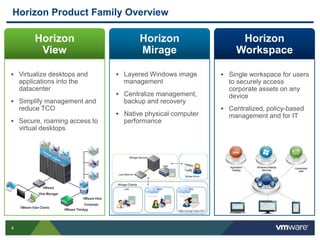
Horizon Product Family Overview
 Layered Windows image
management
 Centralize management,
backup and recovery
 Native physical computer
performance
 Single workspace for users
to securely access
corporate assets on any
device
 Centralized, policy-based
management and for IT
 Virtualize desktops and
applications into the
datacenter
 Simplify management and
reduce TCO
 Secure, roaming access to
virtual desktops
Horizon
View
Horizon
Mirage
Horizon
Workspace
5
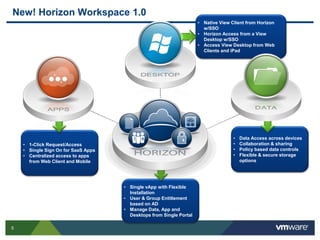
• Data Access across devices
• Collaboration & sharing
• Policy based data controls
• Flexible & secure storage
options
• 1-Click Request/Access
• Single Sign On for SaaS Apps
• Centralized access to apps
from Web Client and Mobile
• Single vApp with Flexible
Installation
• User & Group Entitlement
based on AD
• Manage Data, App and
Desktops from Single Portal
• Native View Client from Horizon
w/SSO
• Horizon Access from a View
Desktop w/SSO
• Access View Desktop from Web
Clients and iPad
New! Horizon Workspace 1.0
6
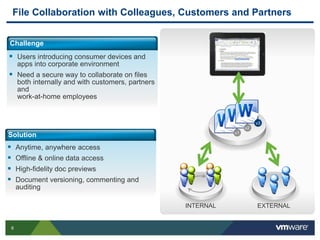
File Collaboration with Colleagues, Customers and Partners
Challenge
 Users introducing consumer devices and
apps into corporate environment
 Need a secure way to collaborate on files
both internally and with customers, partners
and
work-at-home employees
Solution
 Anytime, anywhere access
 Offline & online data access
 High-fidelity doc previews
 Document versioning, commenting and
auditing
v1
INTERNAL EXTERNAL
v2
v3
7
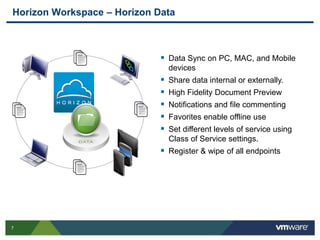
Horizon Workspace – Horizon Data
 Data Sync on PC, MAC, and Mobile
devices
 Share data internal or externally.
 High Fidelity Document Preview
 Notifications and file commenting
 Favorites enable offline use
 Set different levels of service using
Class of Service settings.
 Register & wipe of all endpoints
8
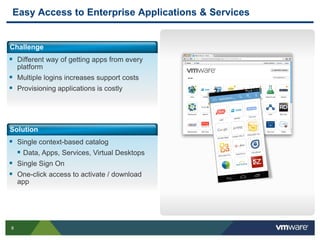
Easy Access to Enterprise Applications & Services
Challenge
 Different way of getting apps from every
platform
 Multiple logins increases support costs
 Provisioning applications is costly
Solution
 Single context-based catalog
 Data, Apps, Services, Virtual Desktops
 Single Sign On
 One-click access to activate / download
app
9
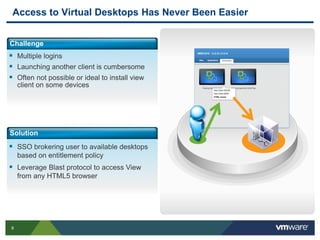
Access to Virtual Desktops Has Never Been Easier
Challenge
 Multiple logins
 Launching another client is cumbersome
 Often not possible or ideal to install view
client on some devices
Solution
 SSO brokering user to available desktops
based on entitlement policy
 Leverage Blast protocol to access View
from any HTML5 browser
10
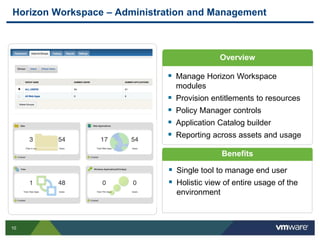
Horizon Workspace – Administration and Management
Overview
 Manage Horizon Workspace
modules
 Provision entitlements to resources
 Policy Manager controls
 Application Catalog builder
 Reporting across assets and usage
Benefits
 Single tool to manage end user
 Holistic view of entire usage of the
environment
11
Horizon Workspace Architecture
12
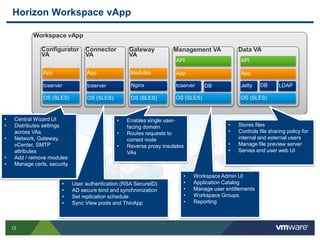
Horizon Workspace vApp
Workspace vApp
Configurator
VA
OS (SLES)
tcserver
Management VA
OS (SLES)
App
API
DBtcserver
Data VA
OS (SLES)
App
API
DB LDAPJetty
App
Connector
VA
OS (SLES)
tcserver
App
Gateway
VA
OS (SLES)
Nginx
Modules
• Central Wizard UI
• Distributes settings
across VAs
• Network, Gateway,
vCenter, SMTP
attributes
• Add / remove modules
• Manage certs, security
• User authentication (RSA SecureID)
• AD secure bind and synchronization
• Set replication schedule
• Sync View pools and ThinApp
• Enables single user-
facing domain
• Routes requests to
correct node
• Reverse proxy insulates
VAs
• Workspace Admin UI
• Application Catalog
• Manage user entitlements
• Workspace Groups
• Reporting
• Stores files
• Controls file sharing policy for
internal and external users
• Manage file preview server
• Serves end user web UI
13
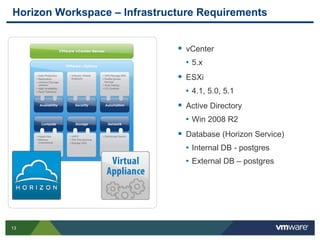
Horizon Workspace – Infrastructure Requirements
 vCenter
• 5.x
 ESXi
• 4.1, 5.0, 5.1
 Active Directory
• Win 2008 R2
 Database (Horizon Service)
• Internal DB - postgres
• External DB – postgres
14
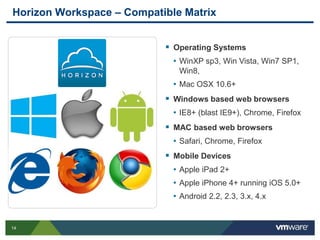
Horizon Workspace – Compatible Matrix
 Operating Systems
• WinXP sp3, Win Vista, Win7 SP1,
Win8,
• Mac OSX 10.6+
 Windows based web browsers
• IE8+ (blast IE9+), Chrome, Firefox
 MAC based web browsers
• Safari, Chrome, Firefox
 Mobile Devices
• Apple iPad 2+
• Apple iPhone 4+ running iOS 5.0+
• Android 2.2, 2.3, 3.x, 4.x
15
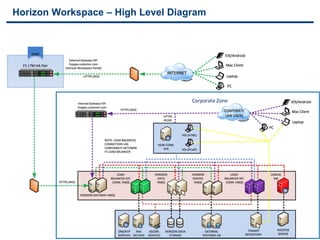
Horizon Workspace – High Level Diagram
16
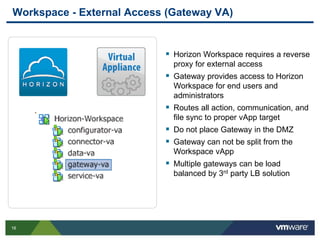
Workspace - External Access (Gateway VA)
 Horizon Workspace requires a reverse
proxy for external access
 Gateway provides access to Horizon
Workspace for end users and
administrators
 Routes all action, communication, and
file sync to proper vApp target
 Do not place Gateway in the DMZ
 Gateway can not be split from the
Workspace vApp
 Multiple gateways can be load
balanced by 3rd party LB solution
17
Highly Available Storage
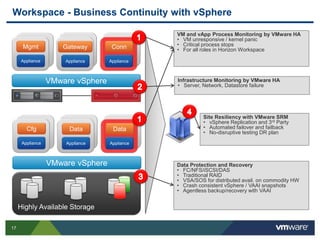
Workspace - Business Continuity with vSphere
Appliance
Mgmt
VMware vSphere
Appliance
Gateway
Appliance
Conn
Appliance
Cfg
VMware vSphere
Appliance
Data
Appliance
Data
VM and vApp Process Monitoring by VMware HA
• VM unresponsive / kernel panic
• Critical process stops
• For all roles in Horizon Workspace
Infrastructure Monitoring by VMware HA
• Server, Network, Datastore failure
Site Resiliency with VMware SRM
• vSphere Replication and 3rd Party
• Automated failover and failback
• No-disruptive testing DR plan
Data Protection and Recovery
• FC/NFS/iSCSI/DAS
• Traditional RAID
• VSA/SOS for distributed avail. on commodity HW
• Crash consistent vSphere / VAAI snapshots
• Agentless backup/recovery with VAAI
18
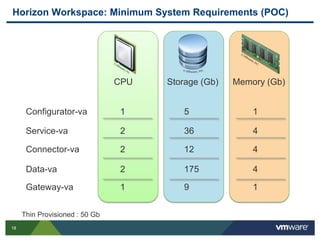
Horizon Workspace: Minimum System Requirements (POC)
Thin Provisioned : 50 Gb
CPU Storage (Gb) Memory (Gb)
Configurator-va 1 5 1
Service-va 2 36 4
Connector-va 2 12 4
Data-va 2 175 4
Gateway-va 1 9 1
19
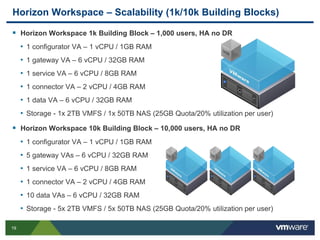
Horizon Workspace – Scalability (1k/10k Building Blocks)
 Horizon Workspace 1k Building Block – 1,000 users, HA no DR
• 1 configurator VA – 1 vCPU / 1GB RAM
• 1 gateway VA – 6 vCPU / 32GB RAM
• 1 service VA – 6 vCPU / 8GB RAM
• 1 connector VA – 2 vCPU / 4GB RAM
• 1 data VA – 6 vCPU / 32GB RAM
• Storage - 1x 2TB VMFS / 1x 50TB NAS (25GB Quota/20% utilization per user)
 Horizon Workspace 10k Building Block – 10,000 users, HA no DR
• 1 configurator VA – 1 vCPU / 1GB RAM
• 5 gateway VAs – 6 vCPU / 32GB RAM
• 1 service VA – 6 vCPU / 8GB RAM
• 1 connector VA – 2 vCPU / 4GB RAM
• 10 data VAs – 6 vCPU / 32GB RAM
• Storage - 5x 2TB VMFS / 5x 50TB NAS (25GB Quota/20% utilization per user)
20
Questions?

Osys Tech Talk 27. Juni 2013

  • 1.
    Osys AG |Hofwiesenstrasse 350 | 8050 Zürich Telefon +41 44 317 18 19 | Fax +41 44 317 18 20 | office@osys.ch | www.osys.ch © 2012 VMware Horizon Workspace Techtalk John Bysäth Senior IT Specialist | john.bysaeth@osys.ch 27. Juni 2013
  • 2.
     Präsentation VMwareHorizon Workspace  Demo VMware Horizon Workspace
  • 3.
  • 4.
    4 VMware View Composer VMware ThinApp VMwareView Clients VMware View Manager Horizon Product Family Overview  Layered Windows image management  Centralize management, backup and recovery  Native physical computer performance  Single workspace for users to securely access corporate assets on any device  Centralized, policy-based management and for IT  Virtualize desktops and applications into the datacenter  Simplify management and reduce TCO  Secure, roaming access to virtual desktops Horizon View Horizon Mirage Horizon Workspace
  • 5.
    5 • Data Accessacross devices • Collaboration & sharing • Policy based data controls • Flexible & secure storage options • 1-Click Request/Access • Single Sign On for SaaS Apps • Centralized access to apps from Web Client and Mobile • Single vApp with Flexible Installation • User & Group Entitlement based on AD • Manage Data, App and Desktops from Single Portal • Native View Client from Horizon w/SSO • Horizon Access from a View Desktop w/SSO • Access View Desktop from Web Clients and iPad New! Horizon Workspace 1.0
  • 6.
    6 File Collaboration withColleagues, Customers and Partners Challenge  Users introducing consumer devices and apps into corporate environment  Need a secure way to collaborate on files both internally and with customers, partners and work-at-home employees Solution  Anytime, anywhere access  Offline & online data access  High-fidelity doc previews  Document versioning, commenting and auditing v1 INTERNAL EXTERNAL v2 v3
  • 7.
    7 Horizon Workspace –Horizon Data  Data Sync on PC, MAC, and Mobile devices  Share data internal or externally.  High Fidelity Document Preview  Notifications and file commenting  Favorites enable offline use  Set different levels of service using Class of Service settings.  Register & wipe of all endpoints
  • 8.
    8 Easy Access toEnterprise Applications & Services Challenge  Different way of getting apps from every platform  Multiple logins increases support costs  Provisioning applications is costly Solution  Single context-based catalog  Data, Apps, Services, Virtual Desktops  Single Sign On  One-click access to activate / download app
  • 9.
    9 Access to VirtualDesktops Has Never Been Easier Challenge  Multiple logins  Launching another client is cumbersome  Often not possible or ideal to install view client on some devices Solution  SSO brokering user to available desktops based on entitlement policy  Leverage Blast protocol to access View from any HTML5 browser
  • 10.
    10 Horizon Workspace –Administration and Management Overview  Manage Horizon Workspace modules  Provision entitlements to resources  Policy Manager controls  Application Catalog builder  Reporting across assets and usage Benefits  Single tool to manage end user  Holistic view of entire usage of the environment
  • 11.
  • 12.
    12 Horizon Workspace vApp WorkspacevApp Configurator VA OS (SLES) tcserver Management VA OS (SLES) App API DBtcserver Data VA OS (SLES) App API DB LDAPJetty App Connector VA OS (SLES) tcserver App Gateway VA OS (SLES) Nginx Modules • Central Wizard UI • Distributes settings across VAs • Network, Gateway, vCenter, SMTP attributes • Add / remove modules • Manage certs, security • User authentication (RSA SecureID) • AD secure bind and synchronization • Set replication schedule • Sync View pools and ThinApp • Enables single user- facing domain • Routes requests to correct node • Reverse proxy insulates VAs • Workspace Admin UI • Application Catalog • Manage user entitlements • Workspace Groups • Reporting • Stores files • Controls file sharing policy for internal and external users • Manage file preview server • Serves end user web UI
  • 13.
    13 Horizon Workspace –Infrastructure Requirements  vCenter • 5.x  ESXi • 4.1, 5.0, 5.1  Active Directory • Win 2008 R2  Database (Horizon Service) • Internal DB - postgres • External DB – postgres
  • 14.
    14 Horizon Workspace –Compatible Matrix  Operating Systems • WinXP sp3, Win Vista, Win7 SP1, Win8, • Mac OSX 10.6+  Windows based web browsers • IE8+ (blast IE9+), Chrome, Firefox  MAC based web browsers • Safari, Chrome, Firefox  Mobile Devices • Apple iPad 2+ • Apple iPhone 4+ running iOS 5.0+ • Android 2.2, 2.3, 3.x, 4.x
  • 15.
    15 Horizon Workspace –High Level Diagram
  • 16.
    16 Workspace - ExternalAccess (Gateway VA)  Horizon Workspace requires a reverse proxy for external access  Gateway provides access to Horizon Workspace for end users and administrators  Routes all action, communication, and file sync to proper vApp target  Do not place Gateway in the DMZ  Gateway can not be split from the Workspace vApp  Multiple gateways can be load balanced by 3rd party LB solution
  • 17.
    17 Highly Available Storage Workspace- Business Continuity with vSphere Appliance Mgmt VMware vSphere Appliance Gateway Appliance Conn Appliance Cfg VMware vSphere Appliance Data Appliance Data VM and vApp Process Monitoring by VMware HA • VM unresponsive / kernel panic • Critical process stops • For all roles in Horizon Workspace Infrastructure Monitoring by VMware HA • Server, Network, Datastore failure Site Resiliency with VMware SRM • vSphere Replication and 3rd Party • Automated failover and failback • No-disruptive testing DR plan Data Protection and Recovery • FC/NFS/iSCSI/DAS • Traditional RAID • VSA/SOS for distributed avail. on commodity HW • Crash consistent vSphere / VAAI snapshots • Agentless backup/recovery with VAAI
  • 18.
    18 Horizon Workspace: MinimumSystem Requirements (POC) Thin Provisioned : 50 Gb CPU Storage (Gb) Memory (Gb) Configurator-va 1 5 1 Service-va 2 36 4 Connector-va 2 12 4 Data-va 2 175 4 Gateway-va 1 9 1
  • 19.
    19 Horizon Workspace –Scalability (1k/10k Building Blocks)  Horizon Workspace 1k Building Block – 1,000 users, HA no DR • 1 configurator VA – 1 vCPU / 1GB RAM • 1 gateway VA – 6 vCPU / 32GB RAM • 1 service VA – 6 vCPU / 8GB RAM • 1 connector VA – 2 vCPU / 4GB RAM • 1 data VA – 6 vCPU / 32GB RAM • Storage - 1x 2TB VMFS / 1x 50TB NAS (25GB Quota/20% utilization per user)  Horizon Workspace 10k Building Block – 10,000 users, HA no DR • 1 configurator VA – 1 vCPU / 1GB RAM • 5 gateway VAs – 6 vCPU / 32GB RAM • 1 service VA – 6 vCPU / 8GB RAM • 1 connector VA – 2 vCPU / 4GB RAM • 10 data VAs – 6 vCPU / 32GB RAM • Storage - 5x 2TB VMFS / 5x 50TB NAS (25GB Quota/20% utilization per user)
  • 20.