1Using ORACLE®LOOPS and CONTROL structures
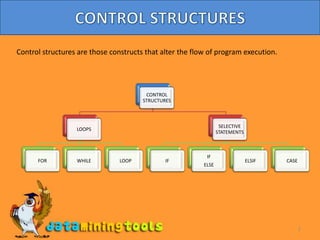
2CONTROL STRUCTURESControl structures are those constructs that alter the flow of program execution.
3LOOPSControl structures are those constructs that alter the flow of program execution.Loop is one such control structure. A loop iterates a given set of statements until a condition is satisfied.There are three types of looping constructs:Simple loop.While loopFor loop.FOR counter INLwr_bnd..Upr_bndLOOPStatement 1;…………END LOOPloopStatement 1;…….…….EXIT WHEN[condition]END LOOPWHILE( condition) LOOPStatement 1……..…….END LOOP
4SIMPLE LOOPA simple loop begins with a LOOP keyword, ends with a END LOOP keyword and in between are the statements to be performed. We must include an EXIT WHEN statement to set the exit condition or else it will form an infinite loop.EXAMPLE:DECLARE	ename VARCHAR2(20);    	counter NUMBER :=40;BEGINLOOP	SELECT age INTO eage FROM InfoTable WHERE 	age = counter;	DBMS_OUTPUT.PUT_LINE(‘Age is’ ||eage);		         SYNTAX	counter += 5;	EXIT WHEN counter >50;END LOOPENDloopStatement 1;…….…….EXIT WHEN[condition]END LOOP
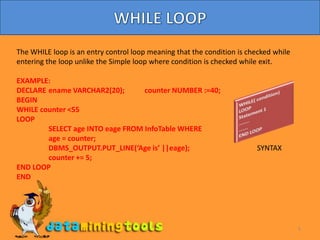
5WHILE LOOPThe WHILE loop is an entry control loop meaning that the condition is checked while entering the loop unlike the Simple loop where condition is checked while exit.EXAMPLE:DECLARE	ename VARCHAR2(20);    	counter NUMBER :=40;BEGINWHILE counter <55	LOOP	SELECT age INTO eage FROM InfoTable WHERE 	age = counter;	DBMS_OUTPUT.PUT_LINE(‘Age is’ ||eage);		         SYNTAXcounter += 5;	END LOOPENDWHILE( condition) LOOPStatement 1……..…….END LOOP
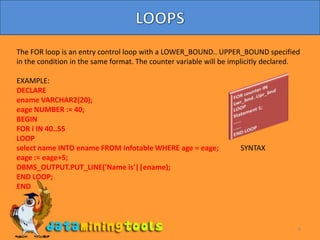
6LOOPSThe FOR loop is an entry control loop with a LOWER_BOUND.. UPPER_BOUND specified in the condition in the same format. The counter variable will be implicitly declared.EXAMPLE:DECLAREename VARCHAR2(20);eage NUMBER := 40;BEGINFOR i IN 40..55LOOPselect name INTO ename FROM Infotable WHERE age = eage;	SYNTAXeage := eage+5;DBMS_OUTPUT.PUT_LINE('Name is'||ename);END LOOP;ENDFOR counter INLwr_bnd..Upr_bndLOOPStatement 1;…………END LOOP
7NESTED LOOPSWe can nest one loop inside another by giving labels to the loops.SYNTAX<<outer_loop>>label for outer loopLOOP      <<inner_loop>>	label for inner loopLOOP	Statement 1;      	 …..       	EXIT WHEN [cond]       	END LOOP inner _loop;Statement 1;…………EXIT WHEN [cond]END LOOP outer_loop;<<outer_loop>>FOR counter INLwr_bnd..Upr_bndLOOP      <<inner_loop>      LOOP      Statement 1;       …..       EXIT WHEN [cond]END LOOP Inner _loop;Statement 1;…………END LOOP Outer_loop;
8SELECTIVE STATEMENTSSelective statements are the constructs that perform the action based on the condition that is satisfied.There are four selective constructs:IFIF…..ELSEIF……ELSIF……ELSECASEIF (condition..)THENStatement1;Statement2;ELSIF     Statement1;     Statement2;ELSE     Statement1;     Statement2;END IF;IF (condition..)THENStatement1;Statement2;……END IF;IF (condition..)THENStatement1;Statement2;ELSEStatement1;Statement2;END IF;CASE selectorWHEN expression 1 THEN  result 1;WHEN expression 2 THEN  result 2;…….ELSE [result n]END
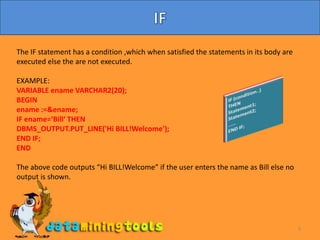
9IFThe IF statement has a condition ,which when satisfied the statements in its body are executed else the are not executed.EXAMPLE:VARIABLE ename VARCHAR2(20);BEGINename :=&ename;IF ename=‘Bill‘ THENDBMS_OUTPUT.PUT_LINE('Hi BILL!Welcome');END IF;ENDThe above code outputs “Hi BILL!Welcome” if the user enters the name as Bill else no output is shown.IF (condition..)THENStatement1;Statement2;……END IF;
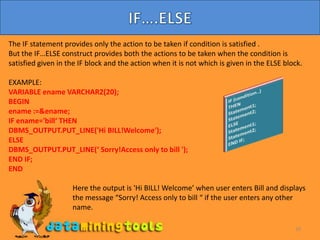
10IF….ELSEThe IF statement provides only the action to be taken if condition is satisfied .But the IF…ELSE construct provides both the actions to be taken when the condition is satisfied given in the IF block and the action when it is not which is given in the ELSE block.EXAMPLE:VARIABLE ename VARCHAR2(20);BEGINename :=&ename;IF ename='bill‘ THENDBMS_OUTPUT.PUT_LINE('Hi BILL!Welcome');ELSEDBMS_OUTPUT.PUT_LINE(‘ Sorry!Access only to bill ');END IF;END		Here the output is 'Hi BILL! Welcome’ when user enters Bill and displays 		the message “Sorry! Access only to bill “ if the user enters any other 			name.IF (condition..)THENStatement1;Statement2;ELSEStatement1;Statement2;END IF;
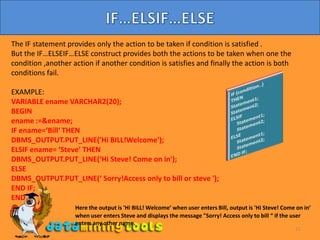
11IF…ELSIF…ELSEThe IF statement provides only the action to be taken if condition is satisfied .But the IF…ELSEIF…ELSE construct provides both the actions to be taken when one the condition ,another action if another condition is satisfies and finally the action is both conditions fail.EXAMPLE:VARIABLE ename VARCHAR2(20);BEGINename :=&ename;IF ename=‘Bill‘ THENDBMS_OUTPUT.PUT_LINE('Hi BILL!Welcome');ELSIF ename= ‘Steve’ THENDBMS_OUTPUT.PUT_LINE(‘Hi Steve! Come on in');ELSEDBMS_OUTPUT.PUT_LINE(‘ Sorry!Access only to bill or steve ');END IF;ENDHere the output is 'Hi BILL! Welcome’ when user enters Bill, output is 'Hi Steve! Come on in’ 		when user enters Steve and displays the message "Sorry! Access only to bill “ if the user 		enters any other name.IF (condition..)THENStatement1;Statement2;ELSIF     Statement1;     Statement2;ELSE     Statement1;     Statement2;END IF;
12CASEThe CASE construct is a special form of the ELSIF construct which matches a selector values with list of expresions and if either is matched the executes those statements.EXAMPLE:VARIABLE ename VARCHAR2(20);BEGINename :=&ename;CASE enameWHEN ‘Bill’ THEN DBMS_OUTPUT.PUT_LINE(‘Hi Bill! Come on in');WHEN ‘Steve’ THEN DBMS_OUTPUT.PUT_LINE(‘Hi Steve! Come on in');WHEN ‘Larry’ THEN DBMS_OUTPUT.PUT_LINE(‘Hi Larry! Come on in’);ELSE  DBMS_OUTPUT.PUT_LINE(‘ Sorry!Access only to bill or steve or larry ');END IF;ENDHere the output is 'Hi BILL! Come on in’ when user enters Bill, output is 'Hi Steve! Come on 		in’ when user enters Steve and output is 'Hi Larry! Come on in’ when user enters Larry and 		displays the message "Sorry! Access only to bill “ if the user enters any other name.CASE selectorWHEN expression 1 THEN  result 1;WHEN expression 2 THEN  result 2;…….ELSE [result n]END
THANK YOU13THANK YOU FOR VIEWING THIS PRESENTATIONFOR MORE PRESENTATIONS AND VIDEOS ON ORACLE AND DATAMINING ,please visit:  www.dataminingtools.net

Oracle: Control Structures

  • 1.
    1Using ORACLE®LOOPS andCONTROL structures
  • 2.
    2CONTROL STRUCTURESControl structuresare those constructs that alter the flow of program execution.
  • 3.
    3LOOPSControl structures arethose constructs that alter the flow of program execution.Loop is one such control structure. A loop iterates a given set of statements until a condition is satisfied.There are three types of looping constructs:Simple loop.While loopFor loop.FOR counter INLwr_bnd..Upr_bndLOOPStatement 1;…………END LOOPloopStatement 1;…….…….EXIT WHEN[condition]END LOOPWHILE( condition) LOOPStatement 1……..…….END LOOP
  • 4.
    4SIMPLE LOOPA simpleloop begins with a LOOP keyword, ends with a END LOOP keyword and in between are the statements to be performed. We must include an EXIT WHEN statement to set the exit condition or else it will form an infinite loop.EXAMPLE:DECLARE ename VARCHAR2(20); counter NUMBER :=40;BEGINLOOP SELECT age INTO eage FROM InfoTable WHERE age = counter; DBMS_OUTPUT.PUT_LINE(‘Age is’ ||eage); SYNTAX counter += 5; EXIT WHEN counter >50;END LOOPENDloopStatement 1;…….…….EXIT WHEN[condition]END LOOP
  • 5.
    5WHILE LOOPThe WHILEloop is an entry control loop meaning that the condition is checked while entering the loop unlike the Simple loop where condition is checked while exit.EXAMPLE:DECLARE ename VARCHAR2(20); counter NUMBER :=40;BEGINWHILE counter <55 LOOP SELECT age INTO eage FROM InfoTable WHERE age = counter; DBMS_OUTPUT.PUT_LINE(‘Age is’ ||eage); SYNTAXcounter += 5; END LOOPENDWHILE( condition) LOOPStatement 1……..…….END LOOP
  • 6.
    6LOOPSThe FOR loopis an entry control loop with a LOWER_BOUND.. UPPER_BOUND specified in the condition in the same format. The counter variable will be implicitly declared.EXAMPLE:DECLAREename VARCHAR2(20);eage NUMBER := 40;BEGINFOR i IN 40..55LOOPselect name INTO ename FROM Infotable WHERE age = eage; SYNTAXeage := eage+5;DBMS_OUTPUT.PUT_LINE('Name is'||ename);END LOOP;ENDFOR counter INLwr_bnd..Upr_bndLOOPStatement 1;…………END LOOP
  • 7.
    7NESTED LOOPSWe cannest one loop inside another by giving labels to the loops.SYNTAX<<outer_loop>>label for outer loopLOOP <<inner_loop>> label for inner loopLOOP Statement 1; ….. EXIT WHEN [cond] END LOOP inner _loop;Statement 1;…………EXIT WHEN [cond]END LOOP outer_loop;<<outer_loop>>FOR counter INLwr_bnd..Upr_bndLOOP <<inner_loop> LOOP Statement 1; ….. EXIT WHEN [cond]END LOOP Inner _loop;Statement 1;…………END LOOP Outer_loop;
  • 8.
    8SELECTIVE STATEMENTSSelective statementsare the constructs that perform the action based on the condition that is satisfied.There are four selective constructs:IFIF…..ELSEIF……ELSIF……ELSECASEIF (condition..)THENStatement1;Statement2;ELSIF Statement1; Statement2;ELSE Statement1; Statement2;END IF;IF (condition..)THENStatement1;Statement2;……END IF;IF (condition..)THENStatement1;Statement2;ELSEStatement1;Statement2;END IF;CASE selectorWHEN expression 1 THEN result 1;WHEN expression 2 THEN result 2;…….ELSE [result n]END
  • 9.
    9IFThe IF statementhas a condition ,which when satisfied the statements in its body are executed else the are not executed.EXAMPLE:VARIABLE ename VARCHAR2(20);BEGINename :=&ename;IF ename=‘Bill‘ THENDBMS_OUTPUT.PUT_LINE('Hi BILL!Welcome');END IF;ENDThe above code outputs “Hi BILL!Welcome” if the user enters the name as Bill else no output is shown.IF (condition..)THENStatement1;Statement2;……END IF;
  • 10.
    10IF….ELSEThe IF statementprovides only the action to be taken if condition is satisfied .But the IF…ELSE construct provides both the actions to be taken when the condition is satisfied given in the IF block and the action when it is not which is given in the ELSE block.EXAMPLE:VARIABLE ename VARCHAR2(20);BEGINename :=&ename;IF ename='bill‘ THENDBMS_OUTPUT.PUT_LINE('Hi BILL!Welcome');ELSEDBMS_OUTPUT.PUT_LINE(‘ Sorry!Access only to bill ');END IF;END Here the output is 'Hi BILL! Welcome’ when user enters Bill and displays the message “Sorry! Access only to bill “ if the user enters any other name.IF (condition..)THENStatement1;Statement2;ELSEStatement1;Statement2;END IF;
  • 11.
    11IF…ELSIF…ELSEThe IF statementprovides only the action to be taken if condition is satisfied .But the IF…ELSEIF…ELSE construct provides both the actions to be taken when one the condition ,another action if another condition is satisfies and finally the action is both conditions fail.EXAMPLE:VARIABLE ename VARCHAR2(20);BEGINename :=&ename;IF ename=‘Bill‘ THENDBMS_OUTPUT.PUT_LINE('Hi BILL!Welcome');ELSIF ename= ‘Steve’ THENDBMS_OUTPUT.PUT_LINE(‘Hi Steve! Come on in');ELSEDBMS_OUTPUT.PUT_LINE(‘ Sorry!Access only to bill or steve ');END IF;ENDHere the output is 'Hi BILL! Welcome’ when user enters Bill, output is 'Hi Steve! Come on in’ when user enters Steve and displays the message "Sorry! Access only to bill “ if the user enters any other name.IF (condition..)THENStatement1;Statement2;ELSIF Statement1; Statement2;ELSE Statement1; Statement2;END IF;
  • 12.
    12CASEThe CASE constructis a special form of the ELSIF construct which matches a selector values with list of expresions and if either is matched the executes those statements.EXAMPLE:VARIABLE ename VARCHAR2(20);BEGINename :=&ename;CASE enameWHEN ‘Bill’ THEN DBMS_OUTPUT.PUT_LINE(‘Hi Bill! Come on in');WHEN ‘Steve’ THEN DBMS_OUTPUT.PUT_LINE(‘Hi Steve! Come on in');WHEN ‘Larry’ THEN DBMS_OUTPUT.PUT_LINE(‘Hi Larry! Come on in’);ELSE DBMS_OUTPUT.PUT_LINE(‘ Sorry!Access only to bill or steve or larry ');END IF;ENDHere the output is 'Hi BILL! Come on in’ when user enters Bill, output is 'Hi Steve! Come on in’ when user enters Steve and output is 'Hi Larry! Come on in’ when user enters Larry and displays the message "Sorry! Access only to bill “ if the user enters any other name.CASE selectorWHEN expression 1 THEN result 1;WHEN expression 2 THEN result 2;…….ELSE [result n]END
  • 13.
    THANK YOU13THANK YOUFOR VIEWING THIS PRESENTATIONFOR MORE PRESENTATIONS AND VIDEOS ON ORACLE AND DATAMINING ,please visit: www.dataminingtools.net