Oracle Apps Load Testing - Best
Practices
Sonu Kumar Saini
Agenda
Oracle iSupplier Portal
Scripting Best Practices for Oracle Apps
Load Test Execution In Oracle Apps
Uniform Load Distribution On Web Servers
Comparative Study of Socket and Servlet Modes
3
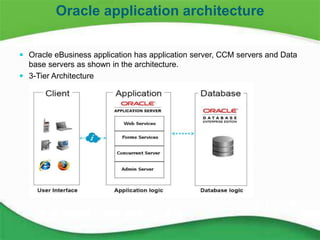
 Oracle eBusiness application has application server, CCM servers and Data
base servers as shown in the architecture.
 3-Tier Architecture
Oracle application architecture
4
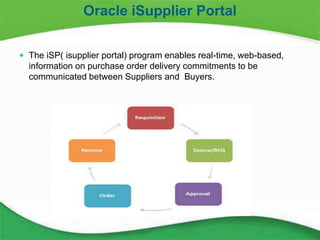
 The iSP( isupplier portal) program enables real-time, web-based,
information on purchase order delivery commitments to be
communicated between Suppliers and Buyers.
Oracle iSupplier Portal
5
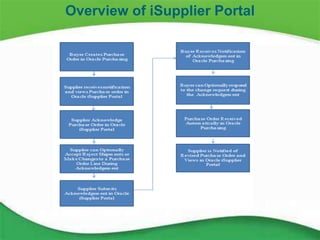
Overview of iSupplier Portal
6
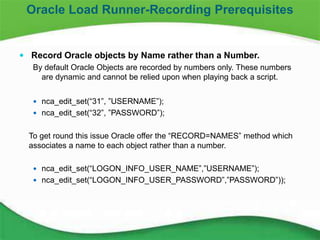
 Record Oracle objects by Name rather than a Number.
By default Oracle Objects are recorded by numbers only. These numbers
are dynamic and cannot be relied upon when playing back a script.
 nca_edit_set(“31”, ”USERNAME”);
 nca_edit_set(“32”, ”PASSWORD”);
To get round this issue Oracle offer the “RECORD=NAMES” method which
associates a name to each object rather than a number.
 nca_edit_set(“LOGON_INFO_USER_NAME”,”USERNAME”);
 nca_edit_set(“LOGON_INFO_USER_PASSWORD”,”PASSWORD”));
Oracle Load Runner-Recording Prerequisites
7
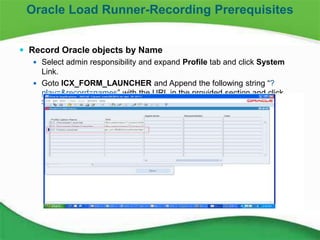
 Record Oracle objects by Name
 Select admin responsibility and expand Profile tab and click System
Link.
 Goto ICX_FORM_LAUNCHER and Append the following string “?
play=&record=names” with the URL in the provided section and click
Save.
Oracle Load Runner-Recording Prerequisites
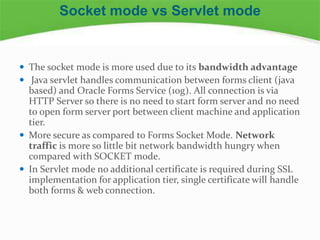
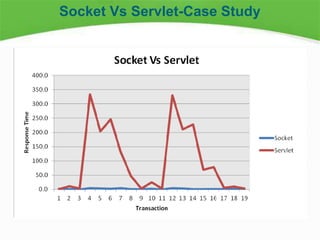
 The socket mode is more used due to its bandwidth advantage
 Java servlet handles communication between forms client (java
based) and Oracle Forms Service (10g). All connection is via
HTTP Server so there is no need to start form server and no need
to open form server port between client machine and application
tier.
 More secure as compared to Forms Socket Mode. Network
traffic is more so little bit network bandwidth hungry when
compared with SOCKET mode.
 In Servlet mode no additional certificate is required during SSL
implementation for application tier, single certificate will handle
both forms & web connection.
Socket mode vs Servlet mode
 Fchdbvfhbdhbvfvf
Socket Vs Servlet-Case Study
10
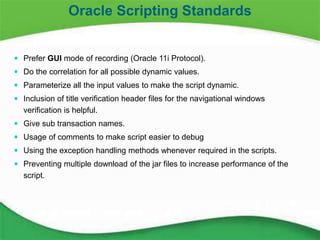
 Prefer GUI mode of recording (Oracle 11i Protocol).
 Do the correlation for all possible dynamic values.
 Parameterize all the input values to make the script dynamic.
 Inclusion of title verification header files for the navigational windows
verification is helpful.
 Give sub transaction names.
 Usage of comments to make script easier to debug
 Using the exception handling methods whenever required in the scripts.
 Preventing multiple download of the jar files to increase performance of the
script.
Oracle Scripting Standards
11
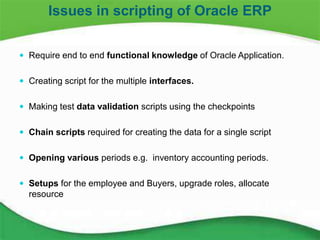
 Require end to end functional knowledge of Oracle Application.
 Creating script for the multiple interfaces.
 Making test data validation scripts using the checkpoints
 Chain scripts required for creating the data for a single script
 Opening various periods e.g. inventory accounting periods.
 Setups for the employee and Buyers, upgrade roles, allocate
resource
Issues in scripting of Oracle ERP
12
 Interface Setups
 Test Data Creation
 Batch Jobs
 Runtime Settings for the Load Test
 LG clean up
 Load Balancing: Stickiness
Test Execution Setups
13
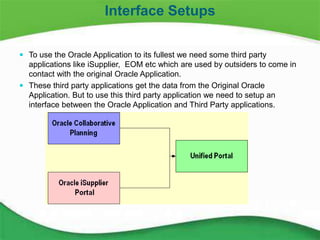
 To use the Oracle Application to its fullest we need some third party
applications like iSupplier, EOM etc which are used by outsiders to come in
contact with the original Oracle Application.
 These third party applications get the data from the Original Oracle
Application. But to use this third party application we need to setup an
interface between the Oracle Application and Third Party applications.
Interface Setups
14
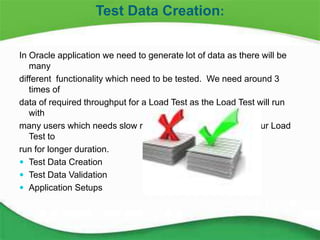
In Oracle application we need to generate lot of data as there will be
many
different functionality which need to be tested. We need around 3
times of
data of required throughput for a Load Test as the Load Test will run
with
many users which needs slow ramp up which in turn makes our Load
Test to
run for longer duration.
 Test Data Creation
 Test Data Validation
 Application Setups
Test Data Creation:
15
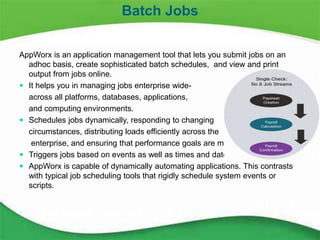
AppWorx is an application management tool that lets you submit jobs on an
adhoc basis, create sophisticated batch schedules, and view and print
output from jobs online.
 It helps you in managing jobs enterprise wide-
across all platforms, databases, applications,
and computing environments.
 Schedules jobs dynamically, responding to changing
circumstances, distributing loads efficiently across the
enterprise, and ensuring that performance goals are met.
 Triggers jobs based on events as well as times and dates.
 AppWorx is capable of dynamically automating applications. This contrasts
with typical job scheduling tools that rigidly schedule system events or
scripts.
Batch Jobs
16
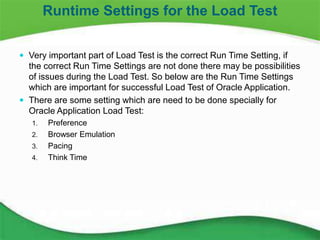
 Very important part of Load Test is the correct Run Time Setting, if
the correct Run Time Settings are not done there may be possibilities
of issues during the Load Test. So below are the Run Time Settings
which are important for successful Load Test of Oracle Application.
 There are some setting which are need to be done specially for
Oracle Application Load Test:
1. Preference
2. Browser Emulation
3. Pacing
4. Think Time
Runtime Settings for the Load Test
17
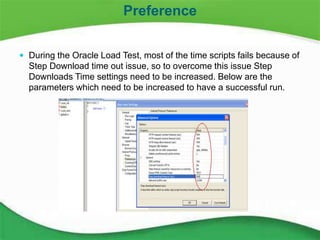
 During the Oracle Load Test, most of the time scripts fails because of
Step Download time out issue, so to overcome this issue Step
Downloads Time settings need to be increased. Below are the
parameters which need to be increased to have a successful run.
Preference
18
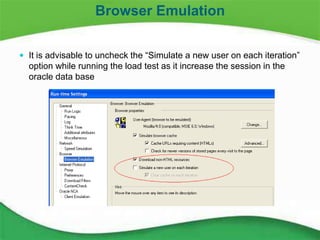
 It is advisable to uncheck the “Simulate a new user on each iteration”
option while running the load test as it increase the session in the
oracle data base
Browser Emulation
19
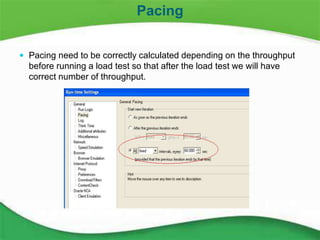
 Pacing need to be correctly calculated depending on the throughput
before running a load test so that after the load test we will have
correct number of throughput.
Pacing
20
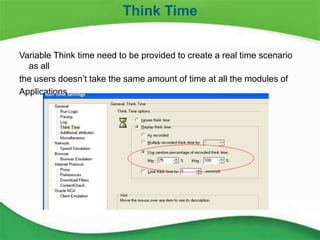
Variable Think time need to be provided to create a real time scenario
as all
the users doesn’t take the same amount of time at all the modules of
Applications
Think Time
21
 Using the Vuser status function:
 This function helps in controller during execution and creates the history in log files also.
Using this function we can easily find which user is running in which iteration and generated
through which load generator.
 lr_vuser_status_message("%s", lr_eval_string("Record Details Iteration {Which Iteration},
SSO ID: {appsuserid}, Agent {Load Generator}"));
 The script name should not be very large:
The script name should not be very large otherwise the script files will not be transferred to the LG.
 LGs need to be cleaned and restarted:
To have a good load test without any issue with the LGs it is preferred to clean the LG by cleaning
all the files present in temp
Oracle Load Test Execution Best Practices
22
 Getting “sending files error” error during Load Test:
 It deals with the parameter naming conventions.
 Parameter name and file name should be same.
 No multiple copy of parameter file at hard drive.
 Back end locking issue
 Some time due to huge user load of particular transaction(eg.500), backend
locking happens and Vusers starts to fail after particular threshold. In this case
we need to do changes in the script and its assignment in the controller.
 Sufficient Rampup Time
 To overcome HTTP - 500 error during Vuser init(), we can increase Rampup
time.
 Concurrent Program Burning the Data of the script:
 Make sure that the concurrent programs which need to be run during the load
test should not burn any type of data which we are using for the Load Test if it is
doing then some remedial steps need to be taken to avoid this.
Oracle Load Test Execution Best Practices
23
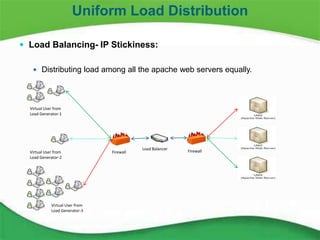
 Load Balancing- IP Stickiness:
 Distributing load among all the apache web servers equally.
Uniform Load Distribution
Load Balancer
Firewall Firewall
Virtual User from
Load Generator-3
Virtual User from
Load Generator-2
Virtual User from
Load Generator-1
24
MSA Process Steps in detail
 Bring down all the nodes of the Web server
 Bring up Web server “Node-1” and down “Node-2 and Node-3”
 Execute the MSA Scenario
• Execute “Application Login“ business process for 1 user 10 iteration from
load generator “ LG-1” machine only
 Bring up Web server “Node-2” and down “Node-1 and Node-3”
 Execute the MSA Scenario
• Execute “Application Login“ business process for 1 user 10 iteration from
load generator “ LG-2” machine only
 Bring up Web server “Node-3” and down “Node-2 and Node-1”
 Execute the MSA Scenario
• Execute “Application Login“ business process for 1 user 10 iteration from
load generator “ LG-3” machine only
• Bring up all Web server Nodes.
Uniform Load Distribution contd…
25
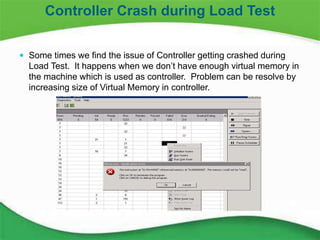
Controller Crash during Load Test:
 Some times we find the issue of Controller getting crashed during Load
Test. It happens when we don’t have enough virtual memory in the
machine which is used as controller.
 To avoid the above issue it is advised to check memory in the machine
before running any load test.
 Some times we find the issue of Controller getting crashed during Load
Test. It happens when we don’t have enough virtual memory in the
machine which is used as controller. Problem can be resolve by
increasing size of Virtual Memory in controller.
 The below pop up comes during the Load Test and automatically
controller disappears.
Controller Crash during Load Test
26
 Some times we find the issue of Controller getting crashed during
Load Test. It happens when we don’t have enough virtual memory in
the machine which is used as controller. Problem can be resolve by
increasing size of Virtual Memory in controller.
Controller Crash during Load Test
27
Sonu is working as Senior Performance Engineer in Performance practice, TCS.
He has more than 10 years of diverse technical experience in serving various
US,UK based customers in Financial Services, Insurance and Manufacturing
domain. His area of expertise includes performance testing & engineering, for
ERP based applications using market standards tools like LoadRunner, Jmeter,
etc.
He holds a B. Tech in Computer Science from UP Technical University , India
and bachelor's degree from Thapar Institute of Engineering & Technology, India.
About the author
Thank You
Sonu Kumar Saini

Oracle appsloadtestbestpractices

  • 1.
    Oracle Apps LoadTesting - Best Practices Sonu Kumar Saini
  • 2.
    Agenda Oracle iSupplier Portal ScriptingBest Practices for Oracle Apps Load Test Execution In Oracle Apps Uniform Load Distribution On Web Servers Comparative Study of Socket and Servlet Modes
  • 3.
    3  Oracle eBusinessapplication has application server, CCM servers and Data base servers as shown in the architecture.  3-Tier Architecture Oracle application architecture
  • 4.
    4  The iSP(isupplier portal) program enables real-time, web-based, information on purchase order delivery commitments to be communicated between Suppliers and Buyers. Oracle iSupplier Portal
  • 5.
  • 6.
    6  Record Oracleobjects by Name rather than a Number. By default Oracle Objects are recorded by numbers only. These numbers are dynamic and cannot be relied upon when playing back a script.  nca_edit_set(“31”, ”USERNAME”);  nca_edit_set(“32”, ”PASSWORD”); To get round this issue Oracle offer the “RECORD=NAMES” method which associates a name to each object rather than a number.  nca_edit_set(“LOGON_INFO_USER_NAME”,”USERNAME”);  nca_edit_set(“LOGON_INFO_USER_PASSWORD”,”PASSWORD”)); Oracle Load Runner-Recording Prerequisites
  • 7.
    7  Record Oracleobjects by Name  Select admin responsibility and expand Profile tab and click System Link.  Goto ICX_FORM_LAUNCHER and Append the following string “? play=&record=names” with the URL in the provided section and click Save. Oracle Load Runner-Recording Prerequisites
  • 8.
     The socketmode is more used due to its bandwidth advantage  Java servlet handles communication between forms client (java based) and Oracle Forms Service (10g). All connection is via HTTP Server so there is no need to start form server and no need to open form server port between client machine and application tier.  More secure as compared to Forms Socket Mode. Network traffic is more so little bit network bandwidth hungry when compared with SOCKET mode.  In Servlet mode no additional certificate is required during SSL implementation for application tier, single certificate will handle both forms & web connection. Socket mode vs Servlet mode
  • 9.
  • 10.
    10  Prefer GUImode of recording (Oracle 11i Protocol).  Do the correlation for all possible dynamic values.  Parameterize all the input values to make the script dynamic.  Inclusion of title verification header files for the navigational windows verification is helpful.  Give sub transaction names.  Usage of comments to make script easier to debug  Using the exception handling methods whenever required in the scripts.  Preventing multiple download of the jar files to increase performance of the script. Oracle Scripting Standards
  • 11.
    11  Require endto end functional knowledge of Oracle Application.  Creating script for the multiple interfaces.  Making test data validation scripts using the checkpoints  Chain scripts required for creating the data for a single script  Opening various periods e.g. inventory accounting periods.  Setups for the employee and Buyers, upgrade roles, allocate resource Issues in scripting of Oracle ERP
  • 12.
    12  Interface Setups Test Data Creation  Batch Jobs  Runtime Settings for the Load Test  LG clean up  Load Balancing: Stickiness Test Execution Setups
  • 13.
    13  To usethe Oracle Application to its fullest we need some third party applications like iSupplier, EOM etc which are used by outsiders to come in contact with the original Oracle Application.  These third party applications get the data from the Original Oracle Application. But to use this third party application we need to setup an interface between the Oracle Application and Third Party applications. Interface Setups
  • 14.
    14 In Oracle applicationwe need to generate lot of data as there will be many different functionality which need to be tested. We need around 3 times of data of required throughput for a Load Test as the Load Test will run with many users which needs slow ramp up which in turn makes our Load Test to run for longer duration.  Test Data Creation  Test Data Validation  Application Setups Test Data Creation:
  • 15.
    15 AppWorx is anapplication management tool that lets you submit jobs on an adhoc basis, create sophisticated batch schedules, and view and print output from jobs online.  It helps you in managing jobs enterprise wide- across all platforms, databases, applications, and computing environments.  Schedules jobs dynamically, responding to changing circumstances, distributing loads efficiently across the enterprise, and ensuring that performance goals are met.  Triggers jobs based on events as well as times and dates.  AppWorx is capable of dynamically automating applications. This contrasts with typical job scheduling tools that rigidly schedule system events or scripts. Batch Jobs
  • 16.
    16  Very importantpart of Load Test is the correct Run Time Setting, if the correct Run Time Settings are not done there may be possibilities of issues during the Load Test. So below are the Run Time Settings which are important for successful Load Test of Oracle Application.  There are some setting which are need to be done specially for Oracle Application Load Test: 1. Preference 2. Browser Emulation 3. Pacing 4. Think Time Runtime Settings for the Load Test
  • 17.
    17  During theOracle Load Test, most of the time scripts fails because of Step Download time out issue, so to overcome this issue Step Downloads Time settings need to be increased. Below are the parameters which need to be increased to have a successful run. Preference
  • 18.
    18  It isadvisable to uncheck the “Simulate a new user on each iteration” option while running the load test as it increase the session in the oracle data base Browser Emulation
  • 19.
    19  Pacing needto be correctly calculated depending on the throughput before running a load test so that after the load test we will have correct number of throughput. Pacing
  • 20.
    20 Variable Think timeneed to be provided to create a real time scenario as all the users doesn’t take the same amount of time at all the modules of Applications Think Time
  • 21.
    21  Using theVuser status function:  This function helps in controller during execution and creates the history in log files also. Using this function we can easily find which user is running in which iteration and generated through which load generator.  lr_vuser_status_message("%s", lr_eval_string("Record Details Iteration {Which Iteration}, SSO ID: {appsuserid}, Agent {Load Generator}"));  The script name should not be very large: The script name should not be very large otherwise the script files will not be transferred to the LG.  LGs need to be cleaned and restarted: To have a good load test without any issue with the LGs it is preferred to clean the LG by cleaning all the files present in temp Oracle Load Test Execution Best Practices
  • 22.
    22  Getting “sendingfiles error” error during Load Test:  It deals with the parameter naming conventions.  Parameter name and file name should be same.  No multiple copy of parameter file at hard drive.  Back end locking issue  Some time due to huge user load of particular transaction(eg.500), backend locking happens and Vusers starts to fail after particular threshold. In this case we need to do changes in the script and its assignment in the controller.  Sufficient Rampup Time  To overcome HTTP - 500 error during Vuser init(), we can increase Rampup time.  Concurrent Program Burning the Data of the script:  Make sure that the concurrent programs which need to be run during the load test should not burn any type of data which we are using for the Load Test if it is doing then some remedial steps need to be taken to avoid this. Oracle Load Test Execution Best Practices
  • 23.
    23  Load Balancing-IP Stickiness:  Distributing load among all the apache web servers equally. Uniform Load Distribution Load Balancer Firewall Firewall Virtual User from Load Generator-3 Virtual User from Load Generator-2 Virtual User from Load Generator-1
  • 24.
    24 MSA Process Stepsin detail  Bring down all the nodes of the Web server  Bring up Web server “Node-1” and down “Node-2 and Node-3”  Execute the MSA Scenario • Execute “Application Login“ business process for 1 user 10 iteration from load generator “ LG-1” machine only  Bring up Web server “Node-2” and down “Node-1 and Node-3”  Execute the MSA Scenario • Execute “Application Login“ business process for 1 user 10 iteration from load generator “ LG-2” machine only  Bring up Web server “Node-3” and down “Node-2 and Node-1”  Execute the MSA Scenario • Execute “Application Login“ business process for 1 user 10 iteration from load generator “ LG-3” machine only • Bring up all Web server Nodes. Uniform Load Distribution contd…
  • 25.
    25 Controller Crash duringLoad Test:  Some times we find the issue of Controller getting crashed during Load Test. It happens when we don’t have enough virtual memory in the machine which is used as controller.  To avoid the above issue it is advised to check memory in the machine before running any load test.  Some times we find the issue of Controller getting crashed during Load Test. It happens when we don’t have enough virtual memory in the machine which is used as controller. Problem can be resolve by increasing size of Virtual Memory in controller.  The below pop up comes during the Load Test and automatically controller disappears. Controller Crash during Load Test
  • 26.
    26  Some timeswe find the issue of Controller getting crashed during Load Test. It happens when we don’t have enough virtual memory in the machine which is used as controller. Problem can be resolve by increasing size of Virtual Memory in controller. Controller Crash during Load Test
  • 27.
    27 Sonu is workingas Senior Performance Engineer in Performance practice, TCS. He has more than 10 years of diverse technical experience in serving various US,UK based customers in Financial Services, Insurance and Manufacturing domain. His area of expertise includes performance testing & engineering, for ERP based applications using market standards tools like LoadRunner, Jmeter, etc. He holds a B. Tech in Computer Science from UP Technical University , India and bachelor's degree from Thapar Institute of Engineering & Technology, India. About the author
  • 28.

Editor's Notes

  • #3 Agenda slide: Heading – Agenda - Font size 30, Arial Bold Please restrict this slide with just 5 agenda points. If you have more than 5 points on the agenda slide please add another slide. If you have only 3 then you can use just one slide and delete the other 2 points.
  • #9 Content Slide: This is usually the most frequently used slide in every presentation. Use this slide for Text heavy slides. Text can only be used in bullet points Title Heading – font size 30, Arial bold Slide Content – Should not reduce beyond Arial font 16 If you need to use sub bullets please use the indent buttons located next to the bullets buttons in the tool bar and this will automatically provide you with the second, third, fourth & fifth level bullet styles and font sizes Please note you can also press the tab key to create the different levels of bulleted content