OAF is an Oracle proprietary framework for customizing, personalizing, and developing custom applications. It uses a model-view-controller framework built with Java EE technologies. There are six packages used in OAF applications including .webui, .lov.webui, .server, and .lov.server packages. Developing an OAF application involves creating a workspace and project, adding packages, modules, and pages, and setting page properties before building and running the application.
![OAF:
Oracle application frame work is a proprietaryframework. Theframework is also available to customers for personalization,
customizationandcustomapplication development.
The oaf is a model viewcontroller frameworkbuilt usingjava ee technologies.
Set the environment variables:
My computer-> advanced-> environment variables -> new.
Variable name: jdev_user_home
Variable value: C:Jdeveloperp21662342_R12_GENERICjdevhomejdevsuriya
The packages, which are usedin the OA Frame Work Applications:
There are six package usedin the OA FrameWorkApplications.
1) <3rdpartyidentifier> .oracle.apps...[] .webui
2) <3rdpartyidentifier> .oracle.apps...[] lov.webui
3) <3rdpartyidentifier> .oracle.apps...[] .server
4) <3rdpartyidentifier> .oracle.apps...[] lov.server
5) <3rdpartyidentifier> .oracle.apps...[] poplist.server
6) <3rdpartyidentifier> .oracle.apps...[] Schema.server
Steps to develop theapplication:
E.g. hello page
1. Create the workspace.
2. Create the project.
3. Create the package.
4. Create the application module.
5. Create the page.
6. Set the properties ofthe page.
Am definition
Windowtitle
Title
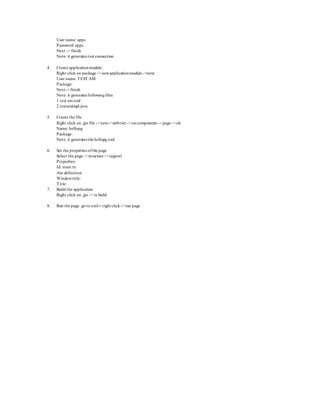
1. Create the workspace:
Workspace -> right click-> newworkspace
Directory name:
File name:
Select add a new oa project
2. Create the project:
Directoryname:
Project name:
Package name:
Next
Use responsibilityfordesign time
Supply the name ofconnection: test
New -> create the connection
Edit -> change the connection
Next
Dbc file name:
User name:
Password:
Applicationshort name:
Responsibility key:
Next – finish
3. Create the package:
Right click on .jpr file -> newbusiness component package -> next
Package name:
Next
Connectionname: test
Sql flavor: oracle
Type map: oracle
Next](https://image.slidesharecdn.com/oaf1-190508111358/85/Oracle-Application-Framework-1-320.jpg)
![OAF:
Oracle application frame work is a proprietaryframework. Theframework is also available to customers for personalization,
customizationandcustomapplication development.
The oaf is a model viewcontroller frameworkbuilt usingjava ee technologies.
Set the environment variables:
My computer-> advanced-> environment variables -> new.
Variable name: jdev_user_home
Variable value: C:Jdeveloperp21662342_R12_GENERICjdevhomejdevsuriya
The packages, which are usedin the OA Frame Work Applications:
There are six package usedin the OA FrameWorkApplications.
1) <3rdpartyidentifier> .oracle.apps...[] .webui
2) <3rdpartyidentifier> .oracle.apps...[] lov.webui
3) <3rdpartyidentifier> .oracle.apps...[] .server
4) <3rdpartyidentifier> .oracle.apps...[] lov.server
5) <3rdpartyidentifier> .oracle.apps...[] poplist.server
6) <3rdpartyidentifier> .oracle.apps...[] Schema.server
Steps to develop theapplication:
E.g. hello page
1. Create the workspace.
2. Create the project.
3. Create the package.
4. Create the application module.
5. Create the page.
6. Set the properties ofthe page.
Am definition
Windowtitle
Title
1. Create the workspace:
Workspace -> right click-> newworkspace
Directory name:
File name:
Select add a new oa project
2. Create the project:
Directoryname:
Project name:
Package name:
Next
Use responsibilityfordesign time
Supply the name ofconnection: test
New -> create the connection
Edit -> change the connection
Next
Dbc file name:
User name:
Password:
Applicationshort name:
Responsibility key:
Next – finish
3. Create the package:
Right click on .jpr file -> newbusiness component package -> next
Package name:
Next
Connectionname: test
Sql flavor: oracle
Type map: oracle
Next](https://image.slidesharecdn.com/oaf1-190508111358/75/Oracle-Application-Framework-1-2048.jpg)


![20260201 [FOSDEM] gomodjail - library sandboxing for Go modules.pdf](https://cdn.slidesharecdn.com/ss_thumbnails/20260201fosdemgomodjail-librarysandboxingforgomodules-260201225659-76609ec4-thumbnail.jpg?width=640&height=640&fit=bounds)


![谷歌留痕技术教程[ 𝙩𝙤𝙥 𝟮𝟯𝟯. 𝙘 𝙤𝙢 ]](https://cdn.slidesharecdn.com/ss_thumbnails/top233-260130173900-2eb784f9-thumbnail.jpg?width=640&height=640&fit=bounds)


