♦Oracle 19c Network Security &
Sni
ffi
ng Test Scenario♦
Alireza Kamrani
07/26/2024
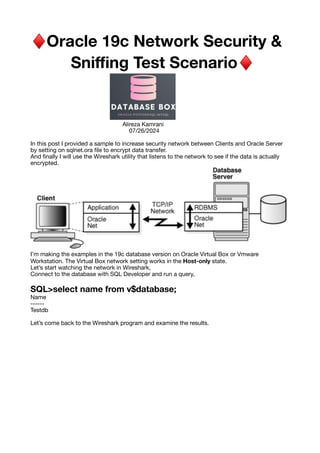
In this post I provided a sample to increase security network between Clients and Oracle Server
by setting on sqlnet.ora
fi
le to encrypt data transfer.
And
fi
nally I will use the Wireshark utility that listens to the network to see if the data is actually
encrypted.
I’m making the examples in the 19c database version on Oracle Virtual Box or Vmware
Workstation. The Virtual Box network setting works in the Host-only state.
Let’s start watching the network in Wireshark,
Connect to the database with SQL Developer and run a query,
SQL>select name from v$database;
Name
------
Testdb
Let’s come back to the Wireshark program and examine the results.
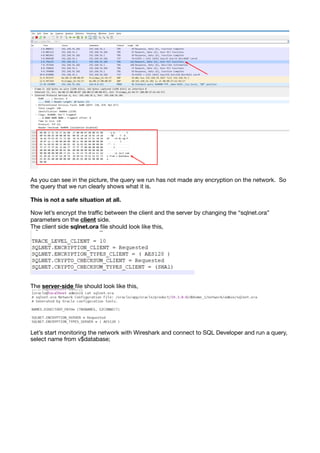
As you can see in the picture, the query we run has not made any encryption on the network. So
the query that we run clearly shows what it is.
This is not a safe situation at all.
Now let’s encrypt the tra
ffi
c between the client and the server by changing the “sqlnet.ora”
parameters on the client side.
The client side sqlnet.ora
fi
le should look like this,
The server-side
fi
le should look like this,
Let’s start monitoring the network with Wireshark and connect to SQL Developer and run a query,
select name from v$database;
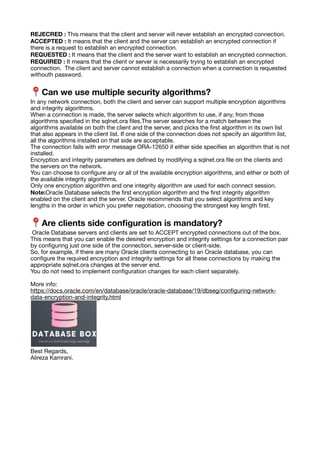
As shown in the picture, the query appears encrypted after the query we run. When we look at
the tra
ffi
c in the Wireshark program as before, the query executed on the client side became
encrypted.
After you close the connection, let’s search all .trc
fi
les on the client. The trace
fi
le created at the
time of the connection will tell us whether the connection is encrypted.
Look for the word “encryption” in these
fi
le.
This result indicates that the data is encrypted over the network with the AES128 algorithm and
data integrity is ensured by the SHA1 algorithm.
Here I present some information about encryption settings:
Con
fi
guring for Network Encryption
The con
fi
guration for Network Encryption is de
fi
ned in the “sqlnet.ora”
fi
le on the client and server
side. Before con
fi
guring, Oracle Net installation must be done on both the server and client side.
Con
fi
guration can be done by replacing the
fi
le “sqlnet.ora” with the text editor or with the
netmgr program.
Two separate parameters are used on the server side.
SQLNET.ENCRYPTION_SERVER = [accepted | rejected | requested | required ]
SQLNET.ENCYRPTION_TYPES_SERVER = (algorithm name)
The parameters used by the client side,
SQLNET.ENCRYPTION_CLIENT = [ accepted | rejected | requested | required ]
SQLNET.ENCYRPTION_TYPES_CLIENT = ( algorithm name )
The SQLNET.ENCRYPTION_SERVER and SQLNET.ENCRYPTION_CLIENT parameters are
parameters that determine whether to encrypt the client and the server.
This parameter can take the following values,
• REJECTED
• ACCEPTED
• REQUESTED
• REQUIRED
The default value is ACCEPTED.
REJECRED : This means that the client and server will never establish an encrypted connection.
ACCEPTED : It means that the client and the server can establish an encrypted connection if
there is a request to establish an encrypted connection.
REQUESTED : It means that the client and the server want to establish an encrypted connection.
REQUIRED : It means that the client or server is necessarily trying to establish an encrypted
connection. The client and server cannot establish a connection when a connection is requested
withouth password.
📍 Can we use multiple security algorithms?
In any network connection, both the client and server can support multiple encryption algorithms
and integrity algorithms.
When a connection is made, the server selects which algorithm to use, if any, from those
algorithms speci
fi
ed in the sqlnet.ora
fi
les.The server searches for a match between the
algorithms available on both the client and the server, and picks the
fi
rst algorithm in its own list
that also appears in the client list. If one side of the connection does not specify an algorithm list,
all the algorithms installed on that side are acceptable.
The connection fails with error message ORA-12650 if either side speci
fi
es an algorithm that is not
installed.
Encryption and integrity parameters are de
fi
ned by modifying a sqlnet.ora
fi
le on the clients and
the servers on the network.
You can choose to con
fi
gure any or all of the available encryption algorithms, and either or both of
the available integrity algorithms.
Only one encryption algorithm and one integrity algorithm are used for each connect session.
Note:Oracle Database selects the
fi
rst encryption algorithm and the
fi
rst integrity algorithm
enabled on the client and the server. Oracle recommends that you select algorithms and key
lengths in the order in which you prefer negotiation, choosing the strongest key length
fi
rst.
📍 Are clients side con
fi
guration is mandatory?
Oracle Database servers and clients are set to ACCEPT encrypted connections out of the box.
This means that you can enable the desired encryption and integrity settings for a connection pair
by con
fi
guring just one side of the connection, server-side or client-side.
So, for example, if there are many Oracle clients connecting to an Oracle database, you can
con
fi
gure the required encryption and integrity settings for all these connections by making the
appropriate sqlnet.ora changes at the server end.
You do not need to implement con
fi
guration changes for each client separately.
More info:
https://docs.oracle.com/en/database/oracle/oracle-database/19/dbseg/con
fi
guring-network-
data-encryption-and-integrity.html
Best Regards,
Alireza Kamrani.

Oracle 19c Network Security & Sniffing Test Scenario

  • 1.
    ♦Oracle 19c NetworkSecurity & Sni ffi ng Test Scenario♦ Alireza Kamrani 07/26/2024 In this post I provided a sample to increase security network between Clients and Oracle Server by setting on sqlnet.ora fi le to encrypt data transfer. And fi nally I will use the Wireshark utility that listens to the network to see if the data is actually encrypted. I’m making the examples in the 19c database version on Oracle Virtual Box or Vmware Workstation. The Virtual Box network setting works in the Host-only state. Let’s start watching the network in Wireshark, Connect to the database with SQL Developer and run a query, SQL>select name from v$database; Name ------ Testdb Let’s come back to the Wireshark program and examine the results.
  • 2.
    As you cansee in the picture, the query we run has not made any encryption on the network. So the query that we run clearly shows what it is. This is not a safe situation at all. Now let’s encrypt the tra ffi c between the client and the server by changing the “sqlnet.ora” parameters on the client side. The client side sqlnet.ora fi le should look like this, The server-side fi le should look like this, Let’s start monitoring the network with Wireshark and connect to SQL Developer and run a query, select name from v$database;
  • 3.
    As shown inthe picture, the query appears encrypted after the query we run. When we look at the tra ffi c in the Wireshark program as before, the query executed on the client side became encrypted. After you close the connection, let’s search all .trc fi les on the client. The trace fi le created at the time of the connection will tell us whether the connection is encrypted. Look for the word “encryption” in these fi le. This result indicates that the data is encrypted over the network with the AES128 algorithm and data integrity is ensured by the SHA1 algorithm. Here I present some information about encryption settings: Con fi guring for Network Encryption The con fi guration for Network Encryption is de fi ned in the “sqlnet.ora” fi le on the client and server side. Before con fi guring, Oracle Net installation must be done on both the server and client side. Con fi guration can be done by replacing the fi le “sqlnet.ora” with the text editor or with the netmgr program. Two separate parameters are used on the server side. SQLNET.ENCRYPTION_SERVER = [accepted | rejected | requested | required ] SQLNET.ENCYRPTION_TYPES_SERVER = (algorithm name) The parameters used by the client side, SQLNET.ENCRYPTION_CLIENT = [ accepted | rejected | requested | required ] SQLNET.ENCYRPTION_TYPES_CLIENT = ( algorithm name ) The SQLNET.ENCRYPTION_SERVER and SQLNET.ENCRYPTION_CLIENT parameters are parameters that determine whether to encrypt the client and the server. This parameter can take the following values, • REJECTED • ACCEPTED • REQUESTED • REQUIRED The default value is ACCEPTED.
  • 4.
    REJECRED : Thismeans that the client and server will never establish an encrypted connection. ACCEPTED : It means that the client and the server can establish an encrypted connection if there is a request to establish an encrypted connection. REQUESTED : It means that the client and the server want to establish an encrypted connection. REQUIRED : It means that the client or server is necessarily trying to establish an encrypted connection. The client and server cannot establish a connection when a connection is requested withouth password. 📍 Can we use multiple security algorithms? In any network connection, both the client and server can support multiple encryption algorithms and integrity algorithms. When a connection is made, the server selects which algorithm to use, if any, from those algorithms speci fi ed in the sqlnet.ora fi les.The server searches for a match between the algorithms available on both the client and the server, and picks the fi rst algorithm in its own list that also appears in the client list. If one side of the connection does not specify an algorithm list, all the algorithms installed on that side are acceptable. The connection fails with error message ORA-12650 if either side speci fi es an algorithm that is not installed. Encryption and integrity parameters are de fi ned by modifying a sqlnet.ora fi le on the clients and the servers on the network. You can choose to con fi gure any or all of the available encryption algorithms, and either or both of the available integrity algorithms. Only one encryption algorithm and one integrity algorithm are used for each connect session. Note:Oracle Database selects the fi rst encryption algorithm and the fi rst integrity algorithm enabled on the client and the server. Oracle recommends that you select algorithms and key lengths in the order in which you prefer negotiation, choosing the strongest key length fi rst. 📍 Are clients side con fi guration is mandatory? Oracle Database servers and clients are set to ACCEPT encrypted connections out of the box. This means that you can enable the desired encryption and integrity settings for a connection pair by con fi guring just one side of the connection, server-side or client-side. So, for example, if there are many Oracle clients connecting to an Oracle database, you can con fi gure the required encryption and integrity settings for all these connections by making the appropriate sqlnet.ora changes at the server end. You do not need to implement con fi guration changes for each client separately. More info: https://docs.oracle.com/en/database/oracle/oracle-database/19/dbseg/con fi guring-network- data-encryption-and-integrity.html Best Regards, Alireza Kamrani.