Storage Management
• Main memory : Memory management requirement – Memory
Partitioning - Contiguous memory allocation – paging – segmentation
– segmentation with paging – 32 and 64 bit architecture examples-
Virtual memory: Hardware and Control structures – Operating System
software – demand paging – page replacement algorithms – thrashing
– Memory management for UNIX, Solaris, Linux, Windows, Android.
ABINAYA R AP/ CSE/ SRIT
Storage Management
Storage Management is defined as it refers to the management of the data storage
equipment’s that are used to store the user/computer generated data. Hence it is a tool or
set of processes used by an administrator to keep your data and storage equipment’s safe.
Storage management is a process for users to optimize the use of storage devices and to
protect the integrity of data for any media on which it resides and the category of storage
management generally contain the different type of subcategories covering aspects such
as security, virtualization and more, as well as different types of provisioning or
automation, which is generally made up the entire storage management software market.
Storage management key attributes: Storage management has some key attribute which
is generally used to manage the storage capacity of the system. These are given below:
1. Performance
2. Reliability
3. Recoverability
4. Capacity
1. Performance 2. Reliability 3. Recoverability 4. Capacity
ABINAYA R AP/ CSE/ SRIT
What is Main Memory:
• The main memory is central to the operation of a modern computer.
Main Memory is a large array of words or bytes, ranging in size from
hundreds of thousands to billions. Main memory is a repository of
rapidly available information shared by the CPU and I/O devices.
Main memory is the place where programs and information are kept
when the processor is effectively utilizing them. Main memory is
associated with the processor, so moving instructions and information
into and out of the processor is extremely fast. Main memory is also
known as RAM(Random Access Memory). This memory is a volatile
memory.RAM lost its data when a power interruption occurs.
ABINAYA R AP/ CSE/ SRIT
Random Access Memory
• RAM is the main memory of a computer. Its objective is to store
data and applications that are currently in use. The operating
system controls the usage of this memory. It gives instructions
like when the items are to be loaded into RAM, where they are
to be located in RAM, and when they need to be removed from
RAM.
• Read-Only Memory
• In each computer system, there should be a segment of
memory that is fixed and unaffected by power failure. This type
of memory is known as Read-Only Memory or ROM.
ABINAYA R AP/ CSE/ SRIT
What are the Memory Management
Requirements?
• 1. Swapping
2. Sharing
3. Relocation
4. Protection
5. Logical Organization
6. Physical Organization
ABINAYA R AP/ CSE/ SRIT
Swapping
• Swapping is a method to improve the main memory
utilization. Moving a process from the main memory to
the backing store and swapping a process from the
backing store to the main memory is called Swapping.
Swapping requires a ‘Backing store’. The backing store is
commonly a fast disk. It must be large enough to
accommodate the copies of all process images for all
users. When a process is swapped out, its executable
image is copied into a backing store. When it is swapped
in, it is copied into the new block allocated by the
memory manager.
ABINAYA R AP/ CSE/ SRIT
Sharing:
• Generally, protection mechanisms are required at the time
of access to the same portion of the main memory by
several processes. Accessing the same portion of the
main memory by the number of processes is said to
be Sharing.
• Relocation
• Relocation is a mechanism to convert the logical address
into the physical address. It is necessary at the time of
swap in a process from one backing store to the main
memory.
ABINAYA R AP/ CSE/ SRIT
Protection:
• Protection means that to provide security from
unauthorized usage of memory. The operating system
can protect the memory with the help of base and limit
registers. Base registers consist of the starting address of
the next process. The limit register specifies the
boundary of that job, so the limit register is also said to
be Fencing Register.
• Logical Address.
• An address which is generated by the CPU that is
called Logical Address.
ABINAYA R AP/ CSE/ SRIT
Physical Address :
• An address which is generated by MMU (Memory
Management Unit) that is called Physical Address.
Physical Address = Logical Address + Content of the base
registers.
•
ABINAYA R AP/ CSE/ SRIT
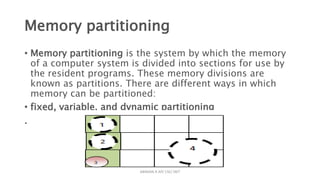
Memory partitioning
• Memory partitioning is the system by which the memory
of a computer system is divided into sections for use by
the resident programs. These memory divisions are
known as partitions. There are different ways in which
memory can be partitioned:
• fixed, variable, and dynamic partitioning
.
ABINAYA R AP/ CSE/ SRIT
fixed partitioning
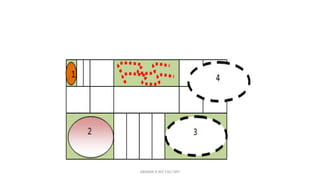
• Let us think about the jewelry box that stores rings. Different pieces of jewelry
represent different computer processes. Say you have a jewelry box that
displays rings. This box has been partitioned into equal parts.
• fixed partitioning is ideal for our rings collection provided we always acquire
rings with sizes less than these fixed partitions. However, we never have
identical jewelry of the same size. Item 1 & 2 fit almost perfectly with little or
no wasted space (partition almost the same size as the process). Item 3
however, leaves a lot more space unoccupied (small process in large
partition), while item 4 has no partition large enough to fit (large process with
unavailable sized partition).
ABINAYA R AP/ CSE/ SRIT
• Fixed partitioning is therefore defined as the system of
dividing memory into non-overlapping sizes that are
A process may be loaded into a partition of equal or
confined to its allocated partition.
ABINAYA R AP/ CSE/ SRIT
Variable Partitioning
• An alternate solution to address these problems is
variable partitioning. In the case of the jewelry box, we
anticipate that we possess different jewelry items with
different sizes. So, we divide the area of our jewelry box
into partitions of different sizes. This way, smaller items
of jewelry (small processes) are assigned small partitions
while the bigger partitions are saved for the bigger items
(large processes).
ABINAYA R AP/ CSE/ SRIT
Variable partitioning
• Variable partitioning is therefore the system of dividing
memory into non-overlapping but variable sizes. This
system of partitioning is more flexible than the fixed
partitioning configuration, but it's still not the most ideal
solution. Small processes are fit into small partitions (item
1) and large processes fit into larger partitions (items 2
and 3). These processes do not necessarily fit exactly,
even though there are other unoccupied partitions. Items
3 and 4 are larger processes of the same size, but
memory has only one available partition that can fit either
of them.
• The flexibility offered in variable partitioning still does
ABINAYA R AP/ CSE/ SRIT
Dynamic Partitioning
• Let us examine a typical 64MB space of memory and let's
assume that the first 8MB of memory is reserved for the
operating system.
ABINAYA R AP/ CSE/ SRIT
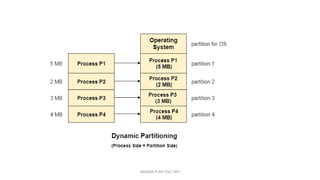
Dynamic Partitioning
• Dynamic Partitioning
• Dynamic partitioning tries to overcome the problems caused by
fixed partitioning. In this technique, the partition size is not
declared initially. It is declared at the time of process loading.
• The first partition is reserved for the operating system. The
remaining space is divided into parts. The size of each partition
will be equal to the size of the process. The partition size varies
according to the need of the process so that the internal
fragmentation can be avoided.
•
ABINAYA R AP/ CSE/ SRIT
Contiguous Memory Allocation
• It is the type of memory allocation method. When a process
requests the memory, a single contiguous section of memory blocks
is allotted depending on its requirements.
• It is completed by partitioning the memory into fixed-sized partitions
and assigning every partition to a single process. However, it will
limit the degree of multiprogramming to the number of fixed partitions
done in memory.
• This allocation also leads to internal fragmentation. For example,
suppose a fixed-sized memory block assigned to a process is slightly
bigger than its demand. In that case, the remaining memory space in
the block is referred to as internal fragmentation.
ABINAYA R AP/ CSE/ SRIT
Non-Contiguous Memory Allocation
• It allows a process to obtain multiple memory blocks in various
locations in memory based on its requirements. The non-contiguous
memory allocation also reduces memory wastage caused
by internal and external fragmentation because it uses the memory
holes created by internal and external fragmentation.
• The two methods for making a process's physical address space
non-contiguous are paging and segmentation. Non-contiguous
memory allocation divides the process into blocks (pages or
segments) that are allocated to different areas of memory space
based on memory availability.
• Non-contiguous memory allocation can decrease memory wastage,
but it also raises address translation overheads. As the process
portions are stored in separate locations in memory, the memory
execution is slowed because time is consumed in address
translation.
ABINAYA R AP/ CSE/ SRIT
Paging
• In Operating Systems, Paging is a storage mechanism used to retrieve
processes from the secondary storage into the main memory in the form of
pages.(The paging technique divides the physical memory(main memory)
into fixed-size blocks that are known as Frames and also divide
the logical memory(secondary memory) into blocks of the same
size that are known as Pages.)
• The main idea behind the paging is to divide each process in the form of
pages. The main memoprocess ry will also be divided in the form of
frames.
• One page of the is to be stored in one of the frames of the memory. The
pages can be stored at the different locations of the memory but the
priority is always to find the contiguous frames or holes.
• Pages of the process are brought into the main memory only when they
are required otherwise they reside in the secondary storage.
• Different operating system defines different frame sizes. The sizes of each
frame must be equal. Considering the fact that the pages are mapped to
the frames in Paging, page size needs to be as same as frame size.
ABINAYA R AP/ CSE/ SRIT
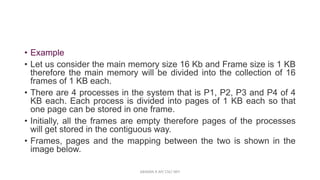
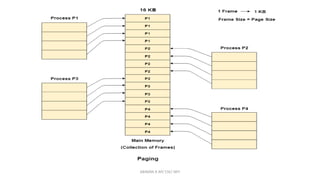
• Example
• Let us consider the main memory size 16 Kb and Frame size is 1 KB
therefore the main memory will be divided into the collection of 16
frames of 1 KB each.
• There are 4 processes in the system that is P1, P2, P3 and P4 of 4
KB each. Each process is divided into pages of 1 KB each so that
one page can be stored in one frame.
• Initially, all the frames are empty therefore pages of the processes
will get stored in the contiguous way.
• Frames, pages and the mapping between the two is shown in the
image below.
ABINAYA R AP/ CSE/ SRIT
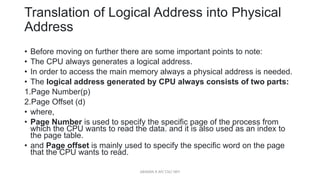
Translation of Logical Address into Physical
Address
• Before moving on further there are some important points to note:
• The CPU always generates a logical address.
• In order to access the main memory always a physical address is needed.
• The logical address generated by CPU always consists of two parts:
1.Page Number(p)
2.Page Offset (d)
• where,
• Page Number is used to specify the specific page of the process from
which the CPU wants to read the data. and it is also used as an index to
the page table.
• and Page offset is mainly used to specify the specific word on the page
that the CPU wants to read.
ABINAYA R AP/ CSE/ SRIT
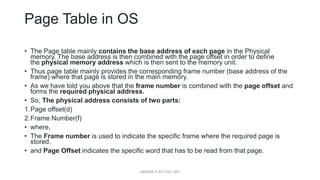
Page Table in OS
• The Page table mainly contains the base address of each page in the Physical
memory. The base address is then combined with the page offset in order to define
the physical memory address which is then sent to the memory unit.
• Thus page table mainly provides the corresponding frame number (base address of the
frame) where that page is stored in the main memory.
• As we have told you above that the frame number is combined with the page offset and
forms the required physical address.
• So, The physical address consists of two parts:
1.Page offset(d)
2.Frame Number(f)
• where,
• The Frame number is used to indicate the specific frame where the required page is
stored.
• and Page Offset indicates the specific word that has to be read from that page.
ABINAYA R AP/ CSE/ SRIT
Segmentation in OS (Operating System)
• In Operating Systems, Segmentation is a memory management
technique in which the memory is divided into the variable size
parts.(In variable-sized memory partitioning, the main memory is
divided into blocks of the same or different sizes. ) Each part is
known as a segment which can be allocated to a process.
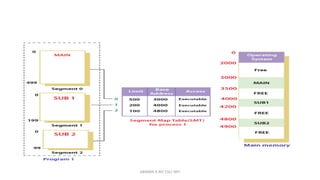
• The details about each segment are stored in a table called a
segment table. Segment table is stored in one (or many) of the
segments.
• Segment table contains mainly two information about segment:
1.Base: It is the base address of the segment(It contains the starting
physical address where the segments reside in memory.)
2.Limit: It is the length of the segment.
ABINAYA R AP/ CSE/ SRIT
• we were using Paging as our main memory management technique.
Paging is more close to the Operating system rather than the User. It
divides all the processes into the form of pages regardless of the fact
that a process can have some relative parts of functions which need
to be loaded in the same page.
• Operating system doesn't care about the User's view of the process.
It may divide the same function into different pages and those pages
may or may not be loaded at the same time into the memory. It
decreases the efficiency of the system.
• It is better to have segmentation which divides the process into the
segments. Each segment contains the same type of functions such
as the main function can be included in one segment and the library
functions can be included in the other segment.
ABINAYA R AP/ CSE/ SRIT
Segmentation with Paging:
• It is better possible to combine these two schemes to improve
on each. The combined scheme was ‘Page the segments’. Each
segment in this scheme is divided into pages and each
segment maintains a page table. So, the logical address is
divided into 3 parts. One is the segment numbers and second
is the page number and another is displacement or offset(D).
• The logical address space is divided into 3 segments
numbered 0 to 2. Each segment maintains a page table, and
the mapping between the page and frame is done by a page
table.
• Advantages of Segmentation with Paging:
• 1. Avoid fragmentation
2. It supports ‘user view of memory’.
3. It also has Hardware support.
ABINAYA R AP/ CSE/ SRIT
virtual memory
• Whenever your computer doesn’t have space in the physical memory it
writes what it needs to remember to the hard disk in a swap file as virtual
memory.
• Let’s assume that an OS requires 300 MB of memory to store all the running
programs. However, there’s currently only 50 MB of available physical
memory stored on the RAM.
• The OS will then set up 250 MB of virtual memory and use a program called
the Virtual Memory Manager(VMM) to manage that 250 MB.
• So, in this case, the VMM will create a file on the hard disk that is 250 MB
in size to store extra memory that is required.
• The OS will now proceed to address memory as it considers 300 MB of real
memory stored in the RAM, even if only 50 MB space is available.
• It is the job of the VMM to manage 300 MB memory even if just 50 MB of
real memory space is available.
ABINAYA R AP/ CSE/ SRIT
Demand Paging
• According to the concept of Virtual Memory, in order to execute some
process, only a part of the process needs to be present in the main
memory which means that only a few pages will only be present in the
main memory at any time.
• However, deciding, which pages need to be kept in the main memory and
which need to be kept in the secondary memory, is going to be difficult
because we cannot say in advance that a process will require a particular
page at particular time.
• Therefore, to overcome this problem, there is a concept called Demand
Paging is introduced. It suggests keeping all pages of the frames in the
secondary memory until they are required. In other words, it says that do
not load any page in the main memory until it is required.
• Whenever any page is referred for the first time in the main memory, then
that page will be found in the secondary memory.
ABINAYA R AP/ CSE/ SRIT
What is a Page Fault?
• If the referred page is not present in the main memory then there will
be a miss and the concept is called Page miss or page fault.
• The CPU has to access the missed page from the secondary
memory. If the number of page fault is very high then the effective
access time of the system will become very high.
• What is Thrashing?
• If the number of page faults is equal to the number of referred pages
or the number of page faults are so high so that the CPU remains
busy in just reading the pages from the secondary memory then the
effective access time will be the time taken by the CPU to read one
word from the secondary memory and it will be so high. The concept
is called thrashing.
ABINAYA R AP/ CSE/ SRIT
Page replacement algorithm:
• The page replacement algorithm decides which memory page is
to be replaced. The process of replacement is sometimes called
swap out or write to disk. Page replacement is done when the
requested page is not found in the main memory (page fault).
ABINAYA R AP/ CSE/ SRIT
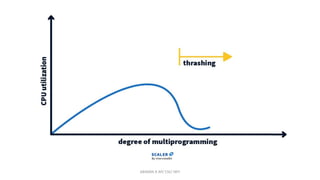
Thrashing
• In multiprogramming, there can be a scenario when the system
spends most of its time shuttling pages between the main memory
and the secondary memory due to frequent page faults. This behavior
is known as thrashing.
• A process is said to be thrashing if the CPU spends more time serving
page faults than executing the pages. This leads to low CPU utilization
and the Operating System in return tries to increase the degree of
multiprogramming.
ABINAYA R AP/ CSE/ SRIT
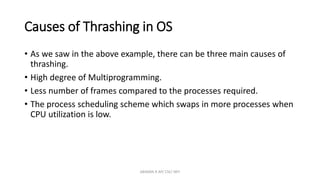
Causes of Thrashing in OS
• As we saw in the above example, there can be three main causes of
thrashing.
• High degree of Multiprogramming.
• Less number of frames compared to the processes required.
• The process scheduling scheme which swaps in more processes when
CPU utilization is low.
ABINAYA R AP/ CSE/ SRIT
OPERATING SYSTEMS: WINDOWS, UNIX,
LINUX, MAC, ANDROID, AND IOS
• Windows Operating System Windows Operating System was introduced into the market
in the year 1985, and as a robust and comprehensive kind of software, has almost 90%
market share over and above other operating system .With its great and dominance
presence in commercial buildings, industrial facilities, as well as its obvious presence as
home computers. Although this assertion is believed not to be so again as a result of
overwhelming peoples interest in open source operating systems. The Microsoft
Operating System as a family of Microsoft windows was created as a graphical layer over
that of old MS dos with its root from MS DOS Command line and this it retains till date
with DOS Box command prompt that is cmd.exe.Original Windows NT core happens to
be the first to take shape in OS/2 operating system upon which modern versions are
dependent. 32 and 64-bit AMD and Intel systems accommodate Windows OS, DEC Alpha,
PowerPC architectures Windows OS, and MIPS is also comfortable with recent versions,
likewise low and mid-range servers. Database and web servers also allows Windows
operating system to use them. In recent years, Microsoft has proofed significant with
marketing and with its finance to establish that Windows interoperability is not in doubt
and that it has all that it takes as a platform to run any enterprise application.
ABINAYA R AP/ CSE/ SRIT
• UNIX Operating System UNIX happens to be one of the very few oldest of all
operating system in recent time of ICT world that is still generally and widely used
and available till date, as none conspicuous operating system but its somehow
secret in its operation and interface design, it is primarily designed for the use by
very large enterprise computing systems. It happens to be one of the common
operating system that is run by servers and other computers that form the large
bulk of the Internet. One might never use UNIX on local PC, but indirect use is
obvious in one form or another, every time one log on to the internet. Very few
users runs UNIX on their personal systems, and a lot of different versions of UNIX
operating system are available for UNIX PC, and one of such is “UNIXy” which so
many users have installed on desktop machines. There are so any different types
and features basic UNIX interface; Linux, with its different version turn out to be
the most common and popular for personal computer platform. Setting up a
UNIX OS can be difficult and it requires some knowledge to operate, but it is
stable and robust, and efficient with system resources.
ABINAYA R AP/ CSE/ SRIT
• Linux Operating System The GNU’s answer to MAC and also Windows is Linux.
Yes, what this means is that Linux is a FREE OS, one can perform International
Journal of Computer Applications (0975 – 8887) Volume 176 – No. 39, July
2020 22 downloads, modification and also redistribution without any cost.
Linux is relatively new in the operating system realm. It was written in the year
1991, and also enhanced for current usage. Linux and Windows can be
compared to an entity that its floor and roof are either replaceable or not.
However, with Linux, as an entity, both floor and roof can be moved in any
manner as one want, but Windows floor and roof are very rigid that it remains
immovable. One cannot go beyond what Microsoft has designed [16, 18].
Linux, designed by Linus Torvalds in the year 1991, heads a group of fresh
school open source Unix’s that came to be in the year 1990, it also include
FreeBSD, NetBSD, OpenBSD, and Darvin. All these is a representation of a
design direction that the whole group agreed upon. Linux code is totally
different compared to the original UNIX source tree code, however, it uses
UNIX standards to behave like a UNIX. Developers in Linux open source
community have desires to acquire a substantial share of end-user desktops
making Linux's intended users to increase in number than the users of the old-
school Unix’s, who have fear share desire in the server and workstation
market.
ABINAYA R AP/ CSE/ SRIT
• Android Operating System The original creator of the platform is Android
Inc., Google later bought it over and released the OS as AOSP (Android
Open Source Project) in 2007. This new development was complemented
by the founding of the OHA (Open Handset Alliance), a consortium saddled
with the responsibility to develop and distribute Android. The software,
which is now been released under the Apache license is tagged among
others, a free open source license. Android releases a new version every
few months as a result of the available huge developer communities who
regularly updates and create applications using custom-built version of
Java. The OHA group is a consortium of several software, hardware and
telecom companies, T-Mobile, Intel, Qualcomm, NVIDIA, HTC, Motorola
and Google Inc., for which Android provides their software platform. Their
main objective of OHA is to develop available technologies that will
considerably lower the cost and time of developing and distributing mobile
devices and services.
ABINAYA R AP/ CSE/ SRIT
• Macintosh Operating System (MAC OS) Mac OS is much older than Windows OS.
It was released one year earlier its Microsoft counterpart, and it happens to be
the first among other OS, ever successful graphical-inclined OS. Mac OS has
undergone basically, two important design transitions, and is on its third stage.
The first transition was from supporting only a single application at one time to
the ability to cooperatively multitask multiple applications (MultiFinder); the
second was the transition from 68000 to PowerPC processors, the third was the
coming together of Mac OS design ideas with a Unix-derived infrastructure in
Mac OS X. Mac OS has very high unifying idea significantly different from that of
Unix’s, this is the Mac Interface Guidelines. These explain a great detail of what
an Apps Graphical User Interface is supposed to depict with its expected
behavior. One major idea the Mac Interface Guidelines is that everything should
stay where they are kept. Mac operating system apps is termed not huge
monoliths. The system's graphic user interface (GUI) support program
instructions or codes, which is partly implemented in a ROM conveyed with the
hardware and partly implemented in shared libraries, communicates easily with
Mac OS software programs through a quite stable event interface. Hence, the
operating system design encourages a distinct and clean separation between GUI
interface and application engine.
ABINAYA R AP/ CSE/ SRIT
• iPhone Operating System (iOS) iOS, which is a mobile OS, is designed
and owned by Apple Inc. It was designed and developed for iPhone,
but later extended support for iPad and Apple TV. iOS root comes
from Mac OS X, hence it is UNIX based OS. Like other OS, iOS is
frequently updated starting from iOS version 4.0 and the latest is iOS
version 5.1.The Core OS layer resides in the bottom of iPhone OS
architecture[19]. Core services layer of iOS architecture encompasses
an additional abstraction layer, cocoa touch layer and media. The
Core OS layer contain the scheduler inclusively, Mach kernel, file
system, hardware drivers and control the memory system, network
and inter process communication and security framework to secure
the system and program data.
ABINAYA R AP/ CSE/ SRIT
THANK YOU
ABINAYA R AP/ CSE/ SRIT

OPERATING SYSTEM-UNIT 3.pptxMemory management for UNIX, Solaris, Linux, Windows, Android.

  • 1.
    Storage Management • Mainmemory : Memory management requirement – Memory Partitioning - Contiguous memory allocation – paging – segmentation – segmentation with paging – 32 and 64 bit architecture examples- Virtual memory: Hardware and Control structures – Operating System software – demand paging – page replacement algorithms – thrashing – Memory management for UNIX, Solaris, Linux, Windows, Android. ABINAYA R AP/ CSE/ SRIT
  • 2.
    Storage Management Storage Managementis defined as it refers to the management of the data storage equipment’s that are used to store the user/computer generated data. Hence it is a tool or set of processes used by an administrator to keep your data and storage equipment’s safe. Storage management is a process for users to optimize the use of storage devices and to protect the integrity of data for any media on which it resides and the category of storage management generally contain the different type of subcategories covering aspects such as security, virtualization and more, as well as different types of provisioning or automation, which is generally made up the entire storage management software market. Storage management key attributes: Storage management has some key attribute which is generally used to manage the storage capacity of the system. These are given below: 1. Performance 2. Reliability 3. Recoverability 4. Capacity 1. Performance 2. Reliability 3. Recoverability 4. Capacity 1. Performance 2. Reliability 3. Recoverability 4. Capacity ABINAYA R AP/ CSE/ SRIT
  • 3.
    What is MainMemory: • The main memory is central to the operation of a modern computer. Main Memory is a large array of words or bytes, ranging in size from hundreds of thousands to billions. Main memory is a repository of rapidly available information shared by the CPU and I/O devices. Main memory is the place where programs and information are kept when the processor is effectively utilizing them. Main memory is associated with the processor, so moving instructions and information into and out of the processor is extremely fast. Main memory is also known as RAM(Random Access Memory). This memory is a volatile memory.RAM lost its data when a power interruption occurs. ABINAYA R AP/ CSE/ SRIT
  • 4.
    Random Access Memory •RAM is the main memory of a computer. Its objective is to store data and applications that are currently in use. The operating system controls the usage of this memory. It gives instructions like when the items are to be loaded into RAM, where they are to be located in RAM, and when they need to be removed from RAM. • Read-Only Memory • In each computer system, there should be a segment of memory that is fixed and unaffected by power failure. This type of memory is known as Read-Only Memory or ROM. ABINAYA R AP/ CSE/ SRIT
  • 5.
    What are theMemory Management Requirements? • 1. Swapping 2. Sharing 3. Relocation 4. Protection 5. Logical Organization 6. Physical Organization ABINAYA R AP/ CSE/ SRIT
  • 6.
    Swapping • Swapping isa method to improve the main memory utilization. Moving a process from the main memory to the backing store and swapping a process from the backing store to the main memory is called Swapping. Swapping requires a ‘Backing store’. The backing store is commonly a fast disk. It must be large enough to accommodate the copies of all process images for all users. When a process is swapped out, its executable image is copied into a backing store. When it is swapped in, it is copied into the new block allocated by the memory manager. ABINAYA R AP/ CSE/ SRIT
  • 7.
    Sharing: • Generally, protectionmechanisms are required at the time of access to the same portion of the main memory by several processes. Accessing the same portion of the main memory by the number of processes is said to be Sharing. • Relocation • Relocation is a mechanism to convert the logical address into the physical address. It is necessary at the time of swap in a process from one backing store to the main memory. ABINAYA R AP/ CSE/ SRIT
  • 8.
    Protection: • Protection meansthat to provide security from unauthorized usage of memory. The operating system can protect the memory with the help of base and limit registers. Base registers consist of the starting address of the next process. The limit register specifies the boundary of that job, so the limit register is also said to be Fencing Register. • Logical Address. • An address which is generated by the CPU that is called Logical Address. ABINAYA R AP/ CSE/ SRIT
  • 9.
    Physical Address : •An address which is generated by MMU (Memory Management Unit) that is called Physical Address. Physical Address = Logical Address + Content of the base registers. • ABINAYA R AP/ CSE/ SRIT
  • 10.
    Memory partitioning • Memorypartitioning is the system by which the memory of a computer system is divided into sections for use by the resident programs. These memory divisions are known as partitions. There are different ways in which memory can be partitioned: • fixed, variable, and dynamic partitioning . ABINAYA R AP/ CSE/ SRIT
  • 11.
    fixed partitioning • Letus think about the jewelry box that stores rings. Different pieces of jewelry represent different computer processes. Say you have a jewelry box that displays rings. This box has been partitioned into equal parts. • fixed partitioning is ideal for our rings collection provided we always acquire rings with sizes less than these fixed partitions. However, we never have identical jewelry of the same size. Item 1 & 2 fit almost perfectly with little or no wasted space (partition almost the same size as the process). Item 3 however, leaves a lot more space unoccupied (small process in large partition), while item 4 has no partition large enough to fit (large process with unavailable sized partition). ABINAYA R AP/ CSE/ SRIT
  • 12.
    • Fixed partitioningis therefore defined as the system of dividing memory into non-overlapping sizes that are A process may be loaded into a partition of equal or confined to its allocated partition. ABINAYA R AP/ CSE/ SRIT
  • 13.
    Variable Partitioning • Analternate solution to address these problems is variable partitioning. In the case of the jewelry box, we anticipate that we possess different jewelry items with different sizes. So, we divide the area of our jewelry box into partitions of different sizes. This way, smaller items of jewelry (small processes) are assigned small partitions while the bigger partitions are saved for the bigger items (large processes). ABINAYA R AP/ CSE/ SRIT
  • 14.
    ABINAYA R AP/CSE/ SRIT
  • 15.
    Variable partitioning • Variablepartitioning is therefore the system of dividing memory into non-overlapping but variable sizes. This system of partitioning is more flexible than the fixed partitioning configuration, but it's still not the most ideal solution. Small processes are fit into small partitions (item 1) and large processes fit into larger partitions (items 2 and 3). These processes do not necessarily fit exactly, even though there are other unoccupied partitions. Items 3 and 4 are larger processes of the same size, but memory has only one available partition that can fit either of them. • The flexibility offered in variable partitioning still does ABINAYA R AP/ CSE/ SRIT
  • 16.
    Dynamic Partitioning • Letus examine a typical 64MB space of memory and let's assume that the first 8MB of memory is reserved for the operating system. ABINAYA R AP/ CSE/ SRIT
  • 17.
    Dynamic Partitioning • DynamicPartitioning • Dynamic partitioning tries to overcome the problems caused by fixed partitioning. In this technique, the partition size is not declared initially. It is declared at the time of process loading. • The first partition is reserved for the operating system. The remaining space is divided into parts. The size of each partition will be equal to the size of the process. The partition size varies according to the need of the process so that the internal fragmentation can be avoided. • ABINAYA R AP/ CSE/ SRIT
  • 18.
    ABINAYA R AP/CSE/ SRIT
  • 19.
    Contiguous Memory Allocation •It is the type of memory allocation method. When a process requests the memory, a single contiguous section of memory blocks is allotted depending on its requirements. • It is completed by partitioning the memory into fixed-sized partitions and assigning every partition to a single process. However, it will limit the degree of multiprogramming to the number of fixed partitions done in memory. • This allocation also leads to internal fragmentation. For example, suppose a fixed-sized memory block assigned to a process is slightly bigger than its demand. In that case, the remaining memory space in the block is referred to as internal fragmentation. ABINAYA R AP/ CSE/ SRIT
  • 20.
    Non-Contiguous Memory Allocation •It allows a process to obtain multiple memory blocks in various locations in memory based on its requirements. The non-contiguous memory allocation also reduces memory wastage caused by internal and external fragmentation because it uses the memory holes created by internal and external fragmentation. • The two methods for making a process's physical address space non-contiguous are paging and segmentation. Non-contiguous memory allocation divides the process into blocks (pages or segments) that are allocated to different areas of memory space based on memory availability. • Non-contiguous memory allocation can decrease memory wastage, but it also raises address translation overheads. As the process portions are stored in separate locations in memory, the memory execution is slowed because time is consumed in address translation. ABINAYA R AP/ CSE/ SRIT
  • 21.
    Paging • In OperatingSystems, Paging is a storage mechanism used to retrieve processes from the secondary storage into the main memory in the form of pages.(The paging technique divides the physical memory(main memory) into fixed-size blocks that are known as Frames and also divide the logical memory(secondary memory) into blocks of the same size that are known as Pages.) • The main idea behind the paging is to divide each process in the form of pages. The main memoprocess ry will also be divided in the form of frames. • One page of the is to be stored in one of the frames of the memory. The pages can be stored at the different locations of the memory but the priority is always to find the contiguous frames or holes. • Pages of the process are brought into the main memory only when they are required otherwise they reside in the secondary storage. • Different operating system defines different frame sizes. The sizes of each frame must be equal. Considering the fact that the pages are mapped to the frames in Paging, page size needs to be as same as frame size. ABINAYA R AP/ CSE/ SRIT
  • 22.
    ABINAYA R AP/CSE/ SRIT
  • 23.
    • Example • Letus consider the main memory size 16 Kb and Frame size is 1 KB therefore the main memory will be divided into the collection of 16 frames of 1 KB each. • There are 4 processes in the system that is P1, P2, P3 and P4 of 4 KB each. Each process is divided into pages of 1 KB each so that one page can be stored in one frame. • Initially, all the frames are empty therefore pages of the processes will get stored in the contiguous way. • Frames, pages and the mapping between the two is shown in the image below. ABINAYA R AP/ CSE/ SRIT
  • 24.
    ABINAYA R AP/CSE/ SRIT
  • 25.
    Translation of LogicalAddress into Physical Address • Before moving on further there are some important points to note: • The CPU always generates a logical address. • In order to access the main memory always a physical address is needed. • The logical address generated by CPU always consists of two parts: 1.Page Number(p) 2.Page Offset (d) • where, • Page Number is used to specify the specific page of the process from which the CPU wants to read the data. and it is also used as an index to the page table. • and Page offset is mainly used to specify the specific word on the page that the CPU wants to read. ABINAYA R AP/ CSE/ SRIT
  • 26.
    Page Table inOS • The Page table mainly contains the base address of each page in the Physical memory. The base address is then combined with the page offset in order to define the physical memory address which is then sent to the memory unit. • Thus page table mainly provides the corresponding frame number (base address of the frame) where that page is stored in the main memory. • As we have told you above that the frame number is combined with the page offset and forms the required physical address. • So, The physical address consists of two parts: 1.Page offset(d) 2.Frame Number(f) • where, • The Frame number is used to indicate the specific frame where the required page is stored. • and Page Offset indicates the specific word that has to be read from that page. ABINAYA R AP/ CSE/ SRIT
  • 27.
    Segmentation in OS(Operating System) • In Operating Systems, Segmentation is a memory management technique in which the memory is divided into the variable size parts.(In variable-sized memory partitioning, the main memory is divided into blocks of the same or different sizes. ) Each part is known as a segment which can be allocated to a process. • The details about each segment are stored in a table called a segment table. Segment table is stored in one (or many) of the segments. • Segment table contains mainly two information about segment: 1.Base: It is the base address of the segment(It contains the starting physical address where the segments reside in memory.) 2.Limit: It is the length of the segment. ABINAYA R AP/ CSE/ SRIT
  • 28.
    • we wereusing Paging as our main memory management technique. Paging is more close to the Operating system rather than the User. It divides all the processes into the form of pages regardless of the fact that a process can have some relative parts of functions which need to be loaded in the same page. • Operating system doesn't care about the User's view of the process. It may divide the same function into different pages and those pages may or may not be loaded at the same time into the memory. It decreases the efficiency of the system. • It is better to have segmentation which divides the process into the segments. Each segment contains the same type of functions such as the main function can be included in one segment and the library functions can be included in the other segment. ABINAYA R AP/ CSE/ SRIT
  • 29.
    ABINAYA R AP/CSE/ SRIT
  • 30.
    Segmentation with Paging: •It is better possible to combine these two schemes to improve on each. The combined scheme was ‘Page the segments’. Each segment in this scheme is divided into pages and each segment maintains a page table. So, the logical address is divided into 3 parts. One is the segment numbers and second is the page number and another is displacement or offset(D). • The logical address space is divided into 3 segments numbered 0 to 2. Each segment maintains a page table, and the mapping between the page and frame is done by a page table. • Advantages of Segmentation with Paging: • 1. Avoid fragmentation 2. It supports ‘user view of memory’. 3. It also has Hardware support. ABINAYA R AP/ CSE/ SRIT
  • 31.
    virtual memory • Wheneveryour computer doesn’t have space in the physical memory it writes what it needs to remember to the hard disk in a swap file as virtual memory. • Let’s assume that an OS requires 300 MB of memory to store all the running programs. However, there’s currently only 50 MB of available physical memory stored on the RAM. • The OS will then set up 250 MB of virtual memory and use a program called the Virtual Memory Manager(VMM) to manage that 250 MB. • So, in this case, the VMM will create a file on the hard disk that is 250 MB in size to store extra memory that is required. • The OS will now proceed to address memory as it considers 300 MB of real memory stored in the RAM, even if only 50 MB space is available. • It is the job of the VMM to manage 300 MB memory even if just 50 MB of real memory space is available. ABINAYA R AP/ CSE/ SRIT
  • 32.
    Demand Paging • Accordingto the concept of Virtual Memory, in order to execute some process, only a part of the process needs to be present in the main memory which means that only a few pages will only be present in the main memory at any time. • However, deciding, which pages need to be kept in the main memory and which need to be kept in the secondary memory, is going to be difficult because we cannot say in advance that a process will require a particular page at particular time. • Therefore, to overcome this problem, there is a concept called Demand Paging is introduced. It suggests keeping all pages of the frames in the secondary memory until they are required. In other words, it says that do not load any page in the main memory until it is required. • Whenever any page is referred for the first time in the main memory, then that page will be found in the secondary memory. ABINAYA R AP/ CSE/ SRIT
  • 33.
    What is aPage Fault? • If the referred page is not present in the main memory then there will be a miss and the concept is called Page miss or page fault. • The CPU has to access the missed page from the secondary memory. If the number of page fault is very high then the effective access time of the system will become very high. • What is Thrashing? • If the number of page faults is equal to the number of referred pages or the number of page faults are so high so that the CPU remains busy in just reading the pages from the secondary memory then the effective access time will be the time taken by the CPU to read one word from the secondary memory and it will be so high. The concept is called thrashing. ABINAYA R AP/ CSE/ SRIT
  • 34.
    Page replacement algorithm: •The page replacement algorithm decides which memory page is to be replaced. The process of replacement is sometimes called swap out or write to disk. Page replacement is done when the requested page is not found in the main memory (page fault). ABINAYA R AP/ CSE/ SRIT
  • 35.
    Thrashing • In multiprogramming,there can be a scenario when the system spends most of its time shuttling pages between the main memory and the secondary memory due to frequent page faults. This behavior is known as thrashing. • A process is said to be thrashing if the CPU spends more time serving page faults than executing the pages. This leads to low CPU utilization and the Operating System in return tries to increase the degree of multiprogramming. ABINAYA R AP/ CSE/ SRIT
  • 36.
    ABINAYA R AP/CSE/ SRIT
  • 37.
    Causes of Thrashingin OS • As we saw in the above example, there can be three main causes of thrashing. • High degree of Multiprogramming. • Less number of frames compared to the processes required. • The process scheduling scheme which swaps in more processes when CPU utilization is low. ABINAYA R AP/ CSE/ SRIT
  • 38.
    OPERATING SYSTEMS: WINDOWS,UNIX, LINUX, MAC, ANDROID, AND IOS • Windows Operating System Windows Operating System was introduced into the market in the year 1985, and as a robust and comprehensive kind of software, has almost 90% market share over and above other operating system .With its great and dominance presence in commercial buildings, industrial facilities, as well as its obvious presence as home computers. Although this assertion is believed not to be so again as a result of overwhelming peoples interest in open source operating systems. The Microsoft Operating System as a family of Microsoft windows was created as a graphical layer over that of old MS dos with its root from MS DOS Command line and this it retains till date with DOS Box command prompt that is cmd.exe.Original Windows NT core happens to be the first to take shape in OS/2 operating system upon which modern versions are dependent. 32 and 64-bit AMD and Intel systems accommodate Windows OS, DEC Alpha, PowerPC architectures Windows OS, and MIPS is also comfortable with recent versions, likewise low and mid-range servers. Database and web servers also allows Windows operating system to use them. In recent years, Microsoft has proofed significant with marketing and with its finance to establish that Windows interoperability is not in doubt and that it has all that it takes as a platform to run any enterprise application. ABINAYA R AP/ CSE/ SRIT
  • 39.
    • UNIX OperatingSystem UNIX happens to be one of the very few oldest of all operating system in recent time of ICT world that is still generally and widely used and available till date, as none conspicuous operating system but its somehow secret in its operation and interface design, it is primarily designed for the use by very large enterprise computing systems. It happens to be one of the common operating system that is run by servers and other computers that form the large bulk of the Internet. One might never use UNIX on local PC, but indirect use is obvious in one form or another, every time one log on to the internet. Very few users runs UNIX on their personal systems, and a lot of different versions of UNIX operating system are available for UNIX PC, and one of such is “UNIXy” which so many users have installed on desktop machines. There are so any different types and features basic UNIX interface; Linux, with its different version turn out to be the most common and popular for personal computer platform. Setting up a UNIX OS can be difficult and it requires some knowledge to operate, but it is stable and robust, and efficient with system resources. ABINAYA R AP/ CSE/ SRIT
  • 40.
    • Linux OperatingSystem The GNU’s answer to MAC and also Windows is Linux. Yes, what this means is that Linux is a FREE OS, one can perform International Journal of Computer Applications (0975 – 8887) Volume 176 – No. 39, July 2020 22 downloads, modification and also redistribution without any cost. Linux is relatively new in the operating system realm. It was written in the year 1991, and also enhanced for current usage. Linux and Windows can be compared to an entity that its floor and roof are either replaceable or not. However, with Linux, as an entity, both floor and roof can be moved in any manner as one want, but Windows floor and roof are very rigid that it remains immovable. One cannot go beyond what Microsoft has designed [16, 18]. Linux, designed by Linus Torvalds in the year 1991, heads a group of fresh school open source Unix’s that came to be in the year 1990, it also include FreeBSD, NetBSD, OpenBSD, and Darvin. All these is a representation of a design direction that the whole group agreed upon. Linux code is totally different compared to the original UNIX source tree code, however, it uses UNIX standards to behave like a UNIX. Developers in Linux open source community have desires to acquire a substantial share of end-user desktops making Linux's intended users to increase in number than the users of the old- school Unix’s, who have fear share desire in the server and workstation market. ABINAYA R AP/ CSE/ SRIT
  • 41.
    • Android OperatingSystem The original creator of the platform is Android Inc., Google later bought it over and released the OS as AOSP (Android Open Source Project) in 2007. This new development was complemented by the founding of the OHA (Open Handset Alliance), a consortium saddled with the responsibility to develop and distribute Android. The software, which is now been released under the Apache license is tagged among others, a free open source license. Android releases a new version every few months as a result of the available huge developer communities who regularly updates and create applications using custom-built version of Java. The OHA group is a consortium of several software, hardware and telecom companies, T-Mobile, Intel, Qualcomm, NVIDIA, HTC, Motorola and Google Inc., for which Android provides their software platform. Their main objective of OHA is to develop available technologies that will considerably lower the cost and time of developing and distributing mobile devices and services. ABINAYA R AP/ CSE/ SRIT
  • 42.
    • Macintosh OperatingSystem (MAC OS) Mac OS is much older than Windows OS. It was released one year earlier its Microsoft counterpart, and it happens to be the first among other OS, ever successful graphical-inclined OS. Mac OS has undergone basically, two important design transitions, and is on its third stage. The first transition was from supporting only a single application at one time to the ability to cooperatively multitask multiple applications (MultiFinder); the second was the transition from 68000 to PowerPC processors, the third was the coming together of Mac OS design ideas with a Unix-derived infrastructure in Mac OS X. Mac OS has very high unifying idea significantly different from that of Unix’s, this is the Mac Interface Guidelines. These explain a great detail of what an Apps Graphical User Interface is supposed to depict with its expected behavior. One major idea the Mac Interface Guidelines is that everything should stay where they are kept. Mac operating system apps is termed not huge monoliths. The system's graphic user interface (GUI) support program instructions or codes, which is partly implemented in a ROM conveyed with the hardware and partly implemented in shared libraries, communicates easily with Mac OS software programs through a quite stable event interface. Hence, the operating system design encourages a distinct and clean separation between GUI interface and application engine. ABINAYA R AP/ CSE/ SRIT
  • 43.
    • iPhone OperatingSystem (iOS) iOS, which is a mobile OS, is designed and owned by Apple Inc. It was designed and developed for iPhone, but later extended support for iPad and Apple TV. iOS root comes from Mac OS X, hence it is UNIX based OS. Like other OS, iOS is frequently updated starting from iOS version 4.0 and the latest is iOS version 5.1.The Core OS layer resides in the bottom of iPhone OS architecture[19]. Core services layer of iOS architecture encompasses an additional abstraction layer, cocoa touch layer and media. The Core OS layer contain the scheduler inclusively, Mach kernel, file system, hardware drivers and control the memory system, network and inter process communication and security framework to secure the system and program data. ABINAYA R AP/ CSE/ SRIT
  • 44.
    THANK YOU ABINAYA RAP/ CSE/ SRIT