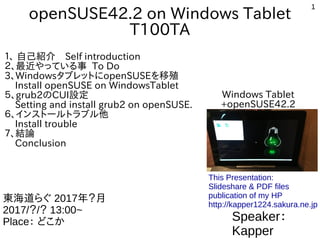
Install openSUSE 42.2 and edit grub2 bootloader.
This is difficult for beginner, but copy and paste commandline only.
Let's install openSUSE on your Windows Tablet.
Next Generations, Tablet will be your only color.
1
openSUSE42.2 on WindowsTablet
T100TA
1、 自己紹介 Self introduction
2、最近やっている事 To Do
3、WindowsタブレットにopenSUSEを移殖
Install openSUSE on WindowsTablet
5、grub2のCUI設定
Setting and install grub2 on openSUSE.
6、インストールトラブル他
Install trouble
7、結論
Conclusion
Speaker:
Kapper
東海道らぐ 2017年?月
2017/?/? 13:00~
Place: どこか
This Presentation:
Slideshare & PDF files
publication of my HP
http://kapper1224.sakura.ne.jp
Windows Tablet
+openSUSE42.2
2.
2
自己紹介 Self Introduction
●
My name:Kapper
●
Twitter account:@kapper1224
●
HP:http://kapper1224.sakura.ne.jp
●
Slideshare: http://www.slideshare.net/kapper1224
●
ニコナレ: http://niconare.nicovideo.jp/users/59379263
●
My Hobby:Linux、*BSD、and Mobile ARM Devices
●
My favorite words:Record than experiment important
●
Test Model:Netwalker(PC-Z1,T1)、Nokia N900、DynabookAZ、RaspberryPi
Nexus7(2012、2013)、OpenPandora、ARM Chromebook、
台湾Android電子辞書 無敵CD-920、CD-928、TW708、GPD-WIN
Surface3、Asus T100TA、WIN-10B、Photon2
●
Recent Activity:
Hacking Linux on Windows10 Tablet (Intel Atom base).
I have been active in the Tokaido Linux User Group.
Hacking Linux on GPD-WIN and many Atom Devices.
I have recently often use the Asus T100TA and GPD-WIN.
3.
3
Recently my test こんな事やってます
1.Linux distro on x86 Windows Tablet 2. Electronic Circuit on ARM
3.Linux distributions on Android 4. Plesentations in Asia(HongKong,Taiwan)
Opensouce Conference
RaspberryPiを使ってLチカ
昔に戻って、電子回路工作を楽しんでます
4.
4
OpenSuseにWindowsタブレットの課題
openSUSE problems onWindows Tablet
●
OpenSuse42.2はどうよ? What’s openSUSE on WindowsTablet?
・Kernel4.4は古くてTurboモード過剰発熱のバグがある Freeze Bug
・Xorgがちゃんと動かない Xorg have some troubles.
・ドライバが古く周辺機種が動かない Firmware was too old.
・Kernelを最新LTSにアップグレードする必要あり Need upgrade kernel
・UEFI32bitのブートローダーパッケージがない。コマンド起動必須
No UEFI32bit bootloader Grub2 and packages on openSUSE.
Need to boot grub2 commandline on UEFI32bit and openSUSE
・Wifi Firmwareがインストール時に機能しないのでUSB有線LAN推奨
When install openSUSE, No Wifi and zypper. Recommended
Wired USB LAN.
●
Tumbleweed ISOの動作NG
No boot Tumbleweed ISO x86-64 on Windows Tablet.
9
Install ISO foropenSUSE42.2
●
Required
1.Windows Tablets
2. USB Memory(>2GB) install openSUSE42.2 x86-64 ISO
3. USB-MicroUSB OTG cable
4. USB hub
5. USB keyboard
6. USB mouse
7. USB Wired LAN adapter
10.
10
Install openSUSE 42.2on Tablet
●
Disable 「Secure boot」 on UEFI. And boot USB on UEFI.
●
Type Grub2 and Boot openSUSE 42.2 install ISO on USB memory.
Linux (hd0,msdos1)/boot/x86_64/loader/linux
root=/dev/mmcblk0p2 nomodeset reboot=pci
initrd (hd1,msdos1)/boot/x86_64/loader/initrd
boot
Type Grub2 command line
Install GUI
11.
11
2ndboot openSUSE 42.2on Tablet
●
Type Grub2 and Boot openSUSE 42.2 install ISO on USB memory,after reboot.
If you don’t use Wired LAN and internet,then openSUSE install error on Tablet.
select gpt?=installed partations. Install partations single 「gpt2」,dual 「gpt6」?
folder⇒/@/.snapshots〜 are openSUSE when install error.
●
linux (hd1,gpt2)/@/.snapshots/2/snapshot/boot/x86_64/loader/vmlinuz-
4.4.49-16-default root=/dev/mmcblk0p2 nomodeset intel_idle.max_csate=1
reboot=pci
initrd (hd1,gpt2)/@/.snapshots/2/snapshot/boot/x86_64/loader/initrd-
4.4.49-16-default
boot
Type Grub2 command line
13
Grub2を自分でビルドして実装する
Install grub2 i386UEFI32bit on openSUSE
●
openSUSEを例に起動設定ファイルを作成。自動設定ファイルでは起動しない
nano /boot/grub/grub.cfg
●
で下記文章を貼り付けて保存。linux〜、initrd〜以下の文章は機種に合わせて
変更する。どうやらGUI関係の文章は使えないらしい。そこを削除すると使える
Copy under text on grub.cfg
if loadfont /boot/grub/font.pf2 ; then
set gfxmode=auto
insmod efi_gop
insmod efi_uga
insmod gfxterm
terminal_output gfxterm
fi
set menu_color_normal=white/black
set menu_color_highlight=black/light-gray
menuentry "Boot OpenSuse42.2" {
set gfxpayload=keep
linux (hd1,gpt2)/@/.snapshots/2/snapshot/boot/vmlinuz-4.4.49-16-
default root=/dev/mmcblk0p2 nomodeset reboot=pci,force quiet splash ---
initrd (hd1,gpt2)/@/.snapshots/2/snapshot/boot/initrd-4.4.49-16-default
}
17
結論 conclusion
ブートローダーさえ何とかなればOK
Kernel4.9LTSお待ちしています。
It isdifficult for beginner on openSUSE now.
But you can be setting grub2 CUI 「copy and paste」
The other WindowsTablet is needed to Kernel4.9LTS.
openSUSEもWindowsタブレットの
時代が来たるなう!!!
Let’s install openSUSE on Tablet!