1
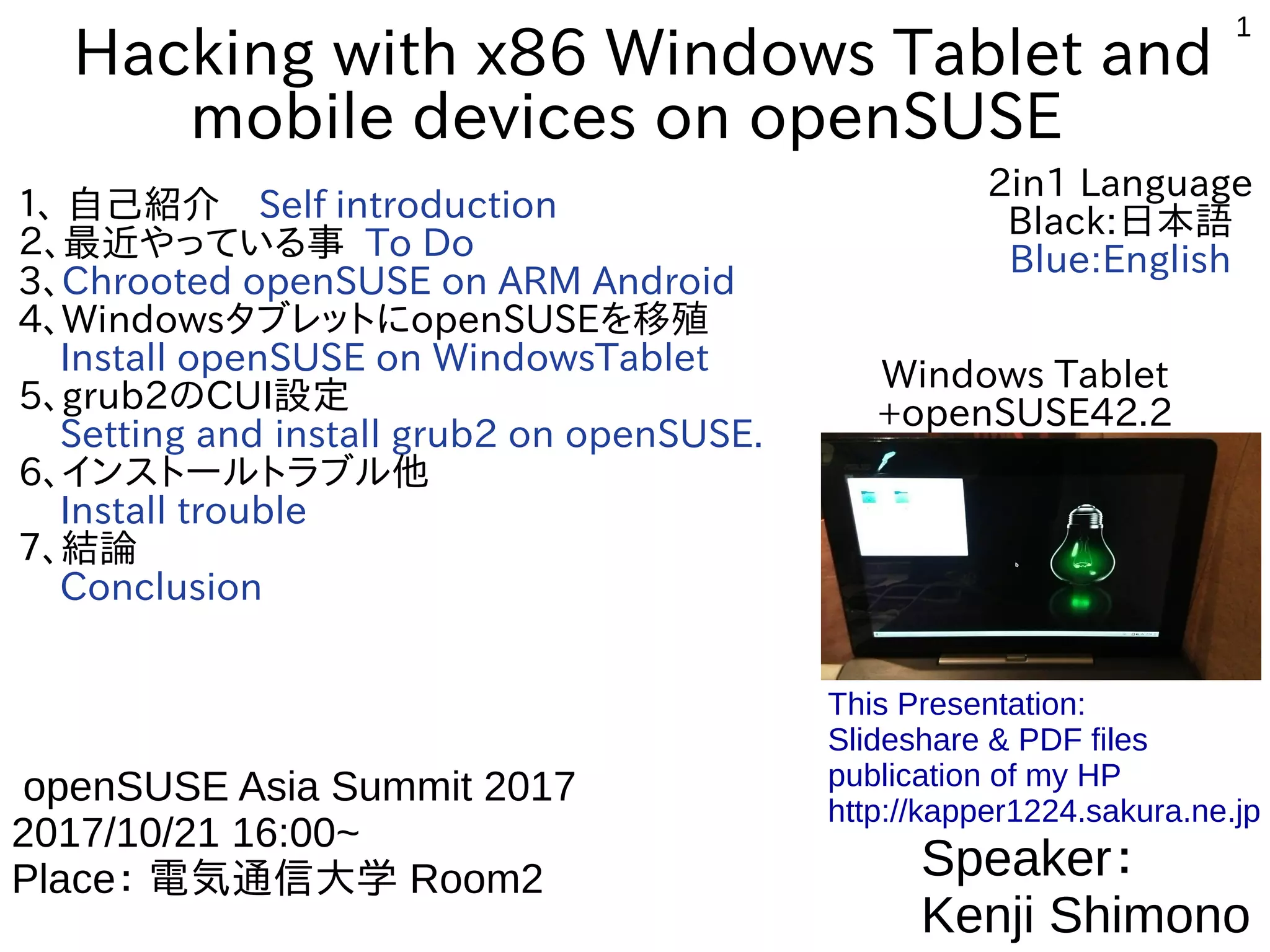
Hacking with x86 Windows Tablet and
mobile devices on openSUSE
1、 自己紹介 Self introduction
2、最近やっている事 To Do
3、Chrooted openSUSE on ARM Android
4、WindowsタブレットにopenSUSEを移殖
Install openSUSE on WindowsTablet
5、grub2のCUI設定
Setting and install grub2 on openSUSE.
6、インストールトラブル他
Install trouble
7、結論
Conclusion
Speaker:
Kenji Shimono
openSUSE Asia Summit 2017
2017/10/21 16:00~
Place: 電気通信大学 Room2
This Presentation:
Slideshare & PDF files
publication of my HP
http://kapper1224.sakura.ne.jp
Windows Tablet
+openSUSE42.2
2in1 Language
Black:日本語
Blue:English
2
自己紹介 Self Introduction
●
My name: Kapper
●
Twitter account:@kapper1224
●
HP:http://kapper1224.sakura.ne.jp
●
Slideshare: http://www.slideshare.net/kapper1224
●
ニコナレ: http://niconare.nicovideo.jp/users/59379263
●
Facebook:https://www.facebook.com/kapper1224/
●
My Hobby:Linux、*BSD、and Mobile ARM Devices
●
My favorite words:Record than experiment important
●
Test Model:Netwalker(PC-Z1,T1)、Nokia N900、DynabookAZ、RaspberryPi
      Nexus7(2012、2013)、Hercules eCAFE EX HD、Jetson TK-1、
      OpenPandora、ARM Chromebook、ZTE OPEN C(FirefoxOS)
      台湾Android電子辞書 無敵CD-920、CD-928、TW708、GPD-WIN   
●
Recent Activity:
 Hacking Linux on Windows10 Tablet (Intel Atom base).
 I have been active in the Tokaido Linux User Group.
 Hacking Linux on GPD-WIN,GPD-Pocket and many Atom Devices.
 I have recently often use the ARM Chromebook.
3
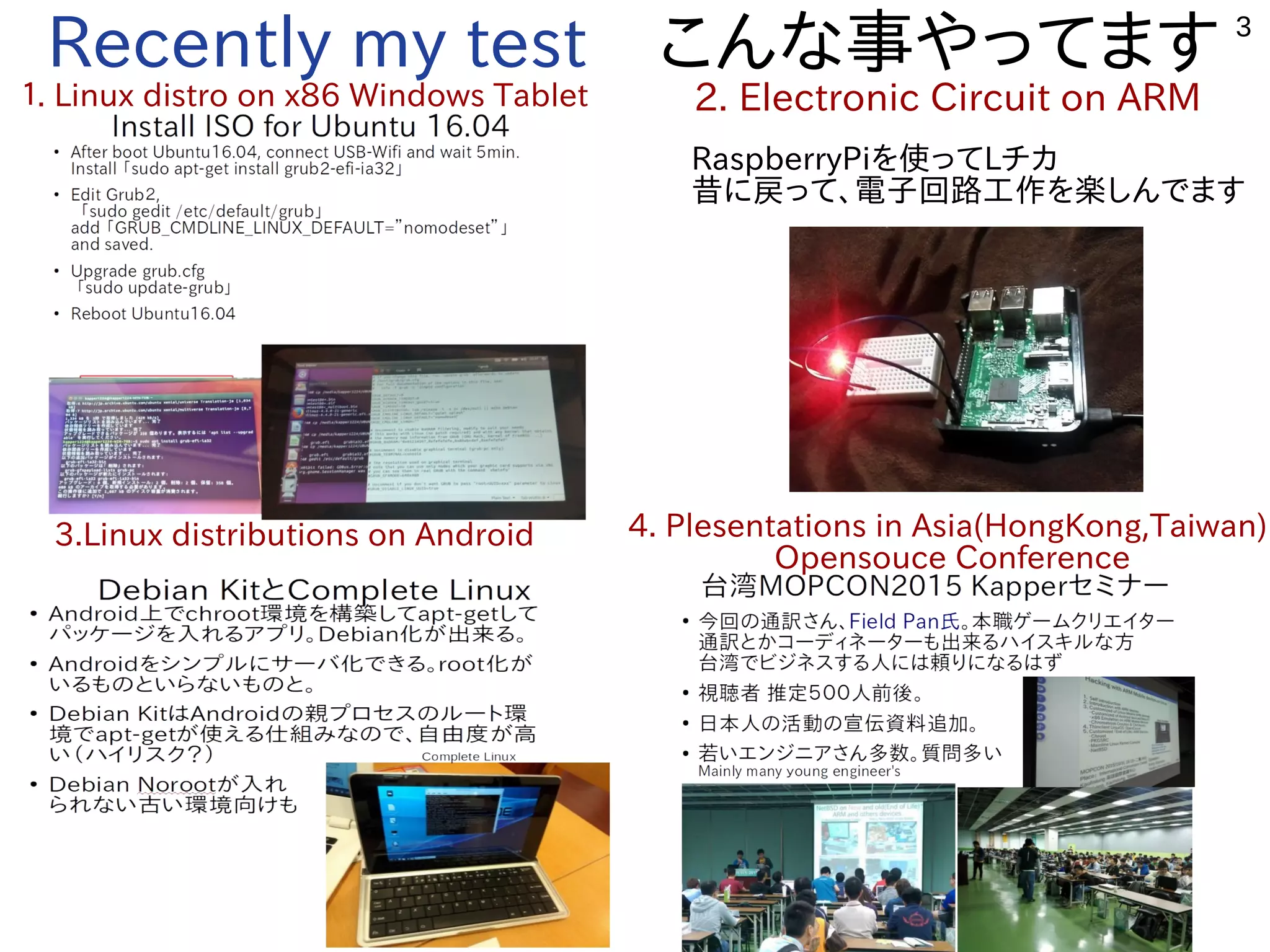
Recently my test こんな事やってます
1. Linux distro on x86 Windows Tablet 2. Electronic Circuit on ARM
3.Linux distributions on Android 4. Plesentations in Asia(HongKong,Taiwan)
Opensouce Conference
RaspberryPiを使ってLチカ
昔に戻って、電子回路工作を楽しんでます
4
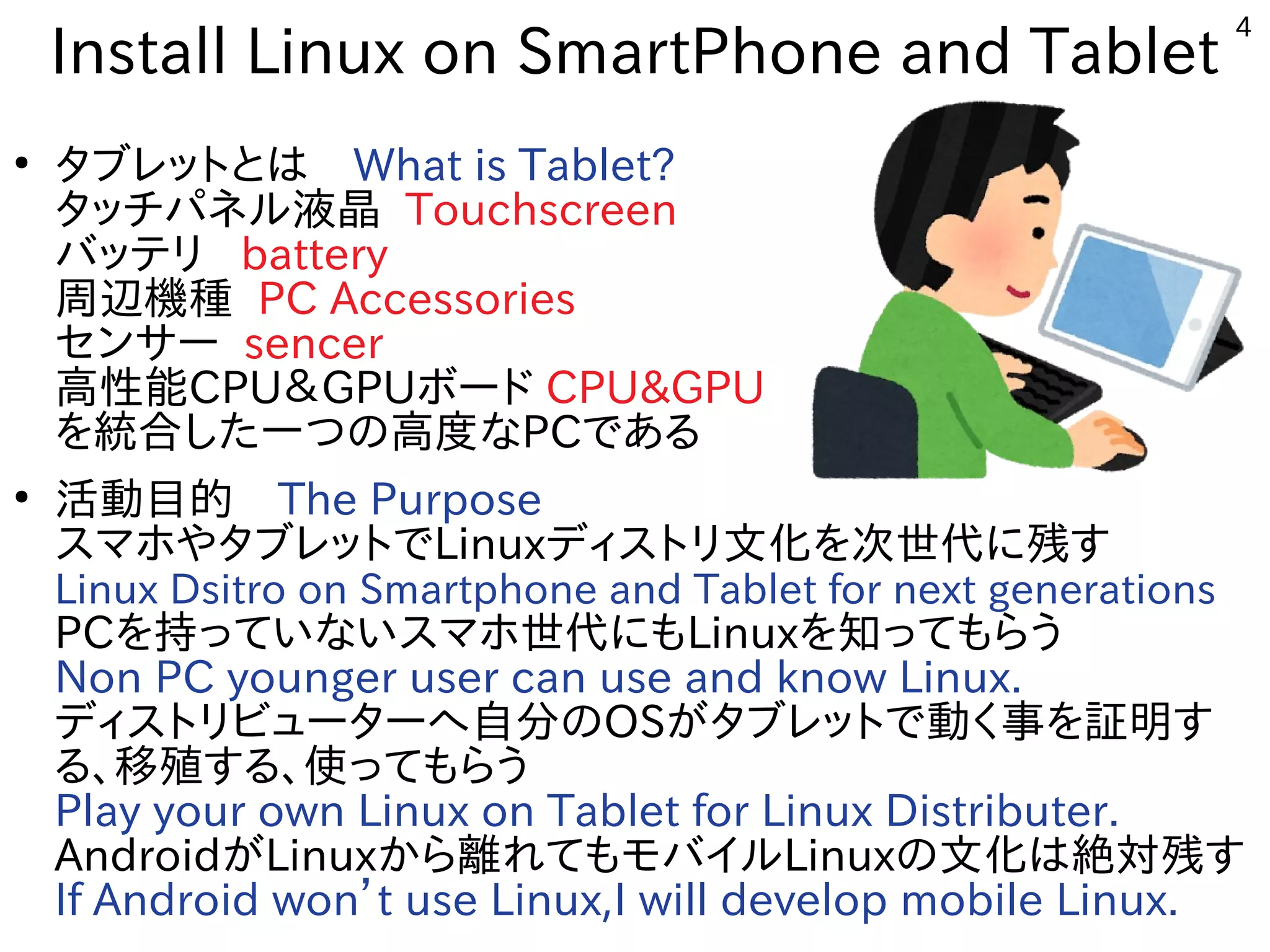
Install Linux on SmartPhone and Tablet
●
タブレットとは What is Tablet?
タッチパネル液晶 Touchscreen
バッテリ battery
周辺機種 PC Accessories
センサー sencer
高性能CPU&GPUボード CPU&GPU
を統合した一つの高度なPCである
●
活動目的 The Purpose
スマホやタブレットでLinuxディストリ文化を次世代に残す
Linux Dsitro on Smartphone and Tablet for next generations
PCを持っていないスマホ世代にもLinuxを知ってもらう
Non PC younger user can use and know Linux.
ディストリビューターへ自分のOSがタブレットで動く事を証明す
る、移殖する、使ってもらう
Play your own Linux on Tablet for Linux Distributer.
AndroidがLinuxから離れてもモバイルLinuxの文化は絶対残す
If Android won’t use Linux,I will develop mobile Linux.
5
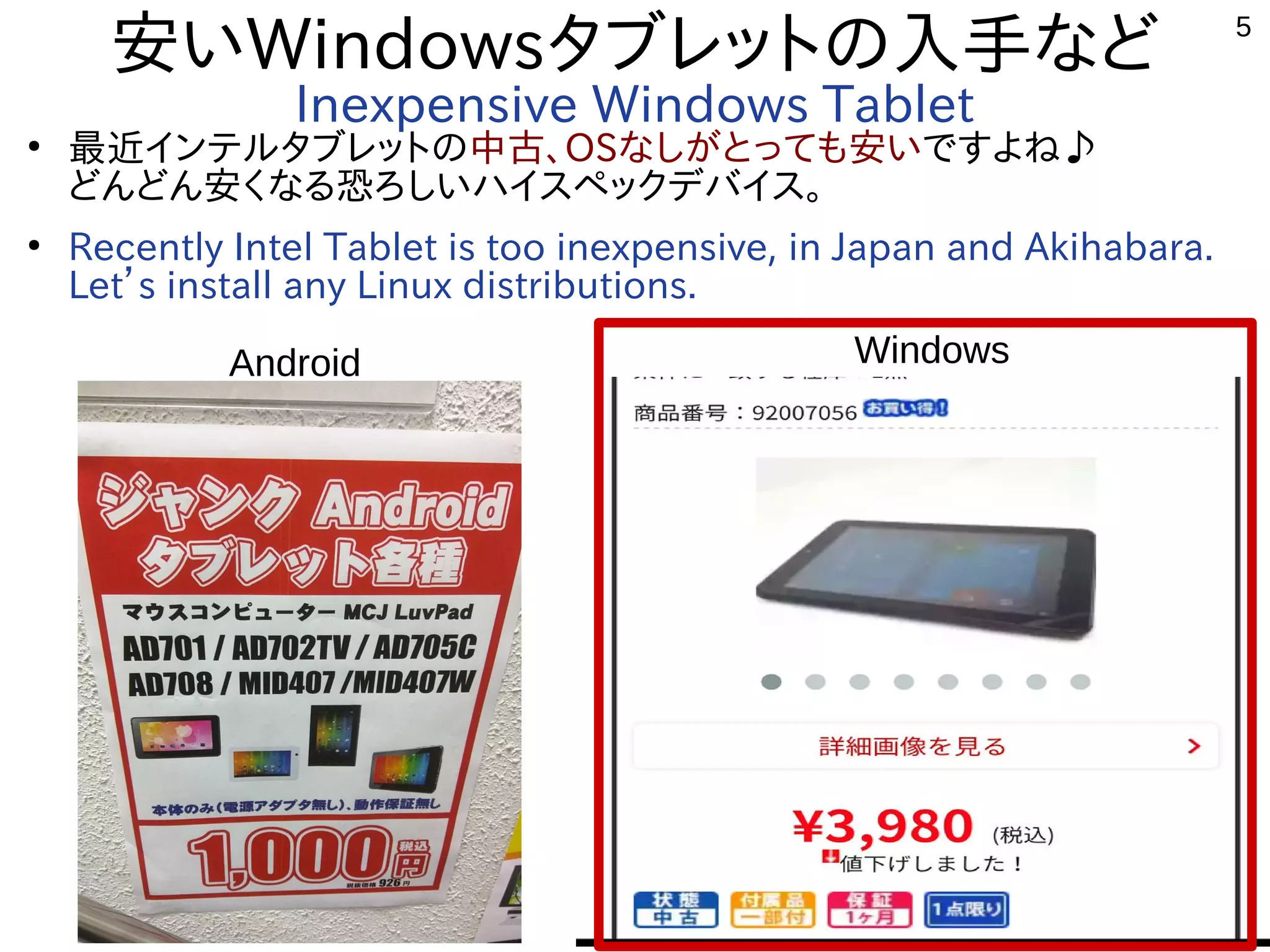
安いWindowsタブレットの入手など
Inexpensive Windows Tablet
●
最近インテルタブレットの中古、OSなしがとっても安いですよね♪
どんどん安くなる恐ろしいハイスペックデバイス。
●
Recently Intel Tablet is too inexpensive, in Japan and Akihabara.
Let’s install any Linux distributions.
Android Windows
6
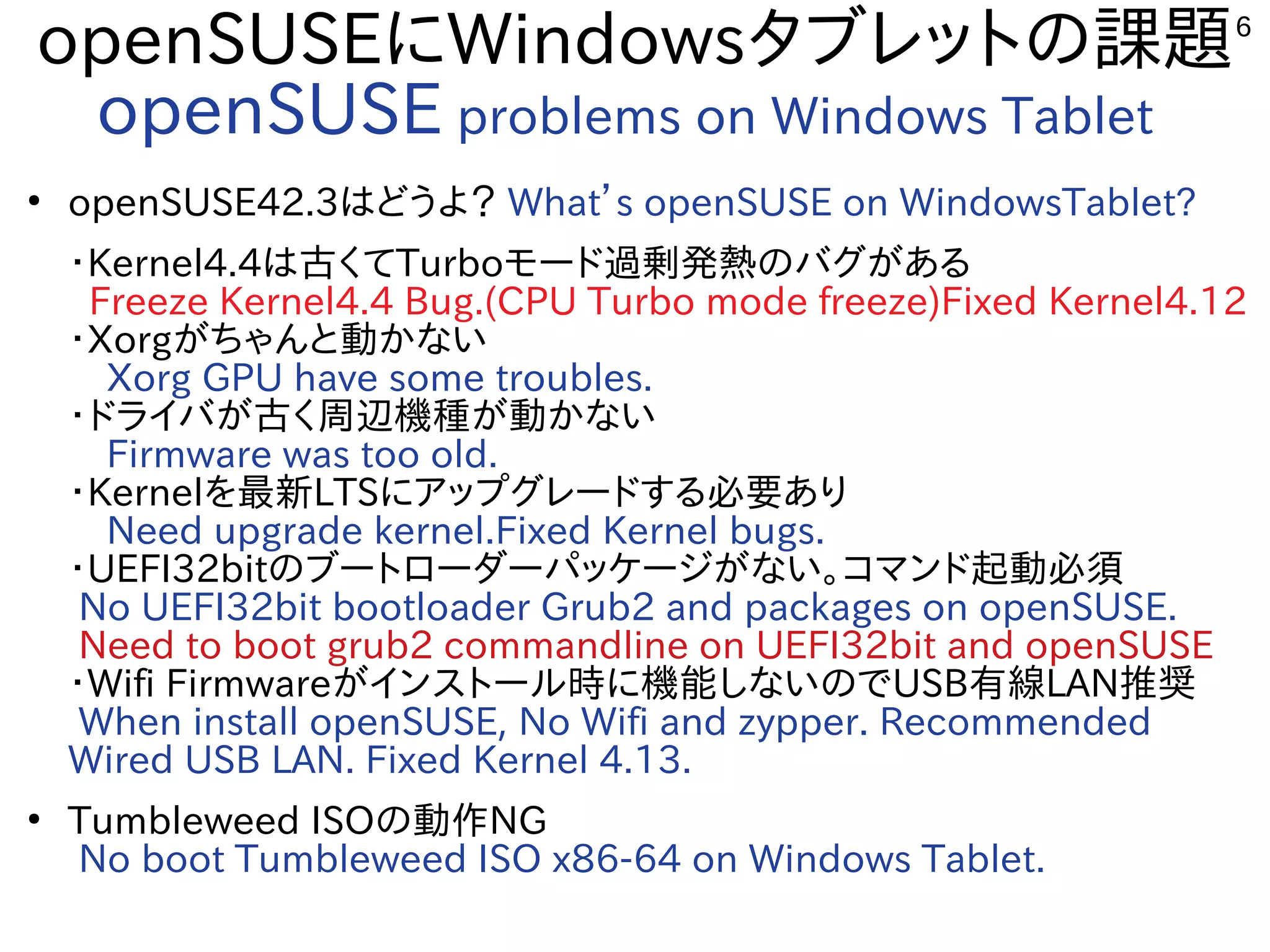
openSUSEにWindowsタブレットの課題
openSUSE problems on Windows Tablet
●
openSUSE42.3はどうよ? What’s openSUSE on WindowsTablet?
・Kernel4.4は古くてTurboモード過剰発熱のバグがある
Freeze Kernel4.4 Bug.(CPU Turbo mode freeze)Fixed Kernel4.12
・Xorgがちゃんと動かない
 Xorg GPU have some troubles.
・ドライバが古く周辺機種が動かない
 Firmware was too old.
・Kernelを最新LTSにアップグレードする必要あり
 Need upgrade kernel.Fixed Kernel bugs.
・UEFI32bitのブートローダーパッケージがない。コマンド起動必須
No UEFI32bit bootloader Grub2 and packages on openSUSE.
Need to boot grub2 commandline on UEFI32bit and openSUSE
・Wifi Firmwareがインストール時に機能しないのでUSB有線LAN推奨
When install openSUSE, No Wifi and zypper. Recommended
Wired USB LAN. Fixed Kernel 4.13.  
●
Tumbleweed ISOの動作NG
No boot Tumbleweed ISO x86-64 on Windows Tablet.
7
まあとにかく入れてみましょう
Let’s install openSUSE.
8
Chrooted openSUSE
on ARM Android
9
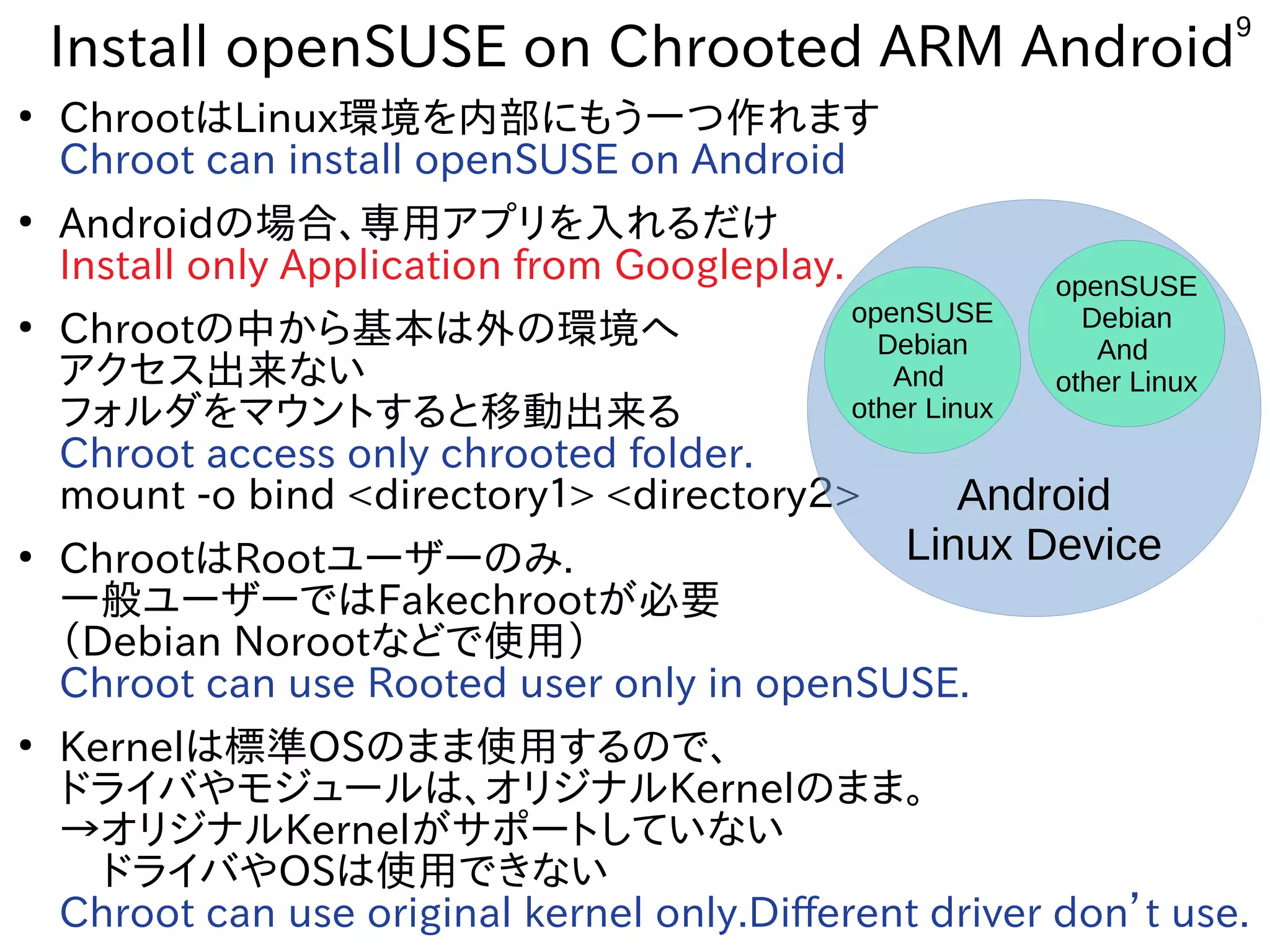
Install openSUSE on Chrooted ARM Android
●
ChrootはLinux環境を内部にもう一つ作れます
Chroot can install openSUSE on Android
●
Androidの場合、専用アプリを入れるだけ
Install only Application from Googleplay.
●
Chrootの中から基本は外の環境へ
アクセス出来ない
フォルダをマウントすると移動出来る
Chroot access only chrooted folder.
mount -o bind <directory1> <directory2>
●
ChrootはRootユーザーのみ.
一般ユーザーではFakechrootが必要
(Debian Norootなどで使用)
Chroot can use Rooted user only in openSUSE.
●
Kernelは標準OSのまま使用するので、
ドライバやモジュールは、オリジナルKernelのまま。
→オリジナルKernelがサポートしていない
 ドライバやOSは使用できない
Chroot can use original kernel only.Different driver don’t use.
Android
Linux Device
openSUSE
Debian
And
other Linux
openSUSE
Debian
And
other Linux
10
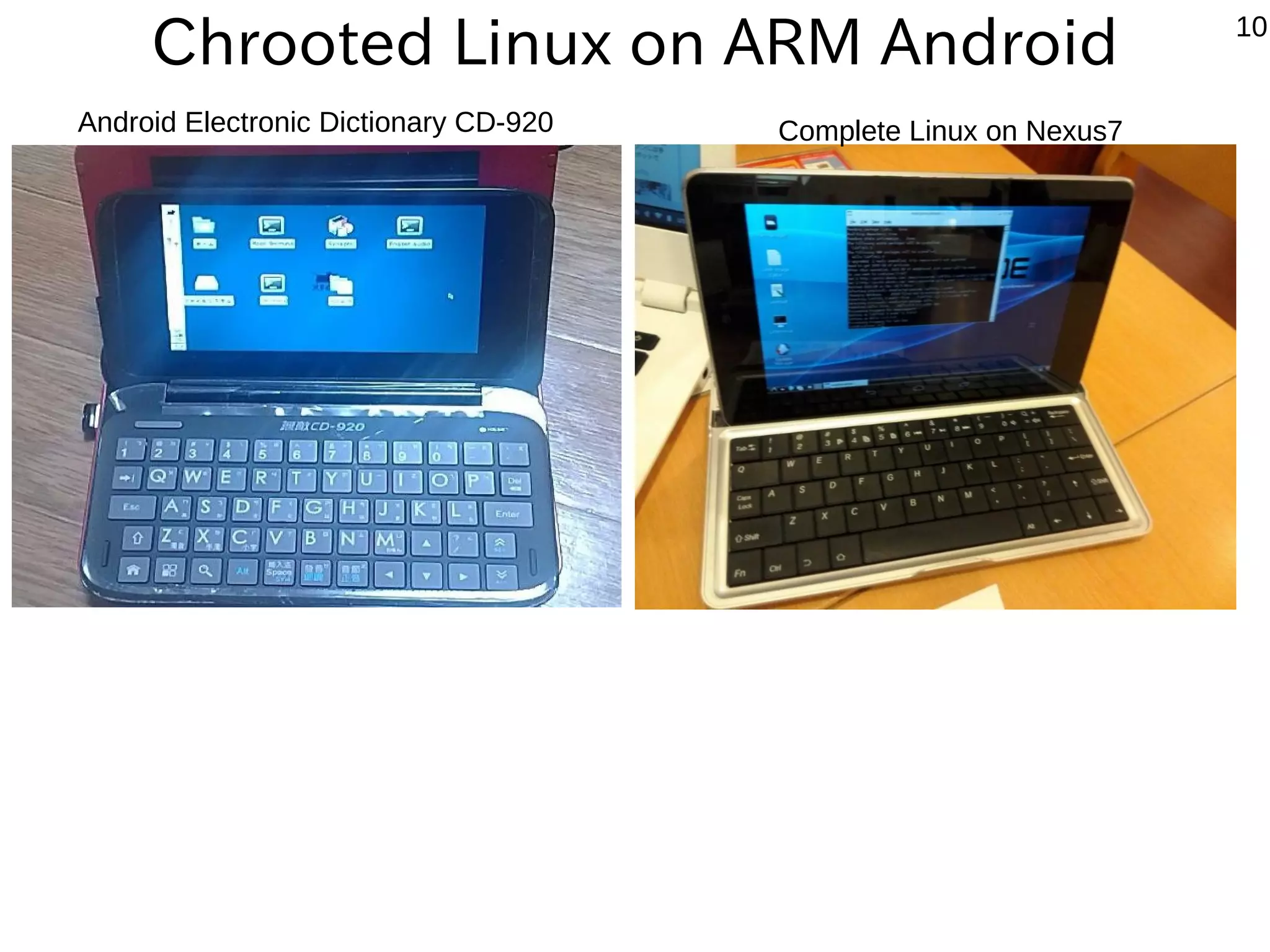
Chrooted Linux on ARM Android
Android Electronic Dictionary CD-920 Complete Linux on Nexus7
11
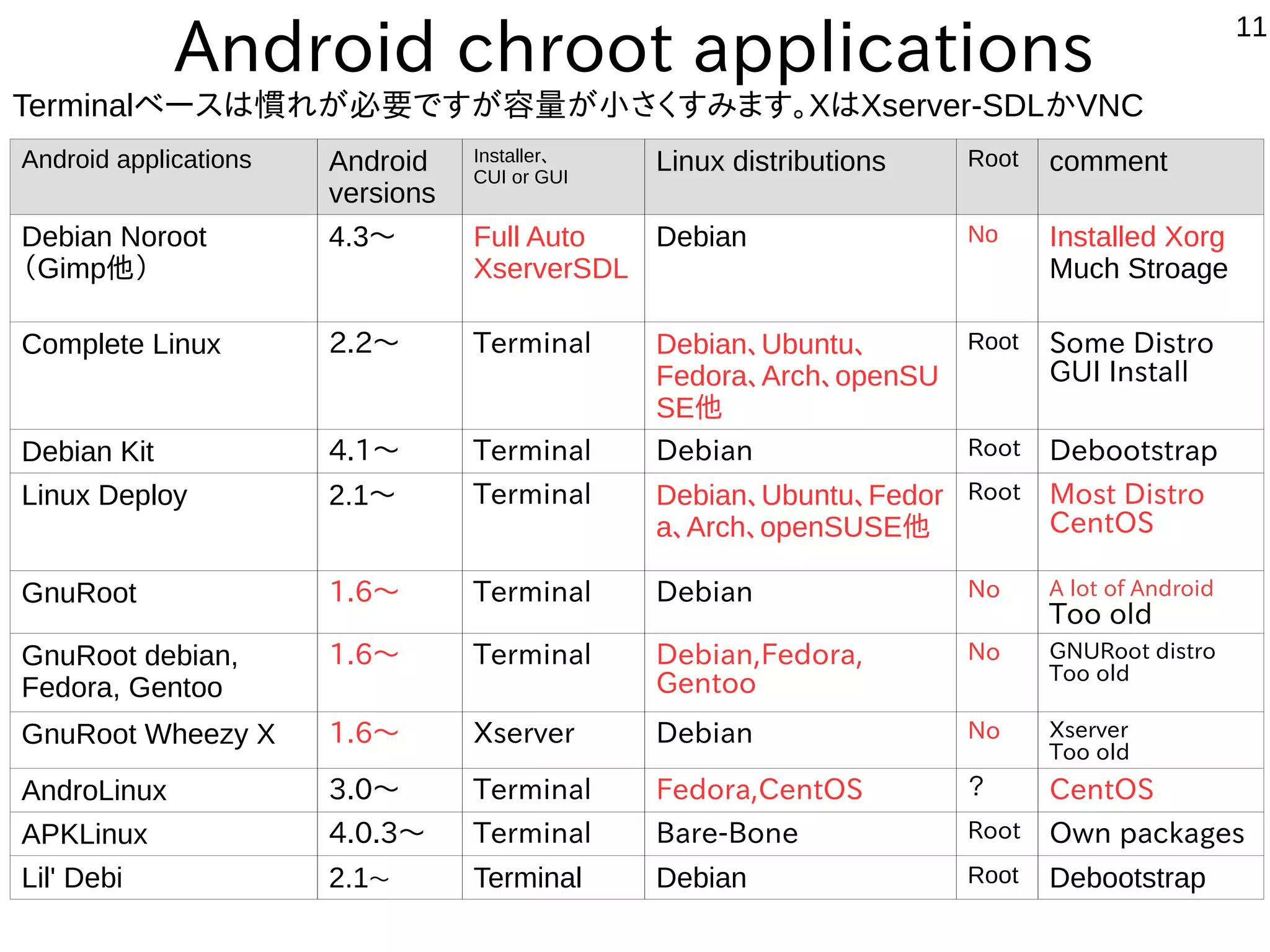
Android chroot applications
Android applications Android
versions
Installer、
CUI or GUI
Linux distributions Root comment
Debian Noroot
(Gimp他)
4.3〜 Full Auto
XserverSDL
Debian No Installed Xorg
Much Stroage
Complete Linux 2.2〜 Terminal Debian、Ubuntu、
Fedora、Arch、openSU
SE他
Root Some Distro
GUI Install
Debian Kit 4.1〜 Terminal Debian Root Debootstrap
Linux Deploy 2.1〜 Terminal Debian、Ubuntu、Fedor
a、Arch、openSUSE他
Root Most Distro
CentOS
GnuRoot 1.6〜 Terminal Debian No A lot of Android
Too old
GnuRoot debian,
Fedora, Gentoo
1.6〜 Terminal Debian,Fedora,
Gentoo
No GNURoot distro
Too old
GnuRoot Wheezy X 1.6〜 Xserver Debian No Xserver
Too old
AndroLinux 3.0〜 Terminal Fedora,CentOS ? CentOS
APKLinux 4.0.3〜 Terminal Bare-Bone Root Own packages
Lil' Debi 2.1〜 Terminal Debian Root Debootstrap
Terminalベースは慣れが必要ですが容量が小さくすみます。XはXserver-SDLかVNC
12
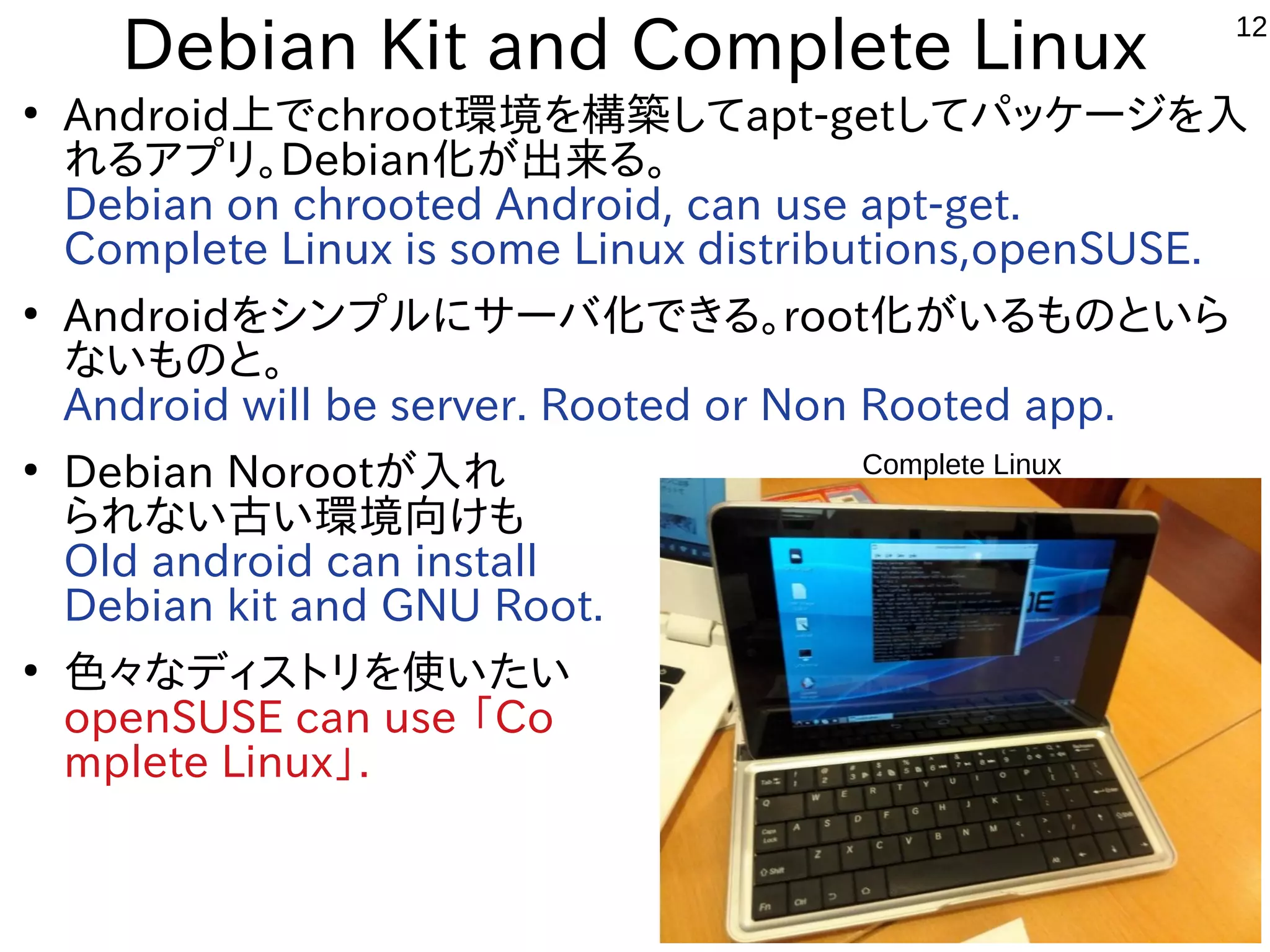
Debian Kit and Complete Linux
●
Android上でchroot環境を構築してapt-getしてパッケージを入
れるアプリ。Debian化が出来る。
Debian on chrooted Android, can use apt-get.
Complete Linux is some Linux distributions,openSUSE.
●
Androidをシンプルにサーバ化できる。root化がいるものといら
ないものと。
Android will be server. Rooted or Non Rooted app.
●
Debian Norootが入れ
られない古い環境向けも
Old android can install
Debian kit and GNU Root.
●
色々なディストリを使いたい
openSUSE can use 「Co
mplete Linux」.
Complete Linux
13
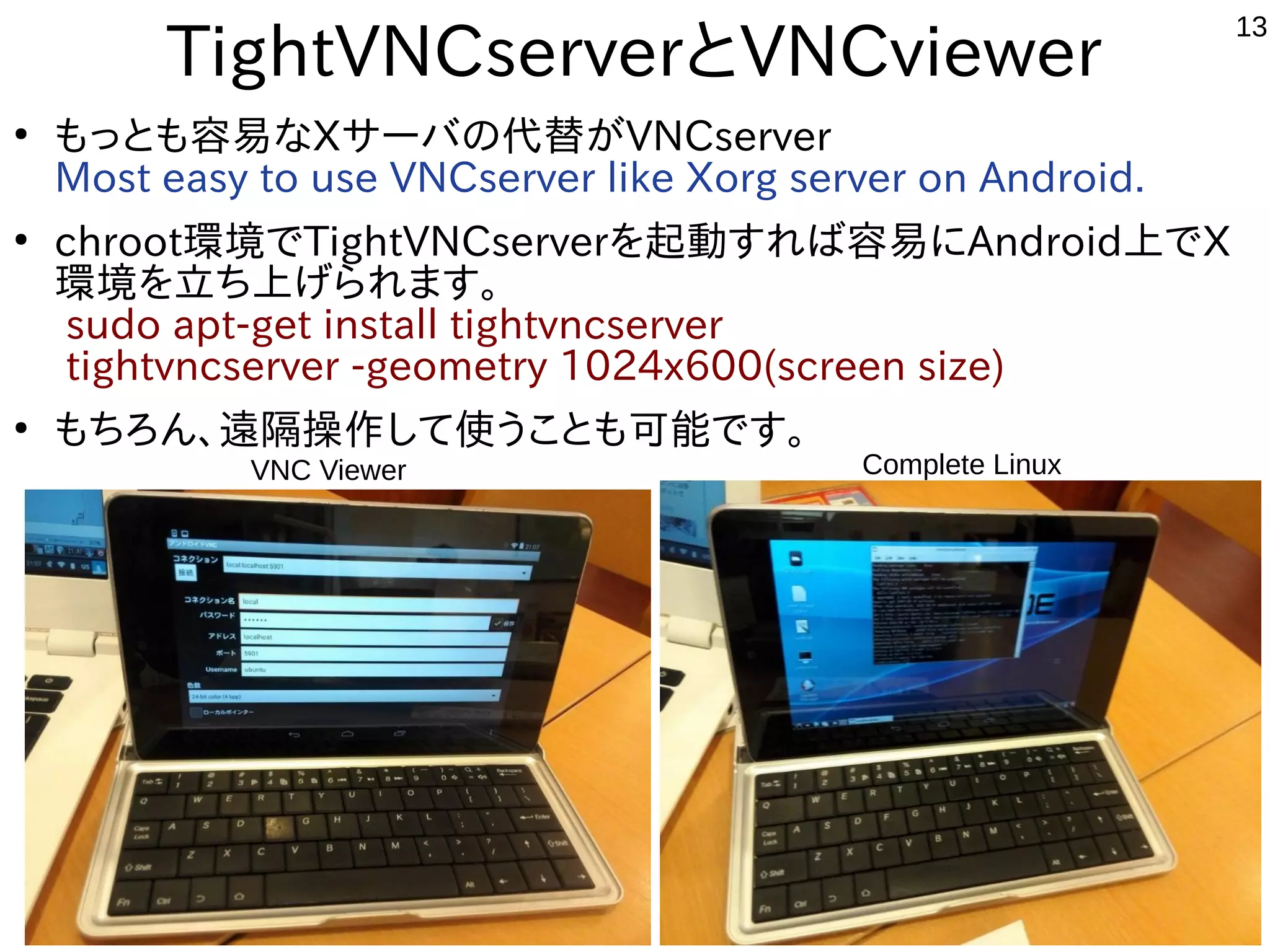
TightVNCserverとVNCviewer
●
もっとも容易なXサーバの代替がVNCserver
Most easy to use VNCserver like Xorg server on Android.
●
chroot環境でTightVNCserverを起動すれば容易にAndroid上でX
環境を立ち上げられます。
sudo apt-get install tightvncserver
tightvncserver -geometry 1024x600(screen size)
●
もちろん、遠隔操作して使うことも可能です。
Complete LinuxVNC Viewer
14
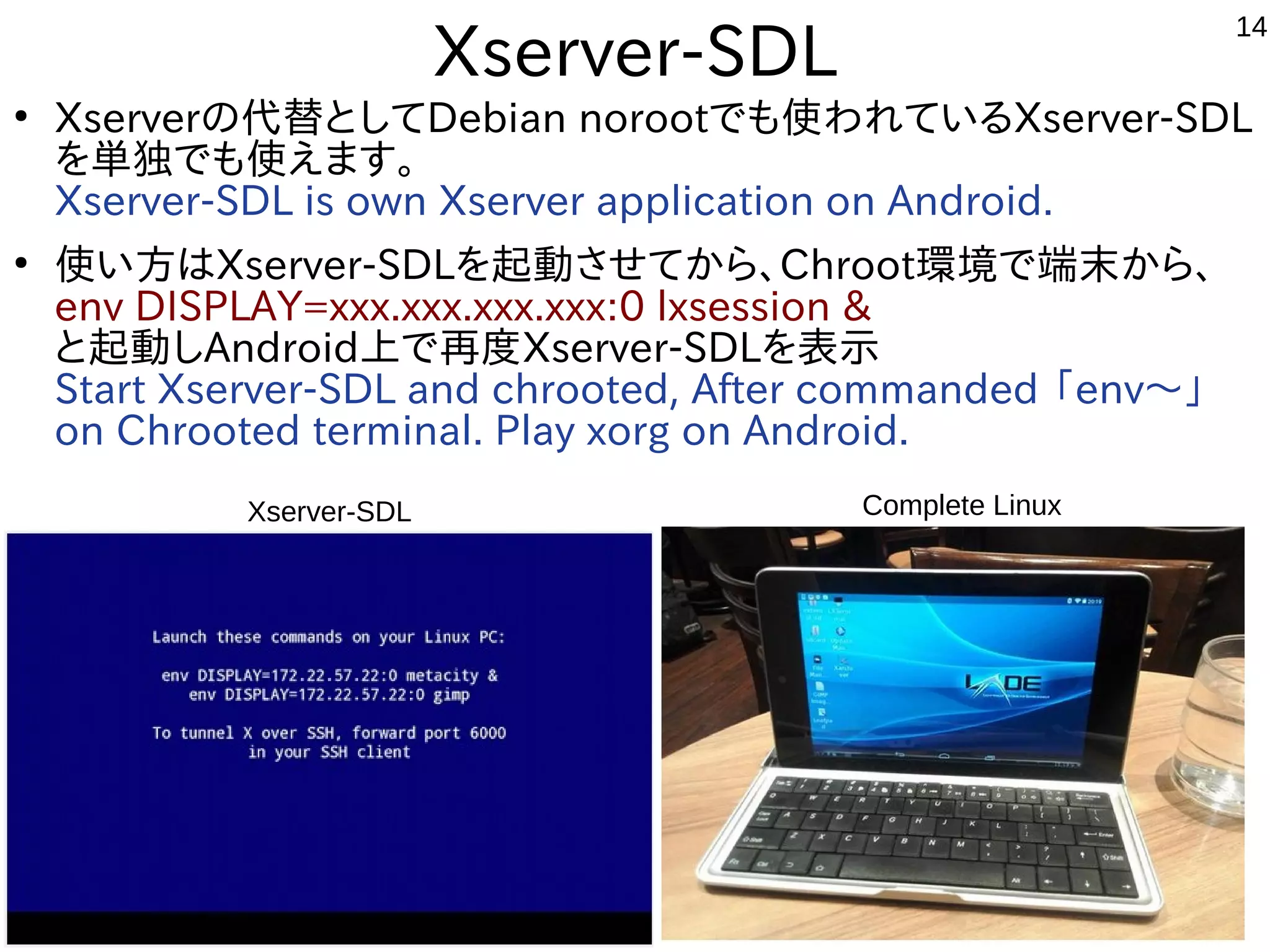
Xserver-SDL
●
Xserverの代替としてDebian norootでも使われているXserver-SDL
を単独でも使えます。
Xserver-SDL is own Xserver application on Android.
●
使い方はXserver-SDLを起動させてから、Chroot環境で端末から、
env DISPLAY=xxx.xxx.xxx.xxx:0 lxsession &
と起動しAndroid上で再度Xserver-SDLを表示
Start Xserver-SDL and chrooted, After commanded 「env〜」
on Chrooted terminal. Play xorg on Android. 
Complete LinuxXserver-SDL
15
Install openSUSE
on x86 Windows Tablet
16
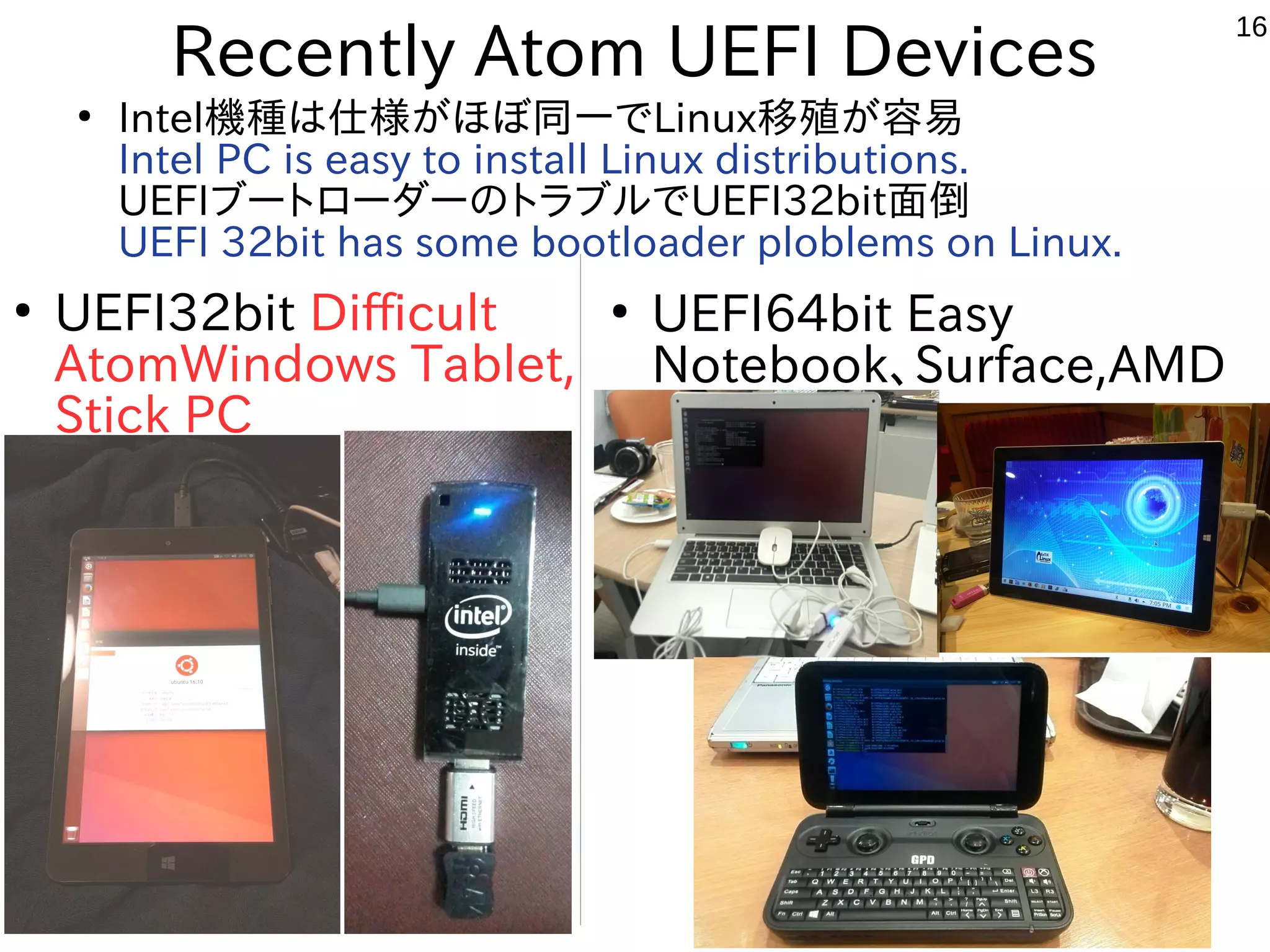
Recently Atom UEFI Devices
●
Intel機種は仕様がほぼ同一でLinux移殖が容易
Intel PC is easy to install Linux distributions.
UEFIブートローダーのトラブルでUEFI32bit面倒
UEFI 32bit has some bootloader ploblems on Linux.
●
UEFI32bit Difficult
AtomWindows Tablet,
Stick PC
●
UEFI64bit Easy
Notebook、Surface,AMD
17
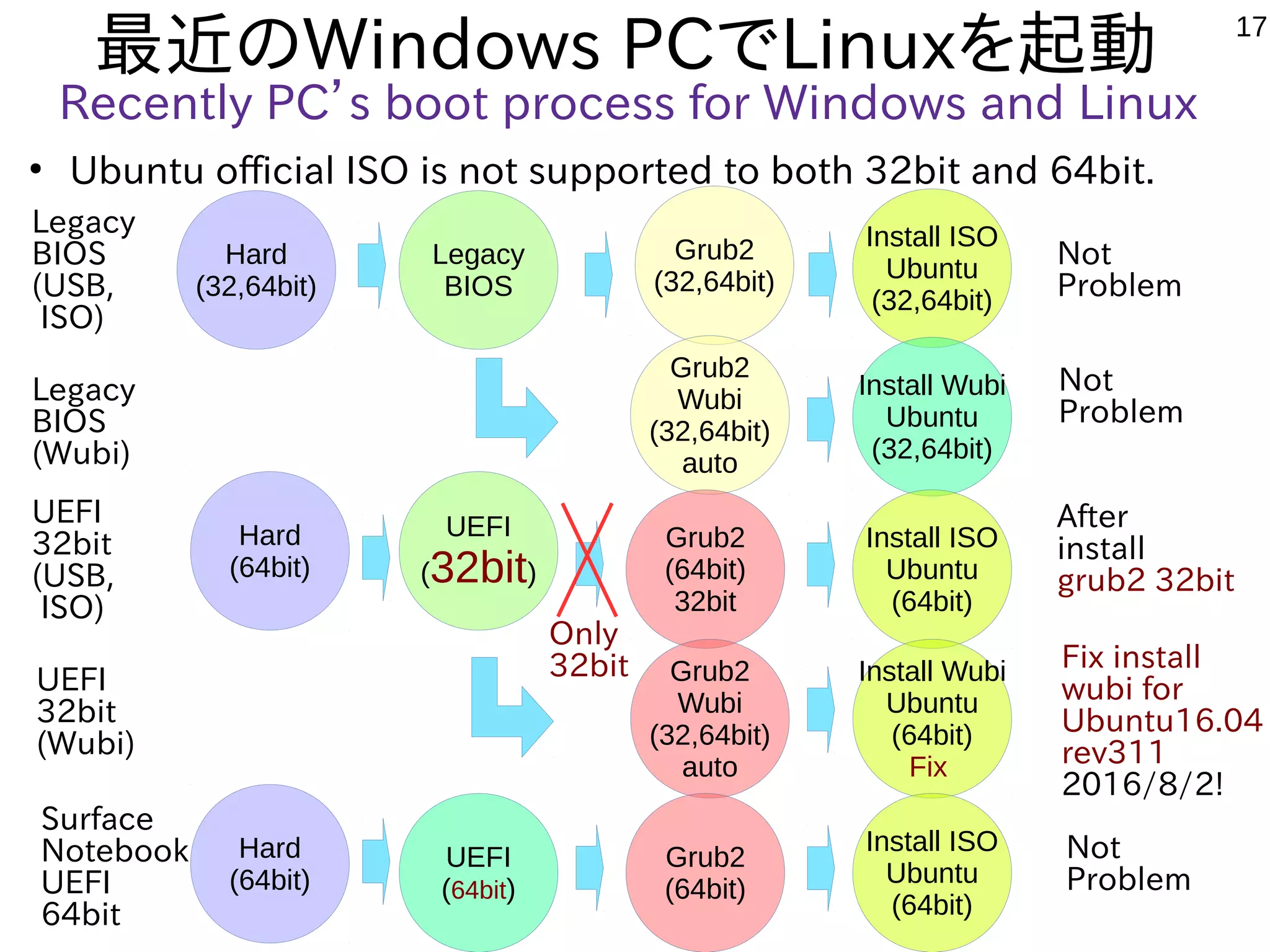
最近のWindows PCでLinuxを起動
Recently PC’s boot process for Windows and Linux
●
Ubuntu official ISO is not supported to both 32bit and 64bit.
Legacy
BIOS
Legacy
BIOS
(USB,
ISO)
Grub2
(32,64bit)
Install ISO
Ubuntu
(32,64bit)
Legacy
BIOS
(Wubi)
UEFI
32bit
(USB,
ISO)
UEFI
32bit
(Wubi)
Hard
(32,64bit)
Grub2
Wubi
(32,64bit)
auto
Install Wubi
Ubuntu
(32,64bit)
UEFI
(32bit)
Grub2
(64bit)
32bit
Install ISO
Ubuntu
(64bit)
Hard
(64bit)
Grub2
Wubi
(32,64bit)
auto
Install Wubi
Ubuntu
(64bit)
Fix
Not
Problem
Not
Problem
After
install
grub2 32bit
Fix install
wubi for
Ubuntu16.04
rev311
2016/8/2!
Only
32bit
Surface
Notebook
UEFI
64bit
UEFI
(64bit)
Grub2
(64bit)
Install ISO
Ubuntu
(64bit)
Hard
(64bit)
Not
Problem
18
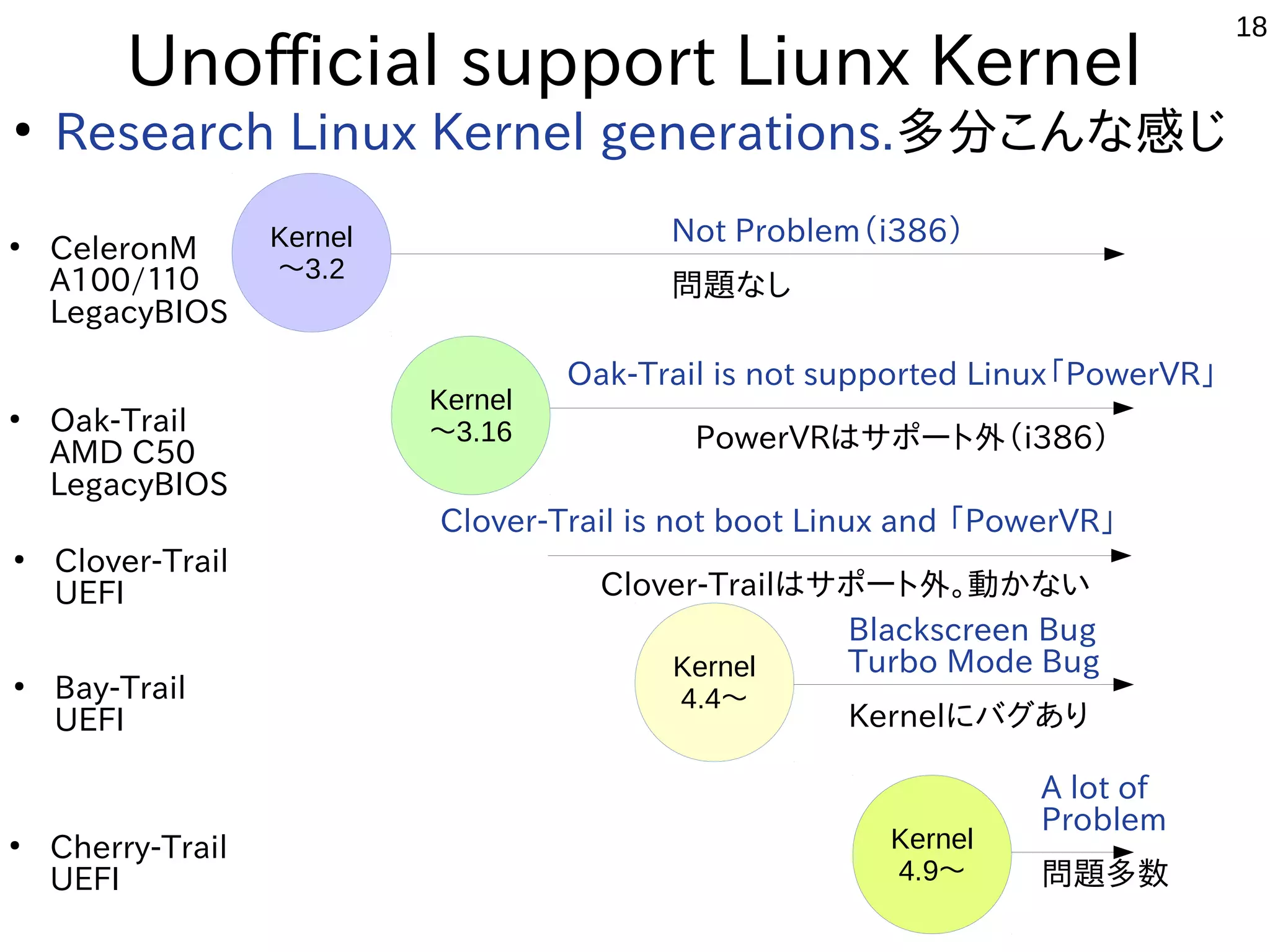
Unofficial support Liunx Kernel
●
Research Linux Kernel generations.多分こんな感じ
●
CeleronM
A100/110
LegacyBIOS
Kernel
4.4〜
Kernel
〜3.2
Oak-Trail is not supported Linux「PowerVR」
    PowerVRはサポート外(i386)
●
Cherry-Trail
UEFI
A lot of
Problem
問題多数
Kernel
4.9〜
●
Oak-Trail
AMD C50
LegacyBIOS
Kernel
〜3.16
●
Bay-Trail
UEFI
Blackscreen Bug
Turbo Mode Bug
Kernelにバグあり
Not Problem(i386)
問題なし
●
Clover-Trail
UEFI
Clover-Trail is not boot Linux and 「PowerVR」
     Clover-Trailはサポート外。動かない
19
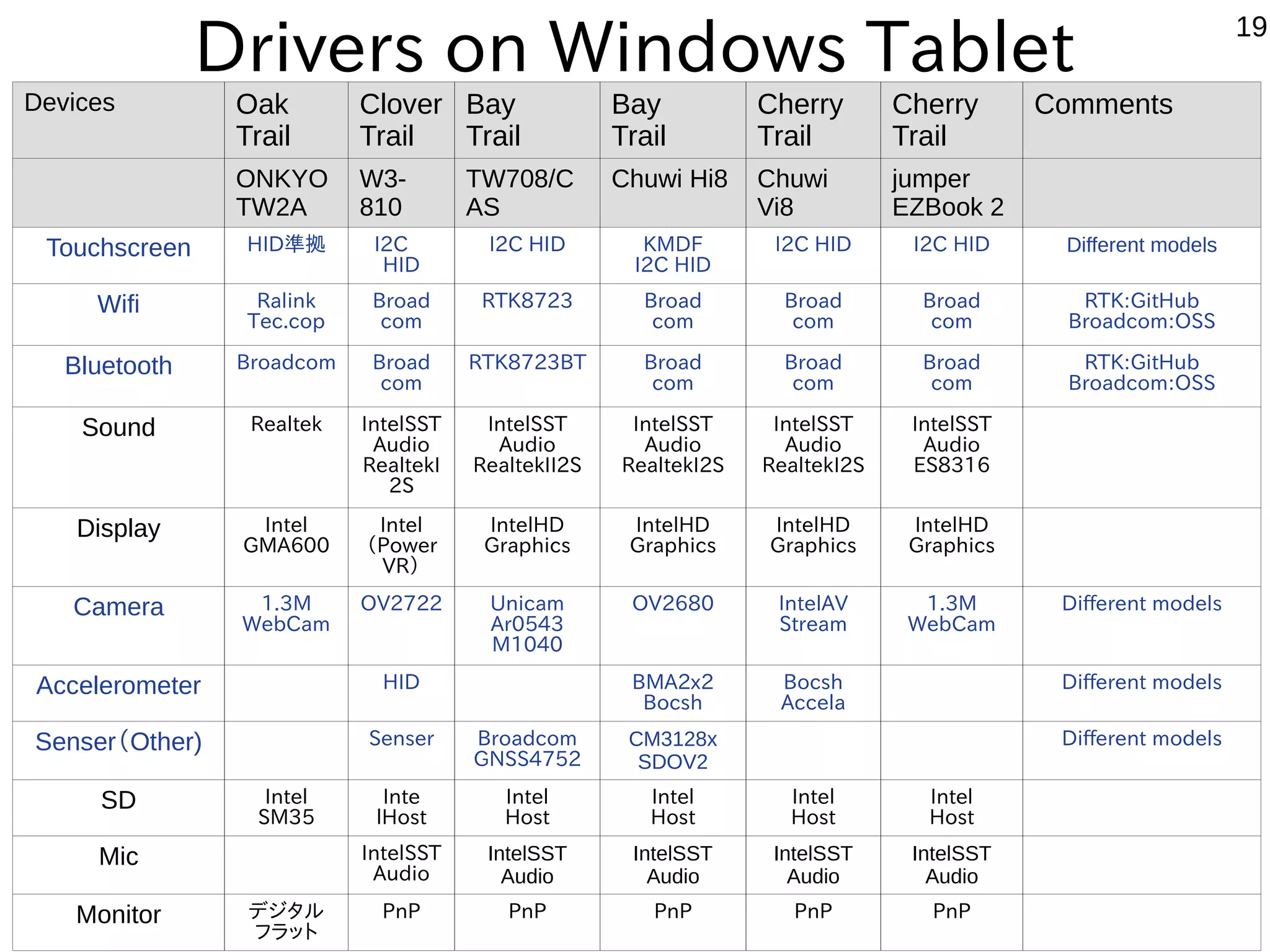
Drivers on Windows Tablet
公式サポート◎、公式HP動作報告○、ユーザー動作報告△、報告なし×
KapperのWindows独断調査(間違っていたらごめんなさい。修正します)
Devices Oak
Trail
Clover
Trail
Bay
Trail
Bay
Trail
Cherry
Trail
Cherry
Trail
Comments
ONKYO
TW2A
W3-
810
TW708/C
AS
Chuwi Hi8 Chuwi
Vi8
jumper
EZBook 2
Touchscreen HID準拠 I2C 
HID
I2C HID KMDF
I2C HID
I2C HID I2C HID Different models
Wifi Ralink
Tec.cop
Broad
com
RTK8723 Broad
com
Broad
com
Broad
com
RTK:GitHub
Broadcom:OSS
Bluetooth Broadcom Broad
com
RTK8723BT Broad
com
Broad
com
Broad
com
RTK:GitHub
Broadcom:OSS
Sound Realtek IntelSST
Audio
RealtekI
2S
IntelSST
Audio
RealtekII2S
IntelSST
Audio
RealtekI2S
IntelSST
Audio
RealtekI2S
IntelSST
Audio
ES8316
Display Intel
GMA600
Intel
(Power
VR)
IntelHD
Graphics
IntelHD
Graphics
IntelHD
Graphics
IntelHD
Graphics
Camera 1.3M
WebCam
OV2722
 
Unicam
Ar0543
M1040
OV2680 IntelAV
Stream
1.3M
WebCam
Different models
Accelerometer HID BMA2x2
Bocsh
Bocsh
Accela
Different models
Senser(Other) Senser Broadcom
GNSS4752
CM3128x
SDOV2
Different models
SD Intel
SM35
Inte
lHost
Intel
Host
Intel
Host
Intel
Host
Intel
Host
Mic IntelSST
Audio
IntelSST
Audio
IntelSST
Audio
IntelSST
Audio
IntelSST
Audio
Monitor デジタル
フラット
PnP PnP PnP PnP PnP
20
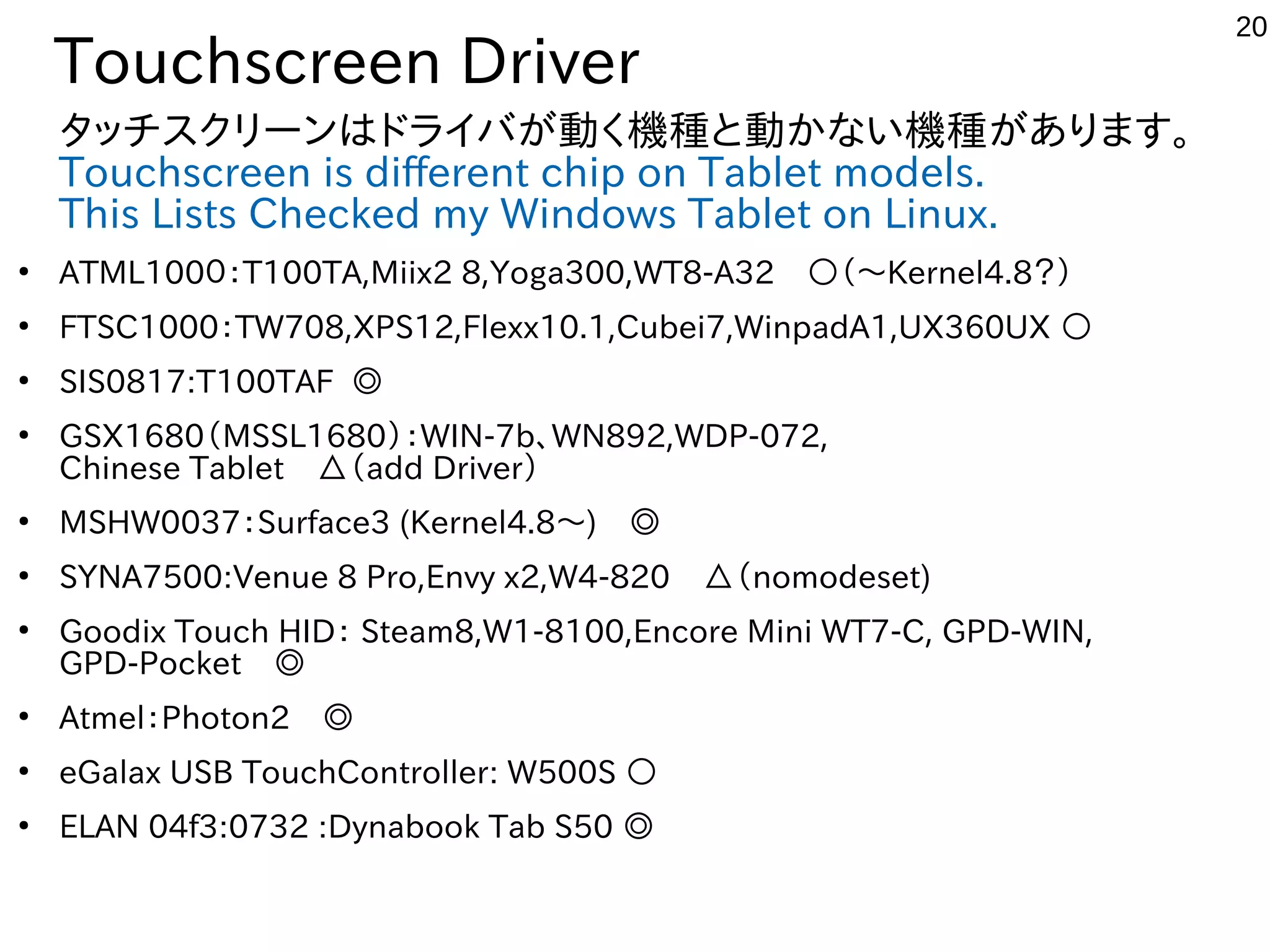
Touchscreen Driver
タッチスクリーンはドライバが動く機種と動かない機種があります。
Touchscreen is different chip on Tablet models.
This Lists Checked my Windows Tablet on Linux.
●
ATML1000:T100TA,Miix2 8,Yoga300,WT8-A32 ○(〜Kernel4.8?)
●
FTSC1000:TW708,XPS12,Flexx10.1,Cubei7,WinpadA1,UX360UX ○
●
SIS0817:T100TAF ◎
●
GSX1680(MSSL1680):WIN-7b、WN892,WDP-072,
Chinese Tablet △(add Driver)
●
MSHW0037:Surface3 (Kernel4.8〜) ◎
●
SYNA7500:Venue 8 Pro,Envy x2,W4-820 △(nomodeset)
●
Goodix Touch HID: Steam8,W1-8100,Encore Mini WT7-C, GPD-WIN,
GPD-Pocket ◎
●
Atmel:Photon2 ◎
●
eGalax USB TouchController: W500S ○
●
ELAN 04f3:0732 :Dynabook Tab S50 ◎
21
~2week
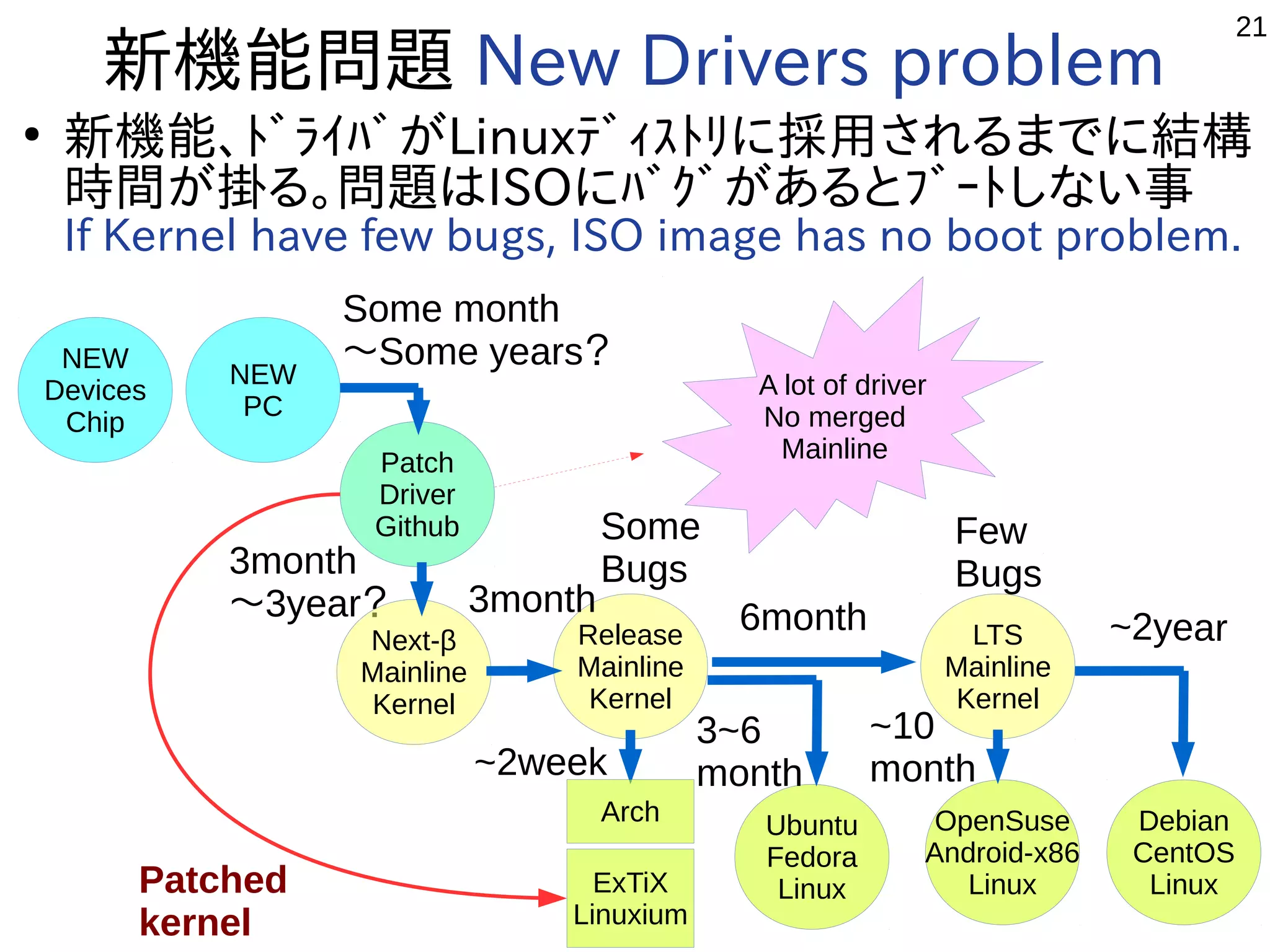
新機能問題 New Drivers problem
●
新機能、ドライバがLinuxディストリに採用されるまでに結構
時間が掛る。問題はISOにバグがあるとブートしない事
If Kernel have few bugs, ISO image has no boot problem.
NEW
Devices
Chip
NEW
PC
Patch
Driver
Github
Release
Mainline
Kernel
LTS
Mainline
Kernel
Ubuntu
Fedora
Linux
Debian
CentOS
Linux
Some month
〜Some years?
3month
〜3year? 6month ~2year
OpenSuse
Android-x86
Linux
3~6
month
~10
month
Few
Bugs
Some
Bugs
A lot of driver
No merged
Mainline
Next-β
Mainline
Kernel
3month
Patched
kernel
Arch
ExTiX
Linuxium
22
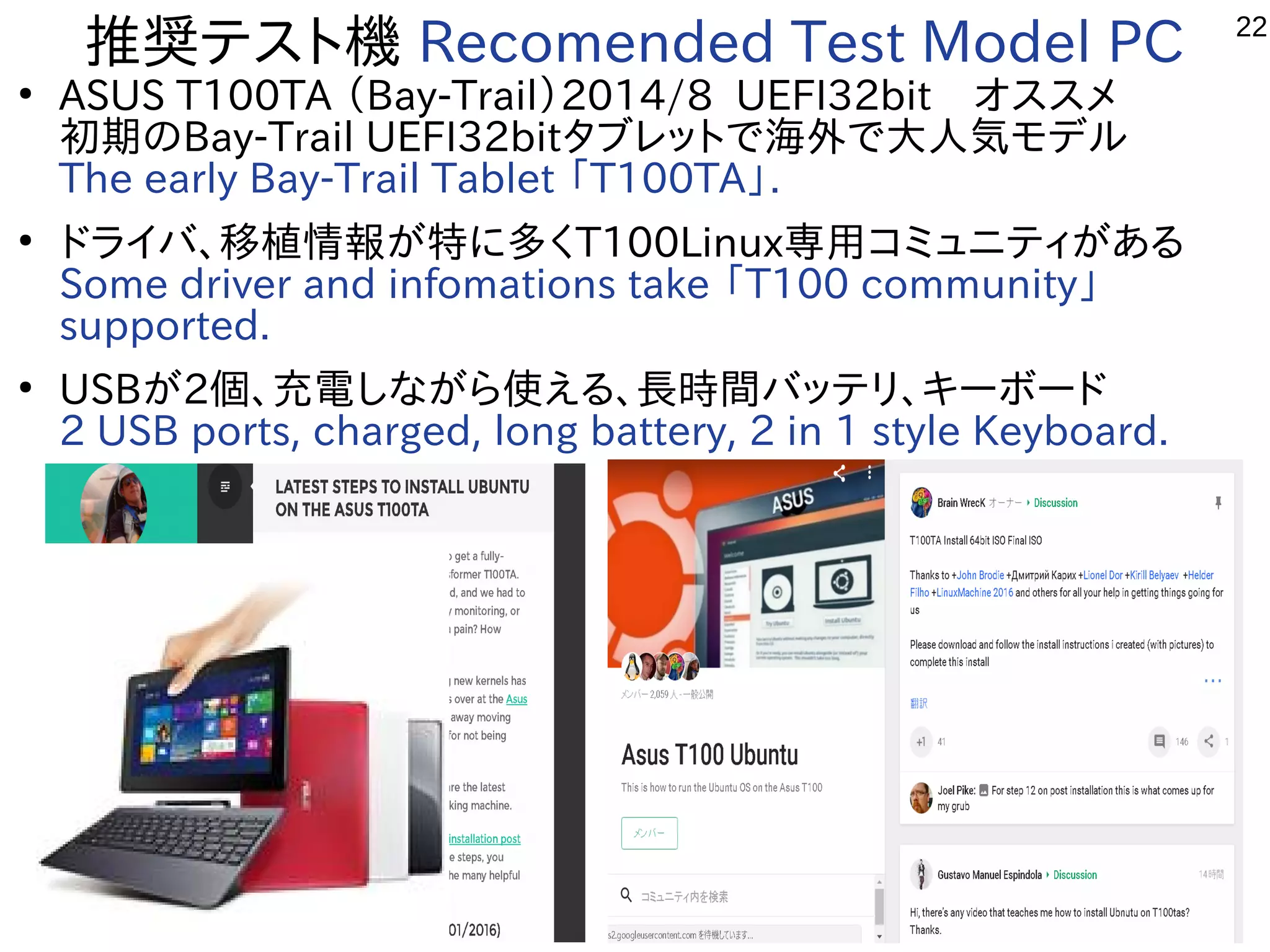
推奨テスト機 Recomended Test Model PC
●
ASUS T100TA (Bay-Trail)2014/8 UEFI32bit オススメ
初期のBay-Trail UEFI32bitタブレットで海外で大人気モデル
The early Bay-Trail Tablet 「T100TA」.
●
ドライバ、移植情報が特に多くT100Linux専用コミュニティがある
Some driver and infomations take 「T100 community」
supported.
●
USBが2個、充電しながら使える、長時間バッテリ、キーボード
2 USB ports, charged, long battery, 2 in 1 style Keyboard.
23
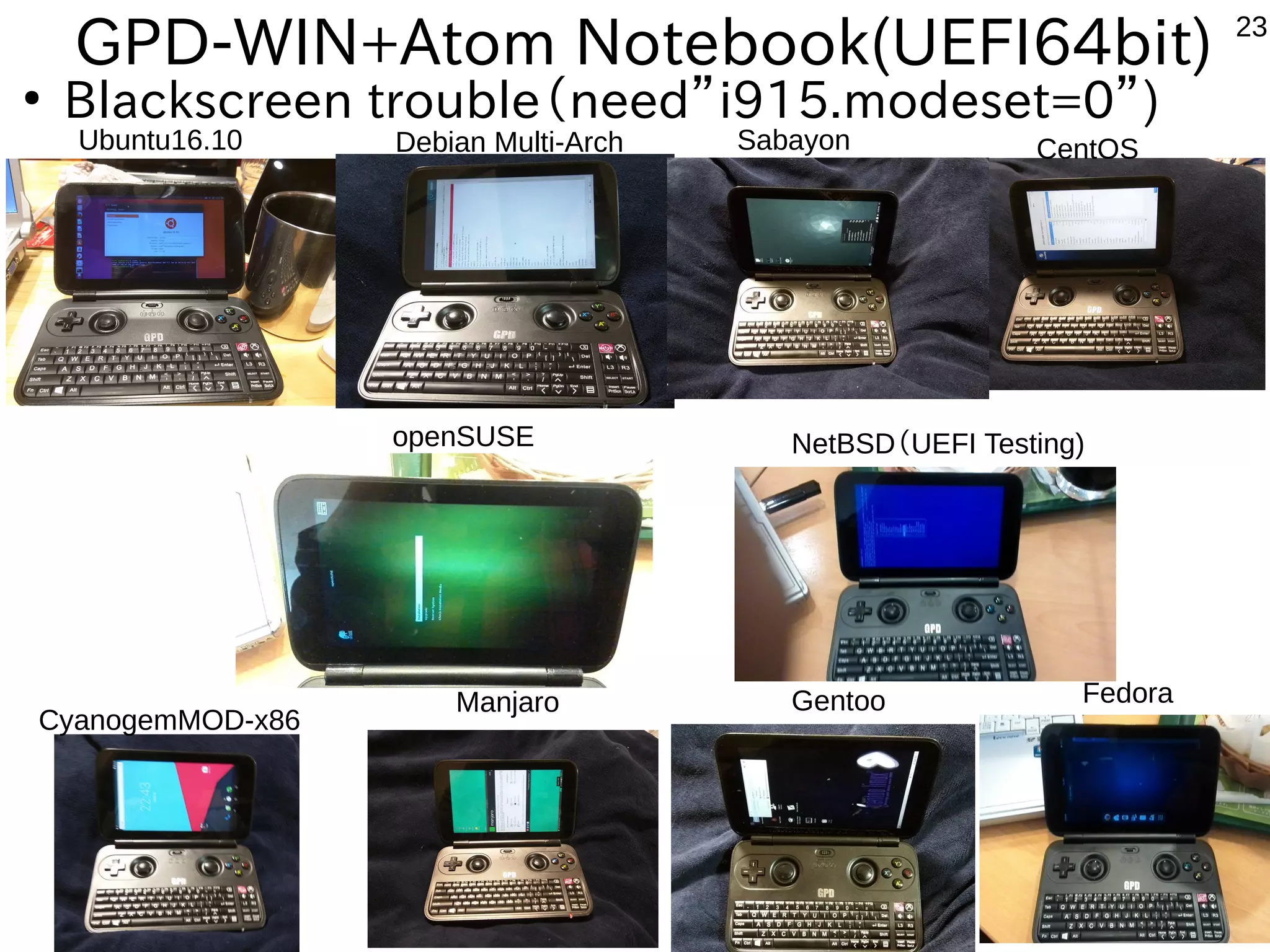
GPD-WIN+Atom Notebook(UEFI64bit)
●
Blackscreen trouble(need”i915.modeset=0”)
Ubuntu16.10 Debian Multi-Arch Sabayon CentOS
CyanogemMOD-x86
Manjaro Gentoo Fedora
NetBSD(UEFI Testing)openSUSE
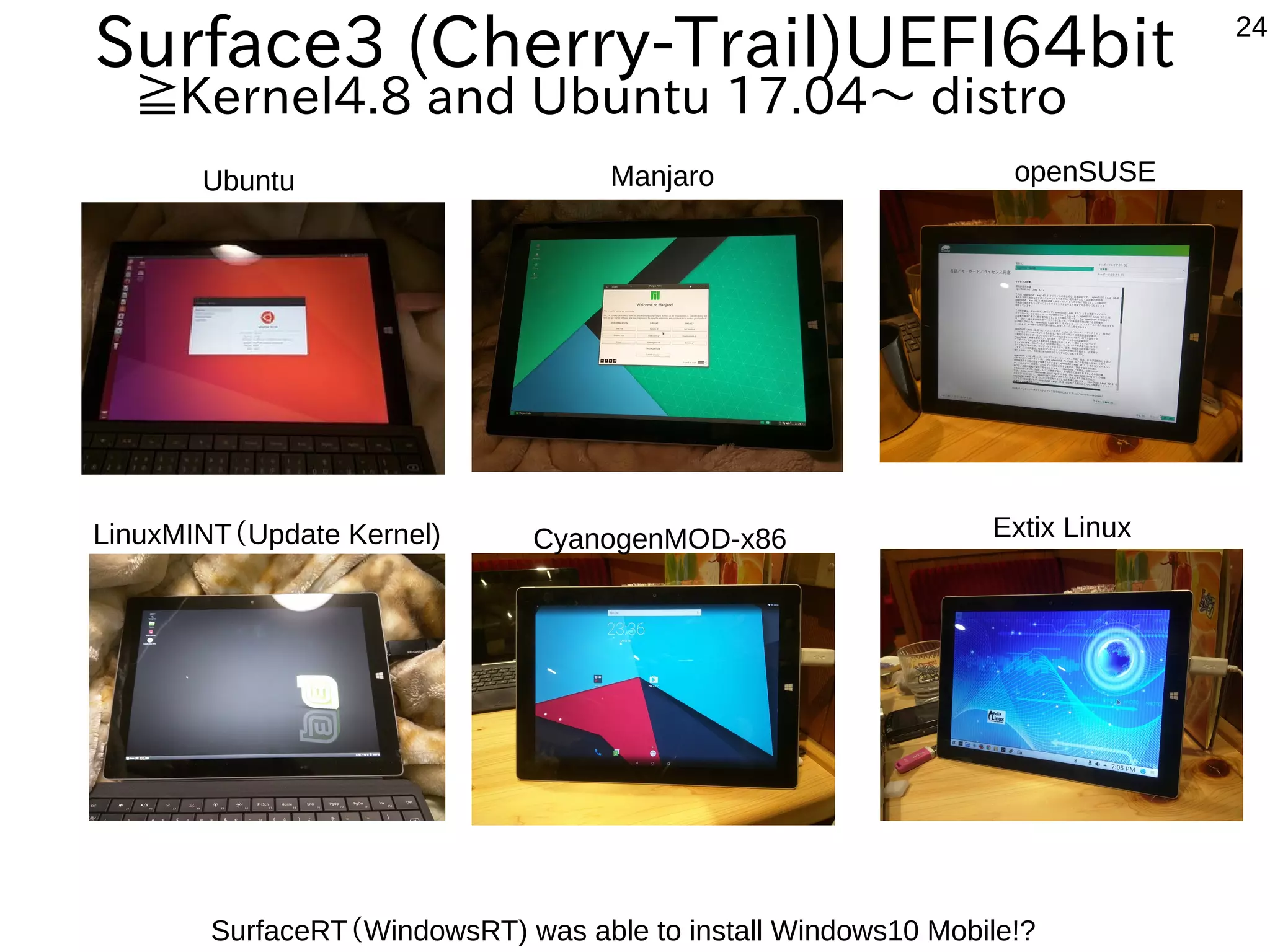
24
Manjaro openSUSE
CyanogenMOD-x86 Extix Linux
Surface3 (Cherry-Trail)UEFI64bit
≧Kernel4.8 and Ubuntu 17.04〜 distro
SurfaceRT(WindowsRT) was able to install Windows10 Mobile!?
Ubuntu
LinuxMINT(Update Kernel)
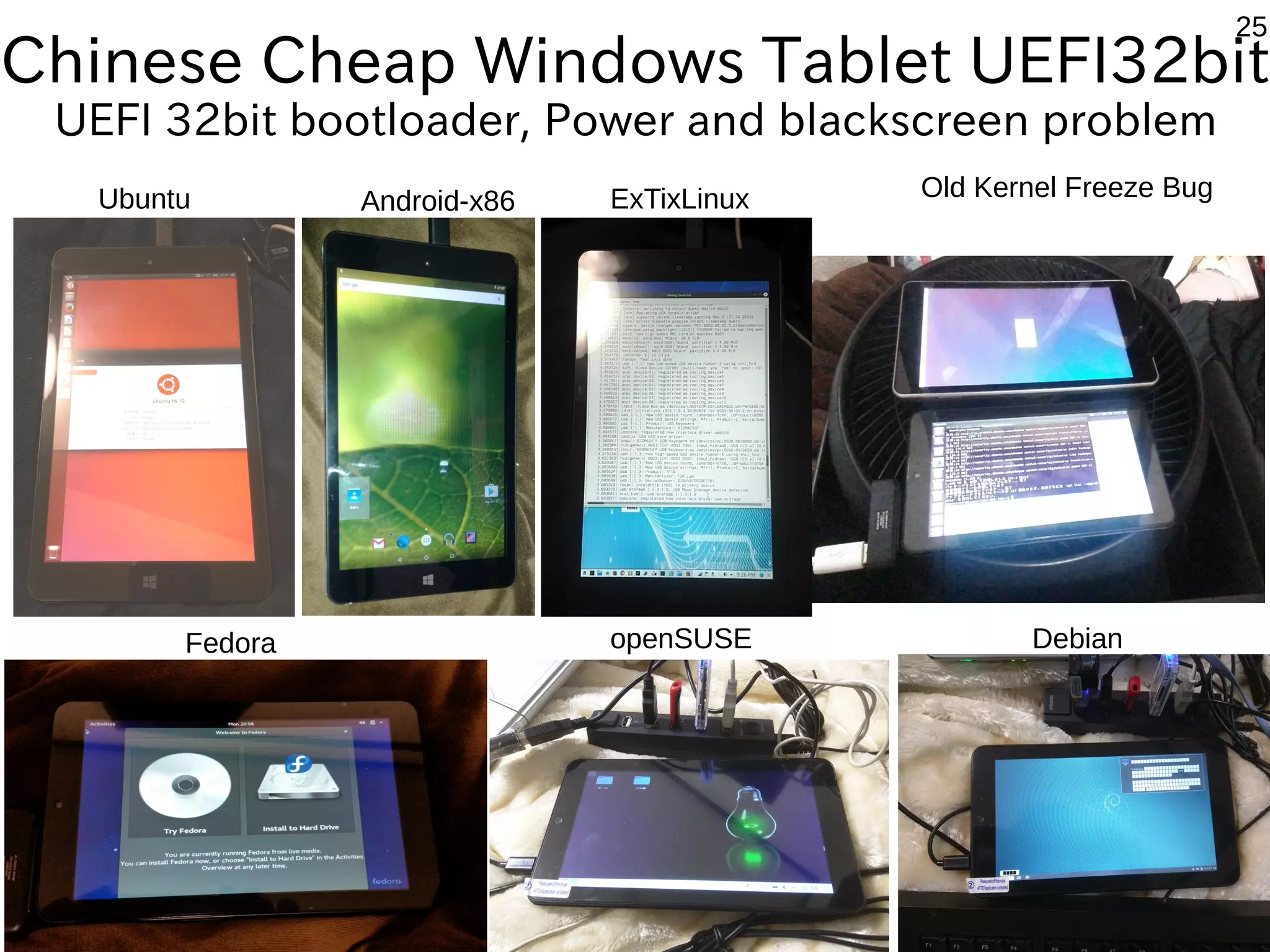
25
Manjaro
Debian
Old Kernel Freeze Bug
Chinese Cheap Windows Tablet UEFI32bit
UEFI 32bit bootloader, Power and blackscreen problem
Ubuntu
Fedora
Android-x86 ExTixLinux
openSUSE
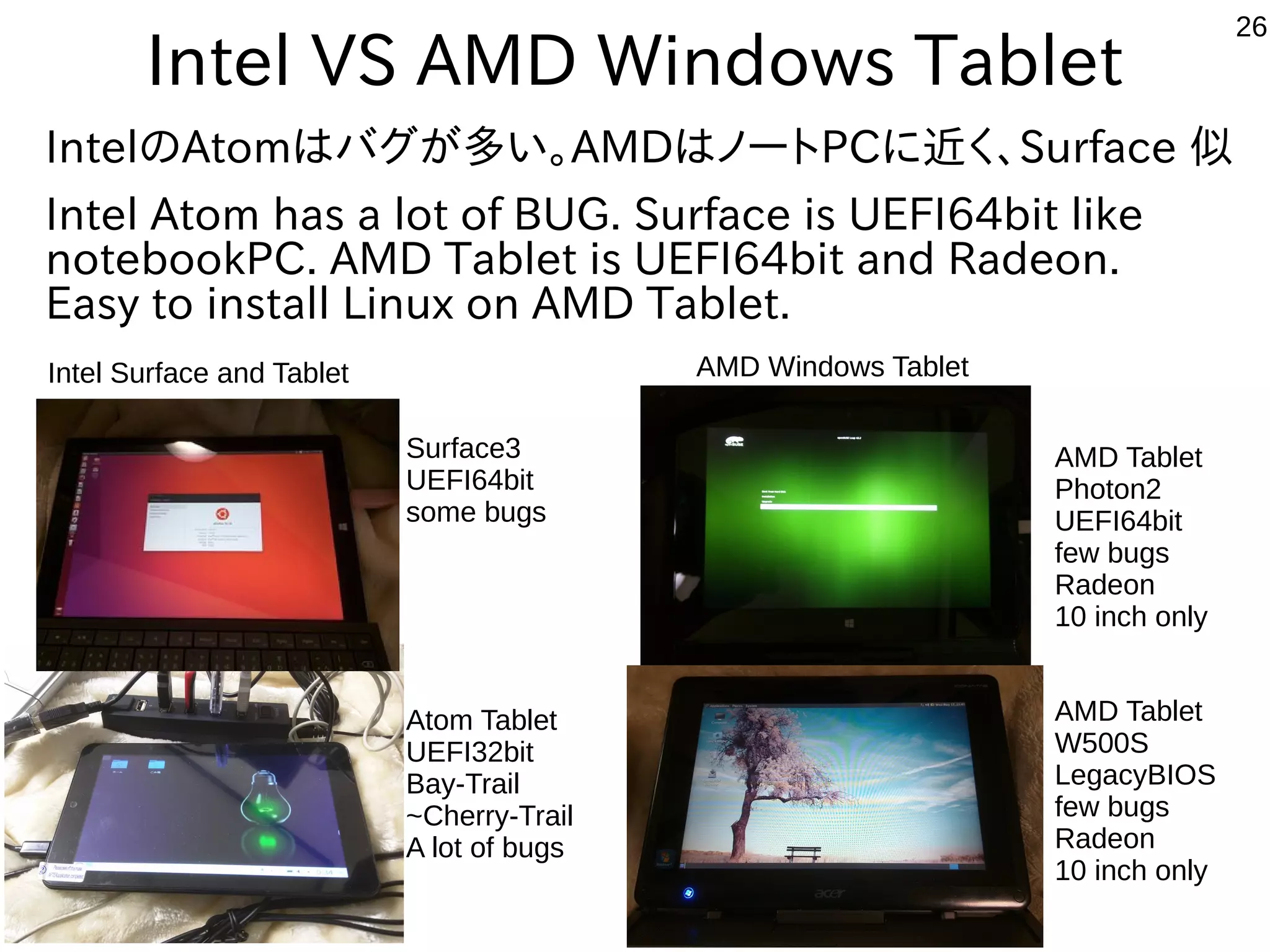
26
Intel VS AMD Windows Tablet
IntelのAtomはバグが多い。AMDはノートPCに近く、Surface 似
Intel Atom has a lot of BUG. Surface is UEFI64bit like
notebookPC. AMD Tablet is UEFI64bit and Radeon.
Easy to install Linux on AMD Tablet.
Intel Surface and Tablet AMD Windows Tablet
Surface3
UEFI64bit
some bugs
Atom Tablet
UEFI32bit
Bay-Trail
~Cherry-Trail
A lot of bugs
AMD Tablet
W500S
LegacyBIOS
few bugs
Radeon
10 inch only
AMD Tablet
Photon2
UEFI64bit
few bugs
Radeon
10 inch only
27
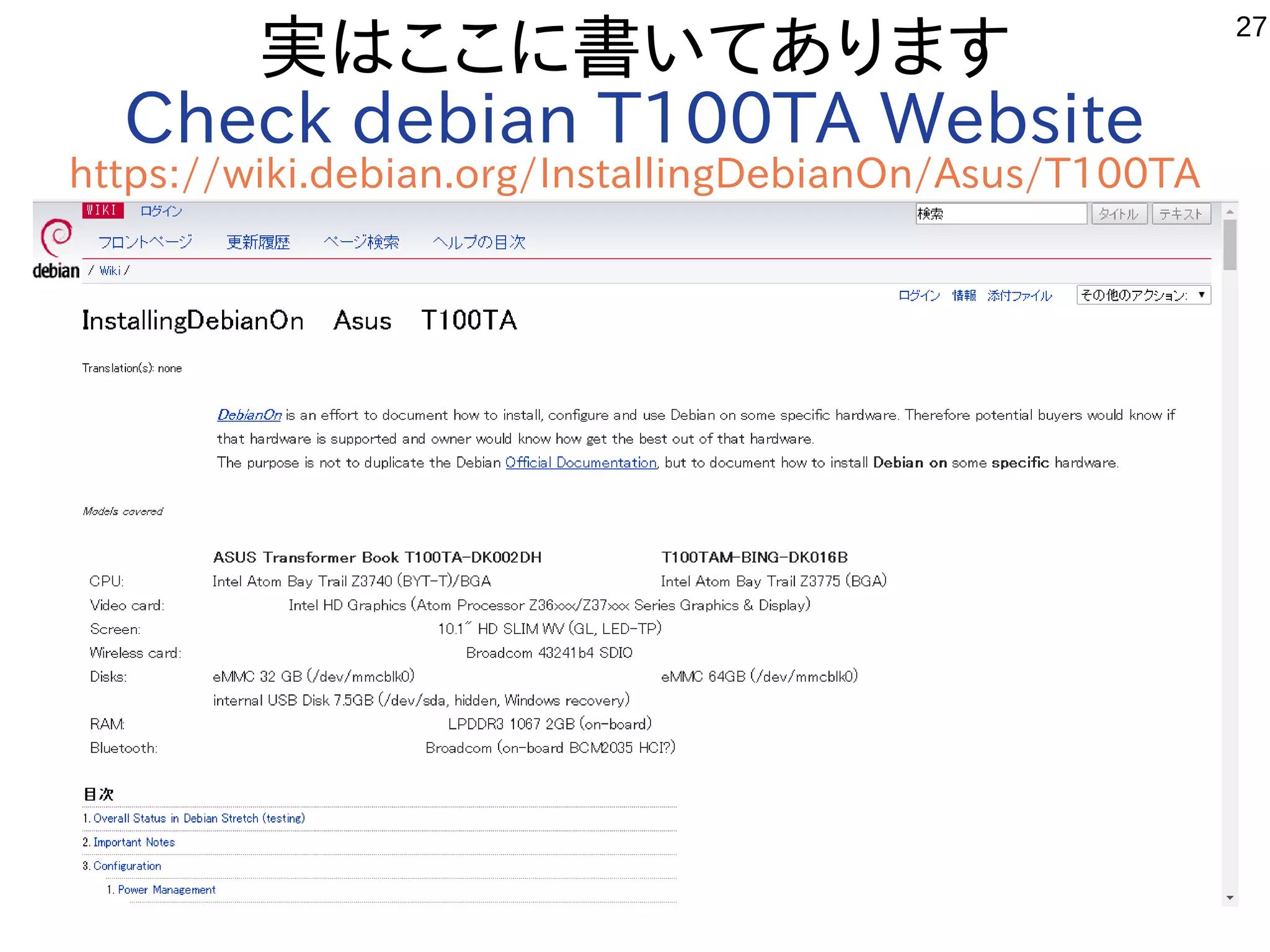
実はここに書いてあります
Check debian T100TA Website
https://wiki.debian.org/InstallingDebianOn/Asus/T100TA
28
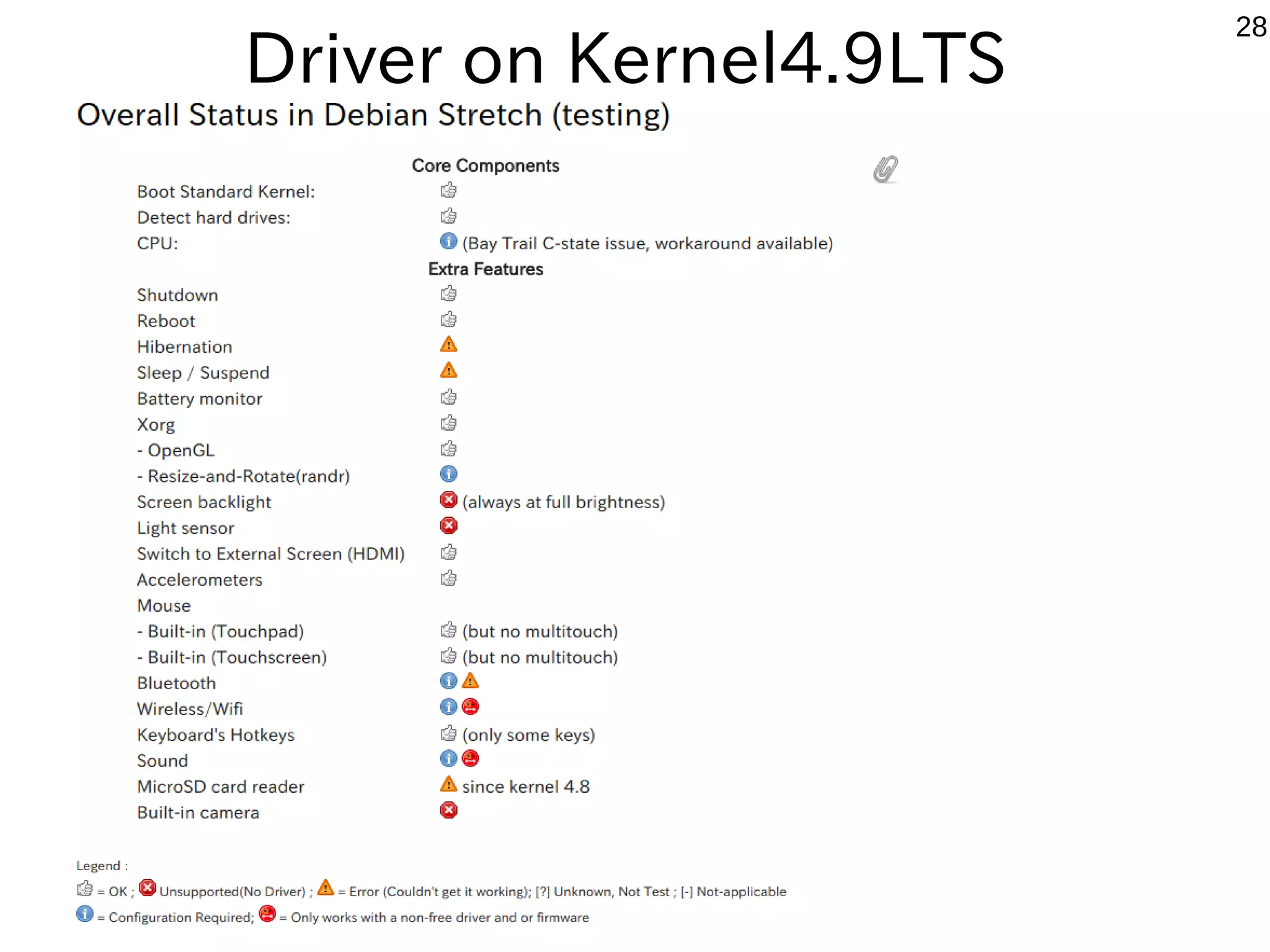
Driver on Kernel4.9LTS
29
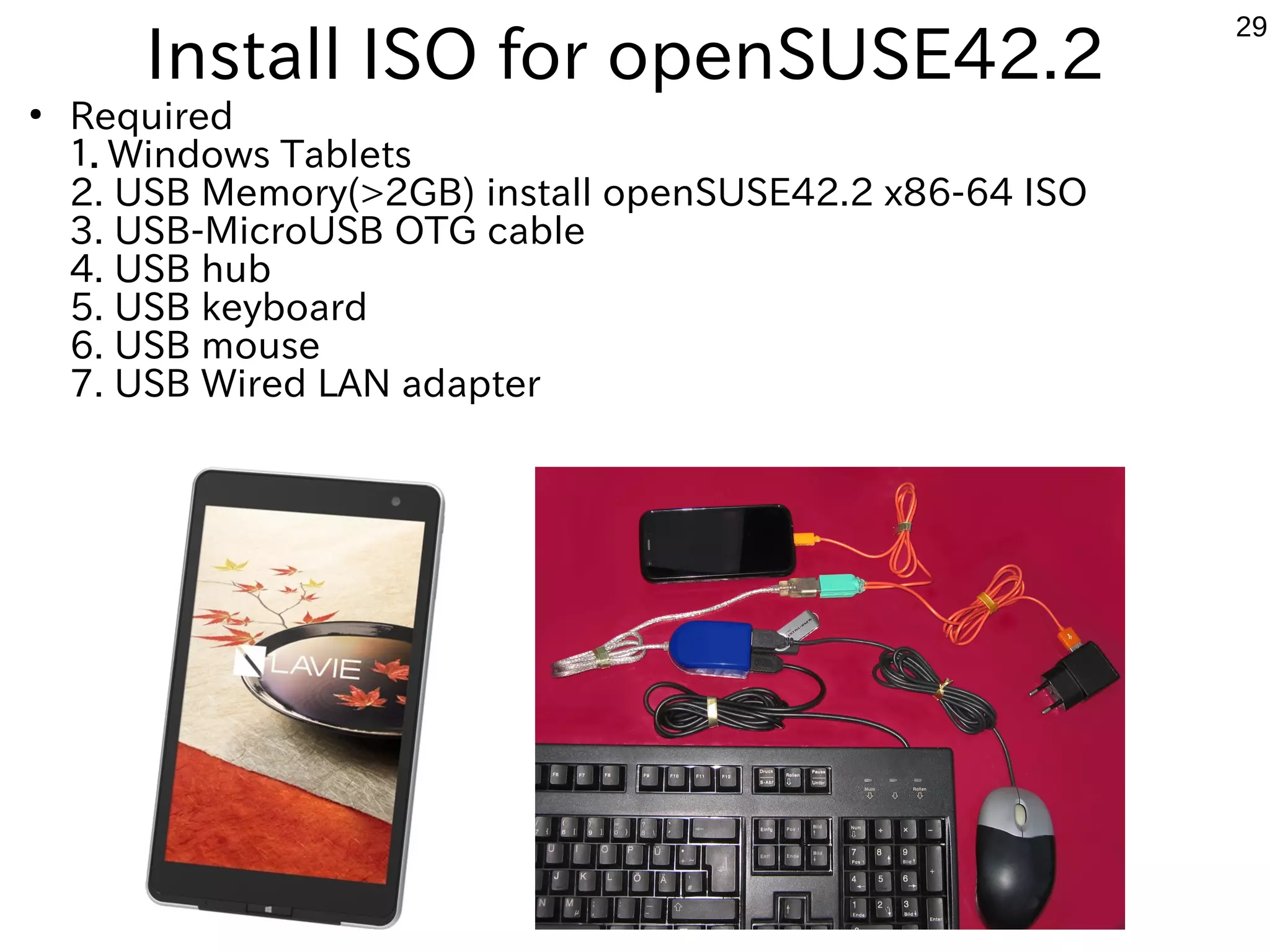
Install ISO for openSUSE42.2
●
Required
1.Windows Tablets
2. USB Memory(>2GB) install openSUSE42.2 x86-64 ISO
3. USB-MicroUSB OTG cable
4. USB hub
5. USB keyboard
6. USB mouse
7. USB Wired LAN adapter
30
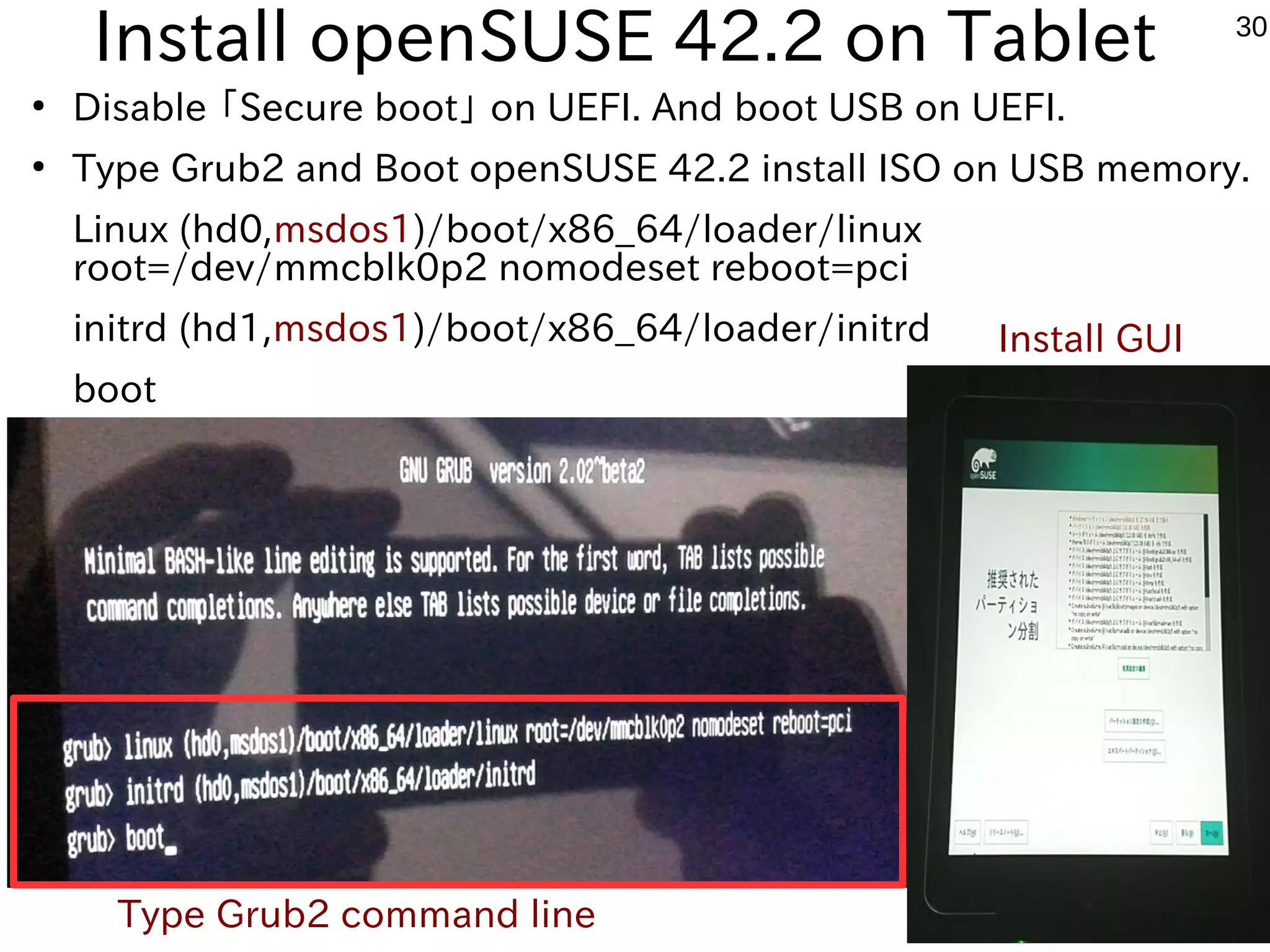
Install openSUSE 42.2 on Tablet
●
Disable 「Secure boot」 on UEFI. And boot USB on UEFI.
●
Type Grub2 and Boot openSUSE 42.2 install ISO on USB memory.
Linux (hd0,msdos1)/boot/x86_64/loader/linux
root=/dev/mmcblk0p2 nomodeset reboot=pci
initrd (hd1,msdos1)/boot/x86_64/loader/initrd
boot
Type Grub2 command line
Install GUI
31
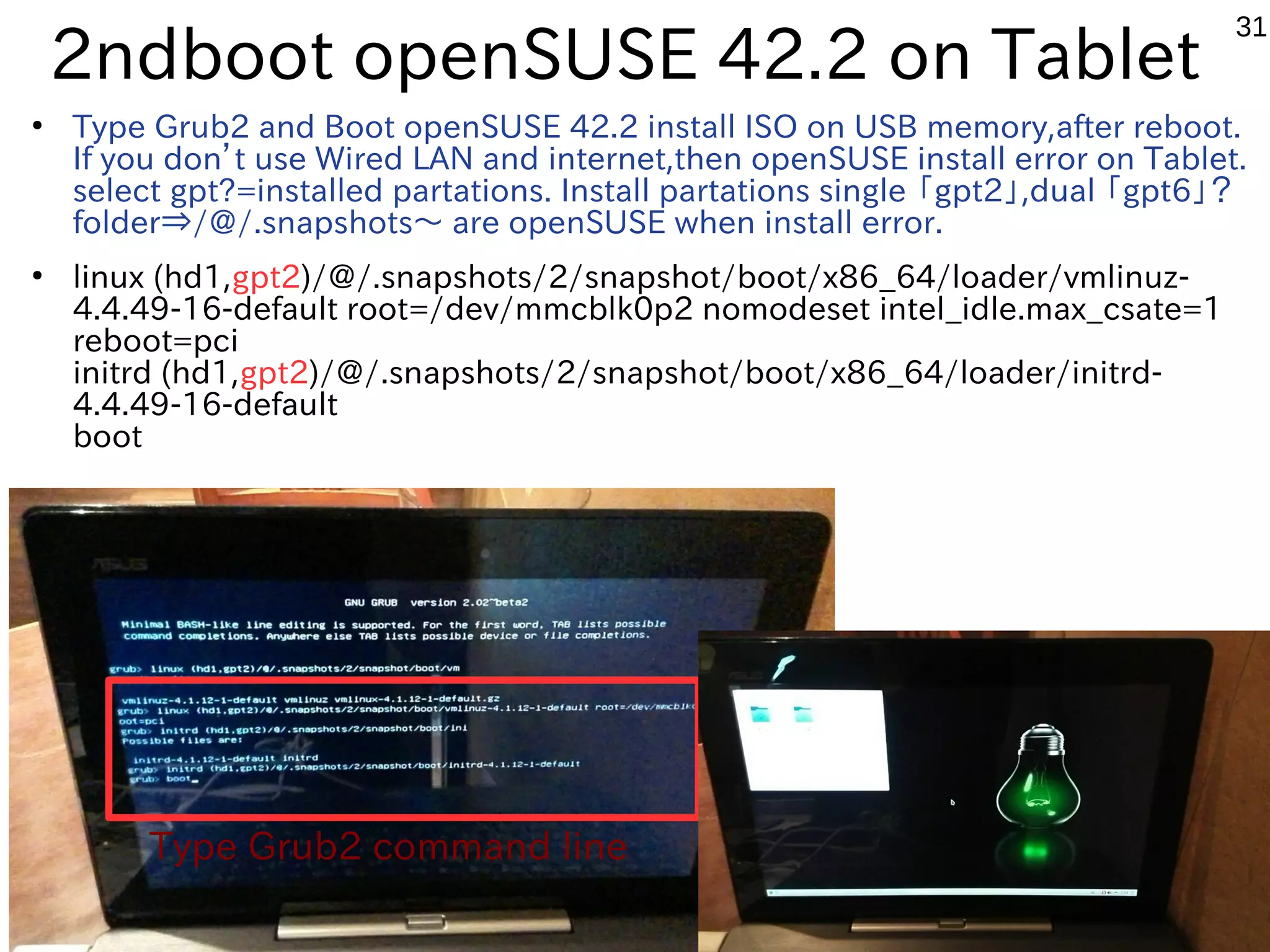
2ndboot openSUSE 42.2 on Tablet
●
Type Grub2 and Boot openSUSE 42.2 install ISO on USB memory,after reboot.
If you don’t use Wired LAN and internet,then openSUSE install error on Tablet.
select gpt?=installed partations. Install partations single 「gpt2」,dual 「gpt6」?
folder⇒/@/.snapshots〜 are openSUSE when install error.
●
linux (hd1,gpt2)/@/.snapshots/2/snapshot/boot/x86_64/loader/vmlinuz-
4.4.49-16-default root=/dev/mmcblk0p2 nomodeset intel_idle.max_csate=1
reboot=pci
initrd (hd1,gpt2)/@/.snapshots/2/snapshot/boot/x86_64/loader/initrd-
4.4.49-16-default
boot
Type Grub2 command line
32
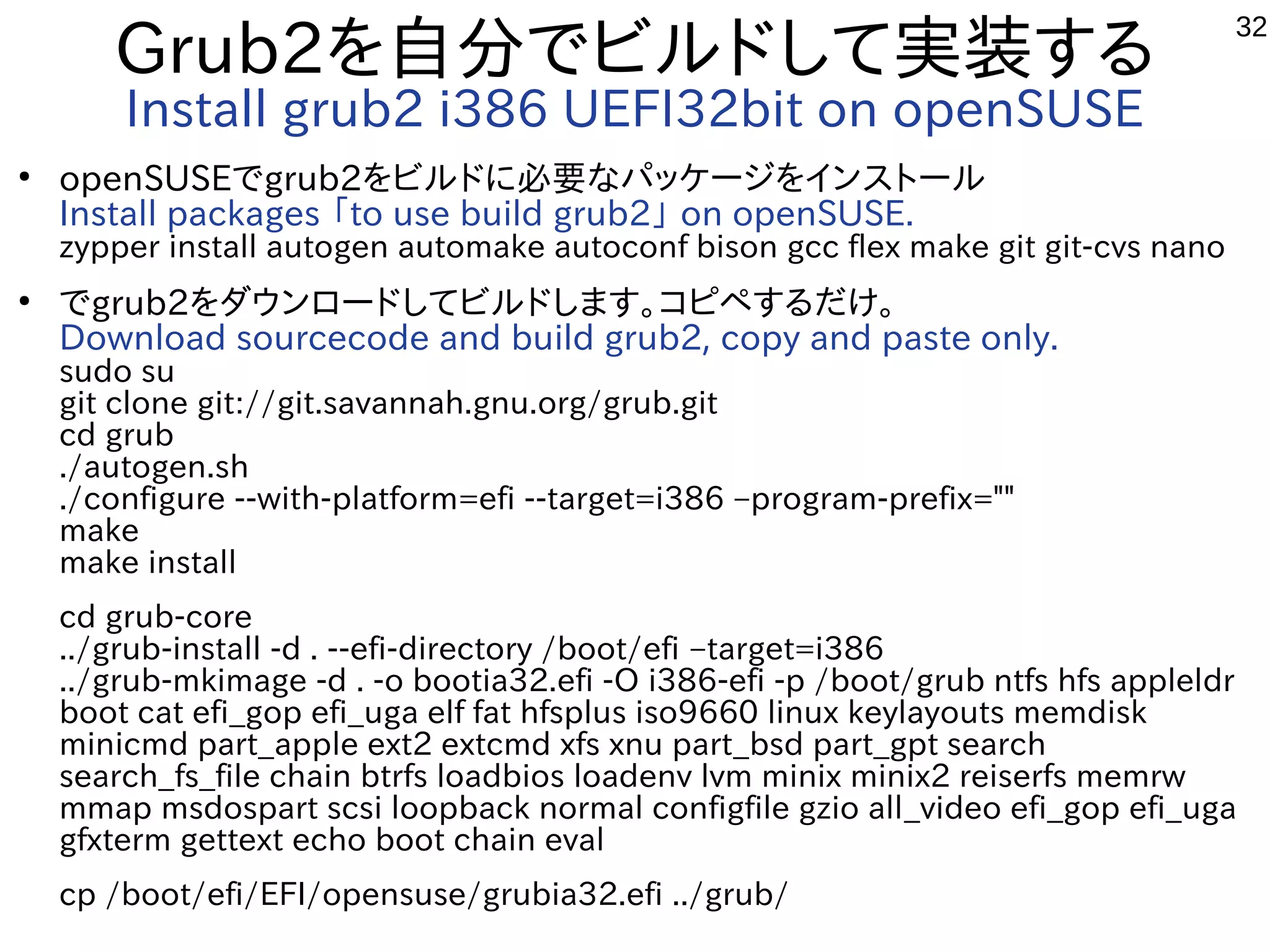
Grub2を自分でビルドして実装する
Install grub2 i386 UEFI32bit on openSUSE
●
openSUSEでgrub2をビルドに必要なパッケージをインストール
Install packages 「to use build grub2」 on openSUSE.
zypper install autogen automake autoconf bison gcc flex make git git-cvs nano
●
でgrub2をダウンロードしてビルドします。コピペするだけ。
Download sourcecode and build grub2, copy and paste only.
sudo su
git clone git://git.savannah.gnu.org/grub.git
cd grub
./autogen.sh
./configure --with-platform=efi --target=i386 –program-prefix=""
make
make install
cd grub-core
../grub-install -d . --efi-directory /boot/efi –target=i386
../grub-mkimage -d . -o bootia32.efi -O i386-efi -p /boot/grub ntfs hfs appleldr
boot cat efi_gop efi_uga elf fat hfsplus iso9660 linux keylayouts memdisk
minicmd part_apple ext2 extcmd xfs xnu part_bsd part_gpt search
search_fs_file chain btrfs loadbios loadenv lvm minix minix2 reiserfs memrw
mmap msdospart scsi loopback normal configfile gzio all_video efi_gop efi_uga
gfxterm gettext echo boot chain eval
cp /boot/efi/EFI/opensuse/grubia32.efi ../grub/
33
Grub2を自分でビルドして実装する
Install grub2 i386 UEFI32bit on openSUSE
●
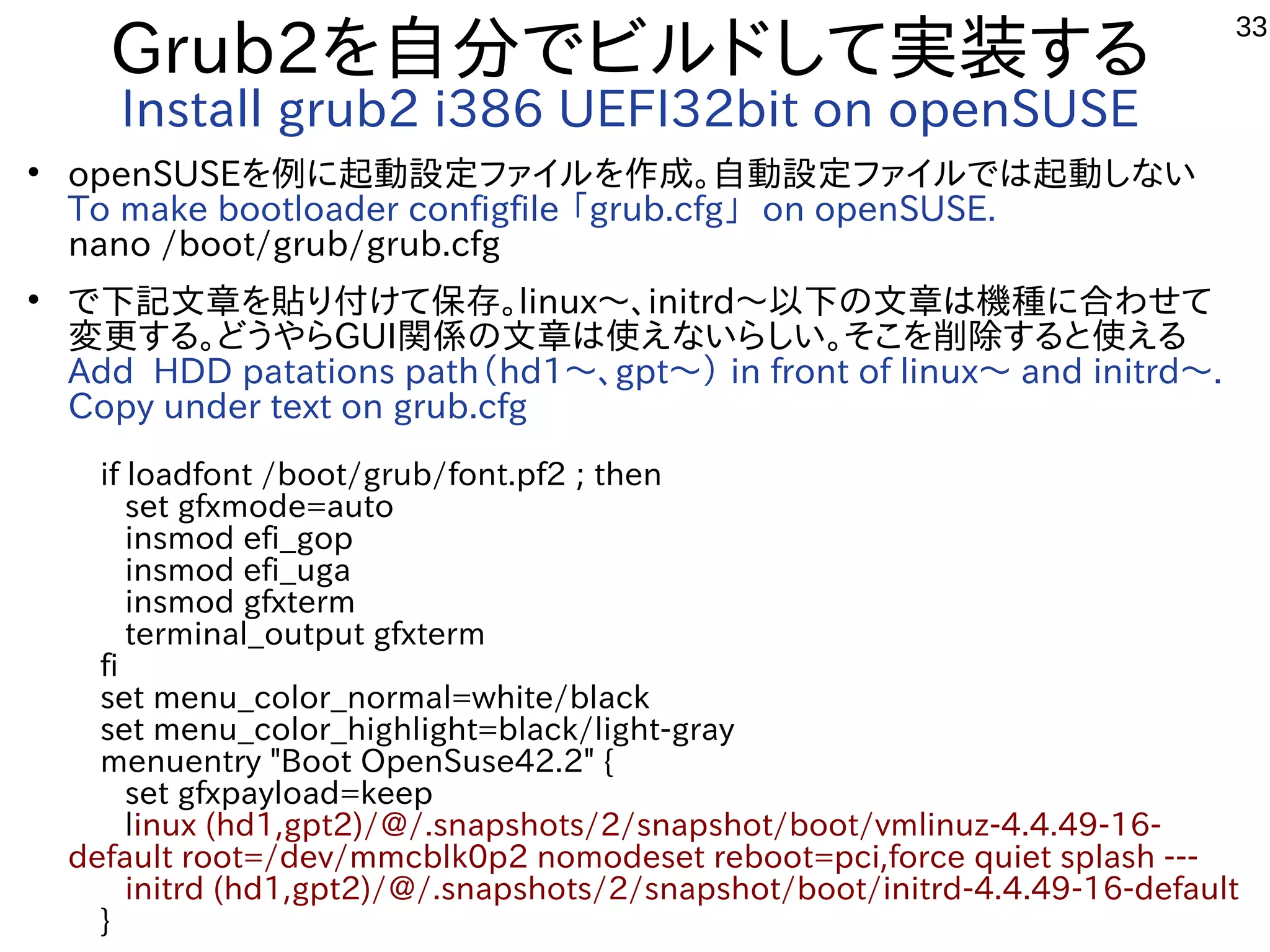
openSUSEを例に起動設定ファイルを作成。自動設定ファイルでは起動しない
To make bootloader configfile 「grub.cfg」 on openSUSE.
nano /boot/grub/grub.cfg
●
で下記文章を貼り付けて保存。linux〜、initrd〜以下の文章は機種に合わせて
変更する。どうやらGUI関係の文章は使えないらしい。そこを削除すると使える
Add HDD patations path(hd1〜、gpt〜) in front of linux〜 and initrd〜.
Copy under text on grub.cfg
 if loadfont /boot/grub/font.pf2 ; then
  set gfxmode=auto
  insmod efi_gop
  insmod efi_uga
  insmod gfxterm
  terminal_output gfxterm
 fi
 set menu_color_normal=white/black
 set menu_color_highlight=black/light-gray
 menuentry "Boot OpenSuse42.2" {
  set gfxpayload=keep
  linux (hd1,gpt2)/@/.snapshots/2/snapshot/boot/vmlinuz-4.4.49-16-
default root=/dev/mmcblk0p2 nomodeset reboot=pci,force quiet splash ---
  initrd (hd1,gpt2)/@/.snapshots/2/snapshot/boot/initrd-4.4.49-16-default
 }
34
Grub.cfgを書き換えてブート画面設定
Edit grub.cfg and change boot screen
●
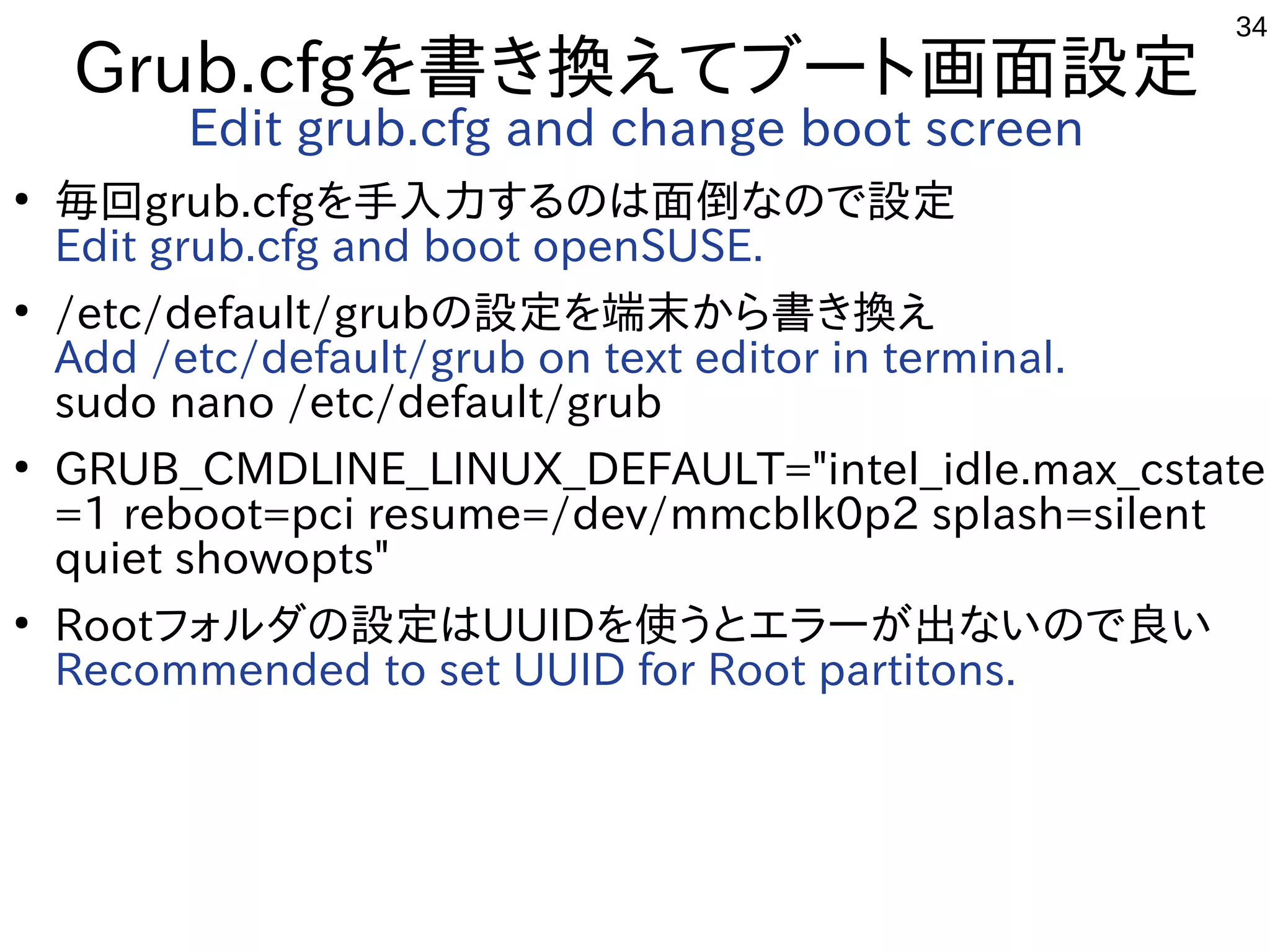
毎回grub.cfgを手入力するのは面倒なので設定
Edit grub.cfg and boot openSUSE.
●
/etc/default/grubの設定を端末から書き換え
Add /etc/default/grub on text editor in terminal.
sudo nano /etc/default/grub
●
GRUB_CMDLINE_LINUX_DEFAULT="intel_idle.max_cstate
=1 reboot=pci resume=/dev/mmcblk0p2 splash=silent
quiet showopts"
●
Rootフォルダの設定はUUIDを使うとエラーが出ないので良い
Recommended to set UUID for Root partitons.
35
自動設定「update-grub」作成
autoconfig script 「update-grub」
●
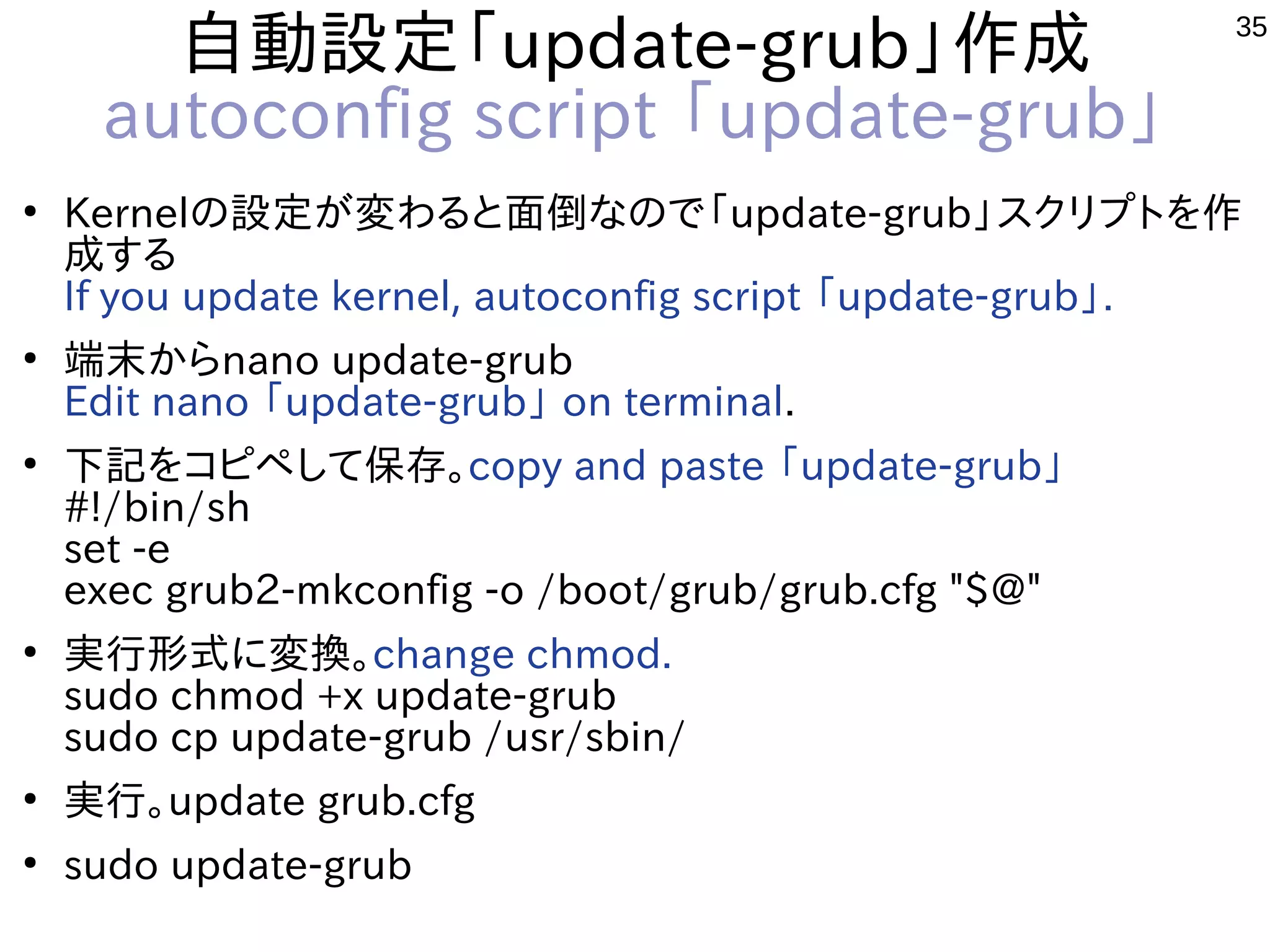
Kernelの設定が変わると面倒なので「update-grub」スクリプトを作
成する
If you update kernel, autoconfig script 「update-grub」.
●
端末からnano update-grub
Edit nano 「update-grub」 on terminal.
●
下記をコピペして保存。copy and paste 「update-grub」
#!/bin/sh
set -e
exec grub2-mkconfig -o /boot/grub/grub.cfg "$@"
●
実行形式に変換。change chmod.
sudo chmod +x update-grub
sudo cp update-grub /usr/sbin/
●
実行。update grub.cfg
●
sudo update-grub
36
自動設定「update-grub」作成
autoconfig 「update-grub」
●
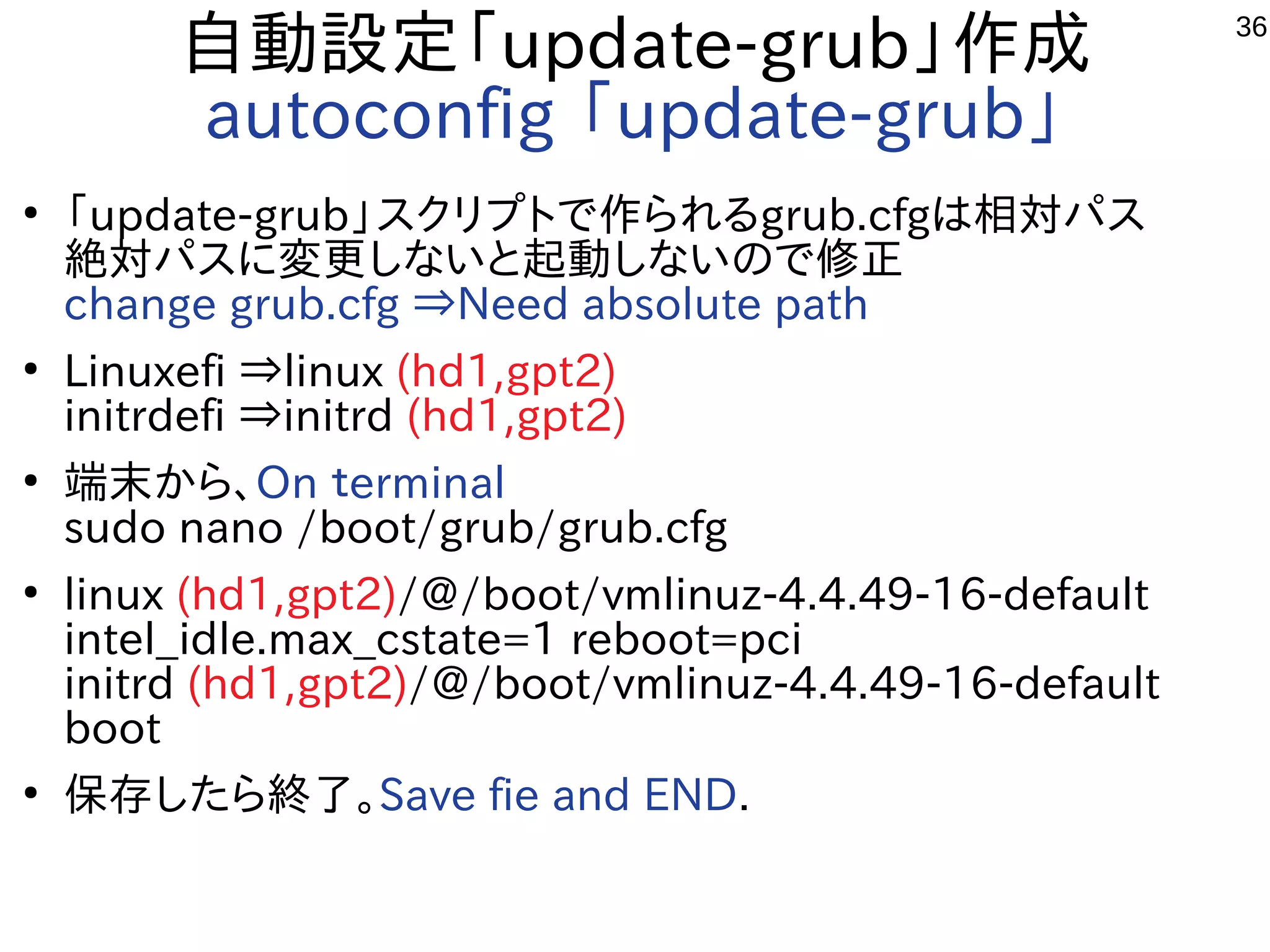
「update-grub」スクリプトで作られるgrub.cfgは相対パス
絶対パスに変更しないと起動しないので修正
change grub.cfg ⇒Need absolute path
●
Linuxefi ⇒linux (hd1,gpt2)
initrdefi ⇒initrd (hd1,gpt2)
●
端末から、On terminal
sudo nano /boot/grub/grub.cfg
●
linux (hd1,gpt2)/@/boot/vmlinuz-4.4.49-16-default
intel_idle.max_cstate=1 reboot=pci
initrd (hd1,gpt2)/@/boot/vmlinuz-4.4.49-16-default
boot
●
保存したら終了。Save fie and END.
37
Wanted! 緩募!
●
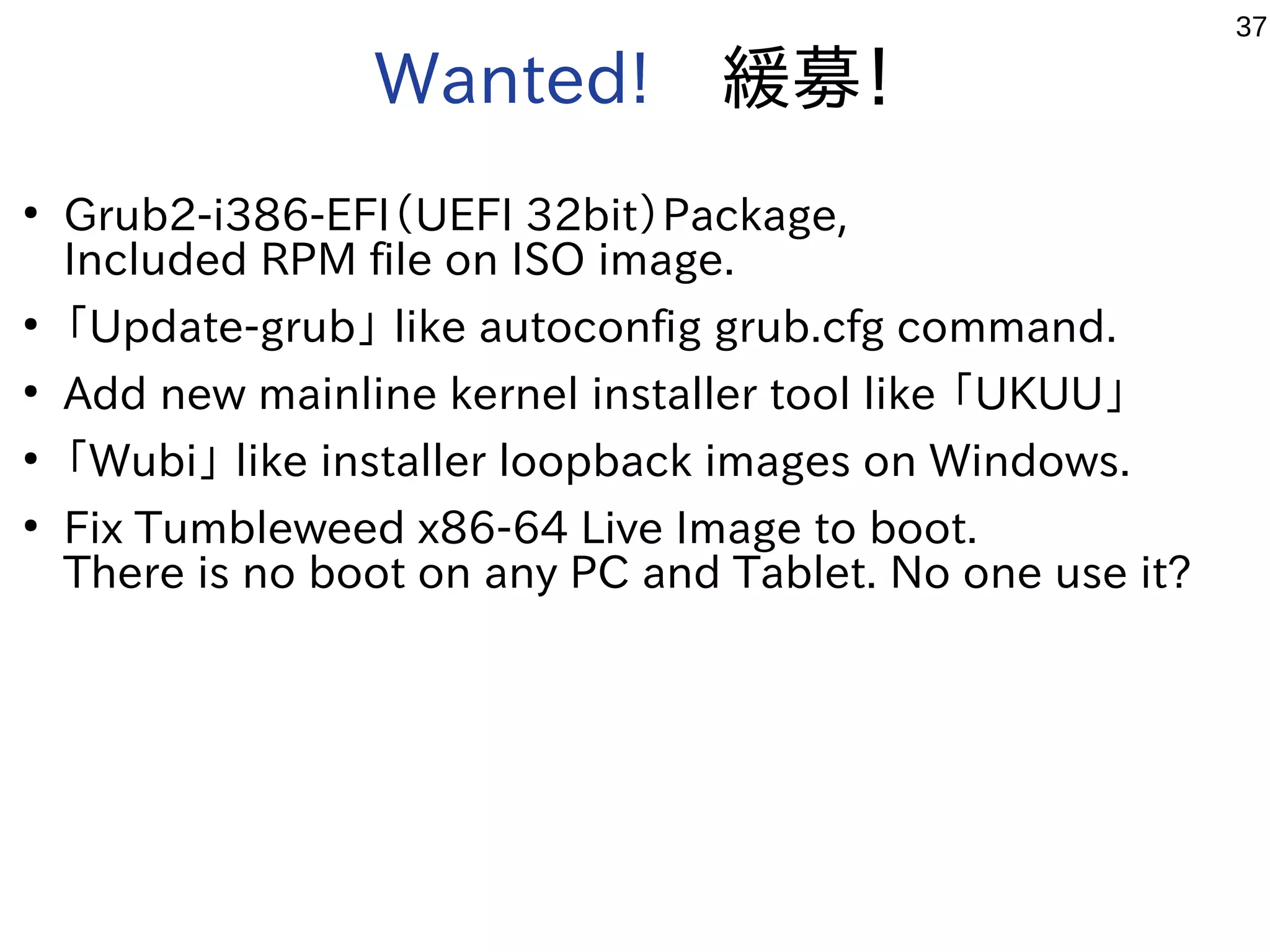
Grub2-i386-EFI(UEFI 32bit)Package,
Included RPM file on ISO image.
●
「Update-grub」 like autoconfig grub.cfg command.
●
Add new mainline kernel installer tool like 「UKUU」
●
「Wubi」 like installer loopback images on Windows.
●
Fix Tumbleweed x86-64 Live Image to boot.
There is no boot on any PC and Tablet. No one use it?
38
結論
conclusion
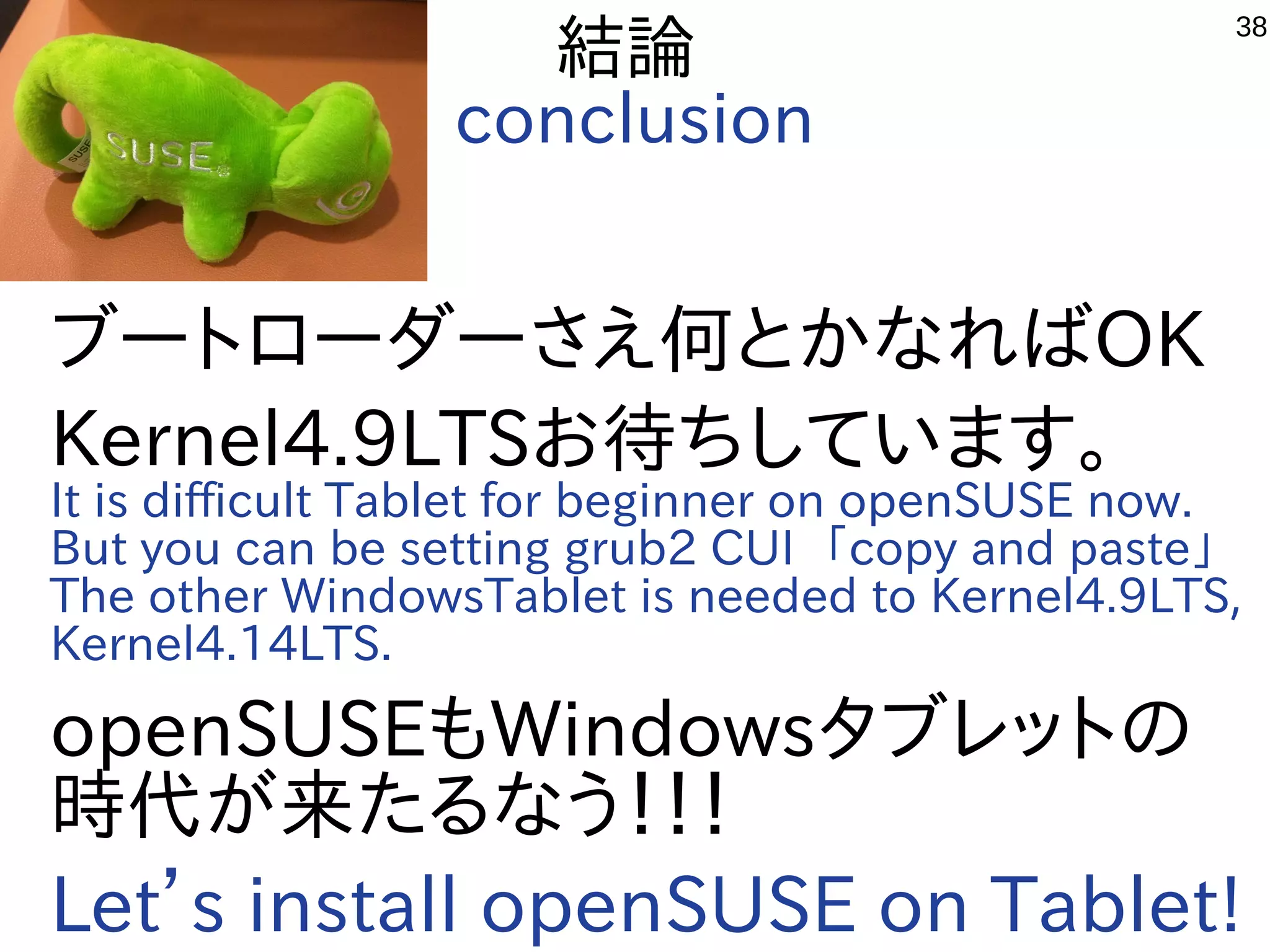
ブートローダーさえ何とかなればOK
Kernel4.9LTSお待ちしています。
It is difficult Tablet for beginner on openSUSE now.
But you can be setting grub2 CUI 「copy and paste」
The other WindowsTablet is needed to Kernel4.9LTS,
Kernel4.14LTS.
openSUSEもWindowsタブレットの
時代が来たるなう!!!
Let’s install openSUSE on Tablet!
Hacking with x86 Windows Tablet and mobile devices on openSUSE #opensuseasia17

  • 1.
    1 Hacking with x86Windows Tablet and mobile devices on openSUSE 1、 自己紹介 Self introduction 2、最近やっている事 To Do 3、Chrooted openSUSE on ARM Android 4、WindowsタブレットにopenSUSEを移殖 Install openSUSE on WindowsTablet 5、grub2のCUI設定 Setting and install grub2 on openSUSE. 6、インストールトラブル他 Install trouble 7、結論 Conclusion Speaker: Kenji Shimono openSUSE Asia Summit 2017 2017/10/21 16:00~ Place: 電気通信大学 Room2 This Presentation: Slideshare & PDF files publication of my HP http://kapper1224.sakura.ne.jp Windows Tablet +openSUSE42.2 2in1 Language Black:日本語 Blue:English
  • 2.
    2 自己紹介 Self Introduction ● My name:Kapper ● Twitter account:@kapper1224 ● HP:http://kapper1224.sakura.ne.jp ● Slideshare: http://www.slideshare.net/kapper1224 ● ニコナレ: http://niconare.nicovideo.jp/users/59379263 ● Facebook:https://www.facebook.com/kapper1224/ ● My Hobby:Linux、*BSD、and Mobile ARM Devices ● My favorite words:Record than experiment important ● Test Model:Netwalker(PC-Z1,T1)、Nokia N900、DynabookAZ、RaspberryPi       Nexus7(2012、2013)、Hercules eCAFE EX HD、Jetson TK-1、       OpenPandora、ARM Chromebook、ZTE OPEN C(FirefoxOS)       台湾Android電子辞書 無敵CD-920、CD-928、TW708、GPD-WIN    ● Recent Activity:  Hacking Linux on Windows10 Tablet (Intel Atom base).  I have been active in the Tokaido Linux User Group.  Hacking Linux on GPD-WIN,GPD-Pocket and many Atom Devices.  I have recently often use the ARM Chromebook.
  • 3.
    3 Recently my test こんな事やってます 1.Linux distro on x86 Windows Tablet 2. Electronic Circuit on ARM 3.Linux distributions on Android 4. Plesentations in Asia(HongKong,Taiwan) Opensouce Conference RaspberryPiを使ってLチカ 昔に戻って、電子回路工作を楽しんでます
  • 4.
    4 Install Linux onSmartPhone and Tablet ● タブレットとは What is Tablet? タッチパネル液晶 Touchscreen バッテリ battery 周辺機種 PC Accessories センサー sencer 高性能CPU&GPUボード CPU&GPU を統合した一つの高度なPCである ● 活動目的 The Purpose スマホやタブレットでLinuxディストリ文化を次世代に残す Linux Dsitro on Smartphone and Tablet for next generations PCを持っていないスマホ世代にもLinuxを知ってもらう Non PC younger user can use and know Linux. ディストリビューターへ自分のOSがタブレットで動く事を証明す る、移殖する、使ってもらう Play your own Linux on Tablet for Linux Distributer. AndroidがLinuxから離れてもモバイルLinuxの文化は絶対残す If Android won’t use Linux,I will develop mobile Linux.
  • 5.
  • 6.
    6 openSUSEにWindowsタブレットの課題 openSUSE problems onWindows Tablet ● openSUSE42.3はどうよ? What’s openSUSE on WindowsTablet? ・Kernel4.4は古くてTurboモード過剰発熱のバグがある Freeze Kernel4.4 Bug.(CPU Turbo mode freeze)Fixed Kernel4.12 ・Xorgがちゃんと動かない  Xorg GPU have some troubles. ・ドライバが古く周辺機種が動かない  Firmware was too old. ・Kernelを最新LTSにアップグレードする必要あり  Need upgrade kernel.Fixed Kernel bugs. ・UEFI32bitのブートローダーパッケージがない。コマンド起動必須 No UEFI32bit bootloader Grub2 and packages on openSUSE. Need to boot grub2 commandline on UEFI32bit and openSUSE ・Wifi Firmwareがインストール時に機能しないのでUSB有線LAN推奨 When install openSUSE, No Wifi and zypper. Recommended Wired USB LAN. Fixed Kernel 4.13.   ● Tumbleweed ISOの動作NG No boot Tumbleweed ISO x86-64 on Windows Tablet.
  • 7.
  • 8.
  • 9.
    9 Install openSUSE onChrooted ARM Android ● ChrootはLinux環境を内部にもう一つ作れます Chroot can install openSUSE on Android ● Androidの場合、専用アプリを入れるだけ Install only Application from Googleplay. ● Chrootの中から基本は外の環境へ アクセス出来ない フォルダをマウントすると移動出来る Chroot access only chrooted folder. mount -o bind <directory1> <directory2> ● ChrootはRootユーザーのみ. 一般ユーザーではFakechrootが必要 (Debian Norootなどで使用) Chroot can use Rooted user only in openSUSE. ● Kernelは標準OSのまま使用するので、 ドライバやモジュールは、オリジナルKernelのまま。 →オリジナルKernelがサポートしていない  ドライバやOSは使用できない Chroot can use original kernel only.Different driver don’t use. Android Linux Device openSUSE Debian And other Linux openSUSE Debian And other Linux
  • 10.
    10 Chrooted Linux onARM Android Android Electronic Dictionary CD-920 Complete Linux on Nexus7
  • 11.
    11 Android chroot applications Androidapplications Android versions Installer、 CUI or GUI Linux distributions Root comment Debian Noroot (Gimp他) 4.3〜 Full Auto XserverSDL Debian No Installed Xorg Much Stroage Complete Linux 2.2〜 Terminal Debian、Ubuntu、 Fedora、Arch、openSU SE他 Root Some Distro GUI Install Debian Kit 4.1〜 Terminal Debian Root Debootstrap Linux Deploy 2.1〜 Terminal Debian、Ubuntu、Fedor a、Arch、openSUSE他 Root Most Distro CentOS GnuRoot 1.6〜 Terminal Debian No A lot of Android Too old GnuRoot debian, Fedora, Gentoo 1.6〜 Terminal Debian,Fedora, Gentoo No GNURoot distro Too old GnuRoot Wheezy X 1.6〜 Xserver Debian No Xserver Too old AndroLinux 3.0〜 Terminal Fedora,CentOS ? CentOS APKLinux 4.0.3〜 Terminal Bare-Bone Root Own packages Lil' Debi 2.1〜 Terminal Debian Root Debootstrap Terminalベースは慣れが必要ですが容量が小さくすみます。XはXserver-SDLかVNC
  • 12.
    12 Debian Kit andComplete Linux ● Android上でchroot環境を構築してapt-getしてパッケージを入 れるアプリ。Debian化が出来る。 Debian on chrooted Android, can use apt-get. Complete Linux is some Linux distributions,openSUSE. ● Androidをシンプルにサーバ化できる。root化がいるものといら ないものと。 Android will be server. Rooted or Non Rooted app. ● Debian Norootが入れ られない古い環境向けも Old android can install Debian kit and GNU Root. ● 色々なディストリを使いたい openSUSE can use 「Co mplete Linux」. Complete Linux
  • 13.
    13 TightVNCserverとVNCviewer ● もっとも容易なXサーバの代替がVNCserver Most easy touse VNCserver like Xorg server on Android. ● chroot環境でTightVNCserverを起動すれば容易にAndroid上でX 環境を立ち上げられます。 sudo apt-get install tightvncserver tightvncserver -geometry 1024x600(screen size) ● もちろん、遠隔操作して使うことも可能です。 Complete LinuxVNC Viewer
  • 14.
    14 Xserver-SDL ● Xserverの代替としてDebian norootでも使われているXserver-SDL を単独でも使えます。 Xserver-SDL isown Xserver application on Android. ● 使い方はXserver-SDLを起動させてから、Chroot環境で端末から、 env DISPLAY=xxx.xxx.xxx.xxx:0 lxsession & と起動しAndroid上で再度Xserver-SDLを表示 Start Xserver-SDL and chrooted, After commanded 「env〜」 on Chrooted terminal. Play xorg on Android.  Complete LinuxXserver-SDL
  • 15.
  • 16.
    16 Recently Atom UEFIDevices ● Intel機種は仕様がほぼ同一でLinux移殖が容易 Intel PC is easy to install Linux distributions. UEFIブートローダーのトラブルでUEFI32bit面倒 UEFI 32bit has some bootloader ploblems on Linux. ● UEFI32bit Difficult AtomWindows Tablet, Stick PC ● UEFI64bit Easy Notebook、Surface,AMD
  • 17.
    17 最近のWindows PCでLinuxを起動 Recently PC’sboot process for Windows and Linux ● Ubuntu official ISO is not supported to both 32bit and 64bit. Legacy BIOS Legacy BIOS (USB, ISO) Grub2 (32,64bit) Install ISO Ubuntu (32,64bit) Legacy BIOS (Wubi) UEFI 32bit (USB, ISO) UEFI 32bit (Wubi) Hard (32,64bit) Grub2 Wubi (32,64bit) auto Install Wubi Ubuntu (32,64bit) UEFI (32bit) Grub2 (64bit) 32bit Install ISO Ubuntu (64bit) Hard (64bit) Grub2 Wubi (32,64bit) auto Install Wubi Ubuntu (64bit) Fix Not Problem Not Problem After install grub2 32bit Fix install wubi for Ubuntu16.04 rev311 2016/8/2! Only 32bit Surface Notebook UEFI 64bit UEFI (64bit) Grub2 (64bit) Install ISO Ubuntu (64bit) Hard (64bit) Not Problem
  • 18.
    18 Unofficial support LiunxKernel ● Research Linux Kernel generations.多分こんな感じ ● CeleronM A100/110 LegacyBIOS Kernel 4.4〜 Kernel 〜3.2 Oak-Trail is not supported Linux「PowerVR」     PowerVRはサポート外(i386) ● Cherry-Trail UEFI A lot of Problem 問題多数 Kernel 4.9〜 ● Oak-Trail AMD C50 LegacyBIOS Kernel 〜3.16 ● Bay-Trail UEFI Blackscreen Bug Turbo Mode Bug Kernelにバグあり Not Problem(i386) 問題なし ● Clover-Trail UEFI Clover-Trail is not boot Linux and 「PowerVR」      Clover-Trailはサポート外。動かない
  • 19.
    19 Drivers on WindowsTablet 公式サポート◎、公式HP動作報告○、ユーザー動作報告△、報告なし× KapperのWindows独断調査(間違っていたらごめんなさい。修正します) Devices Oak Trail Clover Trail Bay Trail Bay Trail Cherry Trail Cherry Trail Comments ONKYO TW2A W3- 810 TW708/C AS Chuwi Hi8 Chuwi Vi8 jumper EZBook 2 Touchscreen HID準拠 I2C  HID I2C HID KMDF I2C HID I2C HID I2C HID Different models Wifi Ralink Tec.cop Broad com RTK8723 Broad com Broad com Broad com RTK:GitHub Broadcom:OSS Bluetooth Broadcom Broad com RTK8723BT Broad com Broad com Broad com RTK:GitHub Broadcom:OSS Sound Realtek IntelSST Audio RealtekI 2S IntelSST Audio RealtekII2S IntelSST Audio RealtekI2S IntelSST Audio RealtekI2S IntelSST Audio ES8316 Display Intel GMA600 Intel (Power VR) IntelHD Graphics IntelHD Graphics IntelHD Graphics IntelHD Graphics Camera 1.3M WebCam OV2722   Unicam Ar0543 M1040 OV2680 IntelAV Stream 1.3M WebCam Different models Accelerometer HID BMA2x2 Bocsh Bocsh Accela Different models Senser(Other) Senser Broadcom GNSS4752 CM3128x SDOV2 Different models SD Intel SM35 Inte lHost Intel Host Intel Host Intel Host Intel Host Mic IntelSST Audio IntelSST Audio IntelSST Audio IntelSST Audio IntelSST Audio Monitor デジタル フラット PnP PnP PnP PnP PnP
  • 20.
    20 Touchscreen Driver タッチスクリーンはドライバが動く機種と動かない機種があります。 Touchscreen isdifferent chip on Tablet models. This Lists Checked my Windows Tablet on Linux. ● ATML1000:T100TA,Miix2 8,Yoga300,WT8-A32 ○(〜Kernel4.8?) ● FTSC1000:TW708,XPS12,Flexx10.1,Cubei7,WinpadA1,UX360UX ○ ● SIS0817:T100TAF ◎ ● GSX1680(MSSL1680):WIN-7b、WN892,WDP-072, Chinese Tablet △(add Driver) ● MSHW0037:Surface3 (Kernel4.8〜) ◎ ● SYNA7500:Venue 8 Pro,Envy x2,W4-820 △(nomodeset) ● Goodix Touch HID: Steam8,W1-8100,Encore Mini WT7-C, GPD-WIN, GPD-Pocket ◎ ● Atmel:Photon2 ◎ ● eGalax USB TouchController: W500S ○ ● ELAN 04f3:0732 :Dynabook Tab S50 ◎
  • 21.
    21 ~2week 新機能問題 New Driversproblem ● 新機能、ドライバがLinuxディストリに採用されるまでに結構 時間が掛る。問題はISOにバグがあるとブートしない事 If Kernel have few bugs, ISO image has no boot problem. NEW Devices Chip NEW PC Patch Driver Github Release Mainline Kernel LTS Mainline Kernel Ubuntu Fedora Linux Debian CentOS Linux Some month 〜Some years? 3month 〜3year? 6month ~2year OpenSuse Android-x86 Linux 3~6 month ~10 month Few Bugs Some Bugs A lot of driver No merged Mainline Next-β Mainline Kernel 3month Patched kernel Arch ExTiX Linuxium
  • 22.
    22 推奨テスト機 Recomended TestModel PC ● ASUS T100TA (Bay-Trail)2014/8 UEFI32bit オススメ 初期のBay-Trail UEFI32bitタブレットで海外で大人気モデル The early Bay-Trail Tablet 「T100TA」. ● ドライバ、移植情報が特に多くT100Linux専用コミュニティがある Some driver and infomations take 「T100 community」 supported. ● USBが2個、充電しながら使える、長時間バッテリ、キーボード 2 USB ports, charged, long battery, 2 in 1 style Keyboard.
  • 23.
    23 GPD-WIN+Atom Notebook(UEFI64bit) ● Blackscreen trouble(need”i915.modeset=0”) Ubuntu16.10Debian Multi-Arch Sabayon CentOS CyanogemMOD-x86 Manjaro Gentoo Fedora NetBSD(UEFI Testing)openSUSE
  • 24.
    24 Manjaro openSUSE CyanogenMOD-x86 ExtixLinux Surface3 (Cherry-Trail)UEFI64bit ≧Kernel4.8 and Ubuntu 17.04〜 distro SurfaceRT(WindowsRT) was able to install Windows10 Mobile!? Ubuntu LinuxMINT(Update Kernel)
  • 25.
    25 Manjaro Debian Old Kernel FreezeBug Chinese Cheap Windows Tablet UEFI32bit UEFI 32bit bootloader, Power and blackscreen problem Ubuntu Fedora Android-x86 ExTixLinux openSUSE
  • 26.
    26 Intel VS AMDWindows Tablet IntelのAtomはバグが多い。AMDはノートPCに近く、Surface 似 Intel Atom has a lot of BUG. Surface is UEFI64bit like notebookPC. AMD Tablet is UEFI64bit and Radeon. Easy to install Linux on AMD Tablet. Intel Surface and Tablet AMD Windows Tablet Surface3 UEFI64bit some bugs Atom Tablet UEFI32bit Bay-Trail ~Cherry-Trail A lot of bugs AMD Tablet W500S LegacyBIOS few bugs Radeon 10 inch only AMD Tablet Photon2 UEFI64bit few bugs Radeon 10 inch only
  • 27.
    27 実はここに書いてあります Check debian T100TAWebsite https://wiki.debian.org/InstallingDebianOn/Asus/T100TA
  • 28.
  • 29.
    29 Install ISO foropenSUSE42.2 ● Required 1.Windows Tablets 2. USB Memory(>2GB) install openSUSE42.2 x86-64 ISO 3. USB-MicroUSB OTG cable 4. USB hub 5. USB keyboard 6. USB mouse 7. USB Wired LAN adapter
  • 30.
    30 Install openSUSE 42.2on Tablet ● Disable 「Secure boot」 on UEFI. And boot USB on UEFI. ● Type Grub2 and Boot openSUSE 42.2 install ISO on USB memory. Linux (hd0,msdos1)/boot/x86_64/loader/linux root=/dev/mmcblk0p2 nomodeset reboot=pci initrd (hd1,msdos1)/boot/x86_64/loader/initrd boot Type Grub2 command line Install GUI
  • 31.
    31 2ndboot openSUSE 42.2on Tablet ● Type Grub2 and Boot openSUSE 42.2 install ISO on USB memory,after reboot. If you don’t use Wired LAN and internet,then openSUSE install error on Tablet. select gpt?=installed partations. Install partations single 「gpt2」,dual 「gpt6」? folder⇒/@/.snapshots〜 are openSUSE when install error. ● linux (hd1,gpt2)/@/.snapshots/2/snapshot/boot/x86_64/loader/vmlinuz- 4.4.49-16-default root=/dev/mmcblk0p2 nomodeset intel_idle.max_csate=1 reboot=pci initrd (hd1,gpt2)/@/.snapshots/2/snapshot/boot/x86_64/loader/initrd- 4.4.49-16-default boot Type Grub2 command line
  • 32.
    32 Grub2を自分でビルドして実装する Install grub2 i386UEFI32bit on openSUSE ● openSUSEでgrub2をビルドに必要なパッケージをインストール Install packages 「to use build grub2」 on openSUSE. zypper install autogen automake autoconf bison gcc flex make git git-cvs nano ● でgrub2をダウンロードしてビルドします。コピペするだけ。 Download sourcecode and build grub2, copy and paste only. sudo su git clone git://git.savannah.gnu.org/grub.git cd grub ./autogen.sh ./configure --with-platform=efi --target=i386 –program-prefix="" make make install cd grub-core ../grub-install -d . --efi-directory /boot/efi –target=i386 ../grub-mkimage -d . -o bootia32.efi -O i386-efi -p /boot/grub ntfs hfs appleldr boot cat efi_gop efi_uga elf fat hfsplus iso9660 linux keylayouts memdisk minicmd part_apple ext2 extcmd xfs xnu part_bsd part_gpt search search_fs_file chain btrfs loadbios loadenv lvm minix minix2 reiserfs memrw mmap msdospart scsi loopback normal configfile gzio all_video efi_gop efi_uga gfxterm gettext echo boot chain eval cp /boot/efi/EFI/opensuse/grubia32.efi ../grub/
  • 33.
    33 Grub2を自分でビルドして実装する Install grub2 i386UEFI32bit on openSUSE ● openSUSEを例に起動設定ファイルを作成。自動設定ファイルでは起動しない To make bootloader configfile 「grub.cfg」 on openSUSE. nano /boot/grub/grub.cfg ● で下記文章を貼り付けて保存。linux〜、initrd〜以下の文章は機種に合わせて 変更する。どうやらGUI関係の文章は使えないらしい。そこを削除すると使える Add HDD patations path(hd1〜、gpt〜) in front of linux〜 and initrd〜. Copy under text on grub.cfg  if loadfont /boot/grub/font.pf2 ; then   set gfxmode=auto   insmod efi_gop   insmod efi_uga   insmod gfxterm   terminal_output gfxterm  fi  set menu_color_normal=white/black  set menu_color_highlight=black/light-gray  menuentry "Boot OpenSuse42.2" {   set gfxpayload=keep   linux (hd1,gpt2)/@/.snapshots/2/snapshot/boot/vmlinuz-4.4.49-16- default root=/dev/mmcblk0p2 nomodeset reboot=pci,force quiet splash ---   initrd (hd1,gpt2)/@/.snapshots/2/snapshot/boot/initrd-4.4.49-16-default  }
  • 34.
    34 Grub.cfgを書き換えてブート画面設定 Edit grub.cfg andchange boot screen ● 毎回grub.cfgを手入力するのは面倒なので設定 Edit grub.cfg and boot openSUSE. ● /etc/default/grubの設定を端末から書き換え Add /etc/default/grub on text editor in terminal. sudo nano /etc/default/grub ● GRUB_CMDLINE_LINUX_DEFAULT="intel_idle.max_cstate =1 reboot=pci resume=/dev/mmcblk0p2 splash=silent quiet showopts" ● Rootフォルダの設定はUUIDを使うとエラーが出ないので良い Recommended to set UUID for Root partitons.
  • 35.
    35 自動設定「update-grub」作成 autoconfig script 「update-grub」 ● Kernelの設定が変わると面倒なので「update-grub」スクリプトを作 成する Ifyou update kernel, autoconfig script 「update-grub」. ● 端末からnano update-grub Edit nano 「update-grub」 on terminal. ● 下記をコピペして保存。copy and paste 「update-grub」 #!/bin/sh set -e exec grub2-mkconfig -o /boot/grub/grub.cfg "$@" ● 実行形式に変換。change chmod. sudo chmod +x update-grub sudo cp update-grub /usr/sbin/ ● 実行。update grub.cfg ● sudo update-grub
  • 36.
    36 自動設定「update-grub」作成 autoconfig 「update-grub」 ● 「update-grub」スクリプトで作られるgrub.cfgは相対パス 絶対パスに変更しないと起動しないので修正 change grub.cfg⇒Need absolute path ● Linuxefi ⇒linux (hd1,gpt2) initrdefi ⇒initrd (hd1,gpt2) ● 端末から、On terminal sudo nano /boot/grub/grub.cfg ● linux (hd1,gpt2)/@/boot/vmlinuz-4.4.49-16-default intel_idle.max_cstate=1 reboot=pci initrd (hd1,gpt2)/@/boot/vmlinuz-4.4.49-16-default boot ● 保存したら終了。Save fie and END.
  • 37.
    37 Wanted! 緩募! ● Grub2-i386-EFI(UEFI 32bit)Package, Included RPMfile on ISO image. ● 「Update-grub」 like autoconfig grub.cfg command. ● Add new mainline kernel installer tool like 「UKUU」 ● 「Wubi」 like installer loopback images on Windows. ● Fix Tumbleweed x86-64 Live Image to boot. There is no boot on any PC and Tablet. No one use it?
  • 38.
    38 結論 conclusion ブートローダーさえ何とかなればOK Kernel4.9LTSお待ちしています。 It is difficultTablet for beginner on openSUSE now. But you can be setting grub2 CUI 「copy and paste」 The other WindowsTablet is needed to Kernel4.9LTS, Kernel4.14LTS. openSUSEもWindowsタブレットの 時代が来たるなう!!! Let’s install openSUSE on Tablet!