OpenOffice
Application with
Python
imacat
imacat@mail.imacat.idv.tw
2014/5/17
“OpenOffice Application with Python” is created by imacat (Yang Shih-Ching),
and licensed under a Creative Commons Attribution 3.0 Unported License.
imacat
● A member of the Apache OpenOffice Project
Management Committee
● An OpenOffice committer
● The system administrator of the OpenOffice
forum and Wiki
● A PyLadies Taiwan organizer
● Graduated from National Taiwan Normal
University
Why OpenOffice?
Why OpenOffice?
● Free and open source
Why OpenOffice?
● Free and open source
● Cross platform – Windows, Mac, Linux, BSD
Why OpenOffice?
● Free and open source
● Cross platform – Windows, Mac, Linux, BSD
● Open and standard file format – ODF
Why OpenOffice?
● Free and open source
● Cross platform – Windows, Mac, Linux, BSD
● Open and standard file format – ODF
● Excellent API design
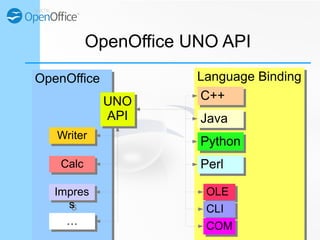
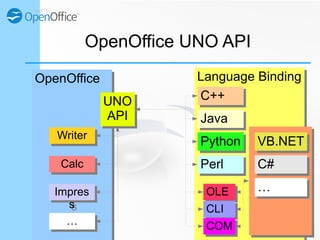
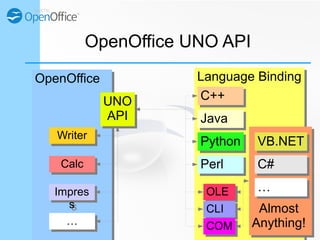
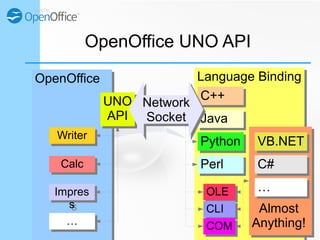
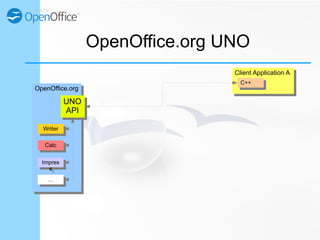
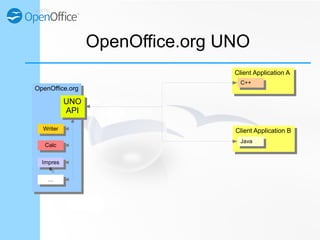
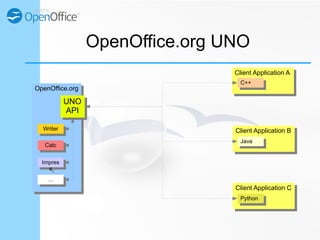
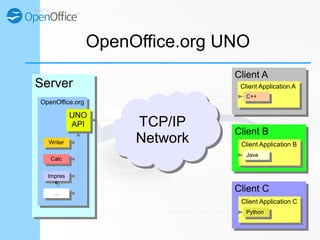
OpenOffice UNO API
OpenOffice UNO API
● Universal Network Object
OpenOffice UNO API
● Universal Network Object
– Universal among programming languages
OpenOffice UNO API
● Universal Network Object
– Universal among programming languages
– Networked API
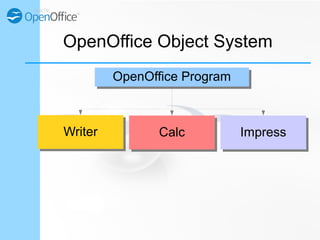
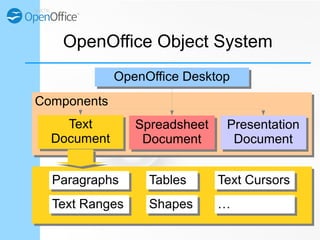
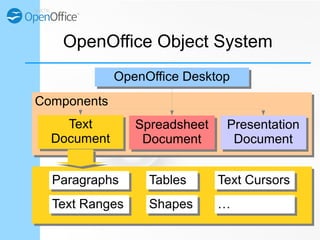
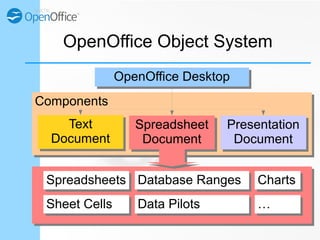
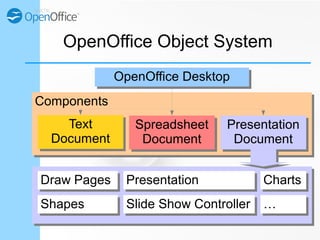
OpenOffice Object System
OpenOffice ProgramOpenOffice Program
WriterWriter CalcCalc ImpressImpress
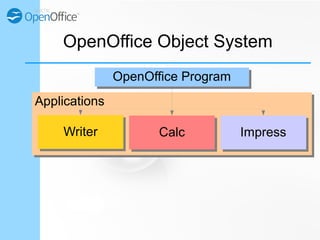
ApplicationsApplications
OpenOffice Object System
OpenOffice ProgramOpenOffice Program
WriterWriter CalcCalc ImpressImpress
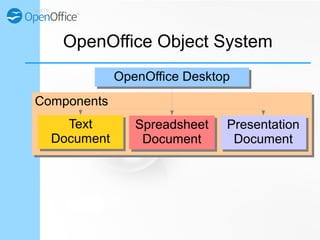
ComponentsComponents
OpenOffice Object System
OpenOffice DesktopOpenOffice Desktop
Text
Document
Text
Document
Spreadsheet
Document
Spreadsheet
Document
Presentation
Document
Presentation
Document
ComponentsComponents
OpenOffice Object System
OpenOffice DesktopOpenOffice Desktop
Text
Document
Text
Document
Spreadsheet
Document
Spreadsheet
Document
Presentation
Document
Presentation
Document
ParagraphsParagraphs
Text RangesText Ranges
TablesTables
ShapesShapes ……
Text CursorsText Cursors
ComponentsComponents
OpenOffice Object System
OpenOffice DesktopOpenOffice Desktop
Text
Document
Text
Document
Spreadsheet
Document
Spreadsheet
Document
Presentation
Document
Presentation
Document
SpreadsheetsSpreadsheets
Sheet CellsSheet Cells ……Data PilotsData Pilots
Database RangesDatabase Ranges ChartsCharts
ComponentsComponents
OpenOffice Object System
OpenOffice DesktopOpenOffice Desktop
Text
Document
Text
Document
Spreadsheet
Document
Spreadsheet
Document
Presentation
Document
Presentation
Document
Draw PagesDraw Pages
ShapesShapes ……
ChartsChartsPresentationPresentation
Slide Show ControllerSlide Show Controller
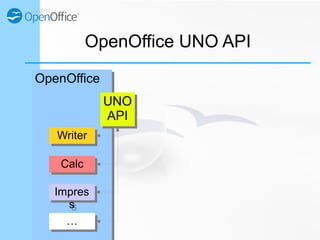
OpenOffice UNO API
OpenOfficeOpenOffice
WriterWriter
CalcCalc
Impres
s
Impres
s
UNO
API
UNO
API
……
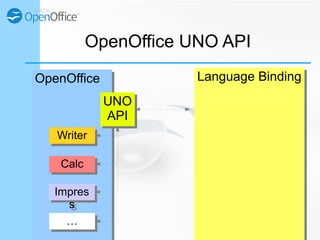
Language BindingLanguage Binding
OpenOffice UNO API
OpenOfficeOpenOffice
WriterWriter
CalcCalc
Impres
s
Impres
s
UNO
API
UNO
API
……
Language BindingLanguage Binding
OpenOffice UNO API
OpenOfficeOpenOffice
WriterWriter
CalcCalc
Impres
s
Impres
s
UNO
API
UNO
API
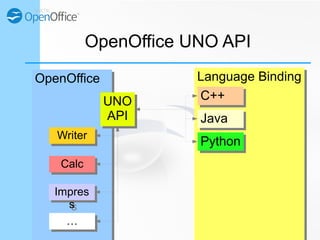
C++C++
JavaJava
……
PythonPython
Language BindingLanguage Binding
OpenOffice UNO API
OpenOfficeOpenOffice
WriterWriter
CalcCalc
Impres
s
Impres
s
UNO
API
UNO
API
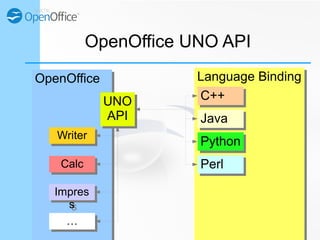
C++C++
JavaJava
PerlPerl
PythonPython
……
Language BindingLanguage Binding
OpenOffice UNO API
OpenOfficeOpenOffice
WriterWriter
CalcCalc
Impres
s
Impres
s
UNO
API
UNO
API
C++C++
JavaJava
PerlPerl
PythonPython
OLEOLE
CLICLI
COMCOM……
Language BindingLanguage Binding
OpenOffice UNO API
OpenOfficeOpenOffice
WriterWriter
CalcCalc
Impres
s
Impres
s
UNO
API
UNO
API
C++C++
JavaJava
PerlPerl
PythonPython
……
C#C#
VB.NETVB.NET
OLEOLE
CLICLI
COMCOM……
Language BindingLanguage Binding
OpenOffice UNO API
OpenOfficeOpenOffice
WriterWriter
CalcCalc
Impres
s
Impres
s
UNO
API
UNO
API
C++C++
JavaJava
PerlPerl
PythonPython
Almost
Anything!
Almost
Anything!
……
C#C#
VB.NETVB.NET
OLEOLE
CLICLI
COMCOM……
Language BindingLanguage Binding
OpenOffice UNO API
OpenOfficeOpenOffice
WriterWriter
CalcCalc
Impres
s
Impres
s
UNO
API
UNO
API
C++C++
JavaJava
PerlPerl
PythonPython
Almost
Anything!
Almost
Anything!
……
C#C#
VB.NETVB.NET
OLEOLE
CLICLI
COMCOM……
Network
Socket
Network
Socket
Client Application AClient Application A
OpenOffice.org UNO
OpenOffice.orgOpenOffice.org
WriterWriter
CalcCalc
Impres
s
Impres
s
UNO
API
UNO
API
……
C++C++
Client Application AClient Application A
OpenOffice.org UNO
OpenOffice.orgOpenOffice.org
WriterWriter
CalcCalc
Impres
s
Impres
s
UNO
API
UNO
API
……
C++C++
Client Application BClient Application B
JavaJava
Client Application AClient Application A
OpenOffice.org UNO
OpenOffice.orgOpenOffice.org
WriterWriter
CalcCalc
Impres
s
Impres
s
UNO
API
UNO
API
……
C++C++
Client Application BClient Application B
JavaJava
Client Application CClient Application C
PythonPython
Client AClient A
ServerServer Client Application AClient Application A
OpenOffice.org UNO
OpenOffice.orgOpenOffice.org
WriterWriter
CalcCalc
Impres
s
Impres
s
UNO
API
UNO
API
……
C++C++
Client BClient B
Client Application BClient Application B
JavaJava
Client CClient C
Client Application CClient Application C
PythonPython
TCP/IP
Network
TCP/IP
Network
OpenOffice UNO API
● Universal Network Object
– Universal among programming languages
– Networked API
● Write your office application in your
favorite language!
But, which language to use?
Language BindingLanguage Binding
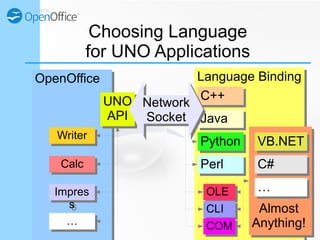
Choosing Language
for UNO Applications
OpenOfficeOpenOffice
WriterWriter
CalcCalc
Impres
s
Impres
s
UNO
API
UNO
API
C++C++
JavaJava
PerlPerl
PythonPython
Almost
Anything!
Almost
Anything!
……
C#C#
VB.NETVB.NET
OLEOLE
CLICLI
COMCOM……
Network
Socket
Network
Socket
Language BindingLanguage Binding
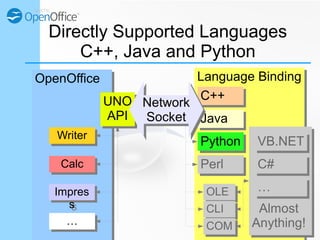
Directly Supported Languages
C++, Java and Python
OpenOfficeOpenOffice
WriterWriter
CalcCalc
Impres
s
Impres
s
UNO
API
UNO
API
C++C++
JavaJava
PerlPerl
PythonPython
Almost
Anything!
Almost
Anything!
……
C#C#
VB.NETVB.NET
OLEOLE
CLICLI
COMCOM……
Network
Socket
Network
Socket
Language BindingLanguage Binding
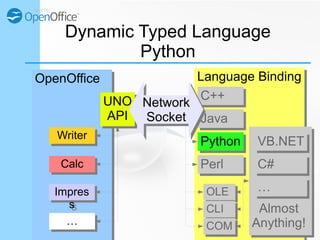
Dynamic Typed Language
Python
OpenOfficeOpenOffice
WriterWriter
CalcCalc
Impres
s
Impres
s
UNO
API
UNO
API
C++C++
JavaJava
PerlPerl
PythonPython
Almost
Anything!
Almost
Anything!
……
C#C#
VB.NETVB.NET
OLEOLE
CLICLI
COMCOM……
Network
Socket
Network
Socket
Choosing PyUNO
for OpenOffice UNO Applications
● Directly supported by OpenOffice itself
Choosing PyUNO
for OpenOffice UNO Applications
● Directly supported by OpenOffice itself
● Dynamic typing making everything easier
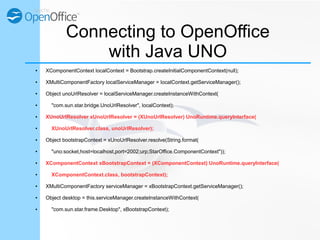
Connecting to OpenOffice
with Java UNO
● XComponentContext localContext = Bootstrap.createInitialComponentContext(null);
● XMultiComponentFactory localServiceManager = localContext.getServiceManager();
● Object unoUrlResolver = localServiceManager.createInstanceWithContext(
● "com.sun.star.bridge.UnoUrlResolver", localContext);
● XUnoUrlResolver xUnoUrlResolver = (XUnoUrlResolver) UnoRuntime.queryInterface(
● XUnoUrlResolver.class, unoUrlResolver);
● Object bootstrapContext = xUnoUrlResolver.resolve(String.format(
● "uno:socket,host=localhost,port=2002;urp;StarOffice.ComponentContext"));
● XComponentContext xBootstrapContext = (XComponentContext) UnoRuntime.queryInterface(
● XComponentContext.class, bootstrapContext);
● XMultiComponentFactory serviceManager = xBootstrapContext.getServiceManager();
● Object desktop = this.serviceManager.createInstanceWithContext(
● "com.sun.star.frame.Desktop", xBootstrapContext);
Connecting to OpenOffice
with PyUNO
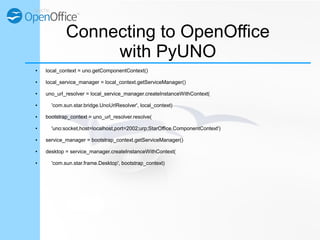
● local_context = uno.getComponentContext()
● local_service_manager = local_context.getServiceManager()
● uno_url_resolver = local_service_manager.createInstanceWithContext(
● 'com.sun.star.bridge.UnoUrlResolver', local_context)
● bootstrap_context = uno_url_resolver.resolve(
● 'uno:socket,host=localhost,port=2002;urp;StarOffice.ComponentContext')
● service_manager = bootstrap_context.getServiceManager()
● desktop = service_manager.createInstanceWithContext(
● 'com.sun.star.frame.Desktop', bootstrap_context)
Connecting to OpenOffice
with Java UNO vs. PyUNO
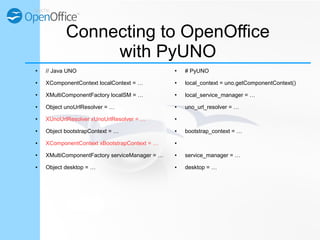
● // Java UNO
● XComponentContext localContext = …
● XMultiComponentFactory localSM = …
● Object unoUrlResolver = …
● XUnoUrlResolver xUnoUrlResolver = …
● Object bootstrapContext = …
● XComponentContext xBootstrapContext = …
● XMultiComponentFactory serviceManager = …
● Object desktop = …
● # PyUNO
● local_context = uno.getComponentContext()
● local_service_manager = …
● uno_url_resolver = …
●
● bootstrap_context = …
●
● service_manager = …
● desktop = …
Choosing PyUNO
for OpenOffice UNO Applications
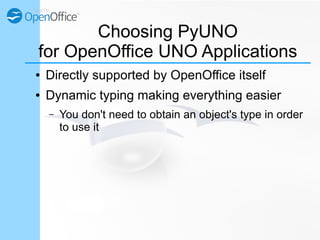
● Directly supported by OpenOffice itself
● Dynamic typing making everything easier
– You don't need to obtain an object's type in order
to use it
Choosing PyUNO
for OpenOffice UNO Applications
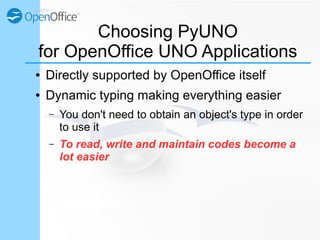
● Directly supported by OpenOffice itself
● Dynamic typing making everything easier
– You don't need to obtain an object's type in order
to use it
– To read, write and maintain codes become a
lot easier
OpenOffice Python Support
● OpenOffice ship with a Python installation
OpenOffice Python Support
● OpenOffice ship with a Python installation
– Linux: /opt/openoffice4/program/python
OpenOffice Python Support
● OpenOffice ship with a Python installation
– Linux: /opt/openoffice4/program/python
– Windows: "C:Program Files (x86)OpenOffice
4programpython.exe"
OpenOffice Python Support
● OpenOffice ship with a Python installation
– Linux: /opt/openoffice4/program/python
– Windows: "C:Program Files (x86)OpenOffice
4programpython.exe"
– Version 2.7.6 as of OpenOffice 4.1
Simple
Example
Demonstration
● Running OpenOffice as a Server
● Connecting to OpenOffice
● OpenOffice Operation
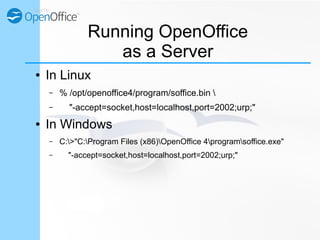
Running OpenOffice
as a Server
● In Linux
– % /opt/openoffice4/program/soffice.bin 
– "-accept=socket,host=localhost,port=2002;urp;"
● In Windows
– C:>"C:Program Files (x86)OpenOffice 4programsoffice.exe"
– "-accept=socket,host=localhost,port=2002;urp;"
Connecting to OpenOffice
with PyUNO
● % /opt/openoffice4/program/python
● >>> import uno
● >>> local_context = uno.getComponentContext()
● >>> local_service_manager = local_context.getServiceManager()
● >>> uno_url_resolver = local_service_manager.createInstanceWithContext(
● ... 'com.sun.star.bridge.UnoUrlResolver', local_context)
● >>> bootstrap_context = uno_url_resolver.resolve(
● ... 'uno:socket,host=localhost,port=2002;urp;StarOffice.ComponentContext')
● >>> service_manager = bootstrap_context.getServiceManager()
● >>> desktop = service_manager.createInstanceWithContext(
● ... 'com.sun.star.frame.Desktop', bootstrap_context)
● >>>
Checking the desktop Object
● >>> dir(desktop)
● ['ActiveFrame', 'ActiveTask',
'ComponentWindow', 'Components',
'ContainerWindow', 'Controller',
'Creator', 'CurrentComponent',
'CurrentFrame', …]
● >>>
Checking the Current Document
● >>> doc = desktop.CurrentComponent
● >>> dir(doc)
● ['ActionLocks', 'AllowMacroExecution',
'ApplyFormDesignMode', 'AreaLinks',
'Args', 'AutomaticControlFocus',
'AvailableServiceNames',
'AvailableViewControllerNames', …]
● >>>
Checking the Spreadsheets
● >>> sheets = doc.Sheets
● >>> dir(sheets)
● ['Count', 'ElementNames',
'ElementType', 'ImplementationId',
'ImplementationName',
'SupportedServiceNames', 'Types',
'copyByName', 'createEnumeration',
'getByIndex', 'getByName', …]
● >>>
Checking the First Sheet
● >>> sheet = sheets.getByIndex(0)
● >>> dir(sheet)
● ['AbsoluteName', 'Annotations',
'ArrayFormula', 'ArrayTokens',
'AsianVerticalMode',
'AutomaticPrintArea',
'BorderColor', 'BottomBorder',
'CellBackColor',
'CellFormatRanges', …]
● >>>
Checking A1
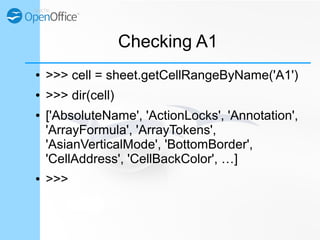
● >>> cell = sheet.getCellRangeByName('A1')
● >>> dir(cell)
● ['AbsoluteName', 'ActionLocks',
'Annotation', 'ArrayFormula',
'ArrayTokens', 'AsianVerticalMode',
'BottomBorder', 'CellAddress',
'CellBackColor', …]
● >>>
Updating A1
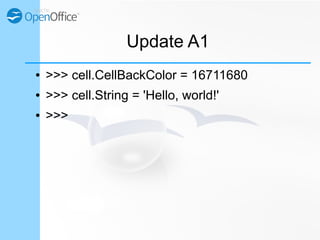
● >>> cell.CellBackColor = 0xFF0000
● >>> cell.String = 'Hello, world!'
● >>>
Updating A1, A2 and A3
● >>> sheet.getCellRangeByName('A1').String = 'Betty'
● >>> sheet.getCellRangeByName('A2').Value = 1630
● >>> sheet.getCellRangeByName('A3').Formula = '=A2*6'
● >>>
Creating a Multiplication Table
● >>> for i in range(1, 10):
● ... for j in range(1, 10):
● ... sheet.getCellByPosition(i-1, j-1).Value = i*j
● ...
● >>>
Writing Your Own UNO Application
is Easy!
Thank you.
Any questions?

OpenOffice Application with Python

  • 1.
  • 2.
    “OpenOffice Application withPython” is created by imacat (Yang Shih-Ching), and licensed under a Creative Commons Attribution 3.0 Unported License.
  • 3.
    imacat ● A memberof the Apache OpenOffice Project Management Committee ● An OpenOffice committer ● The system administrator of the OpenOffice forum and Wiki ● A PyLadies Taiwan organizer ● Graduated from National Taiwan Normal University
  • 4.
  • 5.
    Why OpenOffice? ● Freeand open source
  • 6.
    Why OpenOffice? ● Freeand open source ● Cross platform – Windows, Mac, Linux, BSD
  • 7.
    Why OpenOffice? ● Freeand open source ● Cross platform – Windows, Mac, Linux, BSD ● Open and standard file format – ODF
  • 8.
    Why OpenOffice? ● Freeand open source ● Cross platform – Windows, Mac, Linux, BSD ● Open and standard file format – ODF ● Excellent API design
  • 9.
  • 10.
    OpenOffice UNO API ●Universal Network Object
  • 11.
    OpenOffice UNO API ●Universal Network Object – Universal among programming languages
  • 12.
    OpenOffice UNO API ●Universal Network Object – Universal among programming languages – Networked API
  • 13.
    OpenOffice Object System OpenOfficeProgramOpenOffice Program WriterWriter CalcCalc ImpressImpress
  • 14.
    ApplicationsApplications OpenOffice Object System OpenOfficeProgramOpenOffice Program WriterWriter CalcCalc ImpressImpress
  • 15.
    ComponentsComponents OpenOffice Object System OpenOfficeDesktopOpenOffice Desktop Text Document Text Document Spreadsheet Document Spreadsheet Document Presentation Document Presentation Document
  • 16.
    ComponentsComponents OpenOffice Object System OpenOfficeDesktopOpenOffice Desktop Text Document Text Document Spreadsheet Document Spreadsheet Document Presentation Document Presentation Document ParagraphsParagraphs Text RangesText Ranges TablesTables ShapesShapes …… Text CursorsText Cursors
  • 17.
    ComponentsComponents OpenOffice Object System OpenOfficeDesktopOpenOffice Desktop Text Document Text Document Spreadsheet Document Spreadsheet Document Presentation Document Presentation Document SpreadsheetsSpreadsheets Sheet CellsSheet Cells ……Data PilotsData Pilots Database RangesDatabase Ranges ChartsCharts
  • 18.
    ComponentsComponents OpenOffice Object System OpenOfficeDesktopOpenOffice Desktop Text Document Text Document Spreadsheet Document Spreadsheet Document Presentation Document Presentation Document Draw PagesDraw Pages ShapesShapes …… ChartsChartsPresentationPresentation Slide Show ControllerSlide Show Controller
  • 19.
  • 20.
    Language BindingLanguage Binding OpenOfficeUNO API OpenOfficeOpenOffice WriterWriter CalcCalc Impres s Impres s UNO API UNO API ……
  • 21.
    Language BindingLanguage Binding OpenOfficeUNO API OpenOfficeOpenOffice WriterWriter CalcCalc Impres s Impres s UNO API UNO API C++C++ JavaJava …… PythonPython
  • 22.
    Language BindingLanguage Binding OpenOfficeUNO API OpenOfficeOpenOffice WriterWriter CalcCalc Impres s Impres s UNO API UNO API C++C++ JavaJava PerlPerl PythonPython ……
  • 23.
    Language BindingLanguage Binding OpenOfficeUNO API OpenOfficeOpenOffice WriterWriter CalcCalc Impres s Impres s UNO API UNO API C++C++ JavaJava PerlPerl PythonPython OLEOLE CLICLI COMCOM……
  • 24.
    Language BindingLanguage Binding OpenOfficeUNO API OpenOfficeOpenOffice WriterWriter CalcCalc Impres s Impres s UNO API UNO API C++C++ JavaJava PerlPerl PythonPython …… C#C# VB.NETVB.NET OLEOLE CLICLI COMCOM……
  • 25.
    Language BindingLanguage Binding OpenOfficeUNO API OpenOfficeOpenOffice WriterWriter CalcCalc Impres s Impres s UNO API UNO API C++C++ JavaJava PerlPerl PythonPython Almost Anything! Almost Anything! …… C#C# VB.NETVB.NET OLEOLE CLICLI COMCOM……
  • 26.
    Language BindingLanguage Binding OpenOfficeUNO API OpenOfficeOpenOffice WriterWriter CalcCalc Impres s Impres s UNO API UNO API C++C++ JavaJava PerlPerl PythonPython Almost Anything! Almost Anything! …… C#C# VB.NETVB.NET OLEOLE CLICLI COMCOM…… Network Socket Network Socket
  • 27.
    Client Application AClientApplication A OpenOffice.org UNO OpenOffice.orgOpenOffice.org WriterWriter CalcCalc Impres s Impres s UNO API UNO API …… C++C++
  • 28.
    Client Application AClientApplication A OpenOffice.org UNO OpenOffice.orgOpenOffice.org WriterWriter CalcCalc Impres s Impres s UNO API UNO API …… C++C++ Client Application BClient Application B JavaJava
  • 29.
    Client Application AClientApplication A OpenOffice.org UNO OpenOffice.orgOpenOffice.org WriterWriter CalcCalc Impres s Impres s UNO API UNO API …… C++C++ Client Application BClient Application B JavaJava Client Application CClient Application C PythonPython
  • 30.
    Client AClient A ServerServerClient Application AClient Application A OpenOffice.org UNO OpenOffice.orgOpenOffice.org WriterWriter CalcCalc Impres s Impres s UNO API UNO API …… C++C++ Client BClient B Client Application BClient Application B JavaJava Client CClient C Client Application CClient Application C PythonPython TCP/IP Network TCP/IP Network
  • 31.
    OpenOffice UNO API ●Universal Network Object – Universal among programming languages – Networked API ● Write your office application in your favorite language!
  • 32.
  • 33.
    Language BindingLanguage Binding ChoosingLanguage for UNO Applications OpenOfficeOpenOffice WriterWriter CalcCalc Impres s Impres s UNO API UNO API C++C++ JavaJava PerlPerl PythonPython Almost Anything! Almost Anything! …… C#C# VB.NETVB.NET OLEOLE CLICLI COMCOM…… Network Socket Network Socket
  • 34.
    Language BindingLanguage Binding DirectlySupported Languages C++, Java and Python OpenOfficeOpenOffice WriterWriter CalcCalc Impres s Impres s UNO API UNO API C++C++ JavaJava PerlPerl PythonPython Almost Anything! Almost Anything! …… C#C# VB.NETVB.NET OLEOLE CLICLI COMCOM…… Network Socket Network Socket
  • 35.
    Language BindingLanguage Binding DynamicTyped Language Python OpenOfficeOpenOffice WriterWriter CalcCalc Impres s Impres s UNO API UNO API C++C++ JavaJava PerlPerl PythonPython Almost Anything! Almost Anything! …… C#C# VB.NETVB.NET OLEOLE CLICLI COMCOM…… Network Socket Network Socket
  • 36.
    Choosing PyUNO for OpenOfficeUNO Applications ● Directly supported by OpenOffice itself
  • 37.
    Choosing PyUNO for OpenOfficeUNO Applications ● Directly supported by OpenOffice itself ● Dynamic typing making everything easier
  • 38.
    Connecting to OpenOffice withJava UNO ● XComponentContext localContext = Bootstrap.createInitialComponentContext(null); ● XMultiComponentFactory localServiceManager = localContext.getServiceManager(); ● Object unoUrlResolver = localServiceManager.createInstanceWithContext( ● "com.sun.star.bridge.UnoUrlResolver", localContext); ● XUnoUrlResolver xUnoUrlResolver = (XUnoUrlResolver) UnoRuntime.queryInterface( ● XUnoUrlResolver.class, unoUrlResolver); ● Object bootstrapContext = xUnoUrlResolver.resolve(String.format( ● "uno:socket,host=localhost,port=2002;urp;StarOffice.ComponentContext")); ● XComponentContext xBootstrapContext = (XComponentContext) UnoRuntime.queryInterface( ● XComponentContext.class, bootstrapContext); ● XMultiComponentFactory serviceManager = xBootstrapContext.getServiceManager(); ● Object desktop = this.serviceManager.createInstanceWithContext( ● "com.sun.star.frame.Desktop", xBootstrapContext);
  • 39.
    Connecting to OpenOffice withPyUNO ● local_context = uno.getComponentContext() ● local_service_manager = local_context.getServiceManager() ● uno_url_resolver = local_service_manager.createInstanceWithContext( ● 'com.sun.star.bridge.UnoUrlResolver', local_context) ● bootstrap_context = uno_url_resolver.resolve( ● 'uno:socket,host=localhost,port=2002;urp;StarOffice.ComponentContext') ● service_manager = bootstrap_context.getServiceManager() ● desktop = service_manager.createInstanceWithContext( ● 'com.sun.star.frame.Desktop', bootstrap_context)
  • 40.
    Connecting to OpenOffice withJava UNO vs. PyUNO ● // Java UNO ● XComponentContext localContext = … ● XMultiComponentFactory localSM = … ● Object unoUrlResolver = … ● XUnoUrlResolver xUnoUrlResolver = … ● Object bootstrapContext = … ● XComponentContext xBootstrapContext = … ● XMultiComponentFactory serviceManager = … ● Object desktop = … ● # PyUNO ● local_context = uno.getComponentContext() ● local_service_manager = … ● uno_url_resolver = … ● ● bootstrap_context = … ● ● service_manager = … ● desktop = …
  • 41.
    Choosing PyUNO for OpenOfficeUNO Applications ● Directly supported by OpenOffice itself ● Dynamic typing making everything easier – You don't need to obtain an object's type in order to use it
  • 42.
    Choosing PyUNO for OpenOfficeUNO Applications ● Directly supported by OpenOffice itself ● Dynamic typing making everything easier – You don't need to obtain an object's type in order to use it – To read, write and maintain codes become a lot easier
  • 43.
    OpenOffice Python Support ●OpenOffice ship with a Python installation
  • 44.
    OpenOffice Python Support ●OpenOffice ship with a Python installation – Linux: /opt/openoffice4/program/python
  • 45.
    OpenOffice Python Support ●OpenOffice ship with a Python installation – Linux: /opt/openoffice4/program/python – Windows: "C:Program Files (x86)OpenOffice 4programpython.exe"
  • 46.
    OpenOffice Python Support ●OpenOffice ship with a Python installation – Linux: /opt/openoffice4/program/python – Windows: "C:Program Files (x86)OpenOffice 4programpython.exe" – Version 2.7.6 as of OpenOffice 4.1
  • 47.
  • 48.
    Demonstration ● Running OpenOfficeas a Server ● Connecting to OpenOffice ● OpenOffice Operation
  • 49.
    Running OpenOffice as aServer ● In Linux – % /opt/openoffice4/program/soffice.bin – "-accept=socket,host=localhost,port=2002;urp;" ● In Windows – C:>"C:Program Files (x86)OpenOffice 4programsoffice.exe" – "-accept=socket,host=localhost,port=2002;urp;"
  • 50.
    Connecting to OpenOffice withPyUNO ● % /opt/openoffice4/program/python ● >>> import uno ● >>> local_context = uno.getComponentContext() ● >>> local_service_manager = local_context.getServiceManager() ● >>> uno_url_resolver = local_service_manager.createInstanceWithContext( ● ... 'com.sun.star.bridge.UnoUrlResolver', local_context) ● >>> bootstrap_context = uno_url_resolver.resolve( ● ... 'uno:socket,host=localhost,port=2002;urp;StarOffice.ComponentContext') ● >>> service_manager = bootstrap_context.getServiceManager() ● >>> desktop = service_manager.createInstanceWithContext( ● ... 'com.sun.star.frame.Desktop', bootstrap_context) ● >>>
  • 51.
    Checking the desktopObject ● >>> dir(desktop) ● ['ActiveFrame', 'ActiveTask', 'ComponentWindow', 'Components', 'ContainerWindow', 'Controller', 'Creator', 'CurrentComponent', 'CurrentFrame', …] ● >>>
  • 52.
    Checking the CurrentDocument ● >>> doc = desktop.CurrentComponent ● >>> dir(doc) ● ['ActionLocks', 'AllowMacroExecution', 'ApplyFormDesignMode', 'AreaLinks', 'Args', 'AutomaticControlFocus', 'AvailableServiceNames', 'AvailableViewControllerNames', …] ● >>>
  • 53.
    Checking the Spreadsheets ●>>> sheets = doc.Sheets ● >>> dir(sheets) ● ['Count', 'ElementNames', 'ElementType', 'ImplementationId', 'ImplementationName', 'SupportedServiceNames', 'Types', 'copyByName', 'createEnumeration', 'getByIndex', 'getByName', …] ● >>>
  • 54.
    Checking the FirstSheet ● >>> sheet = sheets.getByIndex(0) ● >>> dir(sheet) ● ['AbsoluteName', 'Annotations', 'ArrayFormula', 'ArrayTokens', 'AsianVerticalMode', 'AutomaticPrintArea', 'BorderColor', 'BottomBorder', 'CellBackColor', 'CellFormatRanges', …] ● >>>
  • 55.
    Checking A1 ● >>>cell = sheet.getCellRangeByName('A1') ● >>> dir(cell) ● ['AbsoluteName', 'ActionLocks', 'Annotation', 'ArrayFormula', 'ArrayTokens', 'AsianVerticalMode', 'BottomBorder', 'CellAddress', 'CellBackColor', …] ● >>>
  • 56.
    Updating A1 ● >>>cell.CellBackColor = 0xFF0000 ● >>> cell.String = 'Hello, world!' ● >>>
  • 57.
    Updating A1, A2and A3 ● >>> sheet.getCellRangeByName('A1').String = 'Betty' ● >>> sheet.getCellRangeByName('A2').Value = 1630 ● >>> sheet.getCellRangeByName('A3').Formula = '=A2*6' ● >>>
  • 58.
    Creating a MultiplicationTable ● >>> for i in range(1, 10): ● ... for j in range(1, 10): ● ... sheet.getCellByPosition(i-1, j-1).Value = i*j ● ... ● >>>
  • 59.
    Writing Your OwnUNO Application is Easy!
  • 60.