
Dynamic slides using OpenOffice Impress Lexatel Technologies, S.L.
Dynamic presentations using OpenOffice Impress SQL queries and high-level API Carles Pina i Estany carles.pinaestany@ lexatel.com
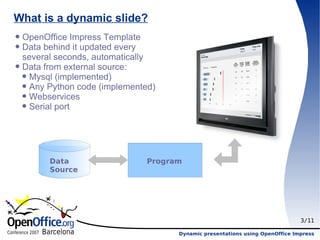
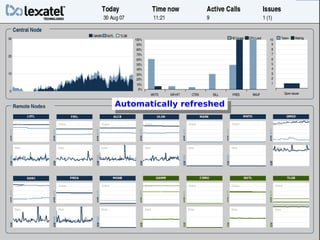
What is a dynamic slide? OpenOffice Impress Template Data behind it updated every several seconds, automatically Data from external source: Mysql (implemented) Any Python code (implemented) Webservices Serial port Data Source Program
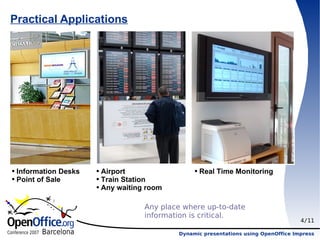
Practical Applications Information Desks Point of Sale Airport Train Station Any waiting room Real Time Monitoring Any place where up-to-date information is critical.
Quick win: After this presentation you will be able to: Grab the code  (http://www.lexatel.com/slides) Make an OpenOffice Impress template Write the config.py file using: Mysql username and password Mysql host Write some queries Execute it!
Automatically refreshed
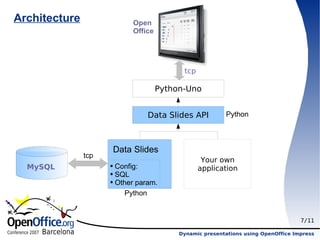
Architecture tcp Data Slides Python tcp MySQL Python Open Office Config: SQL Other param. Your own application
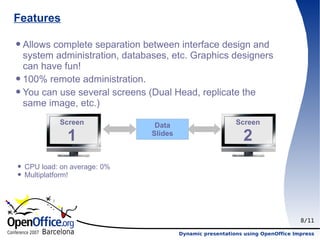
Features Allows complete separation between interface design and system administration, databases, etc. Graphics designers can have fun! 100% remote administration. You can use several screens (Dual Head, replicate the same image, etc.) CPU load: on average: 0% Multiplatform! Screen 1 Screen 2
Problems OpenOffice v2.2 crashed often (New version 2.3 released 17-Sep is much more stable). We implemented watchdog to restart OO if needed.  Python and Mysql do not communicate well over a network (low-level design problem). Using sql-relay (or similar utilities) could avoid the problem.
Download Download code from http://www.lexatel.com/slides Setup the follow variables in config.py: dbhost, dbname, dbuser, dbpassword Assign odpfile1 and odpfile2 to some .odp file (if one fails, try another one)
3 types of code: -SQL queries sql[“name_object”]=”””select param_value from table order by date limit 1””” -Code using high level API sql”code”]=””” a=function(b,c,d) config.ret=a “”” -Code_step: same than Code but will move the graphic

Dynamic Slides using OpenOffice.org Impress and Python

  • 1.
    Dynamic slides usingOpenOffice Impress Lexatel Technologies, S.L.
  • 2.
    Dynamic presentations usingOpenOffice Impress SQL queries and high-level API Carles Pina i Estany carles.pinaestany@ lexatel.com
  • 3.
    What is adynamic slide? OpenOffice Impress Template Data behind it updated every several seconds, automatically Data from external source: Mysql (implemented) Any Python code (implemented) Webservices Serial port Data Source Program
  • 4.
    Practical Applications InformationDesks Point of Sale Airport Train Station Any waiting room Real Time Monitoring Any place where up-to-date information is critical.
  • 5.
    Quick win: Afterthis presentation you will be able to: Grab the code (http://www.lexatel.com/slides) Make an OpenOffice Impress template Write the config.py file using: Mysql username and password Mysql host Write some queries Execute it!
  • 6.
  • 7.
    Architecture tcp DataSlides Python tcp MySQL Python Open Office Config: SQL Other param. Your own application
  • 8.
    Features Allows completeseparation between interface design and system administration, databases, etc. Graphics designers can have fun! 100% remote administration. You can use several screens (Dual Head, replicate the same image, etc.) CPU load: on average: 0% Multiplatform! Screen 1 Screen 2
  • 9.
    Problems OpenOffice v2.2crashed often (New version 2.3 released 17-Sep is much more stable). We implemented watchdog to restart OO if needed. Python and Mysql do not communicate well over a network (low-level design problem). Using sql-relay (or similar utilities) could avoid the problem.
  • 10.
    Download Download codefrom http://www.lexatel.com/slides Setup the follow variables in config.py: dbhost, dbname, dbuser, dbpassword Assign odpfile1 and odpfile2 to some .odp file (if one fails, try another one)
  • 11.
    3 types ofcode: -SQL queries sql[“name_object”]=”””select param_value from table order by date limit 1””” -Code using high level API sql”code”]=””” a=function(b,c,d) config.ret=a “”” -Code_step: same than Code but will move the graphic