Download free for 30 days
Sign in
Upload
Language (EN)
Support
Business
Mobile
Social Media
Marketing
Technology
Art & Photos
Career
Design
Education
Presentations & Public Speaking
Government & Nonprofit
Healthcare
Internet
Law
Leadership & Management
Automotive
Engineering
Software
Recruiting & HR
Retail
Sales
Services
Science
Small Business & Entrepreneurship
Food
Environment
Economy & Finance
Data & Analytics
Investor Relations
Sports
Spiritual
News & Politics
Travel
Self Improvement
Real Estate
Entertainment & Humor
Health & Medicine
Devices & Hardware
Lifestyle
Change Language
Language
English
Español
Português
Français
Deutsche
Cancel
Save
EN
Uploaded by
locationc
PPTX, PDF
129 views
Open
AI-enhanced description
文档介绍了如何使用spendingtracker程序,包括首次打开时需要输入手机号码,每次启动程序时选择购物或非购物模式,以及收集购物数据时的注意事项,如需开启GPS及避免将手机连接电脑。
Read more
0
Save
Share
Embed
Embed presentation
Download
Download to read offline
1
/ 4
2
/ 4
3
/ 4
4
/ 4
More Related Content
PPTX
Open
by
locationc
PPTX
實驗流程說明
by
locationc
PPTX
實驗程序說明
by
locationc
PPTX
實驗流程說明
by
locationc
ODP
Android手機遙控免費簡報軟體Impress
by
Conrad Peng
PDF
iOS App的交互设计
by
nbaction
PPTX
Collect
by
locationc
PPTX
Aug2011_Raising_RTOs
by
WinWire Technologies Inc
Open
by
locationc
實驗流程說明
by
locationc
實驗程序說明
by
locationc
實驗流程說明
by
locationc
Android手機遙控免費簡報軟體Impress
by
Conrad Peng
iOS App的交互设计
by
nbaction
Collect
by
locationc
Aug2011_Raising_RTOs
by
WinWire Technologies Inc
Viewers also liked
PPT
Egypt. Pedro Fernandez i Albert Muntaner
by
clara
PDF
Back matter
by
MSV MSV
PPTX
MK Valenti Before And After
by
mkvalenti
PPTX
Futureled fish rebel
by
guest0d63fcc7
PPT
Backuplines en didactiek nl
by
Backuplines S.L.
ODP
Present Simple
by
lauritabedoya
PDF
Bayesian clinical trials: software and logistics
by
John Cook
PPSX
Vct anafuertes2-120111093510
by
Ana FUERTES SANZ
DOCX
Questionnaire findings and conclusions
by
guestf4c9c4d
PDF
PKI
by
Massimo Penco
PPT
Latest designer collection of indian wear online1
by
ChrisPerez
DOCX
Content: Involver forbrugerne
by
Jan Godsk
PPT
Schwinn 2010 2011-presentacion
by
guest2f08bd
PDF
Facebook page like_cam
by
Taeho Kim
PDF
Quantum UI & Workflow for Essex
by
Somik Behera
PPS
02(3)
by
guest4620b9f
PPT
D11 1 desastres_rega
by
Xavier
PDF
Netric for Publishers
by
Netric
Egypt. Pedro Fernandez i Albert Muntaner
by
clara
Back matter
by
MSV MSV
MK Valenti Before And After
by
mkvalenti
Futureled fish rebel
by
guest0d63fcc7
Backuplines en didactiek nl
by
Backuplines S.L.
Present Simple
by
lauritabedoya
Bayesian clinical trials: software and logistics
by
John Cook
Vct anafuertes2-120111093510
by
Ana FUERTES SANZ
Questionnaire findings and conclusions
by
guestf4c9c4d
PKI
by
Massimo Penco
Latest designer collection of indian wear online1
by
ChrisPerez
Content: Involver forbrugerne
by
Jan Godsk
Schwinn 2010 2011-presentacion
by
guest2f08bd
Facebook page like_cam
by
Taeho Kim
Quantum UI & Workflow for Essex
by
Somik Behera
02(3)
by
guest4620b9f
D11 1 desastres_rega
by
Xavier
Netric for Publishers
by
Netric
More from locationc
PPTX
Upload
by
locationc
PPTX
Photo
by
locationc
PPTX
Download
by
locationc
PPTX
Takeout
by
locationc
PPTX
Photo
by
locationc
PPTX
Other
by
locationc
PPTX
Download
by
locationc
PPTX
Collect
by
locationc
Upload
by
locationc
Photo
by
locationc
Download
by
locationc
Takeout
by
locationc
Photo
by
locationc
Other
by
locationc
Download
by
locationc
Collect
by
locationc
Open
1.
開啟程式
2.
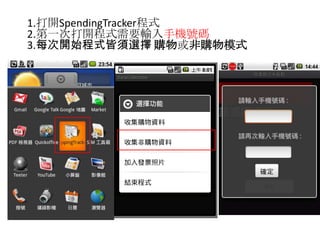
1.打開SpendingTracker程式
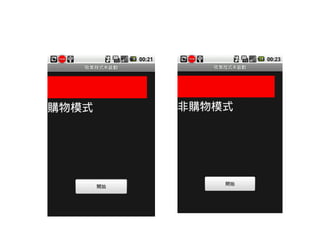
2.第一次打開程式需要輸入手機號碼3.每次開始程式皆須選擇 購物或非購物模式
4.
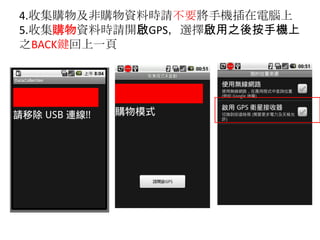
4.收集購物及非購物資料時請不要將手機插在電腦上5.收集購物資料時請開啟GPS,選擇啟用之後按手機上之BACK鍵回上一頁
Download