IT 2033
Object Oriented Programming
Menu-driven Application Development
Budditha Hettige
Department of Computer Science
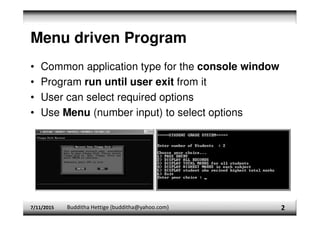
Menu driven Program
• Common application type for the console window
• Program run until user exit from it
• User can select required options
• Use Menu (number input) to select options
2
7/11/2015 Budditha Hettige (budditha@yahoo.com)
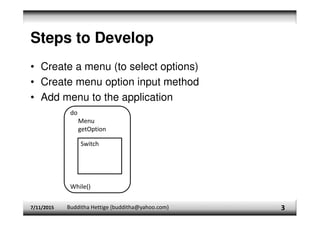
Steps to Develop
• Create a menu (to select options)
• Create menu option input method
• Add menu to the application
7/11/2015 Budditha Hettige (budditha@yahoo.com) 3
do
Menu
getOption
While()
Switch
Example
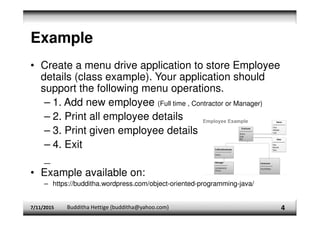
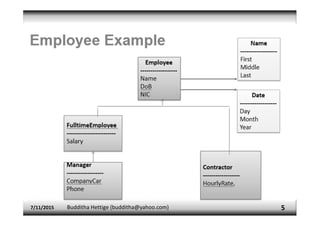
• Create a menu drive application to store Employee
details (class example). Your application should
support the following menu operations.
– 1. Add new employee (Full time , Contractor or Manager)
– 2. Print all employee details
– 3. Print given employee details
– 4. Exit
_
• Example available on:
– https://budditha.wordpress.com/object-oriented-programming-java/
7/11/2015 Budditha Hettige (budditha@yahoo.com) 4
Loop (Main)
7/11/2015 Budditha Hettige (budditha@yahoo.com) 5
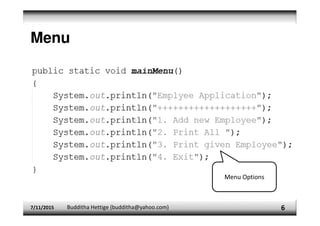
Menu
7/11/2015 Budditha Hettige (budditha@yahoo.com) 6
Menu Options
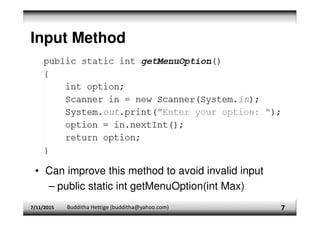
Input Method
7/11/2015 Budditha Hettige (budditha@yahoo.com) 7
• Can improve this method to avoid invalid input
– public static int getMenuOption(int Max)
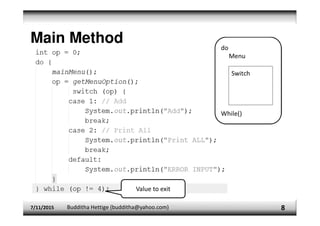
Main Method
7/11/2015 Budditha Hettige (budditha@yahoo.com) 8
Value to exit
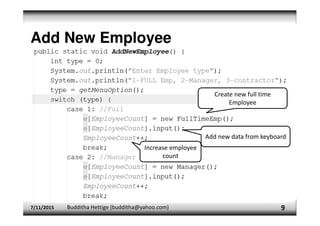
Add New Employee
7/11/2015 Budditha Hettige (budditha@yahoo.com) 9
Create new full time
Employee
Add new data from keyboard
Increase employee
count
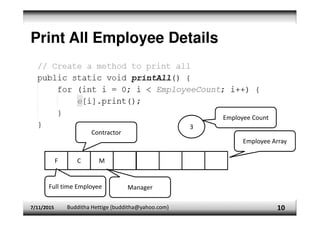
Print All Employee Details
7/11/2015 Budditha Hettige (budditha@yahoo.com) 10
F C M
3
Employee Count
Employee Array
Full time Employee
Contractor
Manager
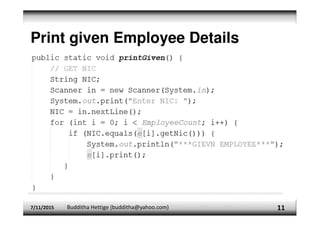
Print given Employee Details
7/11/2015 Budditha Hettige (budditha@yahoo.com) 11
More on application development
• Add error handling method(s) to avoid user errors
• Complete the application
• Build jar file (RUN →Clean and build project [Shift+F11])
• Copy jar file into another location
• Execute Jar file through the command
– Java –jar <jar_file_name>
7/11/2015 Budditha Hettige (budditha@yahoo.com) 12

oop_full java coding and esay to understand.pdf

  • 1.
    IT 2033 Object OrientedProgramming Menu-driven Application Development Budditha Hettige Department of Computer Science
  • 2.
    Menu driven Program •Common application type for the console window • Program run until user exit from it • User can select required options • Use Menu (number input) to select options 2 7/11/2015 Budditha Hettige (budditha@yahoo.com)
  • 3.
    Steps to Develop •Create a menu (to select options) • Create menu option input method • Add menu to the application 7/11/2015 Budditha Hettige (budditha@yahoo.com) 3 do Menu getOption While() Switch
  • 4.
    Example • Create amenu drive application to store Employee details (class example). Your application should support the following menu operations. – 1. Add new employee (Full time , Contractor or Manager) – 2. Print all employee details – 3. Print given employee details – 4. Exit _ • Example available on: – https://budditha.wordpress.com/object-oriented-programming-java/ 7/11/2015 Budditha Hettige (budditha@yahoo.com) 4
  • 5.
    Loop (Main) 7/11/2015 BuddithaHettige (budditha@yahoo.com) 5
  • 6.
    Menu 7/11/2015 Budditha Hettige(budditha@yahoo.com) 6 Menu Options
  • 7.
    Input Method 7/11/2015 BuddithaHettige (budditha@yahoo.com) 7 • Can improve this method to avoid invalid input – public static int getMenuOption(int Max)
  • 8.
    Main Method 7/11/2015 BuddithaHettige (budditha@yahoo.com) 8 Value to exit
  • 9.
    Add New Employee 7/11/2015Budditha Hettige (budditha@yahoo.com) 9 Create new full time Employee Add new data from keyboard Increase employee count
  • 10.
    Print All EmployeeDetails 7/11/2015 Budditha Hettige (budditha@yahoo.com) 10 F C M 3 Employee Count Employee Array Full time Employee Contractor Manager
  • 11.
    Print given EmployeeDetails 7/11/2015 Budditha Hettige (budditha@yahoo.com) 11
  • 12.
    More on applicationdevelopment • Add error handling method(s) to avoid user errors • Complete the application • Build jar file (RUN →Clean and build project [Shift+F11]) • Copy jar file into another location • Execute Jar file through the command – Java –jar <jar_file_name> 7/11/2015 Budditha Hettige (budditha@yahoo.com) 12