What is One Wire Serial Communication
● Serial data transmission over one wire(duh)
● Great for cheap applications that don't require high speed data transfer
● In theory, all AVR processors can handle One Wire Communication
● Timing is extremely important
○ The only way to discern signals from other signals
How Does it Work?
● Two basic implementations
○ Polled Implementations(software only)
○ Interrupt driven (counter required)
● Dallas 1-Wire Protocol
○ Designed by the Dallas Semiconductor Corporation
○ Can use either interrupt driven or polled implementations
○ Polled requires no external hardware
○ Half Duplex(transmitting or receiving not Both simultaneously)
Dallas 1-Wire
● Signal is idle High, need pull up resistor
● Signaling is divided into time slots of 60µs
● Master initiates every communication
○ Regardless of direction
● 5 basic signals: (Write 1, Write 0, Read, Reset, Presence)
● LSB sent first
Overall Communication process
All 1-Wire devices follow this basic sequence:
1. The Master sends the Reset pulse.
2. The Slave(s) respond with a Presence pulse.
3. Master sends a ROM command
4. Master sends a Memory command
How To Send Bits
● In order to send bits in OW protocol it requires precise timing and precise
waveforms
● Errors in these waveforms, or the timing can deliver corrupt data and
requires digital error checking
Bus Signals
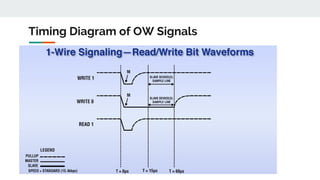
● Write 1
○ The Master pulls the bus low for 15µs then releases for
remainder of 60µs window
Bus Signals Continued
● Write 0
○ The master pulls the bus low for 60µs
● Read
○ Master pulls bus low for 1 to 15µs
○ The slave then releases the line if it wants to write 1 or keeps
the line low for write 0 for remainder of 60 us window.
Timing Diagram of OW Signals
Reset/Presence Signal
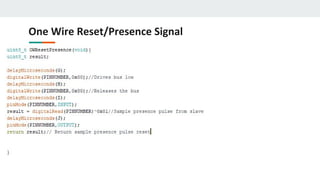
● Reset Signal
○ The master pulls the line low for 480µs and then releases it
○ If slave is present then the presence signal should be seen
○ If no presence signal is detected there is no device connected
● Presence Signal
○ After the Reset Signal has been sent it is the slave that must pull the line
low for 60µs
○ Must pull the line low within 60µs
Reset Presence Signal Waveform
Generating Signals through Software
● Define delay values
● Define our BUS pin
● Initialize the bus as an output
Structure of delayMicroseconds function
One Wire Write function
C++ One Wire Write function
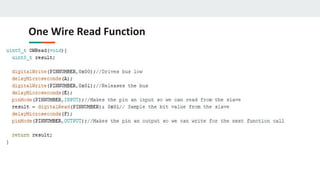
One Wire Read Function
C++ One Wire Read Bit Function
One Wire Reset/Presence Signal
C++ One Wire Reset/Presence Signal
Generating the Signals
● Software Only
○ Simply changing the direction and value of a GPIO and generating
required delay is sufficient
● With UART
○ Requires both TXD and RXD pins to be connected to the bus
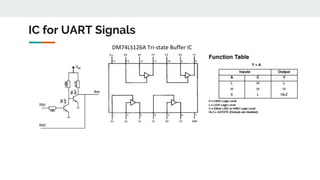
○ Need tri-state or open-collector buffer so the slave can pull the
line low.
IC for UART Signals
DM74LS126A Tri-state Buffer IC
Generating UART Signals
● Baud rate is equivalent to bits/sec
● In order to transmit 1-wire framed data from UART platform we must
frame the data into the same time slots as in the polled implementation
● One UART data frame is used to generate one waveform bit of 1 wire data
or one RESET/Presence signal
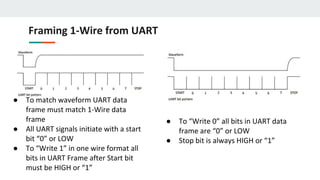
Framing 1-Wire from UART
● To match waveform UART data
frame must match 1-Wire data
frame
● All UART signals initiate with a start
bit “0” or LOW
● To “Write 1” in one wire format all
bits in UART Frame after Start bit
must be HIGH or “1”
● To “Write 0” all bits in UART data
frame are “0” or LOW
● Stop bit is always HIGH or “1”
● “Read 1” Start bit is LOW and slave
writes bit “1” or HIGH in the
remaining data bits in UART frame
● “Read 0” start bit is LOW and the
slave drives the bus low by writing
“0” to the rest of the UART bit
pattern and drives the bus HIGH for
the STOP bit.
Generating One Wire Frame From UART
Reset/Presence Signal with UART
● UART bits 0-3 are LOW, 4 is HIGH, and Slave writes UART bits 5,6,&7
LOW
● Stop bit for this signal is HIGH
Overall Communication process
All 1-Wire devices follow this basic sequence(MUST FOLLOW):
1. The Master sends the Reset pulse.
2. The Slave(s) respond with a Presence pulse.
3. Master sends a ROM command
4. Master sends a Memory command
ROM Commands
● All 1-Wire devices contain a 64 bit identifier stored in ROM
● ROM Commands address those 64 bit identifiers
● After bus master detects a presence pulse it can issue a ROM command to
detect how many slaves are on the bus, and which slave to address.
ROM Commands MAX31820
● Read ROM(33h)-Reads the ROM code of single slave device. If there are
multiple slave devices and the command is issued, data collision will occur.
● Skip ROM(CCh)-Sends data for addressing to all connected slave devices
● Match ROM(55h)-Is used to address individual slave devices on the bus
● Search ROM(F0h)-Is used to get the ID of slave devices if not known
Cyclic Redundancy Check
● CRC is used an every ROM command to check for data integrity.
● CRC - is an error detection code for digital networks.
● It sends a check value along with the data that is transmitted. This value is
determined by dividing the data by a nominal value and returning the
remainder.
● If once the data is received and the remainder value is not the same, after
the received data has been divided by the nominal value, then we know the
data has been corrupted.
How CRC works
● We can think of CRC as an 8 bit shift register with feedback
How CRC Works
● At the beginning of a 64 bit Read ROM command the CRC shift register has
an initial value of zero. CRC = 0x00
● The LSB of the 64 bit identifier is XORd with the LSB of the input data. In the
case of 64 bit identifiers the LSB is a family CRC code(ex: 0xA2). So after the
first byte of data has been processed the CRC register will contain the value
of the CRC code. CRC = 0xA2
● After the entire 64 bit identifier has been shifted into and out of the CRC
register the register should have a final value of 0x00 if no data was
corrupted. If data was corrupted we would have a value inside the CRC shift
register and the data would have to be retransmitted.
CRC Computation of 1-Wire(Look up Table)
1. Dallas Semiconductor Corp. provides a table for CRC calculations. This table
rapidly increase CRC calculations and can process entire bytes of data per
loop run.
2. CRC register is initially zero we then shift in the first byte of 64 bit ID into
register
3. Then we XOR the next byte of data with the CRC register
4. Using pgm_read_byte we point to the index of our table and set our CRC
register to that new value. We are indexing by the XORd value of the CRC
register and the input data.
5. We repeat steps 4 and 5 until we are done with all 64 bits or 8 bytes of our
ID.
6. If CRC is 0 then no data was corrupted else data has been corrupted.
CRC Function Code Example
CRC Look Up Method
This table shows how each byte of data gets shifted into our CRC register and how we
calculate the next index for our CRC value.
Overall Communication process
All 1-Wire devices follow this basic sequence(MUST FOLLOW):
1. The Master sends the Reset pulse.
2. The Slave(s) respond with a Presence pulse.
3. Master sends a ROM command
4. Master sends a Memory command
Memory Commands
● Are commands specific to slave devices or a class of devices
● They deal with the internal memory and registers of slave devices
● Therefore for each device memory commands are specific to that device
MAX31820 Memory Registers
● Memory commands specific to this device would address this device's internal memory
registers
● TH and TL would address BYTE 2 and BYTE 3 of the temperature sensors internal
scratchpad memory
MAX31820 - Ambient Temperature
Sensor
MAX31820 Configuration Registers
● Bits R1 and R0 control the resolution of the temperature reading
● Better resolution slower conversion time, and faster conversion time less
resolution
MAX31820 Function Command Set
Overall Communication process
All 1-Wire devices follow this basic sequence:
1. The Master sends the Reset pulse.
2. The Slave(s) respond with a Presence pulse.
3. Master sends a ROM command
4. Master sends a Memory command
1 Wire Digital Temperature Sensor Implementation
● Assemble this simple circuit, the resistor is needed for the idle state of the
bus(HIGH)
● Also because it will act as a pull up resistor
Step 1
Download Necessary Libraries
Step 2
● Download OneWire Arduino Library
● Download DallasTemperature Arduino
Library
● Place both libraries into your Arduino
library path
● Include both libraries in your C++ code
1 Wire Digital Temperature Sensor Implementation
Step 3 Arduino Code
OneWire and DallasTemperature functions
● OneWire oneWire(ONE_WIRE_BUS) - this is a data structure defined in the one
wire library
● DallasTemperature sensors(&oneWire) - this is another data structure defined in
the DallasTemperature library that is an array of 8 bytes.(that is why the structure
must be passed as a pointer)
OneWire and DallasTemperature functions
● sensors.begin - is a subroutine in the DallasTemperature library that
identifies the type of temperature sensor on the bus and initializes the type
of power supply the temperature sensors requires.
● sensors.requestTemperatures - sends a reset/presence signal to begin
communication with device. Once presence is detected skip ROM command
is sent because only one temperature sensor is on the bus. Then we issue a
memory command that begins to send data of the temperature back to the
master device.
● sensors.getTempCByIndex(0) - This function returns the temperature in
celsius detected by the temperature sensor. If device is disconnected
during process it will return “DEVICE_DISCONNECTED_C”.
OneWire and DallasTemperature functions
References
https://en.wikipedia.org/wiki/1-Wire
http://www.atmel.com/images/Atmel-2579-Dallas-1Wire-Master-on-tinyAVR-and-megaAVR_ApplicationNote_AVR318.pdf
https://www.maximintegrated.com/en/app-notes/index.mvp/id/126
https://forum.pjrc.com/threads/23939-Strange-behavior-on-the-Onewireslave-library?p=33608&viewfull=1#post33608
https://create.arduino.cc/projecthub/TheGadgetBoy/ds18b20-digital-temperature-sensor-and-arduino-9cc806
https://www.hacktronics.com/Tutorials/arduino-1-wire-address-finder.html
https://en.wikipedia.org/wiki/Cyclic_redundancy_check
https://www.maximintegrated.com/en/app-notes/index.mvp/id/27
https://www.maximintegrated.com/en/products/1-wire/flash/overview/
Questions
1. How long are the time divisions of each bit level command?
2. What is the Idle state of the bus line?
3. What are the types of implementations of one wire?
4. Which implementation requires external hardware?
5. How does the master know there is a slave device connected?
6. Where are the 64 bit IDs of connected devices stored?
7. Which signal takes more than 1 time slot to transmit?
8. What device is needed for one wire UART?
9. What is the waveform of the write 1 signal?
10. Can data be both transmitted and received simultaneously by the one wire
protocol?
Answers
1. 60 microseconds
2. HIGH
3. Polled, UART(interrupt driven)
4. UART
5. Presence signal
6. ROM
7. Reset/Presence Signal
8. Tri-state buffer
9. Draw
10. No

One-Wire-Serial-Communication.pdf

  • 1.
    What is OneWire Serial Communication ● Serial data transmission over one wire(duh) ● Great for cheap applications that don't require high speed data transfer ● In theory, all AVR processors can handle One Wire Communication ● Timing is extremely important ○ The only way to discern signals from other signals
  • 2.
    How Does itWork? ● Two basic implementations ○ Polled Implementations(software only) ○ Interrupt driven (counter required) ● Dallas 1-Wire Protocol ○ Designed by the Dallas Semiconductor Corporation ○ Can use either interrupt driven or polled implementations ○ Polled requires no external hardware ○ Half Duplex(transmitting or receiving not Both simultaneously)
  • 3.
    Dallas 1-Wire ● Signalis idle High, need pull up resistor ● Signaling is divided into time slots of 60µs ● Master initiates every communication ○ Regardless of direction ● 5 basic signals: (Write 1, Write 0, Read, Reset, Presence) ● LSB sent first
  • 4.
    Overall Communication process All1-Wire devices follow this basic sequence: 1. The Master sends the Reset pulse. 2. The Slave(s) respond with a Presence pulse. 3. Master sends a ROM command 4. Master sends a Memory command
  • 5.
    How To SendBits ● In order to send bits in OW protocol it requires precise timing and precise waveforms ● Errors in these waveforms, or the timing can deliver corrupt data and requires digital error checking
  • 6.
    Bus Signals ● Write1 ○ The Master pulls the bus low for 15µs then releases for remainder of 60µs window
  • 7.
    Bus Signals Continued ●Write 0 ○ The master pulls the bus low for 60µs ● Read ○ Master pulls bus low for 1 to 15µs ○ The slave then releases the line if it wants to write 1 or keeps the line low for write 0 for remainder of 60 us window.
  • 8.
  • 9.
    Reset/Presence Signal ● ResetSignal ○ The master pulls the line low for 480µs and then releases it ○ If slave is present then the presence signal should be seen ○ If no presence signal is detected there is no device connected ● Presence Signal ○ After the Reset Signal has been sent it is the slave that must pull the line low for 60µs ○ Must pull the line low within 60µs
  • 10.
  • 11.
    Generating Signals throughSoftware ● Define delay values ● Define our BUS pin ● Initialize the bus as an output
  • 12.
  • 13.
  • 14.
    C++ One WireWrite function
  • 15.
    One Wire ReadFunction
  • 16.
    C++ One WireRead Bit Function
  • 17.
  • 18.
    C++ One WireReset/Presence Signal
  • 19.
    Generating the Signals ●Software Only ○ Simply changing the direction and value of a GPIO and generating required delay is sufficient ● With UART ○ Requires both TXD and RXD pins to be connected to the bus ○ Need tri-state or open-collector buffer so the slave can pull the line low.
  • 20.
    IC for UARTSignals DM74LS126A Tri-state Buffer IC
  • 21.
    Generating UART Signals ●Baud rate is equivalent to bits/sec ● In order to transmit 1-wire framed data from UART platform we must frame the data into the same time slots as in the polled implementation ● One UART data frame is used to generate one waveform bit of 1 wire data or one RESET/Presence signal
  • 22.
    Framing 1-Wire fromUART ● To match waveform UART data frame must match 1-Wire data frame ● All UART signals initiate with a start bit “0” or LOW ● To “Write 1” in one wire format all bits in UART Frame after Start bit must be HIGH or “1” ● To “Write 0” all bits in UART data frame are “0” or LOW ● Stop bit is always HIGH or “1”
  • 23.
    ● “Read 1”Start bit is LOW and slave writes bit “1” or HIGH in the remaining data bits in UART frame ● “Read 0” start bit is LOW and the slave drives the bus low by writing “0” to the rest of the UART bit pattern and drives the bus HIGH for the STOP bit. Generating One Wire Frame From UART
  • 24.
    Reset/Presence Signal withUART ● UART bits 0-3 are LOW, 4 is HIGH, and Slave writes UART bits 5,6,&7 LOW ● Stop bit for this signal is HIGH
  • 25.
    Overall Communication process All1-Wire devices follow this basic sequence(MUST FOLLOW): 1. The Master sends the Reset pulse. 2. The Slave(s) respond with a Presence pulse. 3. Master sends a ROM command 4. Master sends a Memory command
  • 26.
    ROM Commands ● All1-Wire devices contain a 64 bit identifier stored in ROM ● ROM Commands address those 64 bit identifiers ● After bus master detects a presence pulse it can issue a ROM command to detect how many slaves are on the bus, and which slave to address.
  • 27.
    ROM Commands MAX31820 ●Read ROM(33h)-Reads the ROM code of single slave device. If there are multiple slave devices and the command is issued, data collision will occur. ● Skip ROM(CCh)-Sends data for addressing to all connected slave devices ● Match ROM(55h)-Is used to address individual slave devices on the bus ● Search ROM(F0h)-Is used to get the ID of slave devices if not known
  • 28.
    Cyclic Redundancy Check ●CRC is used an every ROM command to check for data integrity. ● CRC - is an error detection code for digital networks. ● It sends a check value along with the data that is transmitted. This value is determined by dividing the data by a nominal value and returning the remainder. ● If once the data is received and the remainder value is not the same, after the received data has been divided by the nominal value, then we know the data has been corrupted.
  • 29.
    How CRC works ●We can think of CRC as an 8 bit shift register with feedback
  • 30.
    How CRC Works ●At the beginning of a 64 bit Read ROM command the CRC shift register has an initial value of zero. CRC = 0x00 ● The LSB of the 64 bit identifier is XORd with the LSB of the input data. In the case of 64 bit identifiers the LSB is a family CRC code(ex: 0xA2). So after the first byte of data has been processed the CRC register will contain the value of the CRC code. CRC = 0xA2 ● After the entire 64 bit identifier has been shifted into and out of the CRC register the register should have a final value of 0x00 if no data was corrupted. If data was corrupted we would have a value inside the CRC shift register and the data would have to be retransmitted.
  • 31.
    CRC Computation of1-Wire(Look up Table) 1. Dallas Semiconductor Corp. provides a table for CRC calculations. This table rapidly increase CRC calculations and can process entire bytes of data per loop run. 2. CRC register is initially zero we then shift in the first byte of 64 bit ID into register 3. Then we XOR the next byte of data with the CRC register 4. Using pgm_read_byte we point to the index of our table and set our CRC register to that new value. We are indexing by the XORd value of the CRC register and the input data. 5. We repeat steps 4 and 5 until we are done with all 64 bits or 8 bytes of our ID. 6. If CRC is 0 then no data was corrupted else data has been corrupted.
  • 32.
  • 33.
    CRC Look UpMethod This table shows how each byte of data gets shifted into our CRC register and how we calculate the next index for our CRC value.
  • 34.
    Overall Communication process All1-Wire devices follow this basic sequence(MUST FOLLOW): 1. The Master sends the Reset pulse. 2. The Slave(s) respond with a Presence pulse. 3. Master sends a ROM command 4. Master sends a Memory command
  • 35.
    Memory Commands ● Arecommands specific to slave devices or a class of devices ● They deal with the internal memory and registers of slave devices ● Therefore for each device memory commands are specific to that device
  • 36.
    MAX31820 Memory Registers ●Memory commands specific to this device would address this device's internal memory registers ● TH and TL would address BYTE 2 and BYTE 3 of the temperature sensors internal scratchpad memory MAX31820 - Ambient Temperature Sensor
  • 37.
    MAX31820 Configuration Registers ●Bits R1 and R0 control the resolution of the temperature reading ● Better resolution slower conversion time, and faster conversion time less resolution
  • 38.
  • 39.
    Overall Communication process All1-Wire devices follow this basic sequence: 1. The Master sends the Reset pulse. 2. The Slave(s) respond with a Presence pulse. 3. Master sends a ROM command 4. Master sends a Memory command
  • 40.
    1 Wire DigitalTemperature Sensor Implementation ● Assemble this simple circuit, the resistor is needed for the idle state of the bus(HIGH) ● Also because it will act as a pull up resistor Step 1
  • 41.
    Download Necessary Libraries Step2 ● Download OneWire Arduino Library ● Download DallasTemperature Arduino Library ● Place both libraries into your Arduino library path ● Include both libraries in your C++ code 1 Wire Digital Temperature Sensor Implementation
  • 42.
    1 Wire DigitalTemperature Sensor Implementation Step 3 Arduino Code
  • 43.
    OneWire and DallasTemperaturefunctions ● OneWire oneWire(ONE_WIRE_BUS) - this is a data structure defined in the one wire library ● DallasTemperature sensors(&oneWire) - this is another data structure defined in the DallasTemperature library that is an array of 8 bytes.(that is why the structure must be passed as a pointer)
  • 44.
    OneWire and DallasTemperaturefunctions ● sensors.begin - is a subroutine in the DallasTemperature library that identifies the type of temperature sensor on the bus and initializes the type of power supply the temperature sensors requires. ● sensors.requestTemperatures - sends a reset/presence signal to begin communication with device. Once presence is detected skip ROM command is sent because only one temperature sensor is on the bus. Then we issue a memory command that begins to send data of the temperature back to the master device.
  • 45.
    ● sensors.getTempCByIndex(0) -This function returns the temperature in celsius detected by the temperature sensor. If device is disconnected during process it will return “DEVICE_DISCONNECTED_C”. OneWire and DallasTemperature functions
  • 46.
  • 47.
    Questions 1. How longare the time divisions of each bit level command? 2. What is the Idle state of the bus line? 3. What are the types of implementations of one wire? 4. Which implementation requires external hardware? 5. How does the master know there is a slave device connected? 6. Where are the 64 bit IDs of connected devices stored? 7. Which signal takes more than 1 time slot to transmit? 8. What device is needed for one wire UART? 9. What is the waveform of the write 1 signal? 10. Can data be both transmitted and received simultaneously by the one wire protocol?
  • 48.
    Answers 1. 60 microseconds 2.HIGH 3. Polled, UART(interrupt driven) 4. UART 5. Presence signal 6. ROM 7. Reset/Presence Signal 8. Tri-state buffer 9. Draw 10. No