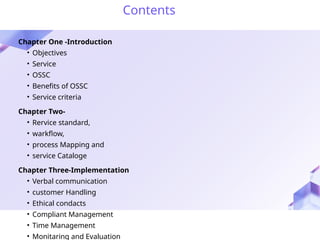
Contents
Chapter One -Introduction
•Objectives
• Service
• OSSC
• Benefits of OSSC
• Service criteria
Chapter Two-
• Rervice standard,
• warkflow,
• process Mapping and
• service Cataloge
Chapter Three-Implementation
• Verbal communication
• customer Handling
• Ethical condacts
• Compliant Management
• Time Management
• Monitaring and Evaluation
3.
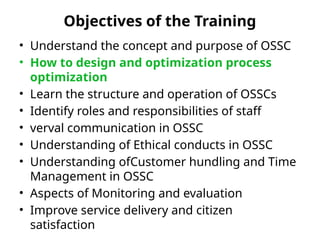
Objectives of theTraining
• Understand the concept and purpose of OSSC
• How to design and optimization process
optimization
• Learn the structure and operation of OSSCs
• Identify roles and responsibilities of staff
• verval communication in OSSC
• Understanding of Ethical conducts in OSSC
• Understanding ofCustomer hundling and Time
Management in OSSC
• Aspects of Monitoring and evaluation
• Improve service delivery and citizen
satisfaction
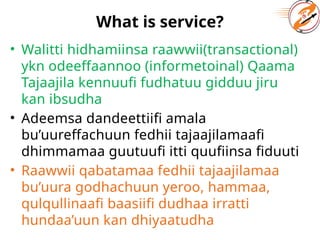
What is service?
•Walitti hidhamiinsa raawwii(transactional)
ykn odeeffaannoo (informetoinal) Qaama
Tajaajila kennuufi fudhatuu gidduu jiru
kan ibsudha
• Adeemsa dandeettiifi amala
bu’uureffachuun fedhii tajaajilamaafi
dhimmamaa guutuufi itti quufiinsa fiduuti
• Raawwii qabatamaa fedhii tajaajilamaa
bu’uura godhachuun yeroo, hammaa,
qulqullinaafi baasiifi dudhaa irratti
hundaa’uun kan dhiyaatudha
6.
Service.....
• Aangoo seeraanadda bahee kenname
naamusa ogummaafi gahuumsaan
deeggaramee sadarkaaraawwii
murtaa’een kan kennamuudha
• Tajaajila mootummaa jechuun kan
mootummaan mootummaaf (G2G),
Mootummaan ummataaf(G2C),
Mootummaan dhaabbilee dhuunfaaf
(G2B) kan hammattudha
7.
To Identify servicefrom any activity...
• Kan kennuufi fudhatu jiraachuu
• yaa’insa hojii (AS Is and to be)
• Guyyaa guyyaan kan raawwatamu ta’uu qaba
(daily)
• Yeroo, baasii, qulqullinaafi baay’inaan kan
safaramu ta’uu qaba
• Deebii kennamu (delivery)
• iftoofinaafi gaafatamummaa kan qabu (Acc. and
resp)
• Customer centered
8.
What is aOne-Stop Service Center?
• Is a physical or digital platform where
multiple public services from various
government agencies are delivered in a single
location or through an integrated system.
• Is a centralized facility that brings together
diverse public services and administrative
procedures under one roof to improve
efficiency,
accessibility, and
citizen satisfaction by minimizing time, cost, and
bureaucracy.
9.
Benefits of aOne Stop Service Center (OSSC)
For Citizens / Service Users
• Convenience
• Access multiple services in a single location or
platform.
• Reduces the need to visit several offices.
• Time and Cost Saving
• Faster service delivery due to simplified
procedures.
• Cuts travel expenses and waiting times.
• Transparency
• Clear information on procedures, requirements,
and fees.
• Reduces corruption and informal payments.
10.
• Improved ServiceQuality
• Standardized services reduce errors and
confusion.
• Better-trained staff handle services
professionally.
• Accountability
• Easier to report problems and track service
delivery.
• Feedback mechanisms are often
integrated.
11.
For Government /Service Providers
Operational Efficiency
• Streamlines processes and reduces duplication of efforts.
• Saves administrative time and resources.
Better Coordination
• Promotes collaboration between different government
agencies.
• Integrates services that are interdependent.
Data Management
• Centralizes service data, aiding in planning and decision-
making.
• Enables digital tracking and reporting of services.
Public Trust
• Increases citizen satisfaction with government services.
• Builds a positive image of government responsiveness.
Scalability
• Makes it easier to add new services or expand to other regions.
12.
Chapter Two
• ServiceIdentification,
• Standard,
• Warkflow,
• Process Mapping and
• Service Cataloge
13.
1. Major Criteriain Service Identification for
OSSC
1. Relevance to Public Needs
• Services must address common and
essential public demands (e.g., ID issuance,
permits, tax payments).
• Should prioritize high-demand and
frequently requested services.
2. Legality and Mandate
• The service must fall within the legal
mandate of the government agency.
• Only legally authorized services should be
included.
14.
3. Feasibility andReadiness
• Consider whether the service process is well-defined
and digitizable.
• Assess availability of skilled personnel, infrastructure,
and technology.
4. Impact on Service Efficiency
• Choose services whose inclusion will reduce time,
cost, and effort for both the public and the
government.
• Prioritize services that can significantly reduce foot
traffic at traditional offices.
5. Inter-agency Integration Potential
• Services that involve multiple agencies but can be
integrated into one workflow are ideal.
• Look for services where coordination adds value to
15.
Cont...
6. Frequency ofUse
• Select services that are requested regularly by
the public (e.g., birth certificate, tax
clearance).
• Avoid rarely used or highly specialized
services in early stages.
7. Standardizability
• The service should follow clear, uniform
procedures and documentation requirements.
• Services with inconsistent practices are not
suitable without reform.
16.
8. Trackability andMeasurability
• The service should be measurable in terms of
performance indicators (e.g., time taken,
satisfaction, success rate).
• Easy to monitor for accountability and
improvement.
9. Affordability and Resource Use
• Consider the cost-effectiveness of including the
service.
• Avoid services that require excessive
investment unless they meet strategic goals.
17.
2. Service DeliveryStandard
1. Service Type
2. Responsible body/service provider
3. Service deliver level(time, cost,
quality...)
4. Service delivery mode(physical, vertual,
both)
5. Customer
18.
3. Business Workflow
•A business workflow is a sequence of tasks or
steps that are followed to complete a specific
business process or service, often involving
– Multiple people,
– Systems, or
– Departments.
• A business workflow is
– An organized,
– Repeatable pattern of activities designed to
accomplish a specific organizational goal,
– Usually defined by rules, roles, inputs, and
outcomes.
19.
Major Points ofwarkflow
• Tasks/Steps: The individual actions or
stages in the process
• Actors: People, systems, or roles
responsible for tasks
• Inputs: Data or materials needed to start
the process
• Rules: Conditions or decisions that guide
the flow
• Outputs: Final result or service delivered
20.
Example:
• For issuinga business license:
– Customer submits application
– Clerk verifies documents
– Supervisor reviews and approves
– License is printed and issued
4. Service Mapping
•Service Mapping is the process of
breaking down a service into its
components (steps, actors, inputs, and
outputs) to understand how it flows
from start to finish, enabling better
delivery, monitoring, and improvement
Steps to:
• Service identification
• Detail activity
• Identify service mapping tools
• Service Mapping
23.
Objectives of ServiceMapping:
• Understand how a service is currently
delivered
• Identify inefficiencies, redundancies, or
delays
• Improve service quality, speed, and
accountability
• Define clear roles and responsibilities
• Support digital transformation or OSSC
integration
24.
5. Service Catalogue
•A Service Catalogue is a structured document or
system that lists all available public services
provided at a center, including:
1. Service Names and descriptions
2. Customer Eligibility Criteria and Required documents
3. Processing time
4. Service charges (if any)
5. Regulations
6. service stages
7. Responsible agency or officer
8. Service Workflow Description
9. Step-by-Step Procedure
10.Contact Information or Responsible Desk
25.
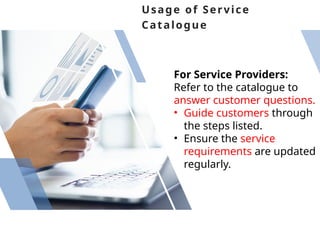
Usage of Service
Catalogue
ForService Providers:
Refer to the catalogue to
answer customer questions.
• Guide customers through
the steps listed.
• Ensure the service
requirements are updated
regularly.
26.
For Customers:
Review servicesto
understand what is
available.
• Prepare required
documents before coming
to the center.
• Follow the steps outlined
to complete service
requests.
Steps to VerbalCommunication in OSSC
1. Start with Courtesy/politeness
Greet every customer warmly and
professionally.
Use polite expressions like "Welcome,"
"Please," and "Thank you."
2. Be Clear and Concise
Speak slowly and clearly.
Use simple, non-technical words unless
necessary.
Avoid long or confusing explanations.
3. Listen Attentively
Do not interrupt while the customer is
speaking.
Show understanding through verbal
cues like “I see” or “I understand.”
30.
Stay calm andrespectful, even if the customer is
emotional or frustrated.
Never raise your voice or sound defensive.
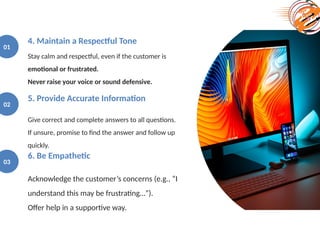
4. Maintain a Respectful Tone
01
Give correct and complete answers to all questions.
If unsure, promise to find the answer and follow up
quickly.
5. Provide Accurate Information
02
Acknowledge the customer’s concerns (e.g., “I
understand this may be frustrating…”).
Offer help in a supportive way.
6. Be Empathetic
03
31.
01 Ask thecustomer if they’ve understood the information provided.
Encourage them to repeat key points to confirm clarity.
7. Ensure Mutual Understanding
02 Listen without judgment.
Apologize sincerely when needed and explain the solution process.
8. Handle Complaints Professionally
03 Close the interaction on a positive note.
Thank the customer and offer further assistance if needed.
9. End Politely
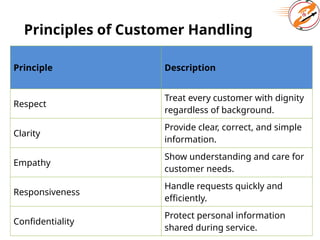
Principles of CustomerHandling
Principle Description
Respect
Treat every customer with dignity
regardless of background.
Clarity
Provide clear, correct, and simple
information.
Empathy
Show understanding and care for
customer needs.
Responsiveness
Handle requests quickly and
efficiently.
Confidentiality
Protect personal information
shared during service.
34.
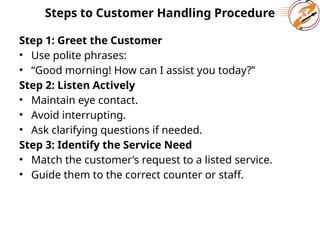
Steps to CustomerHandling Procedure
Step 1: Greet the Customer
• Use polite phrases:
• “Good morning! How can I assist you today?”
Step 2: Listen Actively
• Maintain eye contact.
• Avoid interrupting.
• Ask clarifying questions if needed.
Step 3: Identify the Service Need
• Match the customer’s request to a listed service.
• Guide them to the correct counter or staff.
35.
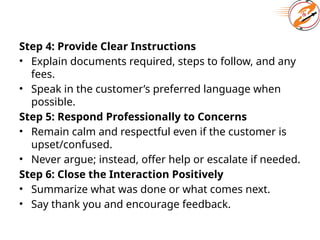
Step 4: ProvideClear Instructions
• Explain documents required, steps to follow, and any
fees.
• Speak in the customer’s preferred language when
possible.
Step 5: Respond Professionally to Concerns
• Remain calm and respectful even if the customer is
upset/confused.
• Never argue; instead, offer help or escalate if needed.
Step 6: Close the Interaction Positively
• Summarize what was done or what comes next.
• Say thank you and encourage feedback.
36.
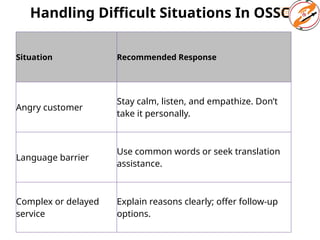
Handling Difficult SituationsIn OSSC
Situation Recommended Response
Angry customer
Stay calm, listen, and empathize. Don’t
take it personally.
Language barrier
Use common words or seek translation
assistance.
Complex or delayed
service
Explain reasons clearly; offer follow-up
options.
37.
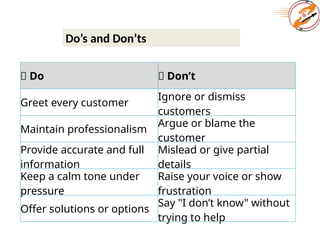
Do’s and Don’ts
✅Do ❌ Don’t
Greet every customer
Ignore or dismiss
customers
Maintain professionalism
Argue or blame the
customer
Provide accurate and full
information
Mislead or give partial
details
Keep a calm tone under
pressure
Raise your voice or show
frustration
Offer solutions or options
Say "I don’t know" without
trying to help
38.
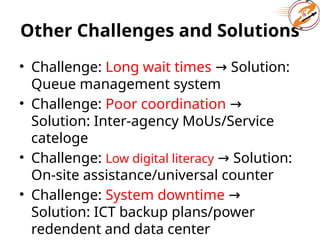
Other Challenges andSolutions
• Challenge: Long wait times Solution:
→
Queue management system
• Challenge: Poor coordination →
Solution: Inter-agency MoUs/Service
cateloge
• Challenge: Low digital literacy Solution:
→
On-site assistance/universal counter
• Challenge: System downtime →
Solution: ICT backup plans/power
redendent and data center
Core Ethical Principles
1.Integrity – Uphold honesty and
truthfulness
2. Impartiality – Treat all clients equally
without bias
3. Accountability – Take responsibility
for actions and decisions
4. Confidentiality – Protect client
information
43.
Expected Conduct atthe OSSC
• Arrive on time and fulfill duties
diligently
• Respect clients and fellow staff at all
times
• Provide accurate and timely information
• Refrain from accepting gifts or favors
44.
Expected Conduct at
theOSSC
Arrive on
time and
fulfill duties
diligently
Respect
clients and
fellow staff at
all times
Provide
accurate and
timely
information
Refrain from
accepting gifts
or favors
Misconduct to Avoid
1.Requesting or accepting bribes or
kickbacks
2. Favoritism, nepotism, or misuse of
authority
3. Disclosure of confidential information
4. Negligence or intentional delay in
service
47.
Reporting and Accountability
1.Report unethical conduct to
supervisors or ethics committee
2. Participate in regular ethics training
3. Cooperate with audits and
performance reviews
4. Support a culture of integrity in the
workplace
48.
• Verbal orwritten warnings
• Administrative penalties or suspension
• Termination of employment
• Legal action in cases of corruption or
abuse
49.
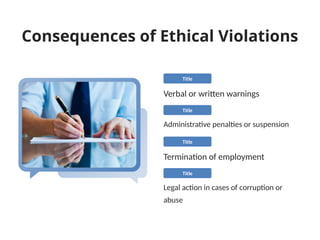
Consequences of EthicalViolations
Verbal or written warnings
Title
Administrative penalties or suspension
Title
Termination of employment
Title
Legal action in cases of corruption or
abuse
Title
50.
Promoting Ethical Culture
•Lead by example – Managers and staff
alike
• Encourage open dialogue and feedback
• Reward ethical behavior
• Include ethics in performance
assessments
Complaint Handling Processin OSSC
• Step 1: Receiving Complaints
Channels: Complaints can be submitted
through:
Face-to-face at the OSSC helpdesk
Suggestion/complaint box
Phone hotline
Online portal or SMS
• Staff must listen actively, remain calm,
and record the complaint immediately.
53.
cont.
Step 2: RegisteringComplaints
• All complaints must be logged in the
Complaint Registry System or manual
logbook.
• Capture the following:
Customer name and contact
Nature and category of complaint
Date and time received
Staff name receiving the complaint
Step 3: Acknowledgement
• Provide a receipt or case number to the
complainant.
54.
Cont...
Step 4: Assessmentand Resolution
• Forward the complaint to the responsible unit or
supervisor.
• Investigate the issue within specified timelines (e.g.,
3–5 working days).
• Take corrective action if necessary.
Step 5: Response to Customer
• Inform the complainant of the outcome and
resolution.
• Use clear, respectful, and non-technical language.
Step 6: Follow-up and Closure
• Verify customer satisfaction if needed.
• Mark the complaint as “resolved” in the system.
Time Management Principles
•Punctuality: Staff must begin and end duties
on time.
• Prioritization: Urgent and quick services
should be handled efficiently.
• Standardization: Each service should have a
defined delivery time.
• Automation: Use digital tools to minimize
manual delays.
• Monitoring: Track time data to inform
decisions and improvements.
57.
Time Management Toolsin OSSC
Tool Description
Queue Management
System (QMS)
Assigns tokens and tracks waiting
times
Digital Timers at
Counters
Helps staff track service time per
customer
Appointment Booking
System
Allows citizens to choose specific
times
Customer Feedback
Terminal
Collects time-related
complaints/suggestions
Dashboard/Display
Boards
Shows live queue and expected
waiting times
58.
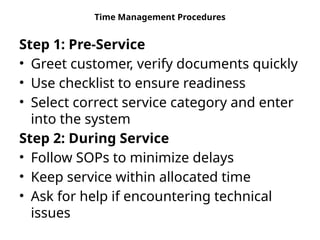
Time Management Procedures
Step1: Pre-Service
• Greet customer, verify documents quickly
• Use checklist to ensure readiness
• Select correct service category and enter
into the system
Step 2: During Service
• Follow SOPs to minimize delays
• Keep service within allocated time
• Ask for help if encountering technical
issues
59.
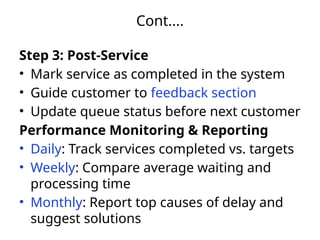
Cont....
Step 3: Post-Service
•Mark service as completed in the system
• Guide customer to feedback section
• Update queue status before next customer
Performance Monitoring & Reporting
• Daily: Track services completed vs. targets
• Weekly: Compare average waiting and
processing time
• Monthly: Report top causes of delay and
suggest solutions
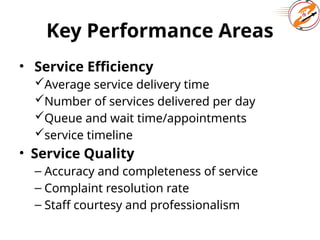
Key Performance Areas
•Service Efficiency
Average service delivery time
Number of services delivered per day
Queue and wait time/appointments
service timeline
• Service Quality
– Accuracy and completeness of service
– Complaint resolution rate
– Staff courtesy and professionalism
62.
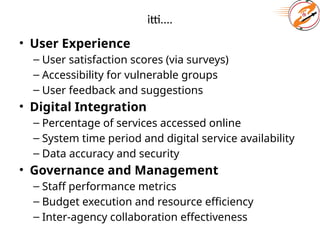
itti....
• User Experience
–User satisfaction scores (via surveys)
– Accessibility for vulnerable groups
– User feedback and suggestions
• Digital Integration
– Percentage of services accessed online
– System time period and digital service availability
– Data accuracy and security
• Governance and Management
– Staff performance metrics
– Budget execution and resource efficiency
– Inter-agency collaboration effectiveness
63.
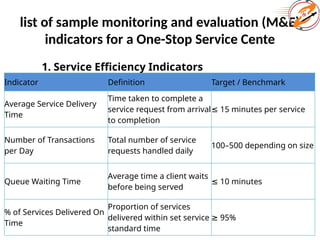
list of samplemonitoring and evaluation (M&E)
indicators for a One-Stop Service Cente
1. Service Efficiency Indicators
Indicator Definition Target / Benchmark
Average Service Delivery
Time
Time taken to complete a
service request from arrival
to completion
≤ 15 minutes per service
Number of Transactions
per Day
Total number of service
requests handled daily
100–500 depending on size
Queue Waiting Time
Average time a client waits
before being served
≤ 10 minutes
% of Services Delivered On
Time
Proportion of services
delivered within set service
standard time
≥ 95%
64.
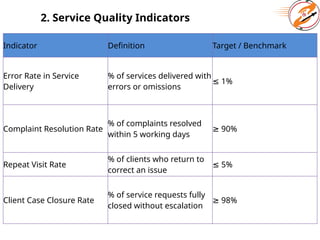
2. Service QualityIndicators
Indicator Definition Target / Benchmark
Error Rate in Service
Delivery
% of services delivered with
errors or omissions
≤ 1%
Complaint Resolution Rate
% of complaints resolved
within 5 working days
≥ 90%
Repeat Visit Rate
% of clients who return to
correct an issue
≤ 5%
Client Case Closure Rate
% of service requests fully
closed without escalation
≥ 98%
65.
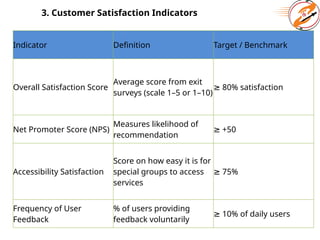
3. Customer SatisfactionIndicators
Indicator Definition Target / Benchmark
Overall Satisfaction Score
Average score from exit
surveys (scale 1–5 or 1–10)
≥ 80% satisfaction
Net Promoter Score (NPS)
Measures likelihood of
recommendation
≥ +50
Accessibility Satisfaction
Score on how easy it is for
special groups to access
services
≥ 75%
Frequency of User
Feedback
% of users providing
feedback voluntarily
≥ 10% of daily users
66.
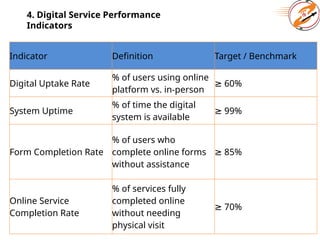
4. Digital ServicePerformance
Indicators
Indicator Definition Target / Benchmark
Digital Uptake Rate
% of users using online
platform vs. in-person
≥ 60%
System Uptime
% of time the digital
system is available
≥ 99%
Form Completion Rate
% of users who
complete online forms
without assistance
≥ 85%
Online Service
Completion Rate
% of services fully
completed online
without needing
physical visit
≥ 70%
67.
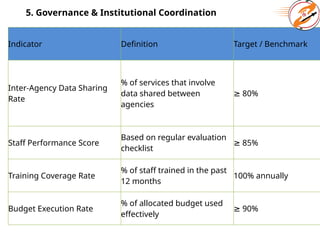
5. Governance &Institutional Coordination
Indicator Definition Target / Benchmark
Inter-Agency Data Sharing
Rate
% of services that involve
data shared between
agencies
≥ 80%
Staff Performance Score
Based on regular evaluation
checklist
≥ 85%
Training Coverage Rate
% of staff trained in the past
12 months
100% annually
Budget Execution Rate
% of allocated budget used
effectively
≥ 90%
68.
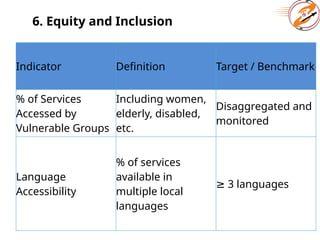
6. Equity andInclusion
Indicator Definition Target / Benchmark
% of Services
Accessed by
Vulnerable Groups
Including women,
elderly, disabled,
etc.
Disaggregated and
monitored
Language
Accessibility
% of services
available in
multiple local
languages
≥ 3 languages
69.
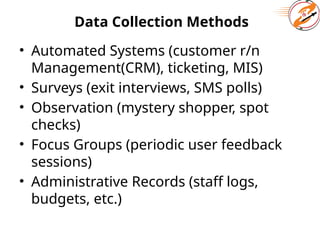
Data Collection Methods
•Automated Systems (customer r/n
Management(CRM), ticketing, MIS)
• Surveys (exit interviews, SMS polls)
• Observation (mystery shopper, spot
checks)
• Focus Groups (periodic user feedback
sessions)
• Administrative Records (staff logs,
budgets, etc.)
70.
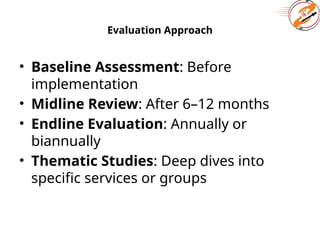
Evaluation Approach
• BaselineAssessment: Before
implementation
• Midline Review: After 6–12 months
• Endline Evaluation: Annually or
biannually
• Thematic Studies: Deep dives into
specific services or groups
71.
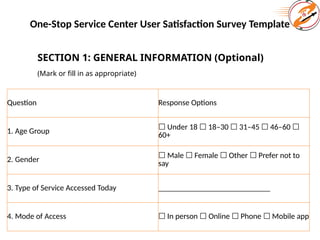
One-Stop Service CenterUser Satisfaction Survey Template
SECTION 1: GENERAL INFORMATION (Optional)
(Mark or fill in as appropriate)
Question Response Options
1. Age Group
☐ Under 18 18–30 31–45 46–60
☐ ☐ ☐ ☐
60+
2. Gender
☐ Male Female Other Prefer not to
☐ ☐ ☐
say
3. Type of Service Accessed Today ____________________________
4. Mode of Access ☐ In person Online Phone Mobile app
☐ ☐ ☐
72.
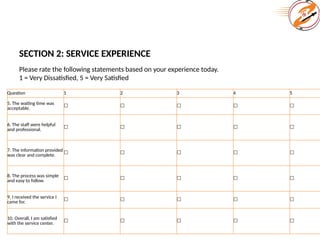
SECTION 2: SERVICEEXPERIENCE
Please rate the following statements based on your experience today.
1 = Very Dissatisfied, 5 = Very Satisfied
Question 1 2 3 4 5
5. The waiting time was
acceptable. ☐ ☐ ☐ ☐ ☐
6. The staff were helpful
and professional.
☐ ☐ ☐ ☐ ☐
7. The information provided
was clear and complete.
☐ ☐ ☐ ☐ ☐
8. The process was simple
and easy to follow. ☐ ☐ ☐ ☐ ☐
9. I received the service I
came for.
☐ ☐ ☐ ☐ ☐
10. Overall, I am satisfied
with the service center.
☐ ☐ ☐ ☐ ☐
73.
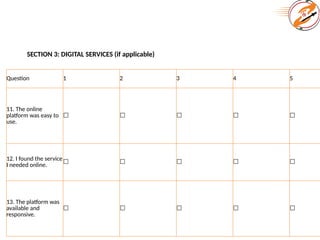
SECTION 3: DIGITALSERVICES (if applicable)
Question 1 2 3 4 5
11. The online
platform was easy to
use.
☐ ☐ ☐ ☐ ☐
12. I found the service
I needed online.
☐ ☐ ☐ ☐ ☐
13. The platform was
available and
responsive.
☐ ☐ ☐ ☐ ☐
74.
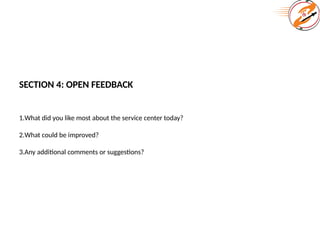
SECTION 4: OPENFEEDBACK
1.What did you like most about the service center today?
2.What could be improved?
3.Any additional comments or suggestions?
75.
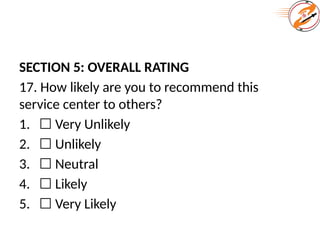
SECTION 5: OVERALLRATING
17. How likely are you to recommend this
service center to others?
1. ☐ Very Unlikely
2. ☐ Unlikely
3. ☐ Neutral
4. ☐ Likely
5. ☐ Very Likely
76.
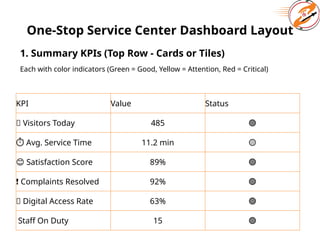
One-Stop Service CenterDashboard Layout
1. Summary KPIs (Top Row - Cards or Tiles)
Each with color indicators (Green = Good, Yellow = Attention, Red = Critical)
KPI Value Status
🚶 Visitors Today 485 🟢
⏱ Avg. Service Time 11.2 min 🟡
😊 Satisfaction Score 89% 🟢
❗ Complaints Resolved 92% 🟢
📱 Digital Access Rate 63% 🟢
Staff On Duty 15 🟢
77.
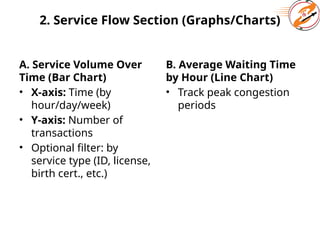
2. Service FlowSection (Graphs/Charts)
A. Service Volume Over
Time (Bar Chart)
• X-axis: Time (by
hour/day/week)
• Y-axis: Number of
transactions
• Optional filter: by
service type (ID, license,
birth cert., etc.)
B. Average Waiting Time
by Hour (Line Chart)
• Track peak congestion
periods
78.
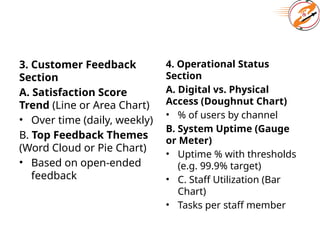
3. Customer Feedback
Section
A.Satisfaction Score
Trend (Line or Area Chart)
• Over time (daily, weekly)
B. Top Feedback Themes
(Word Cloud or Pie Chart)
• Based on open-ended
feedback
4. Operational Status
Section
A. Digital vs. Physical
Access (Doughnut Chart)
• % of users by channel
B. System Uptime (Gauge
or Meter)
• Uptime % with thresholds
(e.g. 99.9% target)
• C. Staff Utilization (Bar
Chart)
• Tasks per staff member
79.
6. Alerts &
NotificationsPanel
• 🔔 New unresolved
complaints
• ⚠️Services below
threshold
performance
• 📌 Feedback requiring
urgent response
7. Drill-down Tabs
(Optional)
Tabs or menu to view
detailed tables:
• By Service Type
• By Age/Gender
• By Channel
(Mobile/Web/In-
Person)
• By Staff Member