Integration Guide
1
Purpose of this Guide
1
2
3
Network Participant journey with easy steps to integrate with ONDC
Provide the necessary resources for Integration
Provide communication channels for query resolution
2
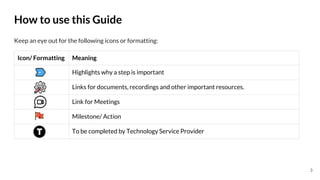
Icon/ Formatting Meaning
Highlights why a step is important
Links for documents, recordings and other important resources.
Link for Meetings
Milestone/ Action
To be completed by Technology Service Provider
Keep an eye out for the following icons or formatting:
How to use this Guide
3
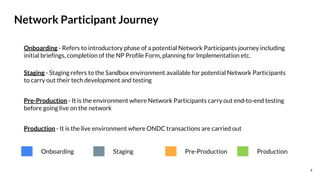
Network Participant Journey
Staging - Staging refers to the Sandbox environment available for potential Network Participants
to carry out their tech development and testing
Pre-Production - It is the environment where Network Participants carry out end-to-end testing
before going live on the network
Production - It is the live environment where ONDC transactions are carried out
Onboarding - Refers to introductory phase of a potential Network Participants journey including
initial briefings, completion of the NP Profile Form, planning for Implementation etc.
Staging Pre-Production Production
Onboarding
4
Network Participant Journey
Go - Live on
Production
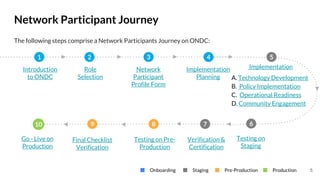
Introduction
to ONDC
Role
Selection
Network
Participant
Profile Form
Implementation
Planning
Verification &
Certification
Testing on Pre-
Production
1 2 3 4 5
7
8
10
Implementation
A. Technology Development
B. Policy Implementation
C. Operational Readiness
D. Community Engagement
6
Testing on
Staging
Staging Pre-Production Production
Onboarding
The following steps comprise a Network Participants Journey on ONDC:
9
Final Checklist
Verification
5
Onboarding
6
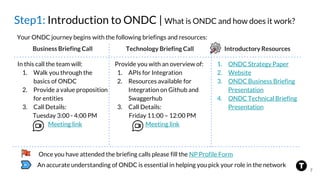
Step1: Introduction to ONDC | What is ONDC and how does it work?
An accurate understanding of ONDC is essential in helping you pick your role in the network
Business Briefing Call Technology Briefing Call Introductory Resources
Provide you with an overview of:
1. APIs for Integration
2. Resources available for
Integration on Github and
Swaggerhub
3. Call Details:
Friday 11:00 – 12:00 PM
Meeting link
In this call the team will:
1. Walk you through the
basics of ONDC
2. Provide a value proposition
for entities
3. Call Details:
Tuesday 3:00 - 4:00 PM
Meeting link
1. ONDC Strategy Paper
2. Website
3. ONDC Business Briefing
Presentation
4. ONDC Technical Briefing
Presentation
Your ONDC journey begins with the following briefings and resources:
Once you have attended the briefing calls please fill the NP Profile Form
7
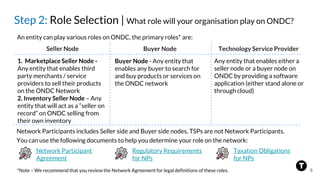
Step 2: Role Selection | What role will your organisation play on ONDC?
Seller Node Buyer Node Technology Service Provider
Buyer Node - Any entity that
enables any buyer to search for
and buy products or services on
the ONDC network
1. Marketplace Seller Node -
Any entity that enables third
party merchants / service
providers to sell their products
on the ONDC Network
2. Inventory Seller Node – Any
entity that will act as a “seller on
record” on ONDC selling from
their own inventory
An entity can play various roles on ONDC, the primary roles* are:
*Note – We recommend that you review the Network Agreement for legal definitions of these roles.
Any entity that enables either a
seller node or a buyer node on
ONDC by providing a software
application (either stand alone or
through cloud)
You can use the following documents to help you determine your role on the network:
Network Participants includes Seller side and Buyer side nodes, TSPs are not Network Participants.
Regulatory Requirements
for NPs
Taxation Obligations
for NPs
Network Participant
Agreement
8
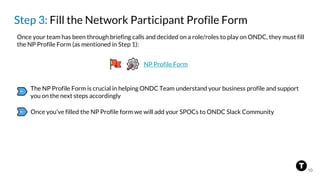
Step 3: Fill the Network Participant Profile Form
Once your team has been through briefing calls and decided on a role/roles to play on ONDC, they must fill
the NP Profile Form (as mentioned in Step 1):
The NP Profile Form is crucial in helping ONDC Team understand your business profile and support
you on the next steps accordingly
NP Profile Form
Once you’ve filled the NP Profile form we will add your SPOCs to ONDC Slack Community
10
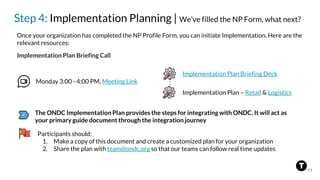
Step 4: Implementation Planning | We’ve filled the NP Form, what next?
Participants should:
1. Make a copy of this document and create a customized plan for your organization
2. Share the plan with team@ondc.org so that our teams can follow real time updates
Once your organization has completed the NP Profile Form, you can initiate Implementation. Here are the
relevant resources:
Implementation Plan – Retail & Logistics
Implementation Plan Briefing Deck
Monday 3:00 - 4:00 PM, Meeting Link
Implementation Plan Briefing Call
The ONDC Implementation Plan provides the steps for integrating with ONDC. It will act as
your primary guide document through the integration journey
11
Implementation
12
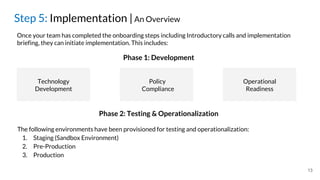
Step 5: Implementation |An Overview
Once your team has completed the onboarding steps including Introductory calls and implementation
briefing, they can initiate implementation. This includes:
Technology
Development
Policy
Compliance
Operational
Readiness
Phase 1: Development
The following environments have been provisioned for testing and operationalization:
1. Staging (Sandbox Environment)
2. Pre-Production
3. Production
13
Phase 2: Testing & Operationalization
Technology
Development
14
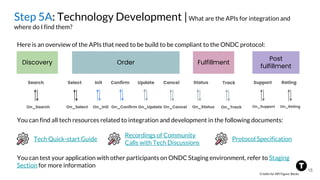
Step 5A: Technology Development |What are the APIs for integration and
where do I find them?
Here is an overview of the APIs that need to be build to be compliant to the ONDC protocol:
Post
fulfillment
Discovery Order Fulfillment
Search
On_Search
Select
On_Select
Init
On_Init
Confirm
On_Confirm
Cancel
On_Cancel
Update
On_Update
Track
On_Track
Support
On_Support
Status
On_Status
Rating
On_Rating
You can find all tech resources related to integration and development in the following documents:
Tech Quick-start Guide
Recordings of Community
Calls with Tech Discussions
Protocol Specification
You can test your application with other participants on ONDC Staging environment, refer to Staging
Section for more information
15
Credits for API Figure: Beckn
Retail MVP
Logistics MVP
Further, find the following:
Participants will be required to build for a Minimum Viable Product (MVP) during their integration journey.
The MVP documents for Retail and Logistics domains are provided below:
Recordings of Community Calls with MVP Discussion
MVP Use Cases Checklist - provides use cases for testing for the MVP
Step 5A: Technology Development |What is the minimum viable product for a
successful ONDC Integration?
16
17
Retail Transaction
Contracts
Logistics Transaction
Contracts
Process flow for Order
Cancellation, returns
& replacements
Process flow for Issue
Reporting
Order state &
fulfillment state
Error Handling &
ONDC error codes
Signing & verification
utility
Compliance
Step 5A: Technology Development | Key Technology Resources available for
NPs
Policy Implementation
18
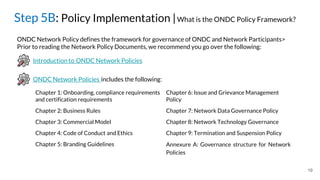
Step 5B: Policy Implementation |What is the ONDC Policy Framework?
ONDC Network Policy defines the framework for governance of ONDC and Network Participants>
Prior to reading the Network Policy Documents, we recommend you go over the following:
Introduction to ONDC Network Policies
ONDC Network Policies includes the following:
Chapter 1: Onboarding, compliance requirements
and certification requirements
Chapter 2: Business Rules
Chapter 3: Commercial Model
Chapter 4: Code of Conduct and Ethics
Chapter 5: Branding Guidelines
Chapter 6: Issue and Grievance Management
Policy
Chapter 7: Network Data Governance Policy
Chapter 8: Network Technology Governance
Chapter 9: Termination and Suspension Policy
Annexure A: Governance structure for Network
Policies
19
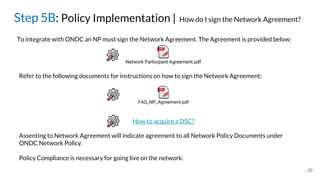
Step 5B: Policy Implementation | How do I sign the Network Agreement?
To integrate with ONDC an NP must sign the Network Agreement. The Agreement is provided below:
Refer to the following documents for instructions on how to sign the Network Agreement:
Assenting to Network Agreement will indicate agreement to all Network Policy Documents under
ONDC Network Policy.
Policy Compliance is necessary for going live on the network.
How to acquire a DSC?
20
Operational Readiness
21
Step 5C: Go-Live Planning | Who and what do you want to enable on ONDC?
GO-LIVE:
What you
bring to
ONDC for
testing
YOUR E-
COMMERCE
UNIVERSE
We will require the following details from you:
1. No. of Sellers/Buyers your team will bring to ONDC
2. Category of goods your team will enable
3. Cities where you will be operational
4. Pin-codes for Go-Live (If you are a logistics firm)
5. Planned dates for milestones
As you begin your implementation, you need to decide what part of your e-commerce universe you want to
enable on ONDC?
Note - Not all these fields may be applicable to you
We request you to share this information with us on the
Implementation Plan itself as it helps us plan for expansion of
ONDC.
22
Step 5C: Operational Readiness | How to enable ONDC transactions on ground?
Simultaneously, your teams must also work on operational preparedness required for ONDC Integration:
Refer to the Operational Readiness Checklist for a detailed view on operational preparedness
23
Customer Support Implementation (GRM)
Reconciliation and Payment Settlement
Support to Delivery Agents
Process for Monitoring of KPIs & SLAs
Additionally, for seller applications
Sharing Seller Profiles with ONDC
Checking seller preparedness. Refer to this questionnaire we prepared for checking
seller readiness
MVP Use Cases for Testing
Community
Engagement
24
Implementation Resources | Community Engagement
ONDC Team uses the following channels to communicate with early stage participants:
ONDC Slack
• You can download slack using this link
• Network Participants can use Slack to
interact with one another and collaborate
on integration or testing
• Slack acts like a repository of all queries and
questions that have been raised by various
NPs in the past
• The SPOCs mentioned in the NP Profile
form will be added to the Slack channel by
the ONDC Team
Community Calls
• Community Calls are organised to provide
Network Participants an opportunity to
interact with the ONDC Team
• The recordings and presentations from
previous calls can be found on this
document
• Community Calls provide a great forum to
get your queries answered
Call Details – Tuesday 4.30 - 5.30 PM,
Meeting Link
25
Staging
26
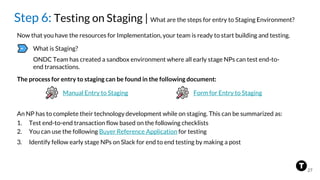
Step 6: Testing on Staging | What are the steps for entry to Staging Environment?
Now that you have the resources for Implementation, your team is ready to start building and testing.
What is Staging?
ONDC Team has created a sandbox environment where all early stage NPs can test end-to-
end transactions.
The process for entry to staging can be found in the following document:
Manual Entry to Staging
An NP has to complete their technology development while on staging. This can be summarized as:
1. Test end-to-end transaction flow based on the following checklists
2. You can use the following Buyer Reference Application for testing
3. Identify fellow early stage NPs on Slack for end to end testing by making a post
27
Form for Entry to Staging
Pre-Production
28
Step 8: Testing on Pre-Production | How do we enter the Pre-Prod
Environment?
After completion of technological development and tech compliance, you can move to Pre-Production
Environment. (Currently, an approval based on the demo is needed for entry to Pre-Prod)
What is Pre-Production?
Pre-Production is the environment where NPs test their development to receive certification to
move to ONDC Production Environment.
The process for entry to pre-production can be found in the following document:
Entry to Pre-Production
You can use the following for support on testing in Pre-Production:
Link for Buyer reference
application
29
Form for Demo
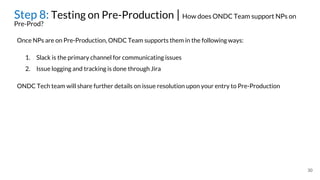
Once NPs are on Pre-Production, ONDC Team supports them in the following ways:
Step 8: Testing on Pre-Production | How does ONDC Team support NPs on
Pre-Prod?
1. Slack is the primary channel for communicating issues
2. Issue logging and tracking is done through Jira
30
ONDC Tech team will share further details on issue resolution upon your entry to Pre-Production
Step 9: Final Checklist Verification |What steps does a NP have to execute on
Pre-Prod to Go-Live on Production Environment?
31
Final Compliance Checklist
The following checklist provides the steps under technical, operational and regulatory compliance that
must be completed to qualify to move into Production environment. These are:
Note:
• An NP must meet all the requirements provided in the document and obtain a go-ahead from
ONDC Tech and Ops team for move to Production
• In addition to the compliances captured in the checklist an NP may also be required to go
through functional testing with the ONDC team
• The checklist provided above is evolving and ONDC may update the same as per any contingent
requirement in the future
Production
32
Step 10: Go-Live on Production | How do we enter the Production Environment?
Successfully surpassing the threshold for functional testing and complying with the final checklist on Pre-
Prod will enable an NP to move to Production environment
What is the Production environment ?
Production is the live environment where live transactions take place with transfer of goods
and services. Your team must have met the compliance requirements for moving to
Production.
33
The process for entry to Production can be found in the following document:
Entry to Production
Probationary Period
All Network Participants moving to Production will be on probation for a period of 2 weeks.
Only upon fulfillment of threshold for successful transactions completed will the move to
Production be made official or else participants will be moved back to Pre-production where
ample support will be provided to ensure their success on Production.
Entry to Production
Step 10: Go-Live on Production | What is the probationary period on ONDC?
34
Probationary Period
All Network Participants moving to Production will be on probation for a period of 2 weeks
maximum. Only upon clearing validation for Ops processes will the move to Production be
made official.
If the thresholds are not met, participants will be moved back to Pre-production where
ample support will be provided to ensure their success on Production.
This is to ensure that the sanctity of the Production environment is maintained.
Detailed on moving from Pre-Production
to Production
Annexure 1
35
List of Documents (1)
36
No. Name of Document
1 ONDC Website
2 ONDC Strategy Paper
3 ONDC Business Briefing Presentation
4 ONDC Technical Briefing Presentation
5 Network Participant Agreement
6 Regulatory Requirements for NPs
7 Taxation Obligations for NPs
8 Implementation Briefing Presentation
List of Documents (2)
37
No. Name of Document
9 Tech Quick-start Guide
10 Recordings of Community Calls with Tech Discussions
11 Protocol Specification
12 Retail MVP
13 Logistics MVP
14 Recordings of Community Calls with MVP Discussion
15 Retail Transaction Contracts
16 Logistics Transaction Contracts
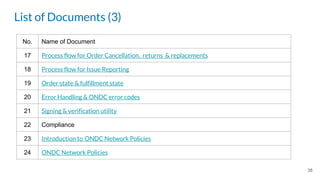
List of Documents (3)
38
No. Name of Document
17 Process flow for Order Cancellation, returns & replacements
18 Process flow for Issue Reporting
19 Order state & fulfillment state
20 Error Handling & ONDC error codes
21 Signing & verification utility
22 Compliance
23 Introduction to ONDC Network Policies
24 ONDC Network Policies
List of Documents (4)
39
No. Name of Document
25 Network Participant Agreement
26 NP Agreement FAQs
27 How to acquire a DSC?
28 Operational Readiness Checklist
29 Manual Entry to Staging
30 MVP Use Cases Checklist
31 Technical Compliance Checklist
32 Entry to Pre-Production
33 Detailed on moving from Pre-Production to Production

ONDC Integration Guide.pptx

  • 1.
  • 2.
    Purpose of thisGuide 1 2 3 Network Participant journey with easy steps to integrate with ONDC Provide the necessary resources for Integration Provide communication channels for query resolution 2
  • 3.
    Icon/ Formatting Meaning Highlightswhy a step is important Links for documents, recordings and other important resources. Link for Meetings Milestone/ Action To be completed by Technology Service Provider Keep an eye out for the following icons or formatting: How to use this Guide 3
  • 4.
    Network Participant Journey Staging- Staging refers to the Sandbox environment available for potential Network Participants to carry out their tech development and testing Pre-Production - It is the environment where Network Participants carry out end-to-end testing before going live on the network Production - It is the live environment where ONDC transactions are carried out Onboarding - Refers to introductory phase of a potential Network Participants journey including initial briefings, completion of the NP Profile Form, planning for Implementation etc. Staging Pre-Production Production Onboarding 4
  • 5.
    Network Participant Journey Go- Live on Production Introduction to ONDC Role Selection Network Participant Profile Form Implementation Planning Verification & Certification Testing on Pre- Production 1 2 3 4 5 7 8 10 Implementation A. Technology Development B. Policy Implementation C. Operational Readiness D. Community Engagement 6 Testing on Staging Staging Pre-Production Production Onboarding The following steps comprise a Network Participants Journey on ONDC: 9 Final Checklist Verification 5
  • 6.
  • 7.
    Step1: Introduction toONDC | What is ONDC and how does it work? An accurate understanding of ONDC is essential in helping you pick your role in the network Business Briefing Call Technology Briefing Call Introductory Resources Provide you with an overview of: 1. APIs for Integration 2. Resources available for Integration on Github and Swaggerhub 3. Call Details: Friday 11:00 – 12:00 PM Meeting link In this call the team will: 1. Walk you through the basics of ONDC 2. Provide a value proposition for entities 3. Call Details: Tuesday 3:00 - 4:00 PM Meeting link 1. ONDC Strategy Paper 2. Website 3. ONDC Business Briefing Presentation 4. ONDC Technical Briefing Presentation Your ONDC journey begins with the following briefings and resources: Once you have attended the briefing calls please fill the NP Profile Form 7
  • 8.
    Step 2: RoleSelection | What role will your organisation play on ONDC? Seller Node Buyer Node Technology Service Provider Buyer Node - Any entity that enables any buyer to search for and buy products or services on the ONDC network 1. Marketplace Seller Node - Any entity that enables third party merchants / service providers to sell their products on the ONDC Network 2. Inventory Seller Node – Any entity that will act as a “seller on record” on ONDC selling from their own inventory An entity can play various roles on ONDC, the primary roles* are: *Note – We recommend that you review the Network Agreement for legal definitions of these roles. Any entity that enables either a seller node or a buyer node on ONDC by providing a software application (either stand alone or through cloud) You can use the following documents to help you determine your role on the network: Network Participants includes Seller side and Buyer side nodes, TSPs are not Network Participants. Regulatory Requirements for NPs Taxation Obligations for NPs Network Participant Agreement 8
  • 9.
    Step 3: Fillthe Network Participant Profile Form Once your team has been through briefing calls and decided on a role/roles to play on ONDC, they must fill the NP Profile Form (as mentioned in Step 1): The NP Profile Form is crucial in helping ONDC Team understand your business profile and support you on the next steps accordingly NP Profile Form Once you’ve filled the NP Profile form we will add your SPOCs to ONDC Slack Community 10
  • 10.
    Step 4: ImplementationPlanning | We’ve filled the NP Form, what next? Participants should: 1. Make a copy of this document and create a customized plan for your organization 2. Share the plan with team@ondc.org so that our teams can follow real time updates Once your organization has completed the NP Profile Form, you can initiate Implementation. Here are the relevant resources: Implementation Plan – Retail & Logistics Implementation Plan Briefing Deck Monday 3:00 - 4:00 PM, Meeting Link Implementation Plan Briefing Call The ONDC Implementation Plan provides the steps for integrating with ONDC. It will act as your primary guide document through the integration journey 11
  • 11.
  • 12.
    Step 5: Implementation|An Overview Once your team has completed the onboarding steps including Introductory calls and implementation briefing, they can initiate implementation. This includes: Technology Development Policy Compliance Operational Readiness Phase 1: Development The following environments have been provisioned for testing and operationalization: 1. Staging (Sandbox Environment) 2. Pre-Production 3. Production 13 Phase 2: Testing & Operationalization
  • 13.
  • 14.
    Step 5A: TechnologyDevelopment |What are the APIs for integration and where do I find them? Here is an overview of the APIs that need to be build to be compliant to the ONDC protocol: Post fulfillment Discovery Order Fulfillment Search On_Search Select On_Select Init On_Init Confirm On_Confirm Cancel On_Cancel Update On_Update Track On_Track Support On_Support Status On_Status Rating On_Rating You can find all tech resources related to integration and development in the following documents: Tech Quick-start Guide Recordings of Community Calls with Tech Discussions Protocol Specification You can test your application with other participants on ONDC Staging environment, refer to Staging Section for more information 15 Credits for API Figure: Beckn
  • 15.
    Retail MVP Logistics MVP Further,find the following: Participants will be required to build for a Minimum Viable Product (MVP) during their integration journey. The MVP documents for Retail and Logistics domains are provided below: Recordings of Community Calls with MVP Discussion MVP Use Cases Checklist - provides use cases for testing for the MVP Step 5A: Technology Development |What is the minimum viable product for a successful ONDC Integration? 16
  • 16.
    17 Retail Transaction Contracts Logistics Transaction Contracts Processflow for Order Cancellation, returns & replacements Process flow for Issue Reporting Order state & fulfillment state Error Handling & ONDC error codes Signing & verification utility Compliance Step 5A: Technology Development | Key Technology Resources available for NPs
  • 17.
  • 18.
    Step 5B: PolicyImplementation |What is the ONDC Policy Framework? ONDC Network Policy defines the framework for governance of ONDC and Network Participants> Prior to reading the Network Policy Documents, we recommend you go over the following: Introduction to ONDC Network Policies ONDC Network Policies includes the following: Chapter 1: Onboarding, compliance requirements and certification requirements Chapter 2: Business Rules Chapter 3: Commercial Model Chapter 4: Code of Conduct and Ethics Chapter 5: Branding Guidelines Chapter 6: Issue and Grievance Management Policy Chapter 7: Network Data Governance Policy Chapter 8: Network Technology Governance Chapter 9: Termination and Suspension Policy Annexure A: Governance structure for Network Policies 19
  • 19.
    Step 5B: PolicyImplementation | How do I sign the Network Agreement? To integrate with ONDC an NP must sign the Network Agreement. The Agreement is provided below: Refer to the following documents for instructions on how to sign the Network Agreement: Assenting to Network Agreement will indicate agreement to all Network Policy Documents under ONDC Network Policy. Policy Compliance is necessary for going live on the network. How to acquire a DSC? 20
  • 20.
  • 21.
    Step 5C: Go-LivePlanning | Who and what do you want to enable on ONDC? GO-LIVE: What you bring to ONDC for testing YOUR E- COMMERCE UNIVERSE We will require the following details from you: 1. No. of Sellers/Buyers your team will bring to ONDC 2. Category of goods your team will enable 3. Cities where you will be operational 4. Pin-codes for Go-Live (If you are a logistics firm) 5. Planned dates for milestones As you begin your implementation, you need to decide what part of your e-commerce universe you want to enable on ONDC? Note - Not all these fields may be applicable to you We request you to share this information with us on the Implementation Plan itself as it helps us plan for expansion of ONDC. 22
  • 22.
    Step 5C: OperationalReadiness | How to enable ONDC transactions on ground? Simultaneously, your teams must also work on operational preparedness required for ONDC Integration: Refer to the Operational Readiness Checklist for a detailed view on operational preparedness 23 Customer Support Implementation (GRM) Reconciliation and Payment Settlement Support to Delivery Agents Process for Monitoring of KPIs & SLAs Additionally, for seller applications Sharing Seller Profiles with ONDC Checking seller preparedness. Refer to this questionnaire we prepared for checking seller readiness MVP Use Cases for Testing
  • 23.
  • 24.
    Implementation Resources |Community Engagement ONDC Team uses the following channels to communicate with early stage participants: ONDC Slack • You can download slack using this link • Network Participants can use Slack to interact with one another and collaborate on integration or testing • Slack acts like a repository of all queries and questions that have been raised by various NPs in the past • The SPOCs mentioned in the NP Profile form will be added to the Slack channel by the ONDC Team Community Calls • Community Calls are organised to provide Network Participants an opportunity to interact with the ONDC Team • The recordings and presentations from previous calls can be found on this document • Community Calls provide a great forum to get your queries answered Call Details – Tuesday 4.30 - 5.30 PM, Meeting Link 25
  • 25.
  • 26.
    Step 6: Testingon Staging | What are the steps for entry to Staging Environment? Now that you have the resources for Implementation, your team is ready to start building and testing. What is Staging? ONDC Team has created a sandbox environment where all early stage NPs can test end-to- end transactions. The process for entry to staging can be found in the following document: Manual Entry to Staging An NP has to complete their technology development while on staging. This can be summarized as: 1. Test end-to-end transaction flow based on the following checklists 2. You can use the following Buyer Reference Application for testing 3. Identify fellow early stage NPs on Slack for end to end testing by making a post 27 Form for Entry to Staging
  • 27.
  • 28.
    Step 8: Testingon Pre-Production | How do we enter the Pre-Prod Environment? After completion of technological development and tech compliance, you can move to Pre-Production Environment. (Currently, an approval based on the demo is needed for entry to Pre-Prod) What is Pre-Production? Pre-Production is the environment where NPs test their development to receive certification to move to ONDC Production Environment. The process for entry to pre-production can be found in the following document: Entry to Pre-Production You can use the following for support on testing in Pre-Production: Link for Buyer reference application 29 Form for Demo
  • 29.
    Once NPs areon Pre-Production, ONDC Team supports them in the following ways: Step 8: Testing on Pre-Production | How does ONDC Team support NPs on Pre-Prod? 1. Slack is the primary channel for communicating issues 2. Issue logging and tracking is done through Jira 30 ONDC Tech team will share further details on issue resolution upon your entry to Pre-Production
  • 30.
    Step 9: FinalChecklist Verification |What steps does a NP have to execute on Pre-Prod to Go-Live on Production Environment? 31 Final Compliance Checklist The following checklist provides the steps under technical, operational and regulatory compliance that must be completed to qualify to move into Production environment. These are: Note: • An NP must meet all the requirements provided in the document and obtain a go-ahead from ONDC Tech and Ops team for move to Production • In addition to the compliances captured in the checklist an NP may also be required to go through functional testing with the ONDC team • The checklist provided above is evolving and ONDC may update the same as per any contingent requirement in the future
  • 31.
  • 32.
    Step 10: Go-Liveon Production | How do we enter the Production Environment? Successfully surpassing the threshold for functional testing and complying with the final checklist on Pre- Prod will enable an NP to move to Production environment What is the Production environment ? Production is the live environment where live transactions take place with transfer of goods and services. Your team must have met the compliance requirements for moving to Production. 33 The process for entry to Production can be found in the following document: Entry to Production Probationary Period All Network Participants moving to Production will be on probation for a period of 2 weeks. Only upon fulfillment of threshold for successful transactions completed will the move to Production be made official or else participants will be moved back to Pre-production where ample support will be provided to ensure their success on Production. Entry to Production
  • 33.
    Step 10: Go-Liveon Production | What is the probationary period on ONDC? 34 Probationary Period All Network Participants moving to Production will be on probation for a period of 2 weeks maximum. Only upon clearing validation for Ops processes will the move to Production be made official. If the thresholds are not met, participants will be moved back to Pre-production where ample support will be provided to ensure their success on Production. This is to ensure that the sanctity of the Production environment is maintained. Detailed on moving from Pre-Production to Production
  • 34.
  • 35.
    List of Documents(1) 36 No. Name of Document 1 ONDC Website 2 ONDC Strategy Paper 3 ONDC Business Briefing Presentation 4 ONDC Technical Briefing Presentation 5 Network Participant Agreement 6 Regulatory Requirements for NPs 7 Taxation Obligations for NPs 8 Implementation Briefing Presentation
  • 36.
    List of Documents(2) 37 No. Name of Document 9 Tech Quick-start Guide 10 Recordings of Community Calls with Tech Discussions 11 Protocol Specification 12 Retail MVP 13 Logistics MVP 14 Recordings of Community Calls with MVP Discussion 15 Retail Transaction Contracts 16 Logistics Transaction Contracts
  • 37.
    List of Documents(3) 38 No. Name of Document 17 Process flow for Order Cancellation, returns & replacements 18 Process flow for Issue Reporting 19 Order state & fulfillment state 20 Error Handling & ONDC error codes 21 Signing & verification utility 22 Compliance 23 Introduction to ONDC Network Policies 24 ONDC Network Policies
  • 38.
    List of Documents(4) 39 No. Name of Document 25 Network Participant Agreement 26 NP Agreement FAQs 27 How to acquire a DSC? 28 Operational Readiness Checklist 29 Manual Entry to Staging 30 MVP Use Cases Checklist 31 Technical Compliance Checklist 32 Entry to Pre-Production 33 Detailed on moving from Pre-Production to Production

Editor's Notes