Forensic Preview, Triage, & Collect
with TD3
Damir Delija
Consultant

OLAF Opatija 2013
Goals
Provide additional hands-on during Encase
Mac Linux course and EnCase Forensic
course
Explore “preview” and “triage” as forensic
processes that complement full drive
“collection”
Discuss use cases where network preview,
triage, and collection may be applicable

Page 2
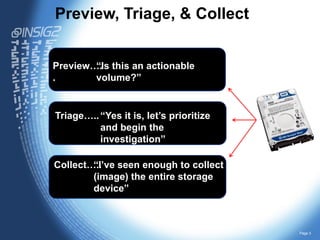
Preview, Triage, & Collect
Preview…. this an actionable
“Is
.
volume?”

Triage….. “Yes it is, let’s prioritize
and begin the
investigation”
Collect…..
“I’ve seen enough to collect
(image) the entire storage
device”

Page 3
Why Preview or Triage?
Triage
Medical - is the process of determining the
priority of patients' treatments based on the
severity of their condition
Digital forensics - is the process of reviewing
data to determine the appropriate actions
based on the severity of the situation and the
relevance / severity of the data.
In triage users have the ability to triage data on
target devices in a matter of minutes and
determine what should happen next.
This ability is critically important in situations when
time is of the essence, enable to close cases
faster by redcing volume of data to process
Page 4
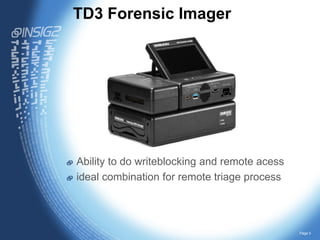
TD3 Forensic Imager

Ability to do writeblocking and remote acess
ideal combination for remote triage process

Page 5
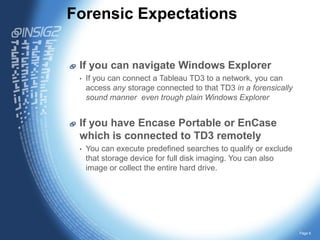
Forensic Expectations
If you can navigate Windows Explorer
•

If you can connect a Tableau TD3 to a network, you can
access any storage connected to that TD3 in a forensically
sound manner even trough plain Windows Explorer

If you have Encase Portable or EnCase
which is connected to TD3 remotely
•

You can execute predefined searches to qualify or exclude
that storage device for full disk imaging. You can also
image or collect the entire hard drive.

Page 6
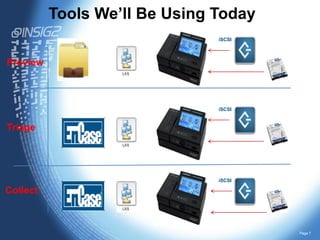
Tools We’ll Be Using Today
iSCSI

Preview

iSCSI

Triage

iSCSI

Collect

Page 7
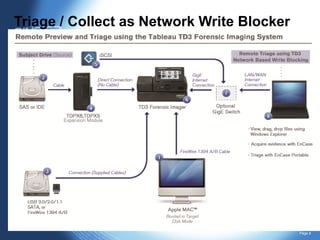
Triage / Collect as Network Write Blocker

Page 8
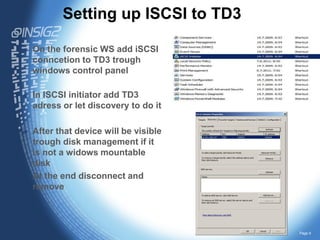
Setting up ISCSI to TD3
On the forensic WS add iSCSI
conncetion to TD3 trough
windows control panel
In ISCSI initiator add TD3
adress or let discovery to do it

After that device will be visible
trough disk management if it
is not a widows mountable
disk
At the end disconnect and
remove

Page 9

Olaf extension td3 inisg2 2

  • 1.
    Forensic Preview, Triage,& Collect with TD3 Damir Delija Consultant OLAF Opatija 2013
  • 2.
    Goals Provide additional hands-onduring Encase Mac Linux course and EnCase Forensic course Explore “preview” and “triage” as forensic processes that complement full drive “collection” Discuss use cases where network preview, triage, and collection may be applicable Page 2
  • 3.
    Preview, Triage, &Collect Preview…. this an actionable “Is . volume?” Triage….. “Yes it is, let’s prioritize and begin the investigation” Collect….. “I’ve seen enough to collect (image) the entire storage device” Page 3
  • 4.
    Why Preview orTriage? Triage Medical - is the process of determining the priority of patients' treatments based on the severity of their condition Digital forensics - is the process of reviewing data to determine the appropriate actions based on the severity of the situation and the relevance / severity of the data. In triage users have the ability to triage data on target devices in a matter of minutes and determine what should happen next. This ability is critically important in situations when time is of the essence, enable to close cases faster by redcing volume of data to process Page 4
  • 5.
    TD3 Forensic Imager Abilityto do writeblocking and remote acess ideal combination for remote triage process Page 5
  • 6.
    Forensic Expectations If youcan navigate Windows Explorer • If you can connect a Tableau TD3 to a network, you can access any storage connected to that TD3 in a forensically sound manner even trough plain Windows Explorer If you have Encase Portable or EnCase which is connected to TD3 remotely • You can execute predefined searches to qualify or exclude that storage device for full disk imaging. You can also image or collect the entire hard drive. Page 6
  • 7.
    Tools We’ll BeUsing Today iSCSI Preview iSCSI Triage iSCSI Collect Page 7
  • 8.
    Triage / Collectas Network Write Blocker Page 8
  • 9.
    Setting up ISCSIto TD3 On the forensic WS add iSCSI conncetion to TD3 trough windows control panel In ISCSI initiator add TD3 adress or let discovery to do it After that device will be visible trough disk management if it is not a widows mountable disk At the end disconnect and remove Page 9