Object-Oriented Design:
Fundamentals
10 – 12
Course: ISYS6542 – Advanced Information Systems
Analysis and Design
Year : 2020
Chapter 12
Systems Analysis and Design in a Changing World, 7th Edition - Chapter 7
©2016. Cengage Learning. All rights reserved.
2
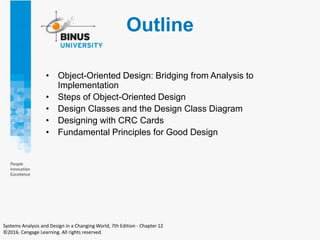
Outline
• Object-Oriented Design: Bridging from Analysis to
Implementation
• Steps of Object-Oriented Design
• Design Classes and the Design Class Diagram
• Designing with CRC Cards
• Fundamental Principles for Good Design
Systems Analysis and Design in a Changing World, 7th Edition - Chapter 12
©2016. Cengage Learning. All rights reserved.
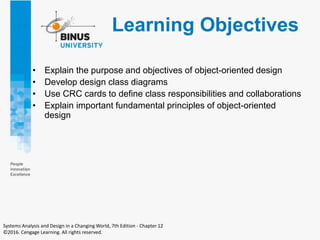
Learning Objectives
• Explain the purpose and objectives of object-oriented design
• Develop design class diagrams
• Use CRC cards to define class responsibilities and collaborations
• Explain important fundamental principles of object-oriented
design
Systems Analysis and Design in a Changing World, 7th Edition - Chapter 12
©2016. Cengage Learning. All rights reserved.
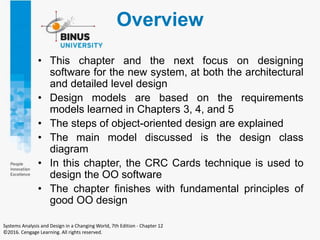
Overview
• This chapter and the next focus on designing
software for the new system, at both the architectural
and detailed level design
• Design models are based on the requirements
models learned in Chapters 3, 4, and 5
• The steps of object-oriented design are explained
• The main model discussed is the design class
diagram
• In this chapter, the CRC Cards technique is used to
design the OO software
• The chapter finishes with fundamental principles of
good OO design
Systems Analysis and Design in a Changing World, 7th Edition - Chapter 12
©2016. Cengage Learning. All rights reserved.
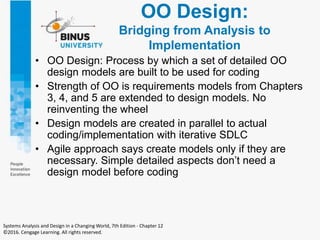
OO Design:
Bridging from Analysis to
Implementation
• OO Design: Process by which a set of detailed OO
design models are built to be used for coding
• Strength of OO is requirements models from Chapters
3, 4, and 5 are extended to design models. No
reinventing the wheel
• Design models are created in parallel to actual
coding/implementation with iterative SDLC
• Agile approach says create models only if they are
necessary. Simple detailed aspects don’t need a
design model before coding
Systems Analysis and Design in a Changing World, 7th Edition - Chapter 12
©2016. Cengage Learning. All rights reserved.
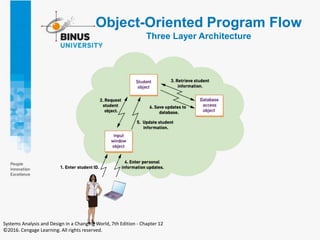
Object-Oriented Program Flow
Three Layer Architecture
Systems Analysis and Design in a Changing World, 7th Edition - Chapter 12
©2016. Cengage Learning. All rights reserved.
Object-Oriented
Program Flow
• Instantiation
– Creation of an object in memory based on the
template provided by the class
• Method
– The function executed within an object when
invoked by a message request (method call)
Systems Analysis and Design in a Changing World, 7th Edition - Chapter 12
©2016. Cengage Learning. All rights reserved.
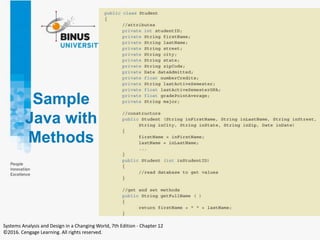
Sample
Java with
Methods
Systems Analysis and Design in a Changing World, 7th Edition - Chapter 12
©2016. Cengage Learning. All rights reserved.
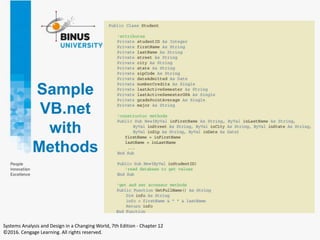
Sample
VB.net
with
Methods
Systems Analysis and Design in a Changing World, 7th Edition - Chapter 12
©2016. Cengage Learning. All rights reserved.
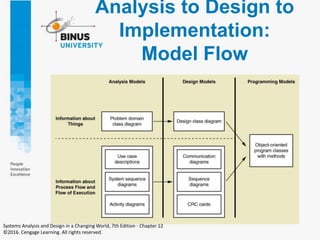
Analysis to Design to
Implementation:
Model Flow
Systems Analysis and Design in a Changing World, 7th Edition - Chapter 12
©2016. Cengage Learning. All rights reserved.
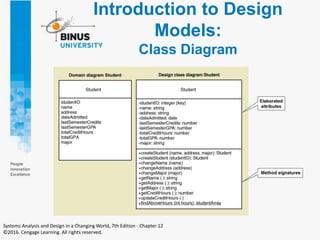
Introduction to Design
Models:
Class Diagram
Systems Analysis and Design in a Changing World, 7th Edition - Chapter 12
©2016. Cengage Learning. All rights reserved.
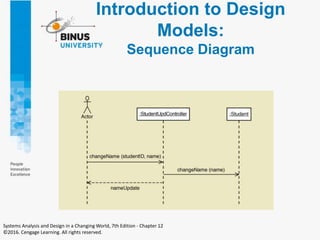
Introduction to Design
Models:
Sequence Diagram
Systems Analysis and Design in a Changing World, 7th Edition - Chapter 12
©2016. Cengage Learning. All rights reserved.
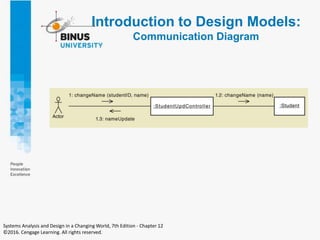
Introduction to Design Models:
Communication Diagram
Systems Analysis and Design in a Changing World, 7th Edition - Chapter 12
©2016. Cengage Learning. All rights reserved.
Introduction to Design Models:
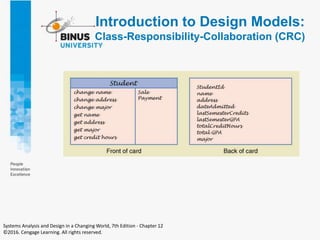
Class-Responsibility-Collaboration (CRC)
Systems Analysis and Design in a Changing World, 7th Edition - Chapter 12
©2016. Cengage Learning. All rights reserved.
Steps of Object-
Oriented Design
• Object-oriented design
– The process to identify the classes, their methods
and the messages required for a use case
• Use case driven
– Design is carried out use case by use case
Systems Analysis and Design in a Changing World, 7th Edition - Chapter 12
©2016. Cengage Learning. All rights reserved.
Steps of Object-
Oriented Design
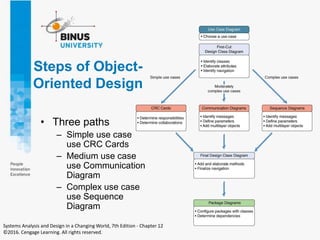
• Three paths
– Simple use case
use CRC Cards
– Medium use case
use Communication
Diagram
– Complex use case
use Sequence
Diagram
Systems Analysis and Design in a Changing World, 7th Edition - Chapter 12
©2016. Cengage Learning. All rights reserved.
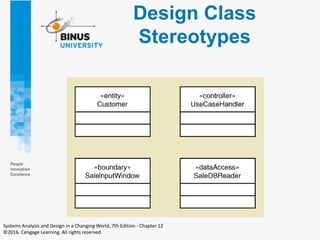
Design Class
Diagrams
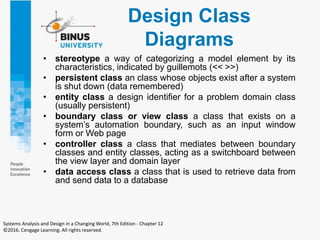
• stereotype a way of categorizing a model element by its
characteristics, indicated by guillemots (<< >>)
• persistent class an class whose objects exist after a system
is shut down (data remembered)
• entity class a design identifier for a problem domain class
(usually persistent)
• boundary class or view class a class that exists on a
system’s automation boundary, such as an input window
form or Web page
• controller class a class that mediates between boundary
classes and entity classes, acting as a switchboard between
the view layer and domain layer
• data access class a class that is used to retrieve data from
and send data to a database
Systems Analysis and Design in a Changing World, 7th Edition - Chapter 12
©2016. Cengage Learning. All rights reserved.
Design Class
Stereotypes
Systems Analysis and Design in a Changing World, 7th Edition - Chapter 12
©2016. Cengage Learning. All rights reserved.
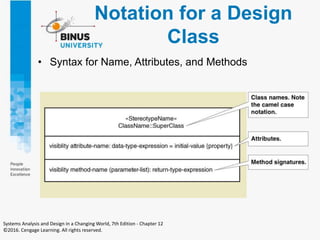
Notation for a Design
Class
• Syntax for Name, Attributes, and Methods
Systems Analysis and Design in a Changing World, 7th Edition - Chapter 12
©2016. Cengage Learning. All rights reserved.
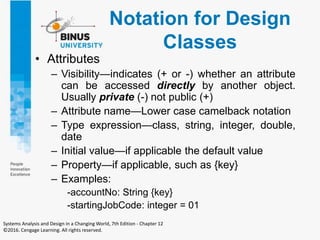
Notation for Design
Classes
• Attributes
– Visibility—indicates (+ or -) whether an attribute
can be accessed directly by another object.
Usually private (-) not public (+)
– Attribute name—Lower case camelback notation
– Type expression—class, string, integer, double,
date
– Initial value—if applicable the default value
– Property—if applicable, such as {key}
– Examples:
-accountNo: String {key}
-startingJobCode: integer = 01
Systems Analysis and Design in a Changing World, 7th Edition - Chapter 12
©2016. Cengage Learning. All rights reserved.
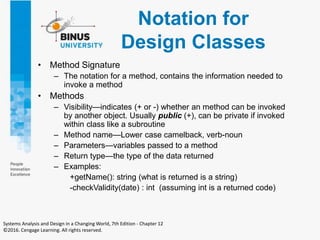
Notation for
Design Classes
• Method Signature
– The notation for a method, contains the information needed to
invoke a method
• Methods
– Visibility—indicates (+ or -) whether an method can be invoked
by another object. Usually public (+), can be private if invoked
within class like a subroutine
– Method name—Lower case camelback, verb-noun
– Parameters—variables passed to a method
– Return type—the type of the data returned
– Examples:
+getName(): string (what is returned is a string)
-checkValidity(date) : int (assuming int is a returned code)
Systems Analysis and Design in a Changing World, 7th Edition - Chapter 12
©2016. Cengage Learning. All rights reserved.
Notation for
Design Classes
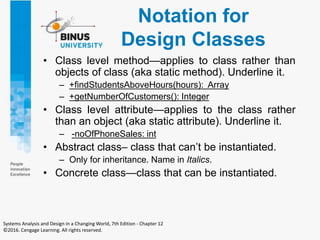
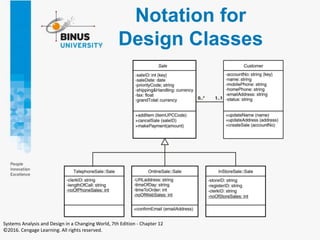
• Class level method—applies to class rather than
objects of class (aka static method). Underline it.
– +findStudentsAboveHours(hours): Array
– +getNumberOfCustomers(): Integer
• Class level attribute—applies to the class rather
than an object (aka static attribute). Underline it.
– -noOfPhoneSales: int
• Abstract class– class that can’t be instantiated.
– Only for inheritance. Name in Italics.
• Concrete class—class that can be instantiated.
Systems Analysis and Design in a Changing World, 7th Edition - Chapter 12
©2016. Cengage Learning. All rights reserved.
Notation for
Design Classes
Systems Analysis and Design in a Changing World, 7th Edition - Chapter 12
©2016. Cengage Learning. All rights reserved.
First-Cut Design Class
Diagram
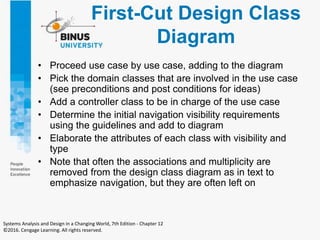
• Proceed use case by use case, adding to the diagram
• Pick the domain classes that are involved in the use case
(see preconditions and post conditions for ideas)
• Add a controller class to be in charge of the use case
• Determine the initial navigation visibility requirements
using the guidelines and add to diagram
• Elaborate the attributes of each class with visibility and
type
• Note that often the associations and multiplicity are
removed from the design class diagram as in text to
emphasize navigation, but they are often left on
Systems Analysis and Design in a Changing World, 7th Edition - Chapter 12
©2016. Cengage Learning. All rights reserved.
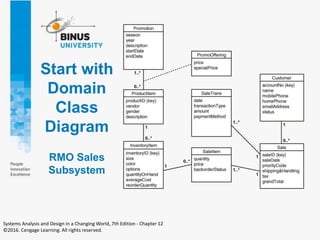
Start with
Domain
Class
Diagram
RMO Sales
Subsystem
Systems Analysis and Design in a Changing World, 7th Edition - Chapter 12
©2016. Cengage Learning. All rights reserved.
Developing
Design Classes
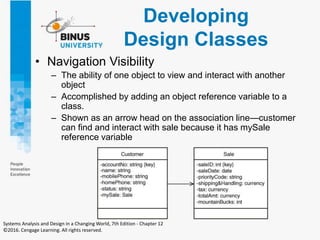
• Navigation Visibility
– The ability of one object to view and interact with another
object
– Accomplished by adding an object reference variable to a
class.
– Shown as an arrow head on the association line—customer
can find and interact with sale because it has mySale
reference variable
Systems Analysis and Design in a Changing World, 7th Edition - Chapter 12
©2016. Cengage Learning. All rights reserved.
Navigation Visibility
Guidelines
• One-to-many associations that indicate a
superior/subordinate relationship are usually
navigated from the superior to the subordinate
• Mandatory associations, in which objects in one
class can’t exist without objects of another class,
are usually navigated from the more independent
class to the dependent
• When an object needs information from another
object, a navigation arrow might be required
• Navigation arrows may be bidirectional.
Systems Analysis and Design in a Changing World, 7th Edition - Chapter 12
©2016. Cengage Learning. All rights reserved.
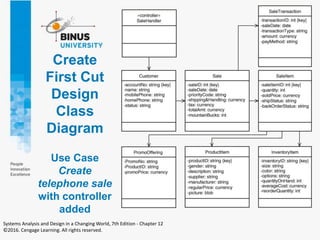
Create
First Cut
Design
Class
Diagram
Use Case
Create
telephone sale
with controller
added
Systems Analysis and Design in a Changing World, 7th Edition - Chapter 12
©2016. Cengage Learning. All rights reserved.
Designing With
CRC Cards
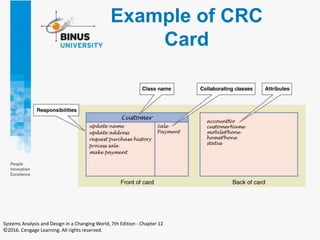
• CRC Cards—Classes, Responsibilities,
Collaboration Cards
• OO design is about assigning Responsibilities to
Classes for how they Collaborate to accomplish a
use case
• Usually a manual process done in a
brainstorming session
– 3 X 5 note cards
– One card per class
– Front has responsibilities and collaborations
– Back has attributes needed
Systems Analysis and Design in a Changing World, 7th Edition - Chapter 12
©2016. Cengage Learning. All rights reserved.
Example of CRC
Card
Systems Analysis and Design in a Changing World, 7th Edition - Chapter 12
©2016. Cengage Learning. All rights reserved.
CRC Cards
Procedure
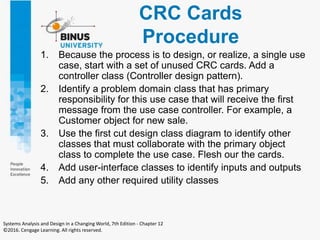
1. Because the process is to design, or realize, a single use
case, start with a set of unused CRC cards. Add a
controller class (Controller design pattern).
2. Identify a problem domain class that has primary
responsibility for this use case that will receive the first
message from the use case controller. For example, a
Customer object for new sale.
3. Use the first cut design class diagram to identify other
classes that must collaborate with the primary object
class to complete the use case. Flesh our the cards.
4. Add user-interface classes to identify inputs and outputs
5. Add any other required utility classes
Systems Analysis and Design in a Changing World, 7th Edition - Chapter 12
©2016. Cengage Learning. All rights reserved.
CRC Cards
Suggestions
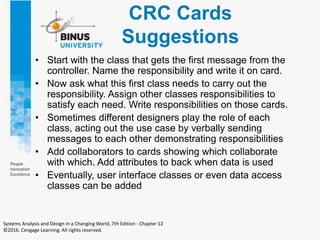
• Start with the class that gets the first message from the
controller. Name the responsibility and write it on card.
• Now ask what this first class needs to carry out the
responsibility. Assign other classes responsibilities to
satisfy each need. Write responsibilities on those cards.
• Sometimes different designers play the role of each
class, acting out the use case by verbally sending
messages to each other demonstrating responsibilities
• Add collaborators to cards showing which collaborate
with which. Add attributes to back when data is used
• Eventually, user interface classes or even data access
classes can be added
Systems Analysis and Design in a Changing World, 7th Edition - Chapter 12
©2016. Cengage Learning. All rights reserved.
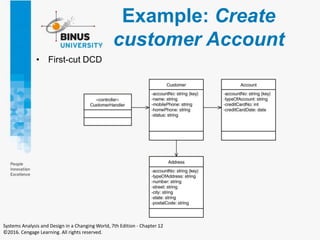
Example: Create
customer Account
• First-cut DCD
Systems Analysis and Design in a Changing World, 7th Edition - Chapter 12
©2016. Cengage Learning. All rights reserved.
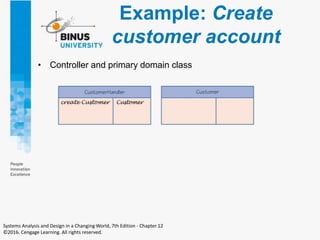
Example: Create
customer account
• Controller and primary domain class
Systems Analysis and Design in a Changing World, 7th Edition - Chapter 12
©2016. Cengage Learning. All rights reserved.
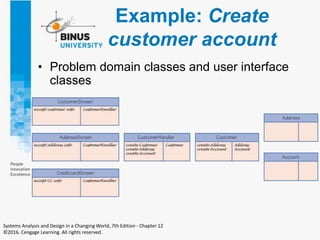
Example: Create
customer account
• Problem domain classes and user interface
classes
Systems Analysis and Design in a Changing World, 7th Edition - Chapter 12
©2016. Cengage Learning. All rights reserved.
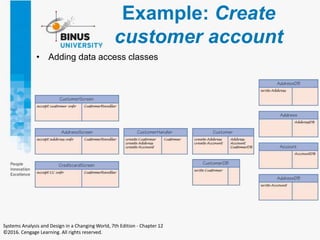
Example: Create
customer account
• Adding data access classes
Systems Analysis and Design in a Changing World, 7th Edition - Chapter 12
©2016. Cengage Learning. All rights reserved.
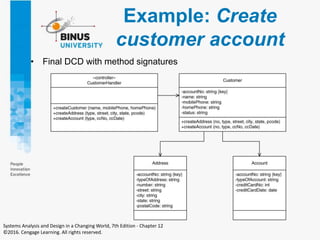
Example: Create
customer account
• Final DCD with method signatures
Systems Analysis and Design in a Changing World, 7th Edition - Chapter 12
©2016. Cengage Learning. All rights reserved.
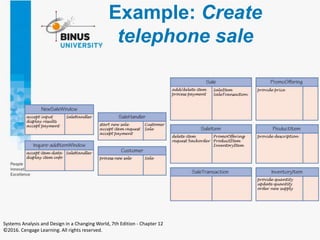
Example: Create
telephone sale
Systems Analysis and Design in a Changing World, 7th Edition - Chapter 12
©2016. Cengage Learning. All rights reserved.
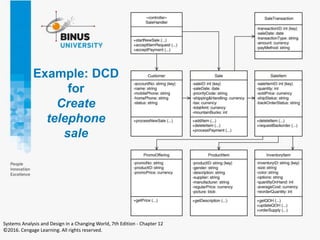
Example: DCD
for
Create
telephone
sale
Systems Analysis and Design in a Changing World, 7th Edition - Chapter 12
©2016. Cengage Learning. All rights reserved.
Fundamental Design
Principles
• Object Responsibility
– A design principle that states objects are responsible for
carrying out system processing
– A fundamental assumption of OO design and programming
– Responsibilities include “knowing” and “doing”
– Objects know about other objects (associations) and they
know about their attribute values. Objects know how to carry
out methods, do what they are asked to do.
– Note that CRC cards and the design in the next chapter
involve assigning responsibilities to classes to carry out a use
case.
– If deciding between two alternative designs, choose the one
where objects are assigned responsibilities to collaborate to
complete tasks (don’t think procedurally).
Systems Analysis and Design in a Changing World, 7th Edition - Chapter 12
©2016. Cengage Learning. All rights reserved.
Fundamental Design
Principles
• Separation of Responsibilities
– AKA Separation of Concerns
– Applied to a group of classes
– Segregate classes into packages or groups
based on primary focus of the classes
– Basis for multi-layer design – view, domain,
data
– Facilitates multi-tier computer configuration
Systems Analysis and Design in a Changing World, 7th Edition - Chapter 12
©2016. Cengage Learning. All rights reserved.
Fundamental Design
Principles
• Protection from Variations
– A design principle that states parts of a system
unlikely to change are separated (protected) from
those that will surely change
– Separate user interface forms and pages that are
likely to change from application logic
– Put database connection and SQL logic that is likely
to change in a separate classes from application logic
– Use adaptor classes that are likely to change when
interfacing with other systems
– If deciding between two alternative designs, choose
the one where there is protection from variations
Systems Analysis and Design in a Changing World, 7th Edition - Chapter 12
©2016. Cengage Learning. All rights reserved.
Fundamental Design
Principles
• Indirection
– A design principle that states an intermediate class is
placed between two classes to decouple them but still
link them
– A controller class between UI classes and problem
domain classes is an example
– Supports low coupling
– Indirection is used to support security by directing
messages to an intermediate class as in a firewall
– If deciding between two alternative designs, choose
the one where indirection reduces coupling or provides
greater security
Systems Analysis and Design in a Changing World, 7th Edition - Chapter 12
©2016. Cengage Learning. All rights reserved.
Fundamental Design
Principles
• Coupling
– A quantitative measure of how closely related classes
are linked (tightly or loosely coupled)
– Two classes are tightly coupled of there are lots of
associations with another class
– Two classes are tightly coupled if there are lots of
messages to another class
– It is best to have classes that are loosely coupled
– If deciding between two alternative designs, choose
the one where overall coupling is less
Systems Analysis and Design in a Changing World, 7th Edition - Chapter 12
©2016. Cengage Learning. All rights reserved.
Fundamental Design
Principles
• Cohesion
– A quantitative measure of the focus or unity of
purpose within a single class (high or low
cohesiveness
– One class has high cohesiveness if all of its
responsibilities are consistent and make sense for
purpose of the class (a customer carries out
responsibilities that naturally apply to customers)
– One class has low cohesiveness if its responsibilities
are broad or makeshift
– It is best to have classes that are highly cohesive
– If deciding between two alternative designs, choose
the one where overall cohesiveness is high
Systems Analysis and Design in a Changing World, 7th Edition - Chapter 12
©2016. Cengage Learning. All rights reserved.
Summary
• This chapter focused on designing software that
solves business problems by bridging the gap
between analysis and implementation.
• Design of software proceeds use case by use case,
sometimes called “use case driven” and the design of
each use case is called use case realization.
• The process of design proceeds along three paths
depending on the complexity of the user case. Simple
use cases use CRC cards, medium complexity uses
communication diagrams, complex use cases
proceed with sequence diagrams.
Systems Analysis and Design in a Changing World, 7th Edition - Chapter 12
©2016. Cengage Learning. All rights reserved.
Summary (continued)
• Design class diagrams include additional
notation because design classes are now
software classes, not just work concepts.
• Key issues are attribute elaboration and adding
methods. Method signatures include visibility,
method name, arguments, and return types.
• Other key terms are abstract vs. concrete
classes, navigation visibility, and class level
attributes and methods,
Systems Analysis and Design in a Changing World, 7th Edition - Chapter 12
©2016. Cengage Learning. All rights reserved.
Summary (continued)
• CRC Cards technique can be used to design how the
classes collaborate to complete each use case. CRC
stands for Classes, Responsibilities, and
Collaborations.
• Once responsibilities are assigned to classes, the
design class diagram is updated by adding methods
to classes and updating navigation visibility.
• Decisions about design options are guided by some
fundamental design principles. Some of these are
coupling, cohesion, protection from variations,
indirection, and object responsibility.
Systems Analysis and Design in a Changing World, 7th Edition - Chapter 12
©2016. Cengage Learning. All rights reserved.
FINISH

Object-Oriented Design Fundamentals.pptx

  • 1.
    Object-Oriented Design: Fundamentals 10 –12 Course: ISYS6542 – Advanced Information Systems Analysis and Design Year : 2020
  • 2.
    Chapter 12 Systems Analysisand Design in a Changing World, 7th Edition - Chapter 7 ©2016. Cengage Learning. All rights reserved. 2
  • 3.
    Outline • Object-Oriented Design:Bridging from Analysis to Implementation • Steps of Object-Oriented Design • Design Classes and the Design Class Diagram • Designing with CRC Cards • Fundamental Principles for Good Design Systems Analysis and Design in a Changing World, 7th Edition - Chapter 12 ©2016. Cengage Learning. All rights reserved.
  • 4.
    Learning Objectives • Explainthe purpose and objectives of object-oriented design • Develop design class diagrams • Use CRC cards to define class responsibilities and collaborations • Explain important fundamental principles of object-oriented design Systems Analysis and Design in a Changing World, 7th Edition - Chapter 12 ©2016. Cengage Learning. All rights reserved.
  • 5.
    Overview • This chapterand the next focus on designing software for the new system, at both the architectural and detailed level design • Design models are based on the requirements models learned in Chapters 3, 4, and 5 • The steps of object-oriented design are explained • The main model discussed is the design class diagram • In this chapter, the CRC Cards technique is used to design the OO software • The chapter finishes with fundamental principles of good OO design Systems Analysis and Design in a Changing World, 7th Edition - Chapter 12 ©2016. Cengage Learning. All rights reserved.
  • 6.
    OO Design: Bridging fromAnalysis to Implementation • OO Design: Process by which a set of detailed OO design models are built to be used for coding • Strength of OO is requirements models from Chapters 3, 4, and 5 are extended to design models. No reinventing the wheel • Design models are created in parallel to actual coding/implementation with iterative SDLC • Agile approach says create models only if they are necessary. Simple detailed aspects don’t need a design model before coding Systems Analysis and Design in a Changing World, 7th Edition - Chapter 12 ©2016. Cengage Learning. All rights reserved.
  • 7.
    Object-Oriented Program Flow ThreeLayer Architecture Systems Analysis and Design in a Changing World, 7th Edition - Chapter 12 ©2016. Cengage Learning. All rights reserved.
  • 8.
    Object-Oriented Program Flow • Instantiation –Creation of an object in memory based on the template provided by the class • Method – The function executed within an object when invoked by a message request (method call) Systems Analysis and Design in a Changing World, 7th Edition - Chapter 12 ©2016. Cengage Learning. All rights reserved.
  • 9.
    Sample Java with Methods Systems Analysisand Design in a Changing World, 7th Edition - Chapter 12 ©2016. Cengage Learning. All rights reserved.
  • 10.
    Sample VB.net with Methods Systems Analysis andDesign in a Changing World, 7th Edition - Chapter 12 ©2016. Cengage Learning. All rights reserved.
  • 11.
    Analysis to Designto Implementation: Model Flow Systems Analysis and Design in a Changing World, 7th Edition - Chapter 12 ©2016. Cengage Learning. All rights reserved.
  • 12.
    Introduction to Design Models: ClassDiagram Systems Analysis and Design in a Changing World, 7th Edition - Chapter 12 ©2016. Cengage Learning. All rights reserved.
  • 13.
    Introduction to Design Models: SequenceDiagram Systems Analysis and Design in a Changing World, 7th Edition - Chapter 12 ©2016. Cengage Learning. All rights reserved.
  • 14.
    Introduction to DesignModels: Communication Diagram Systems Analysis and Design in a Changing World, 7th Edition - Chapter 12 ©2016. Cengage Learning. All rights reserved.
  • 15.
    Introduction to DesignModels: Class-Responsibility-Collaboration (CRC) Systems Analysis and Design in a Changing World, 7th Edition - Chapter 12 ©2016. Cengage Learning. All rights reserved.
  • 16.
    Steps of Object- OrientedDesign • Object-oriented design – The process to identify the classes, their methods and the messages required for a use case • Use case driven – Design is carried out use case by use case Systems Analysis and Design in a Changing World, 7th Edition - Chapter 12 ©2016. Cengage Learning. All rights reserved.
  • 17.
    Steps of Object- OrientedDesign • Three paths – Simple use case use CRC Cards – Medium use case use Communication Diagram – Complex use case use Sequence Diagram Systems Analysis and Design in a Changing World, 7th Edition - Chapter 12 ©2016. Cengage Learning. All rights reserved.
  • 18.
    Design Class Diagrams • stereotypea way of categorizing a model element by its characteristics, indicated by guillemots (<< >>) • persistent class an class whose objects exist after a system is shut down (data remembered) • entity class a design identifier for a problem domain class (usually persistent) • boundary class or view class a class that exists on a system’s automation boundary, such as an input window form or Web page • controller class a class that mediates between boundary classes and entity classes, acting as a switchboard between the view layer and domain layer • data access class a class that is used to retrieve data from and send data to a database Systems Analysis and Design in a Changing World, 7th Edition - Chapter 12 ©2016. Cengage Learning. All rights reserved.
  • 19.
    Design Class Stereotypes Systems Analysisand Design in a Changing World, 7th Edition - Chapter 12 ©2016. Cengage Learning. All rights reserved.
  • 20.
    Notation for aDesign Class • Syntax for Name, Attributes, and Methods Systems Analysis and Design in a Changing World, 7th Edition - Chapter 12 ©2016. Cengage Learning. All rights reserved.
  • 21.
    Notation for Design Classes •Attributes – Visibility—indicates (+ or -) whether an attribute can be accessed directly by another object. Usually private (-) not public (+) – Attribute name—Lower case camelback notation – Type expression—class, string, integer, double, date – Initial value—if applicable the default value – Property—if applicable, such as {key} – Examples: -accountNo: String {key} -startingJobCode: integer = 01 Systems Analysis and Design in a Changing World, 7th Edition - Chapter 12 ©2016. Cengage Learning. All rights reserved.
  • 22.
    Notation for Design Classes •Method Signature – The notation for a method, contains the information needed to invoke a method • Methods – Visibility—indicates (+ or -) whether an method can be invoked by another object. Usually public (+), can be private if invoked within class like a subroutine – Method name—Lower case camelback, verb-noun – Parameters—variables passed to a method – Return type—the type of the data returned – Examples: +getName(): string (what is returned is a string) -checkValidity(date) : int (assuming int is a returned code) Systems Analysis and Design in a Changing World, 7th Edition - Chapter 12 ©2016. Cengage Learning. All rights reserved.
  • 23.
    Notation for Design Classes •Class level method—applies to class rather than objects of class (aka static method). Underline it. – +findStudentsAboveHours(hours): Array – +getNumberOfCustomers(): Integer • Class level attribute—applies to the class rather than an object (aka static attribute). Underline it. – -noOfPhoneSales: int • Abstract class– class that can’t be instantiated. – Only for inheritance. Name in Italics. • Concrete class—class that can be instantiated. Systems Analysis and Design in a Changing World, 7th Edition - Chapter 12 ©2016. Cengage Learning. All rights reserved.
  • 24.
    Notation for Design Classes SystemsAnalysis and Design in a Changing World, 7th Edition - Chapter 12 ©2016. Cengage Learning. All rights reserved.
  • 25.
    First-Cut Design Class Diagram •Proceed use case by use case, adding to the diagram • Pick the domain classes that are involved in the use case (see preconditions and post conditions for ideas) • Add a controller class to be in charge of the use case • Determine the initial navigation visibility requirements using the guidelines and add to diagram • Elaborate the attributes of each class with visibility and type • Note that often the associations and multiplicity are removed from the design class diagram as in text to emphasize navigation, but they are often left on Systems Analysis and Design in a Changing World, 7th Edition - Chapter 12 ©2016. Cengage Learning. All rights reserved.
  • 26.
    Start with Domain Class Diagram RMO Sales Subsystem SystemsAnalysis and Design in a Changing World, 7th Edition - Chapter 12 ©2016. Cengage Learning. All rights reserved.
  • 27.
    Developing Design Classes • NavigationVisibility – The ability of one object to view and interact with another object – Accomplished by adding an object reference variable to a class. – Shown as an arrow head on the association line—customer can find and interact with sale because it has mySale reference variable Systems Analysis and Design in a Changing World, 7th Edition - Chapter 12 ©2016. Cengage Learning. All rights reserved.
  • 28.
    Navigation Visibility Guidelines • One-to-manyassociations that indicate a superior/subordinate relationship are usually navigated from the superior to the subordinate • Mandatory associations, in which objects in one class can’t exist without objects of another class, are usually navigated from the more independent class to the dependent • When an object needs information from another object, a navigation arrow might be required • Navigation arrows may be bidirectional. Systems Analysis and Design in a Changing World, 7th Edition - Chapter 12 ©2016. Cengage Learning. All rights reserved.
  • 29.
    Create First Cut Design Class Diagram Use Case Create telephonesale with controller added Systems Analysis and Design in a Changing World, 7th Edition - Chapter 12 ©2016. Cengage Learning. All rights reserved.
  • 30.
    Designing With CRC Cards •CRC Cards—Classes, Responsibilities, Collaboration Cards • OO design is about assigning Responsibilities to Classes for how they Collaborate to accomplish a use case • Usually a manual process done in a brainstorming session – 3 X 5 note cards – One card per class – Front has responsibilities and collaborations – Back has attributes needed Systems Analysis and Design in a Changing World, 7th Edition - Chapter 12 ©2016. Cengage Learning. All rights reserved.
  • 31.
    Example of CRC Card SystemsAnalysis and Design in a Changing World, 7th Edition - Chapter 12 ©2016. Cengage Learning. All rights reserved.
  • 32.
    CRC Cards Procedure 1. Becausethe process is to design, or realize, a single use case, start with a set of unused CRC cards. Add a controller class (Controller design pattern). 2. Identify a problem domain class that has primary responsibility for this use case that will receive the first message from the use case controller. For example, a Customer object for new sale. 3. Use the first cut design class diagram to identify other classes that must collaborate with the primary object class to complete the use case. Flesh our the cards. 4. Add user-interface classes to identify inputs and outputs 5. Add any other required utility classes Systems Analysis and Design in a Changing World, 7th Edition - Chapter 12 ©2016. Cengage Learning. All rights reserved.
  • 33.
    CRC Cards Suggestions • Startwith the class that gets the first message from the controller. Name the responsibility and write it on card. • Now ask what this first class needs to carry out the responsibility. Assign other classes responsibilities to satisfy each need. Write responsibilities on those cards. • Sometimes different designers play the role of each class, acting out the use case by verbally sending messages to each other demonstrating responsibilities • Add collaborators to cards showing which collaborate with which. Add attributes to back when data is used • Eventually, user interface classes or even data access classes can be added Systems Analysis and Design in a Changing World, 7th Edition - Chapter 12 ©2016. Cengage Learning. All rights reserved.
  • 34.
    Example: Create customer Account •First-cut DCD Systems Analysis and Design in a Changing World, 7th Edition - Chapter 12 ©2016. Cengage Learning. All rights reserved.
  • 35.
    Example: Create customer account •Controller and primary domain class Systems Analysis and Design in a Changing World, 7th Edition - Chapter 12 ©2016. Cengage Learning. All rights reserved.
  • 36.
    Example: Create customer account •Problem domain classes and user interface classes Systems Analysis and Design in a Changing World, 7th Edition - Chapter 12 ©2016. Cengage Learning. All rights reserved.
  • 37.
    Example: Create customer account •Adding data access classes Systems Analysis and Design in a Changing World, 7th Edition - Chapter 12 ©2016. Cengage Learning. All rights reserved.
  • 38.
    Example: Create customer account •Final DCD with method signatures Systems Analysis and Design in a Changing World, 7th Edition - Chapter 12 ©2016. Cengage Learning. All rights reserved.
  • 39.
    Example: Create telephone sale SystemsAnalysis and Design in a Changing World, 7th Edition - Chapter 12 ©2016. Cengage Learning. All rights reserved.
  • 40.
    Example: DCD for Create telephone sale Systems Analysisand Design in a Changing World, 7th Edition - Chapter 12 ©2016. Cengage Learning. All rights reserved.
  • 41.
    Fundamental Design Principles • ObjectResponsibility – A design principle that states objects are responsible for carrying out system processing – A fundamental assumption of OO design and programming – Responsibilities include “knowing” and “doing” – Objects know about other objects (associations) and they know about their attribute values. Objects know how to carry out methods, do what they are asked to do. – Note that CRC cards and the design in the next chapter involve assigning responsibilities to classes to carry out a use case. – If deciding between two alternative designs, choose the one where objects are assigned responsibilities to collaborate to complete tasks (don’t think procedurally). Systems Analysis and Design in a Changing World, 7th Edition - Chapter 12 ©2016. Cengage Learning. All rights reserved.
  • 42.
    Fundamental Design Principles • Separationof Responsibilities – AKA Separation of Concerns – Applied to a group of classes – Segregate classes into packages or groups based on primary focus of the classes – Basis for multi-layer design – view, domain, data – Facilitates multi-tier computer configuration Systems Analysis and Design in a Changing World, 7th Edition - Chapter 12 ©2016. Cengage Learning. All rights reserved.
  • 43.
    Fundamental Design Principles • Protectionfrom Variations – A design principle that states parts of a system unlikely to change are separated (protected) from those that will surely change – Separate user interface forms and pages that are likely to change from application logic – Put database connection and SQL logic that is likely to change in a separate classes from application logic – Use adaptor classes that are likely to change when interfacing with other systems – If deciding between two alternative designs, choose the one where there is protection from variations Systems Analysis and Design in a Changing World, 7th Edition - Chapter 12 ©2016. Cengage Learning. All rights reserved.
  • 44.
    Fundamental Design Principles • Indirection –A design principle that states an intermediate class is placed between two classes to decouple them but still link them – A controller class between UI classes and problem domain classes is an example – Supports low coupling – Indirection is used to support security by directing messages to an intermediate class as in a firewall – If deciding between two alternative designs, choose the one where indirection reduces coupling or provides greater security Systems Analysis and Design in a Changing World, 7th Edition - Chapter 12 ©2016. Cengage Learning. All rights reserved.
  • 45.
    Fundamental Design Principles • Coupling –A quantitative measure of how closely related classes are linked (tightly or loosely coupled) – Two classes are tightly coupled of there are lots of associations with another class – Two classes are tightly coupled if there are lots of messages to another class – It is best to have classes that are loosely coupled – If deciding between two alternative designs, choose the one where overall coupling is less Systems Analysis and Design in a Changing World, 7th Edition - Chapter 12 ©2016. Cengage Learning. All rights reserved.
  • 46.
    Fundamental Design Principles • Cohesion –A quantitative measure of the focus or unity of purpose within a single class (high or low cohesiveness – One class has high cohesiveness if all of its responsibilities are consistent and make sense for purpose of the class (a customer carries out responsibilities that naturally apply to customers) – One class has low cohesiveness if its responsibilities are broad or makeshift – It is best to have classes that are highly cohesive – If deciding between two alternative designs, choose the one where overall cohesiveness is high Systems Analysis and Design in a Changing World, 7th Edition - Chapter 12 ©2016. Cengage Learning. All rights reserved.
  • 47.
    Summary • This chapterfocused on designing software that solves business problems by bridging the gap between analysis and implementation. • Design of software proceeds use case by use case, sometimes called “use case driven” and the design of each use case is called use case realization. • The process of design proceeds along three paths depending on the complexity of the user case. Simple use cases use CRC cards, medium complexity uses communication diagrams, complex use cases proceed with sequence diagrams. Systems Analysis and Design in a Changing World, 7th Edition - Chapter 12 ©2016. Cengage Learning. All rights reserved.
  • 48.
    Summary (continued) • Designclass diagrams include additional notation because design classes are now software classes, not just work concepts. • Key issues are attribute elaboration and adding methods. Method signatures include visibility, method name, arguments, and return types. • Other key terms are abstract vs. concrete classes, navigation visibility, and class level attributes and methods, Systems Analysis and Design in a Changing World, 7th Edition - Chapter 12 ©2016. Cengage Learning. All rights reserved.
  • 49.
    Summary (continued) • CRCCards technique can be used to design how the classes collaborate to complete each use case. CRC stands for Classes, Responsibilities, and Collaborations. • Once responsibilities are assigned to classes, the design class diagram is updated by adding methods to classes and updating navigation visibility. • Decisions about design options are guided by some fundamental design principles. Some of these are coupling, cohesion, protection from variations, indirection, and object responsibility. Systems Analysis and Design in a Changing World, 7th Edition - Chapter 12 ©2016. Cengage Learning. All rights reserved.
  • 50.