
©2017 Zscaler, Inc. All rights reserved.
ZSCALER CONFIDENTIAL INFORMATION
How Zscaler enables simpler Office 365
deployment and a fast user experience
WEBCASTS
Naresh Kumar - Principal Product Manager
To ask a question
• Type your questions into the chat box in the Webex
panel or email us at communications@zscaler.com
• We’ll try to get to all questions during the Q&A
session. If we do not get to your question, we’ll make
sure to follow up afterwards
• At the end of the webcast – please let us know how
we did!
©2017 Zscaler, Inc. All rights reserved.
Ask your question here…
©2017 Zscaler, Inc. All rights reserved. | ZSCALER CONFIDENTIAL INFORMATION2
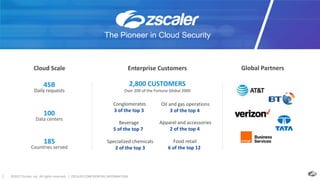
Enterprise Customers
2,800 CUSTOMERS
Over 200 of the Fortune Global 2000
Global Partners
100
Data centers
45B
Daily requests
185
Countries served
Cloud Scale
Conglomerates
3 of the top 3
Oil and gas operations
3 of the top 4
Beverage
5 of the top 7
Apparel and accessories
2 of the top 4
Specialized chemicals
2 of the top 3
Food retail
6 of the top 12
The Pioneer in Cloud Security
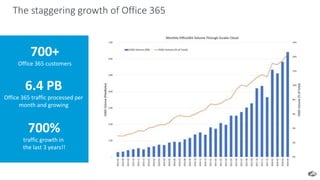
The staggering growth of Office 365
700+
Office 365 customers
6.4 PB
Office 365 traffic processed per
month and growing
700%
traffic growth in
the last 3 years!!
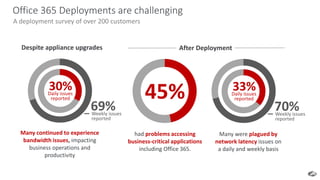
Office 365 Deployments are challenging
A deployment survey of over 200 customers
had problems accessing
business-critical applications
including Office 365.
45%
69%Weekly issues
reported
Many continued to experience
bandwidth issues, impacting
business operations and
productivity
Many were plagued by
network latency issues on
a daily and weekly basis
30%Daily issues
reported
70%Weekly issues
reported
33%Daily issues
reported
Despite appliance upgrades After Deployment
5
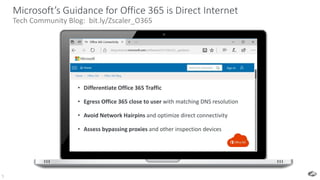
Microsoft’s Guidance for Office 365 is Direct Internet
Tech Community Blog: bit.ly/Zscaler_O365
• Differentiate Office 365 Traffic
• Egress Office 365 close to user with matching DNS resolution
• Avoid Network Hairpins and optimize direct connectivity
• Assess bypassing proxies and other inspection devices
6
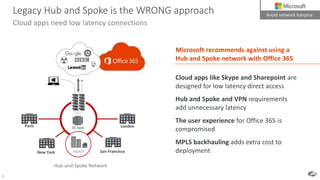
Cloud apps need low latency connections
Legacy Hub and Spoke is the WRONG approach
Cloud apps like Skype and Sharepoint are
designed for low latency direct access
Hub and Spoke and VPN requirements
add unnecessary latency
The user experience for Office 365 is
compromised
MPLS backhauling adds extra cost to
deployment
DC Apps
HQ/IOT San FranciscoNew York
Paris London
Avoid network hairpins
Microsoft recommends against using a
Hub and Spoke network with Office 365
Hub-and-Spoke Network
7
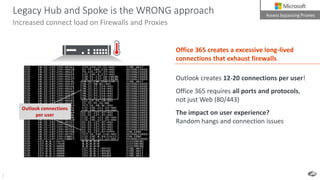
Legacy Hub and Spoke is the WRONG approach
Increased connect load on Firewalls and Proxies
Outlook connections
per user
Office 365 creates a excessive long-lived
connections that exhaust firewalls
Outlook creates 12-20 connections per user!
Office 365 requires all ports and protocols,
not just Web (80/443)
The impact on user experience?
Random hangs and connection issues
Assess bypassing Proxies
8
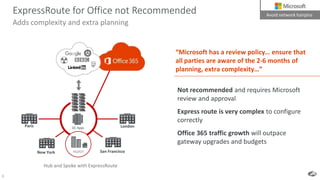
Not recommended and requires Microsoft
review and approval
Express route is very complex to configure
correctly
Office 365 traffic growth will outpace
gateway upgrades and budgets
“Microsoft has a review policy… ensure that
all parties are aware of the 2-6 months of
planning, extra complexity…”
ExpressRoute for Office not Recommended
Adds complexity and extra planning
DC Apps
HQ/IOT San FranciscoNew York
Paris London
Hub and Spoke with ExpressRoute
Avoid network hairpins
9
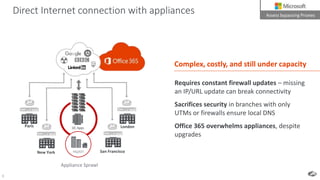
Direct Internet connection with appliances
Requires constant firewall updates – missing
an IP/URL update can break connectivity
Sacrifices security in branches with only
UTMs or firewalls ensure local DNS
Office 365 overwhelms appliances, despite
upgrades
Appliance Sprawl
Assess bypassing Proxies
DC Apps
HQ/IOTNew York
Paris London
Complex, costly, and still under capacity
San Francisco
10
HQMOBILE
BRANCHIOT
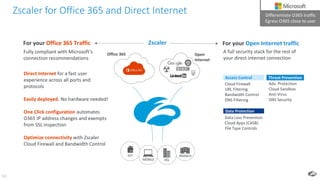
Data Loss Prevention
Cloud Apps (CASB)
File Type Controls
Data Protection
Cloud Firewall
URL Filtering
Bandwidth Control
DNS Filtering
Access Control
Adv. Protection
Cloud Sandbox
Anti-Virus
DNS Security
Threat Prevention
Zscaler
Open
Internet
Differentiate O365 traffic
Egress O365 close to user
Direct Internet for a fast user
experience across all ports and
protocols
Easily deployed. No hardware needed!
One Click configuration automates
O365 IP address changes and exempts
from SSL inspection
Optimize connectivity with Zscaler
Cloud Firewall and Bandwidth Control
A full security stack for the rest of
your direct internet connection
For your Open Internet traffic
Office 365
For your Office 365 Traffic
Fully compliant with Microsoft’s
connection recommendations
Zscaler for Office 365 and Direct Internet Differentiate O365 traffic
Egress O365 close to user
11
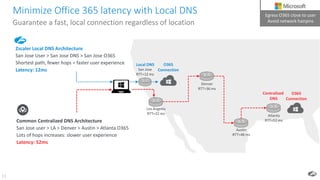
Minimize Office 365 latency with Local DNS
Guarantee a fast, local connection regardless of location
Zscaler Local DNS Architecture
San Jose User > San Jose DNS > San Jose O365
Shortest path, fewer hops = faster user experience
Latency: 12ms
Common Centralized DNS Architecture
San Jose user > LA > Denver > Austin > Atlanta O365
Lots of hops increases: slower user experience
Latency: 52ms
Los Angeles
RTT=22 ms
Austin
RTT=48 ms
Atlanta
RTT=52 ms
Denver
RTT=36 ms
San Jose
RTT=12 ms
Local DNS
Centralized
DNS
O365
Connection
O365
Connection
Egress O365 close to user
Avoid network hairpins
12
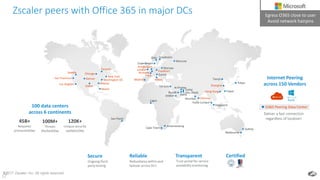
Zscaler peers with Office 365 in major DCs
12©2017 Zscaler, Inc. All rights reserved
Denver
Toronto
New York Paris
London
Amsterdam
Brussels
Stockholm
Moscow
Mumbai
Singapore
SydneyCape Town
Madrid
Riyadh
Johannesburg
San Francisco
Atlanta
Dallas
Frankfurt
Sao Paulo
Lagos
Kuala Lumpur
Tel Aviv
Washington DC
Chicago
Los Angeles
Copenhagen
Melbourne
Milan
Hong Kong Taipei
Zurich
Chennai
Tianjin
Tokyo
Doha
Dubai
Abu Dhabi
Miami
Jeddah
Al Khobar
Warsaw
Seattle
Oslo
Shanghai
45B+
Requests
processed/day
100M+
Threats
blocked/day
120K+
Unique security
updates/day
100 data centers
across 6 continents
Secure
Ongoing third-
party testing
CertifiedReliable
Redundancy within and
failover across DCs
Transparent
Trust portal for service
availability monitoring
Egress O365 close to user
Avoid network hairpins
Internet Peering
across 150 Vendors
O365 Peering Data Center
Deliver a fast connection
regardless of location!
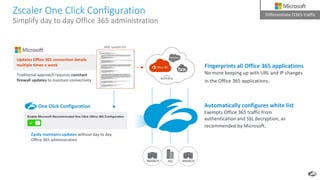
Zscaler One Click Configuration
Simplify day to day Office 365 administration
Easily maintains updates without day to day
Office 365 administration
Traditional approach requires constant
firewall updates to maintain connectivity
HQ BRANCH
Local Network Egress
Unhindered Access
BRANCH
Differentiate O365 traffic
Updates Office 365 connection details
multiple times a week
Automatically configures white list
Exempts Office 365 traffic from
authentication and SSL decryption, as
recommended by Microsoft.
Fingerprints all Office 365 applications
No more keeping up with URL and IP changes
in the Office 365 applications.
.XML update list
One Click Configuration
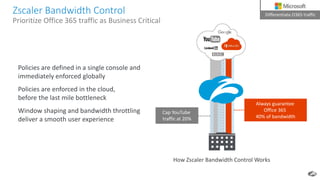
Zscaler Bandwidth Control
Prioritize Office 365 traffic as Business Critical
Always guarantee
Office 365
40% of bandwidth
Cap YouTube
traffic at 20%
Policies are defined in a single console and
immediately enforced globally
Policies are enforced in the cloud,
before the last mile bottleneck
Window shaping and bandwidth throttling
deliver a smooth user experience
How Zscaler Bandwidth Control Works
Local Network Egress
Unhindered Access
Differentiate O365 traffic
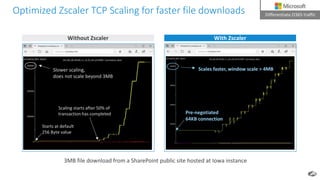
Optimized Zscaler TCP Scaling for faster file downloads
3MB file download from a SharePoint public site hosted at Iowa instance
Without Zscaler With Zscaler
Slower scaling,
does not scale beyond 3MB
Scaling starts after 50% of
transaction has completed
Starts at default
256 Byte value
Pre-negotiated
64KB connection
Scales faster, window scale > 4MB
Local Network Egress
Unhindered Access
Differentiate O365 traffic
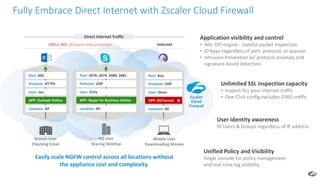
Fully Embrace Direct Internet with Zscaler Cloud Firewall
Office 365 (All ports and protocols)
Port: 443
Protocol: HTTPS
User: Jen
APP: Outlook Online
Location: All
APP: Outlook Online
Port: 3478, 3479, 3480, 3481
Protocol: UDP
User: Chris
APP: Skype for Business Online
Location: All
APP: Skype for Business Online
Port: Any
Protocol: UDP
User: Steve
Location: All
APP: BitTorrent
Internet
Branch User
Checking Email
HQ User
Sharing Desktop
Mobile User
Downloading Movies
APP: BitTorrent
Easily scale NGFW control across all locations without
the appliance cost and complexity.
Application visibility and control
• Adv. DPI engine - stateful packet inspection
• ID Apps regardless of port, protocol, or evasion
• Intrusion Prevention w/ protocol anomaly and
signature-based detection.
User identity awareness
ID Users & Groups regardless of IP address
Unified Policy and Visibility
Single console for policy management
and real-time log visibility
Zscaler
Cloud
Firewall
Direct Internet Traffic
Unlimited SSL inspection capacity
• Inspect ALL your Internet traffic
• One-Click config excludes O365 traffic
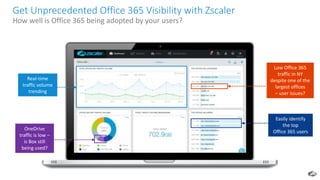
Low Office 365
traffic in NY
despite one of the
largest offices
– user issues?
Easily identify
the top
Office 365 users
OneDrive
traffic is low –
is Box still
being used?
Real-time
traffic volume
trending
Get Unprecedented Office 365 Visibility with Zscaler
How well is Office 365 being adopted by your users?
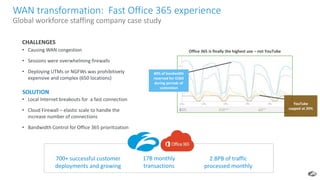
• Causing WAN congestion
• Sessions were overwhelming firewalls
• Deploying UTMs or NGFWs was prohibitively
expensive and complex (650 locations)
CHALLENGES
• Local Internet breakouts for a fast connection
• Cloud Firewall – elastic scale to handle the
increase number of connections
• Bandwidth Control for Office 365 prioritization
SOLUTION
17B monthly
transactions
700+ successful customer
deployments and growing
2.8PB of traffic
processed monthly
Office 365 is finally the highest use – not YouTube
40% of bandwidth
reserved for O365
during periods of
contention
YouTube
capped at 20%
WAN transformation: Fast Office 365 experience
Global workforce staffing company case study
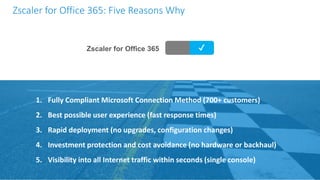
Zscaler for Office 365 ✔
1. Fully Compliant Microsoft Connection Method (700+ customers)
2. Best possible user experience (fast response times)
3. Rapid deployment (no upgrades, configuration changes)
4. Investment protection and cost avoidance (no hardware or backhaul)
5. Visibility into all Internet traffic within seconds (single console)
Zscaler for Office 365: Five Reasons Why
CxOs
CIOs, CTOs and CISOs
Architects and Engineers
Security, Network, Cloud & Enterprise
Operations
Security & Networking
Who should Attend
Scott Guthrie, EVP / Satya Nadella, CEO Chris Drumgoole, CTO
General Electric
Frederik Janssen
Global Head, IT Infrastructure
Pat Gelsinger, CEO / Michael Dell, CEO
DELL
June 25 – 27, 2018 The Cosmopolitan, Las Vegas
Register at zenithlive.zscaler.com
Where CIOs, CTOs, CISOs, and networking/security experts exchange cloud transformation
experiences with thought leaders of leading global companies
Zscaler for Office 365
Solution Brief
zscaler.com/O365
The 4 Pitfalls of
Deploying Office 365
zscaler.com/pitfalls
Learn more about Office 365
Solving the Secure
SD-WAN Paradox
Accelerate the Migration to Microsoft
Azure with Zscaler Private Access
Thank You!
Questions and Next Steps
Naresh Kumar
Principal Product Manager
nkumar@zscaler.com
Other Webcasts
zscaler.com > resources > webcasts and live demos
Tuesday, June 5th, 2018
Americas - 10:00 am PST

O365 quick with fast user experience

  • 1.
    ©2017 Zscaler, Inc.All rights reserved. ZSCALER CONFIDENTIAL INFORMATION How Zscaler enables simpler Office 365 deployment and a fast user experience WEBCASTS Naresh Kumar - Principal Product Manager
  • 2.
    To ask aquestion • Type your questions into the chat box in the Webex panel or email us at communications@zscaler.com • We’ll try to get to all questions during the Q&A session. If we do not get to your question, we’ll make sure to follow up afterwards • At the end of the webcast – please let us know how we did! ©2017 Zscaler, Inc. All rights reserved. Ask your question here…
  • 3.
    ©2017 Zscaler, Inc.All rights reserved. | ZSCALER CONFIDENTIAL INFORMATION2 Enterprise Customers 2,800 CUSTOMERS Over 200 of the Fortune Global 2000 Global Partners 100 Data centers 45B Daily requests 185 Countries served Cloud Scale Conglomerates 3 of the top 3 Oil and gas operations 3 of the top 4 Beverage 5 of the top 7 Apparel and accessories 2 of the top 4 Specialized chemicals 2 of the top 3 Food retail 6 of the top 12 The Pioneer in Cloud Security
  • 4.
    The staggering growthof Office 365 700+ Office 365 customers 6.4 PB Office 365 traffic processed per month and growing 700% traffic growth in the last 3 years!!
  • 5.
    Office 365 Deploymentsare challenging A deployment survey of over 200 customers had problems accessing business-critical applications including Office 365. 45% 69%Weekly issues reported Many continued to experience bandwidth issues, impacting business operations and productivity Many were plagued by network latency issues on a daily and weekly basis 30%Daily issues reported 70%Weekly issues reported 33%Daily issues reported Despite appliance upgrades After Deployment
  • 6.
    5 Microsoft’s Guidance forOffice 365 is Direct Internet Tech Community Blog: bit.ly/Zscaler_O365 • Differentiate Office 365 Traffic • Egress Office 365 close to user with matching DNS resolution • Avoid Network Hairpins and optimize direct connectivity • Assess bypassing proxies and other inspection devices
  • 7.
    6 Cloud apps needlow latency connections Legacy Hub and Spoke is the WRONG approach Cloud apps like Skype and Sharepoint are designed for low latency direct access Hub and Spoke and VPN requirements add unnecessary latency The user experience for Office 365 is compromised MPLS backhauling adds extra cost to deployment DC Apps HQ/IOT San FranciscoNew York Paris London Avoid network hairpins Microsoft recommends against using a Hub and Spoke network with Office 365 Hub-and-Spoke Network
  • 8.
    7 Legacy Hub andSpoke is the WRONG approach Increased connect load on Firewalls and Proxies Outlook connections per user Office 365 creates a excessive long-lived connections that exhaust firewalls Outlook creates 12-20 connections per user! Office 365 requires all ports and protocols, not just Web (80/443) The impact on user experience? Random hangs and connection issues Assess bypassing Proxies
  • 9.
    8 Not recommended andrequires Microsoft review and approval Express route is very complex to configure correctly Office 365 traffic growth will outpace gateway upgrades and budgets “Microsoft has a review policy… ensure that all parties are aware of the 2-6 months of planning, extra complexity…” ExpressRoute for Office not Recommended Adds complexity and extra planning DC Apps HQ/IOT San FranciscoNew York Paris London Hub and Spoke with ExpressRoute Avoid network hairpins
  • 10.
    9 Direct Internet connectionwith appliances Requires constant firewall updates – missing an IP/URL update can break connectivity Sacrifices security in branches with only UTMs or firewalls ensure local DNS Office 365 overwhelms appliances, despite upgrades Appliance Sprawl Assess bypassing Proxies DC Apps HQ/IOTNew York Paris London Complex, costly, and still under capacity San Francisco
  • 11.
    10 HQMOBILE BRANCHIOT Data Loss Prevention CloudApps (CASB) File Type Controls Data Protection Cloud Firewall URL Filtering Bandwidth Control DNS Filtering Access Control Adv. Protection Cloud Sandbox Anti-Virus DNS Security Threat Prevention Zscaler Open Internet Differentiate O365 traffic Egress O365 close to user Direct Internet for a fast user experience across all ports and protocols Easily deployed. No hardware needed! One Click configuration automates O365 IP address changes and exempts from SSL inspection Optimize connectivity with Zscaler Cloud Firewall and Bandwidth Control A full security stack for the rest of your direct internet connection For your Open Internet traffic Office 365 For your Office 365 Traffic Fully compliant with Microsoft’s connection recommendations Zscaler for Office 365 and Direct Internet Differentiate O365 traffic Egress O365 close to user
  • 12.
    11 Minimize Office 365latency with Local DNS Guarantee a fast, local connection regardless of location Zscaler Local DNS Architecture San Jose User > San Jose DNS > San Jose O365 Shortest path, fewer hops = faster user experience Latency: 12ms Common Centralized DNS Architecture San Jose user > LA > Denver > Austin > Atlanta O365 Lots of hops increases: slower user experience Latency: 52ms Los Angeles RTT=22 ms Austin RTT=48 ms Atlanta RTT=52 ms Denver RTT=36 ms San Jose RTT=12 ms Local DNS Centralized DNS O365 Connection O365 Connection Egress O365 close to user Avoid network hairpins
  • 13.
    12 Zscaler peers withOffice 365 in major DCs 12©2017 Zscaler, Inc. All rights reserved Denver Toronto New York Paris London Amsterdam Brussels Stockholm Moscow Mumbai Singapore SydneyCape Town Madrid Riyadh Johannesburg San Francisco Atlanta Dallas Frankfurt Sao Paulo Lagos Kuala Lumpur Tel Aviv Washington DC Chicago Los Angeles Copenhagen Melbourne Milan Hong Kong Taipei Zurich Chennai Tianjin Tokyo Doha Dubai Abu Dhabi Miami Jeddah Al Khobar Warsaw Seattle Oslo Shanghai 45B+ Requests processed/day 100M+ Threats blocked/day 120K+ Unique security updates/day 100 data centers across 6 continents Secure Ongoing third- party testing CertifiedReliable Redundancy within and failover across DCs Transparent Trust portal for service availability monitoring Egress O365 close to user Avoid network hairpins Internet Peering across 150 Vendors O365 Peering Data Center Deliver a fast connection regardless of location!
  • 14.
    Zscaler One ClickConfiguration Simplify day to day Office 365 administration Easily maintains updates without day to day Office 365 administration Traditional approach requires constant firewall updates to maintain connectivity HQ BRANCH Local Network Egress Unhindered Access BRANCH Differentiate O365 traffic Updates Office 365 connection details multiple times a week Automatically configures white list Exempts Office 365 traffic from authentication and SSL decryption, as recommended by Microsoft. Fingerprints all Office 365 applications No more keeping up with URL and IP changes in the Office 365 applications. .XML update list One Click Configuration
  • 15.
    Zscaler Bandwidth Control PrioritizeOffice 365 traffic as Business Critical Always guarantee Office 365 40% of bandwidth Cap YouTube traffic at 20% Policies are defined in a single console and immediately enforced globally Policies are enforced in the cloud, before the last mile bottleneck Window shaping and bandwidth throttling deliver a smooth user experience How Zscaler Bandwidth Control Works Local Network Egress Unhindered Access Differentiate O365 traffic
  • 16.
    Optimized Zscaler TCPScaling for faster file downloads 3MB file download from a SharePoint public site hosted at Iowa instance Without Zscaler With Zscaler Slower scaling, does not scale beyond 3MB Scaling starts after 50% of transaction has completed Starts at default 256 Byte value Pre-negotiated 64KB connection Scales faster, window scale > 4MB Local Network Egress Unhindered Access Differentiate O365 traffic
  • 17.
    Fully Embrace DirectInternet with Zscaler Cloud Firewall Office 365 (All ports and protocols) Port: 443 Protocol: HTTPS User: Jen APP: Outlook Online Location: All APP: Outlook Online Port: 3478, 3479, 3480, 3481 Protocol: UDP User: Chris APP: Skype for Business Online Location: All APP: Skype for Business Online Port: Any Protocol: UDP User: Steve Location: All APP: BitTorrent Internet Branch User Checking Email HQ User Sharing Desktop Mobile User Downloading Movies APP: BitTorrent Easily scale NGFW control across all locations without the appliance cost and complexity. Application visibility and control • Adv. DPI engine - stateful packet inspection • ID Apps regardless of port, protocol, or evasion • Intrusion Prevention w/ protocol anomaly and signature-based detection. User identity awareness ID Users & Groups regardless of IP address Unified Policy and Visibility Single console for policy management and real-time log visibility Zscaler Cloud Firewall Direct Internet Traffic Unlimited SSL inspection capacity • Inspect ALL your Internet traffic • One-Click config excludes O365 traffic
  • 18.
    Low Office 365 trafficin NY despite one of the largest offices – user issues? Easily identify the top Office 365 users OneDrive traffic is low – is Box still being used? Real-time traffic volume trending Get Unprecedented Office 365 Visibility with Zscaler How well is Office 365 being adopted by your users?
  • 19.
    • Causing WANcongestion • Sessions were overwhelming firewalls • Deploying UTMs or NGFWs was prohibitively expensive and complex (650 locations) CHALLENGES • Local Internet breakouts for a fast connection • Cloud Firewall – elastic scale to handle the increase number of connections • Bandwidth Control for Office 365 prioritization SOLUTION 17B monthly transactions 700+ successful customer deployments and growing 2.8PB of traffic processed monthly Office 365 is finally the highest use – not YouTube 40% of bandwidth reserved for O365 during periods of contention YouTube capped at 20% WAN transformation: Fast Office 365 experience Global workforce staffing company case study
  • 20.
    Zscaler for Office365 ✔ 1. Fully Compliant Microsoft Connection Method (700+ customers) 2. Best possible user experience (fast response times) 3. Rapid deployment (no upgrades, configuration changes) 4. Investment protection and cost avoidance (no hardware or backhaul) 5. Visibility into all Internet traffic within seconds (single console) Zscaler for Office 365: Five Reasons Why
  • 21.
    CxOs CIOs, CTOs andCISOs Architects and Engineers Security, Network, Cloud & Enterprise Operations Security & Networking Who should Attend Scott Guthrie, EVP / Satya Nadella, CEO Chris Drumgoole, CTO General Electric Frederik Janssen Global Head, IT Infrastructure Pat Gelsinger, CEO / Michael Dell, CEO DELL June 25 – 27, 2018 The Cosmopolitan, Las Vegas Register at zenithlive.zscaler.com Where CIOs, CTOs, CISOs, and networking/security experts exchange cloud transformation experiences with thought leaders of leading global companies
  • 22.
    Zscaler for Office365 Solution Brief zscaler.com/O365 The 4 Pitfalls of Deploying Office 365 zscaler.com/pitfalls Learn more about Office 365 Solving the Secure SD-WAN Paradox Accelerate the Migration to Microsoft Azure with Zscaler Private Access Thank You! Questions and Next Steps Naresh Kumar Principal Product Manager nkumar@zscaler.com Other Webcasts zscaler.com > resources > webcasts and live demos Tuesday, June 5th, 2018 Americas - 10:00 am PST

Editor's Notes

  • #10 https://msdn.microsoft.com/en-us/library/mt450488.aspx Although ExpressRoute is being used by Microsoft IT, ExpressRoute is not required or recommended for Office 365 customers except in a small number of situations. These situations include a) regulatory requirements that would mandate a direct network connection or b) following a required customer network assessment for Skype for Business voice and video when network deficiencies are discovered that ExpressRoute can address.  In the situations where ExpressRoute for Office 365 is implemented, Microsoft should be directly involved to ensure a successful implementation.
  • #17 TCP Window scaling allows large files to be downloaded faster and efficiently Large TCP Window size per connection to O365 with flexible receive buffer for faster downloads
  • #18 App identification with DPI & Heuristics
  • #20 Kelly services, a long time customer of Zscaler, was looking to deploy Office 365. As they went into pilot mode, their users were complaining and realized that Office 365 creates a high number of long-lived connections that increases network utilization and can overwhelm firewalls. And traffic and congestion was increasing on the MPLS network — which was driving MPLS costs higher. They evaluated deploying NGFWs at all the branches to route traffic locally, but it was too expensive. They decided to leverage the Zscaler Cloud Firewall and bandwidth control to route traffic locally and ensure Office 365 traffic was prioritized over YouTube during periods of congestion. To date, we’ve helped over 700 customers successfully deploy Office 365, and we’re processing 17B requests monthly and about 1.2PB of traffic.